Customer Ratings & Reviews

- Model:
- A51751568Y
- |
- SKU:
- 6264508
Customer reviews
Rating 4.3 out of 5 stars with 7 reviews
(7 customer reviews)to a friend
- Pros mentioned:Customer service, Speed
Rated 5 out of 5 stars
Impressed so far.
||Posted .This reviewer received promo considerations or sweepstakes entry for writing a review.Best thing - this one doesn't get hot or even warm! I asked for and got a factory restore flash drive. Its pretty fast. nothing to complain about. If you need a good computer and good customer service, this one is a good choice.
I would recommend this to a friend - Pros mentioned:Acer brand
Rated 5 out of 5 stars
Love my Acer Laptop
||Posted .This reviewer received promo considerations or sweepstakes entry for writing a review.Wouldn't buy any other laptop....love my Acer!! My last computer was an Acer...great machine!!
I would recommend this to a friend - Pros mentioned:Screen
Rated 5 out of 5 stars
Love it
||Posted .This reviewer received promo considerations or sweepstakes entry for writing a review.Screen is awesome. Acer makes a good product! Smooth running, works great so far.
I would recommend this to a friend - Pros mentioned:Speed
Rated 5 out of 5 stars
Great laptop
||Posted . Owned for 7 months when reviewed.This reviewer received promo considerations or sweepstakes entry for writing a review.Very fast processing speed, switches apps in an instant.
I would recommend this to a friend - Cons mentioned:Heavy
Rated 4 out of 5 stars
I returned
||Posted .This reviewer received promo considerations or sweepstakes entry for writing a review.I didn’t even opened the computer because it was so heavy, I couldn’t see myself lugging it around so I returned it. I think it a good computer if it stayed at home.
I would recommend this to a friend - Cons mentioned:Outdated
Rated 1 out of 5 stars
Absolutely horrible.
||Posted . Owned for 1 year when reviewed.This reviewer received promo considerations or sweepstakes entry for writing a review.This computer was slow to begin with. Slow to power up, slow to use and slow to power off. After slightly more than one year of limited use we cannot use it. I strongly urge any other computer. This feels like a computer from the 1990s.
No, I would not recommend this to a friend - Pros mentioned:Expandable memory, Screen
Rated 5 out of 5 stars
Great features. Good balance of price & performanc
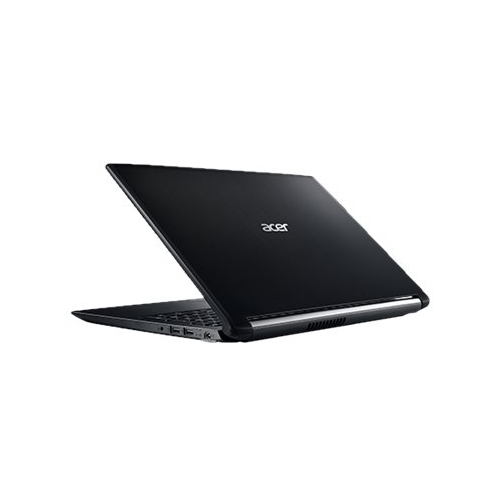
Posted .This reviewer received promo considerations or sweepstakes entry for writing a review.This laptop fit my changing needs. I no longer need to have the latest and fastest as I no longer do video editing or Photoshop beyond Elements. So for small business home office work like spreadsheets, internet use and leisure time electronic puzzles and games the large screen was very useful. Also nice is still having a DVD burner, SD car slot, USB 3.0 in two forms and a 2.0, headphone/mic jack. The screen feature: "night light" which changes color temperature to help with insomnia was a nice bonus. I'm also using this machine as a transition to Windows 10 after avoiding it like the plague for two years (I tried it when free and changed back to my trusty W7Pro). It was just too "frilly" and non-business-like. For this machine I found a free program called "Classic Shell" that works way too well to have been free - not complaining, mind you. It turns the start menu back into one you exactly recognize from Windows 7, including sub-menus, so you can actually find stuff again and make settings easily. And it has a button at the top of the classic W7 menu that with one press instantly reverts to the W10 start menu like you never changed anything. then back again with another click. Best of both worlds at the press of a button. The 5400 RPM HD I knew would be too slow for me with an i5 gen 8 processor, so I ordered a $109 Samsung 860 EVO 500 Gig SSD on Best Buy at the same time and cloned the OEM HD with a bootable disk of Acronis (I already had for backups and cloning). The boot time went to 20 seconds and resume time to 4 to the log-in screen. If you're going to do that swap, do it first thing: Put the new SSD into the laptop first before ever starting it up (a very easy swap-out inside the access door on the bottom), stick the DVD with Acronis or similar in the optical drive and start the computer. Wait (pretty long) for the prom to boot and figure out there is no operating system (no need to check boot order with UEFI. It figures it out.) and goes looking in the optical drive. After Acronis boots (took about 2 whole minutes for me) and appears on the screen plug in your original drive via USB and a SATA to USB adapter (cheap- also on Best Buy. Don't plug it in before booting like Acronis tells you to do or it won't work. I found out the hard way). Order the SATA/USB cable adapter at the same time too if you don't have one. I already use one for my network storage on a 1T SSD (plugged into my AC cable modem/router so I have all my files from several computers in one place). Acronis will take care of partition resizing to go from the 1 T spinning drive to the 500G SSD (if you, like I, didn't need 1T of storage or needless expense). Last, after doing all the Windows updates on the new SSD you can load your old files from the back-up of your old laptop you made with Windows Back-UP. W10 has that nice feature in "Back-Up and Restore (W7)" and will find the back-up on disk, DVD, network storage, cloud storage, etc. if you tell it where to look. My back-ups are on an external SSD so it went very fast via the USB 3.0 plug using that same SATA/USB cable adapter. The end result is a very fast, big screen, feature rich laptop with sufficient memory at 8G (expandable to 16) at a real bargain price! I'm probably going to get another one for my wife.
I would recommend this to a friend