Customer Ratings & Reviews


- Model:
- AN515-42-R5GT
- SKU:
- 6261090
to a friend
Customers are saying
Customers are positive about the Nitro 5's gaming performance, backlit keyboard, build quality, and battery life. They appreciate the smooth gaming experience, comfortable typing experience, sturdy construction, and extended usage time away from an outlet.
This summary was generated by AI based on customer reviews.
- Pros mentioned:Battery life, Build quality, GamingCons mentioned:Lag
Solid Ryzen powered laptop
||Posted .This reviewer received promo considerations or sweepstakes entry for writing a review.Impression: The Acer Nitro An515-42 is a decent entry level gaming laptop powered by the AMD Ryzen processor and Radeon graphics. The base unit comes with only 8GB of memory which is easily upgradeable and a 256GB SSD storage (with an available 2.5 inch enclosure for future expansion possibilities). Pros Build Quality - The laptop is sturdily built and I enjoy typing on the keyboard and using the touchpad (yes it is a Windows Precision Touchpad). The screen offers little flex and that's only when using both hands to twist it a little (not something you would be doing in a real world scenario). Software - Aside from the Windows 10 Home OS, the only other notable software is the inclusion of Nitro Sense among other Acer utilities to manage the fan output. To be honest, I've had no reason to modify Nitro Sense as the laptop runs cool even when I am gaming. Hardware - This is where it gets interesting as this unit is powered by the AMD Ryzen 2500U processor with integrated Vega 8 graphics (uses 1GB of available memory) and also a Radeon RX 560X 4GB discrete graphic option. By use of profiles in the AMD Radeon setting, settings can be configured for use with each card and under System, Switchable graphics users can select a game or app and choose whether to have it run under Power Saving (Vega 8), High Performance (Radeon RX 560x) or Based on Power Source (Vega 8 if unplugged, RX 560X if plugged in). In my experience older titles run well enough (these include Just Cause 2, Styx Master of Shadows, Warframe) while newer titles like Vampyr and Hellblade are a bit sluggish in comparison. Note that I tend to run my games in windowed mode 1280x720 for anyone wondering. The Radeon drivers included with the system work well enough however if you try to update to the latest you may encounter an error during install. If you encounter any botched Radeon driver updates download and use the AMD cleanup utility then install the Acer recommended VGA drivers from the support page https://www.acer.com/ac/en/US/content/support-product/7605?b=1&pn=NH.Q3RAA.002. Hopefully newer drivers will be released soon. Battery life - On power saver on and surfing the web with Microsoft Edge (typing this review) my battery life comes in at a respectable 5 hours and 33 minutes. Results will vary however as factors are changed such as screen brightness, amount and types of apps currently running and so on. Cons Lag -I have seen a lot of people complaining that the laptop is sluggish and slow. So head directly to the task bar and right click the battery icon then go to Power Options. Once there click Choose what closing the lid does then click Change settings that are currently unavailable (in blue). Finally, uncheck Turn in fast startup and reboot. Apparently there is an issue whereby the processor runs at a ridiculously slow speed whether plugged in or not with this setting enabled. Final thoughts - For the value, you get a pretty solid laptop well worth the money. Usage wise I have no real complaints, I hope that a video driver update will extend the compatibility with more PC games. The ones that I do get to play run smoothly and the experience is enjoyable (1280x720 low to medium settings). For a light gaming/college/project usage laptop, the Acer Nitro An515-42 is a worthy choice.
I would recommend this to a friend - Pros mentioned:Backlit keyboard, Build quality

Solid entry level, wish GPU had more kick
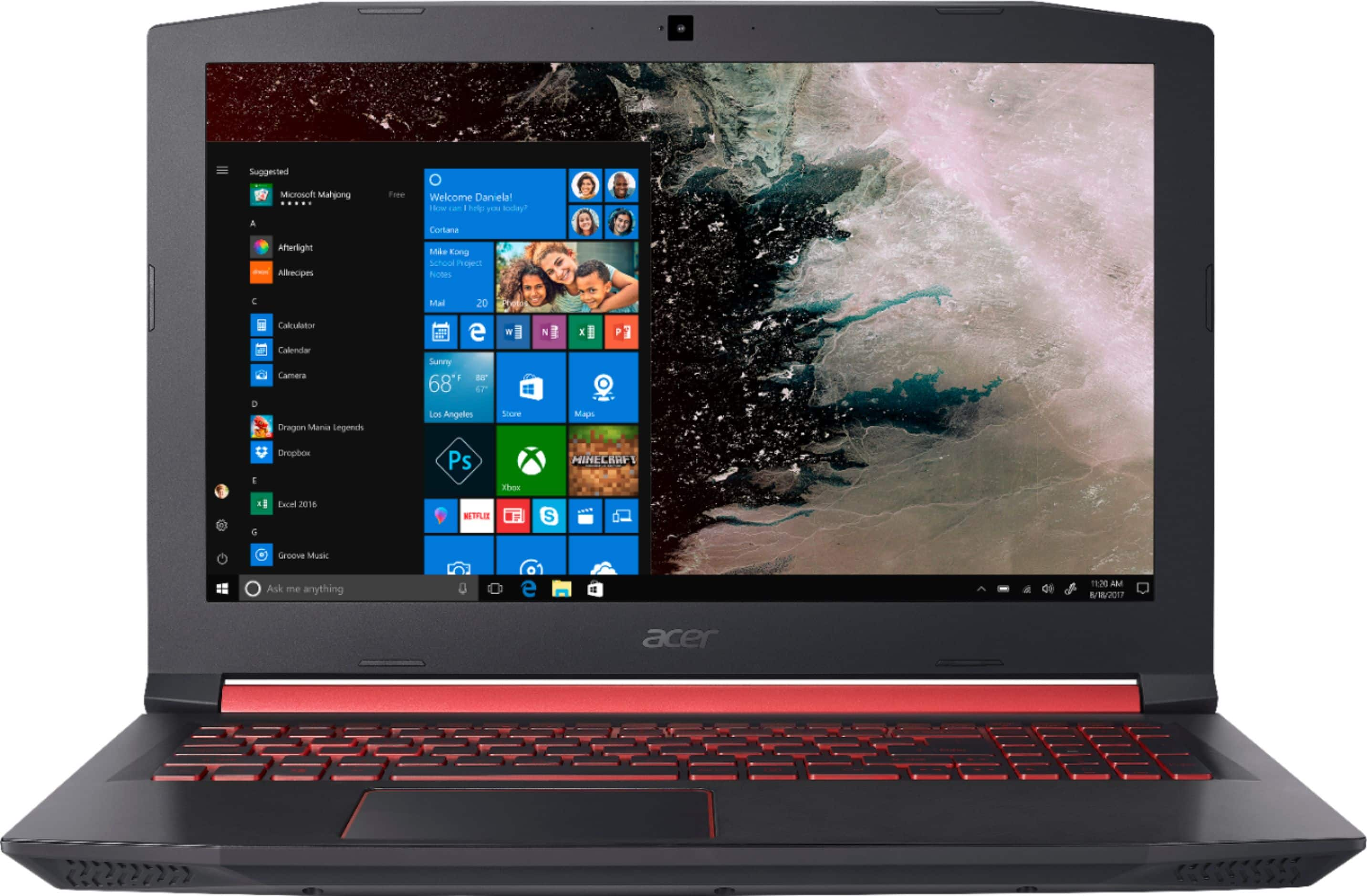
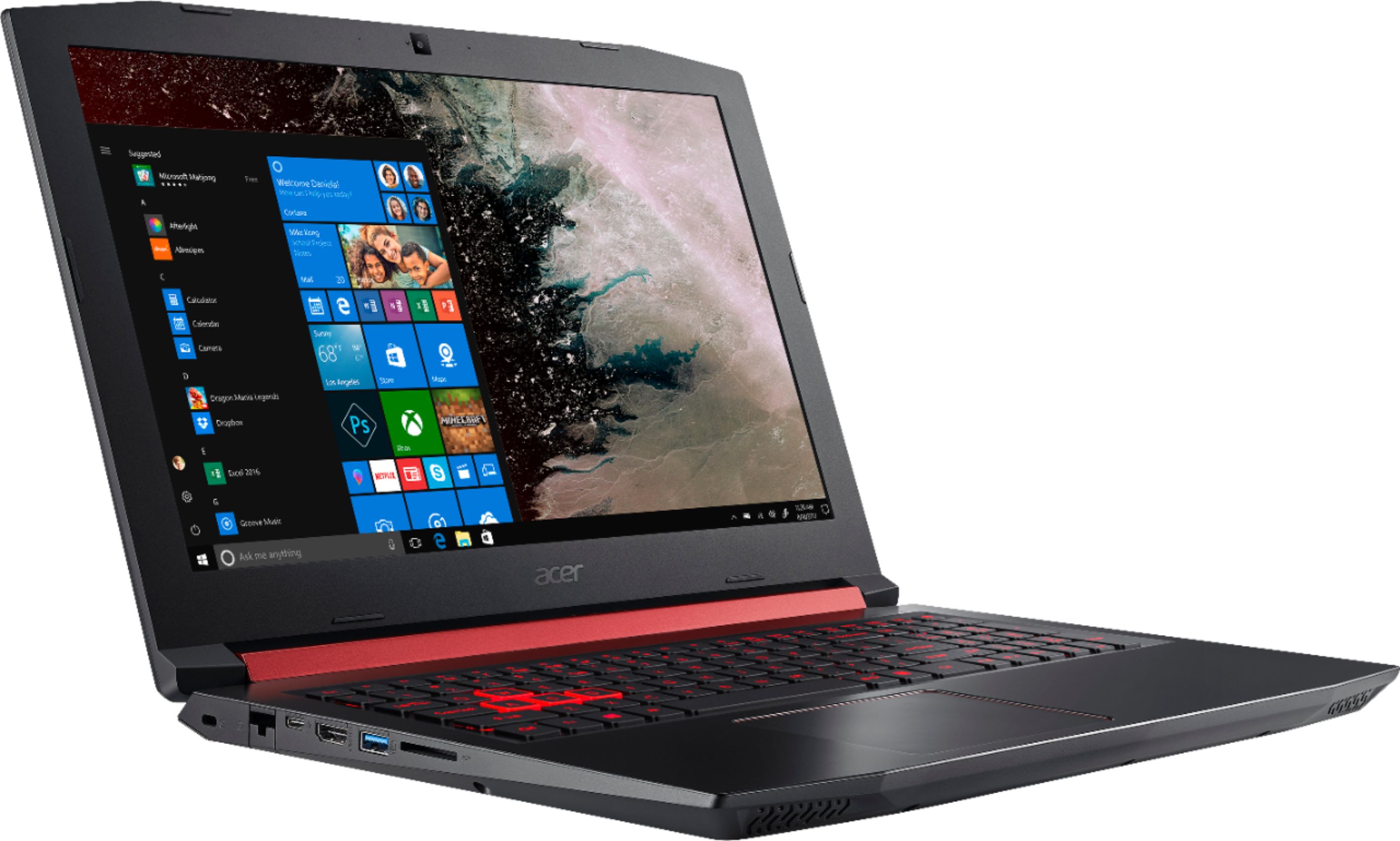
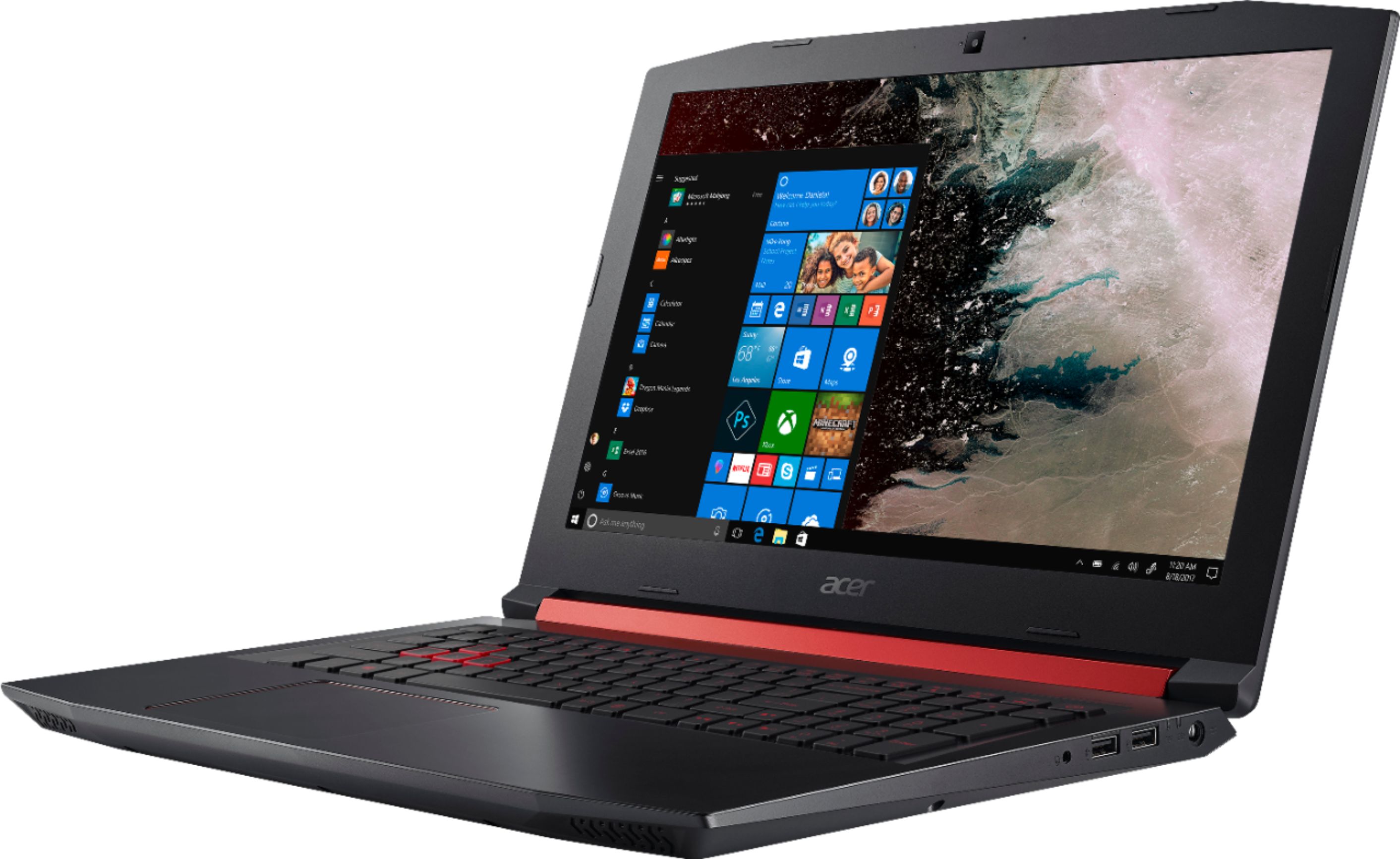
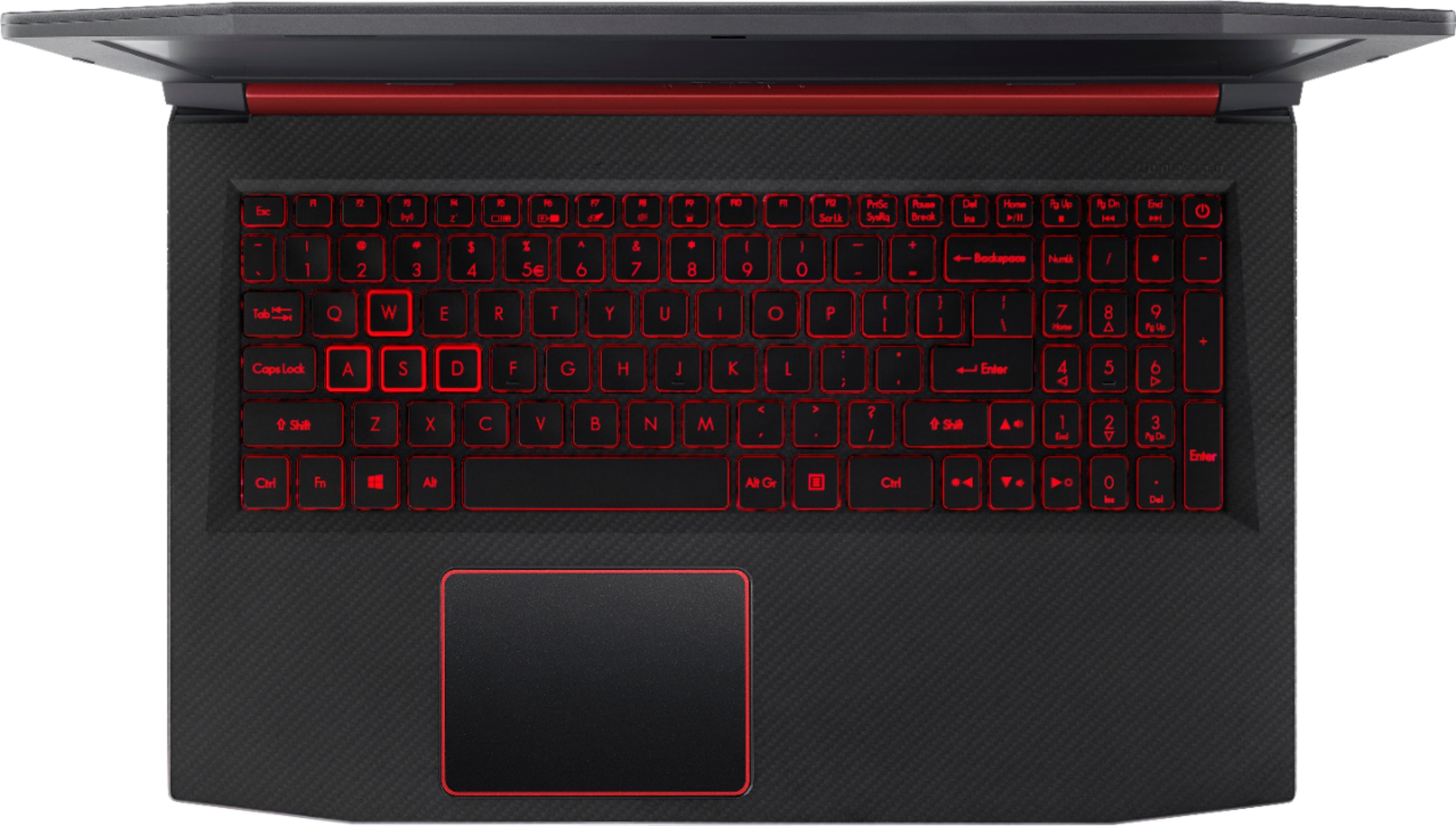
|Posted .This reviewer received promo considerations or sweepstakes entry for writing a review.What is a gaming laptop? Is it a purpose built machine? A style of computer? Or is it something more? The Acer Nitro 5 Ryzen attempts to be all of that on a budget and does a fairly good job with some rough edges. The good news is the worst of those edges is software that is already being addressed. First of all, if you’ve viewed an Acer gaming laptop, either another Nitro or the higher end Predator laptops - this model will look quite familiar. The main body is nearly identical across most of their line, but the lids are different. The Nitro 5 here has a plastic carbon fiber-look textured lid. In some ways this is an improvement from the metal ones found on higher end models, since fingerprints aren’t as much of a problem. Scratch will probably be hidden quite well over time - I see this laptop aging well. Internally the surface of the laptop is made of a hard smooth plastic w/ carbon fiber accents. Considering the material choice, it feels quite premium. The bezel around the screen is a bit thick and the plastic here isn’t quite the same premium feel, which is no big deal. There is a 1 MP camera up top that is probably the noisest camera in low-light I have ever experienced - you won’t want to use this camera for streaming. Finally the hinge area is covered in a maroon acer red with the word ‘NITRO’ embossed in it. The underbody includes 2 access doors - 1 for RAM, which reveals an empty slot for another stick of DDR4, and the other access to a 2.5” SATA drive bay, left empty w/ its sata cable dangling. Certainly if you had an extra HD or SSD, you could readily plug it in here. The m.2 slot is hidden behind more screws, and further surgery would be required to free it, however even without removing the bottom panel complete, I can surmise this isn’t a difficult task. The keyboard seems improved from other models (albeit I don’t own any, but have typed a bit in store). The backlighting is a solid red with black keycaps and transparent sides. This allows the keys to glow around the edges which look quite nice. The WASD quad’s transparent edges wrap around the top of the key setting these off and glowing brighter. The keys are soft in action, and the keyboard is quite quiet. The main keys are full sized, but the F-row are tiny. One trick I learned that in the BIOS you can set the F-row keys to be their media functions if you want by default. Centered below home row is a generously sized trackpad provided by ELAN, which supports Windows 10 multi-touch gestures. I was stuck using it for a bit of Overwatch and had trouble with it responding. I believe it was probably the size combined with gesture recognition that was probably causing my issues. The body in general offers a pretty good selection of ports. The left side includes back to front respectively a kensington lock, gigabit ethernet, USB-C, HDMI, USB 3, full size SD card slot. The right side is the power jack, charging/power indicator leds, 2 USB ports and a 3.5mm AHJ headphone jack (combo mic/headphones). Around front you’ll find two front firing speakers which function adequately. The included power adapter is a 135w model. This adapter must be a trickle down from other models, as it seems quite a bit oversized for a 15w-25w TDP CPU and a 65w TDP GPU. Speaking of the internal hardware - the star of the show is the Ryzen 5 2500u. This 15w TDP part not only brings 4 cores and 8 threads to the table, but essentially can hang w/ Intel’s previous 45w i7 Skylake/Kabylake parts. Now newer i7 8750H cpus will burn it, but it’s a very strong performer given it’s thermal design, and includes an embedded Vega graphics w/ 512 Shader units. The Vega is almost overkill for an embedded GPU here, but it’s part of the Ryzen mobile platform. I only wish they’d have figured out hybrid crossfire to bolster up the dedicated GPU. The iGPU does consume 1GB of the main system ram, so that is one downside. The RX 560X is the GPU found in this laptop. The RX 560X is a fully realized Baffin core with 1024 shader units @ 1275MHz, 16 ROPs, and 4GB of GDDR5 ram @ 5.8GHz. Baffin is the Polaris 11 GPU that has been the basis of the RX 460/560 desktop cards and sits on the low-mid range market (about $100-150 desktop GPU price). This example performs in line with its configuration benefiting from a full complement of shaders and the higher end clock speed, but still it’s a bit of a letdown given the capabilities of the CPU. Essentially the older mid-range 7850 desktop card from 2012 shares a similar configuration and performance figure. That said, for this laptop's intended audience, it performs quite well. I played a few rounds of Overwatch - and while there were a few lags here and there (seemed IO related), the framerate held around 70FPS @ 1080p w/ high settings. Likewise, CS:GO returned similar performance, dipping down into the mid-50s on occasion w/ high settings @ 1080p. Where things started to break down was Dark Souls 3. The default set the game w/ high settings at 1080p. This was a framerate disaster - and while not specifically unplayable, it was dipping down into the mid-20 FPS. Backing the resolution down to 720p shored up the framerate - pushing it up to 60 FPS cap for a majority of the time. Switching graphics options up and down didn’t have much of an impact in this game. A 3dmark synthetic benchmark can be found: https://www.3dmark.com/fs/15958731 - reaching 5400 points - a solid mid-range score. One thing that was apparent during play, was that initial loading seemed quite stuttery, as if loading textures and resources was taking longer than it should. I’m not sure, but the SK Hynix 256GB m.2 sata drive might have been to blame. At least it is an SSD, but the 4k random reads were particularly poor. That said reads sequentially were in the 450MB/s range, while writes were generally slower around 250MB/s. Overall, I’ll take it over a spinning platter any day, but there are higher performing options out there that are pretty affordable. At this price point, it's probably too much to wish for NVMe PCIe, but I would have wanted to see a better unit, either from sandisk or toshiba that might have kept things smooth. The screen is an LG AH-IPS panel w/ DC LED backlighting (yay - for no PWM - flicker free!). It’s not particularly color accurate, or bright, but it has good viewing angles and almost no backlight bleed. Yes, and IPS panel that doesn’t look like a mess on a black screen. It glows, but has great uniformity. Of course it’s 1080p, so the resolution is pretty good for a 15.6” screen. Windows is set to 125% scaling out of the box. If you’re a power user, I’d suggest trimming that to 100% to avoid scaling bugs, and enjoy the extra real-estate the 1080p screen buys you. Overall the experience with this laptop has been positive. There were a few bugs - specifically as some have mentioned: a power management issue w/ the Ryzen chip. My CPU would get stuck at 400MHz and never leave it’s 4x multiplier. I tried many different options, but my final approach was simply to upgrade the BIOS. The 1.08 BIOS appears to fix this issue. Likewise the RX560X and Vega combo is somewhat of a new configuration, so the latest AMD drivers did not work (stay w/ Acer’s provided drivers). I also fought the Nitro sense control panel quite a bit. I couldn’t get a custom fan profile to work, only ‘Auto’ and ‘Max’. Max sounds like a hair dryer, and frankly, I doubt you’ll mess with these settings - as in my testing neither CPU or GPU got over the mid-60C’s w/ the auto profiel and are designed for much higher temps. I did get stuck at the ‘Max’ setting and had to reinstall Nitro Sense (hint, the windows service that runs the fan control is called ‘Predator Service’ not ‘Nitro Service’ as the installer would have you believe). There is also coolboost, which will increase fan speeds essentially all the time. There isn't too much just software installed. Just your normal complement of OEM apps (Acer Care Center was actually pretty helpful). Acer Collection is useless, and Acer power button seems like a hold-over from the Windows 8 days when people had trouble figuring out how to turn off their computer. Norton is here, and easy enough to uninstall (I just use the out of the box MS protection). In conclusion the Nitro 5 Ryzen is a good entry level gamer, with some teething issues. The 400MHz bug took me by surprise, and I’m a pretty serious power user/enthusiast. The Nitro sense fan control also was kludgy and half worked. The CPU performed great after the BIOS update - and you’d be hard pressed to find a better performing CPU/iGPU in this class of machine. The dedicated GPU in my opinion is a bit of a letdown, and only highlights the huge gulf of performance between the low-mid and upper-mid range cards (like the GTX 1060 or 580X). This won't allow AAA titles w/ many options on and require backing the resolution down as well, so keep that in mind. Still this is a decent piece of equipment when you take the price into consideration. The build is solid, materials durable, thermal design will keep up during gaming sessions, keyboard is great, trackpad is good and large, screen is excellent in its class. The biggest cons are going to be driver maturity, an GPU just one performance class ahead of the iGPU, the general chunkiness of the build, and weight (both laptop and power brick). Frankly though - given the price these are easy to live with, and with back to school season approaching this is a great laptop to keep in consideration for students on a budget - especially if they like PC gaming.
I would recommend this to a friend - Pros mentioned:Backlit keyboardCons mentioned:Slow ssd
Cool running entry level gaming laptop
|Posted .This reviewer received promo considerations or sweepstakes entry for writing a review.Pros Brighter keyboard backlight Screen is very bright for most situations Screen has decent color accuracy for the price point Good screen viewing angles for the price Fan sound doesn’t distract even on high Responsive keyboard Keyboard has good travel Responsive trackpad Includes number pad WASD keys are brighter for easier identification Good sound on solid surfaces Expansion bay for traditional hard drive with included screws 8GB memory is good enough for most situations Additional memory slot for upgrade Primary drive is an SSD Includes USB 3.0 and USB-C Port Full sized HDMI port Includes gigabit ethernet port Subtle look allows for use at work and play Includes carrying sleeve Runs very cool even at load Cons Keyboard feels slightly “mushy” Red letters on keys make keys hard to see without backlight Keyboard is cramped on the right side SSD isn’t very fast at approximately 225MBps Marginal battery life when not gaming Charging port feels fragile Carry sleeve has no place for charger Power button is too close to number pad Screen a little dim for brighter areas Speakers fire downward meaning they get muffled and low when not on a hard surface 3D Mark reports system below minimum spec for Vive or Oculus 3D Mark could only muster 12FPS PC Gaming might not get the media attention it once did with high power consoles now available, but that doesn’t mean PC gaming is dead. If it has done anything, it has evolved. Although extremely expensive gaming rigs are still available, the real expansion has been on more affordable gaming rigs. With fast processors now less battery hungry and more affordable, mobile gaming is now within reach of more casual gamers. The Acer Nitro 5 AN515-42-R5GT is Acer’s Ryzen 5 offering for 2018 in this popular category. The Nitro 5 series laptops are more affordable gaming laptops with reasonable specs and an accompanying reasonable price tags, albeit with hard to remember names for each. Specs for the AN515-42-R5GT include an AMD Ryzen 5 2500U processor, 8GB of memory, a 256GB M.2 SSD, dedicated Radeon RS 560X GPU, and an IPS screen to boot. The top shell is faux carbon fiber with a textured finish and the palm rest is a smooth finish faux carbon fiber. There are a few, conservative red accents throughout the laptop but overall the look is very subtle for a gaming laptop. If you keep the bright red keyboard backlight off, this could be used in a professional environment without getting any weird looks. As an entry level gaming laptop, compromises must be made. The challenge is making the right compromises. On the Nitro 5, each component is configured with a lower, mid-range part that is properly sized to not create a bottleneck in any one area. A refreshing change is seeing an included SSD in the mix, albeit a slower one that tops out at about 225MBps. The included 8GB of memory includes an extra slot to allow expansion to dual channel for some added future upgrades. If you need to include some extra storage down the road there is extra hard drive bay that is accessible. Even the screws are included. This is nice as it allows the system to be a little more future proof without breaking the bank. Of course, the display panel is not the highest end, but it is quite good with reasonable color accuracy and good viewing angles. Brightness is good, but gaming outdoors would be near impossible. The speakers are similarly good, but not stellar. The speakers mainly fire downward, so the choice of surface greatly affects sound output and quality. Place it on a hard surface and you have ample volume with acceptable range. Place it on a soft surface and muffled sounds should be expected. Considering the air intake for cooling is also on the bottom, a hard surface is the safer bet for longevity. If there were any real compromise with the system, it would have to be the battery. During light duty use, such as browsing the web and watching videos, expect about 4 hours of battery life with 20% screen brightness. This is surprising considering the Ryzen 5 runs ice cold compared to other gaming laptops. It never showed signs of thermal throttling. During stress testing, temps refused to go much higher than 110 degrees Fahrenheit. No part of the laptop seemed to get very warm and the air was just slightly warm from the cooling fans. If it ever did get hot the cooling fans should be able to do the job. On high with CoolBoost turned on they put out a large volume of air with nothing more than the sound of air rushing. With no sign of high power consumption since it runs so cool, the only assumption could be the included battery is very low capacity. Either way, don’t expect to get a full day out of this battery. When gaming, battery life isn’t much of a concern since most will keep it plugged in for maximum performance but having such short battery life for casual use in 2018 is a bit surprising. The entire keyboard has a red backlight with the WASD keys having bolder lettering and larger light ring. It is a chicklet style keyboard that makes very little sound decent travel and a soft feel. This is helpful when you are in a quiet meeting, but it does lend to make presses feel less precise than compared to Cherry MX or other mechanical switches. It might take some adjustment but if you can get over the feeling, the responsiveness and accuracy is quite good. Spacing is also very good allowing you to quickly find the precise key you want with good separation between keys. This does not carry over to the number pad on the right. The arrow keys, function keys, and number keys are cramped which can cause issues with missed weapons selection. Besides the arrow keys being hard to access quickly, the power button is cramped into the number pad. This could lead to unintentional shutdowns as you try to hit a number. If you use these keys a lot in gaming, a full size USB keyboard should be in order. If you mainly keep to the main part of the keyboard, you should be fine. The trackpad is very responsive with good palm rejection but the same soft feeling when you click the left or right mouse buttons. Considering most gamers use a traditional mouse anyway, this shouldn’t be a big deal. With two standard USB ports, a USB 3.0 port, and a USB-C port you shouldn’t have any problem connection peripherals. You can even take a step further and use the included full-sized HDMI port to connect to a TV for big screen gaming. Of course, the big question everyone wants to know is how well does it perform? The answer to that question is pretty good actually. Being honest, one shouldn’t look at a laptop in this price range to play any recent title maxed out, but with a little tweaking it does well. That said, if you are up for some old titles like Borderlands 2 or COD have fun maxing out every setting you can. On 3D mark, it scored a 1913. There won’t be any playing Oculus on this rig. However; if you are looking at an Oculus then your budget is already much higher. With no other process applications running, NitroSense on max with CoolBoost enabled, 3d Mark turned in 12FPS with a maximum CPU temperature of 134 degrees Fahrenheit and GPU temperature of 129 degrees. Without using benchmark software that is behind a paywall it is hard to confirm, but in basic tests the included Radeon RX650X is performing slightly better than a GTX1050. Combine that with the fact that during multiple passes the thermals stayed well in the green and you have a nice budget gaming system. Even more impressive is how quickly the temps would drop after the load was removed. You shouldn’t have any worries of thermal throttling or premature failure due to repeated heat stress. A nice side effect is that since it runs so cool you can use it safely on your lap without the worry of getting burned while squeezing every bit of performance out of the system. Overall, the Acer Nitro 5 AN515-42-R5GT is a solid offering in the entry gaming laptop segment as well a good laptop overall. Based on the design, it seems like Acer is targeting budget minded gamers who need a multipurpose computer, such as a college student. With a well-rounded specs, for a good price, future upgrade options, and only minor compromises the Acer Nitro 5 is a very compelling budget gaming laptop.
I would recommend this to a friend Awful workmanship, and service. Stay away.
||Posted . Owned for 1.5 years when reviewed.This reviewer received promo considerations or sweepstakes entry for writing a review.Purchased Dec 10, 2018. Within 6 months the screen started to separate where the hinges are. The whole screen would flicker when opening. Warranty covered the repair to what it was before, but didn't fix the issue. Now after another 6 months is separated again and Acer refuses to repair. The screen is held together with Gorilla tape and metal tabs and the left and right side of the screen is much dimmer than the middle. Really sad. Buy a Dell with same software and you will be in better shape.
No, I would not recommend this to a friend- Pros mentioned:Backlit keyboard, Gaming
Very nice IPS display and built
|Posted .This reviewer received promo considerations or sweepstakes entry for writing a review.The screen is gorgeous! The laptop is well built, visually pleasing, looks thin and don't feel heavy even though it is 5 lb 2 oz. Keyboard is very good, good travel and good size, arrow keys position take some time to get used to though. Easy access to add a 2nd hard drive or add more RAM. The laptop is very fast too, I played Fallout 4, Heros & Generals in ultra high setting. Handle RaceRoom racing and Project Cars 2 with ease but Project Cars 2 only in windowed mode to get correct color maybe because the game is designed for nvidia and not AMD. Similar issue in Fallout 4, red color is missing and had to use alt-tab twice to get red color back. Hopefully next firmware will fix this. All in all, this is a lot of laptop for the money, best for back to school, no problem for school work and play games too.
I would recommend this to a friend - Pros mentioned:Gaming
Great Casual Gaming Laptop
|Posted .This reviewer received promo considerations or sweepstakes entry for writing a review.The Acer - Nitro 5 with Ryzen 5 is a great casual gaming laptop. I got it for Fortnite and Overwatch. Both of which run perfectly on high settings without any problem (see screenshots). Making for a happy family (no longer an argument with my other half who wants to watch TV when I want to play Xbox). Yes, you can pay a lot more and get a higher spec'd machine by the Ryzen 5 paired with the RX560X means you are perfectly able to play the two most popular games today in eSports. I haven't run into any heat issues and have used the Nitro 5 on my lap without any concerns. The fans are on the rear of the case and are fairly quiet. In casual use (browsing the web) the fans haven't kicked in - so it's quiet for day to day non-gaming use. Things to love about the Acer Nitro 5 outside of game play include that it's black with laser type etching on the outer case and around the keyboard, red backlit keys (you can turn off), Dolby Audio (great speakers) and the 256GB SSD means it boots in seconds and looks the part of gaming laptop. It's great that Acer included a SSD in the Nitro 5 with a bay for a 2nd hard drive. SSDs give you the OS speed you need for gaming and if you run out of space, it's easy to expand. Acer are the ONLY manufacturer that cares about real users. So the 2nd/spare hard drive bay and memory are easily accessible (the Nitro 5 has 8GB on board, which hasn't been an issue for me). If you get the Nitro Ryzen 5 (and you should) what I love about Radeon graphics is that you can select when you want the GPU or just basic onboard graphics using the AMD Radeon Settings app. There's a lot more control over how you use the graphics card if you're super technical. Technical Stats I ran a Passmark benchmark on it and it scored 2546.3. Putting it (currently, July 2018) as a mid-range gaming laptop. Which is 100% correct. I have Steam, Epic Games and Battle.net installed on the Nitro 5. Last words - for the value you get this is an amazing laptop. Yes, you could spend more for higher specs but the Ntitro 5 plays the games anyway and with the money you save buy the games you want instead! I think the Nitro 5 would also make a great dual use laptop (i.e. gaming but also for other people in the family to use for normal internet and word processing, etc).
I would recommend this to a friend - Pros mentioned:Backlit keyboard
Can't Go Wrong with the Nitro
|Posted .This reviewer received promo considerations or sweepstakes entry for writing a review.Other reviews will probably cover the guts of this machine. What grabs me, sometimes more than the interior, are the aesthetics of the computer. After all, this will reside most likely displayed in your home; it’s a part of everyday life. Since you spend so much time on the computer in this day and age, you want to like what you are looking at and using. Extras also impress me. So many companies don’t really consider the needs, or wants, of the customer. I’ve owned many computers, and none came with its own neoprene sleeve. It’s a simple, basic extra perk, but I appreciated its inclusion. One less thing you have to buy when you get a new computer. The red and black exterior, though, is a bit too masculine for my taste. It’s also common among the gaming laptops I’ve seen of late. Females are gamers too; sleek and sophisticated is good. It doesn’t have to be pink with sparkles, but it doesn’t have to be dark red and black all the time, either. The casing under the keys is very smooth. Very comfortable while typing. That being said, the case does feel rather flimsy. The unit has heft, certainly, but the you can tell the case is plastic. When I carried the computer from room to room with the lid open, my hand naturally wraps around the bottom of the lid. The middle feels unsupported, so don’t hold it too hard; otherwise, it could crack. I like gaming computers for their beefier hardware. I like to have several tabs open at once, several programs open at once, and I have little to no patience. The computer seems quite zippy in this regard. Not a lot of lag (though, to be fair, the hard drive is empty). Usually I stick to Intel processors when buying a computer (personal preference, as I’ve used them for years), but the AMD processor keeps up well. The A-W-S-D keys have a special red rim around them, and makes them stand out. The keys also are a bit more indented than the other keys. It invites the user to rest their fingers on them, even if not actually gaming. The keyboard is backlit, which I just think looks cool. The Touchpad is sensitive to strokes that unlock hidden features, which annoyed me, because I wasn’t trying to activate them. I had to keep stopping and closing out whatever I inadvertently opened. I don’t notice this on my other computers, so I’m not sure if this is a new feature to Windows 10 or to Acer. The computer does not have a lot of bloatware, and I am thankful. Norton is the anti-virus loaded, which I already have, so it’s a seamless install. This is not a complaint for this computer specifically, but I wish SSDs would offer larger capacity. I do use the Cloud Services, but I’m a bit old school in that I appreciate a large local drive, especially if it’s a project I’m working on. I don’t think you can go wrong in buying this Acer Nitro.
I would recommend this to a friend Good Budget Gaming Laptop
|Posted .This reviewer received promo considerations or sweepstakes entry for writing a review.Once again, Acer has shown that its line of PCs is worth checking out, alongside other known and trusted brands. This Acer Nitro 5 15.6" Gaming Laptop with AMD Ryzen 5 - 8GB Memory - AMD Radeon RX 560X - 256GB Solid State Drive, is just such a machine. After unboxing, setting up this Acer laptop was simple and easy. It’s really a matter of letting Cortana guide you through it. Though, of course, you can turn off this voice feature later on in the PC’s settings. Make sure to take the time to get all the Windows Updates installed, too. The textured exterior and shape of the monitor lid of this Acer is kinda edgy, befitting a gaming laptop. Red backlit keypads, red outlined touchpad, and highlighted WASD keys, add to the cool factor. And speaking of the ‘full-sized’ keyboard... the spacing of the keys was comfortable, along with having a separate side number pad, which is desirable to many. One feature I particularly wanted to mention was Acer NitroSense. This console allows you to monitor the laptop’s CPU/GPU temperatures, customize its power plan, and adjust the fan controls. The CoolBlast Technology is good for gamers. When engaged in extended, heavy gaming, you can turn CoolBlast On, which will increase the maximum fan speed and thereby cool down the machine, decreasing its heat output. The sound of the fans, when running at max setting, weren’t overly loud, and didn’t pose a distraction. Be sure to explore, and make use of, the AMD Radeon Settings via your PC’s apps. Not only does this enable you to learn more about what all is inside your Acer Nitro 5 AMD laptop, but this lets you customize various settings to optimize your gaming experience. There is also a mobile app. The AMD Link app allows you to monitor and track your connected PC’s gaming performance and system info, via your smartphone or tablet; along with other handy features. Often, something found lacking in many laptops is the performance (or lack, thereof) of the onboard speakers. However, the sound quality coming from this Acer laptop, was more than good enough. There was no need to turn the volume up to 100, nor connect an external speaker. Gaming effects, dialogue, music, ambient noises - all were clear, precise, and natural sounding. Now there were some components in this Acer gaming laptop, I was unsure about - mainly, its processor and graphics card. AMD has been hit or miss over the years, but I am pleased to say I’ve noticed through my experience using this machine, that AMD appears to have made some very noticeable improvements. As for any ‘Cons’, I’d point out that there is no DVD drive, so if you’re needing one, you’ll have to make use of an additional peripheral. Also, while the 256gb SSD drive is desirable, it may not be enough storage space for some. With that being said, the included zippered sleeve made to fit this laptop, was a nice bonus. So what about my experience, ‘in-game’? How did this Acer laptop perform? Well, upon installing one of my “games of choice” World of Warcraft, and even before logging in to the game itself, I was amazed by the clean, lifelike details present in the cinematic’s graphics, displayed across the screen in bright, stunning color. There, in Full 1080 HD, I could see the gleam of metal from the character’s armor, each individual hair of the Worgen’s fur seemed blown by the wind, even the sheen of perspiration on the character’s faces’ felt real. There didn’t appear to be any noticeable lag or delay during gameplay either, nor when watching the cut-scenes. The depth, and quality of sound (as I touched upon before) created a level authenticity which complimented the graphics, as well. Based on the overall performance, appearance, features, and cost of this Acer Nitro 5 AMD laptop, for basic PC gaming, it really is a fun (and viable) option to some of the other higher priced gaming laptops available today.
I would recommend this to a friend- Pros mentioned:Battery life
Great gaming laptop
|Posted .This reviewer received promo considerations or sweepstakes entry for writing a review.I have enjoyed playing many of my favorite games on this laptop. The specs make this laptop a perfect portable gaming device. The battery has a long battery life and it is lightweight for a 15-inch laptop. It has an impressive graphics performance powered by AMD RYZEN 5 processor and RX Radeon graphics card, which is very good for a gaming experience. It has superior cooling and it includes the option to increase or reduce the fan speed to avoid overheating when gaming. The laptop is designed for gamers with a cool black and red color scheme. The keyboard is comfortable with backlit. The size of the mouse touch pack is decent and it is very responsive. The speakers are on the bottom of the keyboard. I am able to connect everything I need with all the provided ports. It includes 1 AC Power port, headphone jack, 3 USB, 1 USB-C type, Ethernet, 1 HDMI, SD card slot, and a lock slot. Another awesome feature about this laptop is that it is user upgradable. The display is very good and the games look very awesome. This laptop is definitely built to game without limits. The features of a gaming desktop all in a portable laptop that can handle any gaming performance. This is a cool laptop for an incredible gaming experience.
I would recommend this to a friend - Pros mentioned:Build quality
Excellent power with a cool look
|Posted .This reviewer received promo considerations or sweepstakes entry for writing a review.You get a lot of bang for your buck with this laptop. If you're looking to do some gaming while you travel, this is an inexpensive way to do it. The price is impressive for the performance you get from this laptop. I have tried a few games (Killer Instinct, Gears of War 4) and it has ran them without issue. Gears ran at a pretty solid 60 frames per second at 1080p with character text details set to high and most other setting at medium. Killer Instinct ran perfectly at 60 fps with maxed settings. The only issue I really have with this laptop would be it's battery life. Though, to be fair gaming is very demanding on hardware. Using the laptop's balanced mode, I am getting around 5.5 hours. Not terrible, I just wish it was a little better. I'm sure once I stop pushing it so hard, I'll squeeze more life out of it. While not critical, I do wish that it was a touch screen as well. Obviously many will not care about this particular feature, but I think I would be nice to have on it. Pro: Cool look, excellent performance, price, nice hardware Cons: no way to change backlit keyboard colors that I could find, no touch screen, battery life could be better
I would recommend this to a friend - Pros mentioned:Gaming
Entry Level Gaming Laptop with some quirks
|Posted .This reviewer received promo considerations or sweepstakes entry for writing a review.I was able to get the chance to check out the Acer - Nitro 5 15.6" Laptop with AMD Ryzen 5 and 8GB Memory sporting the AMD Radeon RX 560X as well as a 256GB Solid State Drive. When you unbox the laptop the first thing you notice is the carbon fiber surface and anodized style hinge cover. This is an eye pleasing aesthetic Acer did right. Opening it up the keyboard gives off the gaming keyboard look but unfortunately doesn't have the gaming keyboard feel. The keyboard layout is quite cumbersome at first but with time and getting used to, you start to memorize the layout. This was frustrating at first whenever I started typing. After a while of playing and using it for a few school files I quickly got accustomed to the keyboard. The mouse can also take some getting used to. I'm using a Corsair mouse which makes playing overwatch and other games more easy. Keep in mind this is entry level gaming laptop with the Ryzen 5 2500U and Radeon RX 560X graphics card so you're not going to get the best performance but it can easy play Overwatch with frame rates of around 70 FPS. The 15.6 Inch screen is rated at a modest 1920 x 1080 resolution. When playing some games like Witcher 3, the FPS dipped down to nearly 20 so by no means is this the powerhouse but it's still very much playable. After installing some of the games, I noticed an issue with loading some of the game, a quick update to the windows was what needed to easily start play. It also seem some people have bios updateds that is required, but if you're not updating, you're going to have issues. As long as you keep these quirks in mind this computer will do everything you need for gaming. This is a great computer for college level computing is needed.
I would recommend this to a friend Cool Design but Poor Graphics
|Posted .This reviewer received promo considerations or sweepstakes entry for writing a review.Let me start by saying that the design and look and feel of this laptop is very cool. It has a sleek design with the black casing, red highlights and red backlit keyboard. My son and I were very excited about this laptop as our other laptop was not able to play Forza Horizon 3, which is the picture advertised on this laptop. Unfortunately, we are still unable to play Forza Horizon 3. I have attached a picture showing one of the many error codes received when launching Forza. If you hit "ignore and continue" you can eventually get into the game (takes about 10 mins to load) but then the roads and background do not render so you can't really play. I thought the problem might be due to the graphics card settings so I spent several hours upgrading and changing settings. After that, I called Acer support and they gave me several other suggestions, including using the graphics driver from their website. We had no success getting the game to play. I would point out that the Acer support team was fantastic and really tried to help. The problem is with the AMD graphics card and driver, and after reaching out to them several times over the past month it looks like they are not going to help either. After giving up on high graphic games, my son decided to play Roblox, which practically plays in a browser. The laptop continues to have graphics issues, as you can see in the other image I shared. The graphics in Roblox also have trouble rendering. I hate to be too negative on a review like this but I can't honestly recommend this laptop.
No, I would not recommend this to a friendBrand response from TeamAcer
Posted .Dear Chris,
Sorry to hear about the error codes that you have received and the graphics card on your Acer Nitro 5 laptop. We understand that you contacted our technical support but were still unable to resolve the issue. This is not the experience we want our customers to have. If you will please take the time to contact us by phone or chat, we can help address any problems you may be experiencing.
Thank you,
Acer America
**12/20/2018- Edited to Add: AMD has released a new driver v17.40.6001.3304 that should resolve these issues. Please download and install this driver: https://global-download.acer.com/GDFiles/Driver/VGA/VGA_AMD_17.40.6001.3304_W10x64_A.zip?acerid=636808812788813952
We hope this is helpful! Acer America
- Pros mentioned:Gaming
Great Budget Option
||Posted .This reviewer received promo considerations or sweepstakes entry for writing a review.Bought this for my girlfriend when she started playing World of Warcraft with me. Handles the game really well on HIGH settings, even in current BfA content. Would probably do OK with more intense AAA titles. Easy setup and smooth operation. Fast boot and load times thanks to the SSD, even if the drive could be bigger. Only real issue is the AMD graphics drivers, there currently isn't an updated driver for the discreet card. The system also switches between the discreet card and the onboard GPU depending on what your doing, which can be a bit confusing and limits some control you have over the system as a whole. This is more to do with AMD than the Acer product as a whole. That said, this is a great budget-friendly option for the average, mid-level gamer. Thought about getting one for myself for an inexpensive and serviceable mobile option.
I would recommend this to a friend - Pros mentioned:Gaming
Great gaming laptop for the price!!
||Posted . Owned for 10 months when reviewed.This reviewer received promo considerations or sweepstakes entry for writing a review.This laptop has been awesome!! I have to go out of town for business frequently and I was tired of missing out on raids and dungeon runs with my guild while I was gone. I can’t very well bring my battle station desktop with me, so I was looking around for a laptop that could handle gaming and have a reasonable price. This laptop looks really cool. It has a full sized light up keyboard and a great display. Did I mention Ryzen 5?! The display is very crisp. It plays world of Warcraft, Skyrim, and Destiny 2 without any issues.
I would recommend this to a friend - Pros mentioned:Battery life
Good for schoolwork and everyday use
||Posted . Owned for 11 months when reviewed.This reviewer received promo considerations or sweepstakes entry for writing a review.Bought this laptop for everyday use. Works great with word and other programs. I wouldn’t recommend it for gaming, it wouldn’t handle that much. Battery lasts a full day if used continuously. Good laptop overall. Very easy to use.
I would recommend this to a friend - Pros mentioned:Bios update
Great Laptop for the Price
||Posted .This reviewer received promo considerations or sweepstakes entry for writing a review.Got it on sale for $600, a Quad Core 8 Thread CPU, with a Decent GPU for gaming, not great but will run anything you throw at it. Want to throw some more RAM in it, and already threw a 2TB SSHD in it. Very speedy and gets the job done. Had an issue where whenever I would wake it from sleep it would be stuck running at .38 GHz if anyone else runs into this issue it can easily be fixed by getting the BIOS Update from Acers Website.
I would recommend this to a friend - Pros mentioned:Backlit keyboard
Excellent mid-range gaming laptop
||Posted .This reviewer received promo considerations or sweepstakes entry for writing a review.This was exactly what I was looking for, a competent Ryzen-equipped laptop with a good screen, upgraded cooling and enough horsepower to game at 1080p comfortably. Having the discrete GPU leaves the 15watts available for the CPU and there is no throttling while gaming. Very smooth. love the backlit full keyboard with number pad.
I would recommend this to a friend Great Specs, but something is missing
||Posted .This reviewer received promo considerations or sweepstakes entry for writing a review.The laptop comes with dedicated graphics, but only the system can decide when to use it. In other words, you have no way to disable the "on board" graphics processor which uses shared ram. Also the USB-C DOES NOT support video output to HDMI or DisplayPort. This is disappointing as even my Samsung Galaxy can do that. If you are looking to connect more than one screen out don't rely on the USB-C port.
No, I would not recommend this to a friend- Pros mentioned:Gaming
Better than expected
||Posted .This reviewer received promo considerations or sweepstakes entry for writing a review.I bought this with the intent for mainly school use but am very impressed with how it performs while I game. games such as destiny 2 ran with all graphics settings maxed out haven't given me any problems.
I would recommend this to a friend - Pros mentioned:Bios update
Acer didn't test this model before releasing it
||Posted .This reviewer received promo considerations or sweepstakes entry for writing a review.I had troubles with this computer on 3 day, laptop suddenly crashed and couldn't even get windows to do a factory restore, contacted Acer support and they told me they would send a e-recovery drive in a week, it has been almost 4 weeks now and they still tell me they are out of stock and that they will send me some when they get them back on stock, how difficult is it to just have your factory images available for your users to download, I know dell does that. So it went from waiting two weeks, to waiting another week to who know when. I was patient because I managed to install windows again without help from acer. However on stock windows the laptop has audio latency problems, for some reason network drivers and ndis.sys seem to have high interrupt cycles which then cause audio reproduction to make audible stutters in games, videos, music. The worst part is don't know if it is windows or qualcom (wifi driver) or Acer's or Realtek (Audio driver) fault!! I have no audio problems on ubuntu gnu/linux however the dedicated graphics RX560x don't seem yet to be supported on ubuntu 18.04.1 lts. I am at my wits end, but at least the laptop works decently now, not thanks to acer though. Two weeks after it crashed acer publishes a BIOS update fixing some problems, including a weird bug where laptop speed would get randomly throttled down to 0.38GHz (which was reported by many people in their forums), however the audio problem persists, hopefully when I get the recovery media I can check if it is the windows fresh install that messes the audio or if was acer not testing their own products. I am by no means an expert on operative systems but I am tech savvy enough to have tracked down the problem using latency monitor tools, I tried all of the available solutions, using different drivers, reinstalling drivers, changing power settings, checking for damaged driver files, the only thing that seems to help was disabling the wifi card, but I have no use for a laptop that can't reliably play audio while connected to the interned. I learned that before buying a laptop I should read community forums about the laptop model and see if the users are having problems with it, if I had I wouldn't have bought this one.
No, I would not recommend this to a friendBrand response from TeamAcer
Posted .Dear Diego,
We are sorry to hear you are unhappy with your Acer Nitro 5 laptop. This is not the experience we want our customers to have and we would like to help you get this resolved. If you are still needing assistance and are located in the US or Canada please fill out this form so that we can contact and assist you:
http://csapps.acer.com/prompt/?key=27a8c27dc1adebc00f69a6c1bd426ae8b3eaa063
We appreciate you taking the time to write this review.
Thank you
Acer America