Customer Ratings & Reviews












- Model:
- ADO951800F147
- SKU:
- 6366190
to a friend
Customers are saying
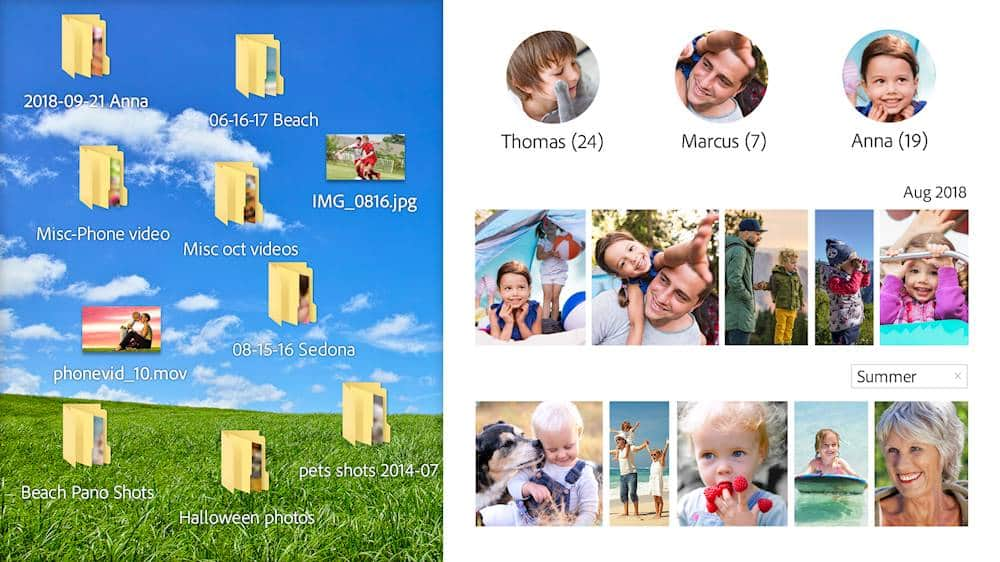
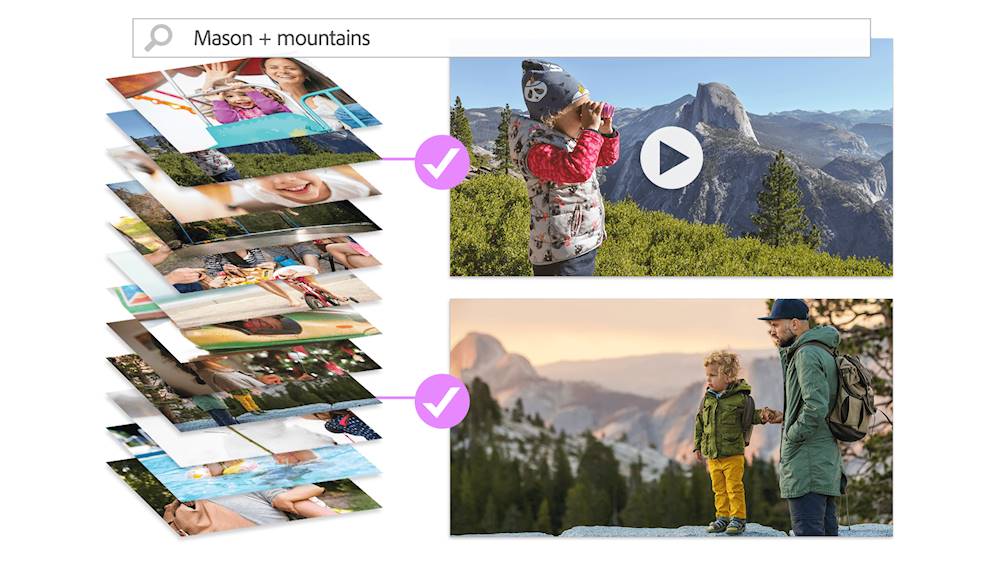
Customers recognize Premiere Elements 2020 as a user-friendly video editing software with an intuitive layout and smooth transitions. They appreciate its affordability compared to Adobe Premiere. While some users find the installation process time-consuming, many acknowledge the software's smart tags and face recognition features.
This summary was generated by AI based on customer reviews.
CODE WAS INVALID!
||Posted . Owned for 2 weeks when reviewed.This reviewer received promo considerations or sweepstakes entry for writing a review.I tried to install this software on my new iMac I also purchased but when I got the the step where I put my redemption code it said it was invalid and to contact the retailer where I purchased the software. So I did and I have had no luck getting through!! I was on hold for 3 hours and was only getting transferred. The call ended another time I tried calling and still no luck. I purchased on 8/21 and it is now 9/11 and I still have not been able to install. I was so excited to start editing photos for my small business.
No, I would not recommend this to a friendGeek squad rocks!
||Posted . Owned for 10 months when reviewed.This reviewer received promo considerations or sweepstakes entry for writing a review.Geek squad did a great job fixing my computer and it now works great!
I would recommend this to a friend- Pros mentioned:Ease of use, Video editing

A worthy consideration for video editor
|Posted .This reviewer received promo considerations or sweepstakes entry for writing a review.I am no newbie when it comes to video editing. I've done numerous videos years ago using significantly older and less responsive hardware than I now possess and using early versions of major software. The 2020 Adobe Premiere Editor turns out to be a very polished video editor that is simple to use and packed with transitions and effects that would allow even a novice editor to produce a worthy and impressive video At this point in time, most video editors have a similar interface and timeline that allows you to drop and drag items and this program is no different. What it does do that my previous editor did not do is to work in 4k and this is a significant feature that works well with today's higher powered computers with ram and ssd's that we have now. I worked on a tower with 32 gb of ram and nvme ssd drive that turned the project into a surprisingly fast outcome. The 4k experiment of about 3 minutes in length was FASTER than what I could do in 720 p years ago (granted the hardware then was not as good as now). I'd recommend this program to anyone who needs an easy to use program at a very competitive price that also has plenty of youtube support videos that will walk you through on how to use it. I know I was bringing myself up to speed using these support videos and relearned some nuances that I had forgotten that I had done years ago.
I would recommend this to a friend Have not installed the microwave yet
||Posted . Owned for 1 month when reviewed.This reviewer received promo considerations or sweepstakes entry for writing a review.No review yet since the microwave is still in the box unopened.
I would recommend this to a friend- Pros mentioned:Ease of use, Video editing
Great Value, Super Video Editing Software!
|Posted .This reviewer received promo considerations or sweepstakes entry for writing a review.Review ------ SUMMARY Adobe is undoubtedly the market leader in photo and video editing software and the 2020 version does not dissapoint. its priced correctly at 99$ and provides a good value for money. I have never used a video editing software before but i am very impressed with the adobe premiere elements software specifically AI powered adobe sensei, it can actually combine photos and videos into a collage. Its easy to install, download and install on a mac or windows, enter the key and imports the videos and with the help of AI, simplify your edits. I love the smart tags, i can search videos by person! I just love it. SETUP The software does not come with CD or USB. its a key , so you download and install. Its a bummer that you can only install on one device. These days everyone has multiple devices and mobile versions, i think we need to think about getting more machine licenses. USAGE Once installed, its easy for a novice to start importing photos and videos and start the editing. you can create a new project, add videos to the project, add text, add animation to the text and so on. It lets you cut, crop , merge videos into one. I think its really the perfect tool if you want to do youtube videos on your own. I wanted to run a record a cooking video for my wife, Although we were not perfect in recording, some of the imperfections were removed using the video editing software. I was able add text on the each of the ingredients and add a summary of recipe which i though was a great because i could not have achieved all this using any free version off the net. I also love the way you can tag videos to different places and persons. This helps me in searching for the right videos. Overall i think its a worthy purchase. PROS ---- 1. Outstanding video editing capabilities, Cut, Merge, Delete 2. AI - Adobe Sensei for editing and creating auto collages 3. Very user friendly, you do not need to be an expert. 4. intelligent tagging for searching Cons --- 1. Only one device per key 2. you need to download 3.5gb file, why not provide a usb instead
I would recommend this to a friend incredible tool
||Posted . Owned for less than 1 week when reviewed.This reviewer received promo considerations or sweepstakes entry for writing a review.bought this as a gift for someone, and she absolutely loves it!
I would recommend this to a friendPerfect
||Posted . Owned for 1 month when reviewed.This reviewer received promo considerations or sweepstakes entry for writing a review.I use this for photos, home videos, podcasting and you tube
I would recommend this to a friendAwesom Platform for editing!
||Posted . Owned for 1 month when reviewed.This reviewer received promo considerations or sweepstakes entry for writing a review.AMAZING for editing! Love the product all around!!
I would recommend this to a friendSo Easy to Use
||Posted . Owned for 1 month when reviewed.This reviewer received promo considerations or sweepstakes entry for writing a review.I love Adobe! This is easy to use and well designed.
I would recommend this to a friendVideo making
||Posted . Owned for 3 weeks when reviewed.This reviewer received promo considerations or sweepstakes entry for writing a review.It's a little hard to understand, but I will get it.
I would recommend this to a friendGlitches
||Posted . Owned for less than 1 week when reviewed.This reviewer received promo considerations or sweepstakes entry for writing a review.I just want to put in the disc and get going... Why can't you just buy these things and just put it in the computer and get going???? First off once you download everything which takes about 25 mins. you are forces to make an adobe account. Once you get a verification email all your problems begin. There is an update and you haven't even done anything yet. How does it know I need an update if I haven't done nothing yet???? smh. I put in the disc, download everything, when I open it-it still takes me to the trial version. I click the version indicating I have purchased the program; I try to put in the redeemable code-- the numbers are accepted but not the letters. It will not let me put in the full code. I can only do the 30 day trial even though it's reading my disc. Doesn't the disc mean I own the software???? And this is on the adobe site. And also your PC have to be updated to the latest software in order to even use the program and that's another issue. I had high hopes for this program. I have to return this piece of garbage. And to make matters worse because of the coronavirus bestbuy is closed.
No, I would not recommend this to a friendDifficult for beginners
||Posted .This reviewer received promo considerations or sweepstakes entry for writing a review.Difficult program to understand and fix pictures. It is a powerful program but takes lots of practice.
No, I would not recommend this to a friend- Pros mentioned:Ease of use, Interface
Quick and Easy Video Editor with lots of Features
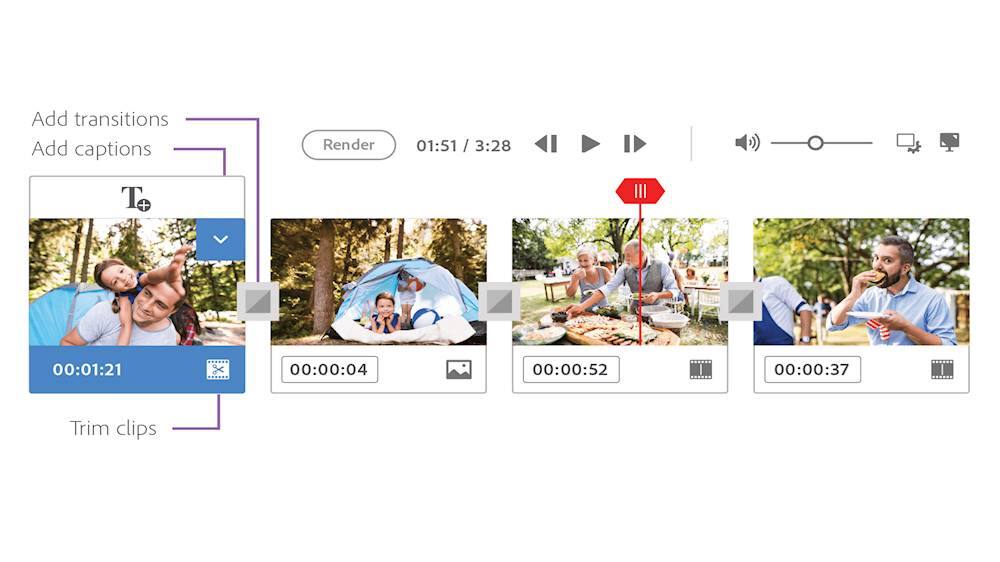
|Posted .This reviewer received promo considerations or sweepstakes entry for writing a review.You never know what to expect when a company takes a high end application, in this case Adobe Premiere, and makes some kind of "lite" or "home" version of it. Adobe Premiere Elements 2020 seems to be a very good balance of ease and features. Actually, probably my favorite thing about it is you have access to both in an integrated sort of way. They give you three main sections or modes in Adobe Premiere Elements 2020, Quick, Guided, and Expert to let you access everything. Quick Quick is a simplistic view meant for you to do basic tasks with out lots of choices getting in the way. If you're just stringing some videos together this may be what you want to use. You can still add transitions and text, probably more but this is just one stream of video. Guided Guided walks you through the process of making changes to your video, adding effects, fixing video problems, and more in a very easy to follow step by step process. A dialog box explains what to do while the element being refereed to is pointed out or highlighted on the interface. This was very helpful for me to learn the interface and get some impressive results quickly! There are 23 tasks it will guide you through. They generally, if not always, use the Expert mode - so it's not hiding the interface. It's walking you through the full thing. Expert In Expert you get three tracks of video and audio you can stack on top of each other in addition to a voice track and a music track. Don't let the word "Expert" scare you. I'm not saying it doesn't do much, it does. The interface is actually deceptively simple looking. As you dig into the options, there are more and more levels, not in a frustrating way, I would just call it well organized, keeping the interface clean. You can also start from a number of templates or tell a story using titles in your video. There is an additional "Create" menu that lets you create a "Video Story", an "Instant Movie" by just selecting clips and a style, or a "Video Collage". So far I've mostly used "Guided" to learn where everything is and what it can do. I've found it very easy to add transitions, video inside large text, adding background music, making text appear on the screen in cool ways, and even adding sky video to a photo, turning the photo into a much more interesting video! Adobe Premiere Element 2020 is perfect for the family. It does everything I want to do and more. It's also easy for the kids to pick up and use! My 10 year old jumped in and started working with it with very little help and she never did video editing before. The Guided mode makes it so easy to do cool stuff and teaches you how the interface quickly. The ease of use, features, and great results I'm getting in such a short amount of time make it an easy video editor to recommend. My only real complaint I have is that when you open Premiere Elements 2020, it first opens this launcher interface. It's not entirely useless since it does give you easy access to recent projects but it's annoying because the window is small and you can't size it. I guess it's ok. I typically just click "Video Editor" and then it launches the real Premiere Elements 2020. Part of the reason they have it is if you have PhotoShop Elements 2020 the launcher sort of integrates the two. Anyway, it doesn't take away from the actual product and the actual product, Elements 2020, is great!
I would recommend this to a friend - Pros mentioned:Interface
Nice upgrade to an already capable product
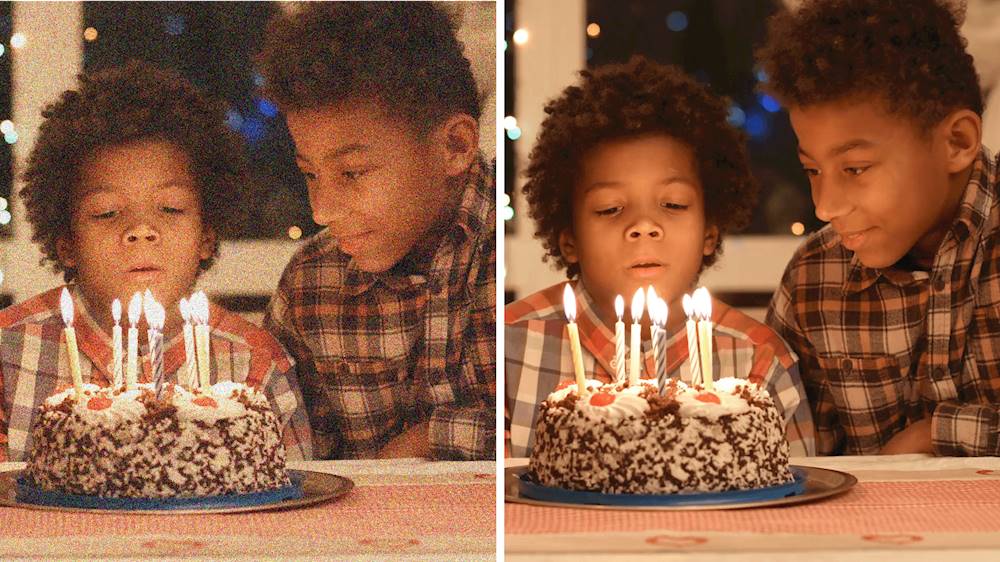
|Posted .This reviewer received promo considerations or sweepstakes entry for writing a review.Adobe Premier Elements 2020 is a pretty good upgrade to the older version I have. The program is very capable, has a bit of a learning curve, but is able to perform some interesting tasks along with the most basic standard tuning. I like some of the new features such as being able to what would typically be black bars when producing wide screen video from vertical (portrait) source and create those bars based on that content. This is a pet peeve of mine, but a lot of people take smartphone video this way. Create. Also the video noise reduction (grainy) feature works well. Guided mode (a mode which guides you through an editing process) and Expert (which basically leaves it to you to use all the tools available in any way you choose). There is quite a bit of help available within the program and video tutorials, but be aware most if not all of it is online based and not installed locally on your computer, so if you do not have an internet connection at the time, you will not be able to access. There are also additional support for 4K content. Although the rendering of this content remains painfully slow. Auto creation and templates are drastically improved if you choose to utilize them. Good performing hardware including a Solid State Drive (SSD) is critical to a good experience. Pros: - Improved auto creation features. - Good media Organizer application included. - Capable products with a plethora of online help and tutorials available. - Interface is intuitive. Cons: - Requires an online account with Adobe. - Video import options can be finicky. - Rendering video is not the quickest. - Most Help options are online and not installed locally on your computer - Video editing requires a pretty capable computer
I would recommend this to a friend - Pros mentioned:Interface
The BEST Premiere Elements in years
|Posted .This reviewer received promo considerations or sweepstakes entry for writing a review.This is going to be a somewhat shorter review, compared to my other reviews. This is not because Adobe Premiere Elements 2020 is bad, but because, for the most part, if you read my review for the 2018 (I skipped the 2019 version, as I felt the improvements, and new features, weren’t enough to make me want to upgrade), you’ll already have an excellent idea of what to expect. Instead, I will focus on the changes – yes, the good, the bad, and the ugly. Let’s start with the biggest change…the inclusion of “Adobe Sensei”. What is Adobe Sensei, you might be asking. Well, to put it in as simple terms as possible, it’s very similar (and as powerful) to the Content-Aware Fill found in Photoshop, but applied to video…in other words, it’s Adobe’s AI, taken to the next level…and, while not 100% ‘foolproof’ (at least in my limited testing, so far), when applied properly, it can be extremely effective. It can also be used for automatically keeping a moving object fairly-centered. For example, if you shot a video in landscape, and had a vehicle that went from one side of the screen to the other, but want to convert it into a portrait video (for Facebook, Instagram, etc). with Adobe Sensei, you can use it to keep that vehicle mostly centered. Other new features include better noise-reduction (ie. removing “grain” from video), and step-by-step guides for time-lapse, fill-frame, & animated sky (honestly, don’t know what this last one is…yet…as I haven’t gotten around to trying it. Moving over to “improvements”, the first (which I rarely use) is the Quick Edit mode. For those who prefer “quick” over “advanced” I’m sure you will appreciate the improvements, especially the speed. Another improvement (great for ‘quick’ & ‘advanced’ users) is the automatic Smart Trim (now with Adobe Sensei). While the 2018 version did a “decent” job (the feature was introduced in 2018), the 2020 version is almost spot-on, as it does a much better job…plus, it’s faster at getting it done. Two other features that are, technically, “improvements”, but are new to me, are single-click slideshows (the ability to create a “slideshow video” from photos), and Auto Creations (the ability…using Sensei, once again…to automatically combine photos & videos into a photo/video “collage”). FINAL VERDICT If you’re a user of Adobe Premiere Elements 2018, and (like me) skipped the 2019 version, I’m here to tell you that it is VERY worth your money to upgrade to the new 2020 version. There are not only huge improvements for features that were introduced in the 2018 version, as well as those that were present in earlier versions, but there are new features that are just too amazing to pass up. The interface is easier to use than ever before, and the “advanced” features are truly ‘advanced’. The text tools are the best I’ve seen (outside of “professional” video editing applications. While 360-degree video editing is still missing, I don’t see that as anything bad…especially at this price point. For those running the 2019 version and trying to decide whether, or not, it’s worth it to upgrade now, all I can say is this - the new features, along, are a strong-enough reason to lean towards the “do”, instead of the “don’t”. Ultimately, it will be your decision to make. For anyone running a version older than 2018…or, for those looking to get into video editing, and looking for a simple-to-use, yet powerful, video editor, I make you this promise: with Adobe Premiere Elements 2020, you will NOT be disappointed. Disclaimer: This product was provided free, or at reduced cost, for the purpose of reviewing the product. Nevertheless, the above review, be it positive, negative, or anywhere in-between, is a 100% honest review, and the price paid played absolutely no part in my review.
I would recommend this to a friend - Pros mentioned:Ease of use, Price
Nice Video Editing Even For Beginners
|Posted .This reviewer received promo considerations or sweepstakes entry for writing a review.Adobe Premier Elements 2020 is the latest release of their scaled-down video creating and editing title. This copy was installed on a Windows 10 machine with an I7 chip and 16Gb of memory so there should be no problem running the program. Any video editing requires adequate power and memory as you are working with large files with several levels of "undo" so it taxes a computer. The first time you open it after installing it, you must log in to an existing or new Adobe account. You are also treated to a series of splash screens including the usual Adobe credits of the dozens of engineers and writers who build and test their products. Thankfully the more often you open Elements 2020 the quicker that goes by. I think many Adobe products are meant for a user capable of a rather steep learning curve, but this program does have a "teach me" function which did make it a lot easier to get started. I opened a 30-second video from a security camera and removed the dead 25 seconds after a bird flew up to the lens, took a look at it's reflection, and flew away. It was only a 5-second clip but it rendered it quickly and flawlessly. I opened videos from my cell phones and other cameras. You can start a project with plans on weaving still images in with your videos, and this was a great feature in that you could leave the existing audio intact and place pictures in the dead zones of your video where nothing was happening. I found this video editor to be one of the easiest I have used. The exports of your projects are easy to make for things like posting on social media, uploading and sharing though phones, or saving for use on disc like DVD. There are tweaks for the quality levels or screen resolution. You can leave the project open and export it one at a time to the various formats for different purposes. At about 40% the price of the full Adobe Premier, The Premier Essentials 2020 program should give a lot of new users a nice opportunity to work with all kinds of video for many purposes.
I would recommend this to a friend - Cons mentioned:Stability
Junk
||Posted . Owned for 1 month when reviewed.This reviewer received promo considerations or sweepstakes entry for writing a review.Keeps crashing. No matter how many times I unload it and re- load it. Can't get customer support to assist with it either,. never buy this crap.
No, I would not recommend this to a friend very bleak program
||Posted . Owned for 1 month when reviewed.This reviewer received promo considerations or sweepstakes entry for writing a review.Upset I bought the program upon reading the reviews. Program is not really user friendly and can only edit videos, though in description it was mentioned pictures were editable.
No, I would not recommend this to a friend- Pros mentioned:Ease of use, Video editing
Elements Guides you to be an Expert Video Editor
|Posted .This reviewer received promo considerations or sweepstakes entry for writing a review.Over the years I have shot videos using VHS and HD camcorders, 4k action cameras and various Android and Apple phones. I would use the video editing program that came with the camera or phone to help clean up the images but most of them were lacking the features and capabilities I found in Elements. Elements allows me to enhance and combine various video clips shot from multiple devices into a single movie. Because the program is feature rich it can be confusing at first but luckily it includes multiple ways to help you learn how to use the program. It also incorporates facial recognition and auto tagging which helps organize and categorize your video segments. When you open Elements there is a film strip showing many of the typical task as well as an Auto Creation section where the program has auto created a movie for you! If you click on a task on the film strip such as Trim Your Video it will walk you through the steps that are needed to trim your video. You can bypass the film strip options and enter Elements Video Editor directly where you can select Quick, Guided or Expert mode. In the Guided mode there are 23 task that use animation to show you how to get many of the most popular task done with the least amount of issues. Once you learn the steps you can skip the Guided mode and go directly into the Expert mode. In Expert mode there are more features and options including one I needed which removes the graininess (noise) from old or poorly exposed movies. Adobe gives you total control over editing the video image in Expert mode while keeping it simple enough that anyone with enough time can master the techniques. The software allows you to create your own movies by combining video clips, photos, text and music. There are so many features and options in this program when it comes to transitions, music and video quality enhancements that you can spend more time selecting options than actually creating the movie. I run this program on a high powered PC and it does take time and resources when exporting or rendering a movie. Make sure your system meets Adobe’s requirements.
I would recommend this to a friend Didn't work!
||Posted . Owned for 1 month when reviewed.This reviewer received promo considerations or sweepstakes entry for writing a review.I purchased this at a Beat Buy and the code that came in the box was not valid. I couldn't get it to activate my copy of the software. Maybe the software is great but I wouldn't know since it wouldn't active. Usually I buy software through an app store hut this was on sale so I got it at a physical store. Last time I'll make that mistake. I do love Best Buy but this was not a good purchase.
No, I would not recommend this to a friend