Customer Ratings & Reviews
- Model:
- ASW-USB3-25
- |
- SKU:
- 3459621
Customer reviews
Rating 4.4 out of 5 stars with 2708 reviews
(2,708 customer reviews)Rating by feature
- Value4.3
Rating 4.3 out of 5 stars
- Quality4.5
Rating 4.5 out of 5 stars
- Ease of Use4.4
Rating 4.4 out of 5 stars
Customers are saying
Customers find value in the easy-to-use feature and fast data transfer of the Data Transfer Cable. They appreciate its compatibility and cloning capabilities, making it perfect for cloning drives. While some customers find the software lacking and the price expensive, overall, customers are pleased with its performance and functionality.
This summary was generated by AI based on customer reviews.
- Pros mentioned:Data transfer
Rated 5 out of 5 stars
Great solution
||Posted .This reviewer received promo considerations or sweepstakes entry for writing a review.I recently replaced my grandmother's Vista based desktop with a modern computer in the monitor model. This served as an excellent solution for her to access all of her files from her old hard drive. We plugged it in the USB port and were up an running in 15 seconds.
I would recommend this to a friend - Pros mentioned:Data transfer, Usb
Rated 5 out of 5 stars
Excellent product
||Posted .This reviewer received promo considerations or sweepstakes entry for writing a review.I needed a transfer cable to clone an SSD drive. I bought a 500 GB Samsung SSD to replace the 128 GB Samsung SSD that came with my computer. I tried the non data cable internal method but it would not clone. I bought the Apricorn Data Cable and followed Samsung's method. Worked very well and now I have enough space that Windows 10 can update. Before it just didn't have the space on the 128 GB to run the update and keep Battlefield 4 on the SSD. I would have had to uninstall BF4 to allow Windows 10 to do any updates. Great product that seems to be well mad and bullet proof. I would recommend this to anyone cloning SSD drives.
I would recommend this to a friend - Pros mentioned:Data transfer
Rated 5 out of 5 stars
Lifesaver if you need it!
||Posted .This reviewer received promo considerations or sweepstakes entry for writing a review.My laptop died and this was the only way to get the data off my old hard drive onto a new one immediately. I honestly didn't think it would work because my laptop was password protected, but there was no issue accessing the data files once hooked up to this devise.
I would recommend this to a friend - Pros mentioned:Data transfer
Rated 5 out of 5 stars
A must have
||Posted .This reviewer received promo considerations or sweepstakes entry for writing a review.The motherboard in my laptop died, but the hard drive was still good. This cable was perfect for me to recover all my data and easily transferred the data to my new laptop. With this cable, I've turned my old internal hard drive into my backup drive for the new laptop. Great data saver.
I would recommend this to a friend - Cons mentioned:Software
Rated 3 out of 5 stars
The cable works fine, but the software doesn't
||Posted .This reviewer received promo considerations or sweepstakes entry for writing a review.I got this item to clone a hard drive to an SSD for a laptop. The cable allows you to do it directly without having to back up to an external drive first. It's a real time-saver. I tried to use the software included to clone the drive, but the result wouldn't boot. I tried twice and gave up. I used the software included in Wndows 7 to do the disk image copy and my SSD booted fine. If you don't plan to use the software included, the cable works great.
No, I would not recommend this to a friend - Pros mentioned:Ease of use
Rated 5 out of 5 stars
It Works!
||Posted .This reviewer received promo considerations or sweepstakes entry for writing a review.I used one of these to upgrade to a Toshiba SSD and it works like a charm. I used the software that came with the hard drive instead of the software that comes with this cable so I can't comment on that. The cable does what it's supposed to do, not much more to say about it!
I would recommend this to a friend - Pros mentioned:Data transfer
Rated 5 out of 5 stars
Does what it is made for.
||Posted .This reviewer received promo considerations or sweepstakes entry for writing a review.Took about 90 minutes to clone a 240 gb ssd from a 320 gb standard hard drive. Switched the drives and after 3 days no issues have been found. Not something I will use regularly (hopefully) but probably saved me 2-3 hours not having to start from scratch on the SSD.
I would recommend this to a friend Rated 4 out of 5 stars
Works pretty well. It does what it claims.
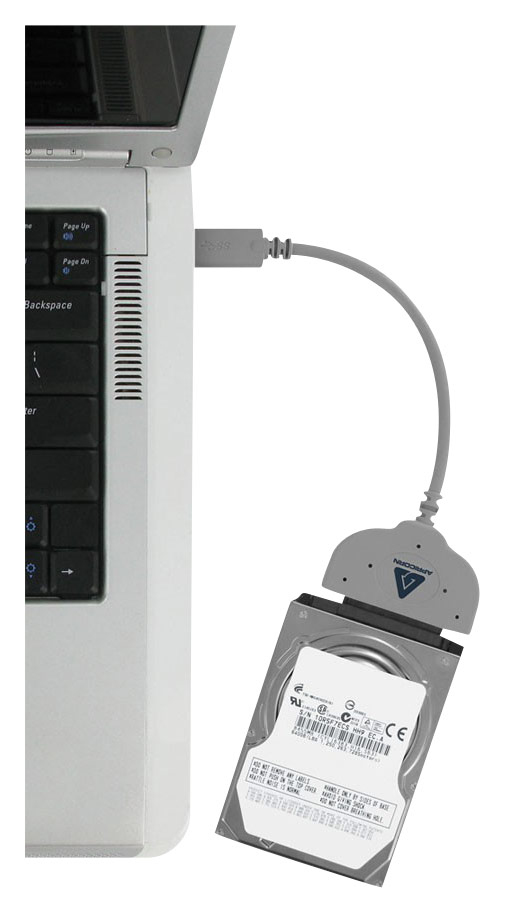
||Posted .This reviewer received promo considerations or sweepstakes entry for writing a review.There isn't much to this product other than the cable and the software on the CD. The cable is rather short, but pretty robust. Normally, I would complain about the length of the cable, but it seems that all cables like this have the same problem. If you want the data transfer software, don't buy this. Go download free and open source software like gparted or plenty of others. I have also heard great reviews about Samsung's disk cloning software, so you might check that out (though I haven't used it personally). Ultimately, you are getting what you need (it's plug-and-play on Windows). I haven't even used the disk cloning software and I don't intend to (I'm happy with gparted). Note: This only works on 2.5" drives as advertised (Will not work on 3.5"). I have tested it personally and wattage isn't a factor like I originally suspected (not sure why, doesn't make much sense). This is intended for USB 3.0, but it works fine on USB 2.0. I'm assuming that is why the length of the cable has to be limited (because USB 2.0 only provides 500mA per port). Hope this review helps you. The picture below shows my cable plugged into a standard laptop drive (Hitachi 700mA 5400 rpm HDD). Don't worry about the power delivery, it works.
I would recommend this to a friend- Pros mentioned:Data transfer
Rated 5 out of 5 stars
Data cable
||Posted .This reviewer received promo considerations or sweepstakes entry for writing a review.Needed a way to transfer pictures and files from a failing hard drive! Plug and play! Bad hard drive acted like a flash drive. Thought l was looking at my old computer. Transferred my data to new hard drive with ease! Didn't even load the supplied software!
I would recommend this to a friend - Pros mentioned:Usb
Rated 5 out of 5 stars
Does what it is supposed to
||Posted .This reviewer received promo considerations or sweepstakes entry for writing a review.I bought this to recover all the pictures from a laptop that had water damage. i was lucky that the hard drive was still functioning so i was able to recover my data. This cable allowed me to plug the old hard drive into my new laptop's USB port and transfer the data.
I would recommend this to a friend - Pros mentioned:Data transfer
Rated 4 out of 5 stars
Never used it
||Posted .This reviewer received promo considerations or sweepstakes entry for writing a review.I got it to see if I could read a crashed drive. It didn't work, so I've never used the software, but I kept the cable for data transfer from so of my external SATA drives, and it works great!!
I would recommend this to a friend - Cons mentioned:Software
Rated 5 out of 5 stars
Worked as expected
||Posted .This reviewer received promo considerations or sweepstakes entry for writing a review.I purchased a SSD that required this type of cable. It wasn't included with the drive but was shown in the installation instructions. I had to go to Best Buy and buy the cable separately. It worked just fine. I didn't use the software. Maybe I will next time.
I would recommend this to a friend - Pros mentioned:Ease of use
Rated 4 out of 5 stars
Good price, easy to use
||Posted .This reviewer received promo considerations or sweepstakes entry for writing a review.Plug it up, insert disc, couple of mouse clicks, voila. You just transferred your OS, files, etc. And saved a substantial amount of $$$ doing it. It's so easy to use, even a caveman could do it!
I would recommend this to a friend - Pros mentioned:Data transfer
Rated 5 out of 5 stars
Wish was cheaper
||Posted .This reviewer received promo considerations or sweepstakes entry for writing a review.My new SSD did not include the hardware to transfer though I did use the software from my new SSD so can not comment on the software, but cable worked perfect and also worked on another old hard drive I had so made a backup copy on that for added protection.
I would recommend this to a friend - Pros mentioned:Data transfer
Rated 5 out of 5 stars
Saved my data
||Posted .This reviewer received promo considerations or sweepstakes entry for writing a review.I bought this transfer cable to get data off of my old hard drive from a dead laptop. Thankfully the old hard drive still worked and after connecting it to this cable I was able to easily copy my photos, music, and documents over to my new laptop.
I would recommend this to a friend - Pros mentioned:Data transfer
Rated 5 out of 5 stars
Essential to recover data!
||Posted .This reviewer received promo considerations or sweepstakes entry for writing a review.My Dell PC got the blue screen of death and this little wire was able to save me from spending over $100 for someone else to extract the data. All I did was pull my hard drive, connect this wire, and I had access to all my data!
I would recommend this to a friend - Pros mentioned:Ease of use
Rated 5 out of 5 stars
Easy Peasy transfer
||Posted .This reviewer received promo considerations or sweepstakes entry for writing a review.Used this cable to transfer old standard hard drive of a Mac book Pro to a SanDisk solid state drive. Worked great with the Mac along with included instructions. Plan to use the Windows software for a not so distant future desk top upgrade.
I would recommend this to a friend - Pros mentioned:Data transfer
Rated 4 out of 5 stars
Worked great for moving to larger harddrive
||Posted .This reviewer received promo considerations or sweepstakes entry for writing a review.Worked great right out of the box for cloning my current laptop drive to a bigger drive so I could then swap the drives out and have teh larger drive in the laptop and an extra drive for backing up data
I would recommend this to a friend - Pros mentioned:Data transfer, Ease of use
Rated 5 out of 5 stars
A must for installing SSD Drive
||Posted .This reviewer received promo considerations or sweepstakes entry for writing a review.I upgraded my regular hard drive to an SSD drive and this transfer cable and software made it incredibly easy. I had to transfer about 700GB of data from the old drive to the new one. It was a one-click operation to clone the entiew drive for easy replacement and my computer started up perfect. It recognized the new drive as the old drive and all the programs worked perfectly. Plus, using the USB 3.0 port it did the entire 700GB transfer in about 40 minutes. If you are replacing a hard drive this cable is a must and a steal at the price.
I would recommend this to a friend - Pros mentioned:Ease of use
Rated 5 out of 5 stars
Worked great!
||Posted .This reviewer received promo considerations or sweepstakes entry for writing a review.Made it so easy to transfer system to a new hard drive! Very useful tool, that I can use again & again as I work in IT; While many folks would only need to use it once to get their system transferred. I thought that it was reasonably priced, too.
I would recommend this to a friend