Customer Ratings & Reviews
- Model:
- ASW-USB3-25
- |
- SKU:
- 3459621
Customer reviews
Rating 4.4 out of 5 stars with 2708 reviews
(2,708 customer reviews)Rating by feature
- Value4.3
Rating 4.3 out of 5 stars
- Quality4.5
Rating 4.5 out of 5 stars
- Ease of Use4.4
Rating 4.4 out of 5 stars
Customers are saying
Customers find value in the easy-to-use feature and fast data transfer of the Data Transfer Cable. They appreciate its compatibility and cloning capabilities, making it perfect for cloning drives. While some customers find the software lacking and the price expensive, overall, customers are pleased with its performance and functionality.
This summary was generated by AI based on customer reviews.
- Cons mentioned:Price, Software
Rated 4 out of 5 stars
It's a special cable, essentially
||Posted .This reviewer received promo considerations or sweepstakes entry for writing a review.This was my first time performing an HDD to SSD migration. Cable did its job... I don't know when I may need it again and hence my only gripe about the price. In their defence, I believe the included software is a factor for the advertised price. I had read it (the included software) did not handle Windows 10 that well so I researched alternatives. There's apparently an update to correct this flaw but I obviously did not want to test if it worked.
I would recommend this to a friend - Pros mentioned:Ease of use
Rated 5 out of 5 stars
Works like a Charm
||Posted .This reviewer received promo considerations or sweepstakes entry for writing a review.This is possibly the simplest way to copy a drive. I have used this product several times in the past. I'm blown away at how easy it is to use. I recommend this to anyone looking to clone an old slow drive on to a new and fast SSD drive.
I would recommend this to a friend - Pros mentioned:Ease of use
Rated 4 out of 5 stars
Exactly what I needed
||Posted .This reviewer received promo considerations or sweepstakes entry for writing a review.I had an old laptop with info on it . Just plugged this puppy into the old drive on one end and into the new laptops USB port with the other , and simply copied everything over. Was extremely eazy.
I would recommend this to a friend - Cons mentioned:Price, Software
Rated 4 out of 5 stars
Cable good software not so much
||Posted .This reviewer received promo considerations or sweepstakes entry for writing a review.This was the only adapter cable I could find locally, I was traveling and needed something quickly. I have 3 others at home for various drives, all of which were cheaper. The cable did end up working, however the included software was not up to the task. I made 1 attempt to use the included software and had to redo the migration with software from the drive manufacturer, which worked fine.
I would recommend this to a friend - Cons mentioned:Power
Rated 4 out of 5 stars
Not the total answer
||Posted .This reviewer received promo considerations or sweepstakes entry for writing a review.Does not work for all disks because it doe not have separate power. Found the hard way that some disks require external AC power to do the copy.
I would recommend this to a friend - Pros mentioned:Ease of use
Rated 4 out of 5 stars
simple and easy to use
||Posted .This reviewer received promo considerations or sweepstakes entry for writing a review.Thanks to a knowledgeable staff ember I found what I needed quickly and it worked great! Simple and easy to use. Very user friendly software too.
I would recommend this to a friend - Pros mentioned:Ease of use, Usb
Rated 5 out of 5 stars
Easy to use
||Posted .This reviewer received promo considerations or sweepstakes entry for writing a review.I am a first time laptop HDD upgrader. While I feel comfortable around tech, using it particularly, I don't necessarily dive into upgrading things myself (I really want to, but it's an expensive hobby I just don't have time for right now). Anyways, cloning my old HDD with this software, plugging in my new SSD to the USB 3.0 and cloning it was an absolute breeze. If you are upgrading your HDD in your laptop, I would highly recommend this transfer cable. Dead simple to use; for techys and non-techys alike.
I would recommend this to a friend - Pros mentioned:Data transfer
Rated 4 out of 5 stars
Great Data Transfer
||Posted .This reviewer received promo considerations or sweepstakes entry for writing a review.Need a quick way to get some info from an internal hard drive I had laying around. It worked with no problem for me. A must for anyone who has loose HD's in their office...
I would recommend this to a friend - Pros mentioned:Data transfer
Rated 5 out of 5 stars
Perfect use for one HDD to another laptop
||Posted .This reviewer received promo considerations or sweepstakes entry for writing a review.My other computer's GPU failed and I needed to use the data off of the HDD and use it on another computer. Worked marvelously and would strongly urge this for someone who does not want to pay $85 for Geek Squad to back up their data
I would recommend this to a friend - Pros mentioned:Data transfer
Rated 5 out of 5 stars
Great product
||Posted .This reviewer received promo considerations or sweepstakes entry for writing a review.Works great with mac. Even boot Mac with this cable / HDD and transfer all data. If you need cable to make your laptop hard drive as external drive or recover your data , this is excellent product. I would recommend this product.
I would recommend this to a friend - Pros mentioned:Data transfer
Rated 4 out of 5 stars
Very nice data transfer cable
||Posted .This reviewer received promo considerations or sweepstakes entry for writing a review.Purchased the cable to recover data from a business laptop that would no longer power up. Connected the cable to the removed hard drive and easily copied the data to the new computer.
I would recommend this to a friend - Pros mentioned:Usb
Rated 5 out of 5 stars
Did The Job
||Posted .This reviewer received promo considerations or sweepstakes entry for writing a review.Used this to transfer the system on my laptop to a SSD. Once connected, the computer recognized the drive with no problem. Comes with transfer software that I didn't use because I was using the software that came with the SSD.
I would recommend this to a friend - Pros mentioned:Data transfer
Rated 4 out of 5 stars
Lifesaver
||Posted .This reviewer received promo considerations or sweepstakes entry for writing a review.I had several hard drives from years of upgrades without an easy way to inspect and back up them. This cable solved both issues and provided a means to erase them too.
I would recommend this to a friend - Pros mentioned:Data transferCons mentioned:Price
Rated 4 out of 5 stars
Works fast
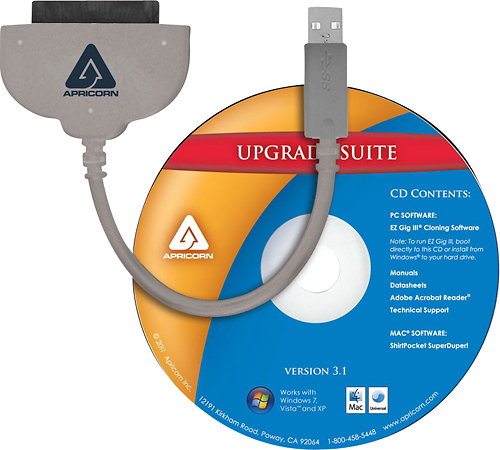
||Posted . Owned for 6 months when reviewed.This reviewer received promo considerations or sweepstakes entry for writing a review.Other than the high price this product works as intended .this includes a cd drive with the software for data transfer from HDD to SSD or vice versa . This is a fast data transfer but if you can find a cheaper one go for it cause 30 bucks is insane!! I was in a hurry and needed my computer for work otherwise I would have looked elsewhere.
I would recommend this to a friend - Pros mentioned:Usb
Rated 5 out of 5 stars
Useful to have around
||Posted .This reviewer received promo considerations or sweepstakes entry for writing a review.I bought this to upgrade my hard drive to an SSD. It worked great, though I used the software which came with my Samsung SSD. I've used this a couple of times and it has been well worth having it.
I would recommend this to a friend - Pros mentioned:Data transfer
Rated 5 out of 5 stars
Works exactly as intended
||Posted .This reviewer received promo considerations or sweepstakes entry for writing a review.No lag experienced from this data transfer cable. It works exactly as intended. I was able to move close to 500GB of data from one hard drive to another using this SATA Wire after my laptop was giving me problems.
I would recommend this to a friend - Pros mentioned:Data transfer
Rated 5 out of 5 stars
transfer made easy
||Posted .This reviewer received promo considerations or sweepstakes entry for writing a review.This made transferring my information from my old HHD to the new SSD so much faster. It made a clone of my old drive so that I can put the SSD right into the computer without having to go through a lot of work
I would recommend this to a friend - Cons mentioned:Software
Rated 4 out of 5 stars
Cable Works but Software did not
||Posted .This reviewer received promo considerations or sweepstakes entry for writing a review.The cable works great for connecting the my new SSD disk drive to my lap top for cloning. I would of give 5 stars if the software would have worked for me but it did not.
I would recommend this to a friend - Pros mentioned:Ease of use
Rated 5 out of 5 stars
So easy to use!
||Posted .This reviewer received promo considerations or sweepstakes entry for writing a review.I bought this just for the transfer cable. I was replacing a laptop hard drive with an ssd hard drive. Never thought i was going to use the software that comes with it. Very easy to use. Worked on first try.
I would recommend this to a friend - Pros mentioned:Ease of use, Speed
Rated 4 out of 5 stars
Easy way to clone HHD and SSD's!
||Posted . Owned for 3 weeks when reviewed.This reviewer received promo considerations or sweepstakes entry for writing a review.I used this to change my laptop from HHD to SSD. The instructions are easy to follow, and the whole process was done in little time, with great results. It cloned my HHD to the SSD. After I made the switch, it worked great and really gave a fresh speed boost to my computer. Highly recommended.
I would recommend this to a friend