Customer Ratings & Reviews







- Model:
- CM3001DM2A-M8186
- SKU:
- 10467061
Rating by feature
- Battery Life
Rating 4.6 out of 5 stars
- Speed
Rating 4.2 out of 5 stars
- Display
Rating 4.6 out of 5 stars
Customers are saying
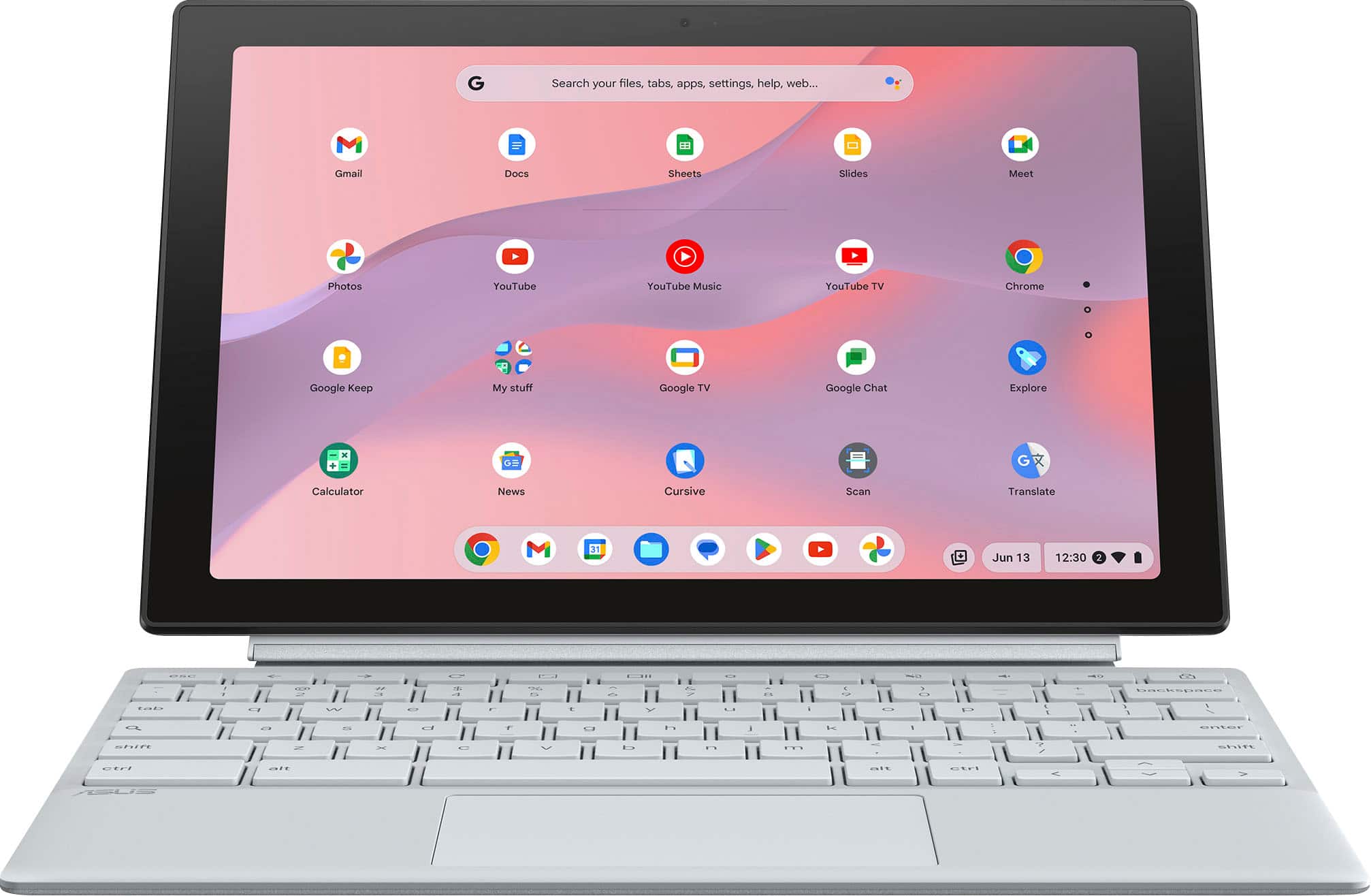
Customers commend the Chromebook Detachable CM3001 for its excellent keyboard quality, portability, and impressive battery life. The MediaTek processor ensures smooth Chrome OS performance, and users appreciate its perfect size and sleek design. However, some customers express concerns about the limited storage and RAM, and a few find the weight slightly excessive when used as a tablet. Additionally, a small number of users have reservations about the operating system.
This summary was generated by AI based on customer reviews.
For my Mom.
||Posted . Owned for 1 month when reviewed.This reviewer received promo considerations or sweepstakes entry for writing a review.My Mom loves it. I got it for her. She has been using it every day.
I would recommend this to a friendNice
||Posted . Owned for 3 months when reviewed.This reviewer received promo considerations or sweepstakes entry for writing a review.Good little Chromebook great for son to do school work and play little games
I would recommend this to a friendLaptop
||Posted . Owned for 2 weeks when reviewed.This reviewer received promo considerations or sweepstakes entry for writing a review.I bought 2 of these 2in1 laptops for my grandaughters that are in 2nd and 3rd grade for Christmas. They LOVE them!!
I would recommend this to a friendASUS Chromebook
||Posted .This reviewer received promo considerations or sweepstakes entry for writing a review.Works great. Would buy again and recommend to a friend.
I would recommend this to a friendLoveeee
||Posted . Owned for 1 month when reviewed.This reviewer received promo considerations or sweepstakes entry for writing a review.So versatile love this labtop! Literally THE best study labtop!
I would recommend this to a friendLaptop
||Posted . Owned for less than 1 week when reviewed.This reviewer received promo considerations or sweepstakes entry for writing a review.I honestly really like this laptop, the price for everything it does is absolutely insane! I’m using it for college and it runs great. Great for typing or writing
I would recommend this to a friend2 in 1 laptop
||Posted . Owned for 1 month when reviewed.This reviewer received promo considerations or sweepstakes entry for writing a review.This is my introduction to using a computer, getting used to it.
I would recommend this to a friendChrome
||Posted . Owned for 1 month when reviewed.This reviewer received promo considerations or sweepstakes entry for writing a review.Perfect just for personal and work stuff you need.
I would recommend this to a friendReview
||Posted . Owned for 1 week when reviewed.This reviewer received promo considerations or sweepstakes entry for writing a review.Amazing. I have always wanted one. Now I can have my son do his work on there
I would recommend this to a friendLaptop review
||Posted . Owned for 1 month when reviewed.This reviewer received promo considerations or sweepstakes entry for writing a review.Good product fast delivery. Works really well for me.
I would recommend this to a friendQuick set up and light weight
||Posted . Owned for 2 weeks when reviewed.This reviewer received promo considerations or sweepstakes entry for writing a review.quick, easy set up. lightweight. great for my purposes
I would recommend this to a friend- Cons mentioned:Operating system
Excellent condition laptop
||Posted .This reviewer received promo considerations or sweepstakes entry for writing a review.The laptop is in excellent shape unfortunately the operating system is just not good
No, I would not recommend this to a friendBrand response from ASUS Answers
Posted .Dear Margarital,
Indeed, the Chromebook is a excellent laptop.
We certainly understand your concern that a Chromebook has limitations. Chromebook operates, or works just like any other laptop, it comes with a web or cloud base OS that is fast, secure, and easy to use and is becoming a popular choice for young and old users alike because of these features. Internet security or antivirus software is integrated, no need to purchase the software or application separately. Besides being a low-cost and lightweight laptop, it supports thousands of popular computing applications, both in Chrome and Android, and Linux applications as well. Since it is a web base OS it does require a Google or Gmail account and an internet connection to use or operate it properly. If this is your first experience with a Chromebook, I recommend using the HELP file incorporated within the OS. To access HELP, please click your profile picture on the Notification Bar, located on the lower right-hand corner of the home screen then click the question mark icon or widget. For more help, please visit Google Support webpage at: https://www.google.com/chromebook/howto/.
Should you need further assistance, please email me at [email protected] and I will be more than glad to help. Or you are most welcome to call Product Support Hotline at: 1(888) 678-3688. Also, you can chat with an ASUS live support agent from the link: https://www.asus.com/us/support/article/1135/.
Thank you for choosing an ASUS product.
Regards,
Rodel
ASUS Customer Loyalty
Mid laptop
||Posted .This reviewer received promo considerations or sweepstakes entry for writing a review.This computer worked fine until a week after i got it, it has a delayed turn on. And skips when i play spotify on a speaker. Buy at your own risk.
No, I would not recommend this to a friendBrand response from ASUS Answers
Posted .Dear Giselle,
We sincerely apologize for the power and speaker issues you're experiencing with the Chromebook and for any inconvenience this may have caused you. This is not the kind of quality to expect from our products, and it's not the norm. To troubleshoot this issue, we recommend performing a Hard Reset.
Hard Reset
1. Remove all external devices such as the AC adapter, USB devices etc.
2. Press and hold the power button and refresh key for 60 seconds.
3. Reconnect AC adapter.
4. Turn on the power of the device
Should the issue persist, please contact our support team at https://www.asus.com/us/support/CallUs to further investigate the problem or assist with repairing the device.
We stand behind our products and continuously strive to improve our products and processes to achieve customer service excellence. For more information, email us at [email protected] and include the case number "N2406014342-0008" as a reference. We will do our best to resolve your case quickly. Your feedback is important to us and enables us to improve our support channels. Thank you for choosing ASUS.
Best Regards,
Chantae
ASUS Customer Loyalty US Support
[Chromebook] How to reset your Chromebook hardware (Hard reset) - https://www.asus.com/support/faq/1041638/
Buyer Beware.
||Posted . Owned for 2 months when reviewed.This reviewer received promo considerations or sweepstakes entry for writing a review.Open box. No charger. No good. Always check before pickup.
No, I would not recommend this to a friendBrand response from ASUS Answers
Posted .Dear Valued Customer,
We're truly sorry to hear that your unit arrived without the charger. For assistance with your order, we recommend contacting Best Buy Support directly, as they’ll be best equipped to provide further details. We do stand behind our product, and we continuously strive to improve our approach and processes in order to achieve customer service excellence. For more information, send us an email at [email protected] and provide the link of this review for reference. We’ll do our best to provide a quick resolution to your case. Please refer to this case number (N2406014342-0009) for us to better assist you.
Your feedback is important as it helps with improvements to ASUS Support channels.
Thank you for choosing ASUS.
Best Regards,
Schottky
ASUS Customer Loyalty US Support
Computer
||Posted . Owned for 1 week when reviewed.This reviewer received promo considerations or sweepstakes entry for writing a review.Great I love it my family and friends are so loving it
I would recommend this to a friendI couldn’t be happier
||Posted . Owned for 1 week when reviewed.This reviewer received promo considerations or sweepstakes entry for writing a review.This device is amazing powerful device meets all my computing needs
I would recommend this to a friendSlow and out dated
||Posted . Owned for 1 week when reviewed.This reviewer received promo considerations or sweepstakes entry for writing a review.When you turn tablet, the apps don’t auto adjust. You have to click a drop down and tell each app to change to portrait or landscape. Very strange and out dated.
No, I would not recommend this to a friendBrand response from ASUS Answers
Posted .Dear RichardG,
Thank you for your comment.
We certainly understand your disappointment and the inconvenience this may have caused if you are having issue with the Chromebook. The laptop needs to be folded all the way into tablet mode to work properly. Furthermore, since this is a web-based computer and it relies on an internet connection for system stability and performance, check if it has access to a stable and a high-speed internet service. Also, by clearing browsing history and minimizing the number of opened browser tabs will help improve and maintain optimum system stability and performance. Additionally, ensure the unit is running with the most current OS update. Should you need further assistance with the product, please email me at [email protected] and I would be more than happy to help. Or, you can speak to an ASUS live support agent 24/7 at http://bit.ly/AsusLiveChat.
Thank you for choosing an ASUS product.
Regards,
Rodel
ASUS Customer Loyalty
Everything a chromebook should be
||Posted . Owned for 2 weeks when reviewed.This reviewer received promo considerations or sweepstakes entry for writing a review.Love it! Laptop/tablet. Love it. Highly recommened
I would recommend this to a friendMy laptop
||Posted . Owned for 1 week when reviewed.This reviewer received promo considerations or sweepstakes entry for writing a review.It’s excellent. The only thing is it’s so slippery.
I would recommend this to a friendOkay
||Posted . Owned for 1 month when reviewed.This reviewer received promo considerations or sweepstakes entry for writing a review.Okay product. What was annoying was that I logged into guest mode and recorded a performance, only to find out that everything gets deleted in guest mode once shut down, and I lost the entire recording. Have not used it much since that poor experience
No, I would not recommend this to a friendBrand response from ASUS Answers
Posted .Dear Syante G,
Thank you for sharing your feedback on the Chromebook. We understand that it didn't meet your full expectations, and we sincerely apologize for that as we do understand your concerns. At ASUS, we take quality control, testing, and inspections seriously to ensure our products meet high standards. Providing our customers with a high level of satisfaction is our top priority, and we'll forward your feedback to our team for review.
We stand behind our products and continuously strive to improve our products and processes to achieve customer service excellence. For more information, email us at [email protected] and include the case number "N2406014342-0003" as a reference. We will do our best to resolve your case quickly. Your feedback is very important to us and enables us to improve our support channels. Thank you for choosing ASUS.
Best Regards,
Chantae
ASUS Customer Loyalty US Support