Customer Ratings & Reviews
![F1 F2 F3 F4 F5 F6 F7 F8 F9 F10 F11 F12
Home Ins Del PgUp PgDn
1 2 3 4 5 6 7 8 9 0 - =
Q W E R T Y U I O P [ ] \
Caps A S D F G H J K L ; '
Ctrl Z X C V B N M , . /
Alt Fn
Num / * - +
7 8 9 4 5 6 1 2 3
Home 8 A 9 PgUp +
End 0 O PgDn +
Ins Del
REPUBLIC OF GAMERS](https://pisces.bbystatic.com/image2/BestBuy_US/images/products/e9846a69-1bb6-42da-b617-2f730ea76bfc.png)

![Intuitive Control Knob
Play/ pause media, adjust volume, and keyboard lighting
ESC F1 F2 F3 F4 F5 F6 F7 F8 F9 F10 F11 F12
1 ! 2 @ 3 # 4 $ 5 % 6 ^ 7 & 8 * 9 ( 0 ) - _ + =
Q W E R T Y U I O P [ ] \
A S D F G H J K L ; '
Z X C V B N M , . /
Caps Lock Shift Ctrl Alt](https://pisces.bbystatic.com/image2/BestBuy_US/images/products/a595f108-c198-451f-8d55-ae2180eb6f50.jpg)
![Esc F1 F2 F3 F4 F5 F6 F7 F8 F9 F10 F11 F12 Home Ins Del PgUp PgDn N 1 2 3 4 5 6 7 8 9 0 - = + Num Cer caps .. ". t Le - Q W E R T Y U I O P [ ] \ A S D F G H J K L ; ' Z X C V B N M , . / Alt REPUBLIC OF GAMERS Ma - T G B Y H N - U J M e I O P T K L i < > / ? Alt Fn x Felos CC 3 < knoim I A LI V I 7 8 9 Home A PgUp 4 5 6 < > 7 2 3 End V PgDn > O Ins Del Mnners +](https://pisces.bbystatic.com/image2/BestBuy_US/images/products/eb9c350c-ab18-453b-9327-0c8915eda692.png)
![ESC F1 F2 F3 F4 F5 F6 F7 F8 F9 F10 F11 F12 Home Ins Del PgUp PgDn
1 2 3 4 5 6 7 8 9 0 - = Backspace
Q W E R T Y U I O P [ ] \
A S D F G H J K L ; ' Enter
Z X C V B N M , . / Shift
Caps Lock A S D F G H J K L : '
Ctrl Alt Fn Spacebar Alt
Num 7 8 9 + - * 4 5 6 1 2 3 0 . - Home 8 9 PgUp
End 2 3 PgDn
Ctrl Alt Fn
REPUBLIC OF GAMERS](https://pisces.bbystatic.com/image2/BestBuy_US/images/products/c66a918f-f0d7-4f45-a833-396c99da46f9.png)
![ESC F1 F2 F3 F4 F5 F6 F7 F8 F9 F10 F11 F12 Home Ins Del PgUp PgDn
1 2 3 4 5 6 7 8 9 0 - = Backspace
Q W E R T Y U I O P [ ] \
A S D F G H J K L ; '
Z X C V B N M , . /
Caps Lock Shift
Ctrl Fn Alt
Num / * - + 7 8 9 4 5 6 1 2 3
Home 8 9 End
PgUp PgDn
Alt
REPUBLIC OF GAMERS](https://pisces.bbystatic.com/image2/BestBuy_US/images/products/a2a85c10-d3b1-4d0f-9d5c-e66b5adcb744.png)
- Model:
- X903 STRIX MORPH 96 WL/NXSWV2
- SKU:
- 6668328
to a friend
Customers are saying
Customers are positive about the ROG Strix Morph 96% Wireless Mechanical RGB Gaming Keyboard's build quality, connectivity options, and low noise level. Many appreciate the extensive customization options, including the RGB lighting. The keyboard's battery life, compact size with a numeric keypad, and typing experience are also well-received, while some have expressed concerns about the keycaps.
This summary was generated by AI based on customer reviews.
- Pros mentioned:Build quality, Connectivity, Rgb lighting

Full function keyboard in compact wireless frame
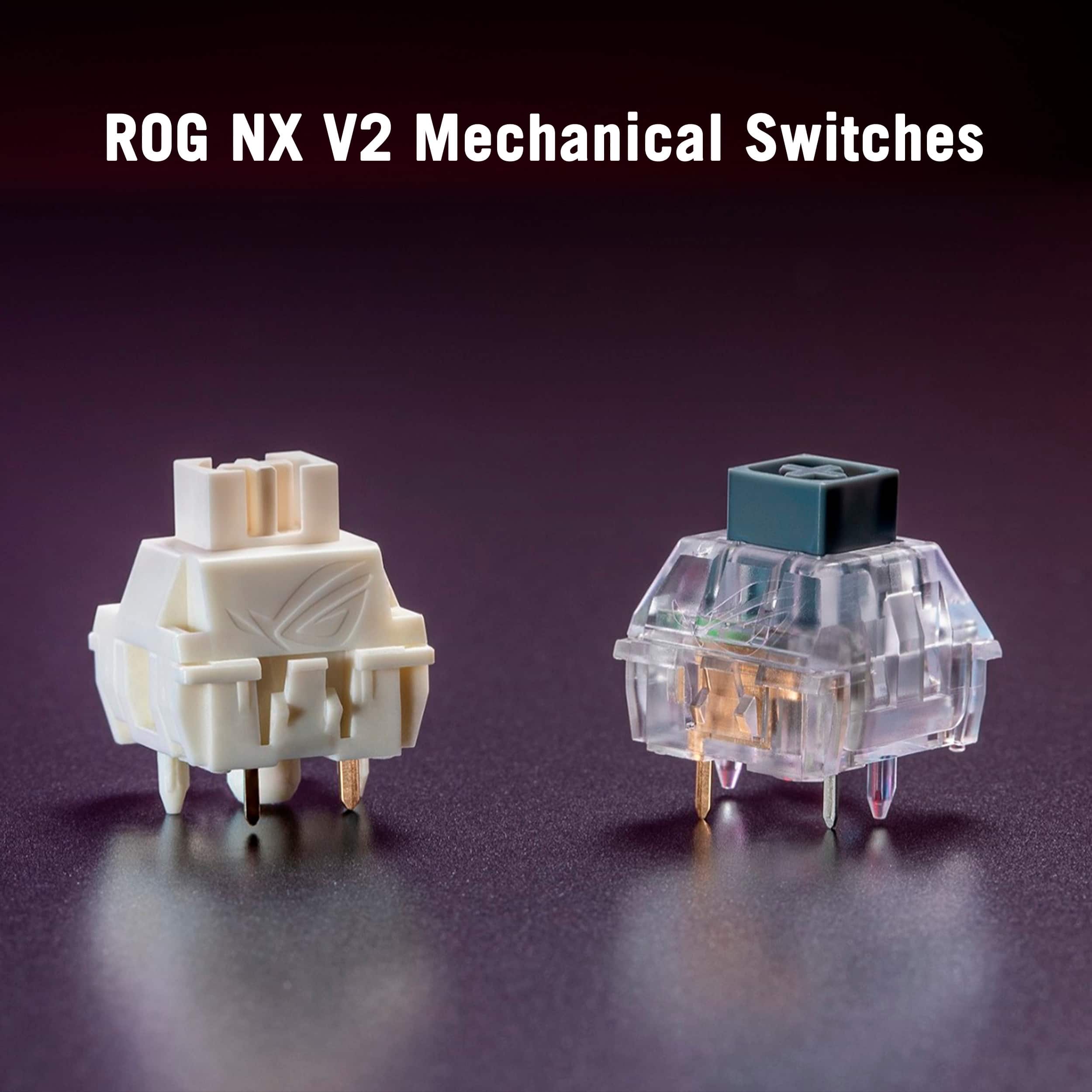
|Posted .This reviewer received promo considerations or sweepstakes entry for writing a review.This ROG Strix Morph 96% wireless keyboard is awesome. It fits a 96% full form wireless keyboard in a sleek and compact design without leaving out any of the essential features I’ve come to expect from any competitive gaming keyboard. It’s super compact and wireless but packs a punch with its hot swappable ROG NX Snow V2 mechanical switches. This is truly a gaming keyboard designed for esports enthusiasts and competitive gamers who desire the added functionality and portability of a wireless unit. Build Quality and Design: ASUS is quickly becoming my go-to favorite for all things gaming, both complete rigs and peripherals. This keyboard does not disappoint. This keyboard has gaming top of mind and delivers on every level. Design and overall functionality are top tier in my opinion. It’s considered 96% as it is basically a full keyboard with all keys and functions but trimmed down to a slightly smaller size without the dead space around the keyboard to keep it portable and wireless without wasted space. It maintains the numeric keypad to the right, but without the extra spacing between that and the main body, making it more compact and portable but still fully functional. This maintains great functionality for gamers who prefer a smaller footprint but still want the convenience of the numeric keypad and full-function multimedia keys for additional work. Also incorporates a multifunction button and control knob to switch the lighting, control media, and adjust volume on the fly. The frame has a sturdy frame with solid and durable feel while keeping things light and portable. RGB lighting adds a little flare for looks that can be fully customized and keeps the gamer feel and appearance while keeping battery life intact for long gaming and work sessions without sacrificing style and personalization. I also really like the 3-level customizable tilt/lift. It has low, medium, and high tilt depending on how I like to keep my wrists angled during any various situation. Multiple connectivity options including Bluetooth, RF Wireless, or wired USB. The Bluetooth, as always, is my favorite as it is a fast, reliable connection without taking up a USB port on my rig. It also functions flawlessly with the included RF USB dongle. Both with low latency and reliable connectivity from afar, no input lag either way. I love that there is a USB dongle slot on the back of the unit to store the dongle when not in use so it doesn’t get lost in the drawer. Of course this can also connect via the included USB cable for increased life span and productivity if my battery runs low at any point. This is also the charge method which I just plug in anytime I’m not using the keyboard and this has kept my battery going wirelessly whenever I need to disconnect. RGB Lighting: This features fully customizable RGB lighting, allowing me to personalize the lighting effects to match my gaming setup and sync all of my peripherals with that main rig as can be seen in the pictures. The RGB lighting is vibrant and adds a visually appealing aspect to my gaming experience but has a smart timeout that shuts down lighting while the keyboard isn’t in use to maintain battery life. Battery Life: Battery life for this keyboard is excellent and of course varies depending on usage and customized lighting settings. With my average use it typically lasts several days of heavy gaming on a single charge. I typically plug it in between uses so I’ve never had it “die” on me even if I forget to plug it in after several days of use. The tethered USB connection options also continues to work while charging if you run out of juice. Switch Customization: Fantastic feel, hot-swappable mechanical ROG NX Snow V2 switches. These switched provide a pleasant soft/smooth and quiet experience with some tactically feedback without the loud slapping. It comes fully equipped and fully customizable with hot-swappable switches which can easily be changed to replace them and tailor the keyboard to your preferred typing experience. This customization is excellent for gamers who want to experiment with different switch types without buying a whole new keyboard. The keyboard comes with several ROG themed keycaps to further customize and really make the appearance exactly how I like it. Overall, this ROG Strix Morph 96% wireless keyboard has been really great. Fantastic addition to my setup and complete functionality in a compact wireless unit. It’s thoughtfully designed and feature-packed for full functional use for any setting. The customization options, wireless performance, and build quality make it a great choice for competitive gamers who want a versatile and high-performance keyboard for everyday use.
I would recommend this to a friend - Pros mentioned:Build quality, Connectivity, Noise level
Well designed, full featured and quality keyboard
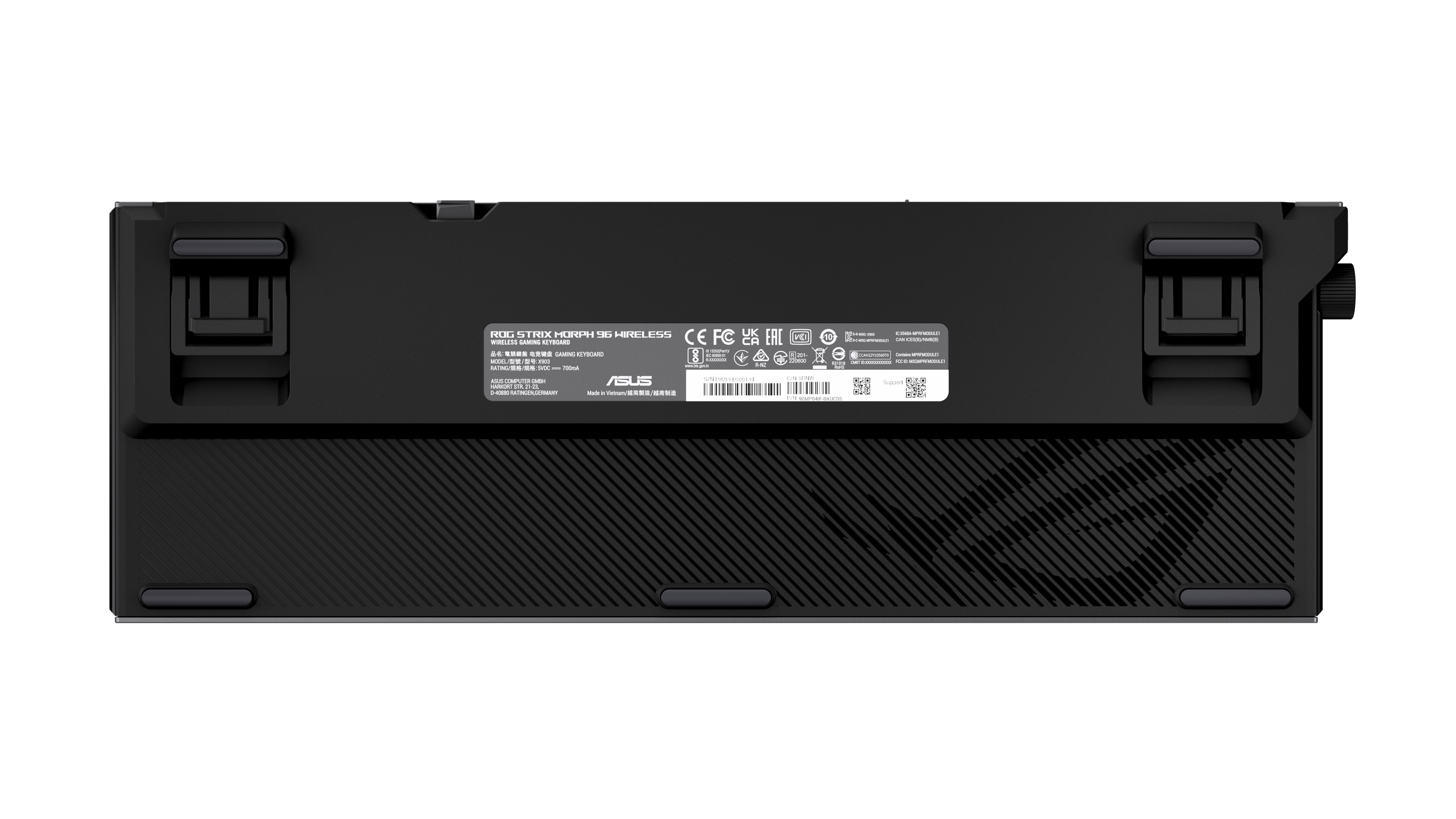
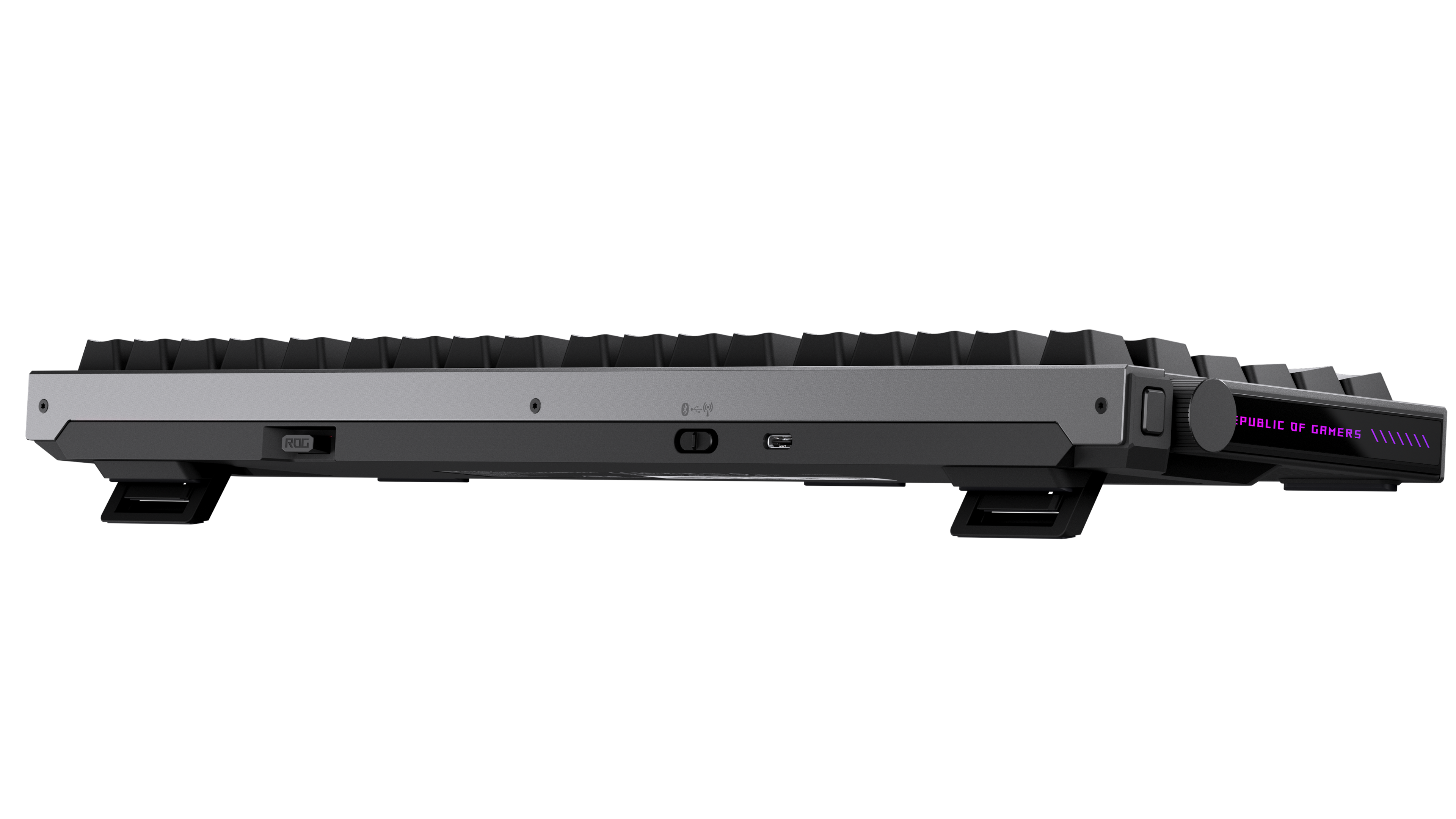
|Posted .This reviewer received promo considerations or sweepstakes entry for writing a review.As someone who spends most of the working day at a computer - and someone who enjoys playing casual PC games with mouse and keyboard - having a pleasurable keyboard experience means a lot to me. I enjoy the tactile feel of a mechanical keyboard and I appreciate little design touches that enhance the experience and capabilities of my keyboard. This ROG keyboard really checks all the boxes. IN THE BOX The keyboard comes in a nice little bag for protection. Underneath that you will find a compartment that houses a few extra keycaps (it comes with a few select, clear keycaps with the ROG branding), a USB extender dongle (more on that later) a USB-C to USB-A cable, as well as a keycap and switch removal tool. And a small allen wrench looking screwdriver to remove switches. Note that the actual USB transponder is conveniently stored in the back of the keyboard itself - a very nice design touch in my opinion. DESIGN This feels like a premium keyboard. Its frame is metal, it has some heft which I love. It does not move a millimeter in use. It has 3 levels of height to adjust the angle. There’s two tabs on the back that flip out for your desired height. The keyboard is a 96 percent design, meaning you’re getting the keypad to the write, but the keyboard has a smaller size than a full size keyboard. For those that don’t know what that means, there’s no separate 6 keys for the INS, DEL, HOME, END, PG UP and PG DN keys. The arrow keys are directly below the right shift key. It took me a little getting used to - as my old keyboard was full size, but I very much prefer the compactness of the 96 layout (by compact, I’m just referring to a full size one, obviously there’s smaller keyboards). There’s a function knob on the left side which I absolutely love. My old keyboard had a similar dial. It allows me to control volume with ease. There’s a function key that changes what the knob does, and that button sits directly above the knob. You can switch between controlling volume, play/pause, lighting, and then there’s a customizable function. In playing around with it, it can scroll on your screen (on the manual function) but I pretty much keep mind on volume. It’s just really convenient. The keyboard has RGB lights, which you either like or don’t. It’s pretty much you’re only source of backlight. But if you prefer a more modest approach, you can change the mode to just white. There’s a lot of information on the keyboard itself, which is a great thing IMO. What I mean by that is the function of each key (beyond the letter/number) is displayed. On the side of the key facing you. For example, Bluetooth pairing and battery level are displayed on the horizontal number keys. It’s just nice because you don’t have to memorize the function of each key. FEATURES You can use this keyboard wireless via the USB dongle or Bluetooth (the latter you can pair up to 3 devices). You can also hard wire it. The battery life is rated for about 90 hours with the lights on, and I’ve seen 1000 hours with no lights. It goes into sleep mode when not in use, well at least the lights turn off after a while, to conserve battery life. The big feature for me are the NX snow mechanical switches. As I said, I type a lot for work and I really enjoy the clickiness sound and feel of a mechanical keyboard. At the same time, the switches aren’t overly loud. It’s a subtle sound that isn’t overbearing. The keys are extremely stable and there’s no wobble in them. The switches are replaceable, for those that care (I wouldn’t replace these unless for some reason they broke). They have 1.8mm actuation point and high force, meaning they react quickly for gaming, but have enough resistance to prevent accidental key presses. This is nice both for gaming when you want a quick response and doing work when you don’t want a keyboard so sensitive you are accidentally hitting keys. The USB dongle is a ROG Omni receiver, meaning it can connect your wireless keyboard and compatible ROG mouse, if you have one - saving on USB ports. There’s an extension dongle that plugs into a USB cord and which allows you to plug in the actual receiver if you have connection issues and need to get the receiver closer to the keyboard from your computer. TYPING AND GAMING EXPERIENCE As I said, I had to adjust my typing going from the full size keyboard to the 96 layout, so there was a little bit of an adjustment, but the typing experience truly is phenomenal. I really enjoy using it. For gaming, while I typically game with a controller, I found it to be highly responsive when playing Battlefield. I’m no professional gamer and I can’t say that it actually made me “better,” point being, it worked great. CONCLUSION This is a terrific high end keyboard meant for gaming (because of the aesthetics) but has plenty of features that make it worthwhile for all professionals or anyone who enjoys a premium typing experience. It’s gaming centric with the design and RGB colors, but it matches my gaming rig and I find it overall to be professional looking despite the ROG design aesthetics. The battery life is great. I’m personally a big fan of ROG products, I have several of them in my custom built PC and am rocking a ROG gaming laptop. But even if I wasn’t predisposed to ROG products, I would definitely consider this keyboard based on its features and design.
I would recommend this to a friend - Pros mentioned:Build quality, Connectivity, Noise level
96% Gaming Keyboard That Types Like a Sportscar
|Posted .This reviewer received promo considerations or sweepstakes entry for writing a review.The ASUS ROG Strix Morph 96% Wireless Mechanical Keyboard blew me away with its build quality. It’s constructed from high‑quality materials—dense plastic, solid metal accents, and a frame that feels substantial without being too backbreaking to move around. The 96% layout is fine: full function row, dedicated arrows, and nav cluster in a compact footprint that doesn’t feel cramped. I’d love ASUS to make this exact design in a 70% form factor someday because that's what I prefer. What really makes it shine is the typing experience. Gaming keyboards have loose actuation that leads to typos when doing real work, but this one nails it for both gaming and touch typing. The ROG NX Snow V2 “Refined Linear” switches are absolutely fantastic—smooth with just enough friction for confidence, like an upgraded Cherry Red but more CONFIDENT and refined. They’re dead silent (no clicky noise) unlike a Blue switch. For anyone wanting a non‑clicky key that still feels premium, these are perfect. They're closer to a Brown switch without the positive down feeling, but bottoming out will give you that feedback. Wireless connectivity is good: USB dongle (USB‑A, which is great since it's 2026 and we haven't gotten rid of A yet), Bluetooth multi‑device pairing, and wired USB‑C all deliver low latency. Battery life seems to be very good. They claim weeks of heavy use before needing a charge. The RGB lighting is customizable without being distracting. Hot‑swappable switches mean I can easily experiment with different linear or tactile options down the road but honestly I love these switches and probably won't do that. The only real downside for me is the squarish ROG gamer typeface. It looks gamer and thematic, but in low light, I’m squinting to distinguish keys. A cleaner, more legible font like ASUS’s ProArt line keyboards would be ideal for my aging eyes. Weight, size, and overall feel are all spot‑on for desk use. This is a magnificent, versatile keyboard that I wholeheartedly recommend for anyone wanting wireless freedom with top‑tier typing and gaming performance. I can't recommend it enough. It types very very very premium!
I would recommend this to a friend - Pros mentioned:Build quality, Connectivity, Noise level
It took a week, but it has really grown on me!
|Posted .This reviewer received promo considerations or sweepstakes entry for writing a review.When I first unboxed this keyboard, the first thing I noticed was the sheer weight of it. It’s exceptionally heavy and dense, but in a good way. It has a really solid, almost insulated feel that immediately makes it feel premium. At first, I was confused by what “96%” meant. It sounds like it would be 96% of the size of a normal keyboard, but it actually means 96% of the standard keys are present. Everything is just compressed together. That also explains what happened to my beloved Print Screen button, which is missing. That’s honestly the only real negative I have with this keyboard. I work from home and also game in my spare time, so I use the same keyboard all day, every day. When I first started using this, I didn’t have strong feelings about it. It just felt like I had switched keyboards. But over the course of a week, I started noticing small details that I’ve really come to appreciate. The biggest one is the feel and sound of the keys. The typing is dampened, but still has that satisfying mechanical feedback. The keys feel soft, but still give you the recoil you expect. I didn’t realize how much of a difference that sound dampening made until I used it for a full week. People on the other end of my calls no longer hear my keyboard like they did before. This has actually been huge for work. I type very fast, and I’ve had people complain that it sounds like a machine gun in the background. With this keyboard, that’s no longer an issue. The RGB on this board is also one of the best I’ve seen. The side lighting, the brightness, and the overall customization are excellent. I also really appreciate that the Gear Link software runs through a browser instead of requiring a full install. That’s a big win for me. I love the tri-mode connection as well. It makes the keyboard very versatile, and the wireless performance has been great. It also claims up to 500 hours of battery life with RGB off, but I’ll probably never test that because the lighting just looks too good to turn off. One of my favorite features is that this is a compact board that still includes a 10 key number pad. That’s huge for me since I also do accounting. Another thing I really appreciate is how approachable this keyboard is. Anyone can pick it up and use it without feeling overwhelmed. I’ve bought high-end gaming keyboards for my staff before, and they ended up going back to cheap wired ones because they didn’t want to deal with all the extra features and complexity, or they were accidentally hitting buttons that opened random apps . This keyboard does a great job of bridging that gap between work and gaming. As for the Gear Link app, it’s very easy to use for lighting customization, but I did find macros a bit confusing. Setting them up isn’t as intuitive as I expected. One of my litmus tests is whether I need to look up instructions to figure something out. If I do, most people probably will too. I was able to get it working, but it took more effort than it should have, and I did have to read some instructions. Overall, I’ve been extremely happy with this keyboard. I’m pretty confident this will be my main keyboard going forward. The compact layout with a number pad, the feel of the keys, the reduced noise, the weight that keeps it from sliding around, and the excellent RGB all come together really well. To me, this keyboard is a huge win in terms of versatility. It works just as well in a professional office setting as it does in a gaming setup.
I would recommend this to a friend - Pros mentioned:Build quality, Noise level
Great for gaming, decent for work
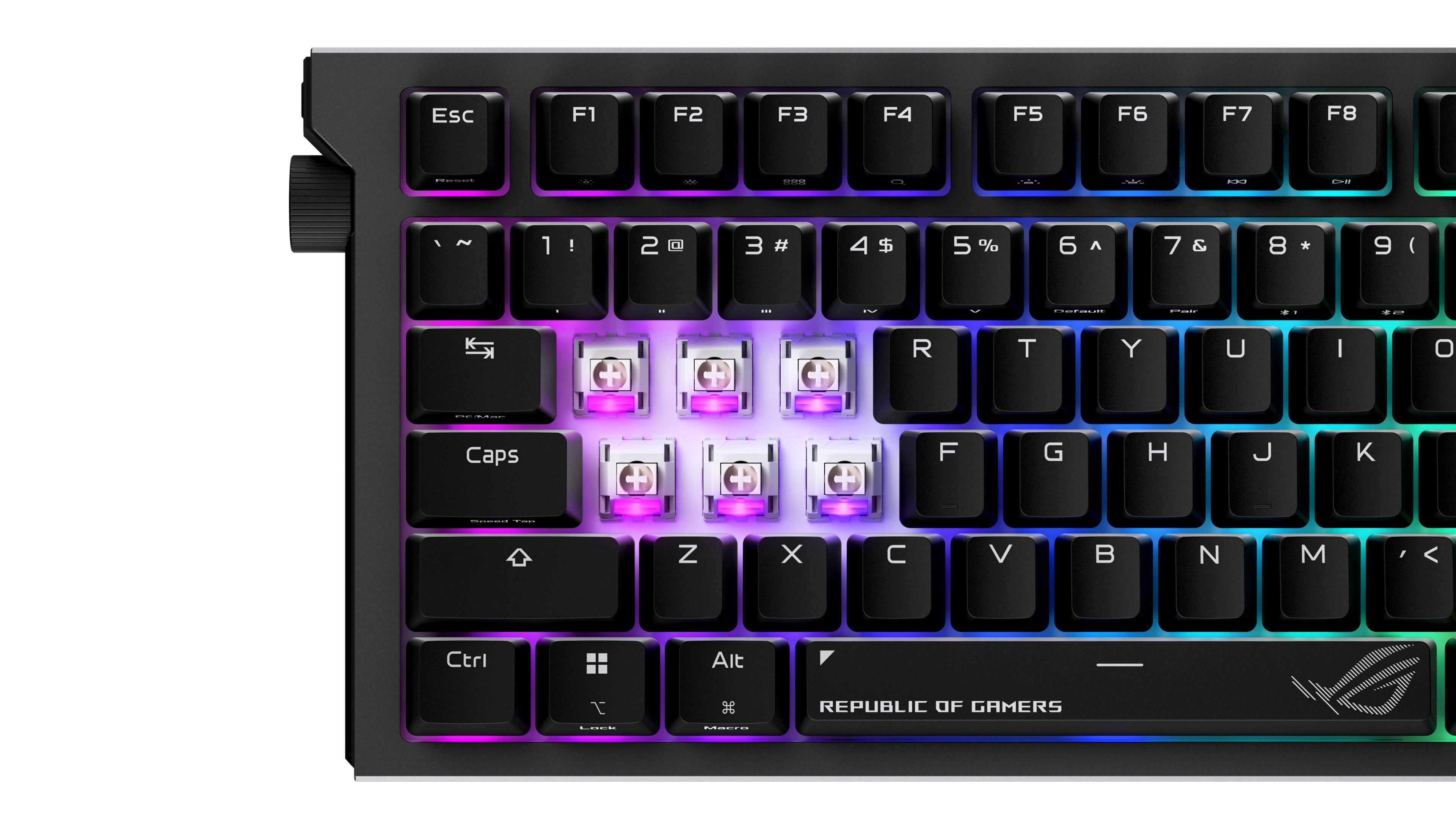
|Posted .This reviewer received promo considerations or sweepstakes entry for writing a review.I have very much enjoyed using this gaming keyboard for gaming and work. It works great for both use cases but takes some getting used to due to some non-traditional layouts. It feels extremely high quality and is a solidly built mechanical keyboard. Pros: - Build quality - Key travel - Customizability Cons: - Crowded layout - Software isn't intuitive First impressions: The keyboard feels like it is built like a tank. It has great weight to it with a mix of build materials including metal and high-quality plastic. The lighting is present on all keys as well as on the left and right sides. I like the volume knob location on the left-hand side. I quickly noticed that the arrows keys are very close to the enter key and the NUM pad so mistakes in my typing were apparent as a result at first. Also, the DEL key is in a non-traditional location on the top right of the keyboard. Software: If you are using ArmouryCrate on your Asus machine, you can download plugins for the keyboard to update firmware and customize the keyboard at the basic level. For advanced customization, you will need to follow the link to their “Gearlink” web interface which allows you to mess with everything. It is not very intuitive to get to (and does not support all browsers), but it gets the job done. Connectivity: I wanted to use this connected to my gaming PC as well as my work laptop which are both connected to the same monitor. The keyboard makes it easy as I use the RF dongle on my home PC and Bluetooth on the work laptop. This is changed with a simple switch, so it is easy to move back and forth as needed. There is also the ability to use a wired connection if wished, there is an included cable in the box. Typing & gaming: Key travel is outstanding if you enjoy mechanical keyboards. Keys are easily swappable with custom keys; some clear ROG themed ones are included in the box. The clear ones have a smooth finish, so they are easier to find by touch than the default black keys. I was a bit annoyed with the Windows key when gaming initially as it is missing a left-hand FN key which messed up my muscle memory. Definitely use the right FN key to disable the WIN key before gaming or else you will be getting out of your game constantly by accident. Also, as stated earlier, the number arrows are in a spot which makes them a bit crowded. It is not an issue once you get used to it but requires some retraining for most. I see pros to having the keys all close together as well as everything is easier to get to quickly in a faced paced game. Typing accuracy improved for me compared to my older, non-mechanical shallow keyboard. There is the usual click sound but it is somewhat muted due to the design and gaskets inside.
I would recommend this to a friend - Pros mentioned:Build quality, Connectivity
Best Built
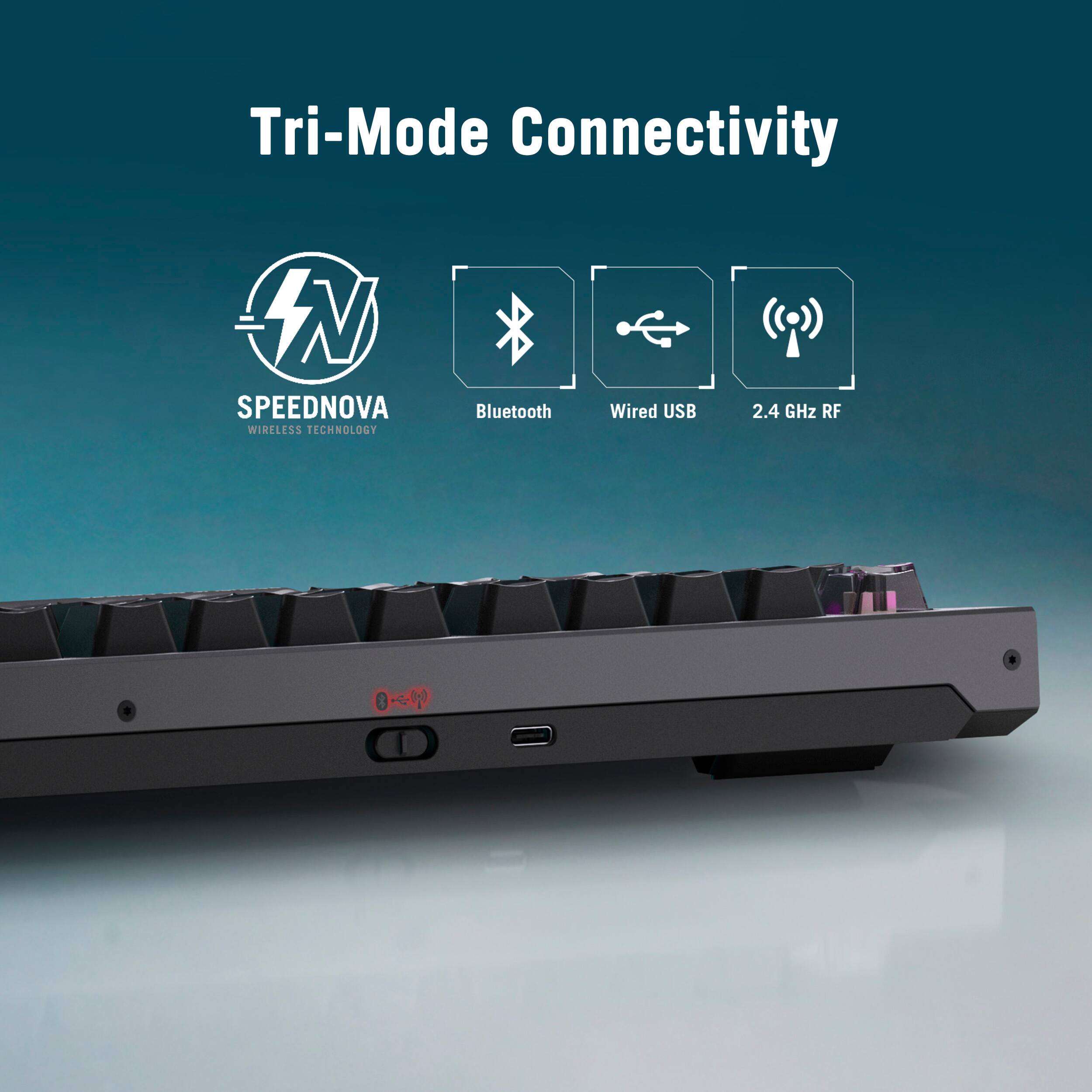
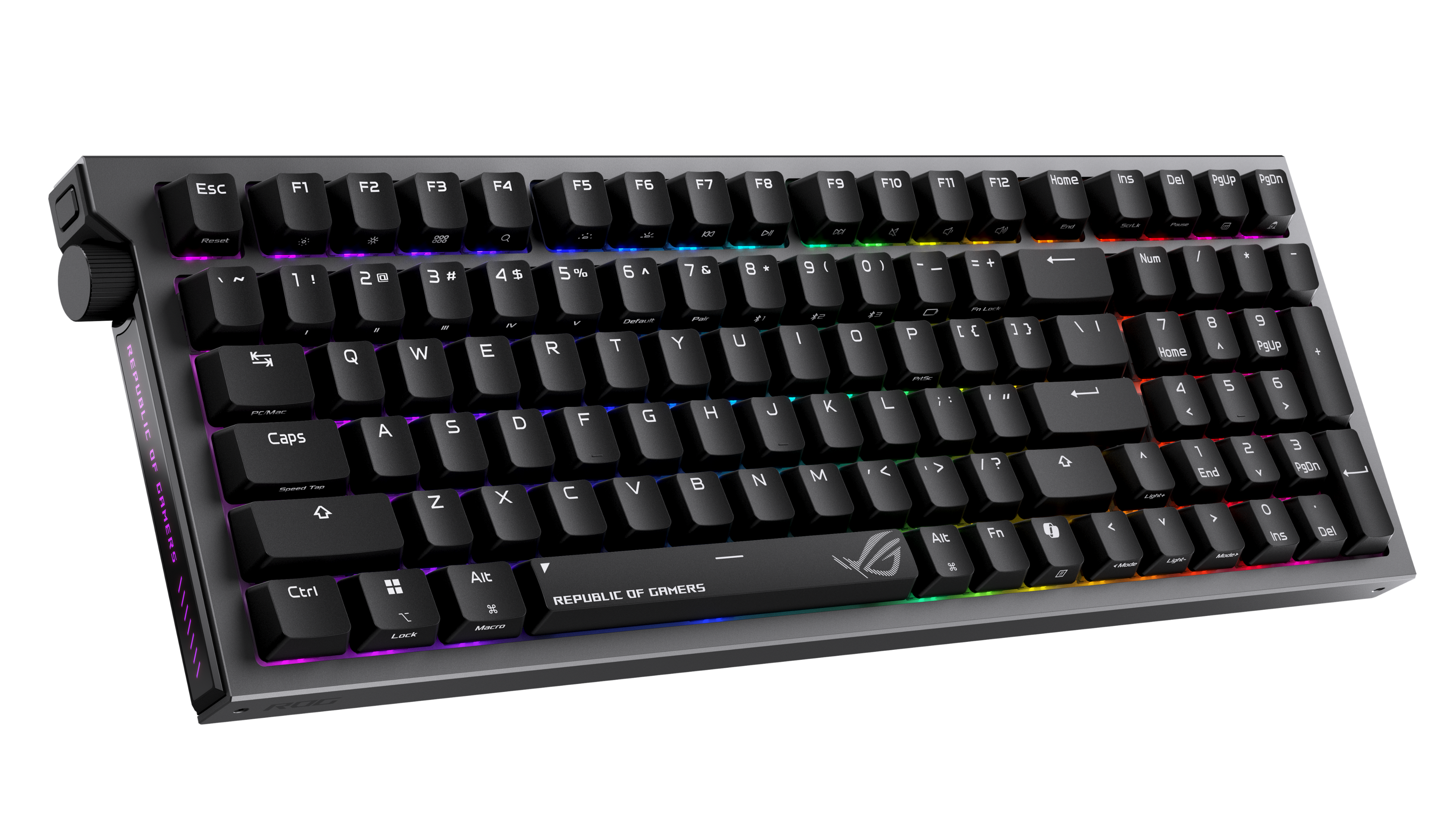
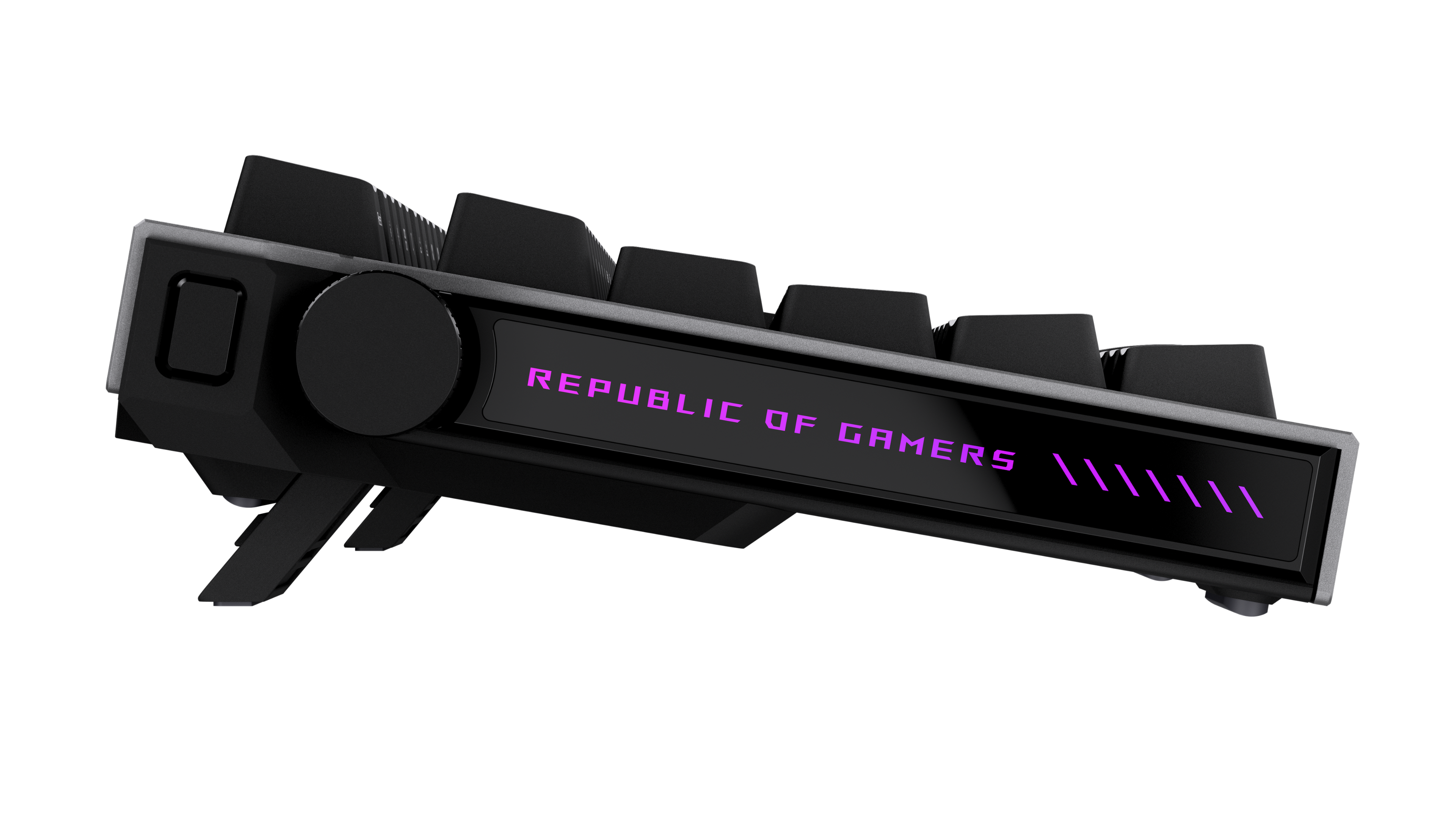
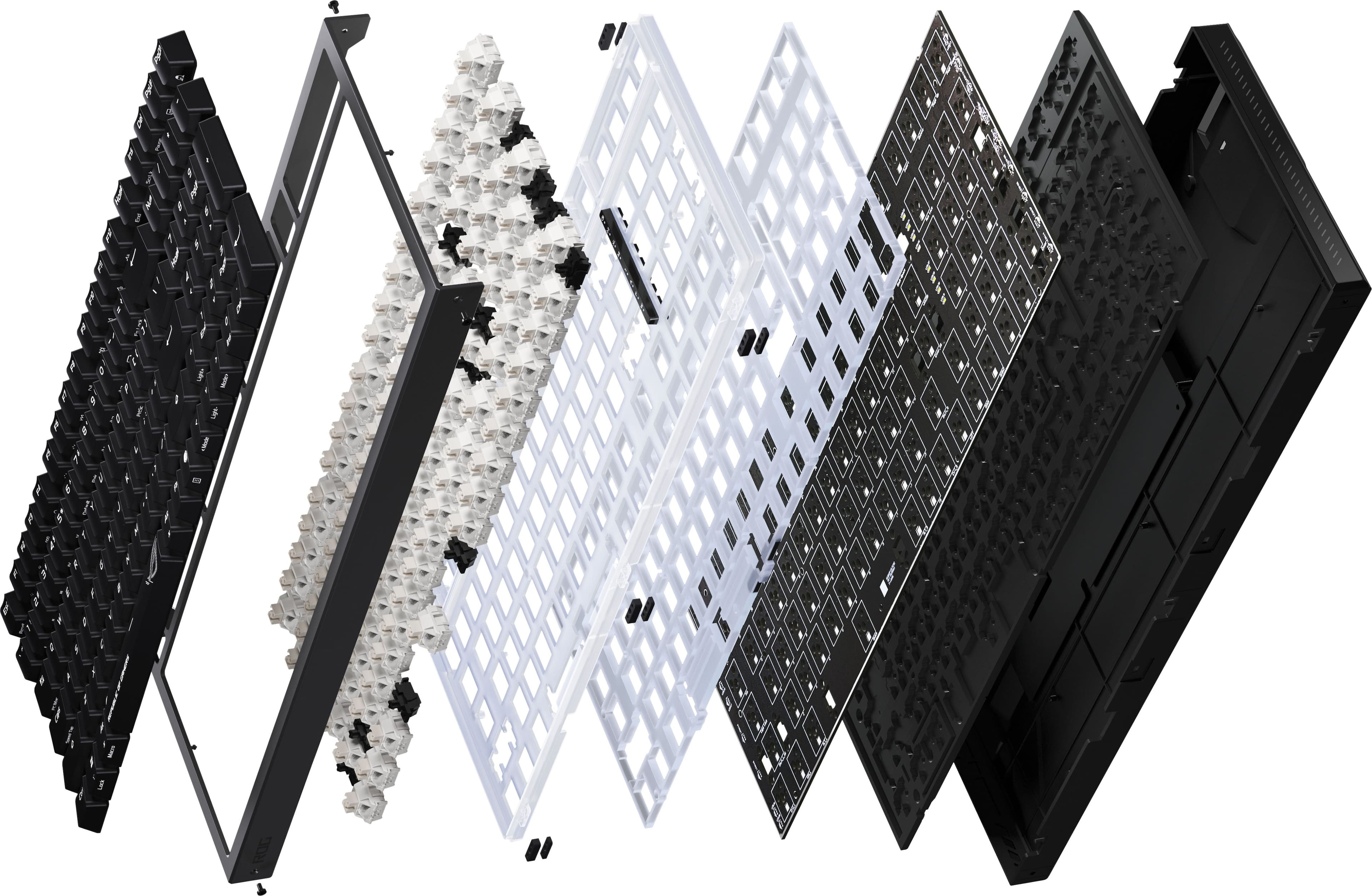
|Posted .This reviewer received promo considerations or sweepstakes entry for writing a review.The ROG STRIX MORPH 96 is a high quality and premium keyboard. Packed with so many features and options the back of the box is filled with descriptions. First things first, connectivity. The ROG comes with three different ways to connect and you can do it all at the same time “Tri-Mode Connection”. This can be done with Bluetooth, a 2.4GHz usb device (ROG SpeedNova) and wired usb. The keyboard is 96% form factored so it does have some crampness but keys are sized right and I don’t mind using it. To be honest, the size is right and it essentially takes away the space around the arrow and number pad keys compared to a full size keyboard. However, this keyboard is not truly compact so all the keys are full sized. The lighting is vibrant, letters/numbers/symbols are clear and the brightness is adjustable…nothing extraordinary here just solid. Every thing on this bad boy is customizable for gaming, preferences and daily use. Apparently every layer can be removed and changed. The keys are also considered hot-swappable and are mechanical. The keys do truly sound amazing! You can even adjust the gaskets and dampening foam to change the feel/sound of the keys. You can use this keyboard with Mac but I would say it’s truly made for pc users in mind. My favorite feature is the control knob located on the left side of the keyboard. You can use it dial the volume, click to play/pause or even change it to customize lighting. One of the best built keyboards I have handled. I love tapping away on this thing!
I would recommend this to a friend - Pros mentioned:Build quality, Customization, Noise levelCons mentioned:Keycaps
A Solid Keyboard with Great Customization Options
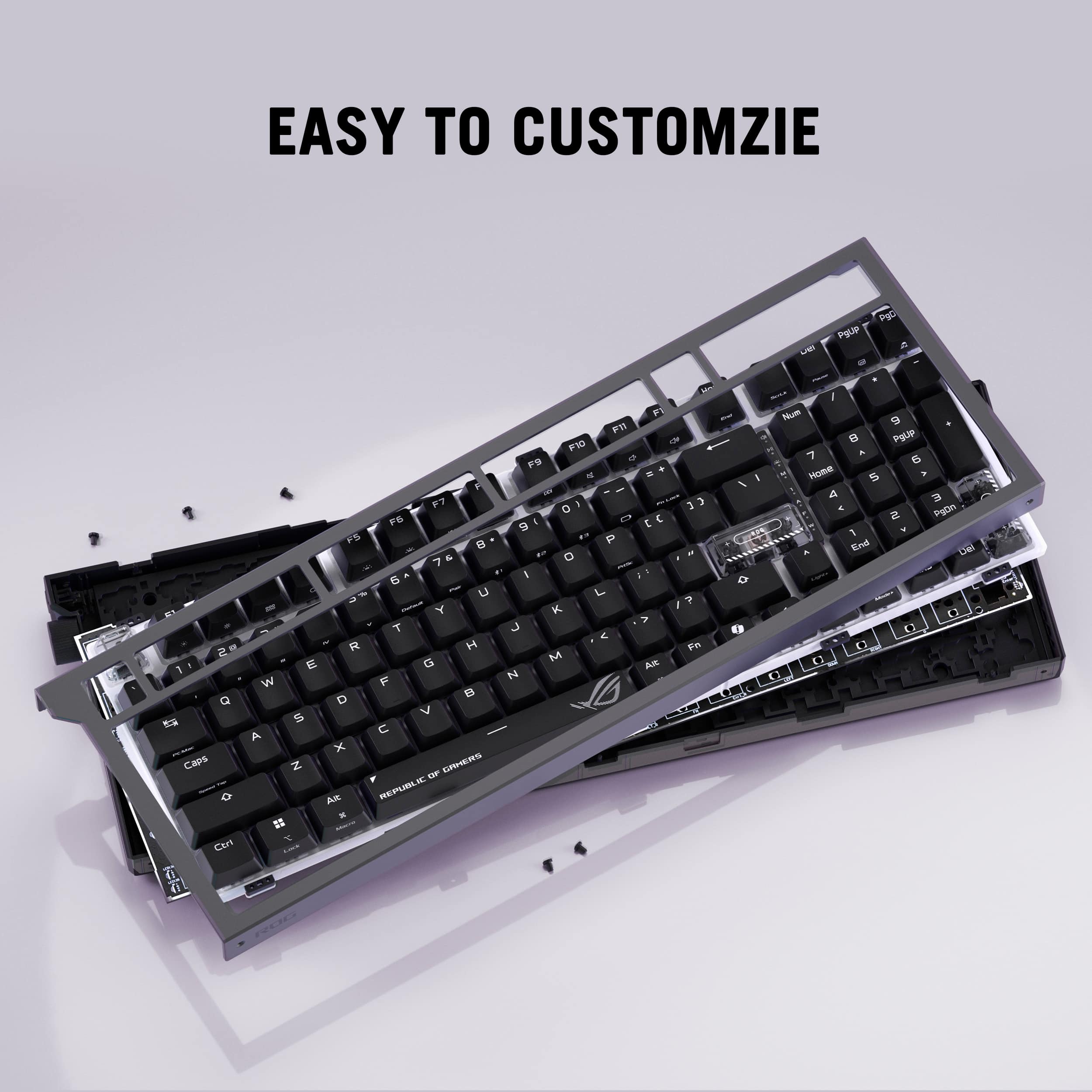
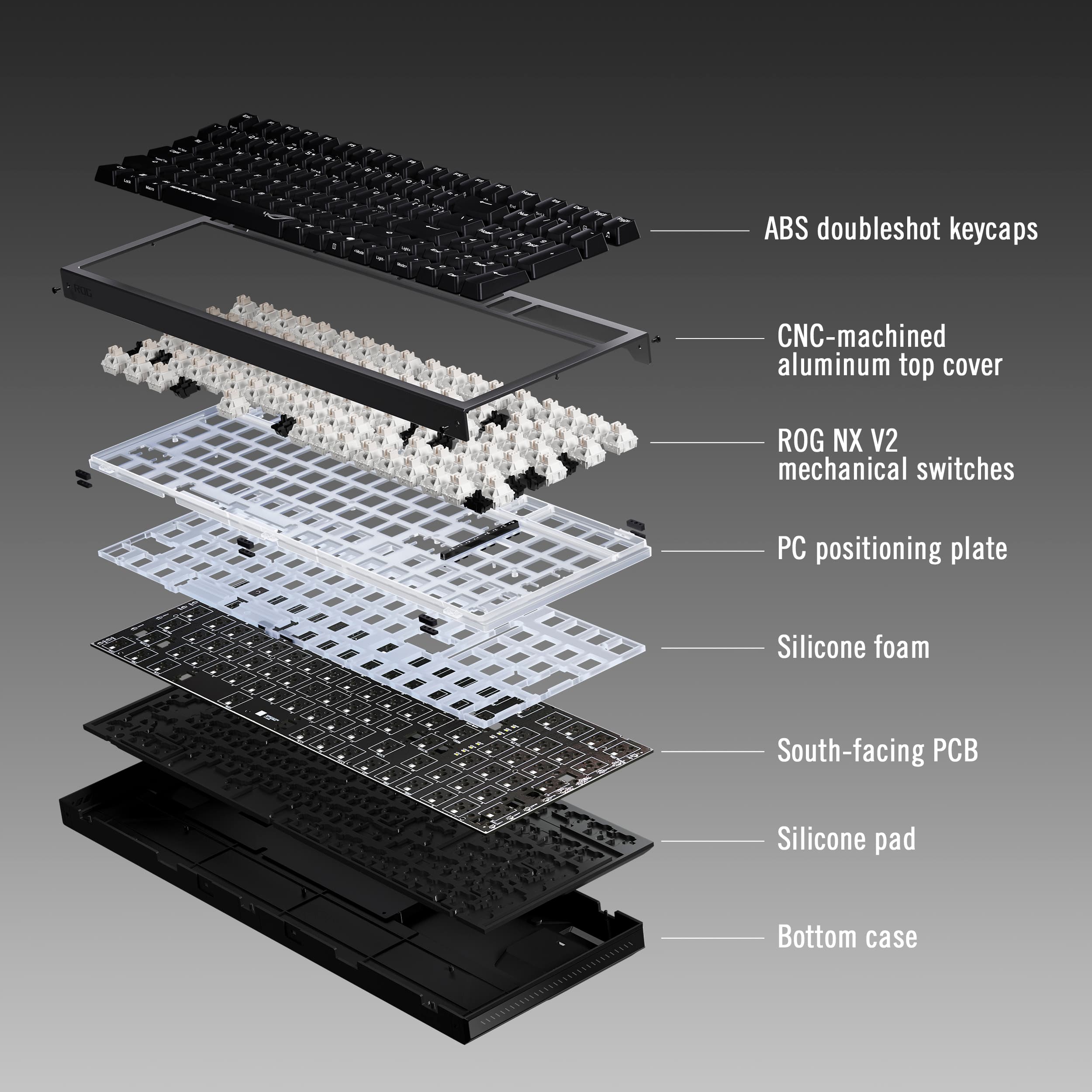
|Posted .This reviewer received promo considerations or sweepstakes entry for writing a review.For the price, you will receive an excellent, highly customizable gaming keyboard that feels remarkably solid and high quality. After having used the keyboard for a couple of days. I have found plenty of pros and cons. This is my review of the ASUS ROG Strix Morph 96% Wireless Gaming Keyboard. *TLDR at the bottom =================================== IN THE BOX/SET-UP: In the box, you get plenty of accessories. You get a 2-in-1 keycap and switch puller, a torx wrench, 1 ctrl keycap, 3 ROG transparent keycaps, a wireless dongle extender, the 2.4GHz wireless dongle(stored on keyboard), a USB-A to USB-C cable, a sticker sheet, and some documentation. Setup is all plug-and-play. I recommend you fully charge the ASUS ROG Strix Morph 96% prior to going wireless. The keyboard does support both a wireless receiver (via dongle) and Bluetooth. GearLink, which I will go into more depth on later, is optional, but I highly recommend the web app because all your customizable software features can be completed within it. =================================== BUILD QUALITY/COMFORT: In terms of build quality, the ASUS ROG Strix Morph 96% seems to be built extremely well. It is on the heavier side, but it’s a good type of heavy. There is mostly plastic, but the top plate feels like a type of aluminum. The key caps are ABS doubleshot keycaps. The bottom case is plastic too. Yet, the keyboard feels solid. If you let someone blindly test this keyboard, I am confident that they will conclude that this keyboard is a lot more premium. For comfort, there certainly can be some adjustments. Personally, the keyboard tends to sit off the ground a little too much for my liking. I found that adding a wrist pad helps considerably. There are three sitting positions for the keyboard. I found that the most comfortable position was using the small keyboard feet. But your mileage may vary. I have medium-sized hands and come from a low-profile gaming keyboard. It may be a matter of getting used to a taller keyboard, which, honestly, I haven’t yet. But overall, it is a comfortable keyboard. =================================== FEATURES/ASUS GEAR LINK The ASUS ROG Strix Morph 96% is packed with plenty of features. First, it's not a full-sized keyboard. As a result, you will be saving some desk space and still be able to use the number pad. Using the software, macros can be programmed, RGB lighting can be customized, and the volume knob isn’t just for volume, but also can be programmed to a custom function. One of the major selling points of this keyboard is the physical customization options. The keycaps are customizable, switches are hot-swappable, the top plate can be removed, and I haven’t done it myself, but the entire keyboard can be disassembled. I had some custom key caps lying around and decided to try them out, and they fit perfectly. This keyboard has plenty of features, but it is missing some notable ones. For example, the keys are not backlit. RGB is limited only to the light bars along both sides and is not per-key. No PBT keycaps, which are more durable than ABS. And overall, a full aluminum body, which typically does come in more premium models, so I cannot complain there. Gear Link is the software that is used to customize the software side of this keyboard. The days of downloading third-party software may be gone soon. Gear Link is a web application that can easily be accessed in a web browser to customize your keyboard settings. I absolutely love this. While it isn’t the most intuitive software (seriously, ASUS, please add some more details on how to configure some of the software settings, e.g., the Fn Combo Key Assignment setting), the UI is clean and organized. Firmware updates can also be installed within here. Overall, once you figure out the software, it is straightforward to use! =================================== GAMING/OFFICE PERFORMANCE: In terms of gaming, the ASUS ROG Strix Morph 96% feels good but not great. But as I mentioned previously, I haven’t quite gotten used to the taller profile of this keyboard and the shorter keycap travel distance. On the bright side, I really enjoyed the speed tap feature. I found it helpful in shooter games like BF6 and games that require quick movement. For example, I’ve been doing some speedruns of the Pragmata demo recently, and the speed tap has saved me so many times. I work in IT and was able to use the keyboard in an office-like setting. I seriously love how comfortable the typing experience is. I also enjoy how quiet the keystrokes are. The programmable macros have been a great addition in assisting me in my workflow. I copy and paste a lot of text and consistently need a certain website open. By customizing some macros, I have been able to complete repetitive tasks more quickly. =================================== CONCLUSION/TLDR: Overall, this is a solid gaming keyboard. At this price point, you will get a gaming keyboard that is highly customizable. Keycaps, switches, and the top plate are all removable. On the software side, there is plenty of customization, too, through Gear Link. While the software is not too intuitive, it is organized, and you’ll learn your way around it eventually. The keyboard is comfortable for the most part, but I did have a hard time adjusting to the taller profile as someone who is coming from a low-profile gaming keyboard. Just keep that in mind. But if you enjoy customizing keyboards and are looking for something budget-friendly and highly customizable, definitely give this one a shot!
I would recommend this to a friendBrand response from ASUS Answers
Posted .Dear BarackObama,
Thank you for your comment.
We appreciate your feedback. Information coming from valuable customers, like you, will help us improve our future product offering and services. Should you need further assistance with the product, please email me at cl-rodel@asus.com and I would be more than happy to help. Or you are most welcome to call Product Support Hotline at: 1(888) 678-3688. Also, you can chat with an ASUS live support agent from the link: https://www.asus.com/us/support/article/1135/.
Thank you for choosing an ASUS product.
Regards,
Rodel
ASUS Customer Loyalty
- Pros mentioned:Build quality, Connectivity, Noise level
Smooth key travel, colored keys, solid feel.
|Posted .This reviewer received promo considerations or sweepstakes entry for writing a review.The ROG (Republic Of Gamers) keyboard makes a great first impression. The solid feel and weight lets me know its built for heavy use. Let's start with features I found amazing. The smooth travel of the keys, are amazingly silent when pressed. They are similar to my PREDATOR-HELIOS-300-i7 Laptop's. Both have color backlighting which can be synced with the game or video being played and viewed. On the top left side is a mode button allowing me to cycle through the different settings. The knob next to this serves multi functions as well, mainly used for volume control. The charging port for the internal battery is a standard USB-C, meaning you won't be far from a power source. On the rear edge of the keyboard is a selector switch giving you the choice of connections: USB - Blutooth - Wireless dongle. The wireless USB dongle stores neatly in a magnetic slot on the back. This is great for consoles that have the USB port, but are not Bluetooth combatable. Located on the bottom are adjustable feet with rubber cushions which really help keep the keyboard in place during use. They also fold flat for use on your lap. Another slick feature are the removable keytops, with the required tool to pop them on and off. You'll never need to worry about having to see the keys thanks to the backlit key lighting. I find this one of the boards' best features. So is the full numeric keypad on the right side. The function keys can be LOCKED by a single keypress, also located on the board. MACROS can be programmed as well as choosing one of three Bluetooth devices, right from the board. Talk about versitility. Last, there is a dedicated COPILOT BUTTON next to the space bar.
I would recommend this to a friend - Pros mentioned:Build quality, Connectivity, Customization
Asus ROG STRIX MORPH 96 Wireless Keyboard Rocks!
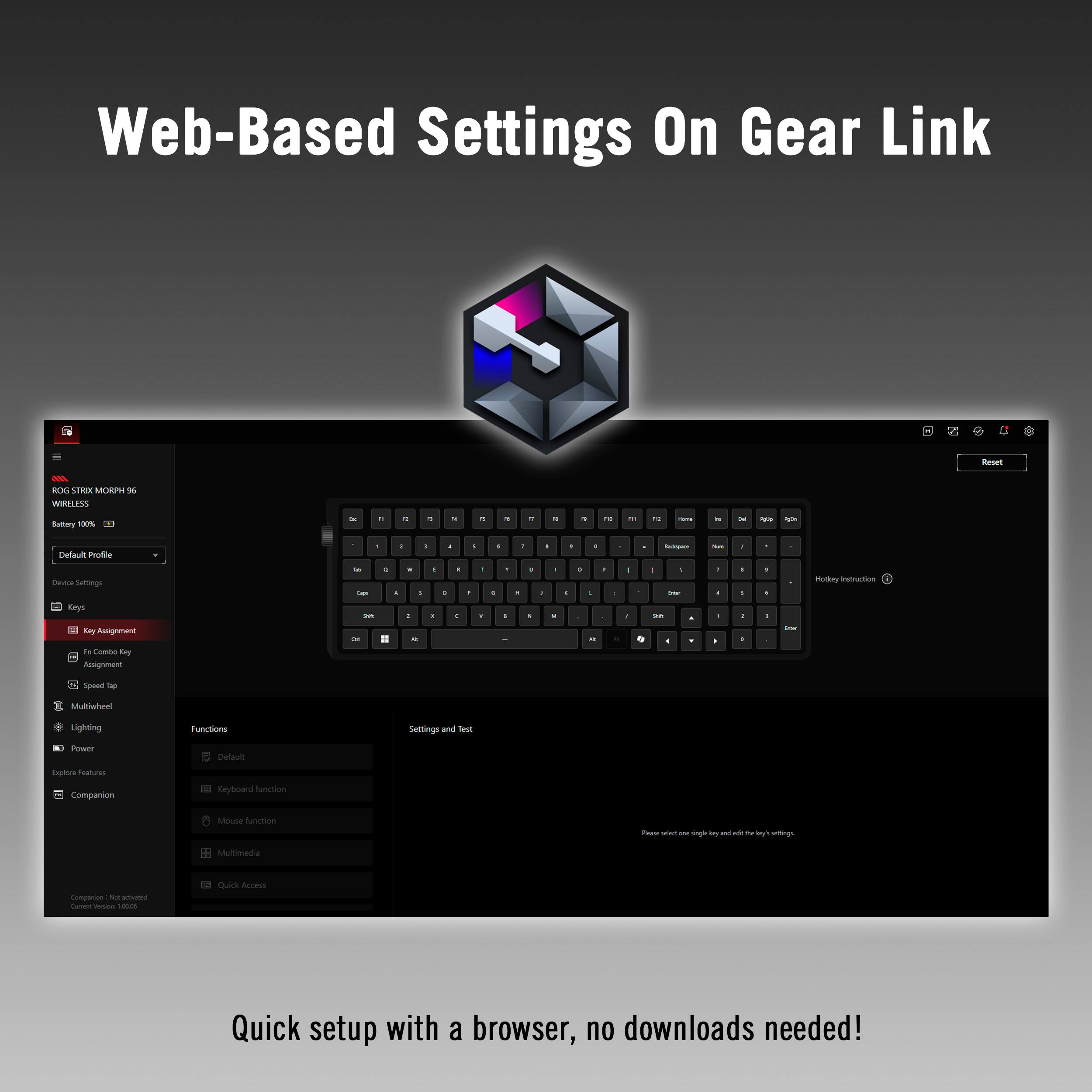
|Posted .This reviewer received promo considerations or sweepstakes entry for writing a review.Asus ROG (Republic of Gamers) keyboards are strongly preferred by fellow gamers because they offer superior build quality, strong wireless performance with Tri-Mode Connection & hot-swappable customizable mechanical switches. Asus introduced the new ROG STRIX MORPH 96 wireless keyboard & it offers Apex Performance! The first thing that sets this keyboard above the competition is its weight and feel. The top cover isn't plastic. It is CNC-machined aluminum! During the most animated gaming, this beauty is stable because of its evenly distributed weight. I love the cushioned sound of the ABS doubleshot keycaps, along with their quality feel. Asus built in a silicone pad above the bottom case & a layer of silicone foam between the South-facing PCB & the PC positioning plate. This design provides an adjustable cushion, as well as noise dampening. There are three ways to connect this keyboard: Bluetooth, Wired USB & 2.4 Ghz RF. Four features that I really appreciate are: 1) Compatibility with both Mac & PC. I use a Mac & it is challenging to find a top tier gaming keyboard that is compatible right off of the bat, until now. 2) Web-based settings on gear link mean less time setting up because no downloads are needed. 3) The Numeric keypad makes this my favorite keyboard between games, when I am working. 4) Onboard switch & knob adjust RGB, volume, and other functions. CONCLUSION: The ROG STRIX MORPH 96 Wireless Keyboard offers everything you would add if you were custom designing an ultra high performance gaming keyboard. It earns my highest recommendation.
I would recommend this to a friend - Pros mentioned:Build quality, Customization
Solid Gaming Keyboard by ASUS
|Posted .This reviewer received promo considerations or sweepstakes entry for writing a review.The new Asus ROG Strix Morph 96 Wireless Gaming Keyboard X903 is all of the things that you have come to expect from Asus in gaming keyboards. It has a very solid build, sounds good when using, and feels good to the touch. The 96% keyboard of a full TKL(tenkeyless) is a little hard for me to get used to, but I guess I will just need time to adjust to a couple of key placements and do a little customization. It’s almost a full-size keyboard with almost as many keys as a full-size keyboard including numbers and five navigation keys (Del, PgUp, PgDn, Ins, and Home). Everything is a little tighter and I need a little more time to fully get more comfortable with the size. I do like the three adjustable tilt angles that the two sturdy feet on the rear provide. It is definitely easy to tell that ergonomics has been considered in the design and layout of this whole keyboard product. The keyboard is fully customizable, and all Macro Keys are programmable. It is manufactured around the DIY concept with all keys made of ABS double shot keycaps. It is designed so that components, the dampening foam, and other adjustments can be made by swapping them out to adjust positioning as desired. Even the positioning plate can be adjusted. The Hot-swappable-ROG NX V mechanical switches work with the soft acoustics to provide a very refined typing feel. The Gasket mounting and dampening layers absorb vibrations and also refine the acoustics and typing feel. Additionally, the South-facing PCB optimizes the keycap compatibility and provides for the ability to do more personalization by customizing the keycaps and also the lighting. Let us talk about the unique lighting design. The translucent PC positioning plate ensures an even illumination across the whole keyboard and the light bars on both ends illuminate when in use. The RGB Aura Sync can be controlled with the Intuitive Control Knob which also allows for media playback and volume adjustments. This knob/wheel is right below a little push button at the top of the left side. Toggling with this button allows movement through the pre-sets and is somewhat coordinated with the wheel. The ROG SpeedNova wireless technology and the Anti-Ghosting with the N-Key Rollover assures top gaming performance. The keyboard has Tri-mode connection and can connect up to three Bluetooth 5.1 devices simultaneously. The keyboard can also be connected by using the RF 2.4GHz ROG SpeedNova wireless technology or wired using a Type C to Type A USB 2.0 cable. The keyboard works with both iOS and Windows computer devices and can easily toggle between both operating systems by using Fn + Tab. ASUS Gear Link is software Asus provides as an APP. It allows the user to customize the keyboard and do any firmware updates as needed. As of today, for this keyboard it is not fully functional, but it will be as it is for most of the recently released Asus components. The keyboard comes with a 2” 1 ROG keycap and switch puller, 3 ROG themed translucent keycaps, 1 Ctrl keycap, 1 USB extender, 1 Torx Wrench, a USB cable, 1 ROG sticker, quick start guide and warranty booklet. Asus rates the battery life in Bluetooth mode at 750 hours with the lighting off and around 110 hours less with the lighting on. Using a wireless connection, ASUS rates the battery life at 590 hours with no lights. Its literature drops this number about 100 hours if the lighting is continuously on. After using this keyboard for a few days and studying how it functions and what all it has to offer, I would rate it as an excellent product, especially for the price that it is offered.
I would recommend this to a friend - Pros mentioned:Build quality
A Compact & Chunky Keyboard With Great Materials.
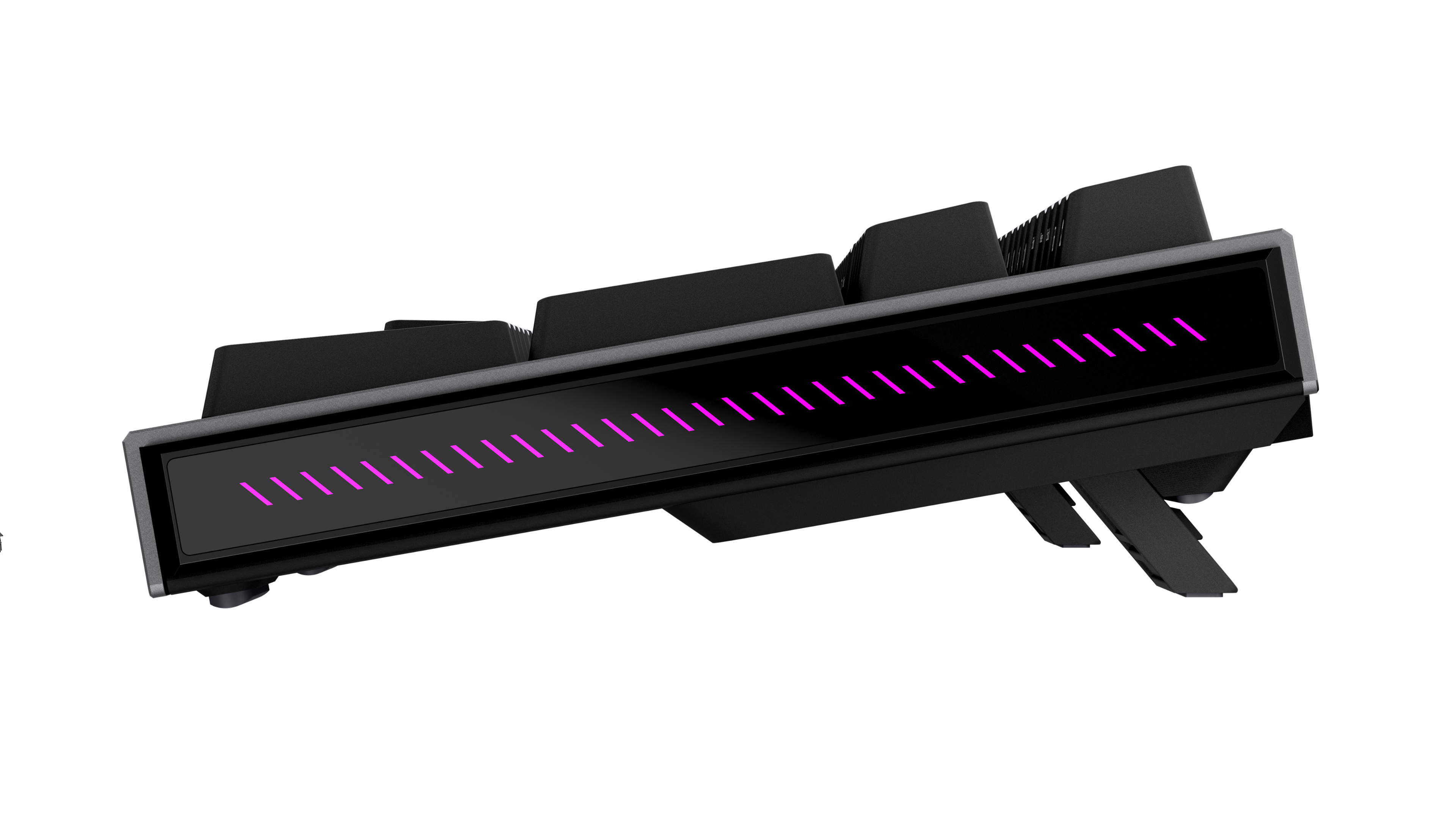
|Posted .This reviewer received promo considerations or sweepstakes entry for writing a review.I’ve been loving this keyboard. It’s been a while since I had a chunky mechanical keyboard and ooo-boy, is this one chunky. It has heft and thickness like none I’ve seen, yet was still very easy to adjust to. Playing games with this is a joy. Having longer, substantial key strokes doesn’t necessarily mean less responsive - these keys trigger almost immediately upon the slightest press by default. __ Design __ The design here grew on me almost immediately. I wasn’t so sure about having the numpad merge with the arrow key area to save space, but I actually enjoy that it’s a bit more portable on my desk as a result. I primarily use WASD keys anyway… The build is fantastic, with what I’m convinced is anodized aluminum on the top, front and back, along with recessed glass at the sides. Both of which give this keyboard a nice feel when handling. It’s also quite heavy for a keyboard and doesn’t feel like it’ll slide around or move when you don’t want it to. On the bottom, 2 sets of rear kickstand feet allow for setting solid angles of incline. It has a nice overbuilt feel to it - more like an SUV than a flashy street car. Surprisingly, this keyboard isn’t backlit, instead it has dual-molded keycaps that do not let light through while accent lighting emits from between all keys and from the side graphics/patterns. No backlit is an odd omission, as playing in darker settings can be great when gaming. Overall, it’s a nit but not a dealbreaker. Another nice thing I enjoy about this is the labeling on the front surfaces of some keys. Mac-specific settings/keys are made much easier to find thanks to literal labeling while not complicating the tops of the keys. Similarly, keyboard features - like keys that toggle its lighting - are marked in the same way, allowing you to adjust simple things without having to jump into Asus’s desktop software. In this case, Fn + the arrow keys allow you to adjust lighting level and modes easily and I didn't need to consult a manual to find them. There are plenty options for lighting here, from various waves of colors, to a flat white. Asus includes a few transparent keys to swap in if you’d like a bit more color coming through - it’s a nice touch. Last but not least, the volume dial. I’ve always gravitated towards physical knobs or dials for controlling volume and this design has a great little knob/button on the side that makes adjusting volume a breeze. __ Mac Support __ Outside of gaming, I primarily use Macs. I was surprised that this keyboard treats it as a near first-class citizen, especially since Mac isn’t known for being a go-to for any real gaming at all. Still, it synced via bluetooth with ease. All of the special Mac keys just worked as they should out of the box. The great side volume adjustment dial also worked instantly to adjust my volume on Mac too. __ Performance __ This keyboard offers several ways to connect. An included USB-A dongle, cable or bluetooth. I chose to use bluetooth most of the time and it remained extremely responsive every time. Like I mentioned above, it’s a bit touchy by default. A slight tap of the finger on a key is enough to trigger it. Even so, I quickly go used to typing on it. Since it’s a mechanical keyboard, it’s a bit noisier than other modern offerings. I wouldn’t do work on it in a room with another person so as to avoid bothering them, but each click feels great. Asus’s claims around key feel seem well-founded. Key caps are also fairly cupped, so keep that in mind. It’s both easier to find keys and potentially accidentally trigger them if you’re not yet used to typing on it. __ Overall __ To date, I think this is my favorite mechanical keyboard I’ve used. It’s combination of a hefty, strong build and design and an overall smaller footprint makes it feel versatile. I love the side volume adjustment and materials used. It took no time to adjust to and feels great when gaming. —————— ** The Good Stuff ** - Surprisingly well built - has heft, plus aluminum and glass details - Compact - Great side volume dial (which can be toggled to control other things) - Strong, nested kickstand feet for various angles ** Less Than Good Stuff ** - No backlighting, only surround accent lighting.
I would recommend this to a friend - Pros mentioned:Customization
Great Keyboard!
|Posted .This reviewer received promo considerations or sweepstakes entry for writing a review.I love this keyboard. I would go as far as to say it's among the best ones I have ever used, and I have used many expensive keyboards over the last few years. Firstly, the typing experience is great. It does take a little bit of getting used to if you haven't used a 96% keyboard in a while, but once you get used to it, you love it. I love having a number pad; I know that many people don't like how the arrow keys blend in with the number pad, but to me, it makes perfect sense because I rarely use the middle keys that 100% keyboards come with. Secondly, every key is customizable (screenshot attached of the GUI), and you don't even need to download anything to get that functionality. ASUS has a web app called Gear Link for that. You can adjust everything from the lighting to the power settings to the scroll wheel on the right. The only problem I had with this was that the Companion add-on, which enables extra features like the ability to mute a microphone and the ability to open a website with a single click using the keyboard, would not work on my computer. Overall, I would suggest this keyboard for any use case. It's definitely good for gaming, but it's also great for other things.
I would recommend this to a friend Great edition to add to the ROG family
|Posted .This reviewer received promo considerations or sweepstakes entry for writing a review.I’ve been using the ASUS ROG Strix Morph 96% wireless keyboard for a while now, and it’s been a great experience! The first thing I noticed was how comfortable it feels. The layout is just right, compact enough to fit in, but still giving you all the keys you need. Plus, the keys are smooth and responsive without being too loud. It’s also lightweight, so it’s easy to move around my setup without feeling cheap. I mainly use it wirelessly, and honestly, I rarely plug it in. The connection has been consistent, and I haven’t had any issues with lag or drop-off. It pairs perfectly with my ASUS TUF Gaming F15 laptop, and the color sync between the two is actually pretty good. The RGB lighting has a lot of customization options, so you can really make it your own depending on your setup. One of my favorite features is the dial. It lights up, and it’s super practical. I use it to adjust volume on the fly and switch between different modes, which feels natural once you get used to it. Overall, it just works the way you want it to without overcomplicating things. It has a clean look, solid performance, and is easy to use daily. I would recommend it. 4.25/5
I would recommend this to a friend- Pros mentioned:Connectivity, Customization, Noise level
Premium gaming keyboard
|Posted .This reviewer received promo considerations or sweepstakes entry for writing a review.If you are the type of person who goes to Best Buy and just walks right past the normal keyboards because you know that is better…this is that keyboard. The ROG STRIX MORPH 96 Wireless sits in that sweet spot between high end gaming hardware and enthusiast mechanical boards. It is the layout that first draws you to it. The 96 design keeps your numpad and functionality but it wraps everything into a tighter footprint. You get more room on your desk and more usability at the same time and a full size board can start to feel too bloated after a very few hours. Connectivity is where this thing takes the crown. There’s wired USB-C, Bluetooth and 2.4GHz wireless. Translation: you can switch between a desktop, laptop or tablet without cables. The wireless performance is outstanding…no lag, no hiccups, no excuses. Now the feel…this is where it earns its price tag. The gasket-mounted design gives each keystroke a slightly cushioned, almost “springy” response mechanical keyboard…it just feels great! It’s controlled, not mushy. Quiet enough to not bother everyone around you, but still delivers satisfying feedback that reminds you why you didn’t cheap out. Customization is another big win. Hot-swappable switches, a modular build and removable top plate allow you to customize this thing to your liking. If you are good at dialing in your setup, this keyboard gives you room to play. If you’re not, then it’s still premium right out of the box. Battery life is good too…you’re easily getting days (if not longer) depending on how aggressive you go with RGB. And yes, the RGB looks exactly how you’d expect from ASUS…bold, customizable, and unapologetically gamer. It’s not cheap, and it’s not trying to be. This is for someone who wants high performance and flexibility and a premium typing experience, but not so much that you are willing to go down a custom keyboard rabbit hole. Bottom line: this is what you purchase if you want your desk setup to feel intentional, not accidental.
I would recommend this to a friend - Pros mentioned:Build quality, Connectivity, Noise levelCons mentioned:Keycaps
Solid keyboard but the caps felt narrow.
|Posted .This reviewer received promo considerations or sweepstakes entry for writing a review.TL;DR - while the ROG Strix Morph 96 is a solid option for those who want a more narrow keyboard but also want to keep your 10-key, I wasn't a fan of the keycaps that came standard on it. It's solidly built, quiet, responsive, and the RGB is some of the best in the business. The left-mounted rotary control also takes some getting used to as most keyboards put their rotary controls on the right side. Wireless performance is solid, and it's still customizable so you can always change your keycaps out for something else. This is a solid choice for those who want to customize their keyboard or like narrow caps, Unboxing - the premium experience starts here. You'll find the keyboard and wireless receiver in a bag, and both the key/switch changing tool, USB-A to USB-C cable, USB-C to USB-A adapter, and some special keycaps in the package. Setup - it's either pair and go or plug in and go, depending on if you're using Bluetooth, the wired connection, or the wireless receiver. If you want to adjust RGB settings or pair a compatible Asus wireless mouse to the wireless receiver, you'll need to download Armory Crate. However, you can change RGB settings without the software to different built-in options. Usage - I love the NX Snow key switches and how quiet they are. While they're not by favorite switches, they're definitely solid linear switches. However, I'm not a fan of the key caps. They feel more narrow than I'd like. The spacing of the switches is far enough apart, however, that you can replace these caps with another set to give the keyboard a different feel altogether. The wireless adapter is a standout here. I set this up with my living room PC, and found that the keyboard worked perfectly from my couch across the room (about 15 feet). In closing, I feel that I could give the Asus ROG Strix Morph 96 a five out of five if the keys felt better. Otherwise, Asus did good here and definitely gives the dedicated makers of keyboards a run for their money.,
I would recommend this to a friend - Pros mentioned:Build quality, Connectivity
Kick Butt Keyboard
|Posted .This reviewer received promo considerations or sweepstakes entry for writing a review.This has proven itself to be one very awesome wireless keyboard. First it's very solidly built and feels like a high quality piece for my computer setup here at home. Typing on it feels rather good with just the right amount of key travel with a satisfying feel. No mushy feeling keys here folks! The built in backlighting is both bright enough and quite colorful that adds to the overall satisfaction this keyboard provides. Battery life is beyond impressive and lasts a rather long time. I've yet to have it dye on me yet. Pairing it to my computer, running Winows11, was effortless and pain free. Range is one outstanding factor for me as I will have often have my computer connected to my living rom TV as an external monitor and sit across hr room on the couch happily gaming away with no issues with the connection to my computer or lag in the input times. It's been impressive so far. Overall I'd have to say this wireless keyboard from Asus has lived up to thr expectations I've come to expect from the company.
I would recommend this to a friend - Pros mentioned:Connectivity, Rgb lighting
Feature-Packed Compact Keyboard Earns Its Place
|Posted .This reviewer received promo considerations or sweepstakes entry for writing a review.I've been using the ASUS ROG Strix Morph Wireless Mechanical RGB Keyboard for just over a week and I’m very impressed. Typing Feel & Performance The tactile feedback on this keyboard is excellent. Keystrokes feel deliberate and satisfying without being overly stiff, and the travel depth hits that sweet spot that makes both gaming sessions and long typing stretches genuinely comfortable. The resistance is in-line with other gaming style keyboards which may cause some extra strokes for heavy handed typists used to office-style butterfly switches. If you spend hours at the keyboard, you'll appreciate how well-tuned the feel is. Wireless Performance One of my biggest concerns going wireless was latency, but the Strix Morph puts that worry to rest. Response is crisp and reliable — honestly indistinguishable from a wired connection in everyday use and gaming. The flexibility to switch between wired and wireless modes is a nice touch too, so you're never left scrambling if your battery gets low mid-session. Speaking of which, battery life is solid and holds up well with regular use. Fun Customization Options This is where the keyboard gets genuinely fun: it comes with a set of transparent keycaps that you can swap in to let the RGB lighting really pop through. It's a small thing, but it adds a personalization layer that you'll enjoy playing with. The RGB itself is vibrant and well-implemented across the board. I love the vertical status lights between the alphabetic keys and arrow keys. It’s a creative touch which fits well with the spirit of the keyboard design. I’m continually impressed with what ASUS comes up with! Control Knob The dedicated control knob is one of those features you don't know you need until you have it. It's intuitive, well-placed, and makes adjusting volume or other functions feel seamless without breaking your workflow. A large button lets you easily change what the control knob activates. It’s pretty, it’s functional, it’s easy to use. What more can you ask for? Software ASUS's ROG Armoury Crate software is easy to navigate, and support has been decent. Customizing lighting, macros, and profiles is straightforward — no steep learning curve here. The One Adjustment The compact layout does take a little getting used to, especially if you're coming from a full-size keyboard. A few keystrokes live in slightly different places than you might expect. That said, once you adjust, the smaller footprint genuinely frees up desk real estate in a way that's hard to go back from. It’s also nice to sit back with a keyboard on my lap without it taking up the whole chair. Bottom Line If you want a wireless mechanical keyboard that delivers on feel, performance, and personality without taking over your desk, the ASUS ROG Strix Morph is well worth a look. The transparent keycap swap option, reliable wireless, and tactile switches make it stand out in a crowded category. Recommended for: Gamers and power users who want wired/wireless flexibility in a compact, customizable package.
I would recommend this to a friend - Pros mentioned:Build quality, Connectivity, Noise level
Very nice space saving gaming keyboard.
|Posted .This reviewer received promo considerations or sweepstakes entry for writing a review.I picked this keyboard up to free up some space on one of my gaming desks. It meets my criteria for having the number keys, be smaller, but not change the typing footprint. I do use my computer for typing documents a lot during business hours, so I did not want to lose the keypad, but I needed more space for the mouse. I can live without the arrow buttons. The build is sturdy with a metal top, thick plastic with a nice feel on the bottom, and very customizable keys. The keystroke feel is good. Travel is good, with a click, but not super loud. While gaming, I greatly appreciate the quick response, and the spring back on the keys. This can be connected by 2.4ghz dongle, Bluetooth, or wired, I typically do bluetooth, but all work well. The dongle is very accessible on the top magnetically held on. The backlights are good on the keys, and on the side also. This matches my ROG monitor and very similar to my computer’s design. The side know is also responsive and works well for volume for me, but these keys are very customizable. It connected without issue to my windows computer. Overall, I have no faults I can give this, 5 stars.
I would recommend this to a friend - Pros mentioned:Build quality, Connectivity
Easy to use and customize gaming keyboard!
|Posted .This reviewer received promo considerations or sweepstakes entry for writing a review.As the title indicates, this is a really great gaming keyboard. Right out of the box, it is really easy to setup. It works really well in Bluetooth, 2.4ghz wireless, or wired mode, but it has the least lag and best responsiveness in wired mode like any other keyboard. It also has a really premium feel that provides a comfortable feel when typing. It is also comfortable to use for long gaming or typing sessions due to the configuration of the keys. You can also adjust the tilt to three different positions, perfect to switch between gaming and productivity tasks depending on your preferences. It also easily switches between use with a Mac and Windows PC so it's truly versatile in that regard. I've also tested swapping the swappable keys and overall it's an easy and very straightforward process. The keys and the keyboard itself are also high quality so you don't have to worry about damaging the keyboard when you swap the keys. Overall, this is a really great keyboard for gaming or productivity tasks and I highly recommend it.
I would recommend this to a friend - Pros mentioned:Connectivity
Very nice looking keyboard that is configurable
|Posted .This reviewer received promo considerations or sweepstakes entry for writing a review.I have truly enjoyed using this keyboard. The connectivity options are great. When I'm using it on my work computer, speed and latency aren't so important. When using the keyboard as a gaming device, latency matters. I find that Bluetooth connection is plenty fast for anything that I need to do. The feel of the keys is really nice. There is some clicking feel to the keys, making it feel like an old- fashioned keyboard like what I originally learned on. My accuracy has been spot on while using it, so the keyboard is very accurate. I only need to use a moderate amount of force to type. The height of the keyboard was perfect for me right out of the box. The aesthetics of the device are nothing short of outstanding. It is so impressive seeing the lighting on the top and sides of it. It's especially nice at night. It truly brightens up my desktop. Another unique feature is the compact size, yet it has a full numeric keypad. ASUS provides some swapable mechanical switches for added versatility. Finally, this is also Mac compatible. I didn't have a chance to use it with my Mac, but it's really nice that it supports its functionality.
I would recommend this to a friend