Customer Ratings & Reviews
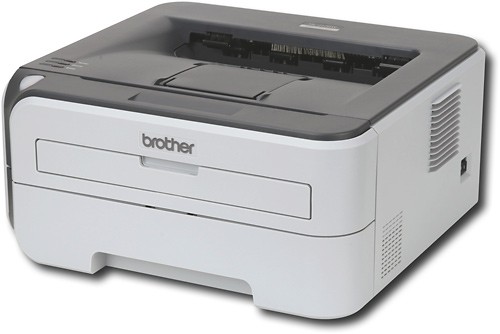
- Model:
- HL-2170W
- |
- SKU:
- 8661806
Customer reviews
Rating 4.3 out of 5 stars with 104 reviews
(104 customer reviews)to a friend
Customers are saying
Customers admire the excellent print quality and wireless ease of use of this printer. Many found setup to be quick and straightforward, also praising its compact size and affordability. A minor drawback mentioned by some users was the printer's noise level during operation.
This summary was generated by AI based on customer reviews.
- Cons mentioned:Noise level
Rated 5 out of 5 stars
Excellent Laser Printer!
Posted .This reviewer received promo considerations or sweepstakes entry for writing a review.I am very content with my purchase. This is perfect for my home office! Having read some reviews, I was a bit skeptical about the setup of the printer. Per the instructions, I plugged in a temporary ethernet cable. The set up was extremely easy and flawless on my (newer) iMac. Setting up two other computers (on in XP, the other in OS X) to work wirelessly was just as easy! I'm not sure why other users had problems. There are some nice features that I wouldn't have expected, such as the ability to do two sided printing (to save paper and to carry less paper around.) Sure, you print the odd pages first then put the pages BACK into the printer's paper reserve, but it works flawlessly. Also, I was surprised to find that printing works wirelessly even if the computer only has an Ethernet connection, with my Airport router. My only minor complaint is that it is a bit loud. And the printer stays on (blowing the fan) for several minutes after printing a page. Then, it quietly hibernates waiting for another print job.
I would recommend this to a friend - Pros mentioned:Print quality
Rated 5 out of 5 stars
Great features, good design for the price!
Posted .This reviewer received promo considerations or sweepstakes entry for writing a review.The HL 2170W is easy to set up and install, whether as a USB stand alone, or a networked wired or wireless printer. Although not a "business-class" printer, it is built solidly enough for it's intended market, home/small business users. This is about the lowest cost laser out there, and yet it has excellent print speed and print quality. It is reasonably quiet, not particularly better or worse than many other laser printers.. Maybe not "elegant", but not ugly either, it blends into my home-office well. I use this in combination with a quality photo ink jet (networked), as ink jets are still too slow, and too costly at printing out pages of text, but color lasers are not yet truly "prime-time:,An ink jet combined with a good B&W laser is a great printing solution for many folks, and the Brother 2170W fits that niche well! BTW, the toner-saving setting is just perfect!! Plenty enough print quality at a setting that keeps toner costs down!
I would recommend this to a friend - Pros mentioned:Ease of use, Print quality
Rated 4 out of 5 stars
Great Printer
Posted .This reviewer received promo considerations or sweepstakes entry for writing a review.Good print quality and reliable wireless connection. Connecting wirelessly allows for the printer to be hidden in a cabinet. Printer was pretty easy to set up via the included directions.
I would recommend this to a friend - Pros mentioned:Print quality
Rated 5 out of 5 stars
THE LITTLE LASER WORKHORSE
Posted .This reviewer received promo considerations or sweepstakes entry for writing a review.I HAVE HAD THIS PRINTER FOR A MONTH NOW. I PRINT NEARLY 100 PAGES PER DAY ADN THIS PRINTER DOESN'T MISS A BEAT. I HAVE ALSO NETWORKED IT SO NOW I PRINT FROM ALL OVER THE HOUSE. THE SETUP WAS EASY AND QUICK SO EVEN THE NOVICE USERS CAN BE UP AND RUNNING.
I would recommend this to a friend Rated 4 out of 5 stars
Good utility printer for the money
Posted .This reviewer received promo considerations or sweepstakes entry for writing a review.After years of ink jet printers and costly replacement cartridges that dry up we went for a simple laser printer. The Brother Network-Ready Wireless Black-and-White Laser Printer has been a solid perfomer for our needs. All we really wanted is a basic printer that can be dependable enough to support our home network of computers that consists of one Windows 7 64-bit laptop, two Windows XP desktops, one Mac Book Pro, and one iMac (both with Leopard). All machines work flawlessly with this printer. The iMac even uses Parallels to run Windows XP and we can print from there as well. The only real gripe I have with it is it is slow to be recognized hard-wired to the network (but fine once it is) during installing the driver on each machine and attempting to get it to connect via wireless was beyond frustrating. Since its footprint is so small we just placed it under our desk and have it hard-wired. Setting it up with a dedicated IP did not seem to help. So after two hours of messing with it I gave up and ran an Eternet cable to it. No big deal but I feel a little taken by HP's "wireless" claim being an easy set up. It is not. FYI: the router we use is a NetGear RangeMax 802.11g Wireless Router. I have had no issues connecting any other type of equipment with this router. Overall, if you want a basic and dependable laser printer that you can hard-wire to your network this little guy is a very good choice. I wish you luck if you want to connect it wireless. For the record I have 15 years in the tech field and have run multiple Windows 2000 servers to host web sites out of my home so I'm not new to networking.
I would recommend this to a friendRated 5 out of 5 stars
This printer is the way to go.
Posted .This reviewer received promo considerations or sweepstakes entry for writing a review.If you are looking for a compact printer for standard print jobs, this is a great printer for it! I am a college student and have had this printer for a year. I've printed many, MANY sheets of paper and only a few months ago did I have to replace the original toner. The print quality is great and the printing speed is surprisingly fast. Also, it's very easy to use and set up and Brother customer service has been great (I called for help setting up a new network to the printer, something that I could have done myself with a little bit more computer smarts). The wireless printing is very convenient, but even without wireless this would have been a great buy. Even though it does not print color or have other fancy features, it is low maintenance and gets the job done!! I highly recommend it.
I would recommend this to a friendRated 4 out of 5 stars
Good wireless printer
Posted .This reviewer received promo considerations or sweepstakes entry for writing a review.As stated by many of the other reviewers of this product, the one major drawback is the wireless installation. I followed the recommendation of hard-wiring to the router for setup, then disconnecting the cable once it was complete, and I think that is indeed the best way to do it -- it REALLY helps. But, I still had trouble because the onscreen setup instructions were not detailed enough and I ended up first downloading the online PDF manual (a pain), then calling the Brother help line. A plus here is that the help personnel were very nice and walked me through the steps for installation quickly (probably because they're so skilled at it now since lots of people probably call!!). Bottom line, make sure you know exactly what kind of wireless network you have and be careful in the options you select at each step, and you'll probably be ok with installing it. Otherwise, if it's taking longer than 30 min, just call the help line. Once it was set up, I had no complaints -- it's a great printer for the price, so now if I'm upstairs working on my laptop I don't need to go downstairs to dock my laptop and print to the hard-wired printer, I can just click "Print" and it's done.
I would recommend this to a friend- Pros mentioned:Ease of use, Wireless
Rated 5 out of 5 stars
Simplest wireless printer on the market
Posted .This reviewer received promo considerations or sweepstakes entry for writing a review.This is my third Brother 2170w printer - I no longer consider any other models. Easy to hook up, easy to start wireless printing, best price on the market for a decent non-inkjet-style printer.
I would recommend this to a friend - Pros mentioned:Wireless
Rated 4 out of 5 stars
Works great, buy spare toner cartridge immediately
Posted .This reviewer received promo considerations or sweepstakes entry for writing a review.After a month I would have to say I'm very satisfied with the overall performance of this printer. The wireless wasn't that hard to setup and has worked flawlessly. My only beef is that the toner cartridge that came with the printer only managed to do 50 pages on the economy setting before dying. I know these are full cartridges, but I would have expected it to last a little more than 50 pages. Make sure you budget and purchase a spare toner cartridge immediately when you buy the printer.
I would recommend this to a friend - Cons mentioned:Noise level
Rated 4 out of 5 stars
Wireless install can be easy if you......
Posted .This reviewer received promo considerations or sweepstakes entry for writing a review.A great little unit that I put on my book shelf. It's a little loud, but for the price you can't complain. Wireless feature is great as I can print from anywhere in the house using my laptop. When installing the wireless feature on my Mac I was only able to set up the wireless once I installed the driver, not the other way that the wizard wants you to. The set up wizard was not able to find the printer on the network before that. Otherwise a good unit.
I would recommend this to a friend - Pros mentioned:Print quality
Rated 4 out of 5 stars
Brother Laser Printer
Posted .This reviewer received promo considerations or sweepstakes entry for writing a review.I've had this printer for about 2 months and it works great. It did run out of toner after only 500 pages and I had to get another cartridge, but since then I've figured out how to change the settings to use less toner, especially on documents that don't need to be of the best quality. And those documents still look great, so you can't tell a lot of difference. It prints very fast as well, which is great, since I print a lot of large documents, 50+ pages.
I would recommend this to a friend Rated 4 out of 5 stars
Great printer - wireless setup tricky
Posted .This reviewer received promo considerations or sweepstakes entry for writing a review.I bought this printer after reading reviews that it was difficult to install wirelessly. Being relatively computer savvy and comparing those reviews with others, I was confident I could handle it. It was WAY more difficult than I expected - simply because neither the provided documentation or online instructions covered what I needed to do to get the printer to communicate with my FIOS router. Brother DEFINITELY needs to update their instructions. IF YOU ARE USING FIOS, HERE ARE SOME TIPS: If you have FIOS, don't even bother reading the woefully insufficient enclosed instructions. Go straight to the online documentation at the Brother Solutions Center (google search) and read all the way and follow all the instructions in those 36 pages. You'll need every step. Disable ALL firewalls INCLUDING the one within the FIOS router. Actually the router just allows you to "minimize" the firewall but that is enough to get the installation done. I disabled windows and Norton firewalls and didn't realize FIOS had one, too. One piece of info I simply couldn't find in the FIOS documentation is that the authentication mode is "Open system" vs. "Shared Key." I had to learn that by trial and error. In the last step before physically installing the drivers, you will probably still not get the IP addresses of the printer and computer to be similar (i.e. 1st 6 numbers the same), and aftewards will need to go into the FIOS router network to manually assign the IP address to the brother printer. Then, when you are installing the drivers and are prompted to select the printer name, don't bother. Select the "IP Address" option and manually input the IP address. Hope this review helps FIOS users save some time.
I would recommend this to a friendRated 4 out of 5 stars
Great printer for a low price
Posted .This reviewer received promo considerations or sweepstakes entry for writing a review.Buy this printer! You'll love it. If you're setting it up for wireless use the direct network cable to router method. It will save you a lot of time and headache.
I would recommend this to a friend- Pros mentioned:Print quality
Rated 5 out of 5 stars
Great Printer
Posted .This reviewer received promo considerations or sweepstakes entry for writing a review.toner that came with it is a trial. it will give about 1000 copies where a new toner will give 1500 or more. Wired worked great. Need to know a little about networking to get the wireless working. The online document walked me step by step with no problems. There is no delay in printing any document and my printer is 100 feet away from my wireless linksys router. I think the price was great.
I would recommend this to a friend - Pros mentioned:Wireless
Rated 5 out of 5 stars
Fast, easy to install, and good on ink
Posted .This reviewer received promo considerations or sweepstakes entry for writing a review.This is a very good printer if you want to focus on cost per page. It beats anything made by HP. It installs very easy, although you do need a network cable for installing the wireless unless you router has a onetouch feature. The only drawback is when the printer comes awake, the lights flicker in the house like a washing machine has just turned on, or a heavy duty vacuum. I worry about power sags so I purchases a UPS for my non-laptop computers.
I would recommend this to a friend - Pros mentioned:Print quality
Rated 5 out of 5 stars
Exactly What I Wanted
Posted .This reviewer received promo considerations or sweepstakes entry for writing a review.I bought this printer about 6 months ago and I have been very satisfied with it. Plugged it in and did a quick set up and it works perfectly. The quality, speed and size are all good. Wi-Fi is such a nice feature. The one problem I had was when trying to install the driver on a PC. I had to go through a few things in the manual to get it working properly. Overall, for 100 bucks you are not going to find a better printer.
I would recommend this to a friend - Pros mentioned:Print quality
Rated 5 out of 5 stars
Great printer!
Posted .This reviewer received promo considerations or sweepstakes entry for writing a review.This is a very good printer. Until now, I have had terrible luck with other inkjet printers, and I was very happy to finally have a printer that actually prints and does not need incessant cartridge head cleaning. I bought the printer on sale last week, at a lower price than is currently listed. However, I would gladly pay the current price, since this really is a well made, high quality printer.
I would recommend this to a friend - Pros mentioned:Print quality
Rated 5 out of 5 stars
Great Wireless Laser Printer
Posted .This reviewer received promo considerations or sweepstakes entry for writing a review.I have had this printer about one year. Easy setup. I did make an error in the initial setup and I caused myself some aggravation. After resetting the printers network card and starting the setup process over, I had no problems. The documents printed are crystal clear and are very professional looking.
I would recommend this to a friend - Pros mentioned:Print quality
Rated 5 out of 5 stars
Great for the money/Features
Posted .This reviewer received promo considerations or sweepstakes entry for writing a review.I just purchased this printer. It took me longer to unpack and place than it did to set it up. I am running a MacBook Pro w/Leopard. I loaded the CD, followed the instructions that came with it and I was literally printing wirelessly within 5 minutes! Print quality is great and the printer is very quiet. Be sure to follow the correct directions for the correct type of computer you use.
I would recommend this to a friend - Pros mentioned:Ease of use
Rated 5 out of 5 stars
Really Cool Device!!
Posted .This reviewer received promo considerations or sweepstakes entry for writing a review.I just bought it a few hours ago, product looks really great. I took me a while to figure out how to configure it manually without installing the entire software, but just the drivers, and I could do it. After that, everything works excellent at any place in the whole house. Wohoo!!! no more cables!!!
I would recommend this to a friend