Customer Ratings & Reviews
- Model:
- F8B04A#B1H
- |
- SKU:
- 7981002
Customer reviews
Rating 4.6 out of 5 stars with 5961 reviews
(5,961 customer reviews)Rating by feature
- Value4.2
Rating 4.2 out of 5 stars
- Quality4.1
Rating 4.1 out of 5 stars
- Ease of Use4.3
Rating 4.3 out of 5 stars
Customers are saying
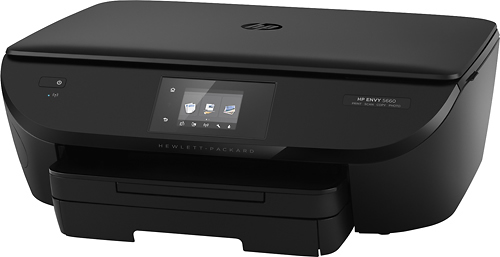
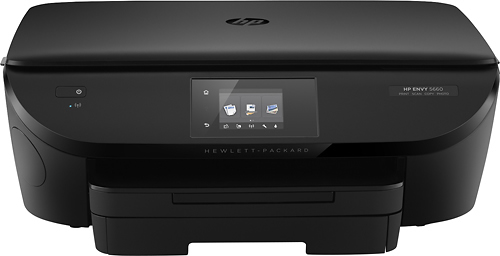
Customers are pleased with the ENVY 5660's print quality, ease of use, and wireless functionality. Many appreciate its compact size and the ease of setup, along with the quiet operation and reliable performance. The printer's scanning capabilities also receive positive feedback. A minor drawback mentioned by some users is the paper tray design.
This summary was generated by AI based on customer reviews.
- Pros mentioned:Print quality
Rated 4 out of 5 stars
Good price easy setup.
Posted .This reviewer received promo considerations or sweepstakes entry for writing a review.Fairly easy setup on the physical side. Maybe 10 minutes per pic to load drivers and set as default printer. Prints rather quickly for a home model printer. I'm not sure I'm a fan of a single cartridge for all three colors - if I run out of yellow I need to replace the whole cartridge?
I would recommend this to a friend - Pros mentioned:Print quality
Rated 5 out of 5 stars
Good Printer
Posted .This reviewer received promo considerations or sweepstakes entry for writing a review.Easy to use. Produces good quality prints. Love that I can send prints to my printer from anywhere by sending them to an email address. Great feature. My only negative would be that I would like it to hold more paper so it doesn't run out as often.
I would recommend this to a friend Rated 3 out of 5 stars
Can't print 4 X 6
Posted .This reviewer received promo considerations or sweepstakes entry for writing a review.Thought I loved this printer until I went to print pictures! It keeps saying "out of paper" although the screen shows I have loaded 4 X 6 photo paper. Very irritating, I googled and couldn't find any answer. Will probably return since I wanted an "all in one" printer that could print photos easily. On the plus side it was extremely easy to set up.
No, I would not recommend this to a friend- Pros mentioned:Print quality
Rated 5 out of 5 stars
Perfect!
Posted .This reviewer received promo considerations or sweepstakes entry for writing a review.Awesome Printer. Was recommended by an associate at Best Buy. He also price matched for us from Walmart. Printer works awesome. Use it with the bluetooth on my laptop. Prints quickly & efficiently. HIGHLY recommended!!!!!!! A+++++
I would recommend this to a friend - Pros mentioned:Ease of use
Rated 5 out of 5 stars
Wedding
Posted .This reviewer received promo considerations or sweepstakes entry for writing a review.Bought this printer to print our wedding invitations. Worked like a charm and has already paid for itself. Easy to set up and adjust settings. The wifi printing was a cool feature too, was able to print pictures from my phone pretty quickly.
I would recommend this to a friend Rated 3 out of 5 stars
Good for Windows-terrible for MAC
Posted .This reviewer received promo considerations or sweepstakes entry for writing a review.I purchased this printer a few months back and had no problems with it until a month and a half ago. I was wise however, to purchase an extended technical support from HP at that time since I've been calling them nearly every day. The printer itself works well but there are connectivity issues to deal with. First, I was told that I need a dual band router which I was able to acquire from my internet service provider. Second, this printer has a hard time recognizing " bonjour" which is Apple's security to enable it to connect properly. Third I was told that even though I have a dual band router any Apple device you plan to use with this printer must be connected to the lower band since most printers are made this way. HP did a workaround for my by setting up the printer under web server number which is generated by the wireless gateway. I am able to print however, not scan this method unless you wish to go online, type in that number and you can hit a scan from there. Be aware however, that if your provider changes that number due to a system crash or reboot then you'll need to have it reinstalled with the new number. They also installed "easy scan" on my IMAC which will work as long as the ENVY remains connected to the printer. I do like easy scan because it takes a lot of the guess work out of scanning. They told me that the Windows operating system does not have this security feature hence you are able to print, copy, or scan. It is unfortunate that most printers take the lower frequency but I was told it must be compatible with the device you are using. With my Windows PC, I have found that I can still print from the 5.0 band. Go figure. So in conclusion, I would advise to use a Windows PC if purchasing this product or if you have an Apple pc then pay a nominal fee for extended tech support. I got one that will last me 4 years which should outlive this printer.
No, I would not recommend this to a friendRated 2 out of 5 stars
will not Air Print from iPad Air 2
Posted .This reviewer received promo considerations or sweepstakes entry for writing a review.I bought this printer thinking I could use it at a seasonal home where I usually have my ipad air 2 in tow. I am not able to use the air print feature as my ipad will not find the ENVY on my network. I have the latest equipment for networking, too, such as reputably branded modem/router combo unit using DOCIS 3.0 technology. There is some long procedure using multiple troubleshooting routines, but skimming those has not given me confidence they will resolve the issue. Reboot this, unplug that. All nonsense. I need to keep this unit as I bought it last year and have not had the opportunity to open it and attempt to install it until this year. Setup was somewhat easy, although there was no manual included, and the website listed on the quick setup page was defunct. If you want to air print, buy something else.
No, I would not recommend this to a friendRated 5 out of 5 stars
Exactly as advertised
Posted .This reviewer received promo considerations or sweepstakes entry for writing a review.This is my 3rd HP printer. My last one finally died and I was not looking forward to replacing it. I decided to stay with HP since I'm familiar with that brand, the ink cartridges and basic use. I picked this printer up yesterday on sale after reading the reviews. Set it up last night and it was so easy. At first I was concerned there was no cable to attach to the computer, but I was able to use the simple instructions to connect to my cell phone and computer. I love the "sharing" feature so I can easily share the printer with any other device. I was pleasantly surprised to see that I can email files to my printer from anywhere! I can't wait to try that. :)
I would recommend this to a friend- Pros mentioned:Print quality
Rated 5 out of 5 stars
Great for printing both documents and photos
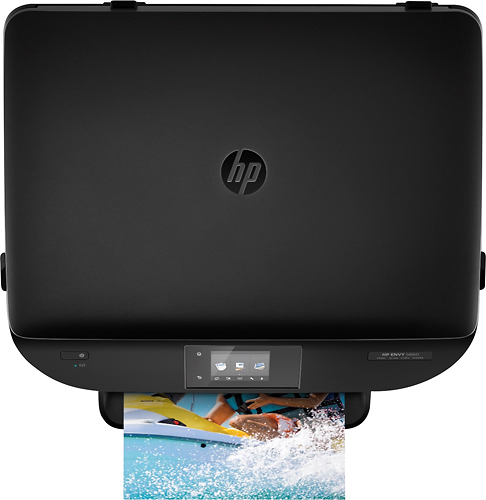
Posted .This reviewer received promo considerations or sweepstakes entry for writing a review.Documents print great. If you read the instructions and set up the printer with the correct paper, your photos will be excellent considering the price point of this printer
I would recommend this to a friend - Pros mentioned:Ease of use
Rated 5 out of 5 stars
Great home printer
Posted .This reviewer received promo considerations or sweepstakes entry for writing a review.Printer is easy to install and works like a charm. It is perfect for home printing and offers double sided printing which I really like. For the price, it is worth it.
I would recommend this to a friend Rated 5 out of 5 stars
Solid printer
Posted .This reviewer received promo considerations or sweepstakes entry for writing a review.Great printer. Good price, HP has always been the best/most reliable brand for us. Mobile printing was easy to set up and works without issues.
I would recommend this to a friendRated 1 out of 5 stars
DO NOT BUY THIS PRINTER IF YOU HAVE A MAC
Posted .This reviewer received promo considerations or sweepstakes entry for writing a review.I bought this printer several months ago as it was highly recommended by the person I spoke with in the store. It is supposed to be wireless and easy to use. I have a macbook and the printer will not stay connected to the network. Every time I try to print I waste about 2 hours trying to get the printer connected. I am not exaggerating. It literally takes two hours to reset everything and get it to print. Once I get it all reset, it will print for that session. The next time I try to print, I have to start all over. I cannot emphasize it enough (in fact, it is taking an immense amount of self-control not to fill this review with expletives), if you have a Mac, DO NOT BUY THIS PRINTER. It is a complete waste of time and the worst printer I have ever owned.
No, I would not recommend this to a friend- Pros mentioned:Ease of use
Rated 5 out of 5 stars
Solid home printer.
Posted .This reviewer received promo considerations or sweepstakes entry for writing a review.Easy to use with minimal set up time. Had all the features I needed , plus some.
I would recommend this to a friend Rated 5 out of 5 stars
I love it!
Posted .This reviewer received promo considerations or sweepstakes entry for writing a review.I had many printers before. Hp,canon,Lexmark.But now I decided to buy one with the HP ink plan. Set up was easy,no problems to print anything.Could be faster but it is fine. The in plan is great! I do not worry to spent $50 in a store and replace 3 times a year for home printing. I am a teacher so I print some.Plan gives you big saving.I will recommend this printer. Do not forget to buy protection plan for 4 years. It is worth it,specially for printers. They break easy. This is my 5th one during 9 years.
I would recommend this to a friend- Pros mentioned:Size
Rated 4 out of 5 stars
Love it
Posted .This reviewer received promo considerations or sweepstakes entry for writing a review.I love the picture quality. It’s the perfect size for my office too
I would recommend this to a friend Rated 4 out of 5 stars
So far, so good
Posted .This reviewer received promo considerations or sweepstakes entry for writing a review.I bought this printer to replace an Epson that died after 3+ years. I had stayed away from HP prior due to their lack of durability..others I've had lasted no more than one year before having network or printing issues. Couldn't pass this one up, after seeing it in action at a family members home. It's been great so far, but not giving it 5 stars cause I've only had it 9 months...want to see how long it lasts.
I would recommend this to a friend- Pros mentioned:Ease of use
Rated 5 out of 5 stars
All that I expected.
Posted .This reviewer received promo considerations or sweepstakes entry for writing a review.Easy to install and set up even with windows 10. Like the blue tooth.
I would recommend this to a friend - Pros mentioned:Print quality
Rated 5 out of 5 stars
Very good printer!
Posted .This reviewer received promo considerations or sweepstakes entry for writing a review.This printer works perfect. It produces good quality images. I would recommend this printer for home use.
I would recommend this to a friend - Pros mentioned:Print quality
Rated 2 out of 5 stars
Don't Buy if you have ASUS Router or an iMac
Posted .This reviewer received promo considerations or sweepstakes entry for writing a review.I bought this based on good reviews. Got it home and got into the wireless setup, only to get an error message and the printer shut down and reboot. Tried to connect again. Same thing. So I called HP Support. First guy wasn't a lot of help. Basically restore to factory settings, unplug, try again. He determined the printer was defective and to return it. So I did. Printer number 2, EXACT SAME ISSUE. Back to tech support. She tried to make me do the same things as support guy #1. Told her that didn't work. She remote accessed into my computer to check router settings, printer drivers, etc. Didn't work. Case was escalated to an engineer. He did the same stuff. Determined that and iMac with an ASUS (I have the AC1900) router didnt work with their printer. Even tried taking down all firewalls and security. Basically said that it was a router problem and a new router would fix it. Or connect to my computer via USB, but lose the wireless printing feature... the whole reason I bought a new printer. I returned the printer again and bought the Canon PIXMA TS9020. Flawless set up. Can print from my phone, iPad, iMac, you name it. Buy the Canon.
No, I would not recommend this to a friend - Pros mentioned:Wireless
Rated 5 out of 5 stars
great price for a grea product
Posted .This reviewer received promo considerations or sweepstakes entry for writing a review.i research all of the wireless printers and this one had everything i needed for my college printouts,
I would recommend this to a friend