Customer Ratings & Reviews

- Model:
- F5A16A#ABA
- |
- SKU:
- 8429334
Customer reviews
Rating 4.3 out of 5 stars with 45 reviews
(45 customer reviews)to a friend
Customers are saying
Customers find value in the Officejet OJ 8040's excellent print quality, ease of use, and wireless functionality, with many praising its ability to print from smartphones and other devices. The included software and large hard drive are also frequently highlighted as positive features, along with the printer's compact size. The fax capabilities are also appreciated by users. Overall, the printer receives overwhelmingly positive feedback regarding its performance and features.
This summary was generated by AI based on customer reviews.
- Pros mentioned:Ease of use
Rated 5 out of 5 stars
Great Printer
||Posted .This reviewer received promo considerations or sweepstakes entry for writing a review.Great printer easy setup does everything i expected it would!
I would recommend this to a friend - Pros mentioned:Hard drive
Rated 5 out of 5 stars
Great Printer for All purposes
Posted .This reviewer received promo considerations or sweepstakes entry for writing a review.All In One is just what it means with this printer. Prints beautiful photographs, scans important documents and saves them to the removable hard drive, fax & receive faxed documents at home, print important documents from computer, print documents to be waiting for you when you get home, HP instant ink delivered to your home by HP before you run out of ink. Copy any documents you need to duplicate. Wireless, touch screen ... It's the best HP Printer I have purchased to date.
I would recommend this to a friend Rated 1 out of 5 stars
Might be nice if it worked
Posted .This reviewer received promo considerations or sweepstakes entry for writing a review.I've spent about 5 hours trying to get this device to work. I could not get the ePrint Web Services to work with my TrendNet router, and there is zero documentation to assist with this. Hooked up my old linksys router running dd-wrt and it works (so there may be some magic configuration item I need to enable on my Trendnet, but I've exhausted all options). Finally, after getting the ePrint services to work, I can't scan because of a ADF issue (it doesn't let me scan from the ADF or glass). Finally, in the course of figuring all of this out, I turned off the printer about 7 times on accident because of the positioning of the power button (touch panel, not a physical button). Super-unhappy with this product and returning ( your mileage may vary)
No, I would not recommend this to a friendRated 1 out of 5 stars
Many issues
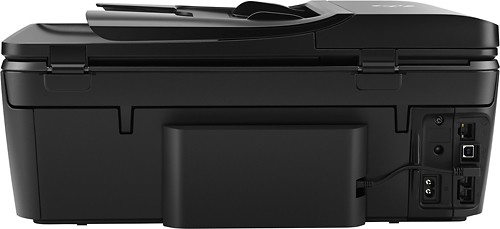
Posted .This reviewer received promo considerations or sweepstakes entry for writing a review.I am an Engineer, and I have great technical skills. The issues I am about to describe are not because I do not have enough experience. ISSUE 1. I noticed that the power adapter located in the back left of the printer is making strange noise. My house is quite and the printer is close to my desk so I could hear it all the time when I was at my desk. The noise is present only if printer is OFF or asleep. HP acknowledged that I am not the only one reporting the issue. ISSUE 2. After receiving replacement printer to resolve issue 1, when scanning from glass, the scanner would work fine with 300 dpi resolution, but would get stock when using 600 dpi resolution. ISSUE 3. After receiving replacement printer to resolve issue 2, few days later wireless stopped working. Now I am waiting for another replacement printer. The main reason I bought the printer is the auto feeder and the printer good appearance. I find many printers to look unattractive. I tried using the NEAT service but did not find it useful after a while. The user interface software is very good and easy to use, unlike in my other brand printer. When the printer works it is very good. My conclusion is that HP used poor quality suppliers to manufacture individual printer parts for this printer model. My assumption is that HP uses different suppliers to manufacture parts for different printer models, so bad experience with this printer does not necessarily mean bad experience with other HP printers. Tech support was good, but then again I am an engineer so I understand well what they are asking me to do in order to diagnose the problem. Issue number 1 that I described above is present in every HP OfficeJet 8040 printer I bought or received from HP.
No, I would not recommend this to a friendRated 1 out of 5 stars
I did not have a good experience with HP!
Posted .This reviewer received promo considerations or sweepstakes entry for writing a review.I did not have a good experience with this this printer. It's not that the printer doesn't work. It is the fact that the printer has a constant error message. Neither does the printer screen reflect what is shown in the manual. This printer has a constant " printer update problem ". Two HP technicians have not been able to fix this problem. In fact, the technicians main thrust of work, was to attempt to sell me a $200 service agreement to fix this printer! This is patently absurd! This is a new printer! This is equivalent to buying a new car on the showroom floor, and then having to hire a mechanic to get it started, so that you can drive it home! Suspecting a driver issue I went to a website, to upgrade all drivers on this computer, and to subscribe to their computer tech support. Their technician could not resolve the problem either! In effect...there is no warranty!
No, I would not recommend this to a friend