Customer Ratings & Reviews
Customer reviews
Rating 4 out of 5 stars with 13 reviews
(13 customer reviews)Rating by feature
- Value3.6
Rating 3.6 out of 5 stars
- Quality3.9
Rating 3.9 out of 5 stars
- Ease of Use3.7
Rating 3.7 out of 5 stars
Customers are saying
Customers admire the versatility of the GEN2 18-in-1 USB-C Hub Docking Station. However, some users experienced difficulties with the HDMI port, reporting connection problems with multiple displays and devices. Feedback suggests that improvements to the HDMI functionality would enhance the user experience. The issues reported may be related to specific configurations or cable compatibility.
This summary was generated by AI based on customer reviews.
- Cons mentioned:Hdmi
Rated 4 out of 5 stars
Quality Business and general use docking station.
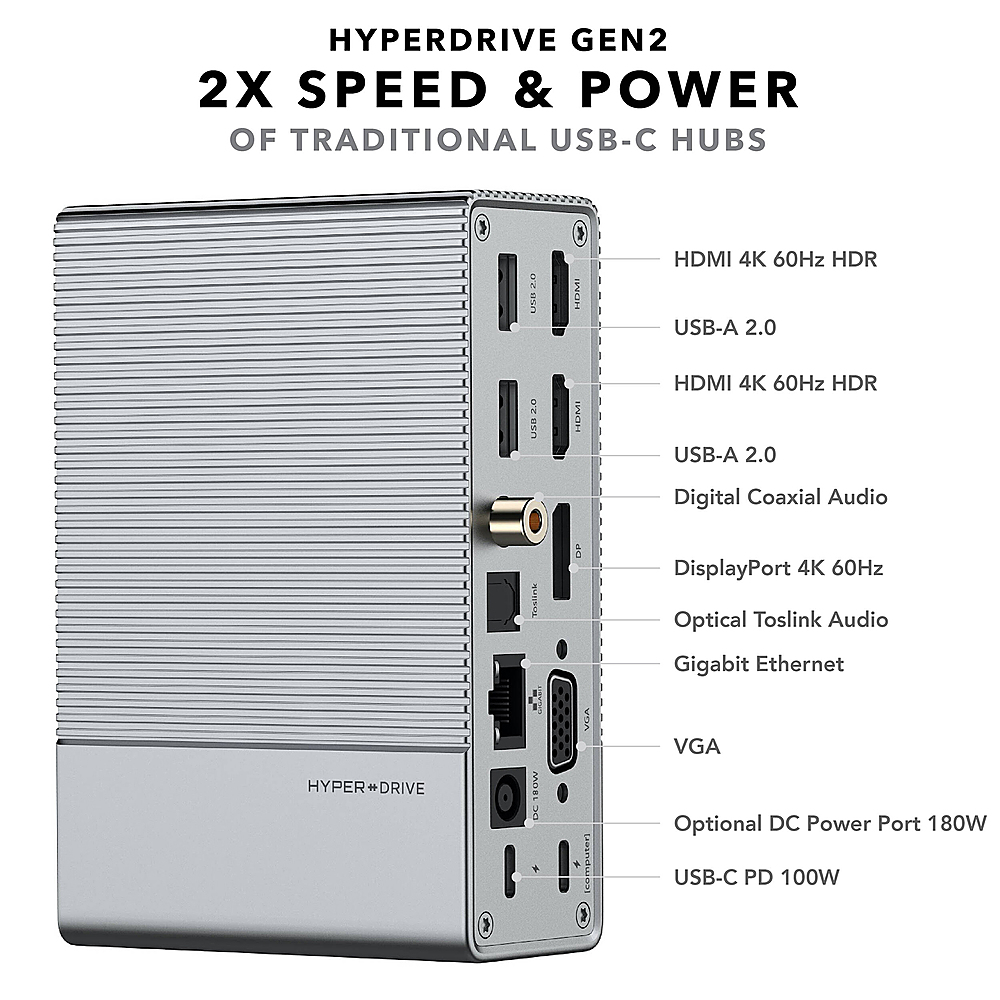
||Posted . Owned for 1 year when reviewed.This reviewer received promo considerations or sweepstakes entry for writing a review.The HyperDrive Gen-2 docking station is reasonable priced and offers all the ports needed for peripheral devices and up to 3 monitors. The USB-C power delivery port worked well charging cell phones and tablets. This was used with a Lenovo X1 Yoga and was a better option than what Lenovo offered. The only detractors if found were the resolution quality when using more than one monitor and the lack of DisplayPorts. When using two monitors the display frequency drops from 60hz down to 30 at the 4k setting. When adding a 3rd monitor the only resolution option is basic HD. It’s good that there are two HDMi ports but it would be nice if the VGA port were changed to a DisplayPort. I would not recommend this device for gamers or users seeking maximum video performance. However this is an excellent docking station and cheaper option for business and general users who don’t require high end video rendering. I would recommend this for most users.
I would recommend this to a friend Rated 4 out of 5 stars
Connectivity
||Posted . Owned for 1 month when reviewed.This reviewer received promo considerations or sweepstakes entry for writing a review.Great setup.for surface users, allows every type of connection and fast internet flow
I would recommend this to a friendRated 5 out of 5 stars
Love it
||Posted . Owned for more than 2 years when reviewed.This reviewer received promo considerations or sweepstakes entry for writing a review.This little guy does it all! I use this for my ipad pro and Imac, my only complaint is how warm it gets and that you have to buy a $100 adaptor to get the full power. I think they just restocked them… I couldn’t find the adaptor anywhere else so that was a major con! I would still recommend this, you can use it anywhere for just about anything.
I would recommend this to a friend- Cons mentioned:Hdmi
Rated 2 out of 5 stars
It works, sometimes...
||Posted . Owned for 2 months when reviewed.This reviewer received promo considerations or sweepstakes entry for writing a review.I have an M1 MacBook Air. I have connected this device up to headphones, USB devices such as a webcam and a StreamDeck, HDMI to an LG Ultrawide Monitor. Every single time I sit down to use my computer, I need to wait a solid 2 minutes for the screen to cycle on and off every 5 seconds. The cycle increases in time when I have an external hard drive connected to it. I tried disconnecting devices, different HDMI cables, both HDMI ports, and a different display using VGA and I still got this issue. This product is fine, at best. It isn't exactly what I was hoping, and I will be replacing it with another product at some point in the future. I personally would not recommend this docking station to most people - especially if you are connecting it to any display. It's a fine USB hub though.
No, I would not recommend this to a friend Rated 5 out of 5 stars
Easy to connect, supply your own power
||Posted . Owned for 9 months when reviewed.This reviewer received promo considerations or sweepstakes entry for writing a review.I tried several do long stations and had no success until I tried this one. The only drawback is it doesn’t come with its own power supply but other than that it’s a great addition to your system.
I would recommend this to a friend- Cons mentioned:Hdmi
Rated 1 out of 5 stars
Just Didn’t Work Properly
||Posted . Owned for 3 weeks when reviewed.This reviewer received promo considerations or sweepstakes entry for writing a review.It just didn’t work correctly. I tried to connect my two other computer screens, mouse, and webcam to my laptop. I have an XPS 17. It would change the setup that I had for the screens from expand to duplicate and i couldn’t change it back. My mouse would also stop functioning properly, like it would scroll with wheel on the mouse. I thought it was my computer until I tried my multi port devices from apple and samsung. the mouse and screens worked properly with these and didn’t work with the 200 dollar hub.
No, I would not recommend this to a friend Rated 5 out of 5 stars
Excellent Hub / Docking Station.
||Posted . Owned for 1 year when reviewed.This reviewer received promo considerations or sweepstakes entry for writing a review.If you're looking for a COMPLETE Hub / Docking Station, here's the one for you if you have several peripherals. I have a UHD Disc Drive for 4K movies and CD's, a Dell Laptop, a full-size 21" Samsung 4K Monitor, my wired headphones, an ethernet connection to my router, plus I have more space available in the Hub if I need to add anything. I did purchase the 180W HYPER Power Adapter to use with the HYPERDRIVE so it will run efficiently if I have a lot going on at once.
I would recommend this to a friendRated 5 out of 5 stars
USB Hub
||Posted . Owned for 3 weeks when reviewed.This reviewer received promo considerations or sweepstakes entry for writing a review.Works great and has plenty of various connections.
I would recommend this to a friendRated 5 out of 5 stars
HyperDrive hub
||Posted .This reviewer received promo considerations or sweepstakes entry for writing a review.This hub works perfectly to connect multiple components and your laptop in order to have multiple displays.
I would recommend this to a friendRated 1 out of 5 stars
HyperNoDrive
||Posted .This reviewer received promo considerations or sweepstakes entry for writing a review.Not happy with the product. Did not meet what I expected.
No, I would not recommend this to a friendRated 5 out of 5 stars
Recommend!
Posted .This reviewer received promo considerations or sweepstakes entry for writing a review.Compact and works well! I use it both at my home and work office. Highly recommend.
I would recommend this to a friendRated 5 out of 5 stars
review
Posted .This reviewer received promo considerations or sweepstakes entry for writing a review.Works as advertised and it's such a solid hub. It connects to everything and has all the ports. Perfect size for stationary with many different port selections. Not good use for portable.
I would recommend this to a friendRated 5 out of 5 stars
Works like a Champ!!!
Posted .This reviewer received promo considerations or sweepstakes entry for writing a review.This hub is solid built with all the ports I need to get my work done. Easy setup up without breaking a sweat.
I would recommend this to a friend
Customer reviews from Hyper
See all Hyper reviewsUser rating, 3.7 out of 5 stars with 21 reviews on Hyper.
3.7(21 reviews)