Customer Ratings & Reviews
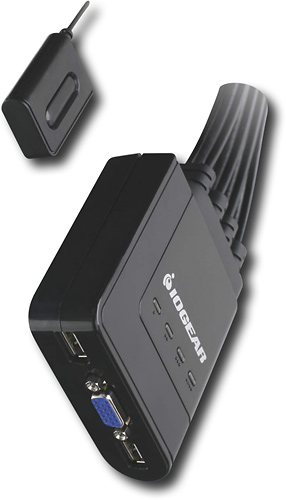
- Model:
- GCS24U
- |
- SKU:
- 9246997
Customer reviews
Rating 4.3 out of 5 stars with 58 reviews
(58 customer reviews)Rating by feature
- Ease of Use4.0
Rating 4.0 out of 5 stars
Customers are saying
Customers regard the 4-Port USB KVM Switch positively for its easy setup, functionality, and affordability. Many users appreciate the simple plug-and-play installation process, while others commend its reliable performance. The price point is also seen as a major advantage, with customers noting that it offers great value for its features.However, some users have expressed concerns about the button used to switch between computers, finding it less convenient compared to other methods.
This summary was generated by AI based on customer reviews.
Rated 5 out of 5 stars
You should not live without it!
||Posted .This reviewer received promo considerations or sweepstakes entry for writing a review.Had to do factory restore on multiple PC and this was it. Yes, I also have the HDMI version of it.
I would recommend this to a friend- Pros mentioned:Price
Rated 5 out of 5 stars
Excellent switch for 4 machines
||Posted .This reviewer received promo considerations or sweepstakes entry for writing a review.I have been using a KVM switch by the same mfg but fitted with PS/2 connectors for several years already and it's a great convenience. I just bought the newest model because I'm upgrading my machines and all will have USB connections for KB and mouse, so I really had to get a new switch. The newer model has all four sets of connections permanently connected to the switch box whereas the old one you could chose to use 2, 3 or 4 sets, so I temporarily tied up two of the sets until I get around to upgrading a 3rd machine. The newer switch also has a small push button switch that toggles you from machine to machine. While it's quick to use, it also seems flimsy and I much prefer the old mechanism where you simply hit the Ctrl key twice to switch to the next PC in sequence. Now I sometimes find myself searching for the tiny KVM switch on my cluttered desk. The new switch simply slows me down when I'm switching back and forth testing programs. With the old mechanism, I was already at the keyboard. I'm also wondering if there will be a shortened life with the new switching switch again because it seems a bit flimsy to me. That aside, it works great, is simple to install and use, and the price has also taken a fall to about 1/3 of what I paid for the PS/2 based KVM switch. So my only complaint really is I'd much prefer to just need the keyboard to switch around.
I would recommend this to a friend - Pros mentioned:Ease of use
Rated 4 out of 5 stars
Works well
||Posted .This reviewer received promo considerations or sweepstakes entry for writing a review.I'm using this on three computers, one running Windows 7, one Fedora 15 and one Windows Server 2008 r2. It's well designed and organized, all the cables for each computer are kept together so it's easy and not confusing to connect. The only glitch I've discovered so far was it has to be set to the Fedora machine when I boot it up or it doesn't want to work on it. Other than that I can, and have, switched between machines with little trouble. There is a slight delay switching between machines. It's cheaper than running multiple monitors, keyboards and mice, and less clutter on the desktop.
I would recommend this to a friend - Pros mentioned:Ease of use
Rated 4 out of 5 stars
Does what it says, making it easy to control 4 pcs
||Posted .This reviewer received promo considerations or sweepstakes entry for writing a review.Enter this handy little switch to allow us to share the keyboard, video, and monitor among up to 4 desktop and/or laptops. Setup was very easy, with the most challenging task being crawling under the desk to thread wires. Once everything was hooked up, I was easily able to switch between the XP and the Windows Seven rig.
I would recommend this to a friend - Pros mentioned:Ease of use
Rated 4 out of 5 stars
Very Handy to have
||Posted .This reviewer received promo considerations or sweepstakes entry for writing a review.I have multiple computers that I need to switch back and forth too. This device is very simple to connect and it just works.... I am in school and have a server and workstation that I have connected with this and it makes it so much easier to switch between them when working on homework,
I would recommend this to a friend - Pros mentioned:Ease of useCons mentioned:Delay
Rated 4 out of 5 stars
Does the Job
||Posted .This reviewer received promo considerations or sweepstakes entry for writing a review.Hooked up personal computer and Laptop docking station. Quick and easy set-up. No issues so far. Delay after switching between machines of Wireless Keyboard and mouse. Video switches instantly
I would recommend this to a friend - Pros mentioned:Compatibility, Ease of use
Rated 4 out of 5 stars
Good easy to install and working great
||Posted .This reviewer received promo considerations or sweepstakes entry for writing a review.Very good product as compatible with both windows and linux boxes at the same time. Easy to install and changing switch is a great design. To start working with all machines, need to restart them once.
I would recommend this to a friend - Pros mentioned:Ease of use
Rated 4 out of 5 stars
Works fine
||Posted .This reviewer received promo considerations or sweepstakes entry for writing a review.Got the KVM Switch to connect 2 desktop computers with 1 monitor. Everything works good so far. Only had the item for 2 months
I would recommend this to a friend - Pros mentioned:Usb
Rated 4 out of 5 stars
Great kvm
||Posted .This reviewer received promo considerations or sweepstakes entry for writing a review.I love KVMs. I think they are one of the best inventions for anyone with more than one machine but no room for individual setups. My one complaint is that it has a button to change which computer you're controlling one at a time cycling through all 4 instead of a switch board to choose faster.
I would recommend this to a friend Rated 4 out of 5 stars
Good Product
||Posted .This reviewer received promo considerations or sweepstakes entry for writing a review.I have 3 computers I switch between and this does the job nicely
I would recommend this to a friend- Pros mentioned:Usb
Rated 4 out of 5 stars
Computer Connection
||Posted .This reviewer received promo considerations or sweepstakes entry for writing a review.This has worked great for connecting the computers
I would recommend this to a friend - Pros mentioned:Ease of use
Rated 5 out of 5 stars
great for offices
||Posted .This reviewer received promo considerations or sweepstakes entry for writing a review.I used this for one of my stores. We have three seperate devices and thismakes it really easy to switch between them.
I would recommend this to a friend - Pros mentioned:Ease of use
Rated 4 out of 5 stars
A very nice 4 port switch. Plug and play for most
||Posted .This reviewer received promo considerations or sweepstakes entry for writing a review.This switch was great for plug and play for most systems.
I would recommend this to a friend - Pros mentioned:Ease of use
Rated 3 out of 5 stars
Works just fine
||Posted .This reviewer received promo considerations or sweepstakes entry for writing a review.This works very well if you need to use two or more computers with just one keyboard, one mouse, and one monitor. Kind of easy switching from one computer to another computer (just push the button).
I would recommend this to a friend - Pros mentioned:Compatibility, Performance
Rated 5 out of 5 stars
Works amazing
||Posted .This reviewer received promo considerations or sweepstakes entry for writing a review.This is my second unit of this type.. That first was a 2 port switch.. I needed to add more computers to the layout so I purchased the 4 port model.. it works amazing.. even between pc and mac computers.. highly recommended..
I would recommend this to a friend - Pros mentioned:Ease of use
Rated 5 out of 5 stars
Great item
||Posted .This reviewer received promo considerations or sweepstakes entry for writing a review.Great item worked well for. What i need it. For. Recommend to everyone
I would recommend this to a friend - Pros mentioned:Usb
Rated 5 out of 5 stars
It works great
||Posted .This reviewer received promo considerations or sweepstakes entry for writing a review.This has worked really well for the purpose we intended
I would recommend this to a friend - Pros mentioned:Ease of use
Rated 5 out of 5 stars
Easy to Install.
||Posted .This reviewer received promo considerations or sweepstakes entry for writing a review.I have 4 different MINI-MACs that I use for different purposes and need to switch between them depending upon the task at hand. One of these I need to open and convert old MacDraw drawings to PDF format on another MINI-MAC which has a newer operating system. I use another which is on at all times to share a printer with others in this house and another which I shut down when I am finished down-loading or up-loading private information. This switch allows quickly connecting the same monitor, mouse, and keyboard to any of the four computers by depressing a tiny pushbutton which is mounted remotely near the keyboard.
I would recommend this to a friend Rated 4 out of 5 stars
Flawless Operation, Easy Setup
||Posted .This reviewer received promo considerations or sweepstakes entry for writing a review.My only complaint is that there is only one button to toggle through all 4 connections. However, you can't beat the price for the functionality.
I would recommend this to a friend- Pros mentioned:Performance
Rated 5 out of 5 stars
excellent product
||Posted .This reviewer received promo considerations or sweepstakes entry for writing a review.never used one of these before but needed to setup a home lab without the clutter. straight forward and quick setup. it is working like a champ!
I would recommend this to a friend