Customer Ratings & Reviews
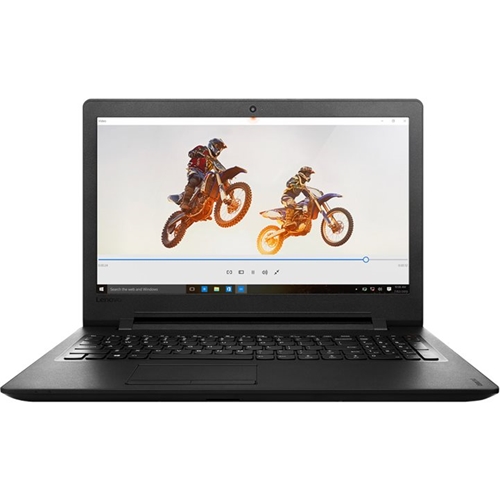
- Model:
- 80TJ002EUS
- SKU:
- 5412713
to a friend
- Pros mentioned:PriceCons mentioned:Basic gaming
Lenovo
||Posted .This reviewer received promo considerations or sweepstakes entry for writing a review.Excellent brand, good price with plenty of power for everyday tasks. Not designed for anything other than basic gaming
I would recommend this to a friendBrand response from Lenovo Product Expert
Posted .Thank you for choosing the Lenovo IdeaPad 110-15 laptop. We are pleased to hear that the IdeaPad 110-15 meets your computing needs so well.

- Pros mentioned:Performance
Met all our needs.
||Posted .This reviewer received promo considerations or sweepstakes entry for writing a review.Gave this as a graduation gift to my niece. Has been a great performer and problem free.
I would recommend this to a friend - Pros mentioned:Hard drive, User friendly
Great buy.
||Posted .This reviewer received promo considerations or sweepstakes entry for writing a review.This laptop is an excellent buy. Simple to use and user friendly. Hard drive and memory is ideal for the average user. Very satisfied.
I would recommend this to a friendBrand response from Lenovo Product Expert
Posted .Thank you for choosing the Lenovo IdeaPad 110-15 laptop. We are leased to hear that the value and performance of the IdeaPad 110-15 meets your computing needs so well.
- Pros mentioned:User friendly
nice laptop
||Posted .This reviewer received promo considerations or sweepstakes entry for writing a review.I was having trouble with my older computer that I've since figured out and the Lenovo seemed to be a good fit, it does what I want and is very user friendly
I would recommend this to a friendBrand response from Lenovo Product Expert
Posted .Thank you for choosing the Lenovo IdeaPad 110-15 laptop. We are pleased to hear that te IdeaPad 110-15 meets your computing needs so well.
- Cons mentioned:Keyboard
Good Computer for the Money
||Posted .This reviewer received promo considerations or sweepstakes entry for writing a review.Haven't used this too much, but so far I am very happy for what I got. The keyboard is a little disappointing but I am happy with everything else.
I would recommend this to a friendBrand response from Lenovo Product Expert
Posted .Thank you for choosing the Lenovo IdeaPad 110-15 laptop. We are pleased to hear that the Ideapad 110-15 is working out for you. With regard to the keyboard, we will look in to improvement for future models.
- Cons mentioned:Keyboard, Speed
Owned less than 4 months
||Posted .This reviewer received promo considerations or sweepstakes entry for writing a review.Mousepad already stopped working. Not a big fan of the way the keyboard is, computer seems kind of slow. Hoping I can get the mousepad fixed though because it hasn't even been 4 months yet.
Access Denied
You don't have permission to access "http://www.bestbuy.com/%7eassets/bby/_img/int/plsvgdef-frontend/svg/Close_Cancel_Line.svg" on this server.Reference #18.1eecc017.1779122316.6320b98
https://errors.edgesuite.net/18.1eecc017.1779122316.6320b98
No, I would not recommend this to a friendBrand response from Lenovo Product Expert
Posted .With regard to the touchpad, you can make adjustments to the touchpad in your system settings. You can get there by clicking on the magnifying glass at the bottom left of your Windows 10 screen. Type "touchpad" in the search window. Select "Mouse & touchpad settings" from the list of choices. You can make general adjustments to the touchpad there. You can also select "Additional mouse options" for more detailed adjustments to the touchpad sensitivity by increasing the delay of the touchpad. If these adjustments don't help, there may be Touchpad driver updates for your specific system. Follow the link below to look for new driver updates for your specific system. You can also run diagnostics from the Lenovo site as well. As always, be sure to create a restore point on your system before you make any changes. You can do this by just typing "restore point" in the search window within Cortana and follow the link to create a restore point. Here is the link:
http://pcsupport.lenovo.com/us/en/products/laptops-and-netbooks/100-series/110-15acl/80tj/80tj002eus/downloads
- Pros mentioned:Performance
real good laptop
||Posted .This reviewer received promo considerations or sweepstakes entry for writing a review.good laptop so far. Ive set up completely. and it is running well
I would recommend this to a friendBrand response from Lenovo Product Expert
Posted .Thank you for choosing the Lenovo IdeaPad 110-15 laptop. We are pleased to hear that the IdeaPad 110-15 is working out so well for you.
- Pros mentioned:Price
Awesome computer
||Posted .This reviewer received promo considerations or sweepstakes entry for writing a review.I couldn't believe the price! Love shopping at Best Buy
I would recommend this to a friend works as expected
||Posted .This reviewer received promo considerations or sweepstakes entry for writing a review.enjoying all of the facets of the new computer. am continuing to learn about it
I would recommend this to a friendIt will take a while to learn it
||Posted .This reviewer received promo considerations or sweepstakes entry for writing a review.Haven't worked with it yet. Do to not enough time in the day
I would recommend this to a friendGreat laptop
||Posted .This reviewer received promo considerations or sweepstakes entry for writing a review.Laptop is for my boyfriends kid...she loves it....
I would recommend this to a friendNot purchase
||Posted .This reviewer received promo considerations or sweepstakes entry for writing a review.About the 5th time I use this laptop, the screen turned black and won't come on. The laptop is on, but the screen stays black. Disappointing for a new purchase.
Access Denied
You don't have permission to access "http://www.bestbuy.com/%7eassets/bby/_img/int/plsvgdef-frontend/svg/Close_Cancel_Line.svg" on this server.Reference #18.1eecc017.1779122316.6320b98
https://errors.edgesuite.net/18.1eecc017.1779122316.6320b98
No, I would not recommend this to a friendBrand response from Lenovo Product Expert
Posted .Try the F12 hot key, your screen brightness may be turned down. If this doesn't help, this system is equipped with OneKey Recovery System. There is a very small pin hole on the left side of the device, right near the power plug port on the device. You will need a pin to push this reset button. Plug the device in. Let the battery charge for about 15 minutes. Push the reset button. The system should boot to a choice screen where you can choose "Restore To Factory Default". Select this. It will delete everything from the hard drive except the original factory install of the operating system. You will need to reinstall all programs and files after the reset. If you don't have copies of the files, try to make one before you restore by selecting "Boot to desktop" and trying to back up your files.
- Cons mentioned:Speakers
For the price you can't beat it
Posted .This reviewer received promo considerations or sweepstakes entry for writing a review.Took it out of the box set it up was easy run smooth and fast an easy to use bought it for the wife the only thing it could be improved the speakers no big deal still recommended
I would recommend this to a friend