Customer Ratings & Reviews

- Model:
- 80V50009US
- SKU:
- 5579132
to a friend
Customers are saying
Customers often highlight the superb screen quality, lightweight design, and impressive battery life of this 2-in-1 laptop. The fast SSD is also frequently praised, along with the laptop's ease of use. However, some users have noted concerns regarding the keyboard layout and fan noise. These issues, while mentioned, don't appear to overshadow the positive experiences reported by many customers.
This summary was generated by AI based on customer reviews.
Awesome Buy!
||Posted .This reviewer received promo considerations or sweepstakes entry for writing a review.I bought this laptop for school, and my job. I love it! The touch screen, 2 in 1 design, backlit keyboard, and fingerprint scanner are awesome bonus features! I use Photoshop for my job, and so having a dedicated graphics card and 4k Screen was very important for me. So far, Photoshop work really well! I love the size of this laptop as well. My old laptop was also 15.6" but the bezel on it was huge. This laptop has a very small bezel. The laptop is a little heavier then you would think, but its premium metal design makes up for it. Battery life is good, considering my old laptop only lasted 3 hours tops, this is a huge difference. I lasted around 5 hours on 80% screen brightness, using Photoshop most of the time, and being left in the cold. That was also on a 80% charge. It charges pretty fast, I haven't really timed it or anything. The speed of this laptop is really nice as well, smooth like butter. I have one complaint however, the laptop is a bit hard to open... It has no indent to allow easy open, but this isn't a deal breaker. The power button is also a little hard to press. However, the right shift button is not as annoying as a lot of reviews say it is. It just takes a bit of time to get use too. Also, the fan isn't that loud. The BIOS update Lenovo released, sorta fixes the problem. The fan does come up with a lot of applications open, but turns off after like a minute or two. My advice, is to get this laptop. The price for what you get is great, premium design, and premium features.
I would recommend this to a friend- Pros mentioned:Speed, Ssd
Great laptop for video editting.
||Posted .This reviewer received promo considerations or sweepstakes entry for writing a review.This laptop with its 6th gen i7 processor and solid state drive is lightning fast and works excellent when editing 4K videos! I am very pleased with this product and know that I will be for the next four years or so.
I would recommend this to a friendBrand response from Lenovo Product Expert
Posted .Thank you for choosing the Lenovo Yoga 710-15. We are pleased to hear that the performance of the Yoga 710-15 meets your computing needs so well.

I love it
||Posted .This reviewer received promo considerations or sweepstakes entry for writing a review.Could use a bit of an upgrade with speed, but overall I like the computer A LOT !
I would recommend this to a friendit broke after a couple years
||Posted .This reviewer received promo considerations or sweepstakes entry for writing a review.I don't think I will be purchasing anything from Lenovo anytime soon! This happened to my Toshiba laptop about 20 years ago.
No, I would not recommend this to a friend- Pros mentioned:Battery life, Screen quality, SpeedCons mentioned:Fan noise
Great Bang for the Buck
||Posted .This reviewer received promo considerations or sweepstakes entry for writing a review.Let's start with the good - It's fast. I use it to edit photos and do some 3d work and it doesn't miss a beat. Out the box it's not loaded with too much bloatware. The fingerprint sensor is nice. Battery life seems reasonable for it's features, but not great unless you run the power saving mode which dims the screen a bit. Still, it's not bad. An SSD at this price point is a nice plus, as is the dedicated video card. I really like the profile of this machine. It's really compact and seems sturdy. The Ultra HD screen is a blessing when editing photos or using CAD. Very nice! I have not had any blue screens and everything I have run on it, in terms of productivity software has been rock solid. It's run most of the Adobe Creative Suite, AutoCAD 2017 LT, Sketch-up, MS stuff, etc without any hiccups. The bad - Although the screen is super sharp and pretty, its glossy finish catches tons of glare. It can be distracting in a bright room. As mentioned the battery life is short if you don't run it in power saver mode. In addition, I had read and was aware about the fan noise, and boy, was it noticeable immediately. It's LOUD. The solution seemed to be to update the firmware, but it's a little annoying no one noticed this before it went to market. Even with the fix, the fans still come on at times while under load and will keep on running long after you are done with the task that stressed things out. I've gotten used to it (and have my headphones in a lot of the time), but if you need or want a really quiet machine you may want to look at something else. My final knock on it is lack of a Ethernet port, or included adapter. Occasionally I'd like to plug in and can't do so without an adapter. Same with HDMI. No full size connector and it didn't come with an adapter. More and more TV's let you livecast, but if you have a presentation in a strange/new place, not every projector has wireless or network capabilities, making this machine useless. Still overall I feel like this was a great deal and good purchase. I got this machine at a discount because it was a return and it easily matches with machines costing 2X as much as I paid for it.
I would recommend this to a friend - Pros mentioned:Speed, WeightCons mentioned:Keyboard quality
BEST BANG FOR THE BUCK IN THIS CLASS, IF YOU ARE N
||Posted .This reviewer received promo considerations or sweepstakes entry for writing a review.REVIEW FOR: LENOVO YOGA 710 MODEL: 80V50009US 2-IN-1 15.6 4K ULTRA HD INTEL CORE I7-7500U-16GB NVIDIA GEFORCE GTX 940MX 256GB SSD BEST BANG FOR THE BUCK IN THIS CLASS, IF YOU ARE NOT TOO FUSSY ABOUT SOME MINOR TOPICS USE CASE: Causal Computing at home (mostly couch surfing and simple photo / video email) Initially I was planning to get a MS Surface Pro 4, but from a price to performance perspective it did not make sense. The lower end Surface was $699 without a keyboard add $100 for a keyboard and you at $800 for a prior gen I5, with low memory and SSD sizes. I have never had good luck with HP, every single one I bought (on the cheap), had something important fail within 2 years. I was very tempted by the Spectre 360, but it also only had the prior gen I7, and no graphics card for $1400. So far I really like the 710. PROS: • Fast, big screen, lighted keyboard, medium light (4lbs), thin, NO BLOATWARE AT ALL! CONS: (minor limitations for me) • Smaller SSD 256GB o Fine for my immediate needs, and easily upgraded later. • Only 2 USB 3.0 ports (no USB-C) o Can rectify with a hub / adapter • No Physical LAN port o With wireless AC not needed • Stupid location of the right Shift Key (hard for touch a touch typist, like me) o Can be remapped with software or just get used to it • Clunky Power Supply (small, but plug is built in and cable not very long) o I have a 3rd party travel charge with different tips I will use • SD CARD DOES NOT INSERT ALL THE WAY sticks out ¾ of the card outside the frame o This was the most annoying thing because I bought a super high speed 256GB SD card to use as my data drive that I now have to return. OK so now I will have to make due with a nano USB 128GB drive as my data drive. • Edge Lit LED’s have significant blooms on a dark screen So, that is a lot of CON’s I know. But for my use case and cheap budget, I was perfect happy paying $100 more than a MS surface for double the performance and saving $500-$600 over a comparable HP Spectre Lenovo 910. PS I liked it well enough to buy a second one for my wife replacing a 3 year old HP that was not liking windows 10 due to lack of drivers from HP.
I would recommend this to a friendBrand response from Lenovo Product Expert
Posted .Thank you for choosing the Lenovo Yoga 710-15. We are pleased to hear that the value and performance of Yoga 710-15 meets your computing needs so well.
- Pros mentioned:Battery life, WeightCons mentioned:Fan noise, Keyboard quality
Everything is well-designed, but right shift key
||Posted .This reviewer received promo considerations or sweepstakes entry for writing a review.I have to return this laptop due to the issue with the right shift keyboard's position. Initially, I thought that I can live with it, but I have to change my mind. Everything is well-designed and made. This laptop is light weight, 8-9 hrs using with battery. I like the 4k screen since it bright and clear. Bottom line it is reasonable for each dollar you paid for this machine, only one BIG mistake in term of design is the right-shift key position, it is completely troublesome since I always hit the up arrow button, instead of the shift; I tried to get familiar with this issue, but it is hard since the mistake happened all the time. I don't know why Lenovo's design team decide to locate the shift button like this, but for me, this is not a good design. One minor issue is the fan noise and I have to install 3rd party software to control the fan noise. Other than those 2 issues, this laptop is one of the best machines that you can try for your work, school, and entertainment.
No, I would not recommend this to a friendBrand response from Lenovo Product Expert
Posted .With regard to the right shift key issue you mention, there is a free software APP called KeyTweak that may help you. You can switch the key functions of specific keys on your keyboard with this software, so you could change the right shift key with the key you hit in its place. Just Google search "KeyTweak" and you will find articles about what the software does and you will find the download location for this free APP.
- Pros mentioned:Battery life, Speed, WeightCons mentioned:Keyboard quality
Great machine, I love it!
||Posted .This reviewer received promo considerations or sweepstakes entry for writing a review.I love my new laptop. It's super lightweight and the 2-in-1 feature is awesome for gaming, surfing the web or viewing all types of social media. It's especially great for Pinterest and Instagram, I keep it out when cooking a new recipe since it has the capability to stand like a cookbook. Don't get me wrong, I don't just use it for fun stuff. The processor is fast and I'm able to use the MS Office Suite very efficiently. It's a very capable machine, no matter what you're using it for. The only negative comment I have about the computer is in regards to the placement of the right shift key; it's just dumb. I type 70+ words per minute and this was really holding me back. I almost considered returning it just for that reason. However, I researched the problem and found that everyone else thought the same thing. I downloaded a free app that was recommended by others online with the same complaint and was able to switch the Up Arrow to the Shift and vice versa. That's working out well for me and I feel like it was a reasonable solution. I got a great deal on this $998 and I am very happy with my purchase. Get the Webroot security package - it's a great deal that comes with peace of mind. I've read that the fan is loud; I disagree. It has a long battery life and does everything I need it to do. It's fast and the display is gorgeous. I'm not sure it could be compared to anything else on the market. Get one!
I would recommend this to a friendBrand response from Lenovo Product Expert
Posted .Thank you for choosing the Lenovo Yoga 710-15. We are pleased to hear that the value, features and performance of the Yoga 710-15 meets your computing needs so well.
- Pros mentioned:Screen quality, SpeedCons mentioned:Keyboard quality
Great price but there has to be a drawback, right?
||Posted .This reviewer received promo considerations or sweepstakes entry for writing a review.PROS: First of all what attracted me to this product was the sleek look and FANTASTIC specs for the price. I got this product open box excellent - geek squad certified for $822. 4k screen looks absolutely magnificent Touch screen is usually pretty responsive Nice travel on keys Attractive design BACKLIT KEYBOARDDDDD Tablet folding style AMAZING specs for the price, out performs my macbook pro late 2013 in terms of hardware NVIDIA graphics allows me to play some midrange games on medium settings comfortably and edit 4k photo and video (this is not going to play fallout 4 or GTAV very well at all, but it does run it with very low framerates in my experience) CONS: I did some reading online and found the keyboard and trackpad to be the biggest problems. Personally, the keyboard doesn't bother me at all. HOWEVER. It doesn't bother me because I don't use the right shift key when I type, I just never have, so I don't run into issues with the odd placement. IF YOU USE THE RIGHT SHIFT KEY this product may not be for you. I have fairly average-sized female hands and I CANNOT reach the right shift key while keeping my hands correctly positioned on the keyboard. Another issue I have is the trackpad. The feedback upon click is AWFUL, the sound it makes sounds like a cheap kids toy and the click pressure is incredibly inconsistent. I find myself reluctant to do some tasks on this laptop simply because of its awful trackpad. Luckily, it has a touch screen but that is not always perfect either. If you are coming from a macbook here are some things you will no longer be able to do: two finger click and drag, rest left finger on trackpad while tracking with right finger, two finger scroll (yes it is there, yes it is absolutely terrible). Something I really miss is the rewind, play/pause and forward music toggles that on the top of almost all keyboards. I didn't realize how often I used them until they weren't there and it is a very hard change to get used to. Another thing is the charger is very short, ends in a huge bulky/blocky plug that has non-foldable prongs. I will for sure be buying a third party charger as sometimes wall design and furniture placement makes this charger unusable. And although this computer has better hardware and specs than my late 2013 macbook pro, don't be fooled, it is actually slower. I don't know how or why but it is. All in all, it is still a great laptop for the price and for a college student on a budget, this laptop works just fine!
I would recommend this to a friend - Pros mentioned:Speed, WeightCons mentioned:Keyboard quality
Light, Fast, Powerful
||Posted .This reviewer received promo considerations or sweepstakes entry for writing a review.I was looking for a budget laptop so i luckily found this one on sale, open box so i went the cheapest i could with it, i did a lot of reviews and was looking for the best laptop for the price, i ended up buying this one and i'm very glad i did. The thing i wanted the most from a laptop was to help me with video editing and audio production, i tested the rendering making a 3 minute video using HitFilm and it rendered the video in 10 minutes like noth..( oh nevermind its a bit noisy) but if you don't mind a fan working this way then this product will be good for you, and also the preview of videos while editing it's not laggy at all, so you have a decent laptop for editing videos there. For Audio editing, works great, render way faster than my older laptop which is amazing, i use ableton live 9 and i didn't have any problem at all. PROS Very Light Great Design Amazing Screen frame Fast Powerful CONS The Shift key on the right sucks, you have to use a program to swap the up Arrow with the shift, i know everyone in the other reviews already complained about this, but really? (Lenovo mada an amazing laptop but with an akward shift placement) - This Model doesn't have a digitalized touchscreen, this means you can't use an active pen like with the lenovo 720 series, i do a lot of graphic design and drawings on adobe illustrator, so having this feature could of made me feel like in heaven. - The Model i have have some Flickering problems, the screen blinks for 1 second from time to time, it jumps from left to right, i(t's pretty weird) i already delivered it to the store for a geek squad check they were nice but they didn't find anything but i'm still having this problem, i'm thinking it may be the graphic card integration that has some problem, since i don't live in the US i will not be able to send it to the Factory even to i have 1 year warranty still i have to leave soon, but it's ok i will check was going on when i'm back in my country. Even with the flaws i found in it this a beautiful laptop, just what i needed.
I would recommend this to a friend - Pros mentioned:SpeedCons mentioned:Fan noise, Keyboard quality
The fan, the fan, the fan
||Posted .This reviewer received promo considerations or sweepstakes entry for writing a review.There are things I love about the 2 in 1: The display is gorgeous! It really is quite fast It's fairly compact for the size, although it's a big on the heavy side 2 in 1 function is great Not a lot of bloatware pre-loaded What I don't like: The fan. The fan. The fan. - yes Lenovo released a BIOS updated, yes, it helped...a little, but the problem is far from solved. It is noisy, and when it kicks on it runs for.ever. Lenovo seems to think they have solved this issue, but, they haven't. I see no reason why my laptop should sound like it is going to fly off the table while I'm reading the news (reading, btw, not watching) Is it a deal breaker for me? No, because I don't use it in an environment where silence is needed, but, if I did, I would have returned it. The shift key, yes, it really is as annoying as everyone says. Sometimes glitchy display. Every now and again, I will come across something that causes the display to flicker. It did it the first time after having it about a month. No idea what caused it that time. The next time, it was using a photo viewer. I ended up ditching the viewer and downloading a different one. battery life is marginal at best. I don't do anything taxing on it, no netflix (most of the time), or videos, I'm mostly a reader and internet browser. That said - that battery life is very unimpressive. I'll browse the internet for say...45 minutes- 1 hour, and it will be down in to the 75-80% area...I can't imagine if I was using it to game or stream...Again, not a deal breaker because of the way I use it, but, if I didn't have plug in access most of the time, I would have returned it. Would I recommend it? Depends...if you are like me and you are semi ok with the ridiculous amount the fan is on, how loud it is, and you have plug in access...then sure, it's a beautiful machine...if not? no way.
I would recommend this to a friend - Pros mentioned:Screen quality, Speed, Weight
Great display-Nice Performance and function
||Posted .This reviewer received promo considerations or sweepstakes entry for writing a review.i got this Laptop to replace my existing work laptop which was a Yoga 2 Pro, Hard-drive crashed in it upgraded it to the 512 Gb Samsung drive but wanted to go new. I compared specs of many but went with this one, larger and better display than the Surface book, This new laptop has a great display, the performance is about 30% better than the Yoga 2 pro with the Samsung drive(Clean install of Win 10 Pro with the restore of my data this older laptop performs better than it was when new now). I will still upgrade OS in the new Lenovo to win 10 Pro and had to get a 15" Macbook sleeve for it. The other close contender was the Macbook Pro 15 "new model, but the wait time was the decision maker and the older tech processor. Looked at other comparable models HP spectrex360, Yoga 910, the two aforementioned as well as the Surface Pro 4 and an ASUS 13.3" UX303UB Series Multi-Touch Notebook (Signature Edition) . What was the decision maker for me was the outstanding display(blew away the competition), the bigger touch screen for the price versus the 13-14" displays made the decision for me, This model is 4 lbs, very slim had the latest I7 processor. with 16 GB of ram. I still may look at a Macbook Pro 15" in the future but hopefully Apple will keep their Processors of their new models up with the latest. The only cons are the right shift key in a weird spot and size of the drive is only 256 GB, will augment with High speed SD cards and cloud storage. I cannot find much info on the build of this unit not many accessories, I may get that new Lenovo mouse, but the touch pad on this unit is really good, much better than the Yoga 2 Pro, Keyboard, keys have nice crisp feel, good spacing and is easy to use. Unit is quiet, fan has turned on a few times. I like this unit a lot so far. Have all my software loaded and have tried the desktop phone and all is great. Synced with my iphone. No complaints. Best buy staff was great.
I would recommend this to a friendBrand response from Lenovo Product Expert
Posted .Thank you for choosing the Lenovo Yoga 710-15. With regard to the right shift key issue you mention, there is a free software APP called KeyTweak that may help you. You can switch the key functions of specific keys on your keyboard with this software, so you could change the right shift key with the key you hit in its place. Just Google search "KeyTweak" and you will find articles about what the software does and you will find the download location for this free APP.
- Pros mentioned:Screen quality, SpeedCons mentioned:Keyboard quality
Nice laptop, for the most part
||Posted .This reviewer received promo considerations or sweepstakes entry for writing a review.Basically, I like the laptop, although I have some qualifications. The processor is fast, there's a lot of RAM, and the boot time is very fast. The 4K screen is very sharp, but some of my software doesn't work well with it, so I either have to try to read tiny tiny tiny menus or change the screen resolution to a lower setting to make it work. The touchscreen is nice, and I use it a lot more than I thought I would during everyday tasks. On the downside, the laptop feels heavy, perhaps because of the additional graphics card. The keyboard is different than the one on my old laptop, so I miss the "A" key and hit the Caps Lock instead, which is annoying. There are fewer keys than I'm used to, and I don't like having to use two hands to use the Home/PgUp/PgDn/End keys, as well as the function keys. I've also got some flickering going on with the display, which I'm hoping is a driver issue but I've upgraded to the newest release and it still happens; hopefully it won't be a problem. I also don't like the power adapter - the plug is on the transformer box, so I need to use an extension cord where I didn't on my old Lenovo laptop. Overall, I think it's a nice laptop, and had the best specs of the ones available when I bought it. I might have gone with the 910 rather than the 710, but I wanted a larger display, and the price was about the same. This model was more than a year old when I bought it, so the technology is better on the new models, but this should serve my needs for a few years.
I would recommend this to a friend - Pros mentioned:SpeedCons mentioned:Fan noise, Keyboard quality
Good 2-in-1
||Posted .This reviewer received promo considerations or sweepstakes entry for writing a review.I bought the Lenovo 710 2-in-1 15.6" to use for vet school and am currently still trying to get used it and figure out it's quirks. So far it has been pretty good. It is very fast, the fingerprint login is a nice quick option I appreciate as well. There have been a few instances where I find the laptop getting very hot, but that may be inevitable. It is also kind of irritating for me when the fan kicks on and off because it goes from loud to noisy randomly. It is not unbearably noisy just noisier than I'd personally prefer. I also have had some trouble with using the keyboard in tablet mode with a certain application of mine, but that is probably no fault of the computer. I do like the different keyboard options for touchscreen. I also can't figure out how to get the camera to flip in Google Hangouts, but once again, might not be the laptop's fault. I did run unto an issue with losing my audio device after a Lenovo update, but was able to find a solution on Lenovo's website. Overall, it is a good laptop so far.
I would recommend this to a friendBrand response from Lenovo Product Expert
Posted .Thank you for choosing the Lenovo Yoga 710-15. Please note, the keyboard and touchpad automatically turn off when the device is in tablet mode. You will need to use the onscreen keyboard when in tablet mode. Please be sure any programs you install are compatible with Windows 10. Non-compatible programs will cause issues with the operation of the system.
- Pros mentioned:Screen quality, WeightCons mentioned:Keyboard quality
Love my 2 n 1 laptop!
||Posted .This reviewer received promo considerations or sweepstakes entry for writing a review.This computer is so much better than my last one. It's touch screen is accurate, its light and slim just right. Only con about it is the shift key is lower than normal on the right. Overall great pc!
I would recommend this to a friend - Pros mentioned:Screen qualityCons mentioned:Keyboard quality
Great 2-in-1 but keyboard stinks for 3 keys
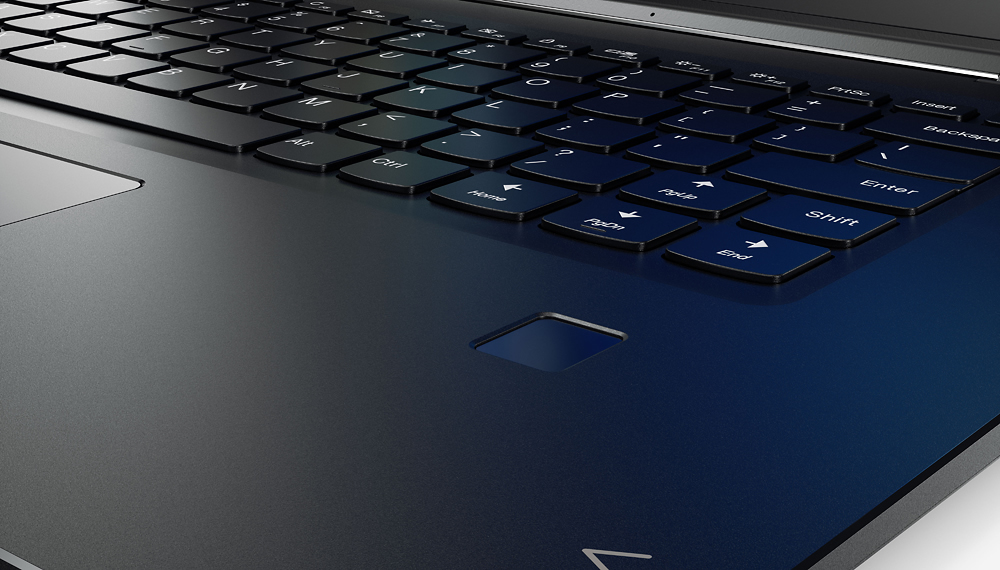
||Posted .This reviewer received promo considerations or sweepstakes entry for writing a review.Why I purchased this. I looked at the Yoga 910, Surface Book and others. This Best Buy exclusive Yoga 710 meet or beat the specs and options I was looking for, i.e. high end cpu, 4k monitor, dedicated gpu, convertible to tablet. The biggest issue or problem I have with this is 3 little areas on the keyboard that are completely horrendous for anyone that plans to use this for typing, creating, editing documents and spreadsheets and so on. The Problems are the Right hand Shift key, Home key, and End key. I can't express enough how bad the layout of these keys are. Touch-type on this requires total re-learning just for the reason of poor layout on these 3 keys. And this is a big device with plenty of real estate to have placed these keys properly! Right Shift key is is a small key located to the right of an up arrow key. How many times do you hit your right shift for capitalization? Now imagine every time you 'think' you've hit it, you actually hit the up arrow and end up typing characters on the wrong line! You have to correct the mess you just entered on the line above, then get back to where you were supposed to type. A royal pain!. Home and End keys. Again important keys when working with and editing documents and spreadsheets. You often need to navigate to the beginning of a line or the end etc. The Home and End keys on this model require you to hold the FN (Function key) in combination to the left or right arrow keys to switch them to Home or End respectively. Was the engineer that designed this keyboard layout NOT a touch typist? This 2-in-1 laptop/tablet is a joy to use, the screen is spectacular, the device looks and performs great, but the keyboard is frustrating to type on!
I would recommend this to a friendBrand response from Lenovo Product Expert
Posted .With regard to the right shift key issue you mention, there is a free software APP called KeyTweak that may help you. You can switch the key functions of specific keys on your keyboard with this software, so you could change the right shift key with the key you hit in its place. Just Google search "KeyTweak" and you will find articles about what the software does and you will find the download location for this free APP.
- Pros mentioned:Ssd, WeightCons mentioned:Keyboard quality
Choose well, it's your money!!!
||Posted .This reviewer received promo considerations or sweepstakes entry for writing a review.I have used several laptop for business and personal but Lenovo yoga beats all when compared based performance and price. New solid state drive give the laptop more than just an alternate to HDD. Used of SSD allowed reduction of weight, noise, and mostly improved cooling system. Converting from laptop to tablet immediately disables the keyboard so that you don't have to worry about pressing keys. Another advantage of this Lenovo is the biometric access control which allow you to login within passwords. Besides all, the color is perfect for all environment use. The black keyboard improve backlights and always look new. Choose we, it's your money!!!!!
I would recommend this to a friendBrand response from Lenovo Product Expert
Posted .Thank you for choosing the Lenovo Yoga 710-15. We are pleased to hear that the value, features and performance of the Yoga 710-15 meets your computing needs so well. We appreciate your loyalty to the Lenovo Brand.
- Pros mentioned:Battery life, Screen quality, Weight
Good machine, but problems with audio & resolution
||Posted .This reviewer received promo considerations or sweepstakes entry for writing a review.Purchased this to use as a laptop and a tablet. Looks great, light weight. Sitting it on your lap causes the vents on the bottom of the unit to be blocked which causes the fan to run a lot, but it's not super loud and it doesn't feel too hot to the touch. Being able to convert it quickly to a tablet by folding the keyboard back is very convenient. The touch screen works well and battery life is good. Good memory, it runs fast. There are TWO problems with this machine: 1st, the resolution is so high that it causes display problems within certain programs, such as menus appearing way too small with no real workaround to permanently enlarge without negatively affecting the rest of the screen. The 2nd and worst issue is that the audio stops working every time headphones are used and then removed from the jack. Online searches led us to find that this is a common problem and that the only way to resolve it is to uninstall the audio driver, restart the machine, then reinstall the driver again (downloaded from the Lenova website). Stupid waste of time and had we been aware of this issue, we'd have chosen something else.
No, I would not recommend this to a friend - Pros mentioned:Screen quality, Speed, Weight
Great 2in1 for photo editing
||Posted .This reviewer received promo considerations or sweepstakes entry for writing a review.Pros: Great colors Lightweight Slim Multi-mode Processing Speed SD card reader Cons: No Kensington lock Have not found a case to use in all 4 modes, not even 3 of the modes Having trouble adjusting window sizes with the touch screen I have yet to find a way to use adjustment brushes in LR using the touchscreen
I would recommend this to a friend - Pros mentioned:Speed, Weight
Great computer for price. Only 250GB Storage
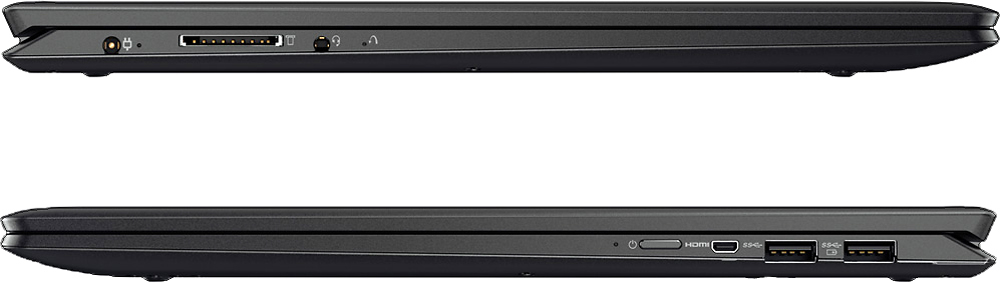
||Posted .This reviewer received promo considerations or sweepstakes entry for writing a review.This computer stands out instantly with the 16GB RAM and i7 processor. But when you see all that computing power you ignore the low 250GB of storage. It has the 2 USB 3.0 and micro HMDI that keeps the laptop thin and light. You don't have a CD drive or an ethernet port, but they would make the laptop bulky anyway. Most software is downloaded or installed from a flash drive so a lack of a CD drive shouldn't be an issue. You can buy an ethernet to USB adapter for about 10 bucks(I already have one). The laptop runs fast when I seem to try to push the memory by running many applications at the same time. It ran beautifully but the fan started to come on a lot, though. Overall the average college student or young professional will have a great laptop for everyday necessities. Recommended. A- (Low Hard Drive Storage)
I would recommend this to a friendBrand response from Lenovo Product Expert
Posted .Thank you for choosing the Lenovo Yoga 710-15. We are pleased to hear that the Yoga 710-15 is working out for you.