Customer Ratings & Reviews



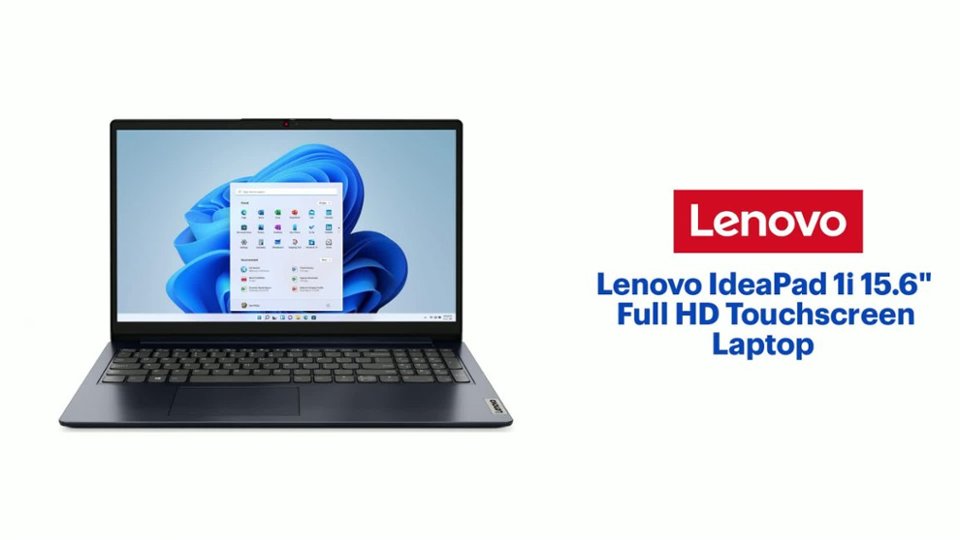
- Model:
- 82QD00HMUS
- SKU:
- 10408339
Rating by feature
- Battery Life
Rating 4.6 out of 5 stars
- Speed
Rating 4.6 out of 5 stars
- Display
Rating 4.7 out of 5 stars
New for home use
||Posted . Owned for 1 week when reviewed.This reviewer received promo considerations or sweepstakes entry for writing a review.Lighter than I expected which is night and the screen is nice and wide. The mouse/ track pad is sort of sticky but that may just I have t figured out the best setting yet. Otherwise pleased!
I would recommend this to a friendBrand response from Lenovo Product Expert
Posted .Hey AaronG, thanks for choosing Lenovo! We're thrilled to hear that you are overall pleased with your IdeaPad 1i. We really appreciate you sharing your experience and feedback with us.

Happy Customer
||Posted . Owned for 9 months when reviewed.This reviewer received promo considerations or sweepstakes entry for writing a review.Very easy to set up, easy to work with The staff helped so much with getting the right equipment to fit my needs
I would recommend this to a friendBrand response from Lenovo Product Expert
Posted .Hi LouiseM-
Thank you for choosing Lenovo and sharing your experience with us. We are happy to hear that you are enjoying the user-friendly design of the IdeaPad 1i. We aim to offer great user experience and are overjoyed to see that we met our goal.
Please reach out to us through the Q & A section of this product webpage if you have any questions or need any assistance.
Best wishes,
Lenovo
Good value with a couple of caveats
||Posted . Owned for 1 month when reviewed.This reviewer received promo considerations or sweepstakes entry for writing a review.This won't be the most blazing fast laptop you've ever used, but it is a decent value for the cost. The screen looks decent and the keyboard feels nice. With a cheap RAM upgrade, this can be an excellent laptop for students or for work use. My one big complaint is that all of these ship from the factory with S-Mode enabled. In my case, I simply could not disable S-Mode without first re-installing the OS. Re-installing isn't difficult, it was just annoying that I had to do it.
I would recommend this to a friendBrand response from Lenovo Product Expert
Posted .Hey DylanR,
Thank you for choosing Lenovo and for sharing your feedback with us, as this does not go unnoted.
We are glad to hear that your IdeaPad 1i offers good value to you.
Please feel free to reach out to us should you have any questions.
Best,
Lenovo
?
||Posted . Owned for 3 weeks when reviewed.This reviewer received promo considerations or sweepstakes entry for writing a review.Love the speed. Great screen. Battery life is not very good. Lasts less than 2 hours before needing a recharge
No, I would not recommend this to a friendBrand response from Lenovo Product Expert
Posted .Hey MJhome,
Thank you for choosing Lenovo and for sharing your feedback with us.
Regarding your issue with battery life – there are many variables that contribute to shorter battery life. Thankfully, many of those variables can be adjusted. By default, the system will tend to give more speed when needed, which can sacrifice battery life. If you want to squeeze out more battery life, we recommend utilizing the Lenovo Vantage application that is preinstalled to adjust settings related to power and battery performance (to access relevant settings, open Vantage > Device Settings > Power). You can also take advantage of the keyboard shortcut, Fn + Q to toggle thermal modes and easily switch between prioritizing battery life or power, or even the best of both worlds.
We hope that the information shared helps you and please feel free to reach out to us should you have any questions.
Best,
Lenovo
Better than anticipated!
||Posted .This reviewer received promo considerations or sweepstakes entry for writing a review.Works like a charm. Fast and really easy to setup and use.
I would recommend this to a friendBrand response from Lenovo Product Expert
Posted .Hey MatthewM,
Thank you for choosing Lenovo and for sharing your feedback with us!
We are glad to hear that your IdeaPad 1i has exceeded your expectations.
Please feel free to reach out to us should you have any questions.
Best,
Lenovo
Lenovo IdeaPad is a winner!
||Posted . Owned for 1 week when reviewed.This reviewer received promo considerations or sweepstakes entry for writing a review.Imagine my delight when I turned my new Lenovo computer on and it worked! Woohoo! It's exactly what I needed since all three of my others failed! They were good in the beginning, too, but now they are failures and I have a new "favorite!" and it was very inexpensive since I got the black Friday deal! I've now reached the limit of my useful information, but this machine really does everything that I want it to.
I would recommend this to a friendBrand response from Lenovo Product Expert
Posted .Hey Slick105, thanks for choosing Lenovo! We're thrilled to hear that your IdeaPad is working out well for you. We really appreciate you sharing your experience and feedback with us.
Highly recommend
||Posted . Owned for 1 week when reviewed.This reviewer received promo considerations or sweepstakes entry for writing a review.I needed a laptop to manage the website and emails for a club that I was elected as secretary of. I didn't want to spend a lot since this is a volunteer position but, I needed something that would be efficient and able to handle the workload. This does the trick. The memory and storage are perfect and it doesn't bog down when I have mulitple window open.
I would recommend this to a friendBrand response from Lenovo Product Expert
Posted .Hi, Precipice. Thank you for choosing Lenovo! We are glad to know that your IdeaPad is a great fit for your use and needs, and we appreciate your time taken to share your experience and feedback with us.
Laptop
||Posted . Owned for 1 month when reviewed.This reviewer received promo considerations or sweepstakes entry for writing a review.Love this laptop it works great the speed and quality fits my needs
I would recommend this to a friendBrand response from Lenovo Product Expert
Posted .Hey ChristineA,
Thank you for choosing Lenovo and for sharing your feedback with us!
We are glad to hear that you love your IdeaPad 1i and that it fits your needs.
Please feel free to reach out to us should you have any questions.
Best,
Lenovo
It works well
||Posted .This reviewer received promo considerations or sweepstakes entry for writing a review.Works great with zero issue, excellent speed and very light
I would recommend this to a friendBrand response from Lenovo Product Expert
Posted .Hey JOSE,
Thank you for choosing Lenovo and for sharing your feedback with us!
We are glad to hear that your IdeaPad 1i is working well for you.
Please feel free to reach out to us should you have any questions.
Best,
Lenovo
Lenovo laptop
||Posted .This reviewer received promo considerations or sweepstakes entry for writing a review.Love this laptop. Easy to use and super fast. Great for school
I would recommend this to a friendBrand response from Lenovo Product Expert
Posted .Hey Tcold,
Thank you for choosing Lenovo and for sharing your feedback with us!
We are glad to hear that you love your IdeaPad 1i.
Please feel free to reach out to us should you have any questions.
Best,
Lenovo
Works great
||Posted . Owned for 1 month when reviewed.This reviewer received promo considerations or sweepstakes entry for writing a review.I love this laptop. It fast and slim. The battery life on it is great.
I would recommend this to a friendBrand response from Lenovo Product Expert
Posted .Hey MarilynnF,
Thank you for choosing Lenovo and for sharing your feedback with us!
We are glad to hear that you love your IdeaPad 1i and that it is working great for you.
Please feel free to reach out to us should you have any questions.
Best,
Lenovo
Love it
||Posted . Owned for 3 weeks when reviewed.This reviewer received promo considerations or sweepstakes entry for writing a review.Love the ease of use. Quickness and slimness. Would definitely recommend for the price
I would recommend this to a friendBrand response from Lenovo Product Expert
Posted .Hey LoriM, thanks for choosing Lenovo!
We are glad to hear that you are loving your IdeaPad 1i, and we appreciate you taking the time to share this with us.
Lenovo IdeaPad
||Posted . Owned for 3 weeks when reviewed.This reviewer received promo considerations or sweepstakes entry for writing a review.Great laptop! Easy and intuitive to use. A breeze to set up
I would recommend this to a friendBrand response from Lenovo Product Expert
Posted .Hey BarbaraP,
Thank you for choosing Lenovo and for sharing your feedback with us!
We are glad to hear that your experience with your IdeaPad 1i has been great.
Please feel free to reach out to us should you have any questions.
Best,
Lenovo
Nice laptop at a great price
||Posted .This reviewer received promo considerations or sweepstakes entry for writing a review.Works great for me, no issues besides the battery life isn't great but I usually leave it plugged in anyway.
I would recommend this to a friendBrand response from Lenovo Product Expert
Posted .Hi AngelaU-
Thank you for choosing Lenovo and sharing your experience with us. We are overjoyed to hear that you are enjoying the IdeaPad 1i. We aim to provide excellent user experience for our products, and we would like to recommend a solution to help enhance your experience.
Firstly, we recommend running and installing all available drivers updates through Lenovo Vantage and Windows Update Settings, these updates are crucial to the device’s health and will affect the device’s power output leading to improve battery consumption. To check for updates within Lenovo Vantage begin by launching the application, then select the “Check for updates” button on the top of the right-hand of the display. To check for Windows Updates, start by launching the Settings app, then selecting the Windows Update tab on the left-hand side of the page, finally select the “Check for updates’ button located in the top right of the page.
The IdeaPad 1i also comes with the ability to change the active performance profile based off of your needs. To start launch Lenovo Vantage, then select "Device settings" from menu located on the left of the display, then scroll down to "Power modes", from here you can select any of the modes based off your needs. We recommend Battery Saver/ Quiet Mode which will reduce battery consumption and reduce the fan noise when using the device.
Please reach out to us through the Q & A section of this product page if you have any questions or need any assistance.
Best wishes,
Lenovo
Nice for the Price
||Posted . Owned for 3 weeks when reviewed.This reviewer received promo considerations or sweepstakes entry for writing a review.I tried an HP but the keys felt cheap, and this one, while still a budget-minded laptop, it feels higher quality. Stick with an i5 or higher. 8 GB memory is fine for most basic computing. Chances are if you need more memory for what you are doing you will need higher end equipment overall, so for folks just wanting a good solid machine this one is a good choice.
I would recommend this to a friendBrand response from Lenovo Product Expert
Posted .Hey Rick,
Thanks for choosing Lenovo!
We are glad to hear that your IdeaPad 1i is working nicely for you, and we appreciate you taking the time to share your perspective with us.
Best,
Lenovo
Great Laptop for Home Use
||Posted .This reviewer received promo considerations or sweepstakes entry for writing a review.This laptop looks great and works well. The battery life is slightly lacking but it meets all our daily needs. The only minor issue was that the charger that came with it doesn't actually go with this laptop, so we ordered the correct one.
I would recommend this to a friendBrand response from Lenovo Product Expert
Posted .Hi ArnoldK,
Thanks for choosing Lenovo and for sharing your feedback with us. We are sorry to hear that battery life fell short for you and that you had an issue with power adapter. We strive to provide the best experience possible, and if your power adapter issue is resolved, we want to address your battery life concerns.
To start, there are many variables that contribute to shorter battery life. Thankfully, many of those variables can be adjusted. By default, the system will tend to give more speed when needed, which can sacrifice battery life. If you want to squeeze out more battery life, we recommend utilizing the Lenovo Vantage application that is preinstalled to adjust settings related to power and battery performance (to access relevant settings, open Vantage > Device Settings > Power). You can also take advantage of the keyboard shortcut, Fn + Q to toggle thermal modes and easily switch between prioritizing battery life or power, or even the best of both worlds.
Please let us know what else we can do to try to improve your experience, as your satisfaction is important to us.
Regards,
Lenovo
Perfect budget work laptop
||Posted . Owned for less than 1 week when reviewed.This reviewer received promo considerations or sweepstakes entry for writing a review.Excellent laptop for the sale price. Sleek color and design. Display is beautiful—clear HD and matte make it easy to look at for long periods of time with no glare or awkward viewing angles. 8GB of RAM makes it a little on the slower side but overall runs very smoothly due to the strong processor. Looked for ages for the perfect budget school and work laptop and this is it!
I would recommend this to a friendBrand response from Lenovo Product Expert
Posted .Hey PaisleyQ,
Thanks for choosing Lenovo!
It is good to know that your IdeaPad 1i is perfect for you, and we appreciate you taking the time to share this with us.
Works Great
||Posted .This reviewer received promo considerations or sweepstakes entry for writing a review.Best laptop I had used in a while. Would've gave it five stars it wasn't for the battery life. Other than works very well once you upgraded the ram to 16 GB.
I would recommend this to a friendBrand response from Lenovo Product Expert
Posted .Hi,
Thanks for choosing Lenovo and for sharing your feedback with us!
Regarding your note on battery life – there are many variables that contribute to shorter battery life. Thankfully, many of those variables can be adjusted. By default, the system will tend to give more speed when needed, which can sacrifice battery life. If you want to squeeze out more battery life, we recommend utilizing the Lenovo Vantage application that is preinstalled to adjust settings related to power and battery performance (to access relevant settings, open Vantage > Device Settings > Power). You can also take advantage of the keyboard shortcut, Fn + Q to toggle thermal modes and easily switch between prioritizing battery life or power, or even the best of both worlds.
We are glad to read that you are otherwise satisfied with your purchase.
Please don't hesitate to reach out to us via the Q& A section of this product page or contact Lenovo Support should you have any questions or need assistance.
Regards,
Lenovo
Love it
||Posted . Owned for 1 month when reviewed.This reviewer received promo considerations or sweepstakes entry for writing a review.Love it. It is perfect for what I needed it for. A backup pc. It was reasonably priced. I haven't had any issues. The touch screen is great and numeric pad awesome for accounting. I wish it had more memory like 1TB. SInce Microsoft updates take up most. Better than a broken cromosone chrome book
I would recommend this to a friendBrand response from Lenovo Product Expert
Posted .Hey Jazz, thanks for choosing Lenovo!
We are glad to hear that you love your IdeaPad 1i and that it is perfect for your needs. We appreciate you taking the time to share this with us.
Computer
||Posted . Owned for 3 weeks when reviewed.This reviewer received promo considerations or sweepstakes entry for writing a review.Great screen picture and light weight. Great touch on key board.
I would recommend this to a friendBrand response from Lenovo Product Expert
Posted .Hey Darrell,
Thanks for choosing Lenovo!
We are glad to hear that your IdeaPad is working out great for you, and we appreciate you taking the time to share your perspective with us.
Best,
Lenovo