Customer Ratings & Reviews



- Model:
- EA7500
- SKU:
- 4830200
Rating by feature
- Value
Rating 4.5 out of 5 stars
- Quality
Rating 4.6 out of 5 stars
- Ease of Use
Rating 4.6 out of 5 stars
Customers are saying
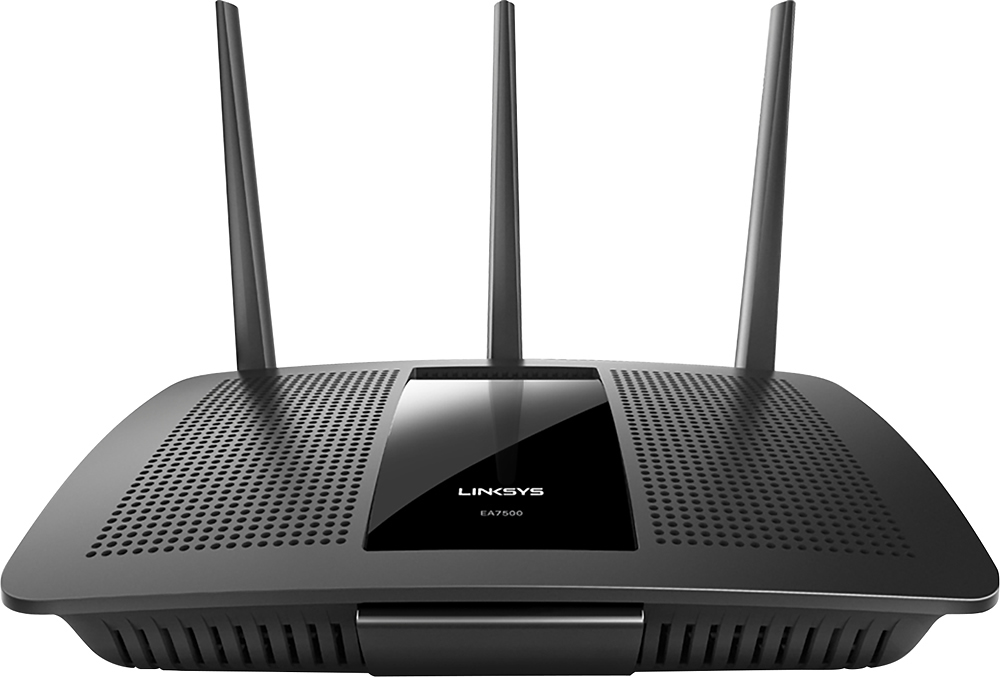
Customers find value in the AC1900 Dual-Band WiFi 5 Router's ease of use, range, and strong signal, frequently praising its performance and simple setup process. Many appreciate the improved WiFi coverage and its suitability for streaming. While some find the router larger than expected, the overwhelmingly positive feedback highlights its effectiveness.
This summary was generated by AI based on customer reviews.
Ok if you don't need wifi
||Posted .This reviewer received promo considerations or sweepstakes entry for writing a review.This router is fine but very flaky wifi for mobile devices. Otherwise it's a typical no frills device
No, I would not recommend this to a friendBrand response from Linksys Staff
Posted .Hi, Nunya,
The EA7500 router is expected to provide a powerful WiFi coverage throughout a medium-size house. However, several factors may have affected its performance, such as physical obstructions and wireless interference. Please get in touch with us at [email protected] so we can have our Escalation Engineers look into this. Include your contact details and a link to this review for reference.
Regards,
Rosalyn
Linksys Support
Did not function out of the box.
||Posted .This reviewer received promo considerations or sweepstakes entry for writing a review.I purchased this router because it claimed to be great for streaming 4K TV. I got it home and unpacked it and started to setup following the instructions exactly. However, the router would not communicate with the server online. Spent an hour and a half on the phone with support just for them to conclude that the router was dysfunctional. Repackaged and returned that day for credit to get the Netgear.
No, I would not recommend this to a friendBrand response from Linksys Staff
Posted .Hi, jrpr,
Our Linksys EA7500 router is easy to set up and it works perfectly with your 4K TV. It appears that what you bought is a possible defective unit, and we found this incident pretty alarming since all our products went through rounds of testing prior to packaging and shipping. No worries, we'll relay your feedback to our Team for investigation. If you decide to purchase a Linksys router in the future, we will gladly welcome you back as one of our most valued customers and answer any questions you may have.
Let us know should you have queries, or should you need assistance in the future. Contact us directly at [email protected], anytime.
We'd be happy to assist you.
Regards,
Jay
Linksys Support

A Good Wireless Router
|Posted .This reviewer received promo considerations or sweepstakes entry for writing a review.Our household has cut the cable cord so we rely on our wireless router. I can have over 20 devices on and accessing the Internet at any one time between the computers, tablets, game consoles, streaming boxes and phones. I had a perfectly service AC1900 router that provided full coverage to my house. I therefore swapped this router in the exact same place. Coverage seems equal is not slightly better then my older router. It could be from the beefier antenna. Setting up the router was an easy affair. Only downside was as soon as I connected it auto connected to the router for configuration. The setup was easy and I like th efact the router will auto update itself. That is nice to see that security patches can be pushed automatically and saves me from having to monitor it as I would with others. The Setup was something my mother could do, though I was not happy with the Smart Wi-Fi not taking a complex password. I did turn it on briefly to play with but after seeing it works and I could connect, I deleted my account. I do not like having connected devices to internet not protected by very long and complex passwords. If they update the system to take passwords that very log or enable some kind of two-factor so I can protect my network I will use the feature again, and if they do I will make sure my parents get one as I can support them easily. However until they do that I will not be using that feature. Otherwise setup was a breeze. My devices as I was fiddling with the different settings that required a radio reset would connect right back. We have run it for a week and no one has noticed the switch. The ability to set certain computers or protcols as High priority is easy and nice. We use Skype to talk to family and sometimes it lag because of a large download. The QOS settings worked great in the tests we ran, it made sure the Skype connection stayed. But otherwise noone has noticed a difference. Again that isn't a bad thing. I don't want to manage the device, and if people don't notice something working I consider it success. If they had two-factor for smart wi-fi, or at least password complexity and long passwords I would give this router five stars. But that missing secure feature on an other wise good router, If you have to support a large number of devices and need a modern router that at least for the first week and half I've had it been working without a hitch this would be the one for you. I did like the fact too that you can turn off all the lights. That is nice if you have it a bedroom or dark room and don't want to see the flashing. I wish more devices had that feature. I'm looking at you bright blue LED's from EVERYONE!
I would recommend this to a friendBrand response from Linksys Staff
Posted .Hi,
Thank you for your time in posting this honest product review. We have noted your feedback and will use this to improve our product. We are glad to know that the setup went smoothly and the test was positive. Should you need further assistance, feel free to contact us at [email protected] with your contact details (name, phone number, and location) and the link to this review for our reference.
Regards,
Linksys Support
http://support.linksys.com
- Pros mentioned:Ease of use, Signal strength
Easy to set up; high quality signals
|Posted .This reviewer received promo considerations or sweepstakes entry for writing a review.This is a very sleek router that puts out a really good signal and was easy to set up. I liked the interface with the Linksys walkthrough in my browser that helped set up my profile, the router name, passwords, guest access, etc. I got some unintended assistance from the Linksys phone staff due to a self-inflicted issue during set up. (Very stupid on my part). The Linksys rep spoke excellent English (may have even been in the US!) actually stayed on the line beyond when I needed her and was even more basic in description and guidance than I needed (perfect for true noobies to routers!).
I would recommend this to a friend Router
||Posted .This reviewer received promo considerations or sweepstakes entry for writing a review.Did work with our TV equipments and hard to hook up had to return it Staff were very helpfully
I would recommend this to a friendThis router is horrible
||Posted .This reviewer received promo considerations or sweepstakes entry for writing a review.I have had nothing but problems since I bought this router, I have spoken to tech support 5 time with issues and setting that no one would know about, router keeps resetting itself and changing passwords. I would NOT recommend this router at all.
No, I would not recommend this to a friendBrand response from Linksys Staff
Posted .Hi, Doubletroublez,
There could be factors that affected the configuration of the router. Since you've mentioned contacting our Support team, allow us to review your case and get you over to our Escalation Engineer for further isolation. Please email us the reference number from the team at [email protected] along with your phone number and the link to this post for our reference.
Regards,
Irish
Linksys Support
A Nightmare to Set-up!
||Posted .This reviewer received promo considerations or sweepstakes entry for writing a review.I purchased this router after reading other reviews, but found the installation to be an absolute deal breaker. I spent a day and a half with Linksys offshore technical support and my home wireless still fades in and out. Sorry I bought this equipment. I would NOT recommend this router unless you enjoy spending hours on the phone in failed attempts at setting-up!
No, I would not recommend this to a friendBrand response from Linksys Staff
Posted .Hi, Slainte,
Setting up the EA7500 Router should be easy using the Smart Setup Wizard which is available even if the router does not have an Internet connection or is in its default settings. If you're still experiencing dropping connectivity, please emails us your phone number at [email protected] so we can trace the history of your case and endorse it to one of our Escalation Engineers for a fix. Include the link to this review for reference.
Regards,
Jay
Linksys Support
- Pros mentioned:Performance, Speed
Amazing!
|Posted .This reviewer received promo considerations or sweepstakes entry for writing a review.I didn't know what to expect when I received this. I assumed it would be like every other router I used...something that works well enough handle my needs but nothing extraordinary. I was so surprised to see that this router worked better than I could anticipate. It handled multiple devices running at the same time with easy...without sacrificing speed to any device. At one point we were streaming video from our TV, had 4 smartphones being actively used, and 2 laptops running...all at the same time. Absolutely worth having if you run several devices at the same time.
I would recommend this to a friend - Pros mentioned:Ease of use
Excellent Router
|Posted .This reviewer received promo considerations or sweepstakes entry for writing a review.I would like to first start off by saying this an excellent router. My very first wireless router purchased back in 2001 was a Linksys, and I have to say the brand is one of the best. For the last couple years I have been renting my cable modem with the built in wireless router and have been very disappointed in the range I was getting. I was actually thinking about purchasing a wifi extender because I would frequently loose connection in my kitchen when streaming video while chopping and doing other prep work as I would cook. No need to now, because the connection is flawless. Network congestion is also a thing of the past. We currently have an ample supply of devices working off this thing: Xbox One, Xbox360, Mac Mini computer, 2 iPhones, iPad, amazon kindle, 2 nintendo 3DS, Apple TV, and an LG smart TV. A few people could play fast paced multi player games on multiple devices simultaneously and wont have a problem with lag. Keep in mind, I am still only paying for my 75 Mbps internet service from my cable provider, but according to the Ookla Speed test, I'm consistently getting high 80's upload speeds in those hard to reach rooms while using the iPad or iPhone, and my Mac Mini (2011) is averaging at 110. Even though I don't currently possess any devices that utilize AC wifi speeds yet, my stuff works great and I'll be ready for it. Another added bonus is the router also has both a USB3 and USB2 ports which work great connecting to an external network hard drive. My TV automatically picked up the drive without an issue and it was pretty easy connecting to it with my Mac. Before I forget to mention, setup was a breeze. Linksys has a Smart WiFi site that is so user friendly and can be accessed even away from home. It walks you though the setting up from start to finish. Up until now, I have never had a separate guest login, but it's a great feature to have. This way friends and family can use the wifi and not have access to stuff they shouldn't. It will also allow you to set up different logins for your network drives adjusting who has read only or read and write authority. Parental controls are also a feature provided, which I haven't yet used, but it's there for when you want to have a handle on what your children are streaming. All in all, this is a fantastic router. As much as I have gone on about it, I still can't say enough about how impressed I am. From the ease of setting up to range and reliability, you just can't go wrong.
I would recommend this to a friend More MU-MIMO capable devices needed
|Posted .This reviewer received promo considerations or sweepstakes entry for writing a review.As it stands, any MU-MIMO router you purchase on the market will currently behave and function the same as any other 802.11ac router and specifically any AC1900 router in it's class. That's because end-user devices require Wi-Fi antennas that specifically take advantage of the MU-MIMO instruction. I had trouble finding a USB 3.0 Wi-Fi card that has MU-MIMO support, and because of that not a single device in my home can currently support such instruction. Now what's MU-MIMO supposed to do and why is such a touted feature of this product so important? Currently, 802.11n and newer Wi-Fi bands broadcast as a single user-multi input multi output (SU-MIMO) gateway. This means that as the signal is broadcast, it offers full bandwidth potential to one wireless device at a time, particularly the device closest to the router with the best acquired signal. Say for example you're using a high-bandwidth application on your PC computer in your bedroom and are farthest from the router, you are being "de-prioritized" to traffic from a device closest to the router, say a smart TV or a game console. If those devices aren't in use at the time you're using your PC computer, however, your PC takes full advantage of prioritization. In homes with particularly fast broadband connections (above 50Mbps), we don't see this issue affect many user's wireless bandwidth potential because routers do a pretty good job at dividing bandwidth between devices. But see, that's the problem with SU-MIMO. If 5 devices are connected and are using Internet traffic simultaneously, each device gets 10Mbps of available bandwidth (50/5). That's the major problem MU-MIMO will solve: the "MU" stands for multi-user; each client device capable of using this tech will take full advantage of your ISP's download speed /and/ will never suffer from de-prioritization if that is such a case as a result of multiple devices requesting packets from the router simultaneously. So all those 5 devices? They can theoretically hit 50Mbps simultaneously and all of them can be downloading music or streaming content and all bandwidth and traffic would be treated equally. How's that for equality? There's only one major problem about this incredible tech: Nothing sold on the market at the moment supports it! I wish Linksys would at least release alongside this class of product a USB 3.0 Wi-Fi adapter that is able to take advantage of MU-MIMO from the get-go. We also plan to see many manufacturers of Wi-Fi devices (smartphones, game consoles, TVs, etc.) take advantage of MU-MIMO tech in future versions of their hardware so that eventually your home can take advantage of this much-welcomed technology that can help alleviate some of the woes Wi-Fi technology has infamously shared since it first became a reality. tl;dr: router of the future, no really. nothing out to support it yet though.
I would recommend this to a friend- Pros mentioned:Ease of use, Performance
Excellent leadership for buying router
Posted .This reviewer received promo considerations or sweepstakes entry for writing a review.I went to Best Buy on Christmas Eve to buy a new router because the old one was not working well. Despite the chaos of Christmas Eve, two representatives helped me to select my router. We discussed the problems I was having, aired the usual gripes about internet providers, and they suggested by best product for the money and my needs. I purchased a LINKSYS MAX-STREAM AC1900 MU-MIMO Gigabit Router, brought it home, set it up in a few minutes, and it works perfectly. Kudos to Best Buy and Linksys!
I would recommend this to a friend - Pros mentioned:Ease of use, Signal strength, Speed
Very Fast, easy to setup! Online apps! Best option
Posted .This reviewer received promo considerations or sweepstakes entry for writing a review.I have had the EA6500 for about two years now and I thought there could be nothing better than the superfast EA6500. Well, Linksys has outdone themselves! The EA7500 is so much faster and extremely easy to install and setup! I love having the web access to the router from anywhere with the website or app. It’s nice to have full control of the router from anywhere. I’m also very impressed with the signal strength which easily covers the whole house and most of the yard. I noticed that the EA6500 had a hard time streaming full HD movies from my local server. Not a problem with the EA7500! This thing is fast! I like having the antenna’s outside of the router. I am not really very tech savy but following the instructions, the setup was really simple! The online apps really help with parental controls and allow for fixing things from anywhere. I received a free sample from Linksys in exchange for my honest feedback!
I would recommend this to a friend Easy to set up
|Posted .This reviewer received promo considerations or sweepstakes entry for writing a review.I replaced an older dual band router with this one. The older one allowed me to connect to the 5GHZ band with any device from almost anywhere in my house. While this router was easy to set up and connect and has some great features I can not connect any of our phones or laptops to the routers 5GHZ band. The only item I have that has connected to it is the TV. All other devices don't even register band 2. I have walked the entire house disconnecting and reconnecting devices to no avail. I have reinstalled the router and gone through the set up process three times. The band 1, 2.4GHZ side works great and actually has better coverage than the old router.
I would recommend this to a friendBrand response from Linksys Staff
Posted .Hi Clarkjrs,
We appreciate the time you spent in sharing this review. Adjusting the router’s wireless channel is a good move to avoid possible interference in your network. The recommended channels for the 2.4 GHz network are 1, 6, and 11 since they are considered non-overlapping channels. For the 5 GHz network, channels 36, 40, 44, and 48 are recommended. Once accomplished, test the connection.
Let us know how it goes at [email protected] with your contact details, location, and the link to this review for reference.
Regards,
Linksys Support
www.linksys.com
very bad
||Posted .This reviewer received promo considerations or sweepstakes entry for writing a review.got this router yesterday replaced it with a dlink dir655..which came out in 08 btw was getting 150mbs on it and only 72 on the linksys..talked with support for 2hours and finally told me had exhausted all my options..so NO i dont recommed this product i will be returning it and try netgear out maybe have better luck with them
I would recommend this to a friendBrand response from Linksys Staff
Posted .Hi,
This is definitely not the experience we want for our customers. Before you return the device, allow us to have our Second Level Technicians assist you with further troubleshooting. Just send us your case number at [email protected] along with the link to this post.
We hope to hear from you soon.
Regards,
Thaddeus
Linksys Support
- Pros mentioned:Range
Excellent Linksys Router
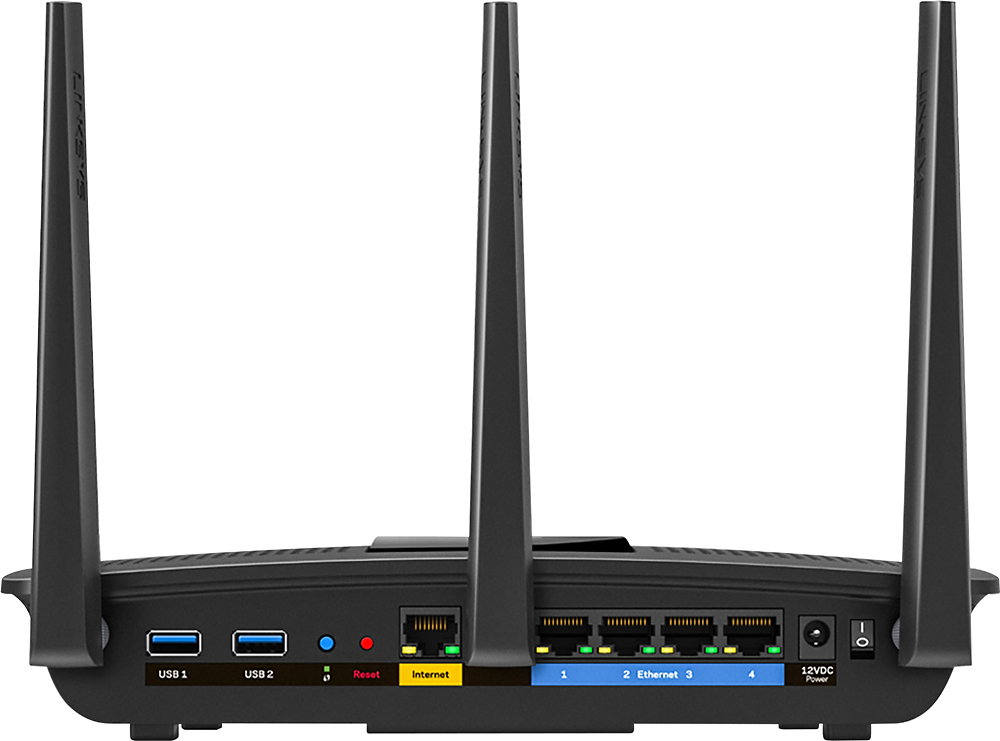
|Posted .This reviewer received promo considerations or sweepstakes entry for writing a review.To be fair i received this product as part of the tech insider network, so i can not attest to the cost of this item versus its value. But i will give you an honest review. This is my 2nd Linksys router. I recently purchased the ac-1600 smart wifi router in November of 14 and that has been an excellent purchase. This new router to my surprise is even better. From the get go this router was easy to setup as it seems all Linksys routers are. Make sure you attach and screw on the 3 wifi antennas as they truly help to achieve a stronger signal. If you follow the quick set up instructions provided you should be setup and good to go within 15 minutes. No need to use the provided install disc either if you do not have a disc tray. You can simply use the WPS setup with the provided pw on the sticker attached to the bottom of the router. As far as range this tops all other routers. I currently live in a small 4 room apartment, and i receive a strong signal in every room. I have no problem receiving a signal outside or deep into my backyard. The range listed on the box says "Medium" sized houses. The "MU-MIMO" technology says its for multi streaming to different devices. Im not sure if i have noticed an increase in speed versus my other linksys, but i will say that it does not have an issue keeping up with multitasking. I tested this by streaming netflix on my laptop, while streaming youtube on my tablet, pandora on my phone and playing xbox live. I had no issues or lagtime on any device. My only issue with this Linksys router would be the design of the antennas. They seem flimsy and seem as if they could break if you are to rough installing them, or if you have children that like to grab everything. Overall this is an excellent router well worth the value you will get. It also includes a USB 2.0 and separate 3.0 input on the back of the device.
I would recommend this to a friend - Pros mentioned:Ease of use
Great router, easy setup.
|Posted .This reviewer received promo considerations or sweepstakes entry for writing a review.Plug this router in using my existing cat6 cables, Add power and with in just a few minutes you're up and running with default settings. The included instructions in the box are simple, but should be enough for most people. But if you're like me and want specific settings and controls then there are plenty of options with the Linksys interface. I had a browser window already open when I powered this router on and it refreshed automatically to the admin\setup page for this router. I didn't have to type in the local IP address to access it for the first time. Very cool. It immediately recognized all my devices that were connected and allowed me to access parental controls for each one. Other routers (ASUS AC1900) you have to use mac addresses for each device to manage parental controls and that becomes a pain. So I did a couple of speed tests once I got the router set up. I have a 200 Mbps connection with cox and usually hit 200+ on a wired connection and 30-40 on wireless. With this router and its new technology I actually hit about 150Mbps download speed on my phone via wireless connection. That's never happened with any other wireless router Ive had in the past. I have a lot of devices connected to this router. Multiple tablets, cell phones, computers, and xboxs. Only time will tell how durable this router is feeding that many devices. But so far so good, I'm completely satisfied. Another thing I'm happy about is the app you can download to manage your router from anywhere. This is so convenient when you are at work and need to shut the internet down because you have kids that are fighting at home over the summer....or because they dont want to do their chores. haha I also like the fact that this router does not light up a dark room with blue LEDs that are too bright. Instead it has a Linksys logo that's lit up and that's it.
I would recommend this to a friend Okay
||Posted .This reviewer received promo considerations or sweepstakes entry for writing a review.Amazon tv buffers. Tried switching between the data streams and nothing better.
No, I would not recommend this to a friendBrand response from Linksys Staff
Posted .Hi, Ratite,
We can optimize the wireless settings of your router to ensure excellent performance. Aside from keeping the firmware up-to-date, we recommend setting fixed channels for both bands to whatever matches your current network setup. Try channels 1, 6, 9 and 11 for the 2.4 GHz Wi-Fi network, and channels 36, 40, 44 and 48 for the 5 GHz. If it doesn't work, email us the details at [email protected] so we can get this sorted out. Don't forget to include your contact information, the review title and the link to this post.
We'd be more than happy to help you out.
Regards,
Jay
Linksys Support
- Pros mentioned:Ease of use
Good Future Proof Router
|Posted .This reviewer received promo considerations or sweepstakes entry for writing a review.I received this free as a part of the Best Buy Tech Insider program. I do not have a MU-MIMO enabled device to test with this router. I did test it with many AC, N, G, and even one old B, 802.11 devices on the frequencies they are available on, 2.4 (B, G, N) and 5 ghz (N, AC). There are hardly any MU-MIMO devices on the market to get the full potential out of this router as of my review. MU-MIMO is like talking back and forth to 5 people at once. Regular MIMO (all WiFi prior to MU-MIMO) is like talking to person A for one second, then talking to person B for one second, etc, then waiting to talk to person A again only after you have talked to the 5th person in the loop. This time-slicing, while efficient because a machine is managing it, is obviously slower than doing all the talking concurrently. The biggest advantage for MU-MIMO is data intensive things like video going to multiple wireless devices at the same time. As long as your router wireless speed and internet/video/data provider can keep up, will be able to have multiple streams of high resolution video going to multiple devices without a hiccup, In theory. The first MU-MIMO enabled devices a lot of consumers will buy and not even realize it will be new models of cell phones released in 2016. I ran this router as a wireless bridge to my main router and as a full router (handling its own DHCP), and also as an access point (linksys calls this bridge) to my main router (passing DHCP responsibilities to main router). Wireless Repeater is also another option which I did not try. In comparison to my high end Netgear R8000 router from circa 1 year ago, the wireless speed to the same AC devices was very similar, when limiting the R8000 to a single 5 ghz channel instead of its usual two channels, which it uses for balancing purposes. The range at which connection speed dropped off was also very similar, just slightly lower on the Linksys. I have to assume the beamforming transmission to AC devices on 5ghz is working about as well as the Netgear R8000. My house is hard on wireless signals, the 3 big chimney stacks all together in the center of the house kill signals pretty reliably, but this Linksys did well also when communicating and providing the internet to my Netgear EX6200 Extender for the far side of the house from the main router. All in all, it was very easy to setup, and will be a good mainstream router for the newer devices coming out with MU-MIMO enabled wireless, for those who stream several HD-video, PC Gaming, or other large data streams at the same time.
I would recommend this to a friend Have issues with wifi connecting to cell phone.
||Posted .This reviewer received promo considerations or sweepstakes entry for writing a review.When using cell it keeps disconnecting from Internet.
I would recommend this to a friendPoor signal strength
||Posted .This reviewer received promo considerations or sweepstakes entry for writing a review.I exchanged it for a router with better range and signal strength
No, I would not recommend this to a friendBrand response from Linksys Staff
Posted .Hi, Smoothmann197,
There are steps that can help improve the range and signal strength of the router. Please email us at [email protected] with your phone number and the link to this post so that we can have you assisted by our Escalation Engineers.
Regards,
Irish
Linksys Support