Customer Ratings & Reviews
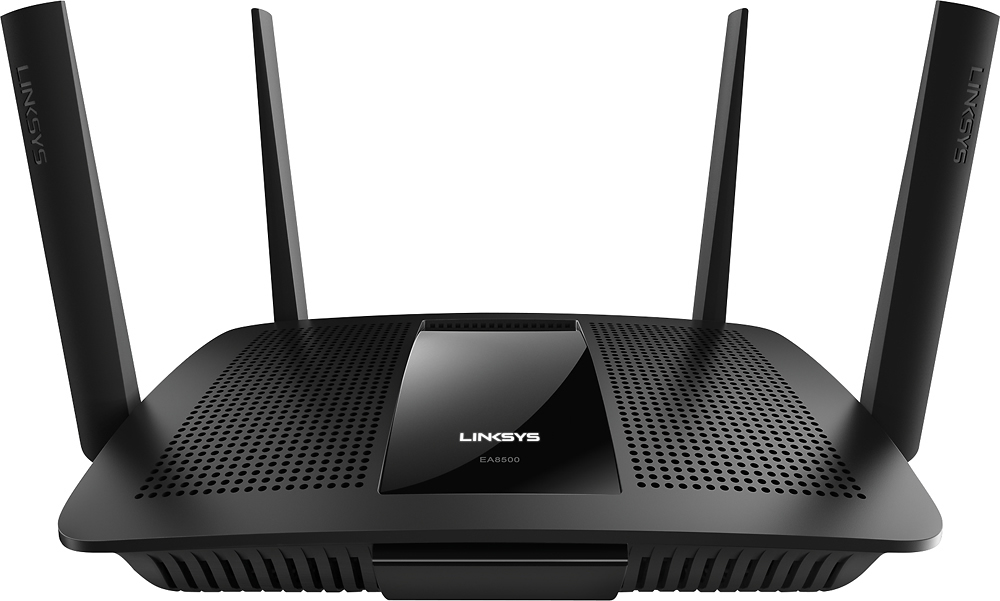

- Model:
- EA8500
- SKU:
- 5265041
to a friend
Customers are saying
Customers appreciate the AC2600 Dual-Band Wi-Fi Router's impressive range, ease of use, and strong signal, leading to positive feedback on performance and setup. Many found the router easy to install and use, resulting in reliable streaming and great coverage. However, some customers experienced connection issues and noted the router's relatively high price and larger-than-expected size. A few users also mentioned concerns about the firmware and occasional lag.
This summary was generated by AI based on customer reviews.
- Pros mentioned:Ease of use
Better service
||Posted .This reviewer received promo considerations or sweepstakes entry for writing a review.Easy set up. Was having problems connecting to WiFi upstairs. Now the service is so much better!
I would recommend this to a friend - Pros mentioned:Speed
Great Router
||Posted .This reviewer received promo considerations or sweepstakes entry for writing a review.upgraded my old router to this and am very pleased, extremely fast with 5 connections, great buy!
I would recommend this to a friend - Pros mentioned:Signal strength
Great for a house with many rooms
||Posted .This reviewer received promo considerations or sweepstakes entry for writing a review.We live in a house with all kinds of walls and the signal comes through perfect in every room!
I would recommend this to a friend - Pros mentioned:Performance, Range, SpeedCons mentioned:Connection, Size
Great router with superb speed and range
Posted .This reviewer received promo considerations or sweepstakes entry for writing a review.I received this product for free as part of Belkin's Friends + Family Program. However, the fact that I received the router at no cost does not impact my review of it in any way. Let me start by saying the router is much larger than the Buffalo N router it replaced. It also has an additional set of two antennas giving it a total of four. This was double what my previous router had and gave me hope that the coverage would be better. After opening the box, attaching the antenna, and opening up the quick start guide I began to setup the router. I used my laptop for the install and configuration but my understanding is that you can also use an iPhone or Android phone. The setup was very simple; I plugged the router in and connected using the information supplied in the guide. I then followed the step by step and went through all the basic configurations for the router. I changed the SSID and the password and then proceeded to setup the available guest network. Once the basic settings were configured I decided to try out some advanced features. Since this router has a built in USB connection, I decided to try connecting an old Seagate USB drive I had laying around. I knew there were some movies, photos, and general backed up data. I connected the drive and then logged into the configuration utility via http://linksyssmartwifi.com The utility makes everything point and click and even allows you to remotely configure the settings (if the option is on). After logging in I clicked on the “External Storage” section and turned on the sharing settings. It was very easy and took less than 2 minutes to set everything up. I fired up my Xbox One and went to the media player. I was excited to see that all my photos and videos were readily available for streaming to the device. I’ve watched several HD 1080p movies stored on the router connected drive and not once did I experience any lag, stuttering, or any issues at all. I decided to do some speed testing from various wireless devices ranging from a laptop to a tablet. I started at the far end of my home where I had at least ten walls between the router and the wireless device used for testing. I fired up a speedtest app on my Galaxy Tab 2 and away she went. Performance was identical to the speeds I received standing next to the router. I was maxing out my ISP connection and experienced very little latency (18ms). I then proceeded to run the same tests from my basement, my second floor, and from my detached garage. The only one that experienced any loss of speed was the test in the garage. Now keep in mind that its about 100 feet away from the router and through several walls, insulation, and vinyl siding. Even with all those obstacles the connection was still very useable. I did experience one issue while using this router with my Xbox One. I spent a Saturday afternoon playing some Call of Duty and then decided to watch a movie via the USB drive connected to the router. I went to the media player on the Xbox and no drive showed up. I knew I was connected to the router because I had just played a multiplayer game with no issues. I booted up my laptop and logged into the configuration utility for the router. I then checked the drive to make sure it was connected and functioning as it was supposed to. Everything checked out as it should, so I checked to see if I could access the drive via the laptop. I had no issues at all using the drive and streaming media to the laptop. At this point I decided to reboot the modem to see if that did anything, which it did not. I then rebooted the router and viola, the issue was resolved. I should mention that I noticed the IP and Gateway information on the Xbox was different then what the router was using. This was the case even though I had it set to auto detect the network information. After rebooting the router, the network information was back to being correct. This issue has happened twice since I setup and began using the router and both times was resolved simply by rebooting the router. The issue is a bit annoying but it doesn’t occur often enough to make me want to return the router. Also the fact that the performance is so much better than my old router makes the issue with the Xbox One; one which I can live with. I’m sure future firmware upgrades will resolve the issue permanently. In closing, I can say that I would gladly recommend this router to friends and family that are looking for increased speed and range over their older routers. The ease of setup makes this ideal for even the most novice of users. You won’t regret your purchase!
I would recommend this to a friend - Pros mentioned:Signal strength
Great router
||Posted .This reviewer received promo considerations or sweepstakes entry for writing a review.Works good, has a strong signal picks up through out the house and on front porch
I would recommend this to a friend - Pros mentioned:Performance
Awesome router
||Posted .This reviewer received promo considerations or sweepstakes entry for writing a review.My last router got fried and this was the only one left in stock. Have not been disappointed!
I would recommend this to a friend Great unit!!!
||Posted .This reviewer received promo considerations or sweepstakes entry for writing a review.Great unit!!! Easy to set up Works great. No losing signal thru entire house
I would recommend this to a friend- Pros mentioned:Range, Speed
Fast and Relatively Stable
||Posted .This reviewer received promo considerations or sweepstakes entry for writing a review.Very quick with excellent range and easy to configure. Had to restart a few times after purchase initially due to some connection issues with all devices around the house. Haven't had issues since (maybe it was a software issue that was fixed?).
I would recommend this to a friend - Pros mentioned:Ease of use, Signal strength
So far so good seems strong and so far no issues.
||Posted .This reviewer received promo considerations or sweepstakes entry for writing a review.So far so good. Had many netgear products that failed plan on using them for target practice. Get good strong signal in the house 3500 square feet. Easy to setup and guest logon a breeze. Hope it holds up like an old linksys system I had.
I would recommend this to a friend - Pros mentioned:Signal strength, Speed
Reliable and strong signal
||Posted .This reviewer received promo considerations or sweepstakes entry for writing a review.I was constantly having issues with my old router when I decided to upgrade to this one. No more issues, very strong signal, helped immensely with Internet speed even with a teenage gamer in the house and streaming Netflix at the same time. Definitely worth the money.
I would recommend this to a friend Great wireless router
||Posted .This reviewer received promo considerations or sweepstakes entry for writing a review.Multiple Bands allow greater coverage in house. Allows whole 3600 sq.ft. home good coverage
I would recommend this to a friend- Pros mentioned:Performance
*I would recommend this to a friend
||Posted .This reviewer received promo considerations or sweepstakes entry for writing a review.I would recommend this to a friend, good performer.
I would recommend this to a friend - Pros mentioned:Range, Speed
Great for Extensive WiFi network
||Posted .This reviewer received promo considerations or sweepstakes entry for writing a review.This unit is working fantastically for our above average home network and WiFi setup. At any given moment we have a minimum of 12 devices accessing the internet and a maximum of around 26 devices. Everything works flawlessly. Once again a great product by Linksys.
I would recommend this to a friend - Pros mentioned:Performance
So far so good.
||Posted .This reviewer received promo considerations or sweepstakes entry for writing a review.Performing better than previous Router. I don't have anything else to say.
I would recommend this to a friend - Pros mentioned:Ease of use, Speed
Good speed
||Posted .This reviewer received promo considerations or sweepstakes entry for writing a review.My other router was several years old and my internet connection seemed slow. I installed this router and wow what a difference. My son plays online with the fastest speed ever. We use phones, tablet and his games with no problems. Easy and quick installation.
I would recommend this to a friend Great Coverage
||Posted .This reviewer received promo considerations or sweepstakes entry for writing a review.Very easy to set up and configure. The coverage is great and the throughput is awesome!
I would recommend this to a friend- Pros mentioned:Ease of use, Performance, Range
OK Looks, Excellent Range, Horrible App
Posted .This reviewer received promo considerations or sweepstakes entry for writing a review.I have been using the Linksys router for around two weeks now and I've got to say it is excellent. For the past six months I have been using the Netgear nighthawk. It to is an excellent router, but the Linksys router definitely has many major advantages over the Netgear Nighthawk. One advantage that can clearly be observed, is the marketing. The Netgear Nighthawk has a sleek and sexy profile. The shiny lip on the Linksys router is not fashionable, nor practical. It gains many fingerprints overtime. Another aspect of the marketing is the name. The Netgear nighthawk was named beautifully. It has a name that can be easily thrown around. All Linksys has is a simple model number which nobody likes to throw around cause you sound like a nerd. Another advantage in terms of marketing the Nighthawk as over the Linksys router is the status LED lights. On the Nighthawk there are numerous LEDs to relay how the router is performing. On the Linksys router there's just one, which is the logo, and all it does is look pretty and tell you if the router is on. Once you get away from marketing, the Linksys router is definitely way better than the Netgear nighthawk. About 50 yards away from the router, the speeds are double on the Linksys router them what they are on the Netgear Nighthawk. Overall, even close to the router this speeds are always faster on the Linksys router. About 20 feet away the download speed is about 15.9 MB per second on the Linksys and about 15.5 on the Nighthawk. From any range the Linksys router is dominant. It can reach through 10 walls and still get a signal. The feature set on the Linksys router is stellar. It has two USB three ports. One of them is SATA. This allows super fast SSD drives to be broadcast as a server over your network. I even hooked up. A simple USB 3 Flash drive to the router and got a nice server going. It dot take much to access files anywhere. I currently have 12 devices connected wirelessly to the network. I have media prioritization my Xbox, so if 2 other people are streaming 4K video, the big guy (me) still has all the bandwidth he needs to watch Netflix :-). The UI on the website of the Linksys router is amazing. It is easy to navigate and contains information quick at your fingertips. I wish I could say the same about the app. It has a horrible card interface that is slow to navigate and looks horrible on the iPad. It is also not updated for the iPad Pro. This is not only super annoying, but makes for a bad overall experience. Not having a decent working app is a major downside of this router. Oh yeah, about the not working part, the app does not work. The router will reboot after changes are made but the changes never get made. I have talked with other people who own this router. They have the same issue. This is not a small problem. Overall the Linksys router is an excellent router. It could be some improvement on the marketing side. But if you are looking for a reliable, fast, and easy to use router then you will have no issues with this router. It is simple plug and play. No set up is required, read the password on the bottom of the router and you can connect to the Internet. No hassles no set up.of course there are many advanced options for setting it up, but if you want plug-and-play then you got plug-and-play
I would recommend this to a friendBrand response from Linksys Staff
Posted .Hi lucus,
We appreciate the time you've spent in providing us a product review. We're grateful to hear about the good points that you've seen on the router. We're also happy to know that you're experiencing good wireless connection on your network. However, we would like to address the challenge that you have experienced with the Linksys Smart Wi-Fi App. The Linksys Smart Wi-Fi app is compatible with iOS version 6.0 or later and Android version 2.2 or later. Linksys Smart Wi-Fi App on mobile web browsers is not supported except when using Safari that is pre-installed in the iPad. Should you need our assistance or if you have questions, feel free to send us an email at [email protected] anytime.
Regards,
Linksys Support
http://www.linksys.com/us/support
- Pros mentioned:Ease of use
Easy to use
||Posted .This reviewer received promo considerations or sweepstakes entry for writing a review.Easy to use. Took a little bit of time to program.
I would recommend this to a friend - Pros mentioned:Signal strength
Works great
||Posted .This reviewer received promo considerations or sweepstakes entry for writing a review.Have a strong signal through our whole house allowing me to use my computer anywhere
I would recommend this to a friend - Cons mentioned:Price
Great router
||Posted .This reviewer received promo considerations or sweepstakes entry for writing a review.Works awesome but would have gave 5 stars if it was a little cheaper.
I would recommend this to a friend