Customer Ratings & Reviews

- Model:
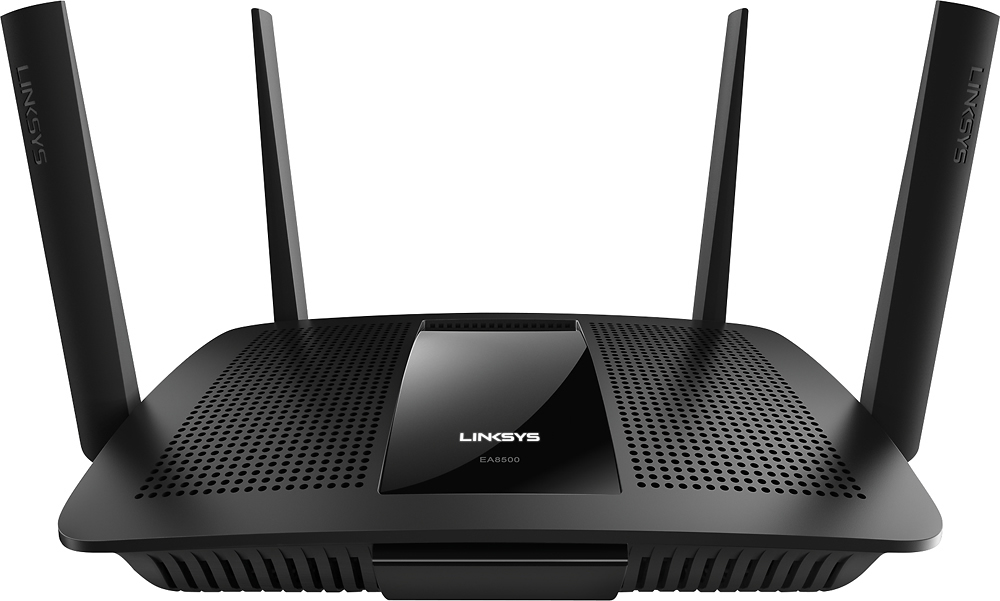
- EA8500
- SKU:
- 5265041
to a friend
Customers are saying
Customers appreciate the AC2600 Dual-Band Wi-Fi Router's impressive range, ease of use, and strong signal, leading to positive feedback on performance and setup. Many found the router easy to install and use, resulting in reliable streaming and great coverage. However, some customers experienced connection issues and noted the router's relatively high price and larger-than-expected size. A few users also mentioned concerns about the firmware and occasional lag.
This summary was generated by AI based on customer reviews.
- Cons mentioned:Connection
Easy setup; works well
||Posted .This reviewer received promo considerations or sweepstakes entry for writing a review.My old router was almost ten years old, so the guys in the store laughed at me when I asked if I should replace it when it seemed to develop some connection problems. So I bought this one, which seems to work quite well. I have no longer had any connection problems with my devices.
I would recommend this to a friend works well
||Posted .This reviewer received promo considerations or sweepstakes entry for writing a review.router met expectations and works well with our multiple devices.
I would recommend this to a friendGood purchase
||Posted .This reviewer received promo considerations or sweepstakes entry for writing a review.We liked this product well enough that when we decided to upgraded we used the same product
I would recommend this to a friend- Pros mentioned:Signal strength
Nice Range & Reliability
||Posted .This reviewer received promo considerations or sweepstakes entry for writing a review.I have not had to reboot the router since I bought it over a month ago. The router is in a far corner of my house; I used to not get any signal in the far opposite corner. With this router, I get almost all bars all the way across the house. This router serves its purpose very well so far.
I would recommend this to a friend - Pros mentioned:Performance
Improvement
||Posted .This reviewer received promo considerations or sweepstakes entry for writing a review.I purchase the Linksys EA 8500 from the advice of a Best Buy technician. So far it is much better than the router supplied by my cable company. The big difference is the peripheral component are all running much smoother and better since the installation.
I would recommend this to a friend - Pros mentioned:Speed
Works great. Whole house is covered now!
||Posted .This reviewer received promo considerations or sweepstakes entry for writing a review.We used to have problems with our leased router from the isp, so bought a new router in hopes that this would solve our problem. It works great, and now we have no problems running many connections on the system at once. Went from a 3 to 10 download speed to over 50! Great product!
I would recommend this to a friend Excellent product
||Posted .This reviewer received promo considerations or sweepstakes entry for writing a review.I have no issues with this router. We installed it with ease and we get high speed internet access.
I would recommend this to a friendSeems to work very well so far.
||Posted .This reviewer received promo considerations or sweepstakes entry for writing a review.Seems to be working very well so far - good reception distance from our home office to our shop area.
I would recommend this to a friend- Pros mentioned:Speed
Exceeded all my expectations
||Posted .This reviewer received promo considerations or sweepstakes entry for writing a review.I was delighted to find that this router exceeded all my expectations. I was experiencing maddening delays and would never have believed that a dual band router could make such an enormous improvement. Now I'm a believer thanks to the reliable recommendations from the Best Buy staff.
I would recommend this to a friend Great router for whole house access.
||Posted .This reviewer received promo considerations or sweepstakes entry for writing a review.I love Linksys products as they are reliable and last longer than any other router I've ever used.
I would recommend this to a friendWiFi access
||Posted .This reviewer received promo considerations or sweepstakes entry for writing a review.Greatly improved wifi access in our home. We have a very expanded house, really helped.
I would recommend this to a friend- Pros mentioned:Range
Linksys home router performs well
||Posted .This reviewer received promo considerations or sweepstakes entry for writing a review.Bought this to replace older Linksys that was failing. Pros- same user setup screens as older Linksys model. Easy setup. Good range. Has GigE ports and server port. Cons- limits number of MAC addresses if using the Wireless MAC security filter.
I would recommend this to a friend Best router ever
||Posted .This reviewer received promo considerations or sweepstakes entry for writing a review.I was needing a new router because I was having to reset my old one because my Wi-Fi kept going out!
I would recommend this to a friendbridged with parental controls
||Posted .This reviewer received promo considerations or sweepstakes entry for writing a review.Installed as a bridge to my isp modem and parental controls still work which is why I bought it.
I would recommend this to a friendgot my speed above 30mbs
||Posted .This reviewer received promo considerations or sweepstakes entry for writing a review.My old router was outdated and i wasnt happy with the speed. This greatly improved my situation
I would recommend this to a friend- Pros mentioned:Speed
handles the traffic
||Posted .This reviewer received promo considerations or sweepstakes entry for writing a review.We have a high internet speed but were buffering ALOT when multiple devices were running at one time. Since installing: 3 smart tvs along with tablets and phones for 4 plus guests have been running buffer free. It is a little pricey. .
I would recommend this to a friend Wi-Fi router
||Posted .This reviewer received promo considerations or sweepstakes entry for writing a review.Great product, great price, highly recommend, 10 stars.
I would recommend this to a friend- Pros mentioned:Signal strength, SpeedCons mentioned:Connection, Size
Great router for larger houses or congested areas
Posted .This reviewer received promo considerations or sweepstakes entry for writing a review.I received this product for free as part of Belkin's Friends + Family Program. I had been considering a new router but I was unsure whether our issue was router related or actually due to our ISP. My previous router was small and discreet, but constantly seemed to be dropping the connection. It was a very expensive router when I purchased it and was a little over a year old so I was hesitant on whether I wanted to replace it when I was not sure if the actual internet connection was the issue or if it was the router itself. When this Linksys arrived, I was surprised by its size and the size of the antennas. The one I had previously was a little larger than a can of soda and had no directional antennas. This Linksys definitely means business. My family joked that it looked like something from the future or outerspace. It is much larger than what we had previously set up, so for the space we had it in, it is not as discreet nor does it fit nearly as well. But given the performance that is ok with me. I am considering shifting its location but it requires a decent amount of work so for now it sits awkwardly in a small space looking too big. First let me explain that the previous router had worked well in our old house for its layout (which was a very open floor plan and only 1400 square feet). When we moved to our new house we began to experience constant lag, drops, disconnects, etc. The router/modem combo that we had to rent from the ISP until ours arrived didn’t even cover half of the house. The house we live in now is 2000 square feet and has a lot more walls and closets and the layout causes a lot of issues with the Wi-Fi. My previous router could barely project Wi-Fi into the garage and forget getting Wi-Fi in the backyard. My daughter and son were lucky to get one bar showing available in their room. My children both reported that every ten minutes or so they would drop connection and have to walk around or move themselves some to get the connection to reestablish. Often they would have to leave and walk to the top of the stairs to reestablish connection and then return to their rooms. So my first test of this router was the distance and signal strength. I had attempted to do a speed test in my daughter’s room once on the old router and the connection would not even stay connected long enough for me to get a speed test. After installing the new router every spot in the house has full bars showing available. I was definitely surprised by this discovery so I started walking down the street. I discovered that I get full bars in my car in the driveway (previously not possible) and I can actually stay connected to my Wi-Fi all of the way down the street to the corner which is 5 houses away and on the other side of the street I can stay connected when walking to my mailbox which is around the corner and down 4 houses. I found this to be remarkable!! Also if we discover any issues anywhere in the house I can point the antenna in that general direction and it helps to fix the lag. My next major issue with my last router was that my connection was constantly dropping. And I mean constantly. We live in a very congested neighborhood full of stucco houses and concrete fence walls with a large number of people all using routers so of course there will be some issues. Our current ISP is one of our only choices unless we opt for satellite so almost everyone is on the same network. With our previous router I would lose connection to my streaming stick in my bedroom (which is about 15 feet away from the router but has many walls and a closet between them) on a regular basis. To the point that often I would load the show and get to watch one minute and it would reload again. On weekends this was so constant that I would eventually give up and find something else to do. We do not have cable so this was a HUGE complaint for me. Of course my husband never experienced it nearly as bad as I did as he was on the Xbox with a fairly clear shot from the router. The new router does occasionally lose the connection during peak times, from my understanding it is due to the constant fight for channels in a congested area and because my neighbors have auto channel set when their router switches channels it can cause hang ups on my end. I have attempted tweaking the channels but because we are so close to all of our neighbors and a local high school, we can expect to lose connection some times. I used to experience this dozens of times per hour on weekends and since installing and optimizing this router I find it happens once or twice a day at most and usually only 2-3 days a week (Friday, Saturday, and Sunday being the heavy usage days in our neighborhood when everyone is home and using their internet). That is a mass improvement. I also want to mention the speed improvement. When I first received the router I did a speed test with the old one and a speed test with the new one. We pay for 50Mbps service but were told we live in a 100Mbps area so we should be able to get faster speeds. Our service is hit or miss out here, largely because we do have so many people connected to the same service. On the day of arrival I tested with the old router and my results were 38 Mbps down and 4.85 Mbps up. When I installed and set up the new router using the exact same test and server a few minutes later I got 61.27 Mbps and 6.26 Mbps. Out of curiousity I actually wanted to put the router to the super test. I had my husband play something on xbox live, my son watched a video on youtube, I streamed a movie to my iPad and a tv show to my streaming stick while my daughter played league of legends. My two devices both had a clear picture, my husband reported no issues, my son said his video played rather well but my daughter experienced lag on her game. She is the furthest from the router in the house and has the most obstacles between her and the router and she said while it was laggy, it still worked. We attempted this on a weekend during the peak times and my husband reported some lag and my second video received some minor decrease in quality. With the previous setup something like that would have caused connectivity issues to at least one of us if not more. Installation of this router is a breeze. I had my router up and running in a very short time. I think it was about 10-15 minutes, but unfortunately I forgot to time it. The Linksys app is very user friendly and simple. I am used to doing a lot of advanced settings and digging through trying to find what I am looking for or needing. The Linksys app is so simple that I keep feeling like I missed something. This is not a bad thing, it just takes some getting used to when you have had to use a much more complicated interface. I felt like the device list is a nice touch where you can edit the image for what is connected to represent what the device is more accurately. This isn’t necessary but I enjoy the ability to see a visual representation of my devices vs a black and white text list of mac addresses and IP addresses. You can use the app to log in to your router and check when you are away from home and set parental controls if necessary. You can see what is connected to the Wi-Fi at a glance. I feel like the app is very user friendly and well designed. You can set up media prioritization which I really like. You can do it by device, by apps or programs, or by games. So in the future I might be letting my daughter try and play League of Legends with prioritization for that game turned on and see how the rest of us fare, but I just recently discovered this as an option. I have not tested this out much yet but I look forward to giving it some testing. My only two major complaints with this router are as follows: My first big complaint is that the positional antennas keep falling. I adjust them and think I have them set properly and leave the room and come back and they have fallen and are lying flat. I keep trying to tighten the screws but I keep having them fall. This is not a huge deal for us overall, but it can be annoying and it does sometimes affect performance. My cat seems to enjoy rubbing on them and pushing them over and they are definitely not cat proof. But sometimes they just fall on their own as I have witnessed when sitting nearby. I feel as though this is a losing battle. My second big complaint is that the Wii U and the router do not like each other. Not at all. It keeps disconnecting and telling me it cannot connect. I had to go in and change the mixed band to b/g only and it connected but now it keeps disconnecting. They do not play well together. Unfortunately Nintendo is one of my son’s favorite devices and they do not allow an Ethernet cable to be connected to it. I find this more of a flaw on Nintendo’s part, but if you are looking to connect any Nintendo device please do not expect this router to play well. It works flawlessly with the Xbox one and our Ps3 however. We tested it across android, apple os, and many other devices in between and the only issue we saw was with Nintendo. This is extremely frustrating for my son. It seems to happen most often at night and is intermittent. Last night they were unable to connect and today it is working fine again. A good example of the large number of users in our area, when I attempt to fix his connection I show 19 available b/g band connections nearby. Overall I am extremely happy with this router and I would definitely recommend it to anyone. If anyone has a larger house or lives in a very congested neighborhood they should really consider this router. We are surrounded by concrete and stucco houses and walls and fences and despite that, this router delivers.
I would recommend this to a friend Not bad, but not great
||Posted .This reviewer received promo considerations or sweepstakes entry for writing a review.I replace my asus AC68 router for the EA8500, thinking I would get better speeds and coverage. I configured the EA8500, as an access point, just like I did with the AC68 with the same settings and location. The result was my bandwidth and coverage went down by 50%. Note: I have 100 Mbps download & upload.
No, I would not recommend this to a friendBrand response from Linksys Staff
Posted .Hi Cybertron,
We appreciate the time you spent in sharing your experience with us. Isolate the issue by checking if your other computers have the same bandwidth. You may also manually update or reflash the router’s firmware. Don’t forget to reset and reconfigure it afterwards.
If the connection will not improve, please send us an email at [email protected] with your contact details, location, and the link to this review for reference.
Regards,
Linksys Support
www.linksys.com
WiFi is strong and reliable
||Posted .This reviewer received promo considerations or sweepstakes entry for writing a review.I have a 2250 sqft house and thought about the more expensive 3 unit models but, this router is strong enough to handle my home easily. Set up was like all of my former routers and not a problem. The price keep coming down so I don't see how you can go wrong.
I would recommend this to a friend