Customer Ratings & Reviews

- Model:
- EA8500
- SKU:
- 5265041
to a friend
Customers are saying
Customers appreciate the AC2600 Dual-Band Wi-Fi Router's impressive range, ease of use, and strong signal, leading to positive feedback on performance and setup. Many found the router easy to install and use, resulting in reliable streaming and great coverage. However, some customers experienced connection issues and noted the router's relatively high price and larger-than-expected size. A few users also mentioned concerns about the firmware and occasional lag.
This summary was generated by AI based on customer reviews.
- Pros mentioned:SpeedCons mentioned:Price
Super Router! Love it and would recommend it.
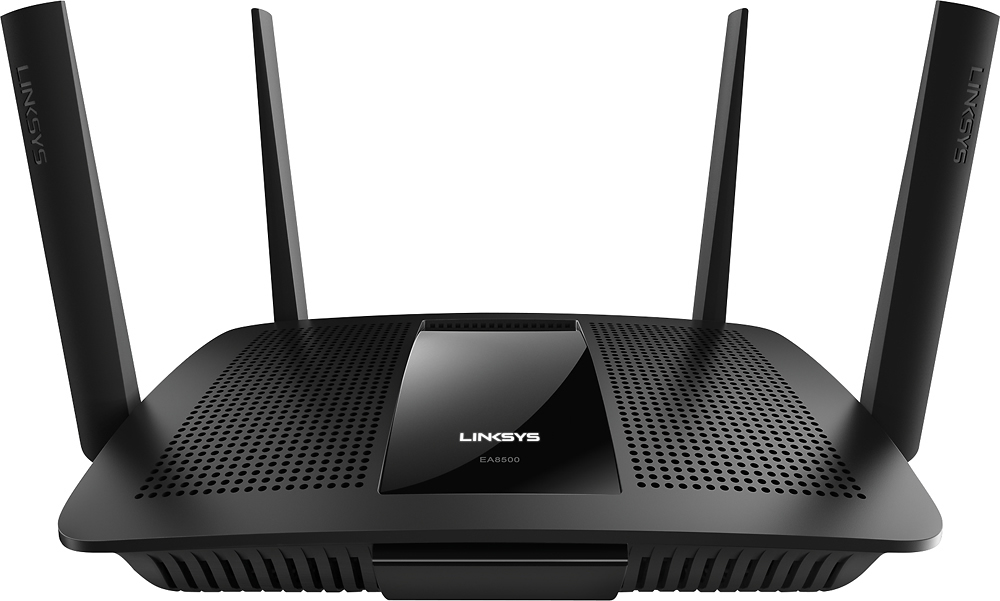
Posted .This reviewer received promo considerations or sweepstakes entry for writing a review.I received this product for free as part of Belkin's Friends + Family Program. My family had been struggling with the router that Comcast provided for our home. We had gone through two of them in a year and I had doubts we would ever have good wifi on our main level or in the basement of our home. We have 3 heavy gamers and 2 working parents (requiring internet access) using our available bandwidth every day. You can’t ask for much more than what this router provides. The only option I had in my situation was to run it as an access point, connected to our Comcast router, via TP-LINK AV600 Powerline Adapters. My maximum speed with Comcast is 75Mbps and depending on placement of the EA8500, I downloaded consistently at the maximum speed. The setup was fairly simple. I don’t read manuals and will only read documentation if necessary. There wasn’t a lot of documentation on setting up the EA8500 as an access point, but I googled it and had it setup and working within 30 minutes. Being a micro-manager, I will use a lot of the features built into the device. Although access via a mobile phone is possible, I tend to do all of my configuration of this router from a home PC. I have 2 SSID’s active – a 2.4Ghz and a 5Ghz. They both seem to work equally as well as far as I can tell. Connected to this router are 4 wireless roku’s, 2 desktop PCs, 1 playstation, 2 laptops, 2 security cameras and 3-5 smartphones or tablets, throughout the day. It can handle whatever we throw at it. I like the cool design of the unit. It’s black with 4 antennas’ that can be positioned any way you want them. THINGS I LOVE It’s manufactured by a reputable, leading brand. It works…all the time. Network Map feature: You can see all connected devices and click on each one and control their access/features/restrictions. The main screen after you log onto the router: It tells me today that I have a firmware update (did the update in the middle of this review and it installed A-OK). There is a lot of good information about what’s going on from this screen and it’s configurable via widgets. Parental controls: Pretty basic setup. I use this to block gaming during the day if my kids are home sick from school. I can block their individual devices, or websites, for a period of time. **Evil Grin** External Storage capability: I could plug in a nice big SSD and access it from anywhere. There are some security settings and other features. If I owned an external storage device, I’d use this. I can’t tell you if it works well or not but I’m glad it’s a feature. THINGS I LIKE SmartPhone App access. Guest access capabilities: I don’t use it but it’s a great feature if I need it. Media prioritization: Since we never have slow internet, thanks to the Power Line adapters and this fast router, this isn’t something we need to use. In the future, if we had a gaming party or something, we could give all the gaming PC’s priority of the network. THINGS I DON’T LIKE (because they could be fixed or made better) It’s a bit pricy. Speed Test feature. Instead of picking the closest server to me, it picked Washington D.C... Don’t they know government slows EVERYTHING down? THINGS I HATE Nothing! In summary: The EA8500 works right away, without having to configure a lot of things. The defaults are ‘good for the common’ folk. Would I buy this unit and/or the next generation of this? You bet! It’s the best home router, with all the basics and all the bells and whistles that you’ll need. You won’t be disappointed. If you’re a person who likes to have total control over what your router does, this is for you.
I would recommend this to a friend Very happy
||Posted .This reviewer received promo considerations or sweepstakes entry for writing a review.I returned the Comcast modem, after buying this unit. The wifi range is outstanding. It covers basically the entire house, including the garage and parts of the front and back yards.
I would recommend this to a friendGreat product
||Posted .This reviewer received promo considerations or sweepstakes entry for writing a review.I didn't plan to purchase this model when I went to the store, but the staff showed some of the key features to me and I was sold. Setup was very simple and I was up and running in no time.
I would recommend this to a friendNice router
||Posted .This reviewer received promo considerations or sweepstakes entry for writing a review.Purchased this for my son and even though he's never set up a wifi network before, he breezed right through it without a hitch. Let's him stream, game, do work, everything he wants to do.
I would recommend this to a friendGreat router!
||Posted .This reviewer received promo considerations or sweepstakes entry for writing a review.We had to purchase a router since we were not able to receive wifi in every room of our house. Not a problem anymore since we hooked this router to our modem, no more complaining!
I would recommend this to a friendFixed my Wireless Issues
||Posted .This reviewer received promo considerations or sweepstakes entry for writing a review.Product provides a better wireless source for my various wireless products that are all at different locations throughout my house. I do not have server interruptions anymore.
I would recommend this to a friendWorks fine with many Wifi Devices
||Posted .This reviewer received promo considerations or sweepstakes entry for writing a review.We are a family of 8 and we connect with over 15 devices on the wifi. We had a Linksys Router (EA6350) that was too slow for us so we upgraded to this. The router is so much better.
I would recommend this to a friendGreat Router
||Posted .This reviewer received promo considerations or sweepstakes entry for writing a review.I upgraded from my fios gateway wifi to this router and it is awesome. I have at least 10 items using wifi in my home and since I starting using this my family has had no issues.
I would recommend this to a friendEasy setup
||Posted .This reviewer received promo considerations or sweepstakes entry for writing a review.I purchased this router to replace one that was 2 years old. Works great and is able to reach the end of my home so that I can stream wirelessly from my smart TV.
I would recommend this to a friendImproved Reception
||Posted .This reviewer received promo considerations or sweepstakes entry for writing a review.I went to this router from an EA6500 mostly in hopes of improving the range. I am now able to get a much stronger wifi signal in my garage. This unit sits in the middle of my house
I would recommend this to a friendTried two and both FAILED
||Posted .This reviewer received promo considerations or sweepstakes entry for writing a review.TERRIBLE! TERRIBLE! TERRIBLE! DO NOT BUY! The first one I purchased did not work right out of the box. The Linksys light would not stop pulsating which suggests that a firmware update was trying to download (I guess). At any rate, after 30 minutes, I packed it up, took it back and exchanged it for another one. The second one worked for a month and a half before it started doing the same thing (pulsating Linksys light). I tried resetting it by unplugging it for 10 seconds as suggested on their website, but it still did not work (ugh!!!). I should have learned my lesson the first time. I exchanged it for a Netgear Nighthawk R8000 which the Best Buy rep recommended (he said he would have never recommended the Linksys AC 2600). Working great so far and was very easy to set up. By the way, Best Buy rep was awesome by allowing me to exchange even though it was more than 45 days.
No, I would not recommend this to a friendBrand response from Linksys Staff
Posted .Hi. We appreciate your time for sharing this feedback. It's quite unfortunate that the device didn't work as expected. It might be possible that the firmware of the device is defective. You could have tried to update the firmware to try and fix the problem. We respect your decision for returning the device. Should you have more questions about any Linksys products, just send us an email at [email protected] and we'll do our best to assist you. We hope to hear from you again.

Worked great for two weeks.
||Posted .This reviewer received promo considerations or sweepstakes entry for writing a review.I haven't had much luck with Linksys routers. The average lasts about a year. This one puttered out after about two weeks, thankfully it was still under warranty.
No, I would not recommend this to a friendBrand response from Linksys Staff
Posted .Hi, Whatyasay,
This is not the experience we wanted you to have with the Linksys EA8500. We hope that you've returned the router for a replacement, and we'd like to take this chance to help you out. Allow us to gather more details of what had happened and to work with you in checking the unit. Please send us an email at [email protected] along with your contact details, location, and the link to this review for our reference.
We look forward to assist you.
Regards,
Linksys Support
www.linksys.com
Solid WiFi reception
||Posted .This reviewer received promo considerations or sweepstakes entry for writing a review.For the money, this is a solid WiFi router. Reception decreases with a great amount of walls. I do get reception outside of my house near the router.
I would recommend this to a friendRouter Linksys
||Posted .This reviewer received promo considerations or sweepstakes entry for writing a review.I LOVE THIS ROUTER!! My internet is faster and I can have multiple devices connected to it and have 4+ people using the internet at once and I can't even tell the difference.
I would recommend this to a friendBetter than my previous router
||Posted . Owned for more than 2 years when reviewed.This reviewer received promo considerations or sweepstakes entry for writing a review.Setup was a bit difficult but that’s because of my internet provider and my lack of expertise, but once I set it up everything has worked great!
I would recommend this to a friendGood router with plenty of distance
||Posted .This reviewer received promo considerations or sweepstakes entry for writing a review.Seems to cut out and leave my PC stranded without internet every-so-often, but not sure if that's the router's problem or something with my PC SET-UP.
I would recommend this to a friendBrand response from Linksys Staff
Posted .Hi Rigg11,
It’s best that you isolate the issue by connecting other devices to the router. If the same thing happens, please reach out to us at [email protected] so we can have one of our Escalation Engineers assist you further. Include your contact details and the link to this review.
Regards,
Rechel
Linksys Support
Great Router
||Posted .This reviewer received promo considerations or sweepstakes entry for writing a review.We have at any one time at least 5 devices , phones, PS4, several computers, etc, and this router handles extremely well. Rarely do we lose signal and have to reboot.
I would recommend this to a friend- Pros mentioned:Ease of use, PerformanceCons mentioned:Price
Amazing Router- Great Coverage and Features
Posted .This reviewer received promo considerations or sweepstakes entry for writing a review.To begin, I would like to note that I received this product for free as part of Belkin's Friends + Family Program. That being said I am very intimately familiar with the device and can provide some honest feedback. The short story is that this is a great high-end router for not only tech enthusiasts but for the everyday consumer as well. Let's start at the beginning, installation is very qucik and easy! I was able to get this device up and running from my phone and computer in under 10 minutes. The immediate benefit that I noticed was the fact that even though I live in a 2500 Sq Ft ranch style house with a long floor plan, the EA8500 provides excellent throughput throughout my house. Whether you are at the edge of the house or next to the router, the wireless range is great. The range is so good that I can even get a quality internet connection from anywhere on my propery which is about 1/2 an acre. In my experience with routers (both high-end and low-end), you have to reboot the device at least once a week. Not so here. I am two weeks in with the device and have not had to reboot it once. In terms of ease and simplicity, the Smart-Wifi app that you can download from the App Store or the Google Play Store is pretty awesome. It gives you the ability to administer the device from anywhere in the world. The app is well designed and easy to use. I can create and administer guest networks right from the app. This has been helpful when I have guests at home (but I'm out of the house) that I don't want on my main network. Remote management works flawlessly. If you are a big cable cutter and love streaming perfect videos every time with no stutter than this is the device for you. I can flawlessly view Apple TV and Roku video streams from anywhere in the house, no matter how far I am. Quality of Service is out of this world. You can pick which devices get priority on your network and unlike other routers, this actually works. For those of you with need for parental control features this is a great device. It allows you to block specific web sites that you don't want your kids getting into so that your kids or husbands don't get into anything naughty. The downside here is that the parental controls are very basic. If you are looking to block general types of content (i.e. mature, gambling, violence) then this device does not have that ability right out of the box. The router does have third party apps that interfaces with that can achieve some of this functionality. Built in you only get site specific content blocking. Another negative worth mentioning is that the price is a bit prohibitive for someone who is looking for a vanilla plug and play router. This is for people with a need for speed and high end but easy to use features. The value that you get from the device is worth the price but only if you are using it to it's full potential. Anyone who is streaming lots of high def content and has a big house, will get their money's worth here. The router is future proof and will easily accommodate your needs for years to come.
I would recommend this to a friend - Pros mentioned:Ease of useCons mentioned:Size
Great router for the multi-user multi-device crowd
Posted .This reviewer received promo considerations or sweepstakes entry for writing a review.I received this product for free as part of Belkin's Friends + Family Program. Although I had an existing wireless network, I started to notice some slowdowns with multiple devices connected. Somewhat annoyingly, I noticed that my girlfriend would sometimes interrupt my night studies to tell me that the internet was slow. The AC2600 replaced an aging but still strong performing Cisco/Linksys E3000. The AC2600 router has four antennas compared to the one internal antenna on the E3000. Surprisingly, since things tend to get smaller over time, it is quite a large router, especially with the antennas connected. The AC adapter will likely take up two slots on your power strip due to its size. The E3000 has its activity lights on its face, while the AC2600 has all the lights where the ports connect. While this makes it easier to see which lights correspond to which ports, it makes it harder to diagnose problems at a glance. If you like to wall mount your router like me, it make seeing the lights even harder. Of course, the look of the router doesn't really matter - I wanted to mitigate the slowdowns. My existing router would deliver data to multiple devices by sending data to one device, then sending it to the next, and then the next, etc. In situations that require less bandwidth, you don't notice that you don't have a constant connection. The AC2600 router uses MU-MIMO technology+ to break through the barrier of only delivering data to one device at a time. When gaming, streaming video, or other high-bandwidth activities, it's more efficient if a router could transmit data to multiple devices simultaneously. That's what MU-MIMO does. It may not be noticeable at first, but once you have a dozen devices connected, it's night and day. This router is best for the user that wants a solid Wi-Fi network without having to take a lot of time for configuration. Router setup is simple with an easy to follow step process. The router has an app for Android and iOS where you can make configuration changes easily. The router also upgrades its firmware automatically, something that I think the typical user rarely does. If you're into alternative router firmware like OpenWRT and lots of configuration options, this may not be the router for you. It's not the most geeky router out there. However, if I was going to recommend a router to most of my friends or my Dad, this would be a solid pick. Our home networks have become essential, and the number of devices that we connect to them is only increasing. The Linksys AC2600 is a great-performing router already configured to maximize its best features.
I would recommend this to a friend - Cons mentioned:Connection
Very dissapointed
||Posted .This reviewer received promo considerations or sweepstakes entry for writing a review.Router would randomly cause internet connection to go down and would not be accessible via is IP address and only way to get working would be to do a factory reset... got very annoying. Maybe is was just a random bad one, but when looked online saw others having same or similar problems. Returned it for a different model (WRT) and that one has not had a single issue.
No, I would not recommend this to a friendBrand response from Linksys Staff
Posted .Hi, Gadgetdude,
Modifying its settings could help in stabilizing the router's internet connection. We understand that you've already returned it but should you need assistance with your new Linksys router, do not hesitate to get in touch with us at [email protected].
Regards,
Irish
Linksys Support