Customer Ratings & Reviews
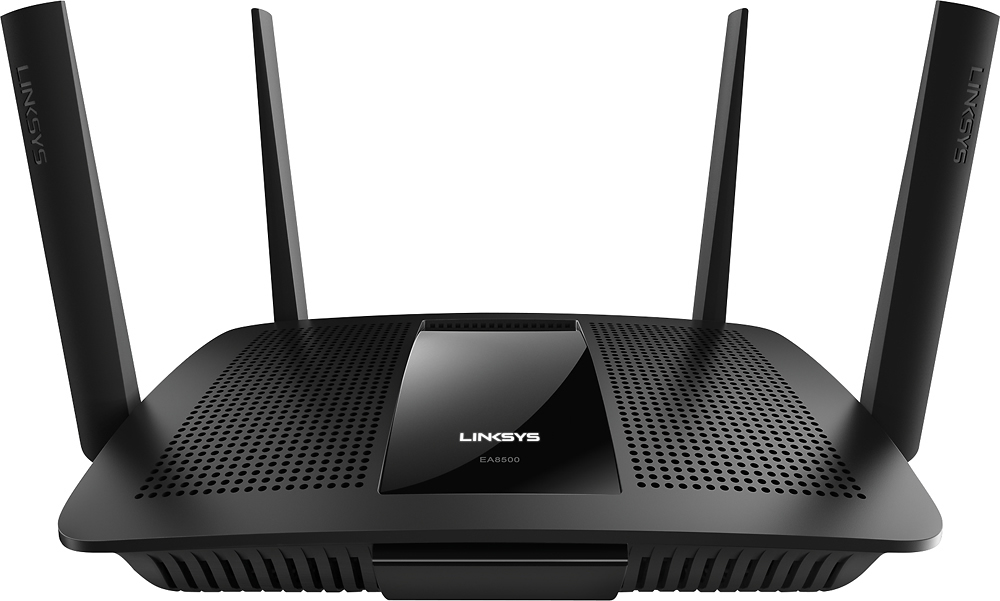

- Model:
- EA8500
- SKU:
- 5265041
to a friend
Customers are saying
Customers appreciate the AC2600 Dual-Band Wi-Fi Router's impressive range, ease of use, and strong signal, leading to positive feedback on performance and setup. Many found the router easy to install and use, resulting in reliable streaming and great coverage. However, some customers experienced connection issues and noted the router's relatively high price and larger-than-expected size. A few users also mentioned concerns about the firmware and occasional lag.
This summary was generated by AI based on customer reviews.
good
||Posted .This reviewer received promo considerations or sweepstakes entry for writing a review.good, good, good,good,good,good,good,good,good,good
I would recommend this to a friendAbsolutely love it
||Posted .This reviewer received promo considerations or sweepstakes entry for writing a review.There is no fighting with no Wi-Fi speed love it!!
I would recommend this to a friendWorked great
||Posted .This reviewer received promo considerations or sweepstakes entry for writing a review.Happy with this purchase it's working great no issues
I would recommend this to a friendGreat
||Posted .This reviewer received promo considerations or sweepstakes entry for writing a review.Wifi has improved 100% great product would buy again
I would recommend this to a friendAwesome
||Posted .This reviewer received promo considerations or sweepstakes entry for writing a review.Works bery good very excellent ...................
I would recommend this to a friendLinksys Dual Band Router
||Posted .This reviewer received promo considerations or sweepstakes entry for writing a review.Very good reception and coverage. I would recommend.
I would recommend this to a friendGreat router
||Posted .This reviewer received promo considerations or sweepstakes entry for writing a review.Has all the settings and features we were looking for.
I would recommend this to a friendSolved our connectivity problems!
||Posted .This reviewer received promo considerations or sweepstakes entry for writing a review.Reliable connection & good range 2nd fl - basement
I would recommend this to a friendWorks great!
||Posted .This reviewer received promo considerations or sweepstakes entry for writing a review.Great Wifi router. Works perfect for what I needed.
I would recommend this to a friend- Cons mentioned:Firmware
Worst Router
||Posted .This reviewer received promo considerations or sweepstakes entry for writing a review.I've tried Linksys routers for years. It's always a hassle to set them up. This was no better. After following the explicit instructions with no luck, I called Lynksys tech support. After 2.5 hours on the phone with an off shore rep. She finally told me she was being timed and she couldn't spend any more time with me. The firmware needed to be updated twice. Finally I gave up, boxed it up, and returned the router. I bought a Netgear, 3200 tri-band for $12.00 more. Plugged it up and it worked. DONT BUY THIS LINKSYS ROUTER,
No, I would not recommend this to a friendBrand response from Linksys Staff
Posted .Hi, Chazman,
Our Customer's satisfaction has always been our top priority. What you have experienced caught our attention and we regret to hear that the EA8500 router is no longer with you. Please provide us your case number or contact details at [email protected] so we can trace the history of your case for investigation. Rest assured, we'll do the necessary action to the representative who failed to assist you.
Hoping to hear from you soon.
Regards,
Jay
Linksys Support
Wi-Fi drops intermittently
||Posted .This reviewer received promo considerations or sweepstakes entry for writing a review.I haven't noticed a real increase in performance over my standard wireless modem/gateway that was initially provided to me by my ISP. Additionally, the wi-fi signal seems to drop out nightly, and is especially frustrating when on Xbox live. The only reason I've given this two stars is because the app is mostly useful when adjusting settings for the router. Unfortunately I'm a few days past the return policy with this router and am left with a partial functioning piece of equipment. I wish I had read some reviews prior to making a decision, because it seems others are experiencing the same issue.
No, I would not recommend this to a friendBrand response from Linksys Staff
Posted .Hi JGrina,
An intermittent connection could be caused by some wireless devices that are using the same frequency with your router. Adjusting the wireless channel is a good move to avoid possible interference in your network. Please get in touch with us at [email protected] so we can go through the necessary steps with you. Include your contact details and the link to this review.
Regards,
Rechel
Linksys Support
Not much better
||Posted .This reviewer received promo considerations or sweepstakes entry for writing a review.I purchased this mainly because of the great sale. When I connected it, I didn't see that much of a great difference. I already have wifi through Comcast. It performed better, but not enough worth keeping it.
I would recommend this to a friendBrand response from Linksys Staff
Posted .Hi, HecD,
We're interested how your EA8500 router behaves. Please share with us the details about your current network setup so we tap one of our Escalation Engineers to help you optimize your router's settings to achieve a great Wi-Fi experience. Get in touch with us at [email protected] with your contact information and the link to this review for reference.
Regards,
Jay
Linksys Support
- Pros mentioned:Range
Great while it lasted
||Posted .This reviewer received promo considerations or sweepstakes entry for writing a review.Great range and speed in a 3500 SQ FT house no dead spots. At almost 4 months to the day I bought it the router died...Glad I bought extended warranty.
No, I would not recommend this to a friendBrand response from Linksys Staff
Posted .Hi Navycrna,
It's quite unusual for the product to stop working in such a short time. Our Escalation Engineers could try a couple of steps to double check if the router is still responding. Please get in touch with us at [email protected] with your contact details and the link to this review.
Regards,
Rechel
Linksys Support
- Pros mentioned:Range, SpeedCons mentioned:Lag
Router superstar
Posted .This reviewer received promo considerations or sweepstakes entry for writing a review.I received this product for free as part of Belkin's Friends + Family Program This device amazed me time and time again. I was very impressed with its priority features to optimize my connection. It extended my range almost triple what my previous router was. I was able to disconnect service to my second Internet allowing me to save almost 100 dollars a month who doesn't appreciate saving money?? I was able to stream using my roku upload and download on the Internet surf on my tablets and phones as well as my husband gaming on his xbox playing call of duty without lag!! This is a big issue in most households these days as we home so many electronics. This device will solve that and allow you to rid your house of arguments over who is hogging the connection and slowing it down. This is great in both households that only use a few Devices and those that have a house full. Save yourself time and money by grabbing up this product. You won't regret it.
I would recommend this to a friend - Pros mentioned:Range, SpeedCons mentioned:Connection
Great Range, Speeds, and no Connectivity Drops
Posted .This reviewer received promo considerations or sweepstakes entry for writing a review.I received this product for free as part of Belkin's Friends + Family Program This product works pretty well for my needs. I previously used an Netgear Nighthawk, and before that the Netgear R6300v2. These products were very fast and decent range, but had several connectivity problems. So trying this product from a different brand was nice for a change. It wasn't quite as fast as the Nighthawk(very close though), but had the same range(if not better), and I didn't suffer from the painful connectivity drops I had to deal with during my time with the Nighthawk. I only dropped one star because of how expensive this would be if I were to have purchased it. Overall, a great product.
I would recommend this to a friend - Pros mentioned:Performance, RangeCons mentioned:Firmware
If you get past the Install, great performance!
Posted .This reviewer received promo considerations or sweepstakes entry for writing a review.I received this product for free as part of Belkin's Friends + Family Program. If you are seriously considering tis modem please read this entire review. PROS Performance Range Remote Configuration USB Flexibility CONS Installation Documentation Current Firmware Cable IN THE BOX The Linksys EA8500 is packed well to survive shipping. However, it unfortunately includes only the bare minimum of documentation and accessories. In the box you’ll find the router and its four antennas plus its AC adapter and a cheap 1m Cat 5 network cable, a documentation CD and a single folded page Quick Start guide. This was a disappointment for it’s price point and also proved inadequate. INSTALLATION The Quick Start guide contains a total of 4 steps which will work fine if you only have a cable or DSL modem or are replacing an existing router configured in a basic manner. Once connected the instructions ask that you continue the installation wirelessly by providing a unique SSID and password making the router secure by default which is a great feature. An easy to miss DIY manual mode using a wired connection is mentioned on the back page. For new installations or existing router upgrades where all devices get dynamic IP addresses, the rest of the installation will go smoothly and you’ll be up a running quickly. Unfortunately, my Comcast Gateway could not disconnected prior to installation as instructed and even the CD documentation did not cover this configuration. I found the workaround was to log into the gateway and switch it to Bridge mode in order for the 8500 do be in control. You may need to call your ISP if you do not have the user and password to log in. Once completed, devices configured for dynamic IPs using DHCP were able to reach the Internet. Unfortunately, I had my NAS, one server PC and a gaming console with static IPs that could no longer be connected to or could reach the Internet. It appears the router blocks access to any IPs that it does not explicitly configure. Initially switching the device to DHCP and then reserving the assigned address by using the Connectivity Settings menu can work around this. PERFORMANCE With all my devices working I was finally got the excellent performance and range I anticipated. I measured the highest speed I’ve experienced and a at least a 20% increase in coverage across both the 2.4 and 5GHz bands. The built-in smart app conveniently provides a speed test option that works great IF you have Flash installed and disable any pop-up blockers. EXTRA FEATURES The router supports an external USB printer or HDD with DLNA support, and I was able to stream movies and music directly without any issues. It includes a parental control feature that governs specific IP access times and supports blocking sites by entering domain names. I would expect to see it configurable to a white list service in its class. REMOTE ADMINISTRATION Linksys offers an iOS and Android Smart Wi-Fi app that provides a good subset of configuration options. This shows your network health and connected devices plus lets you configure Parental Controls, Guest Access, passwords and even update your firmware. Remote troubleshooting is limited since the speed test is not offered. CONCLUSION Linksys has priced this as a premium product with advanced performance and smart features. Though it delivers on the performance, its “smarts” get in the way of a straight forward installation if you are replacing an existing router or using a gateway. While I have described workarounds for all of the issues, this is not expected and almost caused me to return it. With its current firmware, I can only give it a qualified recommendation. If I see these issues addressed in future firmware releases, I will update this review and rating.
I would recommend this to a friendBrand response from Linksys Staff
Posted .Hi Codedancer,
We appreciate the time you've spent in providing us a product review. We're grateful to hear about the good points that you've seen on the router. We're also happy to know that you're experiencing good wireless connection on your network. However, we have taken note of your feedback regarding the packaging, the installation process and the current firmware. We'll be sharing this review with our Development team so they can look into this matter. Should you have questions or you need our assistance, please never hesitate to send us an email at [email protected]
Regards,
Linksys Support
http://www.linksys.com/us/support
WIFI Router
||Posted .This reviewer received promo considerations or sweepstakes entry for writing a review.Purchased this stronger router to get more power throughout the house and use for video doorbell. It does allow distance, but it has gone down twice since we purchased it two weeks ago.
No, I would not recommend this to a friendBrand response from Linksys Staff
Posted .Hi, DBPAPA,
We're glad to hear that it has performed as expected. If you will still continue to experience connectivity outage through this router, please email us at [email protected] with your phone number and the link to this post. Our Escalation Engineers would be happy to assist you.
Regards,
Irish
Linksys Support
OK, but
||Posted .This reviewer received promo considerations or sweepstakes entry for writing a review.Don't know precisely why but everything is still slow downstairs as opposed to upstairs where the modem, etc are located. Slow is better than failing to connect that was my earlier fate.
I would recommend this to a friendBrand response from Linksys Staff
Posted .Hi, Emmy,
Aside from keeping the firmware up-to-date, we recommend assigning fixed channels to what matches best with your current network environment. Try channels 1, 6, 9 and 11 for the 2.4 GHz band, and channels 36, 40, 44 and 48 for the 5 GHz. Update us with the results at [email protected] with your contact details and the link to this post. Our Escalation Engineers will take care of this.
Regards,
Jay
Linksys Support
Poor reliability
||Posted .This reviewer received promo considerations or sweepstakes entry for writing a review.Bought it Aug 5, 2016. Worked great until one week ago. Suddenly stopped working. Wired connections stopped working. Lights in the back blinking yellow. $230 down the drain!
No, I would not recommend this to a friend- Pros mentioned:Ease of use, SpeedCons mentioned:Price
Great router
Posted .This reviewer received promo considerations or sweepstakes entry for writing a review.I received this product for free as part of Belkin's Friends + Family Program This is a really good product. It was very easy to setup, you do not need an expert. I am very impressed with the quality and build of the product. It looks sturdy. The product gives a lot of customization options for all frequencies. It looks kind of like space ship. I was happy with the speed i received for the product. I would like to see if they can integrate cable modem so people dont have to buy this in addition to cable modem. The product comes with a dedicated app that lets you access a lot of the features right from the comfort of your phone. There is a web app too that allows you to use the product from anywhere. Overall i am happy with the product but the price point is pretty hefty. There is a built in speed test to check the speed. I would have liked to them include some hardware for mounting.
I would recommend this to a friend