Customer Ratings & Reviews

- Model:
- EA8500
- SKU:
- 5265041
to a friend
Customers are saying
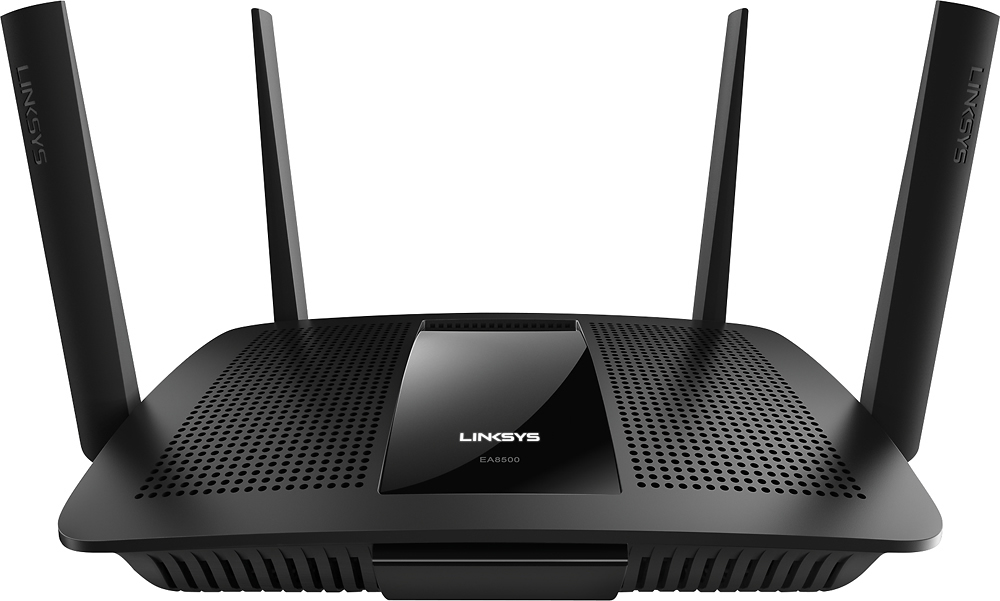
Customers appreciate the AC2600 Dual-Band Wi-Fi Router's impressive range, ease of use, and strong signal, leading to positive feedback on performance and setup. Many found the router easy to install and use, resulting in reliable streaming and great coverage. However, some customers experienced connection issues and noted the router's relatively high price and larger-than-expected size. A few users also mentioned concerns about the firmware and occasional lag.
This summary was generated by AI based on customer reviews.
- Cons mentioned:Size
Nice premium router, with some minor issues
Posted .This reviewer received promo considerations or sweepstakes entry for writing a review.I received this product for free as part of Belkin's Friends + Family Program First off, this router is *HUGE*, and fairly formidable-looking with the external antennas attached. Surprisingly, there's still an external power brick instead of an internal power supply. Physical setup was easy, although I ended up using it vertically because I didn't have enough space to put it flat. I attempted to do the initial router configuration on my iPhone, but I was I was directed to download the Smart Wi-Fi app from the Apple app store. Configuration via smartphones is apparently not supported. I was able to access the router’s web interface from my iPad and computer. The app provides a subset of functionality and configuration compared to the web interface, and seems fairly unnecessary. The iPad interface in the app is just an upscaled version of the phone interface, and doesn't provide any additional configuration options. Replaced my current router with this one, and configured it with the same SSID and password. The 20+ devices in our house were all able to connect to it without changing anything else. The dual bands help balance traffic between the 2.4GHz and 5Ghz device, providing consistently fast speeds, regardless of what everyone’s doing on the network at any given moment. The range isn't quite as good as the AC1600 router that I replaced, but I'd already planned on adding an extender because we didn’t have good coverage with that one anyway. I connected an AC1200 extender fairly quickly & easily, and now all of our devices can connect to each other and the Internet from anywhere in our house. We started experiencing occasional device dropouts after the most recent firmware update. Everything reconnects within ~30-60 seconds, but it can be annoying. I haven't tested file sharing with the USB/eSATA ports, primarily because we already have two dedicated NAS devices on our networks. All-in-all, it's a well-designed and well-made router, with all of the functionality, device support, and throughput that we need. I’m hopeful that the next firmware update will fix the sporadic connection dropouts.
I would recommend this to a friendBrand response from Linksys Staff
Posted .Hi, Mystakill,
Your feedback on this product is appreciated. Since you are experiencing challenges with it, allow us to help you.
For the wireless dropouts, try adjusting the wireless channel of the router as some interference might've been causing it. Make sure also that its firmware is up to date. To improve also the wireless coverage of the network, adjusting the antennas would help.
Should you need further assistance, you may email us at [email protected] and indicate your full name, phone number, location, and the link to this post.
Sincerely,
Linksys Support
http://www.linksys.com
Good,not great!
||Posted .This reviewer received promo considerations or sweepstakes entry for writing a review.Couldn't get it connected for nothing. Tried many times. Instructions not clear enough :(
No, I would not recommend this to a friendBrand response from Linksys Staff
Posted .Hi Bayougirl99,
Thank you for letting us know about what happened. If you’re having a problem setting it up, then there is an option to manually configure the Linksys EA8500. We’re more than willing to help you out. Please reach out to us at [email protected] with your contact details and the link to this review.
Regards,
Rechel
Linksys Support
- Pros mentioned:Ease of use, Range, Speed
Best Router Ever!
Posted .This reviewer received promo considerations or sweepstakes entry for writing a review.I received this product for free as part of Belkin's Friends + Family Program. I wouldn't blink an eye to pay full price for this router though. It is the easiest router I have ever set up and it out performs my every expectation. Set up is so ridiculously simple you could get a child to do it. The mobile app helps you keep track of the system and service from anywhere. Its fast and very user friendly. The range is outstanding. Anyone can use this router and get the full benefits from it. I highly recommend it! I am seriously in love with it.
I would recommend this to a friend Not enough
||Posted .This reviewer received promo considerations or sweepstakes entry for writing a review.Was told by salesman that this would have Wi-Fi reach second floor. It didn't.
I would recommend this to a friendBrand response from Linksys Staff
Posted .Hi, Wlks,
Proper positioning of the Antennas and setting fixed channels for both frequency bands would help you achieve the range that you desire. Please get in touch with us at [email protected] and we'll have one of our Escalation Engineers help you improve the range of our Wi-Fi network. Indicate your contact information and the link to this review for reference.
Regards,
Jay
Linksys Support
Average
||Posted .This reviewer received promo considerations or sweepstakes entry for writing a review.Was trying to replace 4th AirPort Extreme. This router did not perform as well.
No, I would not recommend this to a friendBrand response from Linksys Staff
Posted .Hi, Khouston,
We'd like to help you experience the best out of this router. Please email us at [email protected] with your phone number and the link to this post so we can get you over to Escalation Engineers for assistance in optimizing its performance.
Regards,
Irish
Linksys Support
Disappointing
||Posted .This reviewer received promo considerations or sweepstakes entry for writing a review.Wanted to upgrade my E3200, big (costly) mistake always losing the signal.
No, I would not recommend this to a friendBrand response from Linksys Staff
Posted .Hello, Nikk,
We're glad to know that you have invested with another Linksys unit. If the modem connection is stable and the router's firmware is updated, then allow one of our Escalation Engineers identify what's causing the intermittent signal. Please email more details at [email protected] along with your contact details and the link to this review for our reference.
We look forward to hearing from you.
Regards,
Klaudette
Linksys Support
E-Z set up...BUT BEWARE
||Posted .This reviewer received promo considerations or sweepstakes entry for writing a review.Lynksys redirect to customer support to set up Smart Wi-FI is erractic.Had to return (after trying)Two different routers.There are so many adjustments inherent to your service provider Usung SmartWiFi-app was nice to tweak,but support and application is erratic.Here one day, just spinning with no acess next day.
No, I would not recommend this to a friendBrand response from Linksys Staff
Posted .Hi Bogey,
Thank you for letting us know about what happened. Setting up the Linksys Smart Wi-Fi Router is normally easy using the Smart Setup Wizard. Should you have any Linksys products in the future, please don’t hesitate to reach out to us at [email protected] anytime.
Regards,
Rechel
Linksys Support
- Pros mentioned:Performance, Range
Rock Solid
Posted .This reviewer received promo considerations or sweepstakes entry for writing a review.I received this product for free as part of Belkin's Friends + Family Program. The router has performed rock solid since it was setup. I have had no issues with the hardware or software aspects. Performance has been great and without performing formal scientific tests it seems to definitely outperform the NETGEAR R8000 I replaced it with. Speed and range seem to be better from the Linksys, I have not performed any formal tests, but general usage has showed consistently better performance over the Netgear. I have approximately 20 devices connected at any given time, including Mac and PC Laptops and Desktops, a QNAP, multiple ipads, multiple iphones and android devices, smart devices including WeMo, and others. Speaking of iPhone and Android devices, there are apps from Linksys for this router and while they may not be the most intuitive they do work well. They also have/support remote access to the router via Linksys Smart WiFi, and it works. Setup was easy, no more difficult than any other basic router. In my case I needed to assign a few DHCP Reservations for specific hardware, but overall things were very easy and took less than 15 minutes. One feature I liked was that I was able to have the same SSID for both networks and let devices connect to whichever frequency they find. I have not seen any negative effects from using this setup and will not change it unless I find it to be problematic. Another feature I like is the fact that the antennas are removable and if needed you could use different antennas.
I would recommend this to a friend Not much better
||Posted .This reviewer received promo considerations or sweepstakes entry for writing a review.Not much better than the one we replaced, it really did not improve our wifi
I would recommend this to a friendBrand response from Linksys Staff
Posted .Hi, Tony,
Knowing your experience with this device is very important to us. Are experiencing challenges with the speed or the wireless range? It may help if you'll adjust the wireless channel of the router. Try also to check the speed using different wireless devices. The result may vary on the capacity of the device's wireless adapter.
For further assistance, feel free to email us at [email protected]. In the message, indicate your full name, phone number, location, and the link to this post.
It would be our pleasure to assist you.
Regards,
Linksys Support
www.linksys.com
Ok wifi router
||Posted .This reviewer received promo considerations or sweepstakes entry for writing a review.This router was recommend by a Best Buy associate because we were looking for a better wifi connection for all out devices inside and out side. This was not much of an improvement for the price we paid ($220) versus the older ($80) version we had before. Not very impressed with its performance
No, I would not recommend this to a friendBrand response from Linksys Staff
Posted .Hi, Meathead883,
Thank you for the feedback. The connection that you're experiencing using the Linksys router is not what we expected. Allow us to make this right for you. To achieve maximum wireless coverage, we recommend modifying the channels for both frequencies. For the 2.4 GHz wireless network, please try channels 1, 6, 9 and 11, and channels 36, 40, 44 and 48 for the 5 GHz. It is also ideal to relocate the router in an open area free from possible interference for a much larger Wi-Fi coverage. Should you have queries, or should you need further assistance, get in touch with us at [email protected] along with your contact details and the link to this review for reference. We would be more than willing to help you out.
Regards,
Linksys Support
www.linksys.com
Good
||Posted .This reviewer received promo considerations or sweepstakes entry for writing a review.It can handle gaming and connection of up to 5 devices
I would recommend this to a friendBrand response from Linksys Staff
Posted .Hi, Aguayofam,
Your EA8500 router can handle more than 5 Wi-Fi devices including gaming consoles. However, your router's performance would depend on your ISP's bandwidth subscription and on your device configuration. If you have any concerns or issues with your unit, don't hesitate to reach out to us at [email protected], anytime. We have our Escalation Engineers always ready to serve you.
Regards,
Jay
Linksys Support
- Pros mentioned:Signal strength, Speed
Great Router, strong signal, setup was frustrating
Posted .This reviewer received promo considerations or sweepstakes entry for writing a review.I received this product for free as part of Belkin's Friends + Family Program. This router is definitely the best router I have ever used. I have been using Linksys for over 15 years. The strenght of the signal is ridiculous. With the router that my cable company provided, my signal drops a few feet after I leave my apartment. With this Linksys router, I was able to get a signal in my car outside of my apartment complex. If I had to estimate distance, My car was probably close to 150-200 ft away. The signal was not full strength, but it was pretty good. There were about 50 other wifi signals in the area and there was really no interference with any of them. I have Verizon FIOS as my ISP and pay for 75/75 mbps speeds. On their router I usually get 40-50mbps on wifi, with this one I was getting 65-75 mbps. I only get those speeds on my provided router if I am wired by ethernet. All that being said, the setup was pretty straight forward but it took me about 7 times trying to finally get the router to pickup my internet service from my cabke modem. Not sure what the problem was, but it was a bit frustrating. Setting up the wifi portion of it was super easy. Highly recommend this router for anyone looking for great distance and better signal wall penetration.
I would recommend this to a friendBrand response from Linksys Staff
Posted .Hi deemota,
We appreciate the time you've spent in providing us a product review. We're grateful to hear about the good points that you've seen on the router. We're also happy to know that you're experiencing good wireless connection on your network. However, we would like to address the challenge that you have experienced in setting up the router to your cable modem. There's a big possibility that it took time for the router to establish a connection with your modem. Should you need our assistance, feel free to email us at [email protected] anytime.
Regards,
Linksys Support
http://www.linksys.com/us/support
Does not work as good as my previous router
||Posted .This reviewer received promo considerations or sweepstakes entry for writing a review.For some reason I keep getting kicked off of the router
No, I would not recommend this to a friendBrand response from Linksys Staff
Posted .Hi. Thank you for sharing this feedback with us. This kind of behavior is unusual for our routers. What we can do is update the firmware, then reset and reconfigure the router to try and fix this. Here's the link on how to update the firmware: (http://www.linksys.com/ph/support-article?articleNum=140365). Should you need further assistance, you can send us an email at [email protected]. Please include your contact details and the link to this review in the email. We hope to hear from you soon.
Didn't last a year
||Posted .This reviewer received promo considerations or sweepstakes entry for writing a review.(If you do buy this device make sure to get the best buy protection. If not you will h*** with getting linksys to own up to their warranty) I normally dont write these, but i felt for this product I do. Yesterday afternoon I came home to no wireless internet. I was thinking maybe i just need to reset the router. Same thing. The router just stopped broadcasting itself. Today I took the time reach out Linksys. I was thinking this is an easy fix since the router is still in warranty. Boy, was I wrong. I spent 3 hours online with tech support going over the same troubleshooting i had did early. Long story short the device is still not working. I am just going to buy the new google router or apple airport extreme.
No, I would not recommend this to a friendBrand response from Linksys Staff
Posted .Hi, rob2233,
The EA8500 router should last longer than what you've described. We regret to hear about your experience and we would like to make things right for you. Please share with us your case number or contact details so we can tap one of your Escalation Engineers to review your case for investigation. Since your device is still within the warranty period, we'll definitely assist you with the replacement process. Get in touch with us at [email protected] with your contact information and the link to this review for reference.
Regards,
Jay
Linksys Support
- Pros mentioned:Range, Speed
Works well once set up
Posted .This reviewer received promo considerations or sweepstakes entry for writing a review.I received this product for free as part of Belkin's Friends + Family Program but my review below is completely my own and unbiased. The Linksys EA8500 AC2600 Dual-Band Gigabit Router may be big and ugly but it has an amazing range and has helped me reach upload and download speeds promised by my Internet provider. My previous Apple Time Capsule had terrible range and was very slow, particularly on the 2.4 Gz band. The Quick Start Guide that's included is not very helpful. I was very frustrated setting it up at first because typing linksyssmartwifi.com into my browser didn't work. I then read the online manual (only manual is provided on a CD and I don't have an optical drive) and found out that typing 192.168.1.1 works and from there the set up was very easy. I've been using it for several weeks with no issues, no drop outs. The range is excellent and speed is very good even when the whole family is online with their laptops, smartphones, TVs etc. The only cons are the provided documentation and a very short Ethernet cable. There are a few tweaks to be worked out (ie. speed test only works if my adblock software is turned off), it's pretty big and ugly (looks like it's waiting to become airborne) and the free smartphone app hasn't proven to be very useful, but as a work horse router it does its job well.
I would recommend this to a friend First Unit Failed
||Posted .This reviewer received promo considerations or sweepstakes entry for writing a review.I router failed within two weeks and returned the unit to Best Buy and replaced it with another unit. The second unit is working, but had to reset the router twice. It seems to be working now, but performance seems to be spotty.
No, I would not recommend this to a friendBrand response from Linksys Staff
Posted .Hi, Chicago1952,
We regret to hear about what happened to your first router. If the replacement unit is still an EA8500 model, give us a chance to help in improving your Wi-Fi experience. We would love to get you over to one of our Escalation Engineers to walk you through the process of optimizing its settings. Please reach out to us at [email protected] with your contact information and the link to this post for reference.
Regards,
Jay
Linksys Support
- Pros mentioned:Ease of use, Signal strength
This product is the best router I've had thus far
Posted .This reviewer received promo considerations or sweepstakes entry for writing a review.I received this product for free as part of Belkin's Friends + Family Program. I previously had a Netgear brand router and Netgear brand extender; both of which I purchased at Best Buy. I had to have a $90.00 extender with my old router because the router signal would not reach the rear of our home at all. In using this new Linksys router, I found it was the easiest router to install right out of the box. It would have taken less than 5 minutes except I wanted to rename the router and assign it a WPA password. The Linksys router gave me a signal at the rear of my house where the Netgear 1 I had before did not. However, the signal was only 1 bar on my computer (which was weak). I did get a signal on my Smart TV and overall had few issues. On occasion the signal did drop from the router. After reconnecting it it seemed to work fine again. If I could move the router a bit more into our house, I know the signal would be better and stronger. However, Charter installed my modem, right in the very front of our house and I have to connect it to the router; which limits how far I can move the router. I will look into a longer cable to see if it improves. However, overall this Lynksys router is doing a good job with all our devices in our home and I am very happy with it.
I would recommend this to a friend Ok thought would be better for price
||Posted .This reviewer received promo considerations or sweepstakes entry for writing a review.Ok wireless router. Sales person helped picked one out and it wasn't that great. Seems to cut out all the time. To bad I can't return it to get a better one. She acted liked she knew what she was talking about.
No, I would not recommend this to a friendBrand response from Linksys Staff
Posted .Hi, Angelnbabys,
The router should provide a stable connection once it's set up. Our Escalation Engineers would like to check the unit's wireless settings and help you achieve its expected performance. Please email us your contact information at [email protected] so we can help you get in touch with them. Indicate the link to this review for our reference.
Regards,
Kristine
Linksys Support
- Cons mentioned:Price
Not what I needed
||Posted .This reviewer received promo considerations or sweepstakes entry for writing a review.I came into the store for a modem and they up sold me a modem/router. It cost me double for it. Needless to say I returned it and bought the modem I needed elsewhere.
No, I would not recommend this to a friendBrand response from Linksys Staff
Posted .Hi, Caro,
The sales representative might have overlooked the unit's functionality. The EA8500 is a wireless router that shares your Internet connection from your modem among multiple devices. If you have a Linksys device in the future, please reach out to us at [email protected] anytime so we can help.
Regards,
Kristine
Linksys Support
- Pros mentioned:Ease of use, Speed
Quick. Easy. Excellent
Posted .This reviewer received promo considerations or sweepstakes entry for writing a review.I was having some issues with my previous modem/router (provided by ATT) - don't think it could keep up with the network traffic in my home. Went and bought this router the other day and I am extremely satisfied. The set up process was extremely easy and went very smoothly. Prior to setting this router up I ran a speedtest on my connection and had a 17Mbps download speed. After installing this router I ran another speed test and my connection jumped to 28Mbps. I am no longer experiencing the network crashes that were occurring before. I would highly recommend this router. Keep in mind that I have only had it for a few days so this review is based on my experience these past few days.
I would recommend this to a friend