Customer Ratings & Reviews
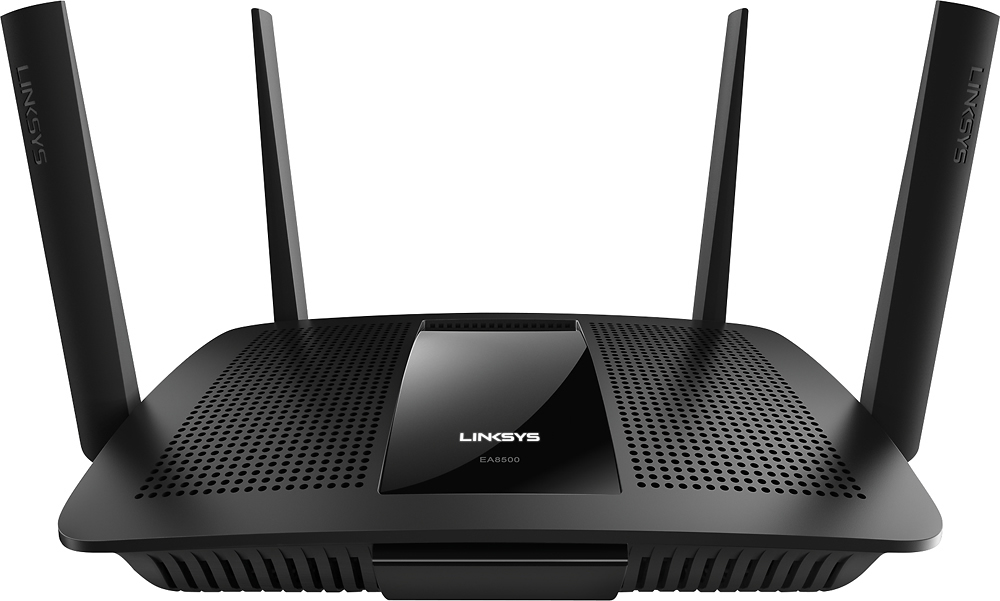

- Model:
- EA8500
- SKU:
- 5265041
to a friend
Customers are saying
Customers appreciate the AC2600 Dual-Band Wi-Fi Router's impressive range, ease of use, and strong signal, leading to positive feedback on performance and setup. Many found the router easy to install and use, resulting in reliable streaming and great coverage. However, some customers experienced connection issues and noted the router's relatively high price and larger-than-expected size. A few users also mentioned concerns about the firmware and occasional lag.
This summary was generated by AI based on customer reviews.
- Pros mentioned:Performance, Signal strength
awesome high-end router
Posted .This reviewer received promo considerations or sweepstakes entry for writing a review.PROS read reviews of this router before purchasing. router has a HIGH price tag, in the end the product is worth the high price tag. purchased several mid-priced routers in past, but always had issues with performance. router was very easy to set up. router fixed several of my of issues with poor performance and signal strength. can get excellent signal strength and faster connections speeds on all my devices. on the mid-priced routers had issues with poor signal strength, poor connection speeds, or sometimes both on all devices. router has performed above what I expected. now i am able to achieve solid connection speeds and solid wireless signals. all my devices are on 2.4mhz N band CONS on 2.4mhz no option to broadcast on wireless N only. only choices are mixed, a,b, or g. but will broadcast on N if set to mixed only option to broadcast on N only is on 5mhz band high price tag, you get what you pay for.
I would recommend this to a friend - Pros mentioned:RangeCons mentioned:Connection
Great features but falls a bit short
Posted .This reviewer received promo considerations or sweepstakes entry for writing a review.I received this product for free as part of Belkin's Friends + Family Program. I've always liked Belkin and Linksys products, and there is a lot I like about this router. But I reluctantly gave this three stars because I experienced connection problems that were frustrating. (More detail below). It's a very good product in most other aspects so I hope that the problems will be worked out in future firmware upgrades. . PROS: It only took me a few minutes to set up. Upload speeds were higher than my previous router (by almost 10%). These speeds were stable while connected (see notes about disconnects below). I like the interfaces, both the web and the Android app. I didn't think that I would ever use the remote access feature, but one day I was away from home and a family member was having trouble connecting. I was able to log in and fix it. I'm a fan of that feature now. The visual network map feature is very nice. Some of the devices aren't displayed with the names that they broadcast to other devices, but I can still figure out which they are. The map also shows which band the device is connected to. I was previously using a higher end router (in about this same price range) and this AC2600 had slightly better range. I wasn't able to get a good signal with my previous router when I was outdoors and downstairs. But I got a decent signal with the AC2600. LOVE the USB features. I'm not the biggest fan of internet cloud services, and they're sometimes not fast enough. So now I have my own "cloud" that I can access and control easily, without having to pay extra for enough storage space. I had no trouble with a broad range of USB devices from older USB 1.2 through 3.0. I used thumb drives, card readers, and external drives. A big plus. I like that there is functionality to add apps to the mobile UI. There's not much available right now, and some of the apps will probably cost extra. But it's an interesting approach. I like the parental controls, though I don't use them at this time. CONS: At least 2 or 3 times a day one or more of my devices would lose the connection and rebooting the router was the only fix. Sometimes this happened when another device accessed the internet, but often the device that lost the connection was the only one being used. When a device was out of range or asleep, it wouldn't reconnect to the AC2600. Sometimes it would simply stay offline, but other times a device would reconnect to a different local wifi network, even when the AC2600 was set as the priority network (my Mac laptop and desktop). When the DID reconnect to the router, they'd often reconnect to the 2.4Ghz band instead of the 5Ghz (which was set as priority). The most frequent problem was with my phone. When I'd return home after being away, it would either reconnect to the 2.4Ghz band, or simply remain connected to the data network. Fortunately I have a widget on the home screen which displays the name of the network, or I'd have ended up paying for data overages. Most of the time, this problem was with devices that were typically connected to the 5Ghz band. Devices seemed to be more easily reconnected to the 2.4Ghz band. On the other hand, it was hard to keep some devices from connecting to this router even when I didn't want them to! My home theater system is connected to a separate network than this router. I connected it to the AC2600 once, but then went back to the other network. But when I turn on the AC2600, it grabs the home theater system away from the other network! I'm not too impressed with the Media Prioritization feature. When I attempted to use this, the speed of each device decreased, sometimes dramatically. The prioritization seems to divide available bandwidth among devices that are entered, so even if only one of those devices is accessing the internet, it can only use that portion of bandwidth. That doesn't really seem much like "prioritizing" to me. For instance, I typically get almost 180Mbps downloads with my laptop. When I added that laptop as 1st priority, along with a couple of other devices, the best download speed I could get was about 43Mbps, even if no other devices were using bandwidth. That's still suitable for most uses, but for those who don't have fast internet speeds, the difference could be major. So I don't feel that this router lives up to its claims of handling multiple streaming devices. I have not yet been able to rectify the dropouts and speed issues. I generally have 10 or 11 devices connected to the router (though seldom have all of them using bandwidth at the same time) and would have expected the AC2600 to be able to handle this. There is no VPN client or server capability with this router. I don't use that right now, but may be wanting to soon. There are VPN passthrough options though, and I suspect that with just a little research, I'll be able to do what I want easily enough. There is not security with the Guest Network. Guests log in through a captive portal, but their information isn't really protected. Minor issue: I'd prefer a plug instead of an adapter that takes up too much room on my power strip. CONCLUSIONS: It's a little unclear what market segment this router is intended for. The price range is such that I'd expect some higher end professional features that are missing. Some features such as the Guest Network, seem to be tailored to businesses that want to offer guest internet with a captive portal. But it seems to be focused on home users who have several family members and/or devices streaming content. The disconnect issues mean that it fails to deliver in that area, though as I mentioned, I'm hopeful that will be ironed out with firmware upgrades. I feel like this will be a very good router if updates can fix the issues, . As it is right now, it falls short. I'm not suggesting that anyone avoid buying this router, but to do the research. The software and firmware versions at the time of this review are: Software: 1.01.1ed9873 / 1.0.0.164693 EA8500 Firmware version: 1.1.4.169978
I would recommend this to a friendBrand response from Linksys Staff
Posted .Hi, dbstevens,
We appreciate your time in writing about the experience you had with the Linksys EA8500 Max-Stream AC2600 MU-MIMO Smart Wi-Fi router. Allow us to gather more details and to help you check what might have caused these challenges. We have also taken note of your feedback regarding to some of the features on the router. We'll be sharing this review with our Development team for future product developments. Please send us an email at [email protected] along with your contact details, location, and the link to this review so we can further assist.
Regards,
Linksys Support
http://www.linksys.com/us/support
Ehh not impressed
||Posted .This reviewer received promo considerations or sweepstakes entry for writing a review.I wasn't too impressed with the system and that seemed to be the same response from many of the people that reviewed it on Linksys's site. Returned it the next morning.
No, I would not recommend this to a friendBrand response from Linksys Staff
Posted .Hi WestonEA,
We hope we had a chance to understand which specific feature on our product didn’t work for you. Should you have any Linksys products in the future, we're here to help if you need assistance. Don’t hesitate to email us at [email protected] anytime.
Regards,
Rechel
Linksys Support
- Pros mentioned:Speed
Powers down for no reason...
Posted .This reviewer received promo considerations or sweepstakes entry for writing a review.When it functions, it's the best router I've ever used, and I've had a bunch of them. The installation was flawless. Others said it took only 20 minutes, as if that was impressive. This thing was up and running in less than 10 minutes. The coverage was outstanding. All of my "dead" zones were now alive. My download speed to/from external sites improved by some 10Mbps. (I don't understand that, but I'll take it.) The "linksyssmartwifi.com" site is superb, nicely done. It would appear that my dream router had finally arrived. Then... I get up the next morning, all of my devices were on LTE. The router had simply powered down. No one had thrown the switch. It can't be powered down remotely. But it was just sitting there dead, with just the Ethernet lights flashing. The Linksys logo was dark. Of course I blamed myself, thinking I had overloaded the UPS outlet that the router was sharing with my modem and external disk drive. Hence, I put it on it's own UPS outlet (a different one this time) and thought I was good. Then... About 5 hours later, the router was dark once again. How can this be? Gear just don't power down on it's own unless there's a problem with the power supply and/or it's over-heating and is shutting down to protect the components. Either way, major disappointment. I went back to Best Buy and exchanged it for a different one, exact make/model. The assumption is bad hardware. Were it not for this issue, I would have rated this product 5 stars. I'll see how this new one performs. Perhaps I can come back later and give it at least 4 stars. And, given how well it works when its not powered down, I would recommend this to a friend.
I would recommend this to a friendBrand response from Linksys Product Expert
Posted .Hi. Thank you for letting us know about what happened. We recommend that you update the router's firmware to stabilize the connection. Download the firmware here: http://www.linksys.com/us/support-article?articleNum=156300. Follow the update instructions in this link: http://kb.linksys.com/Linksys/ukp.aspx?vw=1&docid=d2d5c9da8e68439883b85a9cf72bf7e5_How_to_upgrade_the_router_s_firmware_using_Cisco_Connect_Clo.xml&pid=80&respid=0&snid=3&dispid=0&cpage=search. Should you need further assistance, you may email us your complete contact details, location, and the link to this review at [email protected] so our team may provide more solutions the soonest.
Stable, Great Performance router!
Posted .This reviewer received promo considerations or sweepstakes entry for writing a review.A little background, I had d-link, Netgear, apple, all were good except for Netgear had to reboot weekly to monthly, then RT-AC66R - this was a good Asus router, I had the RT-AC68R - this was good at 2.4GHz but 5GHz sucked in range so 5GHz usability was useless and it had awful USB support (problems). Now the Asus RT-AC87R (I am going to reference it as 87r), where to begin…. I thought this would be my router for years (boy was I wrong)… The 5GHz covered all my house inside, BUT, areas where I put my phone, (to do wifi to hardwired device remote control) just gave me constant problems, some days after a new firmware it seemed to work (sometimes) and I thought finally, then some day or days later BAM not working in those areas again. (Now before you think or say something, all I did was change to the Linksys router, NOTHING ELSE, more on that below). The best I ever achieved from the 87r was about maybe a month with a firmware, before something went wrong, lag, wifi drops, etc.. I totally gave up on USB drives connected through it, now I have a NAS (Best purchase I have made in years) Onto my new Linksys, in my case, this is my first Linksys router I have ever owned. First what I read on it…. - I read the web GUI was slow by some, I find it supper fast, I have no idea why others complain about it at all. - Wifi range, well the Linksys is the same as the 87R with 2.4 GHz range (outstanding), and noticeably better than the 87r on the 5GHz band. - I read of a few having some kind of power down after 6 hours or so, I have never seen this at all (the latest firmware update address this anyway for the ones with tis issue). Now my findings Good -Absolutely no dead wifi spots with the Linksys, super fast connection from my wifi app to wired lan control device. I can't find any WiFi deed spots in my house with this Linksys router on 5 GHz or 2.4GHz. (As I have had with the 87r, especially with my remote app) - I have an app on my phone that connects to a hardwired device, on the 87r this was so bad and useless that the original (old) app no longer functioned and I had to buy a different app to get it to work, I no longer have my phone wifi to hardwired device control problems at all, both apps work great on the Linksys EA8500 and I checked for the latest update on the first app that went wonky on the 87r and it was not updated for 30+ days. - I no longer have any lag (tho dd-wrt firmware on the 87r removed it usually all the time, but it come back after days on the 87r). My online gaming with Asus routers on Monday night’s were all horrible, so bad that I usually shut down my PS4. Now with the EA8500 my lag is very minimal. - Setup was simple, but I did do some reading into this before hand, so I knew what to tweak to get great performance out of the Linksys. - I did have a HP wifi printer problem, FIXED I had to reset my network settings in my HP printer (nothing with the router at all). - My download speeds since I installed the EA8500 are my best ever. Any router before (including the rt-ac87r) I got a max of 30-32 down, now with the Linksys I always see 34-35. -I have adjusted some things in the settings and unlike the 87r, no firmware degradation at all...... Meaning every time I rebooted (I owned 2 87r’s, first one died due to overheating) the 87r would perform worse and worse (more problems, etc..)after every reboot, no matter what firmware I used, until I flushed the ac87r and started from scratch again, it happened with both 87r’s, I have complained about this from time to time with Asus and they did not care. Nothing at all like this on the Linksys, the Linksys just works like it should and rebooting does nothing bad at all to it. - NO WiFi drops with the Linksys on either band, the Linksys just works and works perfectly. - Web page refreshes on wifi devices are the same as my Asus 87r (when it was working good) - I use and love the way QOS is used on the linksys (I hated the Asus way, tried it, never worked for me and turned it off). I see no speed degrade with QOS on, my ps4 also has very little lag, that's my priority in the QOS for me, so QOS in this router works. - Linksys support is very great and responsive (from the printer issue I had, they gave me things to try on my Printer problem that turned out to be resettings network settings on the printer). - DHCP reservation is super easy on the Linksys, you click on “Network Map” and all of your connected devices are showing, just click a device and add DHCP reservation, it’s that easy. Linksys and I also recommends you do this, as some devices get confused (on any router) Bad (if you call it bad) - The IOS app to configure the router does not work with IOS 9 beta yet, expected as it is a beta IOS, it does work from my android note 10.1 version 1 perfectly. (I use the web GUI anyway, but I don't have to go into that often at all due to the Linksys just working). - I have no idea what my wifi connections are at ( meaning 100, 300, 400, or 800), Asus and dd-wrt gave me this info, nowhere found on the Linksys. (This would be my only wish, but not needed) - I don’t have lights up front and I like that, I do have a Linksys light on top that is steady when connected to my ISP and flashing when not, I do like this. - I do not like the fact I only get 90 days telephone support, but with quick e-mail and forum support, it’s not needed. - Pricy but performance and stability is worth the price (I paid more for my Asus rt-ac87r a year before and that was nothing but problems and stuff not working the entire year, yah it has more bells and whistles but at slower speeds and very unstable hardware and firmware) Summery I don't have absolutely nothing bad to say or found about this router, I keep looking for something, not performing properly, but everything I do with the Linksys = it just works perfectly, to date. If you are looking for tons of things to tweak, bloatware (I call it, you may not), love to reboot and have unstable hardware = look elsewhere, BUT if you are looking for a router with all the features needed and for a router that is stable as a rock = Look no further this EA8500 is the one! So far I love this Linksys Router If this stays like this, I have the best router made to date! This is how a router should work, perfectly. NOT half baked!!
I would recommend this to a friend- Pros mentioned:Speed
Fantastic ROUTER SPEEDS UNREAL
Posted .This reviewer received promo considerations or sweepstakes entry for writing a review.Speeds on this thing are unreal. I bought this in the store at 164 Lone Tree Colorado. The Manager Recommended it to me Mike Morris. And let me tell you only took 20 minutes to set up, much faster then the WRT1900AC Router by Linksys. Easy setup, manage your devices all from your smart phone and troubleshooting is made easy, you can notice the differences in speeds. Easy set up, adding devices is so easy its unreal. Overall very easy set up. I've seen a lot of negative complaints on this router, its so easy to install. Its out of the box ready to go! RATING 6 STARS!
I would recommend this to a friend - Pros mentioned:Range
Amazing Speeds and Function
Posted .This reviewer received promo considerations or sweepstakes entry for writing a review.received this product for free as part of Belkin's Friends + Family Program After using this unit I found that it exceeded my expectations with it being user friendly easy to setup for the not so technical. The throughout itself was amazing rendering 4K streaming without any hiccups or buffering. Allows the use in my case of more than 10 devices ranging from TV, Game Consoles, PC and mobile devices to be used at the same time without any issues. I streamed approximately 4TB of data through the unit and it did not even get warm like others I have owned. Max transmission rate was also excellent killing dead spots in my 1800's Victorian at around 3500 square feet. I had dead spots in some areas and now the range is spectacular. This unit would be a great addition to anyone from a novice to a tech expert. The price point is exactly where it needs to be for what you get. The connection is reliable for critical servers. Simply put just Amazing.
I would recommend this to a friend - Pros mentioned:Performance
Unfortunate Bugs Make a Recommendation Difficult..
Posted .This reviewer received promo considerations or sweepstakes entry for writing a review.Before I begin, please note that I received this router for free as part of the Belkin’s Friends + Family Program. This review (as you’ll soon see) has not been influenced by that fact. To cut to the chase, I’d look for a router that is a little less expensive and has more consistent performance on both 2.4ghz and 5ghz bands. The added expense for the AC2600 and MIMO features won’t help out most current devices. To give you some of my background, after years of dealing with flakey routers during the wireless B and G days, I’ve been a firm believer in the Apple Airport routers for over five years. I was nervous to try out the Linksys router, but excited to see if I had been missing anything since my switch. Wireless internet is a weird beast. What works in one household may not have the same results in another. My home is a single-story condo building with roughly 1,200 sq. ft. I’ve got anywhere from 15-20 wireless networks showing on my computer depending on which room I’m in. Needless to say, my environment is a little noisy with interference from. We have a variety of Apple-based products, including MacBooks, iPads, iPhones, AppleTVs and other non-Apple devices. None of them rely on older wireless networks (B/G) except for our Epson printer. Initial Thoughts When I opened the box I was surprised to see how large the router was. I could probably fit six of my Airport Extremes in the same footprint as this Linksys router…but the promise of increased performance might worth the sacrifice. I was also surprised at how big the antennas were. You will want to do some research to see what placement works best for your home, since antenna angles play a part in your wireless coverage. If you have a tight power outlet setup, be warned that this power plug will most definitely block at least one other outlet. Setup Setup was pretty easy and straightforward. Plug in the router, connect to the open network and follow the directions in your browser. It’s nice that you do not need to have wired hookup to do the initial setup. Two minor quibbles with the setup process are that you initially can’t configure the name of your 5ghz network (other than your original SSID with a “_5ghz” attached) and an open guest network is automatically created for you (with a password protected login screen). Performance For the most part, performance was great when the router worked correctly. I was happy to see that I received the same coverage as my Apple Airport Extreme without any dropouts on either the 2.4ghz or 5ghz networks. I was easily able to max out my 100Mb internet connection from wireless devices throughout the condo. Unfortunately, this only lasted a few days. One day I came home to find that none of my devices were connected to the 2.4ghz network anymore. This meant my Nest thermostat, Xbox One, and laptop were no longer accessing the internet. A reboot seemed to solve this problem for a few hours, but by the morning I had the same issue. This seems to be an issue with their firmware (Ver.1.1.4 (Build 169978)) that will hopefully get fixed ASAP. I was able to find a workaround by switching the 2.4ghz channel, but that should happen automatically and not be something a new user should have to problem solve. Since changing the 2.4ghz channel I’ve had solid performance on both bands. Other Aspects The Linksys program has a very thorough and easy to use web interface for the router. The built in speed-test never worked for me due to it requiring Firefox (weird, right?). Linksys offers an iOS app to also handle most of the more frequently accessed aspects of the router. This was a nice touch, but the iPad app was merely a scaled up version of the iPhone app. This router also supports new wireless technology in the form of MIMO that is supposed to increase speeds by 4x. Unfortunately, none of my devices support this technology yet.
No, I would not recommend this to a friendBrand response from Linksys Staff
Posted .Hi steinbch,
Thank you for your time in posting this informative product review. We can feel the inconvenience that you went through in using our device. Let us try to improve the experience. Flash the firmware of your router found on this link: http://www.linksys.com/us/support-article?articleNum=156300. Reset then reconfigure the router. Change the wireless channel to 1,6 or 11 since these are considered as non overlapping channels. If you need further assistance, you can reach us via email at [email protected] provide us your contact details and the link to this review.
Regards,
Linksys Support
http://support.linksys.com
- Cons mentioned:Connection
Much better than you would suspect
Posted .This reviewer received promo considerations or sweepstakes entry for writing a review.I received this product for free as part of Belkin's Friends + Family Program. I have to admit I'm impressed with this piece of hardware. I did have some problems during setup, since my laptop would not connect to the linksys smart wifi over the wifi, however, I was able to complete the setup through my cellphone. I replaced a Netgear Nighthawk with this device and thought I would see no difference or even a loss of ability by switching to this router. I was surprised to find that many of the problems I had been dealing with apparently were due to my Netgear. This router cleared it right up and has provided me with great streaming and a stable connection. The only reason I wouldn't give it five stars is because there was an issue were it lost connection with all of my devices and wouldn't reconnect until I rebooted the router. I would highly recommend.
I would recommend this to a friendBrand response from Linksys Staff
Posted .Hi,
Thanks for sharing your feedback, and we're happy to know that this product works great into your home. We just want to make sure that the device is on its maximum performance. Should you need assistance in the future, please email us at [email protected] along with your contact details and the link to this post for reference.
Regards,
Linksys Support
www.linksys.com/us/support
Not much of a difference
||Posted .This reviewer received promo considerations or sweepstakes entry for writing a review.We cannot have two tabs going at the same time (one on Hulu and one on Netflix). Not worth the extra money
No, I would not recommend this to a friendBrand response from Linksys Staff
Posted .Hi, Momma4,
Your feedback is important to us, and we appreciate your taking the time to share your experience. We understand the hassle that the product didn't meet your expectations, and we would like to make this right for you. Please email us more details about your challenge and the type of setup you wanted to establish so we can look into it and provide a much better recommendation. Get in touch with us at [email protected] along with your contact information and the link to this review for reference.
We'd be more than happy to assist you.
Regards,
Linksys Support
- Pros mentioned:Range
Great router
Posted .This reviewer received promo considerations or sweepstakes entry for writing a review.I received this product for free as part of Belkin's Friends + Family Program. I installed this router about 3 weeks ago and it has been working great for me. It covers my entire home and most of the yard around my home. I set it up with the same SSID and passcode as my old router and all of my devices connected to it without any issue. I have not had to reset it or even really think about it since it was installed. The router can be managed by both the web interface and a smartphone app from both inside and outside your home - there are two separate passwords for this, which takes some getting used to, but isn't a huge deal. The only reason I gave this router 4 stars and not 5, is there is an "apps" platform that is supposed to have apps that add features to this router, but there are very few options and most, if not all seem out of date.
I would recommend this to a friend 1st Bad
||Posted .This reviewer received promo considerations or sweepstakes entry for writing a review.It worked intermediately for two weeks and finally died. Got the replacement from Best Buy and will see how long this works.
I would recommend this to a friendBrand response from Linksys Staff
Posted .Hi, Chicago,
Having the router replaced is a good move. If you need assistance with setting it up, we'll have the Support team walk you through the process. Email us anytime at [email protected] with your phone number and the link to this post for our reference.
Regards,
Irish
Linksys Support
unsatisfactory
||Posted .This reviewer received promo considerations or sweepstakes entry for writing a review.the poor results may be my home layout vs. the item itself, but the salesperson led me to believe this item would work
No, I would not recommend this to a friendBrand response from Linksys Staff
Posted .Hi,
We agree that the router’s performance largely depends on its location in your home and configuration settings. We would like to have our Escalation Engineers take a closer look at your networking environment and ensure that the router is performing at its best. Please reach out to us at [email protected] with your contact details and the link to this review.
Regards,
Rechel
Linksys Support
- Cons mentioned:Connection
Dissappointed
||Posted .This reviewer received promo considerations or sweepstakes entry for writing a review.Drops the internet connection approx every 15-20 minutes. Will be returning.
No, I would not recommend this to a friendBrand response from Linksys Staff
Posted .Hi,
The router is expected to deliver a stable and reliable connection once it's up and running. If the connection only drops on your wireless devices, we can try setting a fixed channel on both networks. Before you consider returning the unit, please reach out to us at [email protected] so we can get you over to our Escalation Engineers. They'll make sure that it will work as expected. Indicate your contact information and the link to this review for our reference.
Regards,
Kristine
Linksys Support
Poor Signal
||Posted .This reviewer received promo considerations or sweepstakes entry for writing a review.This does not give the strong signal it advertises and we have difficulty running more than one device with it.
No, I would not recommend this to a friendBrand response from Linksys Staff
Posted .Hi, KWyoming,
The EA8500 router is capable of providing a good connection and a strong signal strength to your multiple devices simultaneously. As what you've described, it seems that your router needs an optimization. Reach out to us at [email protected] and one of our Escalation Engineers will get taken care of. Please indicate your contact information and the link to this review for reference.
Regards,
Jay
Linksys Support
- Pros mentioned:SpeedCons mentioned:Lag
Faster than a speeding Xbox...
Posted .This reviewer received promo considerations or sweepstakes entry for writing a review.First. I got this product free as part of Belkin's Friends and Family Program. But, I got to say, after I also ended up buying two more for others I know who work in music and the arts. We now send files to each other- I mean, one person is in Nigeria, another in Australia, (plus two more in England who haven't got the router yet...YET)..., and it's as if we're in the same room getting our projects together and making music. I started off fairly skeptical- so many routers, in a pile in storage at the moment--- and it's just BETTER. Lag times are gone, speeds are there, and even just watching streaming videos, I don't have to worry about the old "please standby" icons showing up and interrupting my down time. VERY cool product, VERY much worth it.
I would recommend this to a friend Stay away
||Posted .This reviewer received promo considerations or sweepstakes entry for writing a review.I have never had to leave a bad review, but this needs to be made. From day one i had constant drops in signal all throughout my house (2200sq ft.) even when right next to the router. I called linksys, updated firmware, changed location of the router to now avail. I returned this and bought the netgear nighthawk. Do research before buying a router.
I would recommend this to a friendBrand response from Linksys Staff
Posted .Hi NickB,
We understand your decision. This is not the experience we want you to have with our product. If we can be of any assistance, please let us know at [email protected] anytime.
Regards,
Rechel
Linksys Support
- Pros mentioned:Range, Speed
Fast with Great Range!
Posted .This reviewer received promo considerations or sweepstakes entry for writing a review.I received this product for free as part of Belkin's Friends + Family Program The review title sums it up. This router delivers the speed and range that it promises. The beamforming technology has cleared my dead spots and provided 10Mbps performance in its place. In the vast majority of the house, I see 24Mbps. The setup process had a small hiccup, but the router provided clear instructions on the screen to correct the issue. I'm more than happy with this router. It has great features, such as MU-MIMO, to accommodate future devices. The software is clear and user friendly. I would recommend this router to anyone that wants top-end speed, great coverage and future-ready features. It's a great buy!
I would recommend this to a friend Trash
||Posted .This reviewer received promo considerations or sweepstakes entry for writing a review.Paid almost $200 for this router in November 2016 and its already done with. Worked good for a few months and then the lagging began. I have 60+ mbps internet speed and still couldn't do any online gaming. I disconnected and plugged straight to the modem and played with no problem. Time to go to another brand I guess.
No, I would not recommend this to a friendBrand response from Linksys Staff
Posted .Hi, Gator,
It's odd that the router is behaving in that manner in a short period of time. Let's make sure that the unit is running on the latest firmware version. Please email us your contact information at [email protected] so we can have the product checked by our Escalation Engineers. Indicate the link to this review for our reference.
Regards,
Kristine
Linksys Support
- Pros mentioned:Range, Speed
Good but needs improvement
Posted .This reviewer received promo considerations or sweepstakes entry for writing a review.I received this product for free as part of Belkin's Friends + Family Program In our house, we have many devices (2 tablets, 2 smart tv’s, 2 game consoles, 2 smartphones and more#, slowing down performance. So I looked forward to replacing my 5-year old Belkin with the Linkys AC2600. Setting up the router in less than 15 minutes was a breeze, no cd required. The power brick is large in size, so rearranging the power strip was a must. This is a router that must lay flat and has four antennas sticking up, which can be a negative. The casing looks decent in quality. Installing the Linksys app, while not necessary, is great for those who want more control over their router. It allows you to monitor, set preferences, check speeds, and more in one app. This is a great router if you want to set up parental controls. It’s a great way to easily allow guests to connect with your network. My connection range went from good with my Belkin to excellent #full 5 bars), with the Linkys. I live in a 1500 square foot home, and often have the router in a back room away from devices, so the increased range and strength was valuable. Speed was already very good with my Belkin, and increased with the Linksys, but slowed down if multiple items were accessing the router. For a product that promises 3x faster wi-fi on every device and is built to allow everyone to connect without slowing down, this was very disappointing. Reliability was another issue. If multiple devices were connected, the internet would often drop. In addition, If you turn off the router at the end of the night, your devices will often request you to re-enter your password. This router is solid, middle of the road. If some of the glitches become fixed, it could be a great router.
No, I would not recommend this to a friend