Customer Ratings & Reviews
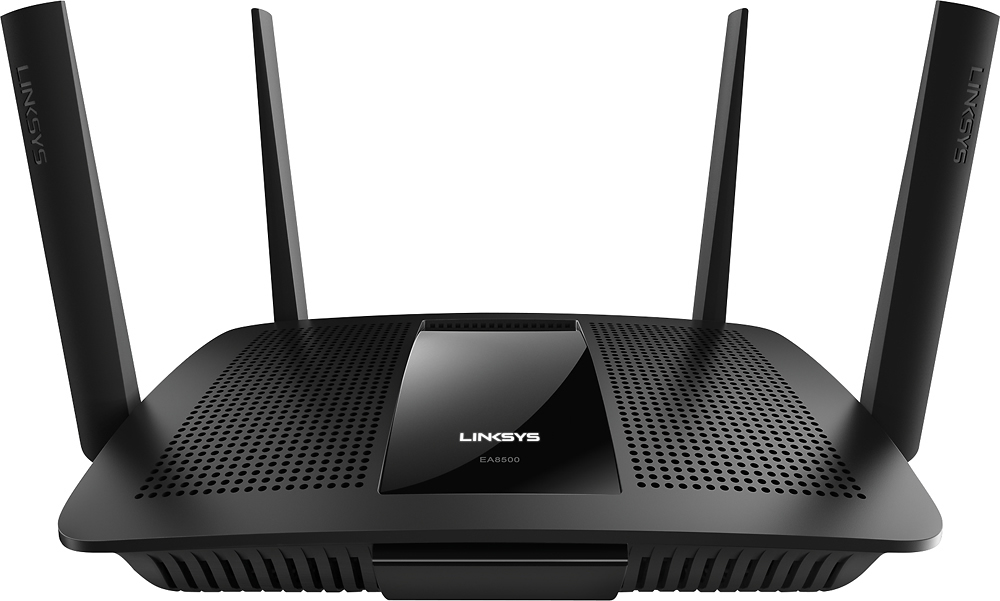

- Model:
- EA8500
- SKU:
- 5265041
to a friend
Customers are saying
Customers appreciate the AC2600 Dual-Band Wi-Fi Router's impressive range, ease of use, and strong signal, leading to positive feedback on performance and setup. Many found the router easy to install and use, resulting in reliable streaming and great coverage. However, some customers experienced connection issues and noted the router's relatively high price and larger-than-expected size. A few users also mentioned concerns about the firmware and occasional lag.
This summary was generated by AI based on customer reviews.
not good
||Posted .This reviewer received promo considerations or sweepstakes entry for writing a review.I have a 4 story house and the salesman told me it would work great and could support 25 devices. It does not work on the first floor. It goes in and out.
No, I would not recommend this to a friendBrand response from Linksys Staff
Posted .Hi,
We value your feedback and we appreciate the time that you've spent in writing this product review. We understand that you encountered some challenges with the Linksys EA8500 router and we're sorry to hear about it. We would like to take this chance to work with you so that we can see what's causing the challenge and for us to work on a resolution. Has it always been like that or was it working fine before? What steps have you taken so far? Is the router's firmware up to date? Please tell us more details about what happened and send it to us at [email protected] so that we can assist you accordingly. Don't forget to include your contact details and the link to this review for our reference.
We'd be more than willing to lend a hand.
Regards,
Linksys Support
www.linksys.com
Excellent Wi-Fi
Posted .This reviewer received promo considerations or sweepstakes entry for writing a review.I received this product for free as part of Belkin's Friends + Family Program. Our home is approximately 2,500 square feet and we have been using an Apple Airport Extreme for several years. The router is kept in our family room on the first floor and the signal for the Airport Extreme does not extend throughout the house. In order for my daughter to get Wi-Fi in her room she has to connect to the Wi-Fi on the first floor and hope that by the time she enters her room she is still connected. Linksys EA8500 Max-Stream AC2600 MU-MIMO Smart Wi-Fi Router was so very easy to hook up. I took it right out of the box, assembled the antennas connected it to the router, registered an online account and in about 20 minutes we were all set. Pros: 5GHz runs more than ten different devices in our home. Easy set up. Cons: 2.4GHz seemed to run slower than it should. Storage feature does not support Time Machine backup. I would definitely recommend the Linksys EA8500 Max-Stream AC2600 MU-MIMO Smart Wi-Fi Router. I am very happy with how easy it was to set up and have had no issues and my daughter is able to connect her wireless devices with no issues in her room.
I would recommend this to a friendBrand response from Linksys Staff
Posted .Hi, Lorraine
We value your detailed feedback and we appreciate the time that you've spent in writing this product review. We are glad to know that you are satisfied with our product. To improve the connection, try changing the wireless channel to 1,6 or 11 for 2.4 GHz and set wireless security to WPA2 Personal. In case you need for help, you can send us an email at [email protected] with your contact details and the link to this review.
Sincerely,
Linksys Support
http://www.linksys.com
Nope
||Posted .This reviewer received promo considerations or sweepstakes entry for writing a review.The networks constantly drop. I swapped this router out because I thought just my model was faulty - nope. I now have a dependable netgear.
No, I would not recommend this to a friendBrand response from Linksys Staff
Posted .Hi Meeeeeee,
It’s unfortunate that you’ve already returned the device. We hope we had a chance to help you out. If we can be of any assistance in the future, please email us at [email protected] anytime.
Regards,
Rechel
Linksys Support
- Cons mentioned:Firmware
Router for the future with frustrating firmware
Posted .This reviewer received promo considerations or sweepstakes entry for writing a review.Disclaimer: I received this product for free as part of Belkin's Friends + Family Program I really want to talk about this router in glowing terms. But unfortunately all I can say that today it's a good but not great router. In the future that may change with features like MU-MIMO being implemented on devices outside the router, but ultimately what's holding back this router is the firmware from Linksys. Pros: *Good USB transfer speeds (both USB2 and USB3) *Good transfer speeds *Good Range on both bands *Stable connections without slowdown even with a lot of devices *Easy to tell if EA8500 was connected to internet at a glance at the front of the router *Fast Wired Transers *Individual transfer lights on back, by ethernet connectors *Setup is fairly easy in directly connected environments that don't require the router to login to the ISP Cons: *Admin Logs contain almost no useful troubleshooting information *It really doesn't like *not* having an internet connection *Setup Didn't detect Centurylink PPPoE connection (or the lack of connection) *PPPoE connection issues with CenturyLink once configured *No wireless security on guest connections *Oversimplified firmware limited configuration options *Linksys Smart Wifi can get confusing and become a security hole *You have to work to actually locally connect to the admin panel The EA8500's above average wireless coverage has been more than enough to blanket my 2500sqft, 2 story home with great coverage in both 2.4Ghz and 5Ghz bands. The USB ports (1 USB3, 1 USB2/eSATA) have provided adequate transfer speeds. The EA8500 has been able to keep my measly 5Mb upstream DSL connection saturated at all times. It's even been able to keep all my home devices (10-15 devices, spread on both bands) simultaneously connected to the fullest ability of my upstream internet connection and my in-home servers with no appreciable loss of speed. In other words, it's been absolutely adequate for today's home use. I doubt anyone buying this router will go home disappointed. But I think that's true for many other routers ~$100. This router's MSRP is on the high end and doesn't bring much extra to the casual home user or the home telecommuter *today*. I really wan One of the reasons to buy this router is its marquee feature—MU-MIMO. But there aren't many devices (I don't have any as of Jan 2016) that can take advantage of this feature today. Hopefully the next generation of devices will fully implement the MU-MIMO standard. I'm really looking forward to the improvement in speed that will allow multiple devices to simultaneously utilize the 802.11AC spectrum. A couple of things that needs to of note: There is no option to enable security (WEP/WPA/WPA2) on the guest networks. The guest networks (enabled by default) do have a captive portal page with a login before allowing internet access, but anyone using the guest network will need a VPN of some sort if they don't want to broadcast all their information for everyone to see. By default the "Linksys Smart Wifi" is enabled. As far as I can tell this mainly allows you to configure your router from anywhere on the internet. Once your router is associated with your Linksys Smart Wifi account you can access your router with your Linksys Smart Wifi username and password or your router password. Be sure to give your router a good, if inconvenient password! Personal Stories/Experiences I ran into a few gotchas in my time with the EA8500, the biggest of which only applies to a small percentage of the population: customers of DSL and other ISP's that still use PPPoE instead of a direct ethernet connection. (If you have Cable or Fiber based internet, this isn't applicable) I have CenturyLink DSL in my home (much to my own chagrin) and the Linksys/Belkin firmware just didn't recognize the PPPoE connection at all. (My DSL modem was in bridging mode) The EA8500 fully completed its setup routine and never complained a single time—even though the router itself never successfully connected to my ISP or the general internet. I was able to finish setup manually with no issues, but the setup wizard took 30 minutes of my life and would have left less technically inclined users in the dark. And once I had the EA8500 fully setup and logging into PPPoE, I mysteriously started getting disconnects from my ISP a few times an hour. I'm not completely sure if it was a PPPoE or a DSL disconnect because the EA8500 logging has been completely lobotomized down to a connection log. Very little information that's useful for troubleshooting remains in its logs; I wasn't able to find anything about the PPPoE negotiation or status at all. I'm not completely sure if my PPPoE problems were due to a compatibility issue with my ISP (CenturyLink) or with the router itself. YMMV. (I would love to hear comments from anyone with similar experiences and if anyone found a real technical log). Once I reset & reconfigured my modem and just let the EA8500 into a double NAT mode, it worked fine and all my PPPoE connection issues disappeared. One downside to the double NAT connection is that some devices may have issues connecting through both NATs.
No, I would not recommend this to a friend - Pros mentioned:Range
Out of the Box Sterling Performance
Posted .This reviewer received promo considerations or sweepstakes entry for writing a review.I received this product for free as part of Belkin's Friends + Family Program and I am so glad that I did. The setup was simple and the load it carries without faltering extraordinary. Belkin Linksys has put together a router that easily meets all your needs with excellent range. Worth every penny
I would recommend this to a friend SLOW POKE
||Posted .This reviewer received promo considerations or sweepstakes entry for writing a review.The videos just keep on loading with the ipv6 enabled. It was working fine the first week only.
No, I would not recommend this to a friendBrand response from Linksys Staff
Posted .Hi, Jay,
Thank you for your feedback. We understand that you encountered some issues with your Linksys EA8500 router. Don't worry because we are here to assist you and find a solution to these challenges. May we know which ISP are you subscribed to? We need to check if the ISP is compatible with iPV6. We also suggest that you try connecting your computer directly to the modem and check if you will encounter the same issue with the videos, this is just for further isolation. Re-flashing the firmware will also help fix this setback. Should you need further assistance, please don't hesitate to contact us at [email protected]. Don't forget to include your contact details and the link to this review for our reference.
We hope to hear from you soon.
Regards,
Linksys Support
- Pros mentioned:Performance, Signal strength
Worked great right out of box, easy setup.
Posted .This reviewer received promo considerations or sweepstakes entry for writing a review.Plugged in network cables and power, connected laptop via Ethernet cable and opened web interface for router via default IP address: 192.168.1.1 and was notified of a firmware update which installed automatically and then after reboot setup was fast and easy. Like that there is webpage interface and an app for setup, control and monitoring. Router provides strong signal throughout medium size home with very good speeds on all devices and has also been extremely reliable.
I would recommend this to a friend - Pros mentioned:Ease of use
This is exactly what I need in a router
Posted .This reviewer received promo considerations or sweepstakes entry for writing a review.This router has been able to handle everything my large family has thrown at it. There is constantly multiple devices connected to this router at all times and at times there are 10 to 15 devices connected at the same time. Gaming Systems, Tablets, Cell Phones, Smart Tvs, Laptops, Chromecast, and more are constantly running and connected to the router and it works flawlessly. The Media Prioritization feature has let me finally be able to stream video to my Smart TV from my cell or tablet without the audio and video getting out of sync. My old router just couldn't handle streaming so I never used it, now I can watch videos on my 65" screen instead of my 41/2" screen! This router is great for everyone. Its very simple to set up for people who are not very tech savvy but it is also a beast for those who need the power to handle multiple devices.
I would recommend this to a friend - Pros mentioned:Speed
Increased connection speed, easy setup
Posted .This reviewer received promo considerations or sweepstakes entry for writing a review.I am very pleased with this router. It has made my internet faster, not by a huge amount but it is an acceptable improvement. It was super simple to set up. I like the router set up page as it has more options than any others I have ever used.
I would recommend this to a friend Easy to use and powerful
Posted .This reviewer received promo considerations or sweepstakes entry for writing a review.First let me say that I received this product for free as part of Belkin's Friends + Family Program. I really like this router. I used Linksys a long time ago and switched to another brand, it was on sale. I think that they have greatly improved the web interface. It is done in a way that is easy to use but yet has all the advanced features you will need. As far as coverage, it is able to cover my entire house and more. I keep the router in the corner of the basement (you know the location that everyone tells you is the worst spot) and it covers the two floors above it with no dead spots. It also cover my garage and back yard with no problem at all. The Linksys AC2600 is very powerful with a very easy to use web interface. Great for people with little router knowledge and powerful enough for a power user.
I would recommend this to a friend4/5 Stars - With the right firmware, FANTASTIC!!
Posted .This reviewer received promo considerations or sweepstakes entry for writing a review.I received this product for free as part of Belkin's Friends + Family Program I've been quite happy with this router, and it has rock-solid performance, as long as you have the right firmware installed. You might see some reviews talking about this router dropping etc, but read on below and you'll see that you just need the right firmware on-board and then you'll love it! Coverage: 5/5 - This router has great WiFi coverage which has significantly improved my SSIDs strengths in my 2 story home. With the external antenna array, and those being moveable, I no longer have any dead/low signal spots in my home. Prior to this router I had another dual-band router installed, and while it did a decent job, I did have weak/dead spots, but these have been eliminated. My home is 2 stories, and is just over 3,000 sq ft. Great! Speed: 5/5 - I have noticed a significant improvement, especially when it comes to short download requests such as site loads, song buffers, etc. I also have much better reliability throughout my house in regards to streaming media. My family uses a lot of media streaming for everything from Netflix/Plex to school videos etc, and since having this router installed, an running the right firmware, I don't recall any buffering interruptions occurring. Fantastic! Connectivity: 4/5 - Here is the main "issue" with this router, but read on and you'll see it's not the router itself, but the need for a better firmware testing process. Here is my experience in firmware issues with this router.... Out of the box, the router was staying connected great, but my family and I were able to notice lag when trying to load up various websites from phones etc. Typically it was not a huge thing, but if each time you're loading a site, you get a delay of 3-5 seconds or so, you'd feel like maybe you lost connection. But then it did load and was very fast. My initial thought was buggy firmware, so, figuring the latest firmware would resolve this, I upgraded to the latest. Within the first hour we already were experiencing several drops, either in internet connectivity or sometimes the WiFi itself would drop out. I did plenty of troubleshooting to make sure it was not some config or a piece of hardware on my network, but when I turned to the forums, I was able to see similar experiences out there. So I decided to download the previous revision (still newer than my out-of-the-box version). Unfortunately, you can't just get a direct download from the site to get older revisions. But there is a way! In order to get previous version's download, you can copy/paste the URL for the current download, and tweak it to the revision number of the previous version (previous revision numbers can be found in the latest release notes). I however was unable to install that version directly - perhaps it does not allow a 'downgrade' in that manner? So here's what I did: I used the 'rollback' feature found in the Troubleshooting area of the routers management UI (why it's not right next to the firmware update area, I'm not sure). Then once that rollback was complete, I then installed the penultimate version that I downloaded. The router has been solid as a rock ever since. So - there's my overview. Fantastic router, poor firmware testing prior to release. That is the main reason I dropped a star from my rating. I would be happy to revisit this review in the future, and if Linksys perhaps puts together a better testing process (maybe an opt-in set of beta testers prior to public release?), and if future firmware starts being more reliable, I'd be happy to update and add that final star! NOTE: I would recommend turning the automatic firmware updating feature OFF by default, and then when you feel like checking for a new version, wait a bit, watch the forums, and see how others' performance is before making the upgrade happen. SUMMARY: If you're comfortable with keeping an eye on and managing your firmware version, you will have a great router with excellent performance! If you are uncomfortable with watching your firmware, I'd still recommend this router, if you have a friend that is familiar with that process - just let them know to look at the forums to find the best version (currently the next-to-last revision as of this writing). 4/5 Stars
I would recommend this to a friendBrand response from Linksys Staff
Posted .Hi cyborat,
We appreciate the details of your review and we have taken note of the points you have seen on the router's performance. We aim to improve our products based on our customers' feedback and suggestions.
We also want you to know that you can always count on us. Feel free to send us an email at [email protected] in case you need our assistance.
Regards,
Linksys Support
www.linksys.com/us/support
Absolute beast... after a bit of in-depth tweaking
Posted .This reviewer received promo considerations or sweepstakes entry for writing a review.To those who have issues with this router shutting off usually in the middle of the day and/or wee hours of the morning, I ran into this issue as well when I first bought this router. I'm going to write the following "solution fix" directions from memory because I am not at my parents' home where I set this up for them... as I live in another state due to my job. Directions: 1) To fix router shutting off at "down times" of the day, go into the router's setup page, go to the "Connections" tab. 2) Go to the tab under "Connections" named something like "Time & Date," "Service, "or "Activity." 3) Under this second tab is where you will find a setup of either Calendar Days or times of the day to select when to allow the router to be put in a "sleep" mode. 4) There is a check box beside some words that read something like... "Check here to allow router to sleep during the following hours of the day." Then, below that written box you should see the selectable times and/or days to allow it to sleep. 5) If I remember correctly, this box which allows it to sleep is marked as "Checked" by default when pulled out of the box. Uncheck this box but make sure all times and days are either blank or at the "midnight" default but still unchecked. I overlooked the "sleep" function of this router like many others because (I do not recall) the sleep function being written about in the setup directions. I just skimmed through the detailed setup for this router when it was bought and overlooked this setting until this sleeping issue was known after a search through the Linksys forums about this. So for all you beginners/intermediate folks with router setup knowledge... I highly advise to never allow the router to set itself up right out of the box. Always go through each and every tab to look it over and make sure nothing like this is checked or selected by default from the manufacturer.
I would recommend this to a friend- Pros mentioned:Ease of use, Range
great coverage, and speed!
Posted .This reviewer received promo considerations or sweepstakes entry for writing a review.After trying the nighthawk by netgear, this router is supreme. Simple to hook up, a webpage to tell me the status of the device, along with features such as how many devices are connected..etc. I recommend Linksys over netgear.
I would recommend this to a friend Back to the Linksys of old
Posted .This reviewer received promo considerations or sweepstakes entry for writing a review.I received this product for free as part of Belkin's Friends + Family Program. Pros: Wifi Range Supported Speed - Nice and Fast Extra Features Management App for Android and iOS Cons: Limited Out-Of-Box documentation Power Adapter takes up more space than it should. Limited "Apps" available This is marketed as a high-end router from Linksys, and it shows. It is well packaged in the box. The router is set in the center and surrounded by a cardboard buffer. The router feels well built and not light and cheap. The 4 antennas have a solid connector that screw on the the router, and they each are pretty hefty. You also get the obligatory ethernet cable and power adapter.Also in there is a little booklet with the Quick Start quick and documentation CD. The Quick Start guide is a 4 picture diagram of plug it in and turn it on. It's a little light on the details, and directs you to connect over wireless to complete the setup. That inital setup is fairly simple and easy to complete if you are just doing the basics. On the back there is a brief mention of an advanced setup for users that wish to skip the wizard and get down to business. Also a nice feature of the booklet is a place to document your SSID and password info, which for some users is a nice reminder. I had no issues getting the router connected and setup with my existing devices, though the power adapter takes up more space than it needs to on a power strip. I was able to setup and get online in a total of about 20 minutes from unboxing to online. The wireless range of the router is great, which with 4 AC MU-MIMO antennas it would be. I have a stronger signal with better speed in my house than with my other wireless equipment. my iPads have issues once in a while with staying connected to my enterprise grade access point at one end of my house. The EA8500 gave me solid signal across my entire house with excellent speeds and no drop outs. That is quite a feat with 2" thick double plaster walls. I was able to get excellent speeds with my laptop which can be picky of the wireless devices it talks to. Wired devices chugged along at gigabit speeds as expected. This is where we get to the title of my review. This reminds me of the Linksys of old, the WRT54G routers. The EA8500 has exceeded what I expected of it. It has been fast, stable, and provides a strong wireless signal on both 2.4GHz, and 5GHz bands. It has many options and features to make it work how you want. Want to make it a print server, sure. Use it with an external hard drive for DNLA it can do that, and works well. It even has the option to add "apps" to add futher fuctionality. You can even use a management app that works on Android and iOS devices. It stumbles a bit on the "apps" part. There are currently only a handful of apps. They are all pay apps with no real demo options. but you can add things like a basic webfilter to the system. The remote management app works well and you can access the router form pretty much anywhere with it. Some setting arent' in the most obvious locations and there are any detailed stats on the main login, but if you need to manage the router on the go it's a good choice if you can't remote into your network. If I was able to give the router a 4.5 star review, that's more inline with where I feel it sits. The power adapter, sparse Quick Start documentation and limited selection of apps are what drags it down. It has enough features to allow an advanced user/geek to really customize it to their needs. I didn't have any issues that some others have posted about, but I likely set things up in a different manner. It has been solid, fast and easy to setup and manage. Those are the important things for me. It might be at the high-end, but if you want a router that supports MU-MIMO, is extensible with the possibility of more features from apps, and won't be bogged down or obsolete in a year, you can't go wrong with the Linksys EA8500.
I would recommend this to a friendNot a fan of linksys
||Posted .This reviewer received promo considerations or sweepstakes entry for writing a review.This product performed poorly. Returned, an upgraded to a different brand
No, I would not recommend this to a friendBrand response from Linksys Staff
Posted .Hi, Movieluver,
We regret to hear that you've already returned the unit. We could have tapped one of our Escalation Engineers to help in optimizing the router's settings to what works best with your existing network setup. Should you have other Linksys device that you need assistance with, feel free to email us at [email protected], anytime.
Regards,
Jay
Linksys Support
- Pros mentioned:Speed
Router's power turns off by itself
Posted .This reviewer received promo considerations or sweepstakes entry for writing a review.I bought the router to check if there is a huge wifi speed difference between my Xfinity Arris TG862 modem/router and a separate router. With Arris, I was getting a wired download speed of 126 Mbps and 25 Mbps wireless. After buying this router, my wifi download speed on the 5 GHz network matched what I was getting from my modem wired. The setup was straight forward. I just had to go through the the quick start guide. The biggest letdown of this router and the reason why I gave it two stars is the unexpected power off. The router with out notice turned off on me each day for the total week I had it. My initial decision to buy the router was to check my wifi speed on an ac-router and to replace it with a budget friendly router. But after experiencing the annoying manual power restart I had to go through, I thought someone would find my experience helpful. Sadly, I am not the only one to experience this problem.
No, I would not recommend this to a friendBrand response from Linksys Product Expert
Posted .Hi Nati,
Thank you for reaching out to us. Allow us to help. Make sure that you router is on its latest firmware, reset then reconfigure your router. Should you need further assistance, you can reach us at [email protected] with your contact details and the link to this review. Looking forward to assisting you.
Regards,
Linksys Support
http://support.linksys.com
Great for Famlies with Many Devices
Posted .This reviewer received promo considerations or sweepstakes entry for writing a review.I received this product for free as part of Belkin's Friends + Family Program This router is very sleek, but dos take up some desk space. It can not be turned on its side like some routers, but I didn't see this as a big issue. I have joked that it reminds me of a space craft, but I do think it looks nice on my desk. Setup was very easy, and quick. Most people will not have any issue installing this, however I did have problems configuring my Brother mfc-j410w wireless printer. I had to uninstall any trace of it, and then was finally able to get it all working. This is why I am giving it 4 stars. I would definitely recommend this to large households or families with many devices
I would recommend this to a friendGood device, could use some tweaks in the firmware
Posted .This reviewer received promo considerations or sweepstakes entry for writing a review.I will start off that I received this product for free as part of Belkin's Friends + Family Program. I have a large home (>7000 sq/ft) ranch with full basement home that was built in the 1960’s. Large rooms and the distance from one end of the other makes it hard for less expensive wireless access points to reach the whole house. My wife doesn’t like to see antennas, so I am limited in where I can place an access point. When I received this, I plugged it in next to my ASUS to see how the signal strength was. Even with 4 antennas vs the 3 on the ASUS, I didn’t see any real difference at the far ends of the house. This is where I have had issues with the ASUS and a TP-Link that I have used as well. I have many IoT devices connected via WiFi as well as phones, tablets, laptops, streaming media, etc. There are times in the past where I felt having all these devices connected seemed to slow down communication. I have to say that on this device I saw none of that. Everything seemed to connect fine, and communicated quickly. I never saw any slowdown. And for the most part it has been set and forget. There are some downsides to the device. The UI to the access point has some limitations that I hope they resolve in later releases (and I’m not aware of any current 3rd party firmware support for the device). The Guest Network function is not encrypted. Anyone can connect, and then is forced to a portal to type in a password. You have no options to change the verbiage of the portal nor to change to just using an encrypted network. Some of the buttons on the back are small and close together, and you can end up hitting the wrong one. There is a light on the top of the device that is always on. There is little logging and tracking of clients in the admin console. If you use the device as a bridge to extend your current network, it shuts down almost every other option on the device. The only other issue I have had is that I will be streaming on the TV while working on my laptop, and all of a sudden my laptop will no longer have access to the internet, but the TV continues to stream the program. I think it’s a good device and I am continuing to use it, and I hope that future firmware releases will fix the minor issues I have mentioned above.
I would recommend this to a frienddisappointed
||Posted .This reviewer received promo considerations or sweepstakes entry for writing a review.Was disappointed with the service didnt increase my modem at all
No, I would not recommend this to a friendBrand response from Linksys Staff
Posted .Hi, Momtochipper,
The routers are designed to provide internet access to multiple devices. As for the speed, they are dependent on how much the modem can provide. If the speed test result shows a noticeable difference, we can help you optimize the router's performance. Email us at [email protected] with your phone number and the link to this post for our reference.
Regards,
Irish
Linksys Support
Capable 802.11ac MU-MIMO router
Posted .This reviewer received promo considerations or sweepstakes entry for writing a review.Disclaimer: I received this product for free as part of Belkin's Friends + Family Program The Linksys EA8500 is one of the newer waves of 802.11ac-based routers supporting MU-MIMO (multi-user MIMO). However, since the technology is new, unless you have or planning on getting multiple MU-MIMO-capable clients, the difference in performance from a regular 802.11ac MIMO probably will not be much. But if you don't already own a 802.11ac-based router, this would be a good way of future-proofing for a while. You can find more technical information on MU-MIMO at SmallNet Builder's site: http://www.smallnetbuilder.com/wireless/wireless-reviews/32711-linksys-ea8500-max-stream-ac2600-mu-mimo-smart-wi-fi-router-reviewed-part-1 Setup is pretty straightforward. You can choose to sign up for Linksys' Smart Wi-Fi account to be able to manage the router remotely, or just configure the router without signing up. There is a Linksys app that allows you to manage the settings on the router using a smartphone (iOS or Android). You need to be careful as it's easy to make changes to the router by accidentally clicking, as the app does not confirm before changes are made. The firmware has support for basic IPv6, VLAN tagging, guest networks, etc. and can show you a basic map of connected clients. The router also has a USB3 and a USB2/eSATA (commonly called eSATAp) port to share external storage devices. The router has 4 detachable antennas, and has good wireless range. MIMO should help where an existing router may not have good signal coverage. 802.11ac is the newest WiFi standard, and for best performance you'd want to have a 802.11ac clients as well. However, the router does supports both 802.11b/g/n (2.4GHz) and 802.11a/n (5GHz) clients. Overall, the router met or exceeded my expectations. The only thing that I dislike is that the indicator LEDs are hidden in the back, and the Linksys logo blinks or lights up based on your Internet connectity. Some may prefer not to have visible LEDs, so that's really more of a personal preference.
I would recommend this to a friend