Customer Ratings & Reviews




- Model:
- EA9500
- SKU:
- 5171100
Rating by feature
- Value
Rating 3.9 out of 5 stars
- Quality
Rating 4.2 out of 5 stars
- Ease of Use
Rating 4.4 out of 5 stars
Customers are saying
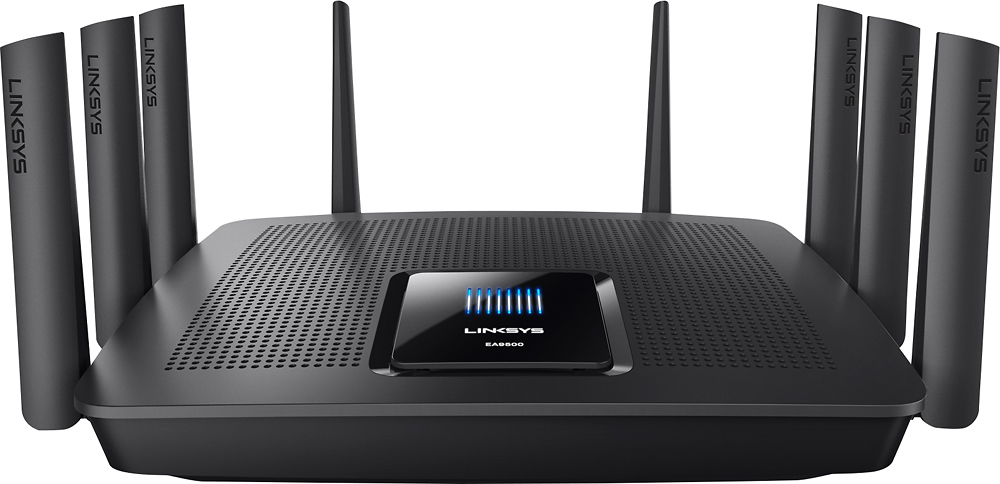
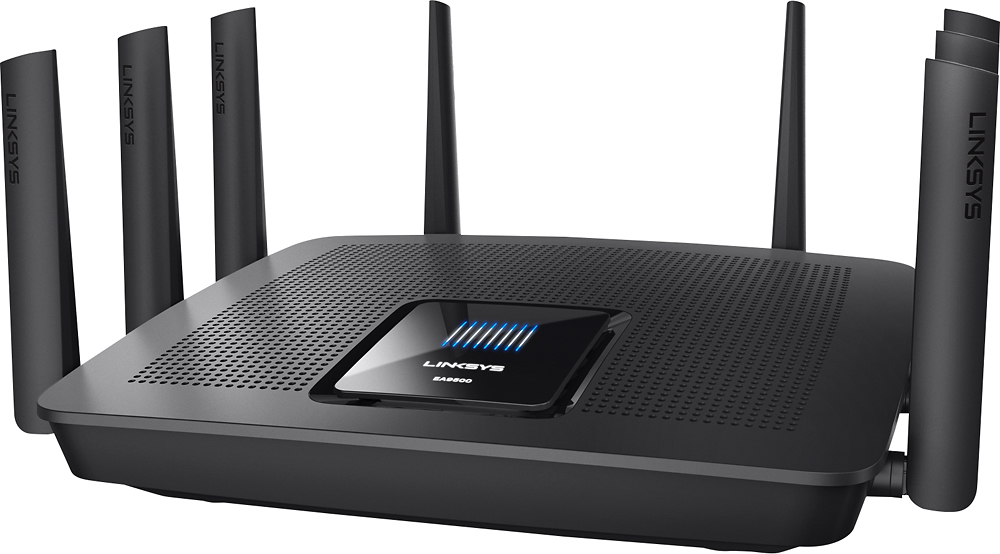
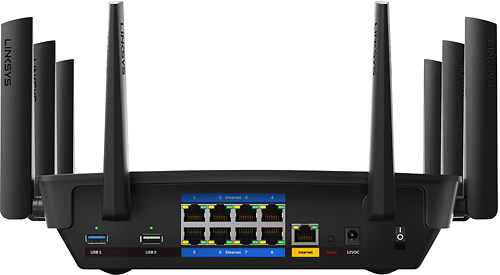
Customers are pleased with the AC5400 Tri-Band WiFi 5 Router's impressive range, ease of use, and strong performance, citing consistently positive experiences with setup and signal strength. Many appreciate the extensive coverage and numerous Ethernet ports. However, some customers note that the router is large and expensive. A few users mentioned occasional connection issues.
This summary was generated by AI based on customer reviews.
Warning for Gamers - Avoid this Router
Posted .This reviewer received promo considerations or sweepstakes entry for writing a review.This router will not allow you to run 2 XB1 on the same network. In short, running >1 or more XB1 on the same network results in setting NAT to closed on one or both consoles making it impossible to host a multiplayer game such as lead a Destiny fire team. More details if interested. There is no easy way to provide wireless access to my 2 XB1s, so invested $600+ on this router and 2 RE7000 Range Extenders over the summer and it has been a long source of frustration and waste of money. Unfortunately it took me a while to identify the problem and troubleshoot the cause until it was too late to return. When both XB1 were online at some points my son and I could not could not lead a fireteam in Destiny but could join a fire team lead by people outside of the house. It turned out to be NAT was reverting to closed on at least one XB1 and eventually both XB1s. Restarting the network & XB1 will set NAT to open briefly and allow functioning if you start a game quickly. Talked to Linksys, they advised it is not possible to run >1 XB1 on a network. After I explained I had been doing that for 1yr+ they said more than likely internet provider or MS changed something. They did say setting up one in a DMZ and one out may fix; it didn't. Talked to the MS Answer Bar and they assured me I can run multiple XB1 on a network, they do it at the store and several employees had them at home. Told me it was most likely how the router was designed. Got home set up my old router, problem solved. Tried using the new router in bridge mode as the worlds most expensive range extender, and I cannot establish a connection to XBLive over the Linksys wifi in Bridge mode. Hope this saves someone some frustration and money.
No, I would not recommend this to a friendI love this router
Posted .This reviewer received promo considerations or sweepstakes entry for writing a review.This is the best router I have bought and I love the app it makes it easy to manage your router and who can use your wifi
I would recommend this to a friendGreat coverage
Posted .This reviewer received promo considerations or sweepstakes entry for writing a review.I am very happy with this router. Has great coverage and never gets disconnected. Easy setup and you has many options.
I would recommend this to a friendGreat Router
Posted .This reviewer received promo considerations or sweepstakes entry for writing a review.I was having problems my cable provided router so I decided to buy this one and its a little pricey but I LOVE it.
I would recommend this to a friendGood Router
Posted .This reviewer received promo considerations or sweepstakes entry for writing a review.It is a good router, the interface is not as accurate and I would like as in what is connected and how it is connected . Over all a GREAT router!
I would recommend this to a friendRouter SW
Posted .This reviewer received promo considerations or sweepstakes entry for writing a review.excellent router. it solver my connection for my devices
I would recommend this to a friendFast speed
Posted .This reviewer received promo considerations or sweepstakes entry for writing a review.I bought this router to replace the old one that the connection is not every stable, everything is good so far.
I would recommend this to a friendGreat router for home and streaming
Posted .This reviewer received promo considerations or sweepstakes entry for writing a review.awesome router and best buy matched the online amazon price. excellent router for TV streaming and home wifi.
I would recommend this to a friendSolid router
Posted .This reviewer received promo considerations or sweepstakes entry for writing a review.The EA 9500 Linksys router does a great job. Love the remote app Which is much better than my old netgear.
I would recommend this to a friend- Pros mentioned:Setup
Defective 2.4ghz band outdated hw version
Posted .This reviewer received promo considerations or sweepstakes entry for writing a review.I had gone to Best Buy to purchase the Netgear X10 but they were sold out. Since I needed a router right then I bought this instead as the company I work for used to give our customers EA6900 but switched to a different brand a year or so ago. I was definitely disappointed. Setup was nice & easy, it looked great but I found out I had hardware version 1. I contacted Linksys to see if they would swap for hardware version 2; still 2 months later and no response. 30-33 days after purchase the 2.4ghz band stopped passing a valid IP address. I did a factory reset of the router & it worked for about 2 minutes then stopped again. Factory reset again but no 2.4ghz band connection was possible. To rule out the laptop being an issue I used another laptop-same problem. So I took the router back to Best Buy since I had a PRP & they swapped it for the X10 that they now had in stock. 0/10 would not buy the Linksys EA9500 again.
No, I would not recommend this to a friendBrand response from Linksys Staff
Posted .Hi, KYTwinsDad,
We regret to hear that you already returned the product. The connectivity issue that you experienced with the 2.4 GHz band of your EA9500 router was very uncommon, and we could have requested one of our Escalation Engineers to have it fixed.
If you have other Linksys device that needs assistance, feel free to contact us directly at [email protected]. We'd be more than happy to serve you.
Regards,
Jay
Linksys Support
Great Router
Posted .This reviewer received promo considerations or sweepstakes entry for writing a review.This item was given to me as a gift, and i have to say it's the best router I ever owned.
I would recommend this to a friendOn the 6th one ...
Posted .This reviewer received promo considerations or sweepstakes entry for writing a review.I really want to like this router, but I can't ... on my 6th one ... totally not worth it 1) This was a version 1.0 and it worked great for about 4-6 months and the 5ghz Wi-Fi band just randomly stopped working, couldn't get it back with any amount of resets, luckily I used Geek Squad Protection and got a new one. 2) Another 1.0 version, worked fine for a few months and then *potentially* got messed up by a power surge ? It was behind a APC backup, but nonetheless, it was bricked and wouldn't turn back on, Geek Squad FTW again. 3) Same issues as #2 4) Version 1.1, both Wi-Fi's stopped working, no amount of resets helped 5) Version 1.1, the LAN ports stopped working, returned 6) Version 2 (the current one) was sitting on the couch when I got all sorts of notifications that my cameras had lost internet connection - went to check the router and it was rebooting .... its been rebooting for 2 days. I was able to get it to reset, however, I can't access the webpage for it. Completely useless. So ... this leads me to believe a few things: 1) I have some serious gremlins in my house, I should probably move. 2) My local Best Buy has gotten every single piece of crap router to not pass QA 3) I'm just that unlucky Throughout the process I've put routers behind surge protectors, directly connected to the wall, behind APC's etc - every which way possible and it doesn't matter. When the router works, its actually phenomenal but it has just been so incredibly unreliable for me. Linksys customer support is straight awful, they are more concerned about the power supply that's being used than troubleshooting the actual issues - this makes me think they have a bad batch of power supplies and they just can't figure it out.... Who would use a different power supply than the one out of the box ?? Luckily i've kept an old Netgear X6 on the wall "just in case" - its gotten a lot of use lately. So, if you want to continually work for it ... then go for it, but I can't recommend a linksys product anymore
No, I would not recommend this to a friendBrand response from Linksys Staff
Posted .Hi FlyboyJ,
We truly appreciate your taking the time to share your product review. As what you have described, it seems that your EA9500 router needs a firmware update and optimization to make the connection of the 5 GHz radio band stable. Please send us your phone number and the link to this post at [email protected] so we can retrieve your case and endorse it to our Escalation Engineers for further assistance.
Hope to hear from you soon.
Regards,
Jay
Linksys Support
Perfect router
Posted .This reviewer received promo considerations or sweepstakes entry for writing a review.I purchased this due to the capabilities and lack of antennas for my current router. Set up took a few times but nothing of an issue.
I would recommend this to a friendGreat Purchase
Posted .This reviewer received promo considerations or sweepstakes entry for writing a review.The only problem i had with this is just the linksys website. And the parental control does not work and hasnt ever worked for me.
I would recommend this to a friendLinksys ea9500
Posted .This reviewer received promo considerations or sweepstakes entry for writing a review.Best router on the market period.long range wifi with out any problem for past two years.
I would recommend this to a friendLoving it..
Posted .This reviewer received promo considerations or sweepstakes entry for writing a review.Meets my all needs. No connection drop, full speed at 5Ghz. Already recommended to my friends
I would recommend this to a friendEhh.. dropping signals
Posted .This reviewer received promo considerations or sweepstakes entry for writing a review.2.4ghz out of my 150mbps I get 15mbps 5ghz smart connect - wifi constantly dropping then phone and other devices connect to 2.4ghz which barely work. I switched from a Netgear Nighthawk X8... I guess I made a wrong choice I see a asus rt5300 maybe time to test that bad boy out.
No, I would not recommend this to a friendBrand response from Linksys Staff
Posted .Hi, Zain970,
Your feedback is valuable to us. As you reported, the router is giving you slow speed on the 2.4 GHz band and dropping of the Wi-Fi signal for 5 GHz frequency which are both unacceptable. Allow us to make this right for you. Have you tried resetting and reinstalling the unit? What about tweaking the channels for both frequencies? We suggest to try channels 1, 6, 9 and 11 for the 2.4 GHz Wi-Fi network, and channels 36, 40, 44 and 48 for the 5 GHz, whatever works best with your existing network ecosystem. If this doesn't work, email us the details so we can endorse your case to our second level support team for further assistance. Get in touch with us at [email protected] along with your contact information and the link to this review for reference. We'd be more than happy to assist you.
We look forward to hearing from you the soonest.
Regards,
Linksys Support
great wi-fi!
Posted .This reviewer received promo considerations or sweepstakes entry for writing a review.This Linksys Wi-Fi Router is a great wi-fi to a big family, I recommend this to every peoples.
I would recommend this to a friendGreat Router for Home
Posted .This reviewer received promo considerations or sweepstakes entry for writing a review.I love this product and the option it comes. The app make setup easy and offer off site control.
I would recommend this to a friendGreat router
Posted .This reviewer received promo considerations or sweepstakes entry for writing a review.Easy hook up. Plug and play. I went from 5mgb download to 25. Wifi is great and all 3 levels
I would recommend this to a friend