Customer Ratings & Reviews
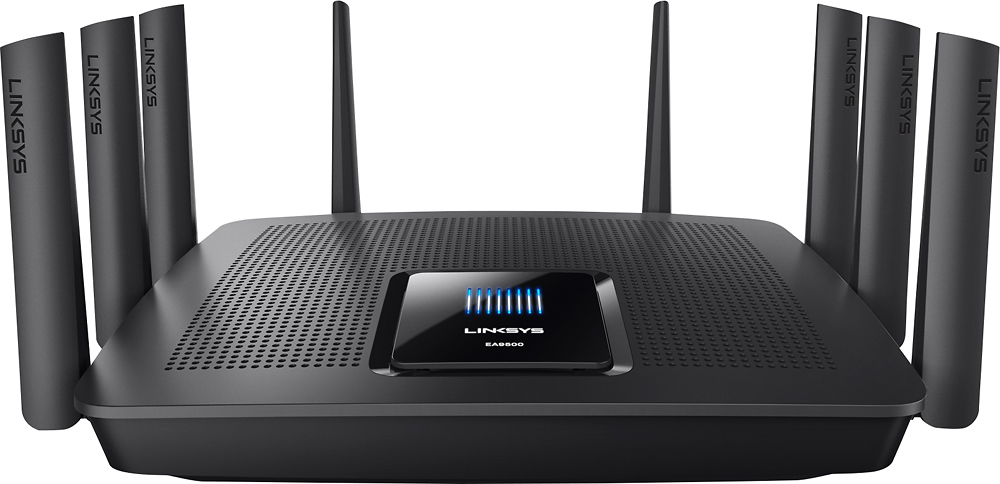
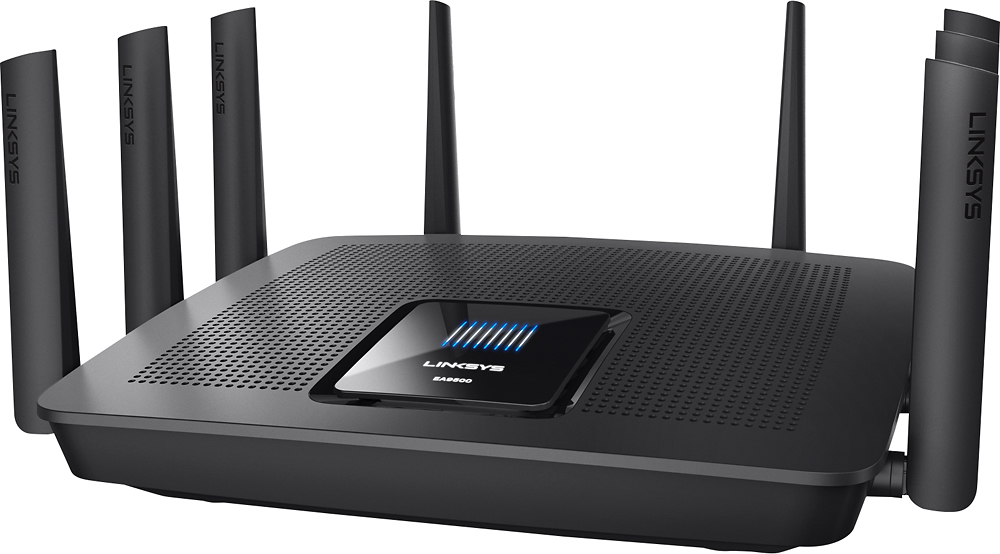
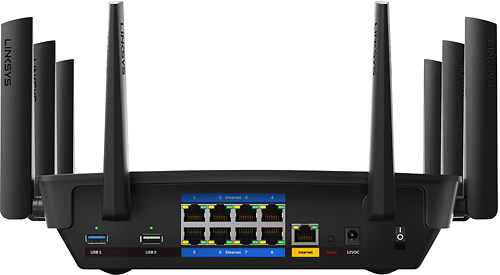




- Model:
- EA9500
- SKU:
- 5171100
Rating by feature
- Value
Rating 3.9 out of 5 stars
- Quality
Rating 4.2 out of 5 stars
- Ease of Use
Rating 4.4 out of 5 stars
Customers are saying
Customers are pleased with the AC5400 Tri-Band WiFi 5 Router's impressive range, ease of use, and strong performance, citing consistently positive experiences with setup and signal strength. Many appreciate the extensive coverage and numerous Ethernet ports. However, some customers note that the router is large and expensive. A few users mentioned occasional connection issues.
This summary was generated by AI based on customer reviews.
Finally a great router
||Posted .This reviewer received promo considerations or sweepstakes entry for writing a review.I've been wanting to upgrade and glad I waited for this one. Always used Linksys but last one had problems with dropping connections and had to restart a couple times a week. This one is running solid since installing a month ago and have never had to reboot. Signal is strong but I added an extender to make it even better. Have no complaints, it is working great.
I would recommend this to a friend- Pros mentioned:Ease of use, Speed
Works great
||Posted .This reviewer received promo considerations or sweepstakes entry for writing a review.Easy to install allowed me to boost to 200 mps. Really good product
I would recommend this to a friend - Pros mentioned:Setup, SpeedCons mentioned:Size

A Beast of a Home/Small Business Router!
|Posted .This reviewer received promo considerations or sweepstakes entry for writing a review.This is by far the most macho networking device I think I have ever had the privilege to integrate into my home network. To give you some context, my home network consists of multiple phones and tablets, laptops, desktops, two TVs, two network enabled audio receivers, an Xbox, Wii U, multiple 1GB network switches, a network area storage device, multiple smart BD players, guests that come over to borrow my bandwidth from time to time, and a bunch of other stuff that I’m probably forgetting about. My home isn’t quite a “smart home” yet but with the Internet of Things taking hold it won’t be long before we all will be investing in beefier networking equipment to keep everything connected. That is where the Linksys EA9500 AMX-Steam comes in. Before I go much further I was asked to give an honest review of this product by BB and I’m going to do just that. Physically, this device is massive. It is the largest piece of networking equipment I’ve seen for the Home/Small Office space. I’ve had a lot of home networking products over the years and this one wins on weight and size. The antennas are industrial looking and strangely attractive as far as antennas go. Be sure to pick a roomy, stable location for this device. The box had plenty of packing to protect it during shipping. My device arrived in a box that looked like it was kicked a few times and then run over. But the device and its contents didn’t have a scratch. The initial setup process was fairly easy and straight forward. If you are part of the set and forget crowd, then simply follow the four-page quick setup guide that comes with the device and you’ll be up and running in about five minutes. For once the marketing matches the experience. However, if you want to dive deeper into your router for a more custom installation then you are looking at 30 minutes minimum setup time. I am impressed with the amount of work Linksys put into consumerizing the graphical user interfaces. It is fairly straight forward and accessible for a network device. I used the quick setup feature first and then did a deep dive into the advanced features. My network is fairly complex with a few older pieces of tech that simply would not work without some additional customization. Setting up my wireless devices was very easy. I gave each network a name, set the password, and then added the information into each one of my wireless devices. I did have one challenge with a Samsung TV. The TV was incapable of speaking to an 802.11n that also leverage the 80hz band. I don’t know why since the router should have stepped the frequency down to accommodate the TV. The solution was to split the 5Ghz networks in two, assign one to a 40hz band, and then assign the TV to that WI-FI network. The other network was set to 802.11ac with an 80hz band for future technology. Maybe some future firmware update will address this issue. My wired devices were easier. I have a pre-existing 8-port 1GB switch that most of my network runs through. My old router had a 1GB switch built in, however, it didn’t have enough ports to support my network. It was also a poorly performing switch. The separate switch removed the network load to behind the router so that the router could focus on internet and wireless communications. This setup served me well for over a year. The EA9500 comes with a built in 8 port GB Switch. Since Linksys chose to brag about how much of a beast this router is I chose to challenge their marketing gods. For my test I used a music library containing 43GB of uncompressed FLAC formatted music. To put this into context, a 3 minutes MP3 is about 7mb. A 3 minutes uncompressed FLAC music file is about 100MB. In find the larger files easier to monitor and measure. I chose to move the folder over the wireless and the wired networks using the router for all wireless communications. I started with the wired devices. All devices performed admirably and in line with what I was expecting. At 10/100 speeds I was pushing 98mbs or roughly 11.3 MB/s. At 10/100/1000 speeds I was pushing 800mbs or roughly 92 MB/s. This is from source to my computer. To confirm my results, I hooked my 10/100/1000 network switch up (no router this time) and ran the same tests. I got the same results. The end result is I retired network switch and am using the router in its place. One less network hop on my network should improve performance slightly and now there is one less device that I need to manage. Win/win! Performing this same test with my wireless network I found that my 802.11g 2.4gz connection was maxed out at 98mbs. That is better than the 56mbs 802.11g specification at this frequency. I also have several 802.11n devices on my network that range in top speeds from 300mbs to 450mbs. Both tests came in about half of the max specification. One thing to keep in mind is that network speed is governed by the slowest connection. In general, I have found that the 5ghz frequencies are not as consistent as the lower 2.4ghz frequencies in both distance and reliability and is completely dependent on location. The location for my router is in the worst possible place for my home; the basement. For these tests I was in direct line of site of the router but there is a lot of stuff in the basement that can generate interference such as electrical wires, my furnace, copper pipes that pick and absorb RF, concrete walls, the floor above, and boxes full of stuff that will often degrade and block signals. My disclaimer is that your personal experience may be much different from mine. Over all though I am happy with the results because the performance is already better than the router the EA9500 replaced. I could not test the 802.11ac performance. I do not currently own any devices, other than the router, that are compatible with the 802.11ac specification. One feature that is a head scratcher is the LED screen on the top of the EA9500. I haven’t figured out why Linksys wasted its time or treasure on this feature. It displays their logo and a bunch of white bars. When the router boots up the white bars are accompanied by some little blue bars. And that’s it! It’s pretty, but other than that it doesn’t server any purpose. The router does have a feature that allows the lights on the router to be turned off. I chose to turn this feature off. No sense in wasting electricity on a useless function. There is a novel network map in the router’s interface. It is nice to see all of the active devices on the network. However, I would have loved to see a bandwidth meter of some kind showing how much bandwidth each device was eating up. This way I could tell who, or what, was killing my connection to my favorite game. On my old router I could tell at a glance if more than one person was streaming video or music. It may seem like a silly feature but it does come in handy. Once you’ve had it with other products you learn to rely upon it for valuable information about your network behavior. It can also help in finding trouble spots on your network. Some of you are probably asking if you can stream movies and play games with the EA9500. I have a 15mb downstream connection and 1mb upstream connection. Definitely not the best. I streamed a Netflix movie on my computer, another Netflix movie on my tablet, a constant stream of full screen video from YouTube to my laptop, Pandora to my home theater receiver, put the wife on Facebook with her laptop, and then loaded up my favorite 24 player, multiplayer video game. The game showed a few moments where my ping was over 200ms but for the most part it was steady at 50ms. 50ms is average latency when this same game is the only traffic on my network. Under my own router the above scenario would net me a 400ms to 900ms latency. In the world of online gaming this is huge and is often the difference between a great game and terrible experience. The EA9500 did an excellent job of managing the network traffic and available bandwidth. Final thoughts. Can I run a sophisticated, Internet of Things, home of the future with this thing? Yes. Can I operate that fancy new Samsung, uh Android, uh cool refrigerator that Best Buy sells? Without a doubt. Can I setup and satisfy the needs of a small office with this? I work from home a lot and do video conferencing, Voice over IP, remote server connection, and remote collaboration with my colleagues via a secure, encrypted VPN connection. So, yes! Do you need this? If you are a power user like me, have a family with high bandwidth demands, or have an eye towards future proofing your technologically advanced lifestyle then yes, I think you are the target audience for this device. If you have a small office with limited space, then this device will also fulfill your needs. If you live in a one-bedroom apartment with a laptop and a cell phone then no, this product is definitely overkill for you. You can get away with a smaller, less powerful model. I went into this product skeptical that it was more snake oil marketing fantasy and came away a believer that this product is what it claims to be. It will be interesting to see what others have to say about. My experience thus far has been very positive and will recommend this for anyone who has a big home, small office with a few employees, or high bandwidth demands and a lot of old and new wireless technology that needs to coexist.
I would recommend this to a friend - Pros mentioned:Range, Setup
Awesome Router!
||Posted .This reviewer received promo considerations or sweepstakes entry for writing a review.Set up was easy and range is great. This router is a amazing!
I would recommend this to a friend - Pros mentioned:Range
Finally a router that covers the whole house
||Posted . Owned for 1 year when reviewed.This reviewer received promo considerations or sweepstakes entry for writing a review.Can't say enough great things about this router. It penetrates to the entire house including 3 levels plus a basement. Multiple streaming devices, work from home, wireless cameras, three printers, four phones, with a total of about 25 devices total connected. Get one when they are on sale!
I would recommend this to a friend - Pros mentioned:Ease of use
Love It
||Posted .This reviewer received promo considerations or sweepstakes entry for writing a review.Easy set up, the app is great. I have nearly 50 devices on the wireless network including 4 smart TVs and 3 game consoles and never experience issues. My initial unit was defective, but Linksys replaced it quickly and with no headache. Their support is awesome and the 3 year warranty and tech support cant be beat.
I would recommend this to a friend Solid router
||Posted .This reviewer received promo considerations or sweepstakes entry for writing a review.This router covers a large area of square footage, so I’m completely satisfied with the purchase. The rerouting process is great for bandwidth utilization also...
I would recommend this to a friend- Pros mentioned:Speed
Make sure you get the v2 model!!
||Posted .This reviewer received promo considerations or sweepstakes entry for writing a review.Beware, there are still v1.0 and v1.1 models floating around. I originally bought the v1.1 and it barely reached 300Mbps on a wired connection on a Gigabit FIOS service. Wireless was even worse. I had read good things about the v2 model and decided to give it a try. Wired is now full gigabit speed and wireless is hitting 224/260.
I would recommend this to a friend - Pros mentioned:Setup, Speed
Awesomeness
||Posted .This reviewer received promo considerations or sweepstakes entry for writing a review.The router is great easy to setup, fast and friendly. Great buy
I would recommend this to a friend Didn't get the increase in speed that I expected
||Posted .This reviewer received promo considerations or sweepstakes entry for writing a review.It's too early to tell and there could be other factors like the modem, but for the price, I was expecting stronger signals throughout the house. We'll see.
I would recommend this to a friendThe unexpected
||Posted .This reviewer received promo considerations or sweepstakes entry for writing a review.I was surprised how well this router held up and was able to keep me wirelessly connected no prblems so far works good no need to figure out how to update firmware it does it on its own compared to the asus brand you had to have a masters degree in tech know how just to update their firmware what a nightmare that was and this one has 8 ethernet ports to connect all your stuff
I would recommend this to a friend- Pros mentioned:RangeCons mentioned:Price
Works great!!!
||Posted .This reviewer received promo considerations or sweepstakes entry for writing a review.Great working Router. A little pricey. It has great range.
I would recommend this to a friend Great product
||Posted .This reviewer received promo considerations or sweepstakes entry for writing a review.Does everything and works like we hoped. We read other comments and we decided to try this one. We are very happy with it
I would recommend this to a friend- Pros mentioned:Ease of use, Speed
Best WiFi router
||Posted .This reviewer received promo considerations or sweepstakes entry for writing a review.Easy setup. Works lightning fast with three separate bands.
I would recommend this to a friend - Cons mentioned:Price
5 Ghz is blazing
||Posted .This reviewer received promo considerations or sweepstakes entry for writing a review.This is a great Wi-Fi router, and I'm really enjoying the blazing fast 5 Ghz connection. However, I was surprised that the 5 gig WiFi connection does not reach as far as the lower speeds. If distance is an issue, you will only be able to continue using the 2.4 gig, not the 5. It also has some nice flexibility with why you set up different Wi-Fi networks. The down side is that's rather pricey.
I would recommend this to a friendBrand response from Linksys Staff
Posted .Hi, Dainks,
We're glad to know that you're enjoying the benefits of having a 5 GHz network. As for the distance of the 5 GHz band, it has a shorter range compared to a 2.4 GHz band. Moreover, for optimal performance, it would help if you place your router at the center of your house away from walls and other obstructions.
Our Escalation Engineers would love to help you achieve the unit's full potential. They'll also further discuss the usage of both bands. Please get in touch with us at [email protected] and indicate your contact information and the link to this review.
Regards,
Kristine
Linksys Support
- Pros mentioned:Speed
Excellent router
||Posted .This reviewer received promo considerations or sweepstakes entry for writing a review.This router replaced my Airport Extreme. While the Airport was an excellent router, it was lacking some configuration options that I needed. This router fulfilled my needs perfectly and extended my network range and speed dramatically. I'm not sure if I'd pay full price for it, but if you can get it on sale it is an excellent router.
I would recommend this to a friend Excellent Router
||Posted .This reviewer received promo considerations or sweepstakes entry for writing a review.Had to get this as an emergency replacement. Looked online at the different styles available and could not decide which one would be best for me. Went to the store and got help from an associate who has this model. He was very helpful in making my decision very easy to purchase this model. Glad to say that all is well with it.
I would recommend this to a friendworks as advertised
||Posted .This reviewer received promo considerations or sweepstakes entry for writing a review.After returning another product, I decided to spend a little more money to get what I needed. Our cable modem is in the basement of our 2800 sq ft home and having a good connection in the bedrooms upstairs was difficult. We have multiple devices connected to the wifi so that makes it more difficult. This router works as advertised and all the kids are happy, even when in their rooms.
I would recommend this to a friend- Pros mentioned:Range, Speed
EXCELLENT RANGE & SPEED!
||Posted .This reviewer received promo considerations or sweepstakes entry for writing a review.This router is the best! Excellent range and speed
I would recommend this to a friend - Pros mentioned:Range
Best Overall Router
||Posted .This reviewer received promo considerations or sweepstakes entry for writing a review.Best Router for Verizon Fios (gigabit) with 8 ports for Ethernet connectivity. Accompanying Linksys app is a huge help to manage devices. Massive Range too I can get a WiFi signal clear down the street from where I live! Price may be high at the moment but it’s the best router hands down.
I would recommend this to a friend