Customer Ratings & Reviews




- Model:
- EA9500
- SKU:
- 5171100
Rating by feature
- Value
Rating 3.9 out of 5 stars
- Quality
Rating 4.2 out of 5 stars
- Ease of Use
Rating 4.4 out of 5 stars
Customers are saying
Customers are pleased with the AC5400 Tri-Band WiFi 5 Router's impressive range, ease of use, and strong performance, citing consistently positive experiences with setup and signal strength. Many appreciate the extensive coverage and numerous Ethernet ports. However, some customers note that the router is large and expensive. A few users mentioned occasional connection issues.
This summary was generated by AI based on customer reviews.
- Pros mentioned:Range, Speed

It's a Beast!
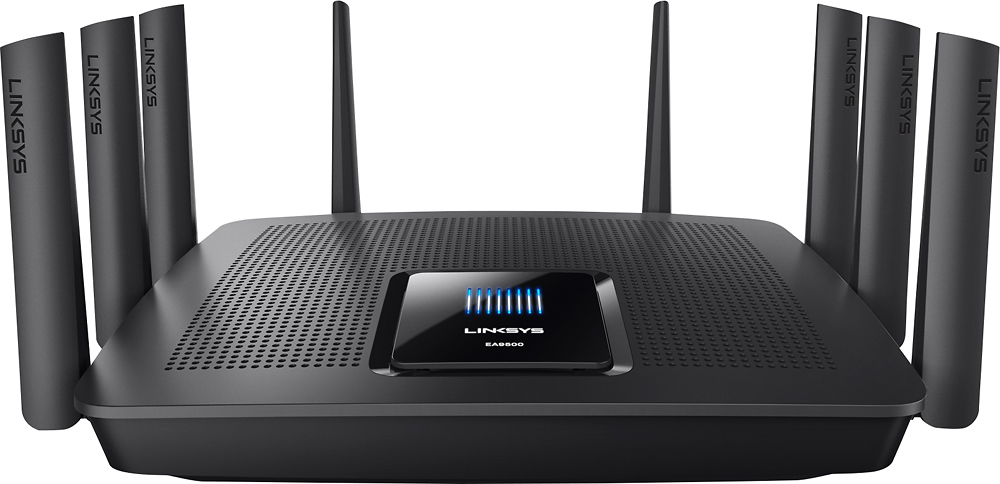
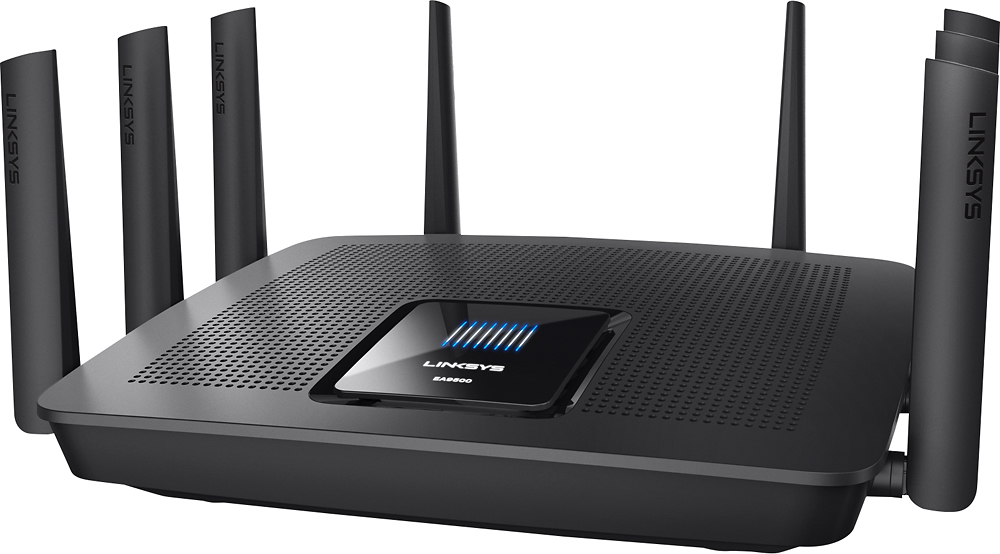
|Posted .This reviewer received promo considerations or sweepstakes entry for writing a review.Well the first thing I'd like to say is WOW. This router is a beast! I'm used to palm sized routers and switches. The EA9500 takes two hands to hold. When you get this baby, you feel like you're about to conquer the world. Between it's size and the 8 antennas, it's impressive. The EA9500 is a Tri-Band router. It uses both the 2.4Ghz and 5Ghz bands but puts out 2 signals in the 5Ghz band. I have devices that can't use the 5Ghz so it's sweet that it broadcasts on both. Setup was a breeze. Plug it into an outlet and run the enclosed Ethernet cable to your modem. Turn it on, connect via your computer browser and just a few clicks and a couple minutes later you are set to go. The WiFi range was better than my old router. I basically lost a bar once I was about 35 feet away but I had all my bars with the EA9500. If you setup a Linksys Smart WiFi Account, you can control your router from anywhere in the world. Among the neat options was the ability to setup a connected device as a priority device. Essentially giving it first crack at your bandwidth. Another nice feature is Guest Access. I'm not sure how the security works but the Help says that when you turn it on, you can give your friends a password and they will have access to the internet but not any of your devices connected to the router. On top of that you can control how many guests can be logged in at once in increments of 5. The 8 antenna's are important. They are directional antennas. The instructions state that for a single level house (which is what I have) point them all up. The signal will then radiate out. If you have a two story house then angle 1/2 of them so it sends the signal up. The WiFi speed on the 2.4Ghz channel is exactly the same as I get when I'm hardwired which is awesome. 36Mbps Down, 6+Mbps Up. It has a Full 8 external ports on the back. Not 7 + 1 like a switch. 8 usable ports plus a 9th for the connection to your modem. So what about streaming multiple devices? No problem. I was able to stream on 5 different devices using the 5Ghz band without a hiccup. Two Rokus, an iPad, an Android tablet and an android phone. I was watching 2 Time Warner shows through their app, MLB TV, You Tube and HBO Go. If you are using a compatible Linksys WiFi Range Extender things get really awesome. Linksys has Seamless Routing. What that means is that your device will automatically connect to either the router or the Extender, whichever has the strongest signal. Move from room to room, front yard or back yard and you don't need to switch to a different network. One stop shopping.
I would recommend this to a friend - Pros mentioned:Performance, Speed
Excellent MIMO router
|Posted .This reviewer received promo considerations or sweepstakes entry for writing a review.This router is one of the few new MIMO routers on the market. I have been using this router for 2 months and am pretty happy with the performance. Our family has upto 40 devices on the network and the wireless performance is very important. EA9500 has all the basic features plus some new. After initial setup the router home screen is a mix of gadgets that give you a quick view of the network. The gadgets can be easily added or removed. Following are the default gadgets listed under Smart Wifi Tools Network Status - Shows a graphical view of current connection to internet. Wireless - Shows the status of both bands and you can quickly look at the wifi passwords. Parental Controls - Turn on or off and see a list of controlled devices Network Map - Listing number of devices connected on both bands Guest Access - Turn Guest Access On or Off along with the set passwords Media Prioritization - Shows any devices that receive priority bandwidth External Storage - A graphical snapshot of disks connected to the router. Additionally you can run a Speed Test - supported browsers only The router settings allow you to configure and setup the following - Connectivity -Basic Settings, Internet Settings,Local Network, Advanced routing, VLAN and Administration Troubleshooting - Status, Diagnostics and Logs - Here you can see the devices that have assigned IP Addresses, Run Ping or Traceroute and reboot the router. Also logs can be enabled an collected. Automatic and manual firmware upgrades can be done from this screen. Wireless - Wireless Settings, MAC Filtering and Wifi Protected Setup Security - Firewall, DMZ and Apps and Gaming. I had a 4 TB hard drive connected to the USB 3 port and regular used it for FTP. I got upto 34-35 MBps on FTP. DLNA works pretty well. I did have issues with the hard drive showing disconnected even though it was plugged in all the time. This would be resolved by removing the USB cable and connecting it back. I would be concerned if I was remote and expected it to work and it didnt. The wireless range has been good in a 3 bedroom house and I have never had icoverage or signal issues. Improvements - Allow renaming the USB share. VPN Setup. All in all it is a very good router and I am pretty sure future firmwares would make it more stable.
I would recommend this to a friend - Pros mentioned:Range, SetupCons mentioned:Size
The Best Router NOW
|Posted .This reviewer received promo considerations or sweepstakes entry for writing a review.This is a multimedia giant, has the ability to stream 4K ready router. You can prioritize your media devices so if there's a slow down through your ISP provider this router will push that device to have the fastest stream. This uses multiple built in antennas 2x 2.4GHz and 2x 5.0GHz. This is one of the most easiest hook ups I was able to do. Just set up and go, I also downloaded the app on my iPhone which gives me control of seeing what is accessing my router whenever or wherever I may be. I also like that I can turn on/off the Guest WiFi from my phone when not in use. Some planning is needed finding a home within my home for this huge router. At the moment it is located in the central room of the house beaming WiFi evenly throughout the house, I now have outside access too so now I can enjoy streaming while I do yard work or cooking on the grill. Pro: Easy to setup (took 5 mins) Range throughout the house is must faster. iPhone app for access to router. iPhone app control of guest WiFi on/off Media Prioritization so tablets and TV have priority if Comcast slows my speeds. Faster than my Cable Modem built in WiFi saw a 10mps higher difference. Con: Planning needed on placement on this device, wider than a toaster; the power you get from this device out weights this one con.
I would recommend this to a friend - Pros mentioned:Ease of use
Crapped out after 3 days
||Posted .This reviewer received promo considerations or sweepstakes entry for writing a review.Set up was a breeze and I had high hopes for this expensive router. It kept dropping the wifi signal and after troubleshooting with linksys twice, it ended up crapping out on me after only 3 days. I traded it in for a Netgear mesh setup. No issues with that.
No, I would not recommend this to a friendBrand response from Linksys Staff
Posted .Hi, Kcb4,
Thank you for bringing this to our attention. What you have experienced is unusual as the router is expected to deliver a stable and reliable connection once it's set up. Our Escalation Engineers could have checked the unit and helped you get it to work as expected. Should you need assistance with your other Linksys devices, please don't hesitate to reach out to us at [email protected] anytime.
Regards,
Kristine
Linksys Support
- Pros mentioned:Performance, Range, Setup
Easy to set up and powerful!
|Posted .This reviewer received promo considerations or sweepstakes entry for writing a review.Opening the box I was in geek heaven as I held in my hands a substantial device that would find it's self at home on a Star Trek episode. That not being the case I am happy it is at home here with me. Linksys has mastered the setup process and requires just 4 steps to get started. The onscreen home page is easy and intuitive. Basically, someone who speaks in regular English and understands user interface was involved. I had all the features setup that I wanted in about 14.5 minutes. The technical specs did not disappoint. With 8 gigabit ports I was left wondering what devices I don't have that I need to get to really max this out. I also love the on/off switch on the back that is easy to get to. As far as performance. I was not able to run enough data through it to make any sort of dent in it's capabilities. So, on top of streaming Netflix and Pandora on two different devices I also started a large file transfer from my network drive to two of my computers. Fast and solid! Then I invited a couple of my gamer friends to come over and did my thing while they played without complaint. My only complaint is that it may be too much for some households and that is the case here under normal circumstances. But when the nephews and nieces are visiting I am sure I wont hear "Billy is hogging the internet." Range is great along with parental controls, and media prioritization make this something I think will last for quite a while!!
I would recommend this to a friend - Pros mentioned:Setup, SpeedCons mentioned:Size
this thing is a beast !
|Posted .This reviewer received promo considerations or sweepstakes entry for writing a review.I was very surprised at the size of the box the Linksys EA9500 shipped in. The router is huge. If it were 1 mm wider, it wouldn't have fit on the shelf I have. make sure you have space. This is the largest router I've used and the 8 antenna are crazy to see. The body is nice and sleek, but with the antenna coming out of everywhere, it reminds me of the predator. Set up is a breeze. I'm no expert in setting up a wireless network. I had it up and running within 10 minutes and started connecting devices. No issues at all here. The Linksys smart wifi web page lets you change network name and passwords easily. I didn't play around too too much after connecting the router, setting up, and connecting devices, but so far so good. I connected 2 iPhones, 2 iPads, my TV, xbox one, PC, & surface to the 5 ghz network and everything ran smoothly. I noticed no delays. One thing I need to still test out is NAT type issues on XBOX live and PS network. I moved away from Linksys routers a couple years back because I couldn't get NAT type to stay open when switching between playing online on xbox and ps, but I'm giving it another try. Last night when I set the router up and connected the xbox, the NAT type stayed open, which is necessary for playing online. When I have a little more time to test things out, I'll switch between gaming consoles to see if the NAT stays open. If the NAT type stays open while switching, then I'll update to 5 * :-)
I would recommend this to a friend - Pros mentioned:Range, Speed
A good router, but not exactly mind blowing
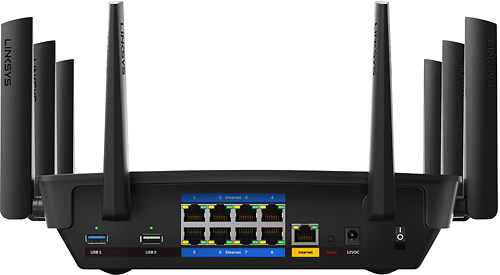
Posted .This reviewer received promo considerations or sweepstakes entry for writing a review.I recently received the Linksys Max Stream AC5400 EA9500 router for a review. This was through the Linksys Family and Friends program. This router contains the latest technologies making it very powerful. It is a MU-MIMO Gigabit router allowing for multiple users on the same network at the same speed. It contains three WiFi bands for a total combined speed of 5.33 Gbps with 4 simultaneous data streams for a fast and strong connection. The entire router is powered with a dual-core CPU with eight antennas allowing for a wide range. Packaging Before we get into the details of the router, I would like to first point out the condition in which I received the router. It arrived in a box twice its width, allowing for the router to move around. The router was not shrink wrapped, so the box was damaged when I received it. I'm unsure as to whether this had any affect on the router, but having such a powerful router arrive in such a condition really isn't the best way to start things off. Arrival aside, opening the box shows a typical layout. The box contained a router, a quick start guide, a short Ethernet cable, a CD with documentation, and a power adapter. The router has eight antennas to cover a wide range. Each antenna was wrapped in plastic, and the entire router was covered in a plastic unsealed bag. One thing to note that this router is not meant to be mounted. Unlike the EA7500 router, there are no notches which allows for wall mounting. This router is heavy, and it is meant to be placed on a flat surface. There are rounded pads that allow it to be placed comfortably on various surfaces. The router is very large, being the same size as a 15 inch laptop, and like a laptop, the power brick is a two part brick, with the AC cable and the brick which connects to the router. Also, it is worth noting that the antennas are already attached to the router. They are flexible and can be rotated, but I don't see any way to remove them. The router hosts two USB ports, one 2.0 and one 3.0, eight Gigabit Ethernet ports, and eight beamforming non-removable antennas, creating a high performance powerful router. It is powered by a power brick providing 5 amps at 12 Volts from a standard wall outlet. Initial Setup The quick setup guide was easy to follow. First, powering on the router and waiting for the startup sequence took about a minute. Giving it another minute after connecting it to the internet cable, it took about two minutes total for my computer to recognize the network. Connecting to the router and logging on to LinkSys Smart WiFi in my browser was simple as well. Going through all of the settings to set up the router wasn't bad. However, I would like to point out that while thi is a Tri-Band router, with one band at 2.4 GHz and two bands at 5.0 GHz, the two 5.0 GHz bands share the same WiFi channel, so your computer will show two different wireless points. During setup, there was an option to have all of the router access points be the same name. I tried that, and for a while, it was hard to tell which band I was using. Doesn't really help much with determining the router's performance. It would be nice if there was a way to understand the advantages and disadvantages of having all channels be the same name. Testing First off, I would like to point out that the router that I am comparing the EA9500 with another Linksys router, the EA7500. Both are great routers, but comparing them is difficult. I ran some performance tests at various locations in my house, and the results were very similar, so it's hard to make a clear distinction between which is better. At the very far end of my house one floor above my router, the area is a dead zone with a poor connection. It was so bad, I had to use a WiFi Extender to get a better signal. I ran into this same issue with the EA9500, so the problem might be the location vs the placement of the router. If you're planning to buy the EA9500 for a large house, a WiFi extender might be required. With my old router, at the far end of my house, I get an average of 9.4 Mbps download speed on the 2.4 GHz band while I get a 13.5 Mbps rate on the 5.0 GHz band. In the best case when situated close to the router, I get an average of 41.7 and 47.2 Mbps download speed. With the EA9500, things are a little different. I get an average of 2.87 Mbps and 4.56 Mbps in the dead zone while up close, I get an average of 13.8 and 47.87 Mbps. With these differences in speed, I think it's alright. The discrepancy of the 2.4 GHz download speed with the EA9500 could be due to streaming issues. During my test, someone was watching a video on the 2.4 GHz band, so the traffic might have caused the discrepancy. Once I tested it again with no interference, I got a better rating of 33.88 Mbps. Either way, the results were not surprising with the dead zone readings being low for both routers, and up close getting around 40 to 45 Mbps max download rating. Speed testing done, there is some connectivity issues with the router. I found at times, my devices could pick up the network, but I cannot connect to it. In a room farthest away from my router, a Samsung Galaxy S4 can pick up the 2.4 and 5.0 GHz router bands, but when I attempt to connect to the 5.0 GHz band, I could connect sometimes, and sometimes I can't. I didn't really face this issue with the EA7500, so this is something to note. Final Thoughts Packaging issues aside, I think the router is pretty good, though when comparing against the EA7500, it's really hard to tell which router is better. It's like comparing Fuji and Gala apples. Both are great, but it's difficult to tell which is better. Based on the tests I've done, the range and speed for the EA9500 is just as good, but if you need better connectivity with more devices, the EA9500 is an excellent product. The three streams really don't cause any issues, though I wish more devices can utilize 802.11ac WiFi so the router can be tested to it's full potential. Looking at the cost, it's easy to say no, but this router is definitely worth it.
I would recommend this to a friend - Pros mentioned:Range, Setup, Speed
Impressively Fast
|Posted .This reviewer received promo considerations or sweepstakes entry for writing a review.I recently installed the Linksys EA 9500 Max-Stream and it is truly impressive. Setup was a breeze, it worked flawlessly and while I'm fairly competent I'm no techie. The router is located in our basement, our house has 3 levels, about 4,000 sq feet, and our bedroom is on the opposite side of the house 2 floors up. We have great coverage in our room and upload/download speeds are incredible compared to our previous router. Attached is a screen shot of our speed test using the Linksys utility, also attached is a screen shot using speedtest.net. Both tests were performed concurrently. Not sure why the Linksys utility shows a much slower download speed, might have something to do with the utility itself (FYI Linksys, when I ran the test the upload speed shows its up around 60 mbps but when the test concludes it says '9', don't know why). But I can confirm that streaming and up/downloading is top notch. This is a great upgrade to our home internet, highly recommended!
I would recommend this to a friend - Pros mentioned:Range, SetupCons mentioned:Size
Excellent Router
|Posted .This reviewer received promo considerations or sweepstakes entry for writing a review.This router has been great in my experience so far. The setup process was very easy. The router provides a Wi-Fi address and password upon arrival, and once you have connected, you're able to make changes to the network through their easy-to-use interface. Nice packaging, and the physical style is also a plus. With it's sleek design, it goes nicely with my other electronic devices around it. The range is great as well. I'm able to connect from my front yard, with the router being upstairs in my house. I'm also a big fan of the 8 wired inputs. Even though this does great Wi-Fi, wired inputs are often neglected these days. If I had one negative thing to say, it would be that the size of the router is a bit large. This doesn't bother me at all, since it's tucked away in my entertainment stand, and it's necessary with all the features packed into this thing. Just worth mentioning to those interested in purchasing.
I would recommend this to a friend - Pros mentioned:Speed
A Powerful & Feature Packed Router for any job
|Posted .This reviewer received promo considerations or sweepstakes entry for writing a review.The router itself is packaged well inside a large box with plenty of padding and the individual parts separated. In the box is the router, the AC adapter which comes in 2 parts (The small power brick and a separate cable to attach), one blue Ethernet cable, and a disc that has a PDF of the manual on it. The router itself has 8 antennas, 8 Ethernet ports, and 2 USB ports. The set up was very easy. Raise up the antennas, plug in the AC adapter, then switch it on. Then connect your modem to the yellow port on the router. It takes a couple minutes to fully boot up the first time, so just wait until Linksys logo is lit. Then connect any other devices you are going to connect wired into any of the open Ethernet ports. Next open a web page to the Linksys smart WiFi router page to continue the set up. Go through the set up which is pretty straight forward naming your networks, and setting passwords. The initial set up was easier then I expected and didn't require me to install any programs. The last step in the set up was an optional set up to create a Linksys Smart WiFi account which allows you to access your router settings and network anytime, anywhere. After this I was done with the set up. The web based settings page is laid out very well with simple toggles and drop downs to turn settings on and off or change them. After it was fully set up I did some testing comparing my old router with the new one and it performed great. The 5Ghz signal from this router is much stronger than my old one. With my old router I noticed that my Galaxy S7's WiFi connection would drop down to 2 bars when I wasn't right next to it. With the Linksys it stayed strong even through walls with 3-4 bars of strength. I tested Netflix as well with my Samsung 4KTV and was able to maintain a strong signal running a 4K movie when I was wired directly to the router as well as connected via WiFi in both the 2.4 and 5Ghz bands. There was no stuttering or buffering at all. Here are the results of some of my speed tests. Of course your speeds and performance will vary depending on your connection speed and internet provider. PC Wired test: 96.26 MB/s Download | 12.18 MB/s Upload | 12ms Ping PC Wireless 2.4GHz: 51.99 MB/s Download | 12.16 MB/s Upload | 18ms Ping Galaxy S7 connected to 2.4GHz: 94.62 MB/s Download | 12.20 MB/s Upload | 18ms Ping Galaxy S7 connected to 5GHz: 97.71 MB/s Download | 12.18 MB/s Upload | 18ms Ping Bottom Line: This router is perfect for anyone looking for top of the line performance with power to spare. With 8 Ethernet ports, 2 USB ports, and excellent Wireless connectivity you can be sure it will handle whatever your network needs are.
I would recommend this to a friend - Pros mentioned:Speed
Beast of a Router!
|Posted .This reviewer received promo considerations or sweepstakes entry for writing a review.Outstanding Router Software Once again, the Linksys software engineers hit another one out of the ballpark. This is the second Linksys router that allowed me to perform the initial setup totally wirelessly. Being a retired software designer and software engineer, I am especially attentive to the quality of software. During setup, I highly recommend letting the wizard assign all three wireless bands the same SSID name of your choosing instead of separate and unique names as is usually done. This allows the EA9500 to intelligently manage your device connections for the best network balance among the three bands. You will then only see the one chosen SSID name in your selection list of connectable networks and you won’t know or care which band you’ll initially be connecting to. I didn’t do this at first, and later reset the router back to factory settings to start over again. Actually, I enjoyed using this intuitive software so much that I reset the router back to factory settings five times to explore different avenues of setup. I was impressed with all the areas I explored and at no time were there any glitches. Surely there must be bugs in this software, but in the three weeks I’ve owned and played with this router, I’ll be darned if I can find any! Large, Heavy, & Powerful Router Physically, this router is a beast. It is easily three to four times the size of most home routers and it weighs a lot. Like me, you may end up buying a larger wall shelf to hold it. Otherwise, it will look like an elephant sitting on a bird’s nest. Locate it centrally and you should be happy with it. See the photo of the router on my new glass wall shelf. Those glass shelves measure 15” (38cm) wide x 11” (28cm) deep and the router fills the top one completely. Operationally, this powerful router filled-in all the previous weak signal spots in our two-level, 4,100 sq. ft. home. We now have 32 devices that connect to our router with only one PC and the server being hardwired to the router through an Ethernet switch. Even though all 32 devices could never stream data simultaneously, this router easily managed multiple wireless Netflix, HBO Go, and Amazon Prime streaming sessions on different devices without lag or spooling. That’s my usual litmus test for routers. During my Internet speed tests there was no appreciable drop in download speed when measured off the output of the router (126.13 Mbps) versus straight off the output of the cable modem (126.17 Mbps). See my screen capture. Recommendations Finally, the Linksys Smart Wi-Fi app (both iOS & Android) that Linksys suggests using to manage your network remotely are software newbies and lack any really useful functionality. Right now, more than anything, the app seems to be a free-to-install platform for marketing in-app purchases of other apps. Fortunately, the Smart Wi-Fi app is not needed to setup or manage your new network. However, there’s no harm in installing it because it will undoubtedly mature into something more useful as time passes. Overall, I would say that this higher-end router’s ability to manage dozens of simultaneous wireless connections would make it very suitable for most small business installations and for all medium to large home installations. It would probably be an expensive overkill for small apartments and homes. However, I do see this router quickly becoming the “must have” router for gamers regardless of the apartment size or home size.
I would recommend this to a friend - Pros mentioned:Speed
Powerful, easy set up and eliminates my dead zone
|Posted .This reviewer received promo considerations or sweepstakes entry for writing a review.I got this beast of a device to replace a NETGEAR R7500 which is a beast in its own right with two USB 3.0 ports and eSATA port...I will miss the eSATA and the additional USB 3.0 port. But the NETGEAR Nighthawk X4 was developing too many drop connections and had two dead spots that I was having a difficult to eliminate. Linksys used to be owned by CISCO and still uses the backbone of the Magic software which is and continues to be very user friendly. Linksys no longer owned by CISCO but by Belkin. Once I got the system up and running, I now had coverage not only in all my dead spots but had coverage that extended all the way to my unattached garage and out into the street into my neighbor's house where I am getting good to a weak connection in neighbir'shouse...just fantastic. My devices not only hold their connection much more reliably but overall speeds have increased. My house is composed of 5 wireless smart TVs, 3 Roku devices, 3 wireless laptops, 2 wireless gaming system, 5 wireless security cameras, and 2-4 various assorted wireless audio/video devices, 6 tablets, and 5 smartphones. The NETGEAR did a good job but this just improves all the connection stability and each device has increased connection speeds. The unit has 1 USB 3.0 port, 1 USB 2.0 port ( not sure why they did not just make both 3.0) but really the additional 4 extra LAN port gives you so much extra flexibility to extend your wired connections to other devices and switches if your willing to run extra long CAT cables to the desired devices to improve your over all connections...but so far not needed as this device really is very stable so far. All my non wireless printers and older printers I was able to use on my NETGEAR router through the NETGEAR printer utility. So far I have gotten a few to work with the new router and its software but still a work in prigress on the other printers. It is a a relatively new Linksys router and most of the software and applications are based on older Linksys system but sure I will get all my printers connected.
I would recommend this to a friend - Pros mentioned:Range, Speed
feature packed high performance wireless router
|Posted .This reviewer received promo considerations or sweepstakes entry for writing a review.After having a long history (good) with Linksys routers I have started to look at upgrading my home network infrastructure. My home network is not simple, has many devices such as Wireless IP Cameras, Multimedia Devices, Network Attached Storage and the usual mix of laptops, desktops, tablets and mobile devices which at time put a strain on my network. I upgraded my Linksys EA6200 Wireless router with a new EA9500 Linksys AC5400 Tri-Band WI-FI router. Unboxing this router and seeing what a sizeable piece of equipment this is can intimidate and inspire all at the same time as you know it must be packed with good stuff. Some of that good stuff includes eight Gigabit ports for local devices, two USB ports (one of the 3.0 variety), two VLAN ports and eight antenna which are able to be swiveled and repositioned, a detected on/off switch. My wife commented that the router looks like a drone! In any case hooking this device up and configuring it is straightforward, I didn’t use the Linksys Smart Wifi online setup as I am familiar with the setup of Linksys routers from using other products, also not a fan of anyone having the configuration of my router on a server somewhere. As I mentioned the setup is straightforward and I copied most of my settings from my previous EA6200 router by using screen shots I had taken of the previous config. This included configuring port forwarding for my IP cameras, hooking up a USB Western Digital drive, configuring the FTP server function that is built into the router and configuring a dynamic DNS service. The router worked flawlessly, provided lightning quick speed and somehow improved my connection to my Internet Service Provider (I suspect since the connection port on the router for your cable modem or device providing your Internet service is also of the Gigibit variety). Speed tests to the internet improved from a typical 11-18 Mbps to 46-56 Mpbs with the new EA9500. I also have a fairly large home with several “dead spots”, this router seems to have no problems blasting a WiFi signal throughout with no real loss of performance. The hard drive I have attached to the USB port also performs substantially better connected to this router, with any file operations taking place almost instantly. Streaming of video from Netflix, Amazon Prime, YouTube and other online sources seems to be vastly improved. I even tested streaming of multiple high bitrate HD home movies from my network attached drive without any buffering issues, quite the testament to how fast this router is. The configuration software has also been improved to display a nice network map, which recognized most of my devices and classified them accordingly. Overall this is a consumer device with business class features and performance; so far I am very happy with it and would wholeheartedly recommend it.
I would recommend this to a friend - Pros mentioned:Setup, SpeedCons mentioned:Lag, Size
Fantastic for large area coverage!
||Posted .This reviewer received promo considerations or sweepstakes entry for writing a review.The Max-Stream MU-MIMO Tri-Band AC5400 WiFi router from Linksys is their newest, flagship consumer router for large homes and/or households with multiple devices that include streaming and/or gaming. They have also made sure that even technologically timid users can set this router up quickly and easily. Here is a quick, wifi 101 for folks considering buying this who have never had or never installed a wireless router. Obviously you will need internet access and you will hook your wifi router to your modem. You will get the very best wireless coverage if you place the wireless router near the center of your home. That isn't always possible but it is optimal. (You may need to purchase a longer ethernet cable to achieve this.) I am not able to place mine in the center of my large house but the 8 external antennae still offer me great coverage in all but area furthest from the router on a second floor so I use a wifi extender there. This modem utilizes the latest, fastest AC5400 protocol but it's backwards compatible for older devices. This means that as you upgrade your phone, computer, streaming video devices and gaming consoles, your router will be able to handle the fastest speeds your devices are capable of. It's almost a must if you stream 4K content to a 4K TV. This modem is also tri-band, which means it has 3 different bands available for all of your devices. This helps eliminate lag when there are people streaming videos, playing online games, video conferencing and using VoIP simultaneously. There is one 2.4GHz band and two 5GHz bands. The router will also automatically switch your device to a less crowded band to eliminate lag or buffering. This is a seriously big router. It has roughly a 10" x 10" footprint so it takes up some space. Fortunately, Linksys has done away with having blinking status lights across the front of the router so it's unobtrusive. Instead there is an LED panel on top of the router than is not very bright and displays the word Linksys if the router is operating properly. I really like this. There is a quick start set up guide that will get it set up quickly and it worked flawlessly for me. You will need to input the pre-selected password located in the quick start guide and then change your network name (SSID) and password to one of your own choosing immediately for security reasons. That's it. You're up and running wirelessly. Additionally, there is a free, Linksys Smart Wifi app available for your smart phone. I really like this app because it allows me to see every device on my network at any given time and prioritize bandwidth to an individual device. It's not the most intuitive app but it functions well. Since installing this router, I have not had a single wifi drop out and have had almost no issue with lag. This is huge because there are 7 people in my home, all of whom have multiple devices and most of whom stream video and are online gamers. There are also three wifi printers. I have had zero issues at all so far so I'm extremely happy. My only disappointment was after the quick set up, it isn't especially easy to access the full router dashboard from my computer. I wanted to do so to change the name of the 5GHz bands. By default, all 3 bands share the same name. This works fine because of the seamless, automatic switching to the lest congested band but I like to see which band my device is connected to. If you have ever tweaked setting on a wireless router, you will be able to access the dashboard with a little effort but even the dashboard isn't as well laid out as others. Since this is not an inexpensive router, you should probably consider if it is right for you. I would suggest that someone with a large home and/or multiple users in the home who stream video and have multiple devices will be very, very happy with this router. If you live in an apartment and there are only one or two users in the home, this is probably overkill and there are less expensive routers that will provide you with exceptional performance.
I would recommend this to a friend - Cons mentioned:Size
Beast of a Router
|Posted .This reviewer received promo considerations or sweepstakes entry for writing a review.First things first, this is a beast of a router in more ways than one. It's not only physically big but it's also a monster when it comes to providing strong wifi coverage. The Setup -------------- Setting up the router provided a bit of a challenge because it was replacing an Apple AirPort Extreme that had a much smaller footprint. I actually had to pull my 65" TV more forward on it's stand to make room for this router. From there, I had to use Linksys' website for setup which wasn't too terribly painful. If you're replacing a router and don't want to have to re-enter SSID's and passwords, you will have the option to name it what you want and set the WPA password what you want. This saved me a ton of time in getting everything connected. The only real hiccup I ran into was that previously, my AirPort wasn't providing DHCP leases assignments, my U-Verse gateway was. So when I attempted to turn of DHCP leasing from the router - I lost all connectivity and had to reboot the router. Just a warning in case anyone else is using something before the router to handle DHCP leases. When I reactive DHCP leasing on the router - everything worked like a charm. I've been using this router for over a week and I can already tell that the coverage in my house is more rock solid than ever. No more hiccups in loading pages or streaming videos from Hulu, Netflix or iTunes. Word of caution - the router is billed as perfect for 4K streaming and I bet it is - just make sure you're ISP plan can support 4K as well. I currently have the 12Mbps internet plan and that's not strong enough for 4K streaming - but it's perfect for 1080p. Pros ------- 1) Did I say this thing was a beast? It's a beast 2) Rock-solid wifi coverage (2-5GHz channels and 1-2.4GHz channel) 3) Works great with Linksys WiFi Range extender - seamless roaming like my old AirPort Extreme / Express setup 4) No stuttering on streaming video from the web Cons ------- 1) Setup isn't as silky smooth as my AirPort Extreme / Express setup 2) Smart Wifi App tends to kill the communication with the router (Don't try to look at router settings when streaming video, it'll hiccup) 3)Cost/Size might be more than what most people need for basic or light web video streaming Overall - I think this is a great router so far. It's about $200 more expensive than my AirPort Extreme but the reliability has been amazing. If you have a large house, need a wide wifi coverage net or plan on streaming anything in 4K - this is the router for you!
I would recommend this to a friend - Cons mentioned:Size
Wealth of Features and Speed
|Posted .This reviewer received promo considerations or sweepstakes entry for writing a review.I've been a fan of Linksys routers for a long time, especially before the brand was purchased by Belkin. Afterwards, I was hesitant to use Linksys products, even though I haven't had that many issues with Belkin products. I took a chance on this router and haven't been disappointed yet. First caveat is the size of the machine. It's HUGE. I got the EA9500 as a replacement for the E4200 and the size difference is staggering. You can probably fit 4 of the E4200s in the same space as the EA9500. There is nice LED display on the top that indicates connection status when the system is booted. As I have a lot of experience in configuring networks, I opted for the manual setup. This is a welcome feature as many new routers I've encountered force users into their easy setups. I like to prevent any internet downtime possible, which is why I prefer to do a manual configured of the router first before performing the swap. During setup, I was further surprised to see the wealth of features available. Being a new Dad, I like knowing that I can eventually setup parental restrictions on specific devices through the router's firmware. It also provides the ability to reserve IP addresses of specific machines if using a DHCP setup. This way, you get the benefits of a static address without the extra work. (I still setup a static & DHCP configuration for my own reasons.) Firmware also includes a visual map of the local network with the option to assign specific icons to devices. Obviously, this isn't necessary, but a welcome touch to keep track; it helps me to quickly identify devices on a crowded network. The router includes 1x USB 2.0 and 1x USB 3.0 ports and media streaming using an updated version of Twonky. I use an external drive for streaming movies from the router and I've already notice a difference when accessing it from media devices on the network; file lists and media files load much faster. 8 antennae are provided, 4 for 2.4 GHz band and 4 for 5 GHz band(s). While I would say it looks excessive, it's nice to have. I live in a two story house and being able to direct the signal makes life easier. Regarding speed, I ran a test from a laptop through the E4200 via N connection, then ran another test using the same system through the EA9500 via AC connection. There was a boost in download speeds, but the biggest discrepancy was upload, going from just over 2 Mbps to over 20 Mbps! If you have the means to pick one of these routers up, I would definitely recommend it.
I would recommend this to a friend - Pros mentioned:Setup
Great Performance
|Posted .This reviewer received promo considerations or sweepstakes entry for writing a review.Set up was easy. The Linksys Logo appeared for set up within a few seconds. Clicked on router SSID and was taken right into set up and was up and running. This Router is a beast. You can feel the quality in the weight of the unit. I put it through the paces. I connected 4 laptops, 3 are AC wireless compatible. Connected 2 Rokus, Connected 2 WiFi TV’s, Connected a Blu-Ray player. Connected 3 Tablets (1 is AC compatible) Connected 3 smart phones, all Android, Connected 2 desktops. Connected a WD MyCloud Drive. This is normal for my house cause I am a PC Tech. All devices had good connections. I streamed music and movies to the related connected devices. I also Streamed music from the My Cloud to remote locations and found worked ok. The laptops had connections at the 866.7mbps. The other devices connected at lower speeds but most Of them usually are averaging 500mbps & is pretty normal. I performed a router speed test and was satisfied with the results. See the Pics. Now, I did find when navigating through the router settings, the router will time out and I have to refresh the page, not sure yet if this is a Linksys thing or a Windows 10 Thing. I’m still investigating. I also discovered when viewing the network map, I could not see Guest Connected Devices. The Guest access was also open with no encryption on some of the devices. I connected a smart phone to test this and connected w/out a password. I contacted Linksys on this and resolved the problem with a Router Firmware Reflash through a remote desktop connection with Linksys and all was good, we also discovered an improper sync with the range extender (possibly my fault) and that was resolved also. The new technology with the EA9500-AC5400 Router and RE7000 Range extender truly pair up for seamless roaming between rooms. So far all is good and would definitely recommend this router for a high performance result. The user interface of the router is fairly simple and can also be monitored with a smart phone app. This could also be a good small business router with the availability of 8 high speed Ethernet ports. I’m currently using 3 ports consistently. The other ports are nice for me when connecting other PC’s that need repair. I did not test the USB ports but suspect they will work just fine.
I would recommend this to a friend - Pros mentioned:Ease of use
Best wireless router you can get!
|Posted .This reviewer received promo considerations or sweepstakes entry for writing a review.This is a wireless router with nitrous! 8 antennas, dual core processing for multitasking devices (not slowing down due to several devices using the WiFi at once), super wide coverage of signal! I live in a small apartment complex and the signal reaches further than any router I've used (came from a dual band n900 Linksys e4500). I've decided to upgrade my internet speed through my provider just to take further advantage of this monster piece of technology. Very easy to set up, very cool looking, no complaints at all! Thank you Best Buy!
I would recommend this to a friend Would give negative star if possible
||Posted .This reviewer received promo considerations or sweepstakes entry for writing a review.This has been the absolute worst electronic purchase ever! I am on my 3rd unit having 2 replacements sent to me from linksys as well as my 2nd range extender (the RE7000) that they have replaced as well. Invested 15-20 hours on the phone with foreign, yet pleasant enough, tech workers. I live in a square, 3,300 sf 2-story and cannot get consistent or far enough coverage. When paired with their extender to take advantage of the mumino technology, the internet fails to open at all on multiple devices, causing us to set up the extender under a different name and losing the purpose of why we bought in 1st place. After being refused to exchange into their new Velop product for all the problems, I ordered the Netgear Orbi yesterday and leaving the linksys brand forever ( I have purchased 9 routers from linksys in my lifetime for personal and rental homes ). Beyond frustrated and out $500...
No, I would not recommend this to a friendBrand response from Linksys Staff
Posted .Hi, JenJon,
Thank you for bringing this to our attention. Experiencing the same result with the replacement unit is definitely uncommon. The EA9500 and the RE7000 should provide you an exceptional wireless performance on your network. Moreover, our Escalation Engineers could have diagnosed both units and help you figure out what's causing this to happen.
If you need help with your other Linksys products, please reach out to us at [email protected] so that our team can contact you immediately for a faster solution.
Regards,
Kristine
Linksys Support
- Pros mentioned:Speed
This router is an internet powerhouse!
|Posted .This reviewer received promo considerations or sweepstakes entry for writing a review.With its exceptional hardware and features, you will have a hard time finding a better Wi-Fi router for your home. I did not realize the extent to which our family was missing out on higher internet speeds because of our old router. Our home's previous router was around five years old, so I knew a new router would likely improve our internet speed, but I am amazed by the speed boost this Linksys router gave us! Top-of-the line performance and features that the router provides has created a phenomenal internet experience. One feature in particular that has been very beneficial to our home's network is Tri-Band Wi-Fi, which is capable of delivering the same Wi-Fi speeds to multiple devices. This a nice feature to have when you live in a household with various devices in use, especially simultaneously. In addition, the signal strength and coverage this router is capable of producing is impressive! We never have to worry about losing signal or even signal strength throughout the house. Setup is easy, and Linksys Smart Wi-Fi (available for computer browsers or mobile devices) is yet another nice feature to have. Simply put, this router is a beast, and I would highly recommend it!
I would recommend this to a friend