Customer Ratings & Reviews
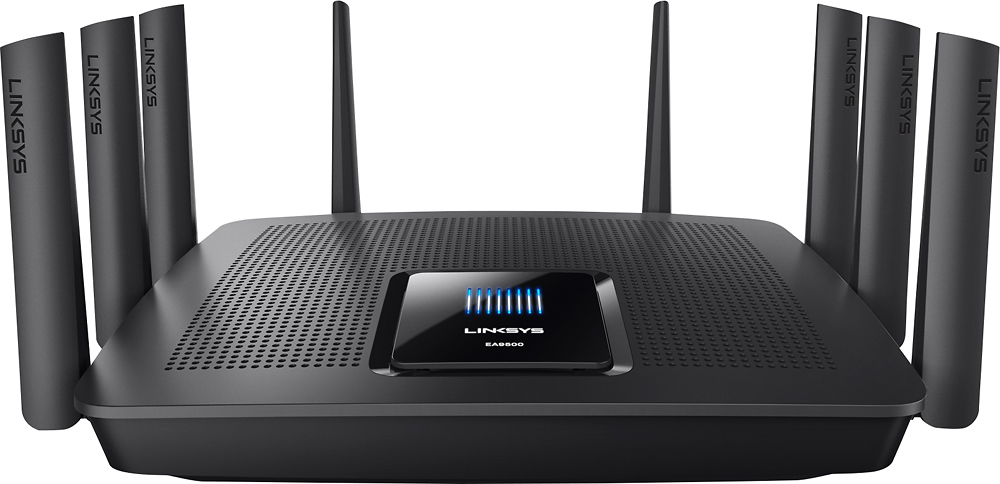
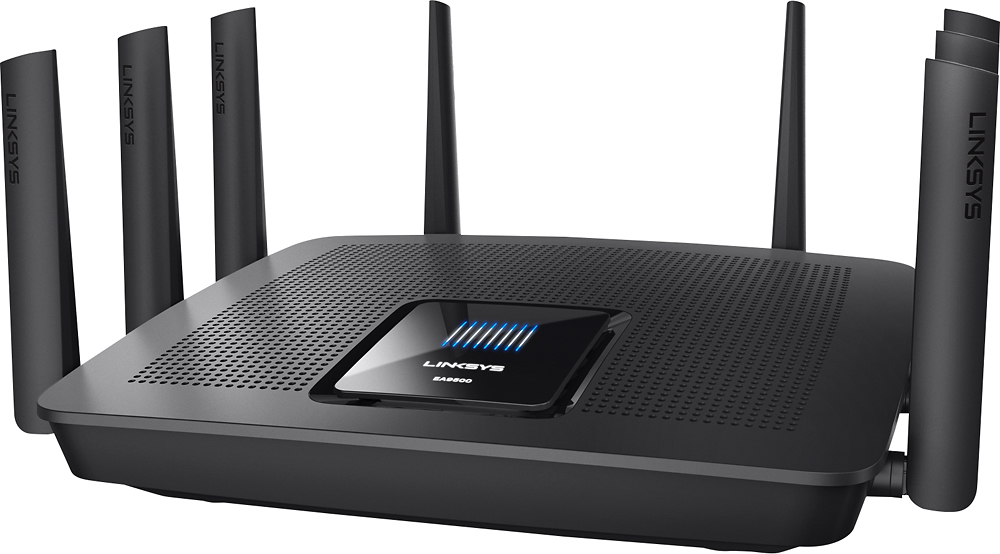




- Model:
- EA9500
- SKU:
- 5171100
Rating by feature
- Value
Rating 3.9 out of 5 stars
- Quality
Rating 4.2 out of 5 stars
- Ease of Use
Rating 4.4 out of 5 stars
Customers are saying
Customers are pleased with the AC5400 Tri-Band WiFi 5 Router's impressive range, ease of use, and strong performance, citing consistently positive experiences with setup and signal strength. Many appreciate the extensive coverage and numerous Ethernet ports. However, some customers note that the router is large and expensive. A few users mentioned occasional connection issues.
This summary was generated by AI based on customer reviews.
- Pros mentioned:Performance, Setup
Great, available, and easily accesable
Posted .This reviewer received promo considerations or sweepstakes entry for writing a review.Purchased this router for setup and use in my parents home. Some initial testing was done in my home before placement. This was very easy to setup, update settings, and add network attached storage. Links us has come a long way and gone all out with this router. Gaming with it found no issues with lag or drops via WiFi. The fact that I could check my network status all ND makes changes from my phone using their app made it worthwhile. It's easy to turn the guest network on/off. The coverage is great in my tri level and parents rancher home. Made me want to keep it for myself. One issue my parents had after setup and placement was due to a power surge, causing the unit to hard reset and we had to set it back up via phone. It was easy for my dad to understand and follow the prompts as this was his very first time doing this. No other issues have been found.
I would recommend this to a friend - Pros mentioned:Ease of use

Must have router for your Wi-Fi needs
|Posted .This reviewer received promo considerations or sweepstakes entry for writing a review.This router has been a god send for our wi-fi usage in our home. With our old wi-fi router, the secondary wi-fi products would struggle to get a good signal. Now with the Linksys router everyone is happy, especially my son who no longer complains about a weak wi-fi signal when he plays his PS4 games online. I would highly recommend this router. It is really easy to set up in 3 easy steps!
I would recommend this to a friend Internet disconnect every day
||Posted .This reviewer received promo considerations or sweepstakes entry for writing a review.Do not buy this router if you need a reliable Internet connection. This router keeps disconnecting from Internet every day, and I have to keeps rebooting it
No, I would not recommend this to a friendBrand response from Linksys Staff
Posted .Hi,
This is definitely not the experience we want for our customer. Allow us to escalate your case to our Second Level Technicians for further isolation and troubleshooting to resolve the challenges that you are having.
Just send us your contact details at [email protected] along with the link to this post as a reference.
We hope to hear from you soon.
Regards,
Thaddeus
Linksys Support
Worst router I've owned
||Posted .This reviewer received promo considerations or sweepstakes entry for writing a review.The router doesn't seem to know how to keep a stable connection even when you go into to app and prioritize
No, I would not recommend this to a friendBrand response from Linksys Staff
Posted .Hi Brandon,
The performance of your router could have been affected by its configuration and location in your home. Changing channels is one of the best ways to resolve intermittent signal and to optimize your wireless connection. You can also adjust the position of the antennas to get its maximum signal strength. Please reach out to us at [email protected] so we can have one of our Escalation Engineers walk you through the necessary steps. Include your contact details and the link to this review for our reference.
Regards,
Rechel
Linksys Support
- Pros mentioned:Ease of use
Top-tier Tri-Band Router
|Posted .This reviewer received promo considerations or sweepstakes entry for writing a review.The Linksys EA9500 replaced my Netgear Nighthawk X6 in my home. It is solid and well-constructed. Easy to setup and offers most standard functionality expected in a router (VLAN, DMZ, Port Forwarding, etc.). Even offers parental controls which allow you to isolate devices on the network and set up periods in which the devices can receive access. Great for families with tablets and young kids. The 8-port switch is a big bonus as most routers come with 4 or less. I initially had some instability with the router when pairing it with my MU-MIMO extender. Once I pulled the extender out of the equation the router became rock solid. Not sure what was going on there, but I will assume it is the fault of the extender as it was giving my Nighthawk fits too. In terms of range I would say the EA9500 is slightly less powerful than the X6. A surprise to me as I expected an improvement. Maybe with MU-MIMO devices I could achieve better long range performance, but with standard AC speeds were a tad lower than what I was getting with the X6 in my 3000+ sq. ft. home. On the plus side, the Smart Connect feature which consolidates both AC bands to a single SSID works considerably better than the Netgear implementation. I have been using the router for nearly a week now and have not had any issues with dropped signal or hangups causing me to reboot the router. A nice change as I ended up turning the feature off on my X6 and running 3 individual networks. As a whole, the router has been stable and fast. I am running on the initial firmware revision and have fortunately not come across any showstoppers. Based on my one week findings I would say the EA9500 is a keeper.
I would recommend this to a friend Stay away
||Posted . Owned for 1 week when reviewed.This reviewer received promo considerations or sweepstakes entry for writing a review.Went through 2 units and you can google and search the issue with randomly losing connectivity. Great when it’s working but had to reboot almost every 7-12 hours. Support was nice but no help.
No, I would not recommend this to a friendBrand response from Linksys Staff
Posted .Hello Al2324,
We understand that you've experienced challenges upon using the Linksys router. To achieve a better performance of the device, let's make sure that it's running on the latest firmware version. For further assistance, email us at [email protected] along with your phone number and the link to this post. Let's take it from there.
Regards,
Princes
Linksys Support
- Pros mentioned:Ease of use, Range
Super fast and super easy setup
|Posted .This reviewer received promo considerations or sweepstakes entry for writing a review.Just set this up yesterday, and so far its been a great router! I had another brand of 5300AC router before this, so I know how these top of the line routers should work, and this one doesn't disappoint. Setup took about 5 minutes, and I had the entire house connected and running is less than 15 minutes. A fantastic upgrade, if you dont have a 5300AC router yet!
I would recommend this to a friend - Pros mentioned:Ease of use, Range, SpeedCons mentioned:Size
So far so good
Posted .This reviewer received promo considerations or sweepstakes entry for writing a review.Setup was simple, even for the advanced settings. Range seems good and speeds are very good. The router itself is rather large, so if you're considering it, make sure you have room for it. Other than size, this seems to be a winner
I would recommend this to a friend Junk
||Posted . Owned for 1.5 years when reviewed.This reviewer received promo considerations or sweepstakes entry for writing a review.Crap don't buy had it warrantied twice and they can't handle heavy use. Drops in the middle of work meetings and have to use our cell phone hotspots.
No, I would not recommend this to a friendBrand response from Linksys Staff
Posted .Hi, Gunsmoke45,
We’d like to check your support records so we can see if there’s anything else that we can try with our Escalation Engineers. Just email us your case number at [email protected] along with a link to this review as our reference when you reach out.
Regards,
Rosalyn
Linksys Support
- Pros mentioned:Range
Incredible WI-FI Router
|Posted .This reviewer received promo considerations or sweepstakes entry for writing a review.Linksys exceeded all expectations with this WI-FI router, it replaced my older Linksys router that had only 3 WI-FI antennas and this one has 8 antennas. It easily is supporting numerous devices in a family of 6 within a 2500 square foot home. I'd also recommend the Linksys range extenders. We're using one of those to provide an Ethernet connection to my wife's PC.
I would recommend this to a friend - Pros mentioned:Ease of use, Performance, Speed
Awesome Router!
Posted .This reviewer received promo considerations or sweepstakes entry for writing a review.Since purchasing this router our family internet experience has tripled! We have 3 IPhones, 3 Tablets, 2 desktops, a 4K TV and a bluray player and Apple TV all running now with no trouble what so ever.! Not to mention 2 gaming systems and 2 handheld gaming devices ..... I am just so wonderfully surprised at how well this router performs.....I didn't think it would be this good honestly. It was very easy to set up and that was a big plus for me. I am even able to go in and check settings and add or subtract users. It's awesome! We have not once experienced any slow down or issues with it. I can honestly recommend this router to anyone who has many devices in their home. We live in a 3 bedroom all one floor house of medium size and it even covers our front and back yards! Totally worth the price!
I would recommend this to a friend - Pros mentioned:Range, Speed
Performance, Performance, Performance
|Posted .This reviewer received promo considerations or sweepstakes entry for writing a review.Wow...this thing is a beast. I have had no issues at all in the few months I've had it. The speeds of my network have increased 20% over my prior router and the range is amazing. I have a 4 story townhome, and this is the first router that actually left me with no dead zones. It is a little large, but otherwise, no downsides. Go out and get one today!!
I would recommend this to a friend Bad don’t buy
||Posted .This reviewer received promo considerations or sweepstakes entry for writing a review.I had to call technical support, on the phone for 2 hours and then they told me it was defective! Not happy!!
I would recommend this to a friendBrand response from Linksys Staff
Posted .Hi, Wjkn,
We value your feedback with our Support team and let us have the case reviewed as it will help us improve our services. If there's anything else that we can help you with the replacement process, then let us know so that we can address it accordingly. Feel free to email us at [email protected] with your phone number and the link to this post for our reference.
Regards,
Irish
Linksys Support
Exceptional WiFi, so-so extras
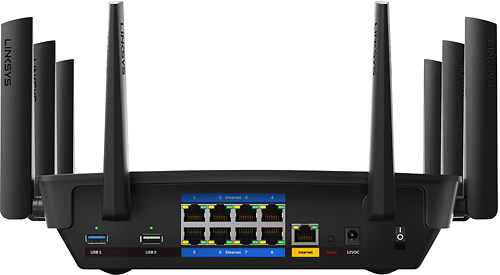
|Posted .This reviewer received promo considerations or sweepstakes entry for writing a review.The short version -- I got this to upgrade my existing WiFi, a reliable but venerable Wireless-N access point, and the Linksys EA9500 blew me out of the water with its connectivity muscle -- 1xgigabit WAN port and 8xgigabit LAN ports on the wired side, and 1x2.4GHz and 2x5GHz channels on the WiFi side The Smart WiFi feature (available through a web site or App) provides handy and capable remote management. The only feature I personally found lackluster was the USB storage performance and that can hopefully be fixed with a firmware update. When I unboxed it the first thing that struck me is how large and hefty the EA9500 is. It’s more than twice the footprint of the router it replaced. It looks and feels like a high quality device with serious networking chops that wants some room for its 8 antennae to open a wormhole into some WiFi glory! The long version -- For the rest of the review I'll cover my experience with select key features. As long as this is, even what follows is a pretty high-level overview. Overall performance: I've got a 1 gigabit Internet connection and the EA9500 could keep up with and utilize pretty much every bit of it. A wired laptop managed 940 Mbps up/down. The fastest WiFi client device I have right now is capable of “just” 866Mbps and the EA9500 fed it Internet bandwidth as fast as it could say “next packet please!” MU-MIMO -- Arguably one of the biggest reasons to specifically consider the EA9500 is its MU-MIMO capability, which means it is specifically designed to accommodate Multiple Users. (MU). Notably, to be able to maintain multiple truly simultaneous WiFi data streams to connected devices. Normal/traditional WiFi is SU (Single User) which gives the impression of communicating with multiple devices simultaneously, but it really just talks to each connected device one at a time but does so so rapidly (100s to 1000s of times a second) that it works "well enough" with the expense of a lot of communication overhead to sustain the illusion. An MU capable WiFi device like the EA9500 tries to address the inefficiencies of the SU model by using multiple concurrent WiFi bands and intelligent device negotiation to truly give WiFi connected devices their own line of communication whenever possible. To do this optimally, your client device also needs to support MU capability, but even not-MU-capable devices can yield some benefit from the EA9500's MU muscle which I'll touch on next in the Network Map section. Network Map: With all of the EA9500's connectivity options, a handy feature to keep an eye on how the EA9500 is tying devices together is the Network Map available in the device interface. It shows a helpful visual representation of connected devices and whether that device is seen as offline, on the wired ports, the 2.4GHz band, and either of the 2 5GHz bands. This is where you can see that even non-MU devices get spread around a bit to the two 5GHz bands even though the devices themselves may be older and not MU aware. The Network Map also gives you the ability to rename device labels, and to change their corresponding icon from a library of about 68 icons including selections for phone, tablet, storage, and even home automation and wifi connected appliances. Using the Network Map I was quickly able to see a clear visual representation of how the 22 connected devices in my home were connecting to the network. Though this feature works generally well there were some quirks, such as WiFi-only devices showing on the map, at times, as though they were on the wired ports. This appeared to happen when the device in question hadn't actively transmitted data on the WiFi for awhile. As soon as the device actively transmitted some packets though it would quickly re-categorize itself on the map from the wired category to the corresponding WiFi band. Probably not a show-stopper or serious flaw to most people, but a quirk to be aware of if/when you're wondering why some of your WiFi devices are sporadically shown on the map as wired devices, with LAN port indicators. There is another category for “offline” devices which is simply devices that the EA9500 is aware of but hasn’t seen at all for quite some time. You can customize the map to show any individual or mix of these categories. USB storage: The EA9500 provides two USB ports -- 1xUSB 2 and 1xUSB 3, clearly marked. I connected a USB 3 hard drive and a USB 2 flash drive to their corresponding ports and they were both quickly available through a Windows/CIFS share at the EA9500's IP address. The EA9500 also provides FTP and Media Server capabilities. I only cared to use the CIFS share option and, sad to say, the read/write performance to either device was pretty awful. I was barely getting 1 MByte/s to or from either device over the network when it was connected to the EA9500 as network attached storage. I direct connected those same USB storage devices to my laptop and I easily get 20-30MBytes/s or better. I was hoping to be able to use the EA9500 to replace an aging network storage device but with <1MByte/s speeds it'll have to wait until it's sorted out with a firmware update or other settings. I read about other people having similar issues with other Linksys models and in many cases their "fix" was to turn off the media prioritization option. I checked though and that option was already off, the default on the EA9500. It’s possible other USB storage devices will work better but USB storage isn’t inherently very complicated and there’s no good reason why the EA9500 provides such poor performance with a standard name brand flash drive and USB hard drive that perform much better anywhere else I connect them. Media Prioritization: Enable/disable WMM, and also set priority for specific devices and/or games and applications like Teamspeak, World of Warcraft, etc., to give you some control in deciding who and what gets dibs on your bandwidth when the packets are fast and furious. Speed test: The interface has a built-in speedtest but I found it pretty inaccurate, typically showing speeds much slower than what I'd get if I went directly to a speed test site myself. At first I thought this was a useful tool to remotely measure the Internet connection from the router itself, independent of the client device but it turns out, from what I can tell from the help files and documentation, that it just serves as a mediator for your client device to do its own speed test which seems redundant and useless. Parental Controls: Not just for parents, but you can use this to specify days and times when specific devices are/aren't allowed passage through to the Internet. Guest access: You can setup a wifi network for guests to get through to the Internet but not to your printer or other devices on your non-guest network. The guest WiFi is not encrypted but it does require guests to enter a password before they can actually get through to the Internet. You can change this password but I could not find any way to completely eliminate the need for it. That’s not bad, just FYI. Connectivity: Here you can change basic things like your WiFi SSIDs and keys, LAN and WAN IP setup, and more. You can also enable RIP routing protocol, which disables NAT, if you plan to use the EA9500 as an internal part of a multi-subnet routed network. There are VLAN settings as well which enable you to specify a VLAN and tagged/untagged, but you can only make these settings to the Internet port and on switch ports 3 and 4. Summary: As an upgrade to my previous WiFi-N router the EA9500 is a wild and happy improvement. In my previous setup my WiFi access point was the bottleneck for my 802.11ac capable devices but the EA9500 enables my current batch of WiFi devices to all operate at the peak of their individual capability and with even a bit of headroom for client upgrades to make full use of up to a 1 gigabit Internet connection. My only real letdown is that the USB storage performed very poorly when setup as a simple CIFS share. It would appear that the EA9500 is not the only Linksys model to suffer from this though, and hopefully it will be addressed in a future firmware update. If your needs, like mine, are primarily to modernize an aged WiFi setup then the EA9500 is a winner. If you need even a moderate performance storage and media server though then I’d recommend not counting on the EA9500 for that particular role until you have a chance to test it out with your own storage devices.
I would recommend this to a friendI do not recommend
||Posted .This reviewer received promo considerations or sweepstakes entry for writing a review.This product never worked me call Linksys and I was informed that this product had come out with problems
No, I would not recommend this to a friendBrand response from Linksys Staff
Posted .Hi,
We'll have our Second Level Technicians assist you further with the device. Just send us your contact details at [email protected] along with the link to this post.
We hope to hear from you soon.
Regards,
Thaddeus
Linksys Support
- Pros mentioned:Ease of use
Hi performance easy setup
|Posted .This reviewer received promo considerations or sweepstakes entry for writing a review.Wow. I'm totally impressed with this router. Setup is really easy through a web interface that asks you what you want in easy language. There's also advanced settings available. It is easy to set up for guest access as well. Also -- wow! 8 gig ethernet ports! I can get rid of my switch and simplify my network! Highly recommended!
I would recommend this to a friend - Pros mentioned:Performance, Speed
Great for Multi-User Home Environment
Posted .This reviewer received promo considerations or sweepstakes entry for writing a review.I've had many Linksys products but none can compare to the AC5400. This Router provides complete coverage of my entire home with extraordinary speed. I have 1Gbps fiber service into the home which I am able to take full advantage of, not only wirelessly but also directly connected. My network is used for various tasks, Media Server, Streaming Netflix, Gaming, Youtube all while being able to use various multiple devices, iPhones, SmartTV's Computers, Printer, iPads, PS4, Xbox One, you name it. I am able to easily manage all my devices while taking full advantage of the devices speed and MIMO capabilities. I would truly recommend this device for anyone in the market for a high-end routing solution.
I would recommend this to a friend Worst router
||Posted .This reviewer received promo considerations or sweepstakes entry for writing a review.This is probably the worst router I have ever owned. I couldn't even take it to the next room without losing WiFi signal.
No, I would not recommend this to a friendBrand response from Linksys Staff
Posted .Hi,
Your Linksys EA9500 router's signal should be able to reach your next room as it is engineered for a very large household. To boost the range, we can try assigning fixed channels for both radio bands to what will work best with your existing network environment. Please reach out to us at [email protected] so we can have one of our Escalation Engineers walk you through the steps. For easy reference, include your contact details and the link to this review.
Regards,
Jay
Linksys Support
- Pros mentioned:Setup
Great for High-end/Pro Users
|Posted .This reviewer received promo considerations or sweepstakes entry for writing a review.The Linksys EA9500 Max-Stream AC5400 Tri-Band router packs some serious power. As an average to high bandwidth user at home, I can occasionally run into problems with my current router. With the EA9500, those bandwidth problems no longer exist. In addition, this router has multiple bands allowing you to assign certain users/equipment to the 5GHz band. This is an optimum band for things that are high demand such as a 4K UHD TV used for streaming or a gaming platform where performance really matters. Setup is a breeze and can be done in just a few minutes. Admin functions for the router are easily controlled by an amazing app (free) designed by Linksys allowing you to control all functions from the palm of your hand. Another great function of this router are the 8 LAN ports on the back. Most routers only have 2-4. This makes it ideal for a work/office environment. I don't have anything negative to say about this router other than that the 8 antennas can make it look a bit beastly. That being said, your router is usually tucked neatly away behind a TV, computer, etc.
I would recommend this to a friend - Pros mentioned:Ease of useCons mentioned:Size
BEAST OF A ROUTER
|Posted .This reviewer received promo considerations or sweepstakes entry for writing a review.SETUP WAS A BREEZE, NO ISSUES SO FAR. WAS SET UP AND RUNNING IN LESS THAN 15 MINS. MOBILE SMART WIFI IS A NIFTY TOOL. PROS- EASY SET UP AND A BREEZE TO USE CONS- SOME OF THE SETTINGS ARE A BIT COMPLICATED TO WORK, FOR BEGINNERS. SIZE IS HUGE AND WEIGHTS 4.5LBS. HARD TO FIND OPERATORS MANUAL FOR IT.
I would recommend this to a friend