Customer Ratings & Reviews



- Model:
- WRT3200ACM
- SKU:
- 5601000
Rating by feature
- Value
Rating 4.3 out of 5 stars
- Quality
Rating 4.6 out of 5 stars
- Ease of Use
Rating 4.5 out of 5 stars
Customers are saying
Customers love the WRT AC3200 Dual-Band WiFi 5 Router's ease of use, range, and performance, with many praising the simple setup and strong signal. Positive feedback also highlights excellent coverage and improved streaming capabilities. While some users noted the router's size and experienced occasional connectivity or firmware issues, the overwhelmingly positive reviews focus on its strong performance and user-friendliness. A few users mentioned needing firmware updates.
This summary was generated by AI based on customer reviews.
- Pros mentioned:Ease of use, Performance
Great
||Posted .This reviewer received promo considerations or sweepstakes entry for writing a review.Hooked the router up, it was very simple. Ran a speed test and it improved my speed drastically. My internet speed is 100mbps and this is putting out 109mbps.
I would recommend this to a friend - Pros mentioned:Range, Speed
Amazing router! Fast Speeds!!!
||Posted .This reviewer received promo considerations or sweepstakes entry for writing a review.First things first, this router is blazingly fast!!! We recently upgraded our Xfinity Internet speeds(200 Mbps) and the router cable modem combo unit that Comcast provided us was giving us issues. Lots of lagging while playing on 2 different xbox's, mom and dad streaming on netflix, it was not fun. We recently upgraded the old one with a new a modem and this router as well. Since I do a lot of streaming on Twitch, this router was able to handle high bandwith and usage. Beaforming technology definitely helps the range and power of the signal in our 3000 sq ft house. MU-MIMO teachnology helps a lot since we have at least 12 wifi devices in our house. We don't lose any speeds and it helps keeps the signal as well. Overall, amazing router for high end gaming and lots of usage.
I would recommend this to a friend - Pros mentioned:Ease of use
Adequate Dual-Band Wi-Fi Router
||Posted .This reviewer received promo considerations or sweepstakes entry for writing a review.Cable updates forced our necessitated purchase of a modern router and modem. We weren't certain how this router would function in our two story situation, but it sends out a strong signal regardless the huge rock fireplace in the center and other suspected obstacles. Night & day difference from the outdated unit we had. Easy enough to set up.
I would recommend this to a friend - Pros mentioned:Speed
Excellent Range!
||Posted .This reviewer received promo considerations or sweepstakes entry for writing a review.A key element in eliminating cable is a router that can cover your entire home. This Linksys does the job with ease! With 3 Stories of home to cover I needed a router with strength and speed at a cost that wouldn’t break the bank. The Linksys AC3200 does the job with power and speed to spare.
I would recommend this to a friend - Pros mentioned:Speed
Must Have If You Have ATT WiFi Router
||Posted .This reviewer received promo considerations or sweepstakes entry for writing a review.What can I say. We have AT&T internet at home, and a lot of devices using WiFi. I thought our internet was slow because we are at the end of our local hub line "so that's what AT&T told me". I happen to ask one of our IT guys at work and he said my problem was the modem router combination AT&T supplied to us. He said I really need to try the Linksys WRT 3200 router. He said even I can set this router up, and he was right WOW that was simple. The hard part was setting up the AT&T router to just be a modem. I got it done as there was plenty of YouTube videos on how to do it. Anyways it has been up and running for more than a week now and everything connects like its the only thing hooked up. There is over 20 devices hooked to this WiFi right now and it is super fast. I kick myself all the time for not doing this a long time ago. Well worth the $$$
I would recommend this to a friend - Pros mentioned:Setup
Great Wireless Router
||Posted .This reviewer received promo considerations or sweepstakes entry for writing a review.I purchased this Linksys-Wireless-AC3200 Dual-Band WI-Fi Router to replace a 20 year old Links-Wireless router. I get a much strong single. I was amazed on how much faster the uploads and down load speeds were to my devices, such as computers, laptops, tablets and Mobil phone. It has many great features. Such as I can setup a second network just for my home business and keep it separate from the home network. Very easy to set up. I can''t say enough good things about this Links-Wireless Router. I would recommend this product for home use and or for businesses.
I would recommend this to a friend - Pros mentioned:Performance, Setup, SpeedCons mentioned:Size

Fast and stable router
|Posted .This reviewer received promo considerations or sweepstakes entry for writing a review.Router came in a neat packaging using foam to protect it and the antennas (4 in total). Setup was a breeze, the interface wizard is very simple and auto detected my cable modem connection quickly (you can also access a more detailed interface to fiddle with settings like NAT, Lan settings etc) and I was up an running within 5 minutes. I'll point pros and cons I noticed. Pros: -Easy setup -Fast and strong connection (I was able to get full bars from my living room where the router is at to my bedroom, whereas other routers would not). -Reliable, I have not lost any connections since installed, be it wireless or lan cable. -The status leds are not glaringly bright, and you can disable them if you wish. -Was able to max out my cable modem connection speed, sometimes even exceeding it more than I was provisioned for! Cons: -Big, make sure you have a good dedicated space for the router. -Power brick is big too, make sure you have good space if you are using an extension or surge protector as I had to fiddle with mine. I guess with great power, comes bigger sizes too.
I would recommend this to a friend - Pros mentioned:Ease of use, Range, Speed
Impressive Router for business owners and techie
|Posted .This reviewer received promo considerations or sweepstakes entry for writing a review.It took roughly 10 minutes from out of the box to setup to have internet connection. It is very easy to use and setup if you have little experience with network equipment.. But with those who have experience, I was quite impressed with the ports it has and as well as the menu system. As you could see within the attached photos, you can establish an OpenVPN server for added security and it was able to connect to my account with ease. The monitoring software keeps track of all the devices and their upload and download status. Now for the range, I have a have some mix feelings about this. From the opposite side of the house, I lost 3/4 of my download speed (I was about 3 rooms and one floor away, but I was expecting the connection to be better) but while i was outside, I was more than 150 feet away and I was still downloading about 27mb/s from a regular 60mb/s connection.. While I was on the same floor of the router, there was only 1mb difference in speed between the Ethernet connection and wireless and it was a stable connection for long periods of downloads and streaming videos. This is a good router for business owners if they want to check device usage and it has remote access to monitor the usage too. Like I said, I was fairly impressed with what this could do but the connection between multiple rooms could be a bit better but I am satisfied.
I would recommend this to a friendBrand response from Linksys Staff
Posted .Hi, TagMstr,
Your feedback is greatly appreciated. To achieve an optimal Wi-Fi experience with your new WRT3200ACM router, try tweaking the channels for both frequency bands to whatever works best with your current network environment. Should you need a hand, shoot us an email at LinksysCares@linksys.com and we'll get you over to our Escalation Engineers for further assistance.
Regards,
Jay
Linksys Support
- Pros mentioned:Performance, Setup
Terrific mid-range priced router
|Posted .This reviewer received promo considerations or sweepstakes entry for writing a review.After giving this dual-band router a whirl for 48 hours here are my thoughts. The quick start guide that comes in the package is right on the money with its instructions, allowing for a very simple set-up. I was up and running within 5-10 minutes of opening the box. After connecting to the Wi-Fi network for the first time you are directed to the Linksys website to check for updates for the router and adjust any Wi-Fi settings that you want to. After completing this process you will be taken to your router’s homepage that shows you (see screenshot) all the features this router has to offer, including: -Guest access -Parental controls -Managing external storage -Media prioritization (put Netflix at the front of the line for your bandwidth usage) This router provided excellent coverage throughout my 2 story, 2300 square foot home. I had it located in a central location on the first floor. With 2 adults and 2 children in our home (and guests), there can be up to 20 wireless devices connected at a time between tablets, phones, gaming systems, laptops, etc. The MU-MIMO tech that this router has promises that it can handle numerous devices without impacting W-Fi performance. After 2 days of testing this claim I was not able to disprove it and never experienced any bandwidth/buffering issues. As far as routers go, this one is mid-range in price but high end in performance. I would recommend it to anyone in need of a router that can provide great wireless performance to numerous devices and also easy access to settings.
I would recommend this to a friend - Pros mentioned:Ease of use, Speed
This router is a beast!
|Posted .This reviewer received promo considerations or sweepstakes entry for writing a review.One word could review this router... Wow! When I first connected to the router I thought it was a bit sluggish, however, once the initial setup was complete my devices were connecting blazing fast. This router feels very well built. The four removable antennas are connected to the unit with metal connectors, not cheap plastic ones, making a very solid connection with the base. I had no concerns about breaking these when I tightened them down. The power brick (Wall wart) is huge but designed so it doesn't block the other outlets on a standard power strip. Overall this router is quite a bit larger and heavier than some of the others on the market, which speaks to the build quality. The web-based admin site is very easy and intuitive. It lacks a help menu, but with a few clicks, you will easily find the settings you're looking for. This router also is fully compatible with DD-WRT and OpenWRT for those advanced users who want to control every aspect of their device. This router is also compatible with the Linksys app (available for both Apple and Android). This app gives the user full access to their router from anywhere, providing they activate this feature. The signal strength, both 2G and 5G bands, was far better and stronger than expected. From over a block away I was able to maintain a stable connection to my network, I also noticed that my signal was quite a bit stronger than my neighbors even though I was just outside their house. Overall this is an excellent router for anyone looking to upgrade their home network. Pros: Easy setup Android / Apple App Fully Compatible with DD-WRT and Open-WRT Strong signal strength 4 wired Gigabit ports, 1 USB 3/2 port, and 1 SATA port Metal antenna connectors Build quality Guest Network Cons: Large power brick
I would recommend this to a friend - Pros mentioned:Range
The Best Router yet
||Posted .This reviewer received promo considerations or sweepstakes entry for writing a review.This is the best router I have ever owned Runs very smoothly with no interruption
I would recommend this to a friend - Pros mentioned:Ease of use, SpeedCons mentioned:Size
Advanced WRT router
|Posted .This reviewer received promo considerations or sweepstakes entry for writing a review.Wanted to let you guys know the positives and negatives of this Linksys WRT 3200 ACM router. First off normally I am one of those guys that buys the cheaper routers that do the job, but since switching cable providers my internet speeds have gone down to 50 download/ 5 upload. With the lower speeds I had noticed issues using my netflix account in the TV that is in my bedroom (farthest point from my router.) The decision was made to upgrade to the Linksys WRT 3200 ACM which has a crazy amount of features that gamers or those that do online conferences would appreciate but for me it was just the fact that until I get higher cable upload/download speeds I needed to gain the benefit of every Mbps without losing signal. Long story short, this router is amazing. I now get 5 bars (from 3) on the farthest room in my house and have noticed a big improvement using Netflix or my smart TV programming etc. I have many things connected to this router and that is where the improvement is most noticeable. A normal traditional router uses single-useer MIMO tech which means Wi-Fi to one device at a time, while this router uses the Next-Gen Multi-User MIMO tech which means WiFi to multiple devices at once, at the same speed... It is also open source ready and for those of you who get a dreaded port issue playing an online PS4 game and need to go into settings to allow ports this router will be a Godsent as it is very easy to manipulate networking functions. Now lets go into the setup of the router. It comes with obviously the router and an ethernet cable along with the power supply. Also a card in the box that tells you the initial password/username for the router (you change this after). Setup was a breeze with zero complications. I removed my old router, put this in its place, found it on the wifi signal and it took me right away to a page where I could change my password along with add or remove features (guest log on etc etc)... Now I obvously love the router, it has improved my limited infrastructure of what I need it for. I have an amazon alexa app along with security cameras set up on it, multiple iphones, ipads and netflix along with gaming systems for the family. It handles everything fine with all bars in my 1200sf home. Positives: Advanced features for those that like to mess around with security, ports, privacy, VoIP. Easy intuative website that Linksys has done a great job with New Gen router for those of us that want to get the benefit of the best when we do competitive gaming on PC or gaming consoles. Negatives: Price Big, meaning if you put it on your table it will take a good amount of space (you can stand it up if you prefer). Probably more then most of us need in a router, many features that I for one wont ever bother with or look at. submitted a few pictures as well.
I would recommend this to a friend Excellent product
||Posted .This reviewer received promo considerations or sweepstakes entry for writing a review.My overall reception for WiFi has increased significantly and allows me to connect more effectively.
I would recommend this to a friend- Pros mentioned:Setup, Speed
Compact and Powerful
|Posted .This reviewer received promo considerations or sweepstakes entry for writing a review.It's always nice to unbox a Linksys product. They have very tactile packaging, similar to Apple products. When I opened the Linksys WRT 3200 ACM, you are greeted by a little welcome note from Linksys. Under the note, the new router was sitting on a well protected foam bed. Under the router was a 'quick start' guide and 4 antennas. Under the foam bed was a CD of information, a power cord, which surprisingly in this day and age seemed to be rather large, and an Ethernet cord, which I am concerned about the longevity of, as it is more of a ribbon cable, rather than a traditional Ethernet cable. On to the set up, it was a breeze setting up the actual product. Screw in the 4 antennas, plug in the power cord, and then connect the Ethernet cable from your modem to the 'yellow' Ethernet port on the back of the router. Turn the power on. A nice light blue power light blinks at you. Then an amber 'Internet' light and the 2.4GHz and 5GHz 'Wifi' emblems. When the Internet light turns to light blue, you are good to go. I connected initially via my phone. Got connected and went to LinksysSmartWiFi.com to set up the router. The connection failed and timed out the router. I tried to connect with my PC to no avail, it kept showing 'no internet'. So looking at the troubleshooting guide, it suggested resetting the router. To do this, hold down the little red button on the back for 10 seconds. I did this, the router went blank, then powered back on, then internet came back up and the WiFi emblems. This time I was able to connect on both my phone and on my PC and get the router configured. Not sure what happened first time round that warranted me having to reboot the router, but second time was a charm. I validated everything, set up the router passwords, and here I am, writing my review via the new router. Speeds seem to be fine, and evenly balance between my phone and my laptop. Videos have streamed with no lag, but as a caveat, I do have AT&T GigaPower fiber optic at my home, so speed typically isn't an issue. I haven't taxed the router as of yet, but once I transition over my home automation products (Hue Lights, NetGear Cameras, LiftMaster Garage Opener etc) that will start taxing the router a little more. Overall, the router has been fairly simple to set up, apart from my teething issue causing me to have to reboot (hence the 4 stars). It has a relatively small footprint, so isn't too obtrusive on my desk, and the balancing of the signal between my phone and PC is working well.
I would recommend this to a friend - Pros mentioned:Performance, Speed
Great router with intuitive controls & fast speed
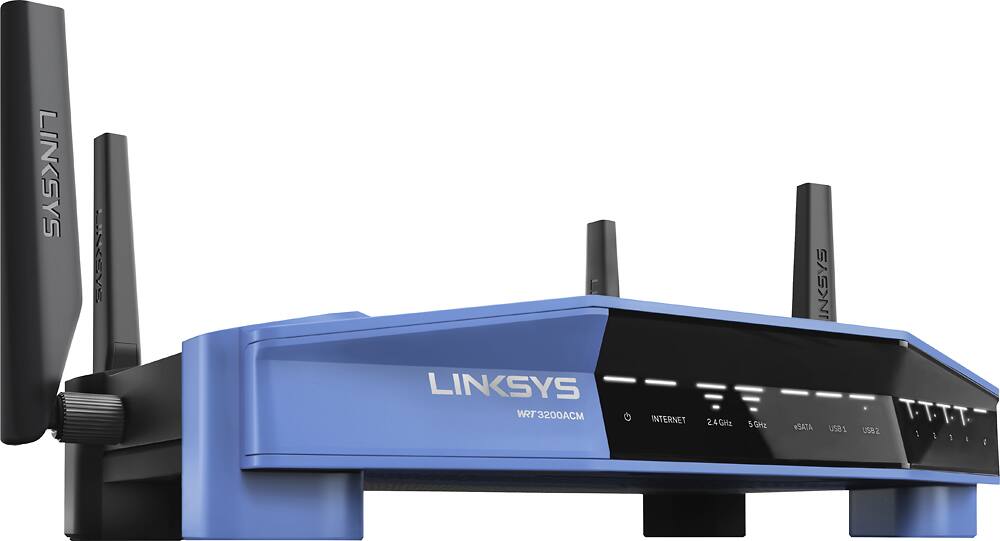
|Posted .This reviewer received promo considerations or sweepstakes entry for writing a review.There are several things I really like about this new router from Linksys. For one, I find the design to be quite striking with its classic dual-tone black & blue theme and the four antennas that come out of its chiseled and angular body. It is a sleek and futuristic-looking device. Each of the four antennas are easily screwed on and it is a simple matter to adjust the antenna angles while trying to find the best position for optimal signal propagation. The black upper housing is perforated with numerous circular holes (openings) that ventilate the heat out of the router well. I feel very confidant that even during hot days, the router will not have any issues dissipating the heat effectively and protecting the internal circuitry. Having used lower- and mid-level routers before many years ago that had suboptimal thermal design that led to frequent router resets and disconnections, I place high importance on a router's thermal design nowadays. Having said that, if there was one thing I could change about the router design, I would make the footprint of the router to be a bit smaller so that I could save more space on my shelf. Since this router is a flat rectangular design with four legs that is meant to be placed down in one orientation, it takes up more space compared to routers that "stand up" like a book would. Another thing I really liked was its speed and reliability. I have four smartphones, 2 eBooks, a wireless printer, a Chromecast, and two laptops connected to the router (about half the devices are on the 2.4GHz band and the rest are on the 5GHz band). All the devices share the bandwidth very well and there have been no conflicts nor slowdowns. Each device connects to the Internet seamlessly and smoothly. Absolutely no complaints here. And the 5GHz band definitely offer much faster speeds than the 2.4GHz band. Sitting out here on my front porch table where I'm pretty far away from the router, I get 4.57 Mbps download on the 2.4GHz band while I get 25.30 Mbps on the 5GHz band. My max Internet speed from Time Warner is 50 Mbps. Another very important thing that Linksys gets right is the easy-to-use router settings page. The Settings page has a simple and clean design where the router options are sorted logically and at easy-to-find locations on the left side of the screen. Some router companies try to spice up the settings page with wild colors and fancy graphics that often make things harder to find and distracting at times. I appreciate the clean and straightforward design that Linksys chose to use. No need to look gimmicky and tacky. The Network Map section provides a nice visual look at all the devices that are connected to the network (the router occupies the middle of an oval and all the connected devices are located on the orbit around the router). This makes it easy to quickly scan and identify the devices that you're looking for. Other useful features include Guest Access (on both the 2.4GHz & 5GHz bands), Parental Controls (you can block individual devices from accessing the Internet at your specified times), Media Prioritization (for giving higher Internet priority for apps and games of your choice), External Storage (adding your own external hard drive to create your own personal Cloud drive), and an easy-to-use Connectivity options menu for things such as creating a Static IP address, setting up Static DNS's, and creating IP forwarding rules. For the moderate- to experienced users who have dabbled in router settings before, everything is pretty easy to figure out and configure. But for beginners and the everyday person, some setting options might look overwhelming and confusing. I feel Linksys could've done more here by putting a Help or Question Mark icon next to or closer to each setting choices to provide a brief summary of what each option does. To be fair to Linksys, there is a Help link but it is located all the way on top of the router settings page. All on all, I highly enjoy this router and all the features it offers. If you are a power-use type that need the extra features & options this router offers (such as personal Cloud, individual device control, fast device-to-device file sharing) at stable & superb speeds, this router is definitely worth the money. But if all you expect from a router is connecting your phone and laptop to the Internet to perform simple browsing and watching videos, this router is overkill. It is still a good buy but overkill.
I would recommend this to a friend - Pros mentioned:Range, Setup, Speed
A fast and very impressive router
|Posted .This reviewer received promo considerations or sweepstakes entry for writing a review.I am going to be honest here, the last Linksys router that I bought was the WRT54G, which was about 12 years ago. It has served me well through the years and I expect the same quality and longevity out of the WRT3200. This router has some weight to it and it feels very sturdy. Four antenna allow you to angle the signal direction to suit your needs. Setup was pretty simple and straight forward and it walks you through the steps. Very easy for beginners to set up and the advanced features are rich and full of features that the most advanced users will enjoy customizing. I haven't played around with the open-source features, but according to the manual, its ready to play nice with open-source applications. The range has been really good in my large house and I have really good coverage at each of the corners in both the upstairs and downstairs. This is a router that will last you for a while with its fast speeds and ability to handle a lot of devices. I have about 50 devices connected to it and I have noticed zero slowdowns at all. IMO, get this now!
I would recommend this to a friend - Pros mentioned:Ease of use, Speed
Linksys makes Smart WiFi easy to use
|Posted .This reviewer received promo considerations or sweepstakes entry for writing a review.A long time ago, I set up my first WiFi network in my first apartment. It was a bit of a tedious process because the idea of home wireless networking was very new. My brother insisted that I have it though because it would make my life easier. He was of course very correct in that estimation and I’ve never had a residence that didn’t have WiFi. That being said, as our Internet protocols have advanced, so has the equipment for our home networks. I’ve had routers that connect to modems, modem/router combinations, and even just direct connections to switches with a good old ethernet cable. My point is that I’ve had experiences setting up networks. So, when I was presented with the opportunity to review the Linksys WRT 3200 ACM Router, I was a little hesitant because sometimes, it can just be a pain. But, as I was to find out quite quickly, the Linksys WRT 3200 is an impressive piece of hardware with an even more impressive signal output. Before I get into the review at hand, I want to describe our current WiFi network and its settings. We have a Netgear Nighthawk C7000 WiFi Cable Modem Router combo headlining our network. While we can turn off the WiFi network from the Netgear, we have been using it. We also have a mesh network set-up for signal consistency throughout the house via the eero WiFi system. Now, we also have the Linksys set-up as yet another WiFi network signal. I mention all this because all of these systems are pulling the same signal from our Internet Provider (Time Warner) and it makes the speed test results below even more impressive. SET-UP (ROUTER) Set-up was very, very easy. The Linksys comes with a quick start guide that gives you 4 simple steps to get your WiFi network up and running. You connect it to power with the supplied cable, then you connect the router to your modem (in our case, the Netgear Nighthawk). Once the indicator lights on the front of the Linksys show that it is powered and receiving an Internet signal, you connect to the wireless network through your computer (or mobile device) using the default network name (Linksys00505 in our case) and provided password. For me, this part of the set-up process took about 5 minutes. It was that easy. I used a MacBook Pro (mid-2014 model) to connect to the network and it was just as easy as selecting the network name from my WiFi drop-down menu and typing in the password. The last step of the set-up is to launch the Linksys Smart WiFi instructions in an Internet browser. This step includes the Linksys system updating. I would recommend that you give permission to the system to update automatically, but you can always change this later. SET-UP (SMART WIFI) Once you have the initial set-up complete, then you can move into the Smart WiFi aspect of the router. It’s actually quite ingenious the way the Linksys has it set-up. First of all, you can connect to the router’s settings via the web address listed above, or through the mobile app (available for iOS or Android). What’s really cool about this particular system is how easy it is to use. As I mentioned, I’ve set-up and maintained several different WiFi networks throughout my adult life and I’ve always needed assistance getting them set-up (either from a human or additional instructions online) because the admin panel is always written in gibberish (a.k.a. programmer’s speak). The interfaces are just not very friendly. Linksys got this system right with the Smart WiFi option. Anyone can get their network set-up quickly and easily when using this option. SPEEDTEST When it came to speed testing the WiFi signal, I used two sources - speedtest and sourceforge. Both options give the user a clear view of the network speed and what you are truly getting. We were recently upgraded to a 250-meg service when our internet provider was acquired by a new company. But, we’ve never really seen that download speed and assumed it was because we were checking it the speed at times when the provider may have been throttling the network signal (higher traffic times). As it turns out, it was the hardware we were using at home. As you will see below, I have listed the results of the speed tests. I only used sourceforge to test out the accuracy of speedtest and then I used speedtest to test each of the networks against each other. LINKSYS WRT 3200 speedtest: 231.18 Mbps (down) | 19.89 Mbps (up) sourceforge: 228 Mbps (down) | 23 Mbps (up) (only used to test the results of speedtest) NETGEAR NIGHTHAWK C7000 speedtest: 97.66 Mbps (down) | 15.43 Mbps (up) EERO WIFI SYSTEM speedtest: 86.23 Mbps (down) | 19.53 Mbps (up) I ran the test several times - switching back and forth between the networks - and every time, the Linksys router won with the best download speed. We got the same results when we ran the speed test on the iPhone, too. I continue to be very impressed by the speed of the signal provided by the Linksys router. CONCLUSIONS The Linksys WRT 3200 ACM Router is a solid piece of networking hardware. It’s very easy to set-up and I don’t think you’ll be disappointed with its performance.
I would recommend this to a friend Great Router
||Posted .This reviewer received promo considerations or sweepstakes entry for writing a review.I was advised by a sales person at Best Buy this router was a top line. So far it's been great.
I would recommend this to a friend- Pros mentioned:Setup, Speed
Easy Setup and Extended Range
|Posted .This reviewer received promo considerations or sweepstakes entry for writing a review.With my old router, I needed a repeater to get wireless coverage in certain parts of the house. With this one, I don't. Setup was a breeze going through their wizard. I need to play with the parental controls on the device. I currently have a separate setup for that. I may be able to get rid of it with what is included in this router. Speed seems to be faster. Going around the house resetting network access for all the smart devices was a necessary hassle. There is a WPS button on the back for Wi-Fi Protected Setup, it just isn't labeled as such. There is no written manual, but online Help is available through the web Smart Wi-Fi interface. Overall, now that we have multiple devices in the house doing higher bandwidth activities, we seem to be sharing the net bandwidth better.
I would recommend this to a friend - Pros mentioned:Performance, Setup
One of the best routers around
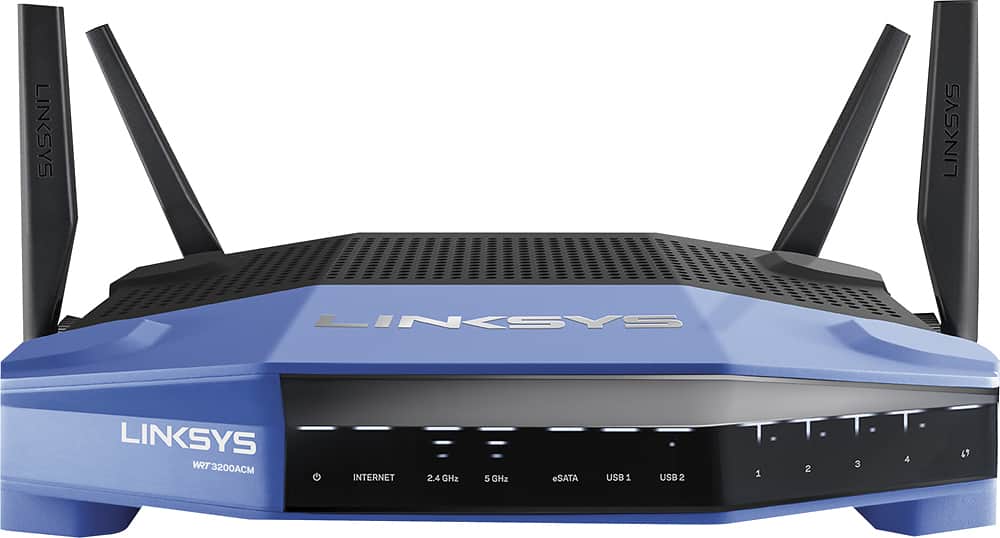
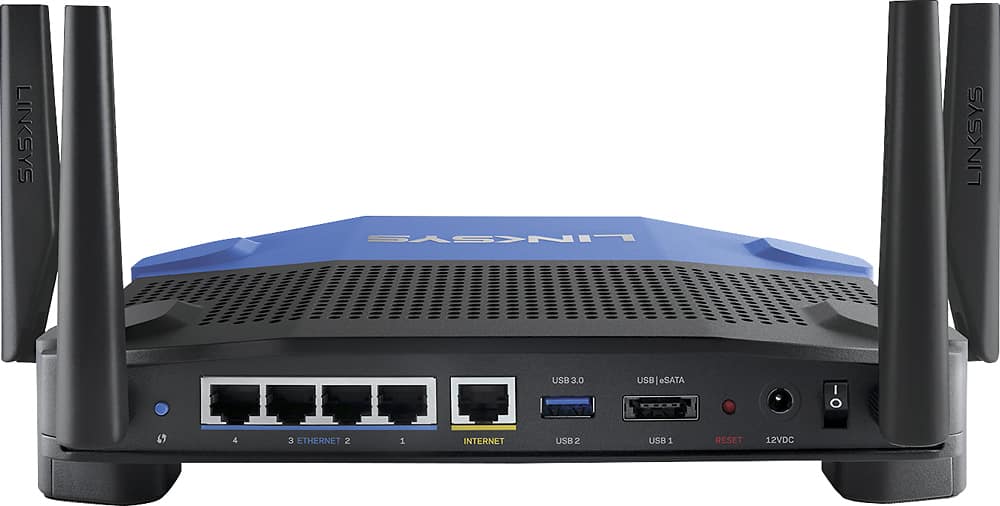
|Posted .This reviewer received promo considerations or sweepstakes entry for writing a review.It is hard to go wrong with this router. There is pretty much nothing I can say bad about from what I have experienced thus far. Starting with looks, this thing looks cool. It takes me back to the style of older Linksys routers but with a much more modern and premium style. The indicators in the front are pretty hard to get confused by and are very straight forward. The rear side contains four gigabit Ethernet ports, a internet Ethernet jack, 1 USB 3.0 slot and 1 east/USB2.0 combo port. This should be more than enough for most people. It looks like it can be mounted on the wall as it has holes on the legs. It is not a larger router compared to some of the more high end models. The advertised specs are pretty self explanatory so I am not going to go in depth on that, but the performance of this router is excellent. I have it hooked up to my main PC via ethernet but all the other devices in my house (laptop, other PC, IoT devices, Xbox, tablets, phones) are all connected via wifi. Most devices are 5ghz in my house and the coverage was excellent. I keep my router in the basement (not ideal) and I only had one bedroom which got degraded coverage, I do not feel this was because of distance but just materials. To test the network speed I transferred a 2GB file from computer to computer over the 5gHz network. I received 29 Megabyte per second (240 mbps) transfer time while doing this which is pretty good overall. I compared it to my EA9500 router which is a tri band router. When testing I received almost identical performance. The larger 80mhz and 160 mhz channels seem like they might be useful for high speed transfers but I am curious if it is affected by how crowded the wifi is in an area. I live in an area that is not too crowded with wifi and performance was great. Media prioritization is a useful feature if you want to ensure certain devices obtain the fastest connection. The software for the router is very easy to use and uses Linksys Smart Wifi management so you can manage it over an app even if you are away from the network with a login. I do wish it had two factor authentication as it seems rather unsafe to use this with only a password login as it controls the entire network of your house. Hopefully they add support for this in the future. Firmware updates can be set up to be automatic keeping it simple for every user. Setup took less than 10 minutes and involved plugging it in, logging into the router and setting up a network name and passwords. It was that simple. The router does not display a network map though you can see the devices connected. In summary, this is an amazing router that looks cool, performs great and is easy to use. Be sure you check out the documentation to ensure you have the antennas properly positioned for single level or multi level homes.
I would recommend this to a friend