Customer Ratings & Reviews








- Model:
- 920-013369
- SKU:
- 6629029
Rating by feature
- Value
Rating 4.6 out of 5 stars
- Quality
Rating 4.9 out of 5 stars
- Ease of Use
Rating 4.8 out of 5 stars
Customers are saying
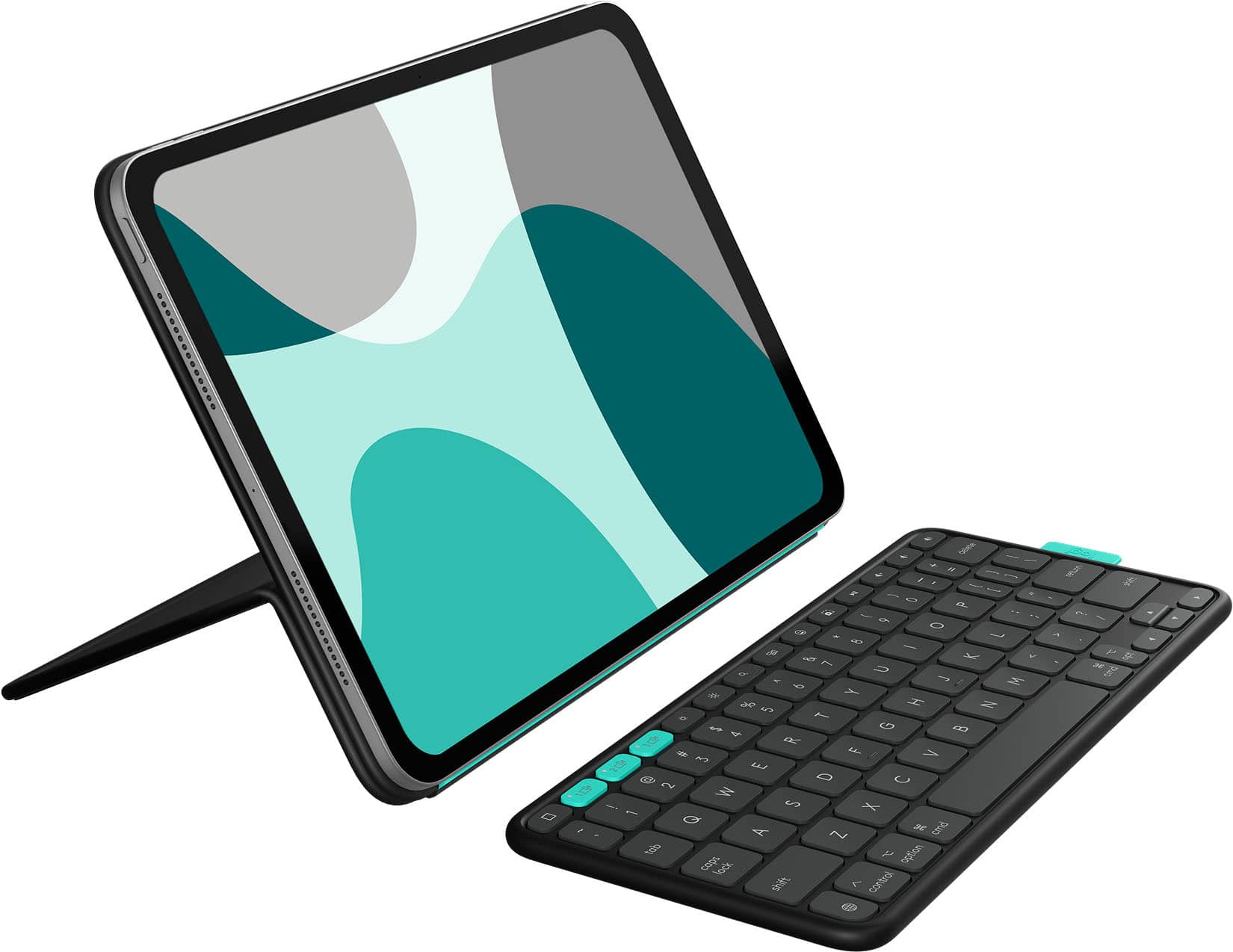
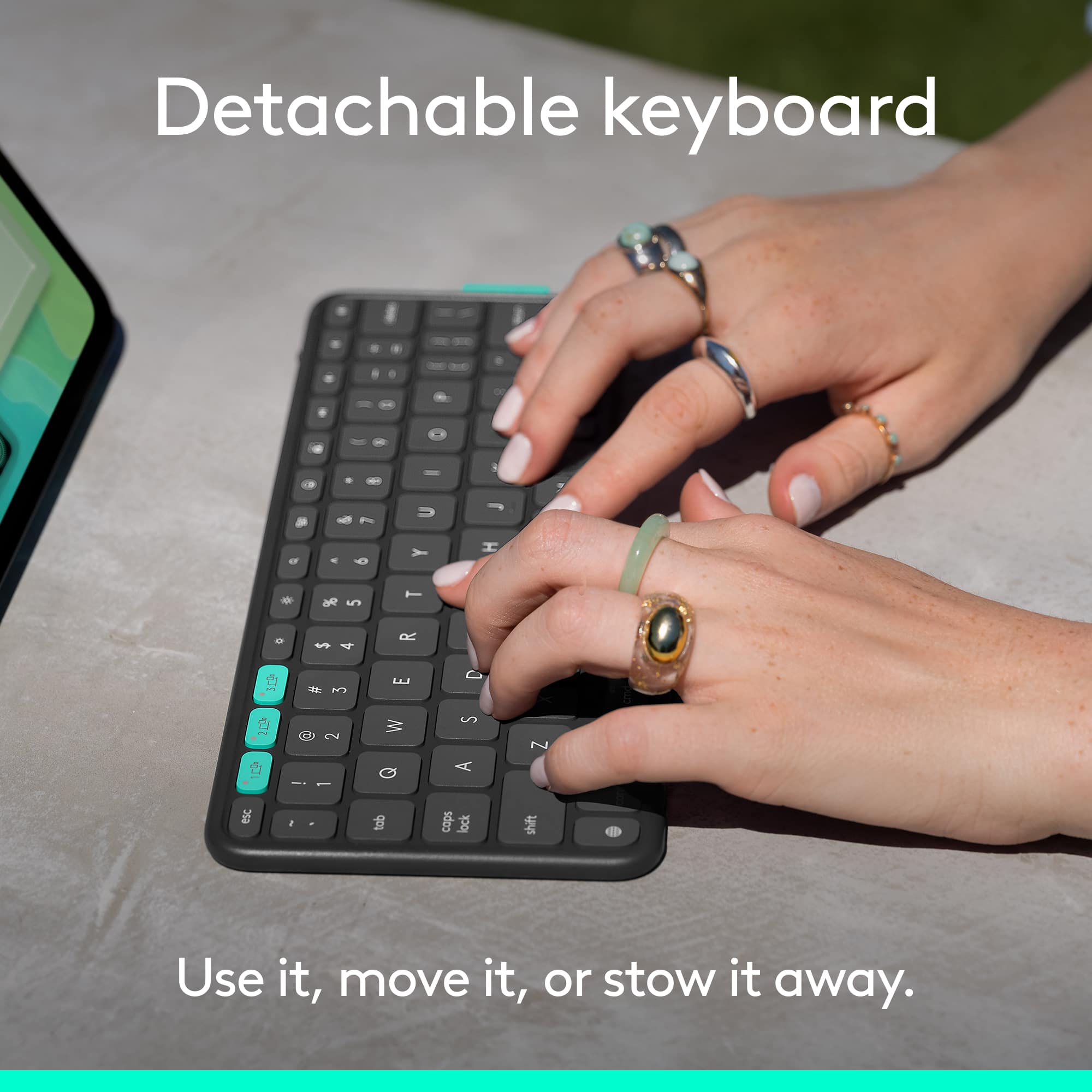
Customers regard the Flip Folio Keyboard Case as providing a comfortable typing experience due to its detachable and magnetic keyboard, and appreciate its portability and solid build quality. The case offers quick connectivity and strong magnetic attachment for the iPad. However, some customers have expressed concerns about the level of protection offered and the added weight.
This summary was generated by AI based on customer reviews.
Best Product for iPad users
||Posted . Owned for 1 month when reviewed.This reviewer received promo considerations or sweepstakes entry for writing a review.The best product for iPad Air and Pro users who want a detachable keyboard at any time. The quality of the keyboard and its case are 10/10 for me
I would recommend this to a friendBrand response from Logitech
Posted .Thank you for the stellar review! We're so glad the keyboard case is ticking all the boxes for you—versatility and quality truly go hand in hand here. Here's to smooth typing and seamless switching wherever your iPad takes you!

Great product
||Posted .This reviewer received promo considerations or sweepstakes entry for writing a review.This works well with my mobile device and my iPad . I love it
I would recommend this to a friendBrand response from Logitech
Posted .Thanks for the great review! We’re thrilled our product is meeting your expectations. Your support helps us continue to innovate and improve.
Nice product
||Posted . Owned for 1 week when reviewed.This reviewer received promo considerations or sweepstakes entry for writing a review.Very nice for the price and a good alternative to other items
I would recommend this to a friendBrand response from Logitech
Posted .We’re happy to hear you’re enjoying the Logitech - Flip Folio Keyboard Case for iPad Pro 11-inch. We’re thrilled to know it’s meeting your expectations. Your support means a lot to us.
Highly recommended
||Posted .This reviewer received promo considerations or sweepstakes entry for writing a review.Amazing! Love this case, very convenient and works really good
I would recommend this to a friendBrand response from Logitech
Posted .We are absolutely delighted to hear such a resounding endorsement for the Logitech Flip Folio Keyboard Case! "Amazing," "very convenient," and "works really good" are exactly the kind of words we love to hear from our customers.
Good purchase
||Posted . Owned for 1 week when reviewed.This reviewer received promo considerations or sweepstakes entry for writing a review.I like that I can remove the keyboard for use with the pad slanted
I would recommend this to a friendBrand response from Logitech
Posted .That's wonderful feedback! We're thrilled to hear that the Logitech Flip Folio Keyboard Case is a good purchase for you, especially liking the flexibility of removing the keyboard and using your iPad at a slanted angle. We designed it to be versatile and appreciate you highlighting those features that enhance your experience. Thanks for choosing Logitech!
- Pros mentioned:Attachment strength, Portability, Typing comfortCons mentioned:Protection

Almost There
|Posted .This reviewer received promo considerations or sweepstakes entry for writing a review.I recently spent a couple of weeks using the Logitech Flip Folio with my iPad Pro 11″ (M4) — and I also tested it briefly with the iPad Air 11″ (M2/M3) and iPad Air 5th‑gen — and I’ve got some honest thoughts. Overall, I'd give it a solid 3 out of 5 stars. Let me break it down for you: ✔️ What I Liked 1. Decent Setup, Snaps In Nicely From the moment you snap the iPad into place, the folio feels secure. The magnetic latch is firm, and there's no wobble when typing or drawing — nice touch for an everyday carry setup. 2. Clean, Minimalist Design Love how slim and sleek this thing is. It feels far lighter than a traditional keyboard case, and it slides effortlessly into any backpack or even a shallow tote. 3. Comfortable Typing Feel The keys are satisfyingly responsive with good travel and spacing. It doesn’t feel cramped at all, and while it’s not mechanical — it gets the job done for emails, notes, or light editing. ⚠️ What I Didn’t Love 1. Zero Side Protection The lack of side protection really surprised me. If the iPad takes a tumble from its side, you're looking at exposed edges. Not great for accidental drops. 2. No Touch Pad I missed it. There’s no trackpad — which means I’m constantly reaching for the screen. I get that it’s probably to keep the folio slim and affordable, but it’s a noticeable drawback if you're coming from a folio case with a trackpad. 3. No Backlighting Working in low light? You’re on your own. No backlit keys means typing after dusk isn’t ideal unless you’ve got a strong overhead light in the room. 💬 Final Take Overall, it’s a decent budget folio if you're after something clean, light, and effective for everyday use. It’s especially great if you don’t care about typographical bells and whistles. But those missing features — no side protection, touch pad, or backlight — do hold it back from being a full-featured “pro” accessory. For the price, it sits in that mid-range zone: better than bare bones, but not up to par with premium folios. So yeah—a solid 3 stars out of 5. If those compromises work for your setup, it’s a fair pick. But if you rely on a trackpad or need full coverage and nighttime typing, you might want to look closer at the competition.
I would recommend this to a friendBrand response from Logitech
Posted .Thanks for your detailed feedback on the Flip Folio. We're glad to hear you appreciate its secure fit, minimalist design, and comfortable typing experience. We understand your points regarding the lack of side protection, a trackpad, and backlighting, and we'll certainly take these considerations into account for future product development.
- Pros mentioned:Typing comfortCons mentioned:Weight
Missing key components to make it 5 star.
|Posted .This reviewer received promo considerations or sweepstakes entry for writing a review.The Logitech Flip Folio case for the IPad Pro 11 inch is a pretty good case with a few drawbacks that might keep it from being your best option. The weight of the case is a little much for someone trying to keep their iPad light and portable but with that weight comes a certain level of protection that might be useful if you are prone to having your iPad get jostled around a bit. The keyboard attached magnetically on the back of the case which may fall off however in those jostles if not in secured in a bag. Couple that with the fact that this case has no place to secure an Apple Pencil and it starts to lack quite a bit in the portability category. The keyboard itself is actually quite nice to type on for short periods of time. I don’t see myself doing longer pieces on it but for shorter articles or reviews (like this one) I really find that the keys are responsive and sized well for most hands. It also comes with a top row of function keys that are tailored to the iPads functionality like emojis, brightness controls, screen shots, and audio keys to help streamline your workflow. I’m a little disappointed that the keyboard is powered by 4 CR2016 batteries instead of being a rechargeable LiOn battery like most portables on the market today, but it boasts a 2-year battery life so only time will tell if it holds to that promise, if it does then maybe those batteries would be worth replacing. The stand function holding the iPad itself is tight and offers good stability even when pushed on, it doesn’t fall down or flop easily so pushing on it with the Apple Pencil or finger while using it wont topple it. Overall its not a terrible case, but it does have some room for improvement especially for the peripherals like securing the keyboard or an Apple Pencil.
No, I would not recommend this to a friendBrand response from Logitech
Posted .We appreciate your detailed feedback on the Flip Folio case for the iPad Pro 11-inch. Your insights regarding the weight, keyboard attachment, and Apple Pencil storage are invaluable for our product development, and it's good to hear the keyboard and stand offer a positive experience.
- Pros mentioned:Typing comfortCons mentioned:Protection
High quality case! New creative ways to use iPad
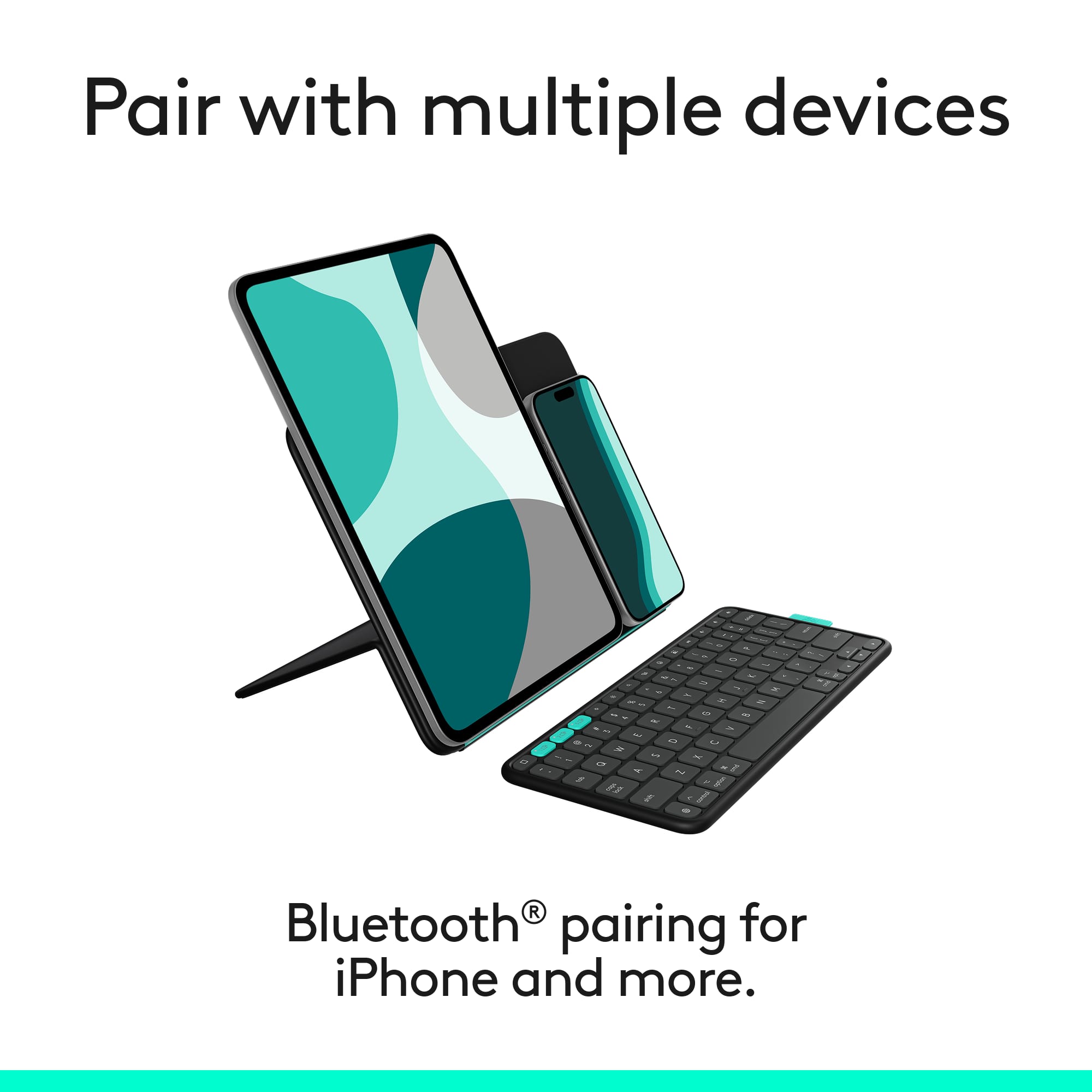
|Posted .This reviewer received promo considerations or sweepstakes entry for writing a review.Logitech’s new flip folio for iPad is a great case with new features that allow you to use your iPad in ways that were not possible before. There are a lot of cool new features, and this is the perfect case for some people. While others might prefer a different case in which I will provide further detail. This case is minimalist and is meant to increase productivity with your iPad. There are really two parts to the case. The first is the actual case part which is made up of silicone material and magnetically attaches to the iPad. In the closed position it covers both the front and back of the iPad. While it is opened it flips around and acts as a stand that has a hinge for multiple angle adjustment. The iPad can be used in both portrait and landscape mode. If you use it in portrait mode, you can also place your phone next to it. The one downside is that the case does not protect the edges of the iPad. I would not recommend dropping your iPad from any significant height. The second part of the case is the keyboard. It is decently sized and easy to type on. It includes tons of shortcuts to assist with creative apps. They keyboard also magnetically attaches to the case when not in use. I believe this case is a great case and for many people it will help them with productivity and creativity. However, if you are looking for a case that adds a lot of protection this one is not it. Also, the keyboard does not include a trackpad, so this case is not really meant to use your iPad as a full laptop replacement. Overall, it is built out of high-quality materials, and I am a huge fan of the Logitech brand. This case/keyboard combo allows you to use your iPad in ways that many other cases have not.
I would recommend this to a friendBrand response from Logitech
Posted .We're thrilled to hear your positive feedback on the Logitech Flip Folio Keyboard Case for iPad Pro 11-inch (M4) and iPad Air 11-inch (M2 & M3/5th Gen)! It sounds like you've truly embraced the innovative features we designed to enhance your iPad experience.
- Cons mentioned:Protection
Best open stand style case + keyboard combo
|Posted .This reviewer received promo considerations or sweepstakes entry for writing a review.First off this case is much more of a stand and keyboard than an actual case and I want to note that first and foremost because this will make or break your experience with this product depending on your personal preference. That said I personally love this combo Logitech is using with this flip folio. Before getting this, I was, funny enough using another stand type case and my Logitech G915 TKL keyboard or Logitech mx keys mini both of which are low profile keyboards very similar to what comes with this budget buster of a setup. So when I say more of a stand I mean that the case portion does not provide edge protection which allows you to prop any way you like for use which I enjoy as I tend to want to hold the raw iPad while doing certain tasks like drawing or photo editing but want it in a case for everything else and this allows that to happen without some big headache of stripping a hard to fit case off all the time. The keyboard has batteries in it which is interesting as they aren't rechargeable they are button style but are quoted to last a LONG time. We shall see on that front. There is also an on off switch to be seen for it which I'm already used to with both my other Logitech keyboards. The stand is very very ridged so it for sure stays where you want it but feels abnormally stiff the first time you try until you get a feel for it lol. As someone that already used my iPad and keyboard combo like this coming out of my bag now as one unit and not pieces is amazingly convenient and I actually really really like this flip folio. I took one star off because non rechargeable batteries everything else I love.
I would recommend this to a friendBrand response from Logitech
Posted .It's truly fantastic to get such a detailed look at how the Logitech Flip Folio Keyboard Case for iPad Pro 11-inch enhances your specific use cases. Your appreciation for its design, enabling you to seamlessly switch between holding your raw iPad and using it with the case, really highlights its versatility. We understand your point regarding the non-rechargeable batteries, but it's great to know the overall convenience and rigid stand contribute significantly to your positive experience. This kind of in-depth feedback is invaluable for us.
- Pros mentioned:Attachment strengthCons mentioned:Weight
Works well, but very bulky
|Posted .This reviewer received promo considerations or sweepstakes entry for writing a review.I’ll get the big negative out of the way first, because there’s a lot that’s great here. The one downside? It is BULKY. The case & keyboard together feel like they weigh more than the iPad itself, and when put together it feels like I have a laptop in my backpack…and one of the great things about using an iPad is that it’s light. That said…if you can get past how heavy the Folio is, it does the rest of its job very well. The keyboard is one of the better Bluetooth keyboards I’ve used; the key travel is fantastic and the spacing compromises it makes to fit the form-factor are fair (I haven’t missed a stroke yet in the time I’ve been using it). I love that the keyboard also magnetizes to the outside of the case when it’s closed - in the week I’ve been using it, it hasn’t detached in my bag once. The case itself works well too (though again, it is BULKY). The non-traditional design looks a bit funky and takes some getting used to, but it allows a lot of viewing angles. I’m also a big fan of the small lip on the bottom - it allows you to put the iPad in portrait mode (in addition to the magnets keeping it in place in landscape mode). I prefer to use my iPad case-less when I’m using it to read books, and it’s very simple and easy to remove the iPad from the Folio to do so. All in all, this is a perfectly fine case/keyboard solution - just know that it will add a significant amount of weight to your bag.
I would recommend this to a friendBrand response from Logitech
Posted .Your detailed feedback on the Logitech Flip Folio Keyboard Case is incredibly valuable, highlighting both its strengths and the notable bulk. We're truly pleased that despite the added weight, you're experiencing the benefits of a great keyboard with excellent key travel and secure magnetic attachment, alongside the versatile viewing angles and easy iPad removal the case provides. It's clear that while the bulk is a consideration, the functionality and design elements are making a real difference in how you use your iPad Pro!
- Pros mentioned:Typing comfortCons mentioned:Weight
Heavy but Sturdy, works on lap
|Posted .This reviewer received promo considerations or sweepstakes entry for writing a review.I did not like this case initially, I felt it is too heavy, and the added keyboard makes it even bulkier to carry and that does not add much value, but I have used it for close to a week and have started to like it. First the keyboard, as I liked it from the get-go. The typing is comfortable, I am not making mistakes, the key press feels right. The space between the key's felts nice. Overall, a good typing experience, except it not backlit, which is probably because of the battery they have used. It is supposed to have two years battery which you have to replace. I have not figured out yet how to replace it, but I am sure that Logi will put instruction online. Back to the case, it is heavy, and keyboard attaches outside of it making it even heavier and bulky to hold, and this part I still do not like. But other than that, I have started to like it, mainly because of the stability and angle while putting the iPad on lap. The case holds the iPad steadily and you can type long text in that position. Just like this review which I am typing on using the flip folio, keeping the iPad on my lap just like the laptop. And this is a big win for me for flip folio as a product. As a side note: Keyboard connected with my M1 Pro, M2 Air, and iPad 10th gen. Case fits M2 Air as written on the box, but it also fits the iPad 10th Gen almost as good as M2 Air. Overall, I like it, just wished it was a little lighter.
I would recommend this to a friendBrand response from Logitech
Posted .Your initial hesitation about the Logitech Flip Folio Keyboard Case for iPad Pro 11-inch (which you mistakenly called K780) due to its weight and bulk eventually gave way to appreciation. You consistently praise the excellent typing experience of the detachable keyboard, finding it comfortable and accurate. The product's standout feature for you is its stability and ideal angle for lap use, transforming your iPad into a highly functional laptop-like setup. Despite wishing it were lighter and noting the non-backlit, battery-powered keyboard, its multi-device connectivity and practical utility ultimately earned your positive recommendation.
- Pros mentioned:Build quality, Typing comfort
Solid option for M4 iPad Pro
|Posted .This reviewer received promo considerations or sweepstakes entry for writing a review.I received this keyboard case from Best Buy to try out, and honestly, I didn’t expect to like it as much as I do. I figured it would be a decent add-on for my iPad Pro, but it’s actually become something I use every day. The first thing I noticed was how clean and sleek the design is. It doesn’t scream “keyboard case” or add a ton of bulk. It just looks good and feels solid in hand. I’ve been carrying it around to meetings, using it on the couch, at the kitchen counter, and it’s held up great. Typing on it is probably my favorite part. The keys feel really nice, way better than I expected from a case keyboard. I’ve typed out notes, emails, even some longer docs, and I didn’t miss my laptop once. It’s genuinely a nice typing experience. The stand is super easy to flip up when I'm ready to work and it keeps the iPad at a nice viewing angle while using the keyboard. If you use your iPad for work or productivity, this case makes a big difference. It’s not flashy, but it’s smart, clean, and just works well. I didn’t think I’d end up relying on it this much, but now I kind of can’t go without it.
I would recommend this to a friendBrand response from Logitech
Posted .Your feedback on the Logitech Flip Folio Keyboard Case for iPad Pro 11-inch is genuinely compelling. What started as an unexpected trial has clearly become an indispensable daily tool, which speaks volumes about its practical value. The sleek, non-bulky design and solid feel, combined with a typing experience that you rank above expectations and comparable to a laptop, truly highlight its strengths. The easy-to-use kickstand that provides an ideal viewing angle further enhances its utility for productivity. It's evident this case transforms your iPad into a highly capable work companion, proving its worth by becoming something you "can't go without."
- Pros mentioned:Build quality
Great case for IPAD 11 Pro
|Posted .This reviewer received promo considerations or sweepstakes entry for writing a review.Great quality case and keyboard. It is super easy to set up. All you need to do is place your Ipad on the magnetic service and turn on bluetooth and enter the code to connect the keyboard. I also enjoy that you can easily use the keyboard with multiple bluetooth devices by pressing the 3 buttons on the top left so it is not a single use product. When you are not using the keyboard it magnetizes to the front of the case for easy storage. For storage it attaches upside down as to not damage the keys, which is nice. It look me a few uses to find this feature because the packaging does not show it. The box just says “stow able keyboard” so a picture of that on the packaging would be helpful. All of the magnets that attach the ipad to the case itself as well as the keyboard storage are very secure and do not detach easily, so they don’t slip around while you are trying to work. The batteries that come in the keyboard say they have a life of two years so they will probably last until your next Ipad upgrade.
I would recommend this to a friendBrand response from Logitech
Posted .This review of the Logitech Flip Folio Keyboard Case for iPad Pro 11-inch clearly outlines why it's a strong contender. You highlight the great quality of both the case and keyboard, emphasizing the super easy setup via magnetic attachment and Bluetooth pairing. The multi-device Bluetooth connectivity with dedicated switching buttons is a standout feature, making it a versatile tool beyond just your iPad. You also appreciate the clever upside-down magnetic storage of the keyboard to protect the keys, a thoughtful design aspect you wish was more clearly advertised. Finally, the secure magnets that prevent slipping during use and the impressive two-year battery life of the included batteries add to its overall appeal and practicality.
- Pros mentioned:Attachment strength, Typing comfort
Noble iPad case option, with some rough edges
|Posted .This reviewer received promo considerations or sweepstakes entry for writing a review.I am a fan of Logitech products. They tend to be made of high quality materials, offer an alternative for whatever product you’re looking for, and while not all of their products are inexpensive, it feels like you are getting a value. The feature of the Logitech Flip Folio that I believe is the key factor for it being a top choice is the keyboard that is stowable, with nice sized keys that are a satisfying typing experience, and the other feature that I feel is worthwhile is the magnetic attachment and kickstand function. I will start with the keyboard, it’s a good keyboard. The key travel is adequate, the feel of the keys is comparable to a full desktop keyboard, and there are what you would expect on this keyboard, including function keys. One thing I was disappointed about was the lack of backlighting. This has been a desired feature for a long time for any keyboard, so I think this was a missed opportunity. The case itself fits my iPad Pro 11 M4 quite well, the magnets to hold the iPad are strong and sure. The flap that covers the front of the iPad has a hinge that is covered by the outer materials, which by the way is a soft touch plastic feel, that is prone to showing fingerprints. This hinge is fairly strong, and I think it would last for quite a while. The issue I have with it is the hinge material feels loose. It even looks loose, which sot of looks cheap. I think the material will hold up, but I can’t tell this soon. The hinge has no movement once I place it to stand up the iPad, so I think the hinge will do its job. The color is a dark gray, almost black. Again this doesn’t play well with fingerprints. The keyboard stows in an indentation on the cover flap. When the keyboard is not in place, it creates a large formation that I think if I were to carry it around without the keyboard would get on my nerves. I would say overall the Flip Fold is an ok case for my iPad, but I would probably seek other alternatives.
No, I would not recommend this to a friendBrand response from Logitech
Posted .Thank you for your detailed and honest feedback on the Logitech Flip Folio Keyboard Case. We truly appreciate your insights on the keyboard's quality, the strong magnetic attachment, and your observations regarding the lack of backlighting, the hinge material, and the case's finish. Your experience is valuable to us as we strive to improve.
- Cons mentioned:Protection
Another great alternative from Logitech!
|Posted .This reviewer received promo considerations or sweepstakes entry for writing a review.For those who need moderate protection for their iPads as well as functionality (keyboard, touch), Logitech is by far the best. I spent a significant amount of time sifting through all the options and trying a few different products. This included some really cool and seemingly nice ones from foreign no-names. I ultimately decided on the Combo Touch. After being very happy with that case, I was pleasantly surprised Logitech came out with this interestingly more and less functional option. The biggest difference between the Combo Touch (a five star product) and this one, is the lack of the touchpad. If that's a necessity you're probably not even reading this. Diving in to the main differences of why I'd choose this over the Combo Touch: -Much more versatile -Stowable keyboard -Positioning options seem better, even tho it's similar Why I'd consider the Combo Touch: -It has all around protection, this sits on the case, sides exposed -Trackpad -Keyboard has a slightly better feel -Works with the smart contacts meaning it's powered thru the iPad One thing to consider is that neither are superior in their protection of the pencil if you have one. I'm still working on the but your best bet is to buy something after market that attaches to the case magnetically (which defeats the purpose of the pencil charging on contact to the iPad) or figure out a way to add a closing strap that secures the pencils in place. For me, I am very mobile with my iPad so it's always a slight concern at minimum. Flip Folio details: -It is run on button batteries. This is the biggest drawback. I understand limitations but this is the biggest miss. -The keyboard works really well and feels good. Not as good as my Macbook Pro or the Combo Touch, but very good. -There are built in smart keys on the keyboard -You can position vertical or horizontal but it's repositioning it on the case and not the positioning flap. This is common and not my preference but I assume there's a design limitation since everyone does it this way. -Huge fan of the stowing keyboard, I typically wouldn't be a fan of the detached keyboard. I'm mostly fine with it in this situation. -Batteries are advertised to last two years -Although I don't really need it, there's multi device pairing which worked well and seamlessly. I'll spend more time figuring out how I can best utilize this feature. Overall, I highly recommend this. It's a more versatile but slightly less functional version of the Combo Touch. Logitech is definitely the winner for these types of iPad cases in my opinion. Much more than an OEM marketed one or the many other brands out there.
I would recommend this to a friendBrand response from Logitech
Posted .Thank you so much for this incredibly detailed and insightful review of the Logitech Flip Folio Keyboard Case! We truly appreciate you sharing your experience, especially the thoughtful comparison to the Combo Touch. Your feedback on its versatility, the storable keyboard, and areas for improvement like battery type and Apple Pencil security is invaluable to us.
- Pros mentioned:Portability
Solid Traveling iPad Case & Keyboard
|Posted .This reviewer received promo considerations or sweepstakes entry for writing a review.If you’re looking for a convenient way to travel with your iPad, consider the Logitech Flip Folio made for the iPad Pro 13-in. M4 for or the iPad Air 13-in. M2 & M4 models. There is another Flip Folio for the iPad Pro 11-in. (M4 model) or the iPad Air 11-in. M2 & M3 models. Prices range between $159 and $179. The Flip Folio is a self-contained case and keyboard for these iPads. The keyboard conveniently stores magnetically on one side of the case. For travelling, having the keyboard and case so close tother makes it more compact to carry rather than separate devices. Installation is quite simple: (1) Attach your iPad to the case magnetically, (2 Separate the magnetically attached keyboard and enter a 6-digit number to pair it to your iPad. (3) Fold back one side of the case to make it stand up for desktop use. As simple as this is to use, there were some minor drawbacks. The main one for me was that the keyboard was so much smaller than I was accustomed to due to close proximity of the keys. To fit onto the case, size was an issue. This keyboard is 1-1/4 in. shorter than my standard desktop keyboard. If you have small hands, this may not be an issue. Placing the keyboard onto the case, actually enlarges the size of the case if space is an issue. This Logitech Flip Folio is reasonably priced compared to other Logitech Folio cases. If you looking for convenience when traveling, consider the Flip Folio.
I would recommend this to a friendBrand response from Logitech
Posted .Your evaluation of the Logitech Flip Folio Keyboard Case for iPad Pro 11-inch (also compatible with various iPad Air models) emphasizes its strength as a convenient travel companion. You highlight its integrated case and magnetically storable keyboard for compactness, and the straightforward setup process. However, the smaller keyboard size compared to a standard desktop keyboard is a notable drawback for you, impacting typing comfort despite its good price point. Ultimately, you recommend it for those prioritizing portability and a streamlined setup while traveling.
- Pros mentioned:Attachment strength, Portability
Convenient, But A Few Missed Opportunities
|Posted .This reviewer received promo considerations or sweepstakes entry for writing a review.The Logitech FlipFolio is extremely convenient, with the Bluetooth keyboard. It provides more options for places to use my iPad, where an attached, conventional keyboard doesn't quite fit. When you aren't using the BT keyboard, it attaches via magnet to the rear cover; the magnet is strong enough to hold the keyboard in place so it doesn't fall off. The addition of the acqua function buttons allow me to pair my iPhone and Mac as well, and type between the three devices with the push of a button. The power button on the keyboard is a bit hard to find at first. I don't like the idea of a battery-operated keyboard; the times that I'm using my iPad for something critical will be a time when the battery needs to be replaced. This is a definite Con for me; I know the iPad has a keyboard, but if I'm doing something important and I have to use that one, it's enough to break my concentration. The one thing I can't give up is an adjustable brightness, backlit keyboard. The Logitech FlipFolio does not have a backlit keyboard. I use my iPad in all sorts of situations with varying degrees of room lighting, so not having this feature in not efficient because it leads to constant mis-typing. Also, if room lighting is in the back of you, or on the sides, your hands can cast a shadow on the keys. The stand on the rear of the Logitech FlipFolio is continuously adjustable, and is perfect for a variety of activities, from working, gaming, and streaming. Despite the convenience of a BT keyboard, there are quite a few smaller things that cummulatively, represents a missed opportunity (a Con): ---The keyboard is thin, but still should have some thin rubber feet, or a rubber / silicone coating. It's nice to have it seperate from the folio itself, but if you type at an angle, the keyboard slides over the surface since it's lightweight. ---I'd like to see the material on the folio surface that contacts the iPad to be a bit 'softer'; feels like fairly hard plastic. ---The instructions are attached directly to the inside of the packaging and is easy to throw away (white sheets on a white box). Similarly, the warranty information is in a small, plain white envelope attached to the inside of the box, and is hard to notice. As previously mentioned, I'm concerned about replacing a battery on the keyboard at an inconvenient time, and the lack of a backlit keyboard. Those were the two factors for my rating.
No, I would not recommend this to a friendBrand response from Logitech
Posted .We appreciate your detailed feedback on the FlipFolio, especially your insights regarding the keyboard's battery and the absence of backlighting. Your comments about the keyboard's stability and the folio's interior material are also valuable to us, and we're always looking for ways to enhance our products for a better user experience.
- Pros mentioned:Typing comfort
Decent at best, but hard to recommend
|Posted .This reviewer received promo considerations or sweepstakes entry for writing a review.I don’t think it’s as simple as saying, ‘well, this thing is nearly half the cost of Apple’s overpriced solution…’ and calling it a day. Sure, it’s *significantly* cheaper, and I would argue in some ways it provides more flexibility than what the Magic Keyboard can. It’s probably most fair to point out that these aren’t really competing products, since the Logitech option doesn’t have a touch pad. Sorry…I’m getting ahead of myself. Here’s what I like about it: it’s super flexible and can be used with the iPad in both landscape AND portrait modes, which is something that I think a lot of standard iPad cases/folios miss out on. Also, I actually like that the keyboard is a separate physical piece from the rest of the case, which again points to flexibility. The hinge allows for many different viewing angles, even ones nearly flat— but is not a good solution for ‘drafting’ when you rest your palm on the display. And, while $160 is still a bit steep, even in 2025, it is way cheaper than what you can get from Apple. Logitech is a reputable brand. The keyboard types well, is lightweight, and I like that it attaches magnetically to the case (although I’d prefer the magnets be a little stronger). Also, there is a little rubber tab at one end of the keyboard that makes detaching from the case super simple. It is far from perfect, though. I do not like the material… this isn’t that different from competing products, but this rubbery material gets fingerprinty and greasy and over time looks kind of gross. Maybe if you clean your case daily it could last longer, but many people don’t clean their screens weekly, and that’s where the cost is. The hinge may offer a wide variety of viewing angles, but I don’t think it is that stable of a hinge. Fresh out of the box, it is almost inflexible, so much so that I wasn’t sure I was bending it the right way. I tried checking the instructions, but all that was provided in the box were unhelpful graphics that didn’t provide much insight on how to use it. (I know, it’s a case, how hard can it be?) But I did struggle a bit. Also, when bending the hinge, the crease that forms on what is the ‘inside’ of the cover doesn’t look like it belongs. It’s almost as if there is too much material in that crease, and it doesn’t wrinkle consistently across the length of the fold. It’s minor, but it looks weird to me. And finally, I find the hinge to be loosening relatively quickly over a short period of time, where it seems to be ‘slouching’ over the course of watching a movie, for instance. I don’t have high hopes that this is going to last as long as your iPad will, and as soon as you buy a replacement, you’re already over the cost of Apple’s premium product. I can’t ding this for not having a touchpad from a design perspective, but I can from a price perspective. Obviously a touch pad would change the design of the whole thing, I get that, but without a touch pad it’s hard to justify the price. There’s also an issue when it comes to product integration. Yes, it pairs quickly and easily to your iPad, but Apple has not yet perfected their user interface for third-party keyboard products, so the floating keyboard shortcut window across the bottom of the display, despite not needing to access the keyboard, is annoying. If I have an external keyboard, I’d like to free the screen entirely of any keyboard-related graphics and have the space for displaying whatever I’m typing. I know this isn’t strictly a “Logitech” problem, but functionally, I can buy a cheap rubbery iPad case and mobile bluetooth keyboard on Amazon for a lot less than $160. This is at best ‘decent,’ but with questionable durability on the hinge, and not enough differentiation from a much less expensive solution, I don’t know that it’s worth the price.
No, I would not recommend this to a friendBrand response from Logitech
Posted .We appreciate your detailed feedback on the Flip Folio Keyboard Case. It's valuable to hear your thoughts on its flexibility, design, and areas for improvement like the material, hinge stability, and the overall user experience. This helps us continue to refine our products.
A great keyboard but the case misses opportunities
|Posted .This reviewer received promo considerations or sweepstakes entry for writing a review.This is a case that's not entirely clear what it wants to be, and in the process, loses a key opportunity. As a folio iPad case, it has a strong magnetic hold with your tablet; however it's lacking any real side protection. That's not a deal breaker and it's expected. What's nice is that the case maintains a slim profile when closed....for the most part. The problem is that the keyboard has a partitioned space on the outside of the case. When the keyboard isn't there, that space feels...empty, and ruins the "flat profile." But if you keep the keyboard attached to the case, the keyboard sticks out far enough to make the case bulky and unbalanced. Folding the case is also limited. It's an odd feeling, but the cover of the case bends inward, which you then flip around to create a stand - and that's the only way it can be used. The keyboard is essentially meant to be used independently of the case. The thing is, the keyboard still has a magnetic hold on the inside of the cover, but the only way to prop up the iPad is by using the cover folded to the back. This was a totally missed opportunity. About the keyboard: It's actually pretty fantastic. Key travel is short, but typing on it is quite comfortable. The keys are well spaced for an 11" tablet and I appreciate the inclusion of task keys - although I miss having clearly laid-out function keys. The keyboard also supports 3 connections and, frankly, is quite a great bit of travel kit all on its own. One weird thing about the keyboard: it doesn't have a way to power externally, relying on an internal battery that is supposed to last many years. I guess time will tell, but that makes me a bit nervous.
No, I would not recommend this to a friendBrand response from Logitech
Posted .We appreciate your detailed feedback on the Flip Folio Keyboard Case. We understand your points regarding the case's design and the keyboard's integration, and this input is valuable for our continuous product development. It's great to hear the keyboard itself provides a comfortable typing experience.