Customer Ratings & Reviews

- Model:
- 915-000159/915-000160
- |
- SKU:
- 9837565
Customer reviews
Rating 4.4 out of 5 stars with 7679 reviews
(7,679 customer reviews)Rating by feature
- Value4.3
Rating 4.3 out of 5 stars
- Quality4.6
Rating 4.6 out of 5 stars
- Ease of Use4.2
Rating 4.2 out of 5 stars
Customers are saying
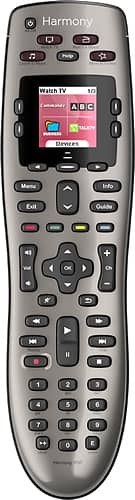
Customers are satisfied with the Harmony 650 8-Device Universal Remote's ease of use, compatibility, and price. Many appreciate the setup process and customization options, along with features like the backlight and macro programming capabilities. However, some users point to areas needing improvement, such as battery life and button size. Concerns were also raised regarding the remote's responsiveness.
This summary was generated by AI based on customer reviews.
- Pros mentioned:Customization, Ease of use, Price
Rated 4 out of 5 stars
Budget Universal Remote does the trick...
||Posted .This reviewer received promo considerations or sweepstakes entry for writing a review.Highly customizable. Fairly easy to setup. Harmony has also improved the software for setting up remotes. A low cost and flexible way to consolidate remotes. Macro feature is nice touch and great convenience feature (one touch for multiple commands). One feature I wish it had is the ability to customize the activities listed on the screen (when there is no activity enabled or basically the home screen).
I would recommend this to a friend - Pros mentioned:Compatibility, Ease of useCons mentioned:Battery life
Rated 5 out of 5 stars
Love the Logitech 650
||Posted .This reviewer received promo considerations or sweepstakes entry for writing a review.i recommend this remote to everyone and have one in my home. This remote is the best general purpose, do-it-all device! No need to go real high end, this remote can do it all. Unless you really need to connect your smartphone (aren't phone battery lives bad enough without controlling the TV?) this is the way to go. The screen gives you all the info, customization, and assistance you will need. Plus, this device works with old and new hardware! I hooked it up to a stereo from the 90's ANDY a brand new Roku
I would recommend this to a friend - Cons mentioned:Button size
Rated 4 out of 5 stars
Works well for reasonable price
||Posted .This reviewer received promo considerations or sweepstakes entry for writing a review.I use this with a Samsung tv, Samsung blu-ray player, xfinity dvr, Sony home theater receiver, and Sony CD player. Set up is pretty easy using their downloadable app for Windows. You configure everything in the app then synch with the remote over USB. All my device commands were available, and for the few commands without corresponding buttons on the remote, you can configure "soft" buttons that label the 4 buttons around the remote's screen. The only weird thing about the software is that you have to create a login even though it's an app running on your computer. I gave it four stars for a few minor complaints: The OK button is too small in the middle of the arrow buttons. It takes practice to learn to press just OK without hitting other buttons around it. Also, the All Off button is awkwardly located. Finally, I have not figured out yet how to put in a delay between turning on the tv power and setting the proper hdmi input. So, it always comes up on whichever input it was last using. However, The screen on the remote always reminds you to press Help if something isn't right and it will reissue the commands. This usually fixes problems like the tv input being wrong, or the power being off on a device.
I would recommend this to a friend - Pros mentioned:Ease of use
Rated 5 out of 5 stars
This thing is amazing!
||Posted .This reviewer received promo considerations or sweepstakes entry for writing a review.For whatever reason, I have always dismissed these Harmony remotes as more of an overpriced novelty than a necessity. However, when I recently purchased a new television, blu-ray player, and soundbar for our home I realized that I would need a good way to tie all the remotes into one. Especially with the soundbar, i knew that the family wasn't going to have it with using a separate remote for volume. I decided to give this thing a try and it was phenomenal! The setup was so easy once you download the software from their website. You will need to hook the remote to a PC with a provided USB cable, but the software walks you through programming everything. You simply need to enter the model numbers for your equipment and it will ask you a few additional questions such as what device should the volume buttons control and what device should the channel buttons control. This thing even works with my TiVo DVR box that's provided by my cable provider. The special thumbs up\down and MyTivo buttons are programmed to the 'soft' buttons that are tied to the LCD screen. This thing is nothing short of amazing. I went back and bought two more for my other televisions.
I would recommend this to a friend - Pros mentioned:Ease of use
Rated 5 out of 5 stars
Easy to setup but allows for advanced programming
||Posted .This reviewer received promo considerations or sweepstakes entry for writing a review.I've owned many remotes and the Logitech Harmony 650 is the best for the money. It's simple to setup for the novice via a PC app that uploads the programming to the remote. However, for advanced users or uses you can also custom program just about everything to get things to work exactly as you wish. Also, with the help button you can easily correct a problem (like a device didn't turn on or switch to the correct source). It's really the perfect remote for both the novice as well as the expert. Battery life is excellent and the color screen is easy to read and provides just enough extra custom buttons to address those unique buttons or situations. Really the next better remote is the big brother of this remote which is $350. But for the money, this does almost everything just as well. Also, this remote has a backlight (which in my opinion is a requirement) which some Logitech Harmony remotes don't have. Further, unlike using your phone as a remote, the real physical buttons in my opinion are also required so you can hit buttons by feel. Anyway, great remote. The only things I could say could be improved is the setup/programming app could be arranged a little more logically. Also, the ability to modify the hard-coded activities would be useful in some situations. You need to sometimes figure out a unique solution because the activities have hard-coded commands that you can't change the order of (which is sometimes required). Are you listening Logitech?
I would recommend this to a friend - Pros mentioned:Ease of useCons mentioned:Button size
Rated 4 out of 5 stars
Good All-Around Remote
||Posted .This reviewer received promo considerations or sweepstakes entry for writing a review.I've now bought two Logitech 650 remotes, one for each of my AV setups. They were easy to program online and function really well and I like having the same remote in each area so we don't have to remember how to use multiple and different remotes in each area. It's nice to have one remote that will handle (most) everything that each AV setup has for components, including the Comcast DVR and cable boxes. There are only a couple of shortcomings. One, when using an AVR with a multi-zone setup, the 650 can't switch between zones, so I have to pull out my AVR remote to handle that task. Second, the 'Enter' Button and Navigation Buttons (arrows) around it are kind of small. From an ergonomic perspective, these buttons should be about 50% larger to make their use easier. But aside from those minor issues, I think the 650 works great.
I would recommend this to a friend - Pros mentioned:Compatibility, Ease of use
Rated 5 out of 5 stars
BEST UNIVERSAL REMOTE SINCE SLICED BREAD!!
||Posted .This reviewer received promo considerations or sweepstakes entry for writing a review.I was skeptical about purchasing this remote control because I am not technologically savvy at all. However, the salesperson talked me into buying it, and boy am I glad I did! Before owning this remote, I had one for the TV, one for my Bose Cinemate Home Theater speaker system, and last but not least one for the DVR. When the Geek Squad came to hook-up my new Sony TV they programmed the remote for me, too. And because the remote has the capacity to program up to 8 devices, they programmed my PS3, too. The only downside is that I have to operate the PS3 with the controller, e.g., when watching a DVD and I want to pause or fast forward, etc. But really that's no big deal neither. It's SO cool how you can just pick it up and it automatically will have two choices appear, i.e., WATCH SMART TV & WATCH TV on the screen. The SMART TV mode is all of your apps, internet, etc. Then you can push a button right under the screen where it has all your devices listed and take your pick!! Trust me when I tell you, you can't go wrong with this purchase. It's definitely worth the money! Logitech has some of the best products you can buy. I made a very good choice if I must say so myself! I even purchased a Logitech wireless mouse for my laptop a few years ago that can be used on any surface and it's been great!
I would recommend this to a friend - Pros mentioned:Ease of use
Rated 5 out of 5 stars
Excellent smart remote
Posted .This reviewer received promo considerations or sweepstakes entry for writing a review.I have owned several Harmony remotes and I always break them, usually by dropping them repeatedly on ceramic tile floors. It is to their credit that they are able to take the beating I dole out. So, this time when I needed to replace the remote, I did a step or two down in Harmony models. I have found this model to be excellent. Though not as advanced as other models, I found that this satisfies 99.99% of my needs. Also, because it was a less expensive model, I won't feel as bad when I break this one, and I inevitably will.
I would recommend this to a friend - Pros mentioned:Compatibility, Price
Rated 4 out of 5 stars
Great remote for all my devices
||Posted .This reviewer received promo considerations or sweepstakes entry for writing a review.This was an upgrade from my Harmony 300 that I loved but I added a few new components to my system and the old Harmony 300 could only control 4 devices. The ability to control all my devices with the ability to add even more in the future is great. I would give this a five star rating except that having to scroll through the screen to access some of the commands that used to be on the buttons of my original remote is a bit annoying but it does allow you to have access to every command that the original remote had even if it takes a bit of scrolling to do it. Other than that, it is a fantastic and capable remote at a reasonable price especially when it goes on sale. I may even buy another one just to have as a back up should anything happen to this one. It also allowed me to transfer my commands from my old Harmony 300 to the 650 via the MyHarmony software. Piece of cake.
I would recommend this to a friend - Pros mentioned:Compatibility, Ease of use
Rated 5 out of 5 stars
Awesome, easy to program
||Posted .This reviewer received promo considerations or sweepstakes entry for writing a review.Actually this 650 model was my second Harmony. First bought the 665, which can control more devices and has more devices to choose from. both work great, bought the 650 because I didn't need 10 device model. I had given up on all in one remotes many years ago as they did not perform well. Well these Harmony remotes work wonderfully. My wife always ran into issues about how to get a DVD, or Apple TV to come up by using at least three different remotes. Now we have no issues as she says "I'm going to do my yoga," and that is it. She goes in and hits the DVD button and the DVD player turns on, the input switchers goes to HDMI one, the TV goes to HDMI 2, and the sound bar turns on! BAM! Then to go back to TV she hits the Watch TV button and the DVD player shuts off, the inputs are put back to where they need to be and I don't hear "Honey I can't get he TV back on." Awesome remote! Bought one for my daughter too. Easy setup with a great program downloaded to my computer.
I would recommend this to a friend - Pros mentioned:Compatibility, Ease of use, PriceCons mentioned:Battery life
Rated 5 out of 5 stars
I now have two
||Posted .This reviewer received promo considerations or sweepstakes entry for writing a review.I've had this remote for a couple of years and it's my go to remote for my main entertainment system. It worked when the remote from the cable company wouldn't turn on my sound bar. I just bought a second one for the entertainment system upstairs. I was able to easily connect an old Panasonic dvd recorder, an old Philips dvd player, a JBL sound bar, and a 6 or 7 year old smart Sony tv in about 15 minutes. No more dealing with the hassle of changing inputs on my tv every time I changed an activity. At 56 bucks, I think it's well worth the price. I also no longer have a dozen remotes with dead leaky batteries laying around the house.
I would recommend this to a friend - Pros mentioned:Compatibility, Ease of use
Rated 5 out of 5 stars
Easy Set Up, Completely Automates Everything!
||Posted .This reviewer received promo considerations or sweepstakes entry for writing a review.I love this remote. I am not a technophile, but the set up was a breeze. Just write down the product and its model number, load everything online w/ a USB cable, works like a dream! Specifically, I have my TV, sound bar, DVD player and cable box set up. I'll be adding my Apple TV this week.
I would recommend this to a friend - Pros mentioned:Customization, Ease of use
Rated 5 out of 5 stars
I own 3
||Posted .This reviewer received promo considerations or sweepstakes entry for writing a review.These remotes are fantastic if you have a couple of devices in a room - I could in theory use one for each of my rooms - but I have a hard enough time losing the remote in one room, let alone 3 - I have an entertainment center in my basement ( Roku, Bose, TV ), and my living room ( Roku, Xbox One, TV, Sound Bar ) and bedroom ( TV, Roku ) - These devices are easy to setup, highly customized, and work with just about any device you could own. By using activities, You can manage which devices are used in which scenario - i.e. On my living room remote I have watch an activity for Movie -- it turns on my TV, goes to the right input, turns on the sound bar, and uses the volume keys to control the sound bar - When I select Watch TV as my activity - it will instead set the remote to use the volume keys on my TV as I dont want to use my sound bar for every show I watch - no need to have immersive sound to watch the nightly news. Highly recommend this!!
I would recommend this to a friend - Pros mentioned:Compatibility, Ease of use
Rated 5 out of 5 stars
Does what I wanted
||Posted .This reviewer received promo considerations or sweepstakes entry for writing a review.Needed a remote that would control my Smart TV, DVD, and Sound System. Saw this one online and looked up my components by model number on the Logitech website and they said it would control them all. So I purchased the unit. Very simple and easy to program. Just plug it into your PC with USB, go to the proper Logitech site in the instructions, create a user account, enter your model numbers and set it up. I have found it controls EVERYTHING that the OEM remotes did. Now 1 remote instead of the 3. Just a little tricky learning where some of the little used commands are for some of the hardware units. But the LCD display helps out quite a bit. I highly recommend it for anyone wanting get rid of all those remotes and go to just one. It works well with the Smart TV commands and we use it for Netflix and all the other Smart TV apps with no issues. Make sure you look up your hardware model numbers first on the Logitech website to make sure they work with it.
I would recommend this to a friend - Pros mentioned:Ease of use, Price
Rated 4 out of 5 stars
Good universal remote, but not great
||Posted .This reviewer received promo considerations or sweepstakes entry for writing a review.I've configured my remote to "Play a game" (Xbox One, TV and Bose sound system), Watch Apple TV (New version of Apple TV, TV and Bose sound system, and Watch Netflix (Netflix app on my TV and Bose sound system). While it generally will turn everything on and switch inputs on the TV properly, it doesn't always work. There are times I have to switch to each device and power toggle them on, or switch to the tv and change the input. Luckily, I'm able to do this all from the single remote, so it is still much better than hunting down the tiny Bose remote, the TV remote and do power and input swapping individually. I'm sure the higher end units work better, but this fit the price point I wanted and meets my needs.
I would recommend this to a friend - Pros mentioned:Ease of use
Rated 4 out of 5 stars
Works great to eliminate multiple remotes
||Posted .This reviewer received promo considerations or sweepstakes entry for writing a review.Easy to set up with on-line computer. Just go to Harmony web site and establish a user account, which stores all info for remotes. Then compile a list of all your devices (TV, cable box, surround sound, etc) make and models. Then plug remote into computer via USB. The step by step process to program the remote is very simple. However, on multiple occasions, I had trouble with harmony program recognizing remote. Each time, had to unplug remote, sign off, sign back on and plug remote in again. Seems to be a program error on Harmony's end. But, now went from 3 remotes to one. A definite "Must Have" in you have multiple remotes. Works great, after remote was programmed....took about 20 minutes.
I would recommend this to a friend - Pros mentioned:Customization, Ease of use
Rated 5 out of 5 stars
Versatile Remote
||Posted .This reviewer received promo considerations or sweepstakes entry for writing a review.I used to think these things were a rip-off--until I used one. I thought, "Oh, big deal, it has a little screen." What I assumed was a gimmick was actually some very clever design. For anyone used to using the typical twenty-buck universal remote, you will be delighted by this remote. This easy to program--no searching for stupid four-digit codes that require you push certain buttons in a particular sequence and you have absolutely no idea when a code doesn't work if you entered the code wrong or have the wrong code. Plus there is nearly limitless customization. When you take your time online, you can really get this remote to do whatever you want. A universal remote until I bought this thing has always felt like a compromise. This is a universal remote that's better than the factory remote.
I would recommend this to a friend - Pros mentioned:Ease of use
Rated 5 out of 5 stars
Very flexible and functional
||Posted .This reviewer received promo considerations or sweepstakes entry for writing a review.I love this remote so far. At first I was disappointed in the programming; it is quite easy to find your components with the MyHarmony, but I wished it had more flexibility. I thought all you could do was assign devices and activities. But no, if you look under Settings and Buttons, you get much more precise control than I had at first thought. If you go to "Remote Gallery", and click on your remote, you can see these options - I didn't even know they were there at first. Unlike some reviewers, I think the construction feels solid, and the buttons are backlit with a faint orange - dim, but enough to see in the dark.
I would recommend this to a friend - Pros mentioned:Compatibility, Ease of use
Rated 5 out of 5 stars
Pleasantly surprised
||Posted .This reviewer received promo considerations or sweepstakes entry for writing a review.I was getting frustrated dealing with all the remotes for my home entertainement center. This Logitech Harmony came up on Best Buy Deals and I thought I would give it a shot. Setup was easier than I expected. You input the devices and model numbers of your equipment and it looks up the codes. I have an ancient Technics Amp which drives extra speakers and it found it! After you put your devices in you organize them into activities. So normally when I watch TV I needed to turn on the cable box, the bose system, and TV. With the Harmony I just punch one button and everything comes on and then I can control them all with one remote. I was so pleased I went and bought the larger Harmony which had more capacity for another system I had. For me it simplified my life.
I would recommend this to a friend - Pros mentioned:Compatibility, Setup
Rated 5 out of 5 stars
Excellent for theater room
||Posted .This reviewer received promo considerations or sweepstakes entry for writing a review.Initial set up takes some time but it's worth every second! Pretty easy to get programmed. It even works on an old receiver from the early 90s! Love that it has troubleshooting right on the remote. Couldn't ask for better!
I would recommend this to a friend