Customer Ratings & Reviews
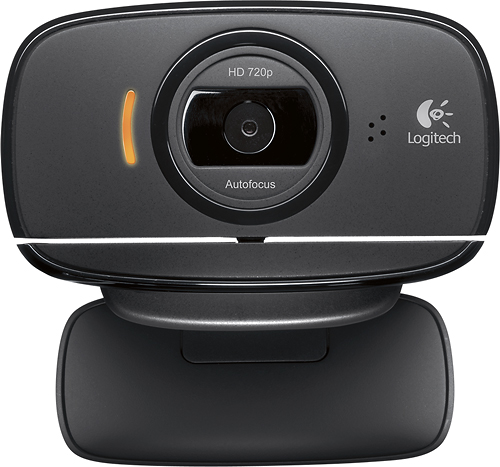
- Model:
- 960-000715
- |
- SKU:
- 1722057
Customer reviews
Rating 4.5 out of 5 stars with 711 reviews
(711 customer reviews)Rating by feature
- Value4.3
Rating 4.3 out of 5 stars
- Quality4.2
Rating 4.2 out of 5 stars
- Ease of Use4.5
Rating 4.5 out of 5 stars
Customers are saying
Customers recognize the HD Webcam C525's excellent camera quality, with many praising the great sound and picture. Its ease of use and simple installation were also frequently highlighted as positive aspects. The resolution was also favorably reviewed. Overall, customer feedback points to a positive user experience.
This summary was generated by AI based on customer reviews.
Rated 2 out of 5 stars
Not what I expected at all
||Posted .This reviewer received promo considerations or sweepstakes entry for writing a review.bad picture just not a good cam software uissues cam did not do as I expected it too have used other models that were great this is not one of them was not worth the price paid
No, I would not recommend this to a friend- Cons mentioned:Connectivity
Rated 1 out of 5 stars
Doesnt work well
||Posted .This reviewer received promo considerations or sweepstakes entry for writing a review.Camera turns on until you try to broadcast then it shuts off. No support.
No, I would not recommend this to a friendBrand response from Logitech
Posted .Hi, sorry to read your C525 webcam stopped working for you suddenly. Sometimes the webcams stop working because the platform that it's being used with needs to do updates or you have to tell the computer in the app settings to use the webcam as the default.
Rated 2 out of 5 stars
Didn't work for me
||Posted .This reviewer received promo considerations or sweepstakes entry for writing a review.Could have been the laptop, an older Dell XPS17. Doesn't matter it didn't work, so I returned it with no problems.
I would recommend this to a friend- Cons mentioned:Connectivity
Rated 1 out of 5 stars
Did not like
||Posted .This reviewer received promo considerations or sweepstakes entry for writing a review.Did not like this purchase. Difficult set up and could not ever sync with laptop.
No, I would not recommend this to a friend Rated 2 out of 5 stars
it is just a camera w/ mic
||Posted .This reviewer received promo considerations or sweepstakes entry for writing a review.I just needed an up to date camera and this fit my needs. Also came with built in mic.
No, I would not recommend this to a friendRated 2 out of 5 stars
It’s on
||Posted . Owned for more than 2 years when reviewed.This reviewer received promo considerations or sweepstakes entry for writing a review.Not sure I would buy this brand again. Freezes a lot when using.
I would recommend this to a friendRated 1 out of 5 stars
Camera was outdated when I purchased it!
||Posted .This reviewer received promo considerations or sweepstakes entry for writing a review.The calling service that comes with the camera is no longer available for use even! There is a disclaimer that pops up, after you try to download the software that came with it, telling you to try alternative solution, and consider using Skype.
No, I would not recommend this to a friendRated 1 out of 5 stars
Would not work with my processor
||Posted .This reviewer received promo considerations or sweepstakes entry for writing a review.I hooked this camera up to my computer and I conldnt use it because it said it would not work with my processor so I returned it.
No, I would not recommend this to a friendBrand response from Logitech
Posted .Hi Jeff. The C525 is compatible with Windows® 10 or later, Windows 8, Windows 7. Just make sure you change the settings in the app you're using it with (Zoom, Team, etc) to use the webcam as the new source.
Rated 1 out of 5 stars
Okay camera
||Posted .This reviewer received promo considerations or sweepstakes entry for writing a review.Camera froze up after 15 minutes on a interview and would not reset. I would not recommend product
No, I would not recommend this to a friendBrand response from Logitech
Posted .Hi, sorry to read your C525 webcam stopped working for you suddenly. Sometimes the webcams stop working because the platform that it's being used with needs to do updates or you have to tell the computer in the app settings to use the webcam as the default.
Rated 1 out of 5 stars
Similar to cheap digital camara
||Posted .This reviewer received promo considerations or sweepstakes entry for writing a review.Hard to affix, reliably. VERY grainy image. Another situation, you get what you pay for. I will be returning for a better model.
No, I would not recommend this to a friendRated 1 out of 5 stars
Poor quality image
||Posted . Owned for 1 month when reviewed.This reviewer received promo considerations or sweepstakes entry for writing a review.The quality of image was poor and grainy. I returned it.
No, I would not recommend this to a friendBrand response from Logitech
Posted .Hello, we are sorry to hear that the C525 did not meet your expectations, we hope that you were able to get another product within the Logi family to suit your needs. If you ever have any questions, please visit us at: https://support.logi.com/hc/en-us
- Pros mentioned:Ease of use
Rated 5 out of 5 stars
Im starting to love Logitech.
Posted .This reviewer received promo considerations or sweepstakes entry for writing a review.I’ve been really impressed with more recent Logitech products, they seem to be much improved all round, much more robust and definitely with more design thought. This Web Cam will not disappoint on that front and is truly a good value good quality product. I found it straightforward and easy to set up, with easy to follow on screen instructions from the install disc, which actually tells you in mid set up to go off and grab a cup of coffee while it installs the program for you. I did, and it did, and everything was completed without any issues 10 minutes later! I’m a frequent user of Skype so I rely on a decent Web Cam. I was keen to try an improved quality HD picture Cam and in this Cam I’ve found the picture quality to be very, very good indeed and a definite 25% improvement over what I had previously, and what I had previously was pretty good, or so I thought. The install program recognized that I had Skype installed so it pulls everything together seamlessly, thus avoiding any extra work for me. Another improvement for me was this Cam’s light correction ability in handling annoying hot spots of bright background light from Lamps and Windows, and it handled that so much better than past Cam’s I’ve used. Flare ups of light from bright backgrounds are virtually eliminated with this cam. In the past I’ve found the integrated microphone quality on most low and mid priced Cams to be fairly poor, and for that reason I previously had a separate microphone to override any built in microphone. With this Logitech HD Cam thats not an issue since the microphone quality was pretty nice, and overall this is a very good upgrade on sound and picture quality all round. Ultimately this is a Web Cam video package rather than just a simple Web Cam. It’s got some great features that are nice to have, like motion detection ability, face following, video mask, and the one click upload to Face Book, Twitter, You Tube etc…. On screen software with this cam is simple and easy to use. Like most tech devices and gadgets these days, when you change and/or upgrade, you realize just how outdated your current devices are, even after such a short time frame. That’s what this Logitech Web Cam did for me, I felt upgraded with improved picture, sound, and versatility across the board and at the price point for this Cam it would be silly not to make that upgrade in my opinion. There's a valid complaint that most Web Cams struggle with, and that’s the mounting clip/base and its suitablility for laptops. They are generally good for static desktop monitors that usually have more depth in their physical design, but do not present the same stability on thinner Laptop lids. I have this Web Cam placed on a static HP desktop monitor and it sits and fits very nicely. I tried it on a Dell Latitude Laptop and it wasn’t too bad at all. So, very little if anything on the downside that I can see, and I can comfortably say that this Logitech C525 HD Webcam is a nice quality product in every other way, and at a great price point for its features.
I would recommend this to a friend Rated 1 out of 5 stars
bad camera
||Posted .This reviewer received promo considerations or sweepstakes entry for writing a review.I pluged in the camera came on but not good, hooked up next day and would not come on
No, I would not recommend this to a friendRated 1 out of 5 stars
Never again
||Posted .This reviewer received promo considerations or sweepstakes entry for writing a review.This wouldn’t work half the time and sucked when it did
No, I would not recommend this to a friendRated 1 out of 5 stars
Its ok
||Posted .This reviewer received promo considerations or sweepstakes entry for writing a review.Does what u expect wish the mic was a little better
I would recommend this to a friend- Pros mentioned:Overall performance
Rated 5 out of 5 stars
My first web camera and works as advertised
Posted .This reviewer received promo considerations or sweepstakes entry for writing a review.My first web camera and works as advertised...what more can one ask for :-) I have not been into web cameras at all but I have recently become more interested in using them for meetings with employees in Asia and Europe. With all the different time zones it is often better to make a Skype call with video rather than go into the office to use the video conference system. (It is a lot cheaper as well!) Not having any prior experience with web cameras meant that I came at this review of the Logitech C525 HD Webcam with no expectations based of previous history so here goes: The Logitech C525 HD Webcam is an easy to use camera that has performed well with the video-chatting programs I tried: Skype and Google Chat. I liked the little window in the box that shows you the actual product and unpacking was, as it should be, easy. I’m using it with a Windows 7 PC and just needed to plug the unit in and follow the on screen instructions from using the installation disc. Total install time was ~10min start to finish. I mounted the Webcam on top of my DELL LCD screen and it is stable and very hard to knock off. I installed Logitech Vid HD from the software CD that came with the unit. I very much enjoyed the one click share to Facebook, YouTube and Twitter as well as the motion sensor ability, Auto focus, 360 degree swivel, the 8 MP photos and the high quality videos it takes. The unit did everything as advertised. I did not have an independent microphone attached to my system so the Mic on the camera was an excellent addition. The audio went through loud and clear witch quite impressed me. Like all recent Logitech products I have added to my new home computer system, the Logitech C525 HD Webcam was easy to install / use and is good quality all the way around.
I would recommend this to a friend - Pros mentioned:Ease of useCons mentioned:Mounting stability
Rated 4 out of 5 stars
Logi cam has been great so far
Posted .This reviewer received promo considerations or sweepstakes entry for writing a review.I like it a lot, very clear image, very easy to use. The only drawback is how it stands on my laptop. I wish you can clip it somehow, so when I move my laptop around ( not just horizontally) it will stay on. But I have to say I'm very very happy with the image and sound quality, amazing.
I would recommend this to a friend Rated 4 out of 5 stars
Logitech C525 Webcam Great for Grandma Chats
Posted .This reviewer received promo considerations or sweepstakes entry for writing a review.Logitech HD Webcam I’m planning on giving this webcam to my Mom as a gift, and because she is of “the Greatest Generation” and not great with using new technology, I installed it on my PC first to get it up and running and to be able to teach her the basics of how to use it. She’ll be using it for video chats with Grandchildren and far-away friends and family. Installation: This webcam is flexible – it’s hinged and rotates and has a “lip” so you can unfold it and secure it on top of your monitor if you’re using a desktop, or on top of your laptop screen. (You can place it anywhere within the limits of the length of the USB cord attached to your PC.) Insert the software CD, follow the onscreen instructions, plug the webcam into a USB port on your PC, and everything installs in just under ten minutes. Once the software and webcam were up and running, I used the Logitech software to create a short video and snapped a couple of photos. The onscreen images (video and still) are crisp and clear, proving out the advertised HD quality. The webcam menus are easy to use and intuitive. The auto-focus feature worked very well, and you can change the settings to “follow my face.” It did that very well when I moved around in my chair. Audio is built in, and the mic is sensitive and picks up your voice clearly. The Logitech software allows you to quickly share your images and videos on Facebook or YouTube. It also integrates with Gmail video chat, Skype, Windows Live Messenger, AIM and Yahoo Messenger for video calling. Logitech provides its own HD Video Calling service, and you can sign up for a free account. I did not test this service. Some interesting features: - Motion detector mode - Face Recognition Log-In - Video effects with a “Mask Maker” - Magix Video Editing & Photo Manager software included PROS: - Easy to set up and use - Compact, folds up easily, very portable - HD (720p) quality video - Built in audio - Autofocus keeps picture sharp & clear - Works well in low-light areas - “Follow my Face” works just like you’d think it would - Standard and wide-screen video. CONS: - During video chats/calls, I experienced some drag or freeze – this does not happen with my laptop webcam. Conclusion: This is a more-than-adequate webcam to use for video calls. Exceptionally good video and sound quality, nice feature set, and really like the “fold & go” design.
I would recommend this to a friend- Pros mentioned:Ease of use, Overall performance
Rated 5 out of 5 stars
Excellent and Easy to Use!!!!!!!!!!!!
Posted .This reviewer received promo considerations or sweepstakes entry for writing a review.From initial installation to the ease of use and great picture quality this Web Cam is a winner. The extra features such as Web Controller and Effects are very nice adding to the fun of viewing our Grandchildren.
I would recommend this to a friend - Pros mentioned:Ease of use
Rated 5 out of 5 stars
Great, well-designed camera
Posted .This reviewer received promo considerations or sweepstakes entry for writing a review.The system used was Windows XP. I run several operating systems, but this was tested in XP. Install: easy, but took a long time - Compact and easy to travel with - Sets securely on top of my laptop - Am very impressed with video quality - Works well with Google, Yahoo - Works very well for both making videos and taking pictures. - Zoom feature works very well; it kept a great picture - The built in mic with noise reduction had great sound quality Overall i was very impressed with the features of this product, I would recommend this to other users that are looking for a slim webcam with great quality video and picture capture. I used it mainly for chatting over Yahoo IM, doing video chats, and taking pictures/videos. It did an excellent job. Also for a person that travels for there job this is nice because it's small enough to just keep in your laptop bag since there is no bulk to the camera.
I would recommend this to a friend