Customer Ratings & Reviews
- Model:
- 920-009270
- SKU:
- 6373452
Rating by feature
- Value
Rating 4.3 out of 5 stars
- Quality
Rating 4.5 out of 5 stars
- Ease of Use
Rating 4.3 out of 5 stars
Customers are saying
Customers are delighted by the keyboard's quality, ease of use, and long battery life, frequently praising its slim design and responsive keys. Many appreciate its multi-device compatibility, allowing seamless switching between computers and other devices. However, some users found the lack of a traditional caps lock key and the phone cradle inconvenient.
This summary was generated by AI based on customer reviews.
Tablet only
||Posted .This reviewer received promo considerations or sweepstakes entry for writing a review.Use only with the right tablets or you will waste your time and money
No, I would not recommend this to a friendBrand response from Logitech
Posted .Hello Dhuhehe332, Thank you for taking time to give your feedback about the K580 Multi-Device Wireless Keyboard. If you ever have any questions about what keyboards are compatible with tablets, please go to Logitech's website. Here's a list of keyboards that should work with most tablets: https://www.logitech.com/en-us/products/tablet-keyboards.html. Hope that you found this helpful and that all is going well. Thank you for being a Logitech customer. - Richard from Logitech
- Pros mentioned:Battery life

A very functional & multi-device keyboard
|Posted .This reviewer received promo considerations or sweepstakes entry for writing a review.I don’t usually sing the praises for keyboards, but I absolutely love this keyboard. In fact, I’m removing the wired keyboard for my Dell desktop and replacing it with this one. For one, the feedback of the keys is the best I’ve experienced in a long time. And while the Dell keyboard has a numeric keypad, I rarely ever use those these days. To test this keyboard out, I connected it by Bluetooth to both my Android Pixel 3 XL phone and my Samsung laptop. I use my Samsung laptop all the time using its attached keyboard and the laptop can perform as a laptop or as a tablet. I don’t normally use it in tablet mode, primarily because I don’t prefer the accompanying pen or the on-screen keyboard. Using the K580 was a delight when using the laptop in tablet mode. The K580 keyboard has two dedicated keys you can press, with the first key toggling you to the first device (my phone) and the second key toggling you to the second device (my laptop). For a mouse, I was using my Logitech M585 mouse and Bluetooth connected it to both my phone and laptop. The M585 mouse has a button on the top that you can press to toggle between the two devices. So, when using the laptop, I pressed the keyboard key assigned to the laptop, then pressed the button on the mouse to also select the laptop. To work with my phone, I pressed the keyboard key assigned to the phone, and then pressed the button on the mouse again to toggle it to the phone. The K580 keyboard has a slot on the top of the unit where you can place your phone while using the keyboard. The slot is quite large, but I found it tight when using my phone w/case. And with my case on, I found that I could not stand the phone on-end. Now, it fit just fine on-end after taking my phone case off. But with phones getting longer and longer with each new phone iteration, the remaining space in the slot when inserting the phone on its side might not be long enough in upcoming years. If that should happen, just remove your phone’s case and stand the phone in the slot on-end. While connected to my phone and laptop, the same function buttons on the keyboard that changed my laptop’s volume or brightness also did the same on my phone. And if you are using a device that supports Google Assistant, there’s a dedicated key on the K580’s keyboard to start a Google Assistant session. While all the functionality of this keyboard is great, the feedback from typing on the keys is top-notch and one of my favorite features. And let’s not forget that the battery is rated for 24 months. Outstanding! I give this keyboard 5 stars.
I would recommend this to a friend - Pros mentioned:Key feel
A welcome Chrome OS addition to the Logi lineup!
|Posted .This reviewer received promo considerations or sweepstakes entry for writing a review.The Logi K580 is an excellent bluetooth keyboard - I didn’t think the market was ready for the Chrome OS edition, but I’m happy to see it! The device is almost exactly the same as the K470 keyboard for Windows - Except for a few key differences that make ALL the difference: The K470 uses a proprietary dongle, whereas this new K580 supports UNIFYING (Finally!) The K580 utilizes the gap in its industrial design to allow for a phone holder (Why the K470 just covers this up I really don’t understand!) The K580 supports up to 3 device pairings (the K470 is a single-device/dongle-only proposition)... These 3 devices can be Bluetooth or UNIFYING. The K580 Chrome edition supports specific button layout with function keys for Chrome OS, as well as dedicated Launcher and Google Assistant keys. The keyboard has a good build quality but is a bit light. The key travel is good, comparable to a laptop keyboard in key feel - The keys aren’t as solid as some of the higher end Logi offerings, but perfectly usable, even when switching back and forth between Logitech’s higher-end (MX) offerings at other stations… To give you some perspective. Some of the panels, particularly the phone holder/battery cover/Receiver dongle hider are made of a flimsier grey plastic. This thing seems to be the first thing I’ll break on the keyboard, but it’s secured well to the keyboard and is plenty sturdy, I just hate seeing flimsy plastic on battery/removable doors. This is a great, welcome device supporting external keyboards for Chromebox, docked Chromebooks, and other VM use cases. Really excited about the Chrome OS Market getting the support it needs to be successful!
I would recommend this to a friend - Pros mentioned:Key feel, Keyboard quality
Better than my Apple Wireless Keyboard
|Posted .This reviewer received promo considerations or sweepstakes entry for writing a review.I think this is priced perfectly at $49.99. Its functionality is superb, the keyboard feels great, and it syncs seamlessly to your devices. Being the Chrome OS Edition it has some special keys but it doesn't take long to get used to them. I would use my Apple wireless keyboard to type notes on my iPad, but this Logitech K580 keyboard actually feels more crisp and responsive. The keys are also not annoyingly small in size. I synced with a Google Pixel with ease and overall it just works great and as it should.
I would recommend this to a friend Great versatile keyboard
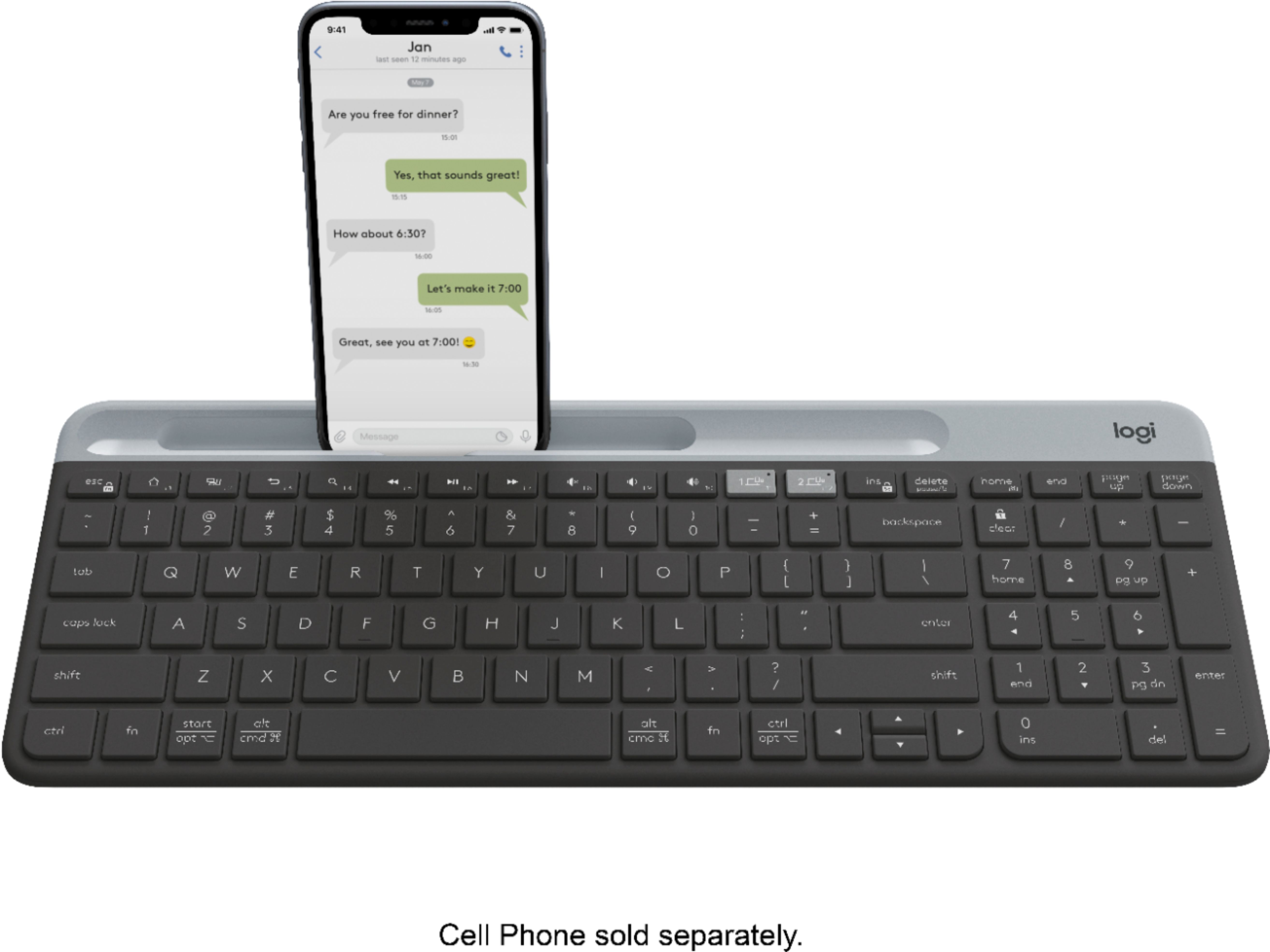
|Posted .This reviewer received promo considerations or sweepstakes entry for writing a review.This versatile wireless keyboard offers lots of flexibility. It can be connected via Bluetooth to two devices at the same time and you can switch between these two devices by simply pressing a special key, indicating which device you want your keystrokes to be directed to. Pairing the keyboard to your devices via Bluetooth is a snap. And, if for some reason, you prefer to connect the keyboard via a USB port, Logitech provides a connector for that in the package, too. This keyboard works with Windows, Chrome and Android devices. This version has dedicated keys for Chrome devices, such as Chromebooks. I used it with an Android phone, an Android tablet and a Windows computer without problems. It has a dedicated slot to hold your cell phone when you want to type on it. The slot keeps the phone’s screen visible either in landscape or portrait mode while you type long messages or create documents on your phone. Using this keyboard to type on your cell phone makes it so much easier than using the cell phone’s small keyboard. The feel when typing on the keyboard is excellent. And It includes a dedicated numeric keypad for the numbers folks. This is a quality product. Logitech has produced a versatile, comfortable keyboard that you could use on multiple devices all day long.
I would recommend this to a friend- Pros mentioned:Keyboard quality
Good keyboard, but also a missed opportunity
|Posted .This reviewer received promo considerations or sweepstakes entry for writing a review.The Logitech K580 is an excellent keyboard, but it's also a bit of a missed opportunity. I'm a big fan of hooking my chromebook up to my TV and using it to stream video or type on a larger screen. I thought this keyboard would make this a much more convenient experience. I was partially right. The keyboard is a joy to type on, and the build quality feels great. The Chrome OS specific keys all work very well, and I have no complaints whatsoever . . . except for one. They should have included a touch pad. Given the fact that there are very few Chrome OS devices that would require a full-time, separate keyboard (i.e. not laptops) it makes sense that most users would want to use this only occasionally with a television or other display. A touch pad would made this much more convenient. As it is, having to carry around a separate Bluetooth mouse is just one more thing to keep track of. Aside from that, this is an excellent keyboard.
I would recommend this to a friend - Pros mentioned:Keyboard quality
Useful for Table or Smartphone
|Posted .This reviewer received promo considerations or sweepstakes entry for writing a review.The Logitech - K580 Multi-Device Chrome OS Edition Wireless Membrane Keyboard - Graphite is a useful option for a tablet or smartphone which you need to write a large email or document, but your thumbs just can't hen-peck effectively. The keyboard is geared for the Chrome OS and works seamlessly with multiple devices via Bluetooth connective. I found the keyboard to be easy to use and the generally quiet keys are nice and easy to push. The slim feel of the overall keys and keyboard make for easy storage or bringing with you to class. I really do not see why it is advertised for use with a Chromebook however since all Chromebooks already have a physical keyboard. This really seems geared for tablets and smartphones. PROS - Logitech quality and brand - Slim design - Easy setup and use - Bluetooth connectivity - Multiple devices CONS - No real purpose for Chromebooks as advertised. - Not designed for other OS, but can work with some on a limited basis
I would recommend this to a friend - Pros mentioned:Battery life
Great device for TVs, tablets, phones, etc...
|Posted .This reviewer received promo considerations or sweepstakes entry for writing a review.The keyboard has a nice solid build quality, battery life is supposedly in excess of one year, bordering on the ridiculous, but so far used for about 16 hours with no indication of battery life diminished. You can pair this via the usb unifying remote and Bluetooth devices. It can be paired to many devices though it can only be used on two via a quick switch on the keyboard. I really only used it for my tablets, none of which can fit on the cradle due to cases. My Android phone also has the same cradle fit issue and really I do not see any reason to use a keyboard on an android phone. The phone touch screen is much faster and easier to use. Indeed using the keyboard, I still have to use the touchscreen to send/enter. I only use phone for text and short email responses, no need for a keyboard. So I really love the ability to use with my tablets and my smart TVs to enter inputs and leisurely type long email responses.
I would recommend this to a friend No Caps
||Posted . Owned for 3 weeks when reviewed.This reviewer received promo considerations or sweepstakes entry for writing a review.it is Chrome version with no CapLocks Please make sure that you are in Chrome OS
No, I would not recommend this to a friendBrand response from Logitech
Posted .Hi, thank you for sharing your experience with the K580 keyboard for Chrome OS. I'm sorry that the device does not offer a caps lock indicator. Logitech does have other keyboards that do have Caps Lock indicator that will work on multiple platforms including Chrome OS. The MK540 is a mouse and keyboard combo and the keyboard has the Caps Lock indicator. I hope you're able to find something that works for you with the features you are seeking. Thank you for being a Logitech customer. Kristi from Logitech
Returned it
||Posted . Owned for 2 weeks when reviewed.This reviewer received promo considerations or sweepstakes entry for writing a review.I hated how it didn’t have any of the f keys I needed. It was sturdy though and heavy duty. Just not for me.
No, I would not recommend this to a friendBrand response from Logitech
Posted .Hello, sorry to hear the keyboard did not suit your needs. Thank you for the review!
Very Nice Keyboard for Chrome OS and Android!
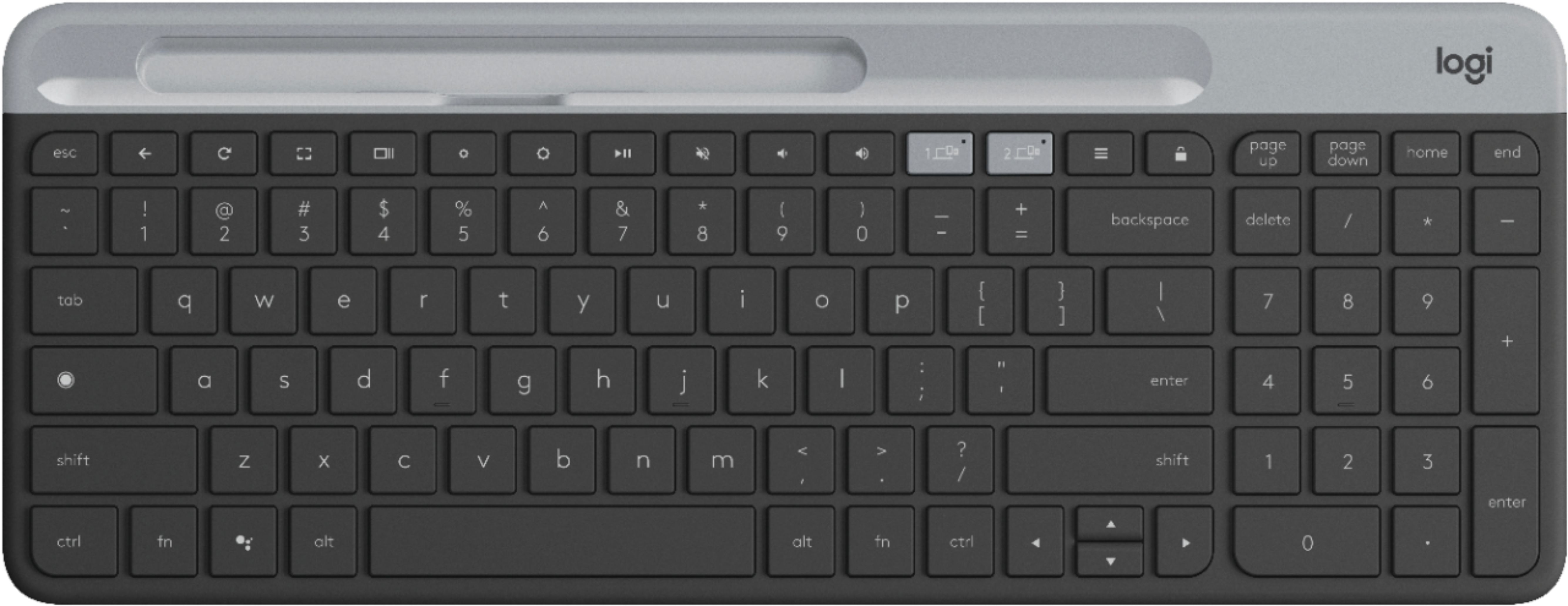
|Posted .This reviewer received promo considerations or sweepstakes entry for writing a review.The K580 Chrome OS Edition is a great, "compact" full-size keyboard! I've long been a big fan of Logitech keyboards and mice. I've been using Logitech keyboards (K360) for the past 7-8 years at home and work on Windows computers because I really have liked the layout, key locations and that it also includes a full-sized keypad. I've also recently started using the K470, which is pretty much the exact same keyboard as the K580, but for Windows (and, unfortunately, only for one device) With the K580 Chrome OS Edition, as you may expect, the key placement/functionality is geared towards Chrome OS, as well as Android. If you are familiar with a Chromebook keyboard layout, this is pretty much the same, with possibly a few minor changes. Where the F# function key row at the top of a normal keyboard, there are the normal Chrome OS shortcuts with a few different locations or different key altogether. There is a little different design for the arrow keys (with half-sized up/down keys, which is taking a little while to get used to). In place of the caps lock key (or search key on a Chromebook), there is the Chrome App launcher. And to the left of the left alt, there is the Google Assistant launcher. It has a low profile and has a built-in, non-adjustable incline. The keys are definitely very quiet when typing as advertised. The area on the top edge (the lighter gray area) has a slot to put your Android device and is also a slide-off cover to access the batteries and a slot where you could store the nano receiver. For our Chromebook, I plugged in the nano Unifying receiver. Everything worked as expected, trying out the different shortcut/actions keys. The only issue I had was trying to access the shortcut icons on the app tray without touching the screen or using the track pad. If you have a Chromebook and think you wouldn't need a separate keyboard, at least this gives you a keypad (if you tend to prefer using it as I do), and, for our case, Home/End keys and Page Up/Page Down keys (which are missing from our Acer Chromebook). It's also helpful if you want to connect your Chromebook to a TV and use it from further away without a long HDMI cable. Pairing to my Android phone using bluetooth, and then later to my Android tablet, using the device 2 button was very easy. Once you have your Android device ready to pair via bluetooth, press and hold the device button until it starts flashing, then select to pair on your device. When it connects, it will ask you type a code directly on the keyboard and hit Enter. Once paired, press fn-9 to set the layout to Android, then you're all set! I do like that you get the familiar keyboard shortcuts available in the Chrome browser, such as ctrl-R, ctrl-T, ctrl-W, etc. The K580 doesn't have a power switch to turn the keyboard off when not in use, but it says that it has an "Auto-sleep" feature, giving an expected battery life for the keyboard of up to 24 months. For the fun of it, I tried it out on a Windows computer. In Chrome OS mode, the key functions for say the Windows key is attached to the Chrome App Launcher button on the far left instead of the Google Assistant button (where the Windows key is normally located). But, in Android mode, the Google Assistant button acts as the Windows key and the App launcher button opens the Windows search box. The only thing is there are no Insert, Caps Lock, Num Lock or Function [F#] keys. Also, the keyboard isn't recognized by Logitech Options or SetPoint. All in all, this is a great keyboard for your Chrome OS and/or Android devices!!
I would recommend this to a friendUnfortunately this device failed
||Posted . Owned for 3 months when reviewed.This reviewer received promo considerations or sweepstakes entry for writing a review.Shift key failed after 3months. Can’t return note happy........
No, I would not recommend this to a friendBrand response from Logitech
Posted .Hi Larry237, sorry that the shift key on the K580 has stopped working outside of the return policy for Best Buy. Logitech has a 1 year limited warranty on this keyboard. You can start a warranty claim at support.logi.com and the warranty team can assist you in trying to resolve this issue. Thank you for being a Logitech customer! Kristi from Logitech.
Faulty
||Posted . Owned for 1 month when reviewed.This reviewer received promo considerations or sweepstakes entry for writing a review.After about a month, the space key started sticking. Quite disappointed.
No, I would not recommend this to a friendBrand response from Logitech
Posted .Hello, I am sorry to hear about the sticking key. You may need to clean out the keyboard with some compressed air to fix the issue. I hope this helps. Thank you for taking the time to write this review, we appreciate the feedback.
I didn’t enjoy it.
||Posted . Owned for 3 weeks when reviewed.This reviewer received promo considerations or sweepstakes entry for writing a review.It was returned. Missing important keys I needed to work.
No, I would not recommend this to a friendBrand response from Logitech
Posted .Hello, I am sorry if there was any confusion regarding the product. Thank you for taking the time to write this review, we appreciate the feedback.
No F-keys
||Posted . Owned for 3 weeks when reviewed.This reviewer received promo considerations or sweepstakes entry for writing a review.It's hard to use for work. No F-keys and different key layout.
No, I would not recommend this to a friendBrand response from Logitech
Posted .Hello, I am sorry to hear this keyboard was hard to use for work. Thank you for the review.
Great mobile keyboard - has a few issues
|Posted .This reviewer received promo considerations or sweepstakes entry for writing a review.What's included: keyboard, USB dongle, (2) AAA batteries and basic set up instructions. Set up was easy on all the platforms I tried. I used it on a Chromebook, Windows 10 Home fully updated, OsX Catalina fully updated on a late 2014 2.6ghz Mac Mini, first gen. Google Pixel, Nook Tab 4 and an Acer Iconia One tablet from 2016. The keyboard worked on every one of them except the Nook. The Nook saw the keyboard, but I was unable to enter the given password. I'll have to give it another try later on. On all of the PC's (Mac, Windows and Google) everything I tried worked. The number's pad and keys just synced and had no issues. On the tablets and phone, typing from the main keys and numbers row worked as they should, but the number pad wouldn't. It was like I needed a NUM key to unlock the pad...but there isn't such a key. I tried the padlock key on the top row, but that locked the entire keyboard and it disappeared from my tablet. Not a big deal as I can use the top row of numbers to do what needs to be done. The numbers pad is just convenient. I tried both USB and bluetooth on the PCs and neither one seemed to have any lag. It kept up with me and I don't type fast, but I can do about 30-35 wpm. Connecting to Bluetooth was really easy. Once you've connected both 1 and 2, just hold one down for 3 seconds and it will start flashing rapidly. Then just enter your PC, tablet, or phone Bluetooth settings and connect the K580. On you device a 6 digit code will appear and you enter it in the K580 and hit return. Then go back to the device and click OK or connect. Tada, it works. The 6 digit code was my issue with the old Nook. I saw the code but couldn't get the Nook to take it. I'll try again as it was the first tablet I tried and maybe I did something wrong. Anyway, once you get it down, "it's just so simple". So is it light? Yes and no. It's light enough to carry around, but it's heavier than it looks. There aren't any legs to prop up the back so you're stuck at the moulded level. The USB dongle has a nice spot to store it under the grey top, but the batteries are out of luck if you're like me and pull them out when the unit isn't being used. The groove in the top grey cover is there to hold your device, but it only does so at whatever angle the device sits. I have a cover on my Pixel and it wouldn't fit unless I liked looking at it at a 90 degree angle. Taking the cover off helped slightly, but not enough to remove it every time I want to use the keyboard. I ended up just propping the Pixel up against my Airfryer in the kitchen. Overall it does the job pretty well and works with most devices I could throw at it. If there was battery storage, a better tray for device holding and collapsible legs on the bottom, this keyboard would be great for me. As it is, it's still great, it just leaves me wishing Logitech would have gone a bit further with the design.
I would recommend this to a friendLightweight, solid BT keyboard
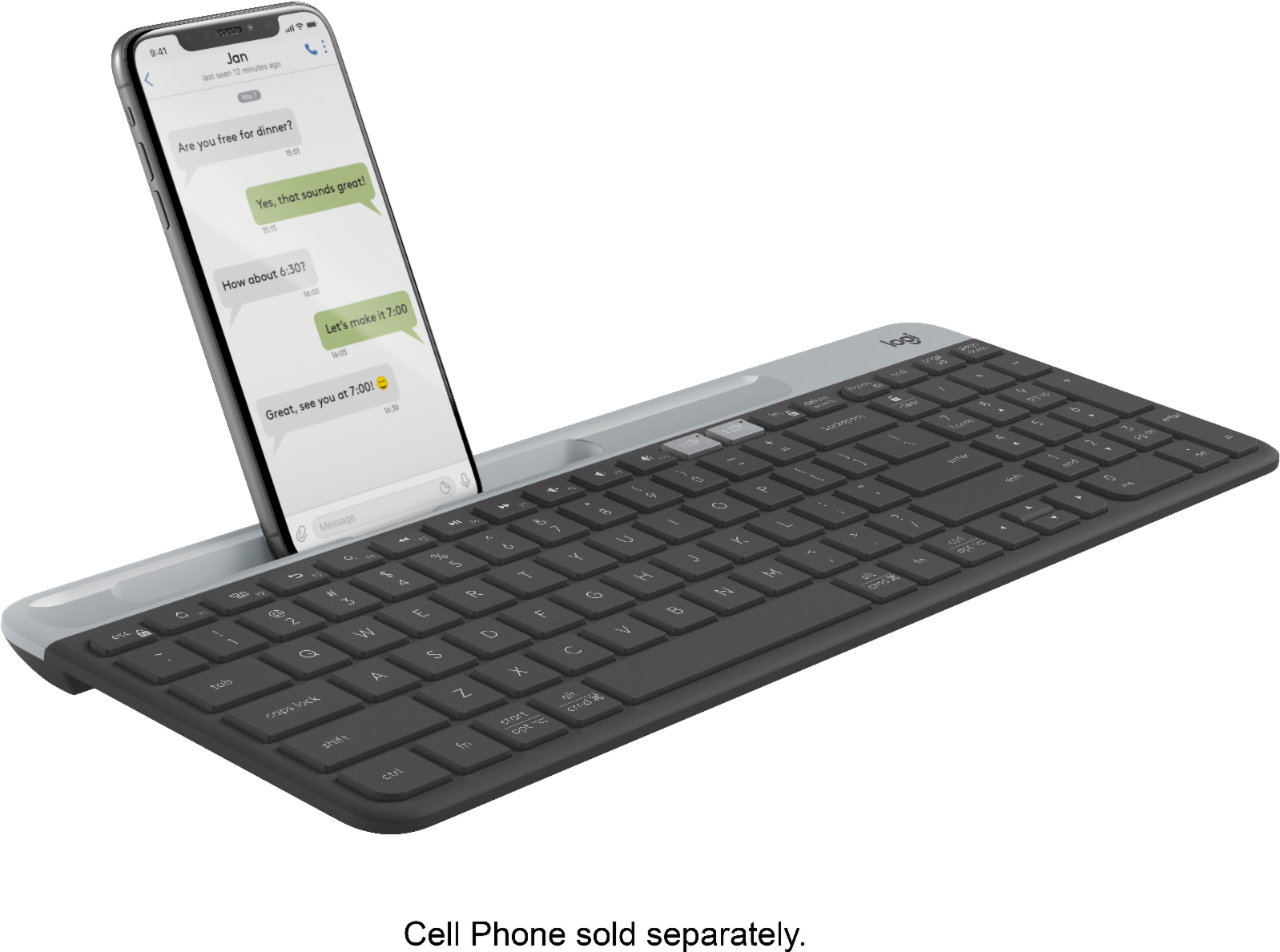
|Posted .This reviewer received promo considerations or sweepstakes entry for writing a review.I have a lot of 'devices' ; like way too many. So the opportunity to connect a keyboard to multiple devices was irresistible. Coming out of the box, it already had the batteries on board and the graphic how-to had me up and running in about two minutes. Connections-- you can connect via bluetooth or via usb dongle. The usb dongle is stored underneath the top cover where the batteries are accessed. I went with bluetooth as most of my devices have that. Once you have one connected, you can connect a second! I connected windows-based laptops and desktops, chrome tablet, android tablet and iOS Switching between two devices was as simple as pressing a button. Physical-- physically, the keyboard is visually appealing and has built in tilt at the back which also serves as a carrying handle. There is a keypad!!!!! For anyone who struggles on a tablet or phone without a keypad, your worries are over! There are rubber pads on the bottom to provide slip-free typing on various surfaces. I had a hard time finding the on-off switch (hint- it's a little switch on the back without any markings.. Dings--The most unusual feature is a slot at the top of the keyboard, in the cover, that is meant to hold your phone or small tablet. This would be better if it were, say, 3 mm wider! My phone in its protective case ALMOST fit in there. It was THAT close, but sadly I had to remove the case to insert it into the slot. The other problem with the neat slot is that, for me, it is too perfectly vertical. I think this would be more useful if it were tilted back slightly so you could see the screen on the phone without lowering your head. So, for me, the slot is pretty useless, which took away a star.
I would recommend this to a friendQuiet Cool Keyboard Switches Between Phone and PC
|Posted .This reviewer received promo considerations or sweepstakes entry for writing a review.The Logitech K580 Bluetooth keyboard is the same size and style of the K470 wireless keyboard that was released recently. I was glad to see the "delete" key moved on the 580 to the place where I normally look for it, near the upper right of the number keypad. Included is a quick setup poster that shows you with diagrams what to do to get it working. You can opt to use the included USB receiver to connect with a PC also. It features the same quiet scissor type keys as the 470, with the same surface of the keys. Not a slick shiny surface that shows finger prints and such, but a nice gray slightly grainy non-slip type surface. A bit like non-stick cooking surface. And they feel and sound like a nice laptop does when you type. The big difference in this keyboard is that it is all set for alternating phone and computer use. Both are easily paired and the output device can be switched easily with the press of one of a pair of easy-to-find buttons (light gray) that have a tiny indicator light that shows it has been selected. The K580 has a slot in the battery/storage cover that allows you to set your phone or small tablet in it and view it's screen so you can type away. It was great for writing a few emails quickly. This keyboard can easily fit in luggage or notebook case to take along on trips or to work. It would be great to cast your phone to a suitable TV and really make use of your ability to type away. Some people may have cases on their phones that make cradling the phone in the slot impossible. The "tilt" angle is not adjustable, so you'll need to keep the keyboard a bit further away to see the screen clearly. I would have made the phone slot adjustable. I can see my phone's screen fairly easily with a 5.7" display. Others may not find theirs easy to see. Logitech's new wireless keyboards claim that the two AAA batteries can last as long as 2 years. That's a plus. Overall, this is a really nice keyboard. Very low profile and stylish. I like it.
I would recommend this to a friend- Pros mentioned:Keyboard quality
works great on a chromebook
|Posted .This reviewer received promo considerations or sweepstakes entry for writing a review.I did use this on my daughter's chromebook and on my android phone. I didn't use the included dongle, but set up via bluetooth which was quick and easy. Typing felt comfortable and didn't feel cramped at all. I always prefer to have a number keypad and was happy to see this had one as well. Typing is nice and quiet. The tray for the device is great but may not be deep enough for some devices with an otterbox case. That being said it worked great for everything I needed!
I would recommend this to a friend comfortable, easy to set up, useful to have
|Posted .This reviewer received promo considerations or sweepstakes entry for writing a review.The Logitech K580 is a nice portable keyboard. It can connect to a Bluetooth-enabled device, such as your smartphone, and it can connect wirelessly to a laptop or desktop computer via USB dongle. The layout and type of keys present mimic a Chromebook, but the keyboard can be used with any computer. Just remember that there are no function keys along the top or side as are commonly found on Windows keyboards. But if you’re like me and plan to use this with a Windows laptop (because I don’t like extensive typing on laptop keyboards—I can never find a comfortable way to rest my wrists without constantly bumping the mouse touchpad), the function keys, as infrequently as you need to use them, are still there on the laptop’s keyboard. There is a cradle along the top to set your smartphone either horizontally or vertically so you can see its screen while you type. I don’t know how many people do extensive typing on their phones, but, with this keyboard and its cradle, your phone is transformed into a miniature computer as there is no longer a need to hunt and peck on the phone’s little pop-up keyboard. Instead, you type on a real, full-sized keyboard at keyboard typing speeds. As far as the keyboard itself, it is comfortable to use while lightweight enough to carry in a computer bag or laptop case. Initial setup was very easy. Pairing by Bluetooth to my phone took only a few seconds, and it worked well once paired. If you plan to connect by USB, remember that the dongle is located under the top front cover of the keyboard where the batteries are (it took me a couple of minutes of deciphering the included pictogram instructions to figure this out). Batteries are included.
I would recommend this to a friend