Customer Ratings & Reviews
- Model:
- 910-007476/910-005783
- SKU:
- 6411503
Rating by feature
- Value
Rating 4.6 out of 5 stars
- Quality
Rating 4.7 out of 5 stars
- Ease of Use
Rating 4.7 out of 5 stars
Customers are saying
Customers are pleased with the M500s Advanced Wired Optical Mouse's overall performance, smooth scrolling, and ease of use. Many find the ergonomics comfortable and appreciate the reasonable price. Some customers find the mouse a bit heavy and are not used to the placement of the side buttons.
This summary was generated by AI based on customer reviews.
Perfect wired mouse for my desktop PC.
||Posted .This reviewer received promo considerations or sweepstakes entry for writing a review.I purchased this mouse to replace a very old IntelliMouse for my desktop PC. I really like this mouse's contour fit. It easily fits my hand and is easy to do whatever I am doing (i.e., photo/video editing, games, creating/editing documents, etc.). The scroll wheel works well as well as each of the buttons. The overall construction is very solid and durable and it should last for a long time. I was able to purchase this on sale, so the price was an excellent value. I would highly recommend this wired mouse by Logitech.
I would recommend this to a friendBrand response from Logitech
Posted .Thanks for your kind words! We’re proud to know our Logitech M500s Advanced Wired Optical Mouse is meeting your needs. Your support keeps us motivated.

- Pros mentioned:Scrolling
Logitech - M500s Advanced Wired Laser Mouse with H
||Posted . Owned for 1 month when reviewed.This reviewer received promo considerations or sweepstakes entry for writing a review.Logitech - M500s Advanced Wired Laser Mouse with Hyper-fast Scrolling - Black This mouse has very simple but very useful features. It fits well in my hand. Is super fast, scrolls smooth and has plenty of features. Overall i am pleased with this mouse.
I would recommend this to a friend The Mouse for When the Magic Disappears
||Posted . Owned for 1 week when reviewed.This reviewer received promo considerations or sweepstakes entry for writing a review.This is the mouse that replaced the Apple Magic Mouse, which “magically” stopped working 4 months after the warranty expired. The “logi” mouse works well and allows continued access to my Apple desktop computer. Happy to not have to rely on “magic”!
I would recommend this to a friendBrand response from Logitech
Posted .We're so glad your M500s is providing reliable access to your Apple desktop! It's great to hear it's a dependable replacement. Thanks for sharing your experience and your feedback!
Great Mouse
||Posted . Owned for 1.5 years when reviewed.This reviewer received promo considerations or sweepstakes entry for writing a review.This mouse is great for office use and reliable with its cord for input during game.
I would recommend this to a friend- Pros mentioned:Ease of use
It's a corded mouse.
||Posted . Owned for 3 weeks when reviewed.This reviewer received promo considerations or sweepstakes entry for writing a review.It's a corded mouse. Nothing fancy, just functional for use on my woodshop computer.
I would recommend this to a friend One of the best so far
||Posted . Owned for 1 month when reviewed.This reviewer received promo considerations or sweepstakes entry for writing a review.I love my mouse love the way its design fit like a glove all smiles here.
I would recommend this to a friendBrand response from Logitech
Posted .Absolutely thrilled you love the Logitech M500s!Sounds like the M500s is a perfect fit for you! We love that the design feels comfortable and natural in your hand. Happy clicking!
My new mouse
||Posted . Owned for 1 month when reviewed.This reviewer received promo considerations or sweepstakes entry for writing a review.Functional and precise, does what it’s supposed to do
I would recommend this to a friendDecent Logitech Mouse
||Posted . Owned for 3 weeks when reviewed.This reviewer received promo considerations or sweepstakes entry for writing a review.Fair mouse for the price. Doesn't have the feel of a more expensive/pro gaming mouse.
No, I would not recommend this to a friendBrand response from Logitech
Posted .Thank you for your feedback on the Logitech M500s. We appreciate your honesty. While the M500s is a solid option for everyday computing tasks, it's not designed to offer the same level of performance and features as a gaming mouse.
- Pros mentioned:Price, Scrolling

A very nice wired mouse, with features too!
|Posted .This reviewer received promo considerations or sweepstakes entry for writing a review.You'll see from the pictures that this is very similar in size to my Logitech wireless mouse of the same series number. What I like about this mouse, is the slightly larger size feels just a bit more comfortable in my hand. It moves freely around, it is wired but I like a wired mouse in some applications for accuracy and response. I found this worked for the fine motor skills of a mouse for AutoCAD. That is important as I spend a lot of time in that program and the speed I move around the drawings, or also for the accuracy, that is important. I used this for some gaming and found it works great for that too. This has shortcuts keys for things and an excellent scrolling wheel with selections for both clicky scroll or smooth scroll, one of my favorite Logitech features. A nice mouse, great price, and with Logitech quality, you cannot go wrong!
I would recommend this to a friendBrand response from Logitech
Posted .Hi Steve, Thank you for your review! It is greatly appreciated. Continue to enjoy your device. If you ever need assistance, please contact Logitech Support on the website. LaShonda from Logitech
- Pros mentioned:Ergonomics
Free-scrolling/high DPI in budget-friendly package
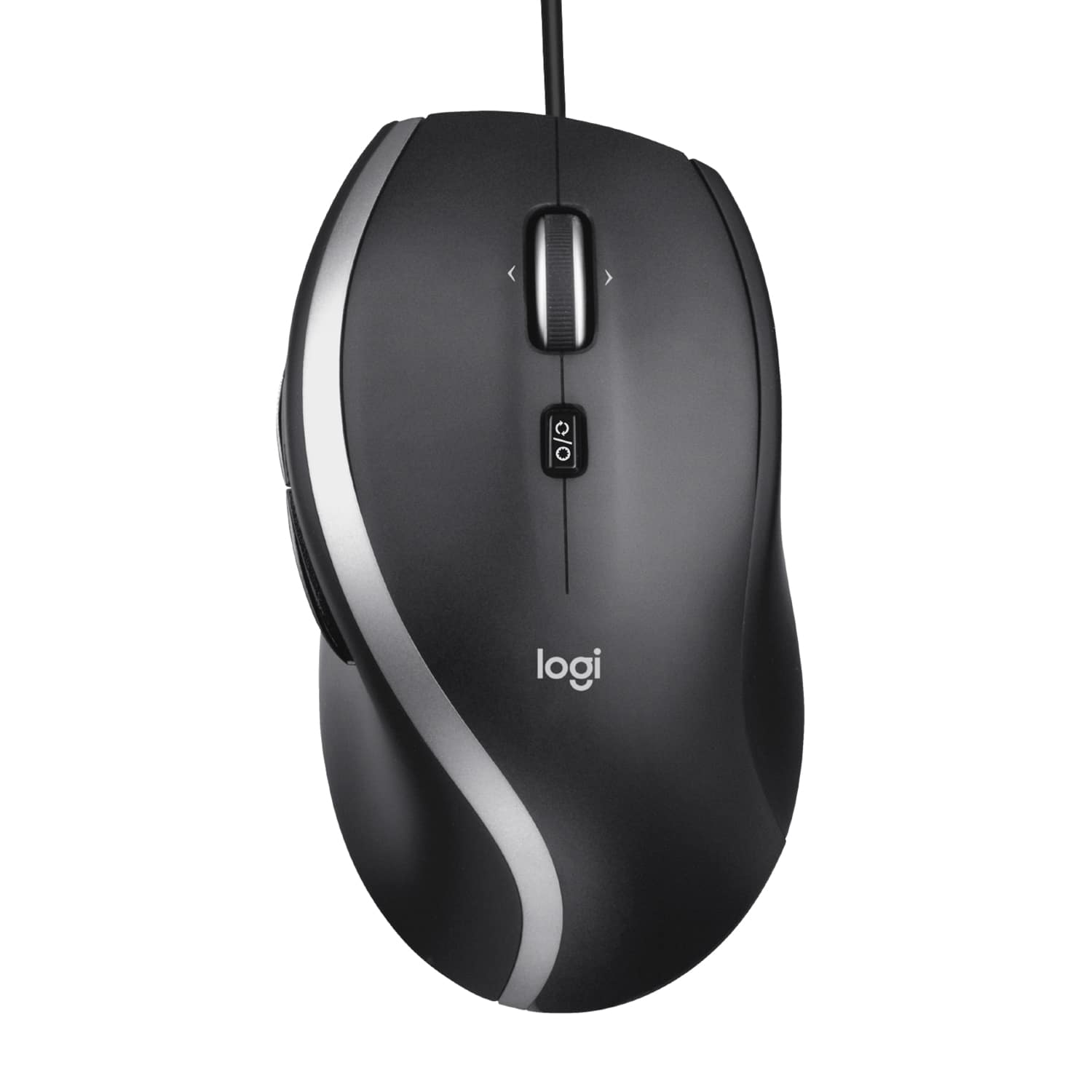
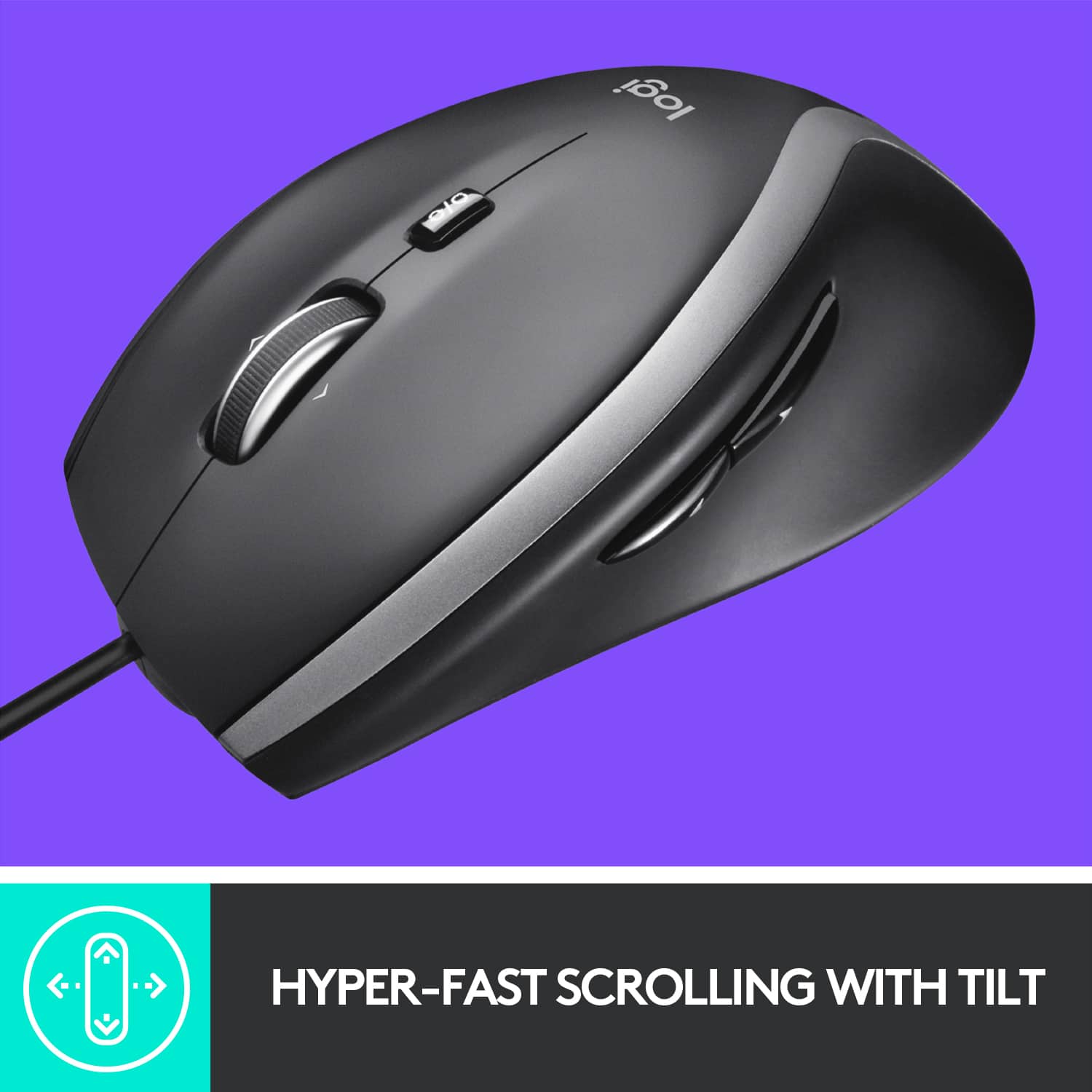
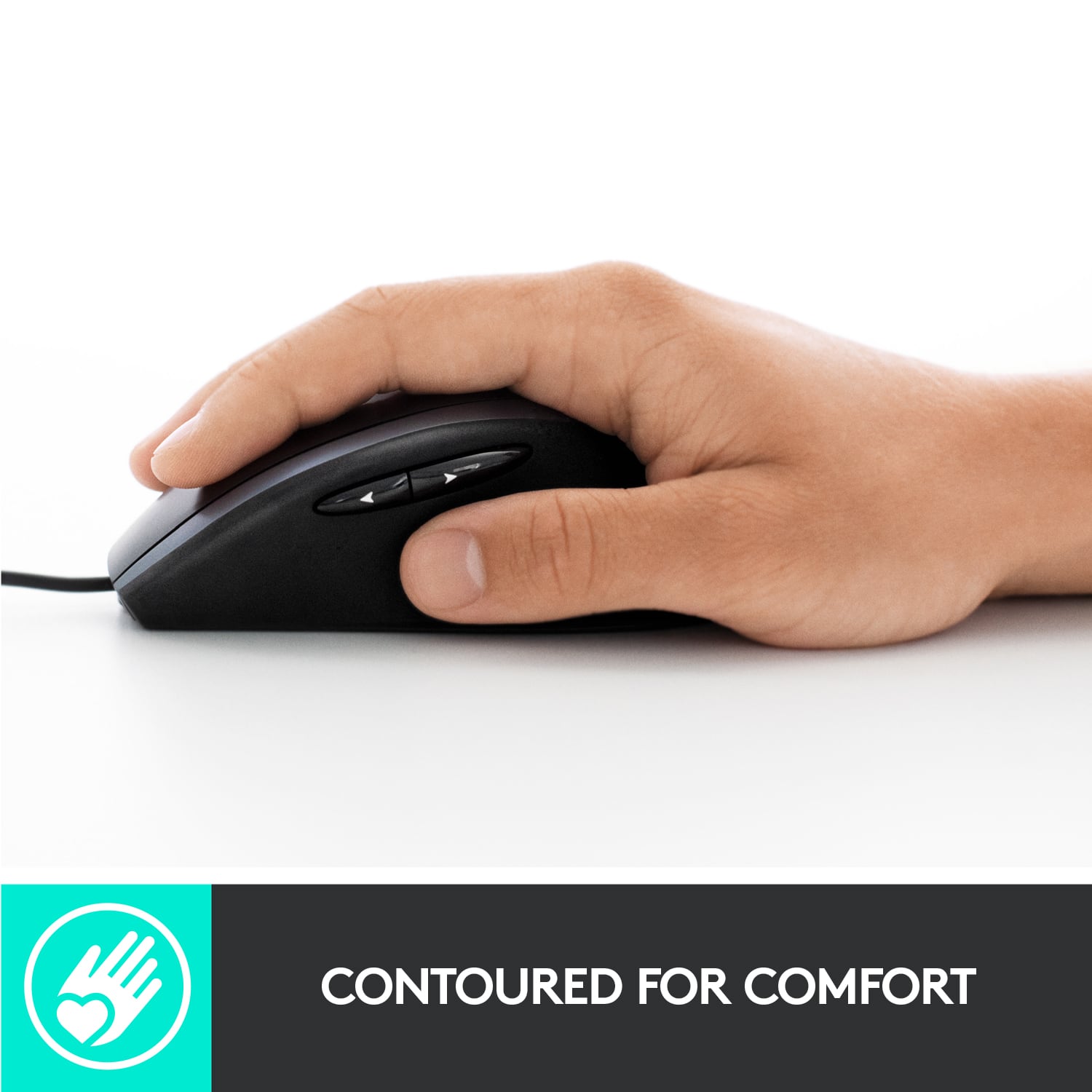
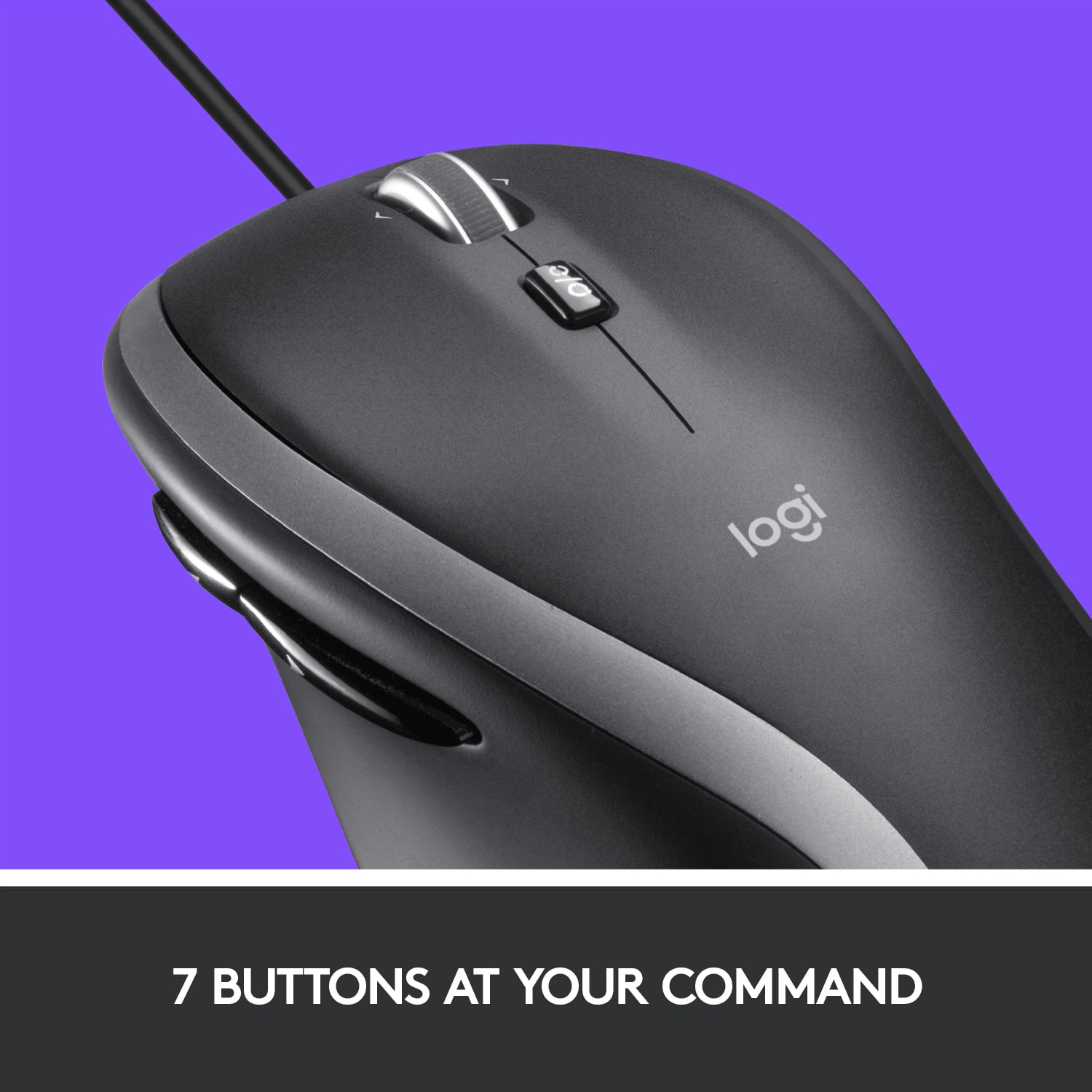
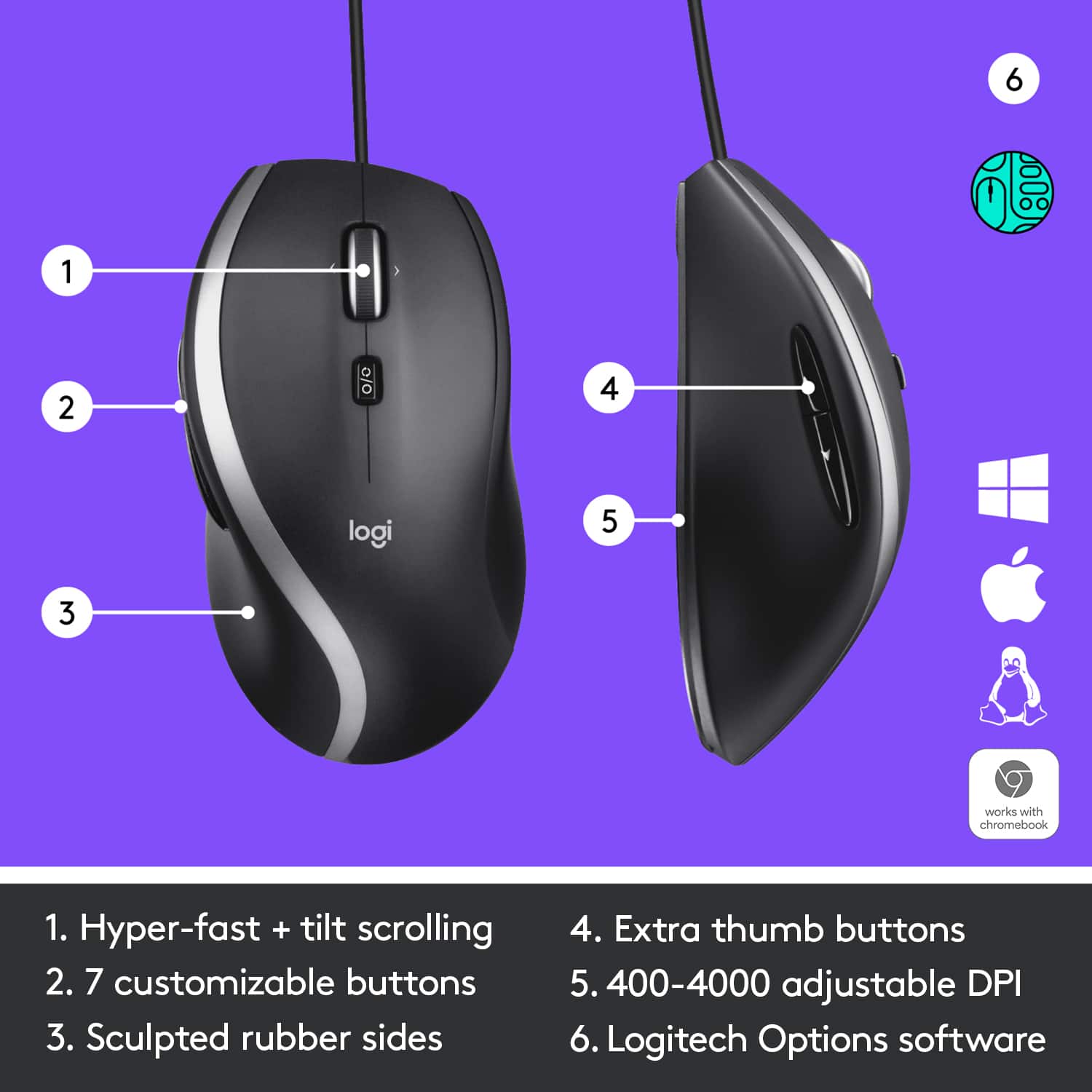
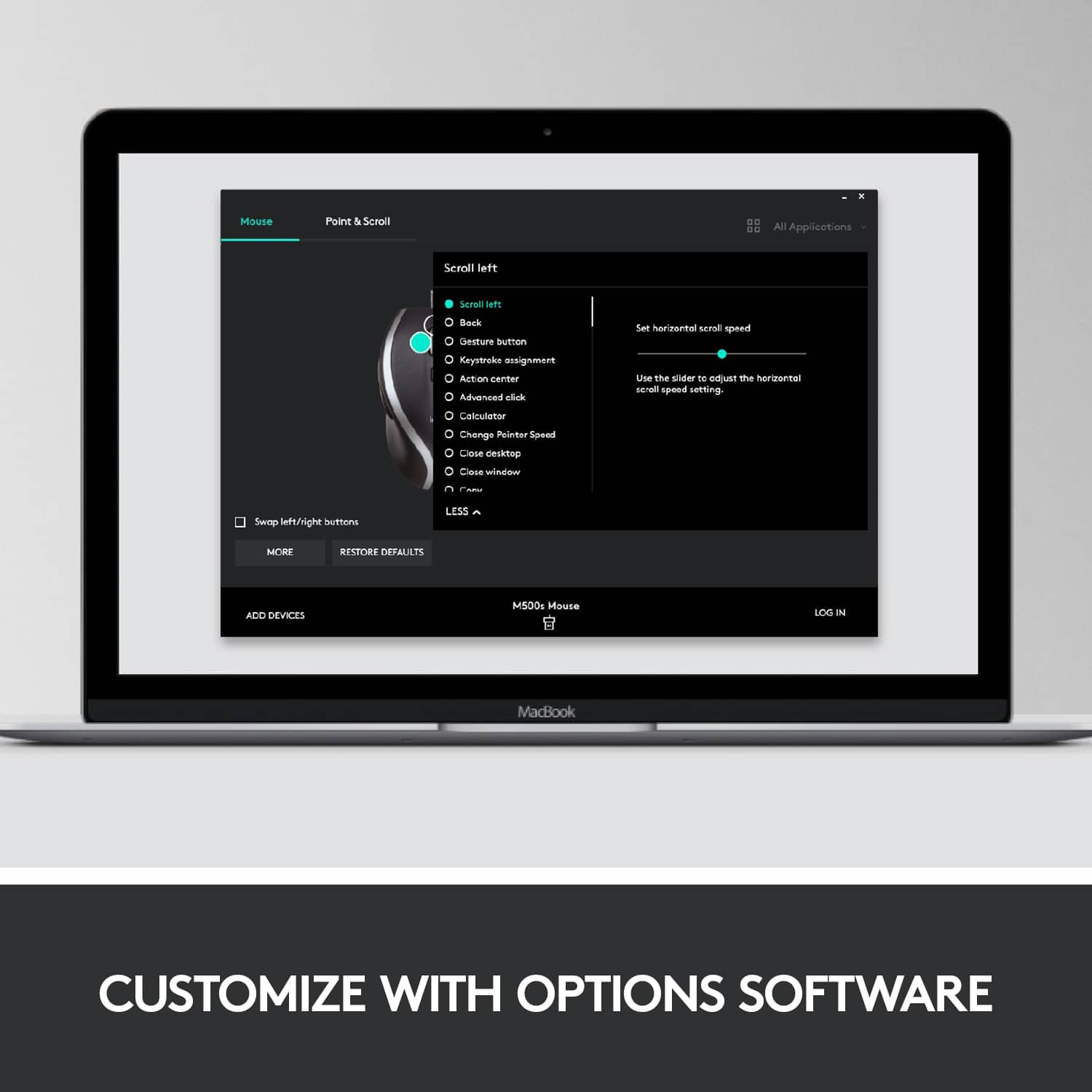
|Posted .This reviewer received promo considerations or sweepstakes entry for writing a review.How excited can you get about a budget mouse these days? I mean, this one doesn't offer tunable weights, an airplane cockpit's worth of side and macro buttons, or even RGB lighting...heck, it's not even wireless. So why does the Logitech deserve a second look? Simply put, if you need an accurate mouse that offers a few productivity enhancements that won't break the bank (or look awkward sitting at your PC in an office setting), the M500s really DOES offer a few things to get excited about. In particular, it's got a few standout features, solid tracking and mousing performance, Logitech's trademark ergonomics and sturdy build quality, a splash of style without looking childish or "gamey," and all at a pretty bargain basement price. In terms of design and ergonomics, the M500s features a splash of professional styling with an inlaid silver ribbon that separates the steel grey plastic roof & integrated left/right mouse buttons from the rubberized thumb indent and side buttons. The design and colorway aren't garish or overstated, but they do help the mouse stand out from a sea of single-color OEM mice without looking like a Transformer waiting to unfurl beneath your hand. Both sides features a pleasant-to-the-touch rubberized finish and are sculpted to fit the contours of an arched right hand/palm/resting fingers quite comfortably (sorry lefties, nothing to see here). I don't have huge hands, typically a size Large in men's gloves, and I can comfortably rest my hand on the mouse and my fingers lay naturally along the entire surface of the buttons rather than feeling like I have to claw at the ends of the buttons or push down with my finger tips to get a mouse click to register. The two side buttons are conveniently placed just slightly above where the thumb would naturally rest and the rear button is long enough that it allows you to activate it with the pad of the thumb below the knuckle without feeling awkward or like you need to take your finger off the mouse and move it back to hit the button--it's a very VERY comfortable and convenient layout for enabling lots of back and forth navigation on webpages or undo and redo actions in Photoshop. The mouse wheel features a ribbed rubber band running around the outer edge that makes it incredibly easy to activate with any part of the index or middle finger--much preferable to the smooth rubber coatings I've experienced on other mice that start to become slippery as oils build up over time. At nearly 120g, the mouse has just a bit of heft to it; those of you used to an esports or high-dollar gaming mouse may have a little adjustment to make, but for office work or even light gaming, it's not too terribly burdensome to shove around a mouse mat. Other than the mouse wheel deadened "thunk" on a downward wheel-click button activation, all other buttons exhibit a very clear audible "click"' when activated, so if you work in close quarters with others and need your mouse/work area DEAD silent, this one might not be for you. The cord is 6 feet long so it should reach around most desks/office furniture with cable to spare, but it is rubberized and a bit on the thin side so it does drag and kink a little easier than if the cable was braided and a bit thicker (which seems to be all the rage these days). As for the buttons themselves, the mouse has 7 assignable buttons (left, right, middle/scroll wheel, thumb front and thumb rear, and scroll wheel left & scroll wheel right) with an 8th controlling the mouse wheel's scrolling behavior (more on that one in a bit). Yes, two of those mouse buttons are not buttons per se, but are activated by rocking the mouse wheel side to side. For large office documents, Photoshop images, big webpages, etc., having left and right scroll controls right on the mouse wheel is actually pretty convenient, and the actuation force to register a wheel-left and wheel-right click is less than that required for a middle mouse click...this is GREAT because it makes it pretty difficult to to accidentally enter a middle-click while you're using the wheel-left and wheel-right buttons. That brings us finally to the scroll-wheel mode button just below the wheel itself. This isn't a digital switch like the other mouse buttons (i.e. it's not assignable in software)--it's a physical switch that changes how the wheel itself spins on its axle. On one setting, you get the feeling of a traditional "precision" scroll wheel with each small movement of the wheel matching the slight haptic feedback of a wheel detent or light clicking sensation. On the other setting, you get what Logitech calls "hyper-fast scrolling"...that is, the mouse wheel spins freely and rapidly on its axle with the slightest touch. This makes navigating through giant office documents, massive Photoshop images viewed at 400%, or enormously long blogs and webpages completely effortless. It's a feature I enjoy immensely on my Logitech G903 gaming mouse and it's wonderful to see its inclusion here in an entry level productivity mouse. It would have been a major coup if Logitech could have had a tiny LED light up the icon on the mode button so you could see what mode the wheel was in without having to give it a spin first, but that's a minor observation rather than a criticism as even the pricier G903 doesn't have a way to indicate which scroll mode is active. From there, you'll need to head into the relatively low-drag Logitech Options program if you want to personalize the mouse's behavior beyond what Windows will natively let you do in the mouse control panel. Thankfully, you can access all features and capabilities of the Logitech Options program without having to sign up for an account and log in (though that option is there, as well). Here you can easily assign functions to the various mouse buttons (individual functions per click, but not macros--at least not that I've been able to see), set scroll wheel direction, pointer smoothing, and set pointer speed. There's also a VERY handy option to customize the mouse buttons per application so that you could, for example, have the thumb buttons mapped to 'forward' and 'back' for web surfing, and 'redo' and 'undo' for photo editing. One niggle of note within the Options program though. Logitech makes it a point of touting that the M500s features a 400-4000 DPI optical sensor, but there's nowhere I can find within the Options program where you can actually set pointer sensitivity by way of those DPI levels--there's simply a slider for "Pointer speed." Yes, the slider still works in practice, but the slider isn't marked or graduated so there's no way to know just what setting you're using at any given time; you simply have to try out a location on the slider to see if you like the results. If you're generally OCD with your customization settings or have a favorite DPI level that matches your workflow/style, it's slightly frustrating to have the actual DPI settings hidden from you (unless I'm just looking in the wrong place--but this seems pretty easy to remedy with a software update). With just a few minor observations aside, there's definitely a LOT to like about Logitech's budget offering here--it's a tremendous value for the asking price, and in return you get supreme comfort, sturdy build quality, and nearly flawless usability both physically and in the software interface. Logitech's M500s is DEFINITELY recommended if your sights are set around this price level.
I would recommend this to a friendBrand response from Logitech
Posted .Hi, glad to see you're enjoying the price conscious and classic M500s wired mouse! If you have any questions, check out the Logitech support page at https://support.logi.com/hc/en-us/articles/360024323353. Continue to enjoy!
- Pros mentioned:ScrollingCons mentioned:Side buttons
Decent office mouse that's comfortable
|Posted .This reviewer received promo considerations or sweepstakes entry for writing a review.I've been using the mouse for a little over a week now as my main mouse for work every day. I had a cheap unbranded mouse before, so this has overall been a slight upgrade. The mouse fits nicely around my hand and is comfortable to hold and use. I'm on windows 10, so I just plugged in the mouse and started using it. It is accurate out of the box and works well. The one negative for me is the way the back and forward buttons on the side work. They are too soft, so you're not sure if you did or didn't touch them. Most mice now have these there, so while it's nice to have if you don't have a mouse with it, I am expecting more of a click. The scroll wheel also lets you click left and right, which is a neat feature but not one I'm using at all probably as its new, and I just don't feel its that useful. Overall a decent office mouse to use, and an upgrade from a cheap unbranded mouse.
No, I would not recommend this to a friend - Pros mentioned:Ergonomics
Corded Precision!
|Posted .This reviewer received promo considerations or sweepstakes entry for writing a review.The Logitech - M500s Wired Optical Mouse is precision at it's finest when you are needing comfort and ergonomic styling for all-day use without fatigue. With 7 programmable buttons, up to 4000 adjustable dpi setting, and speed wheel for scrolling, you will be able to fly through your tasks with precision. This mouse, while corded, offers excellence feel, comfort, and responsiveness. To program your buttons, a quick download from the Logitech site gets you up and running in no time. The tactile touch and feel of the mouse is smooth on top for quick responsive buttons, and slightly matte on the sides for positive grip. PROS - Logitech Brand, Quality, and Innovation - Responsive, Ergonomic, and well designed for long periods of use - Precision specs allow for detailed work or gaming in a pinch! - Software support for 7 programmable buttons to make your experience unique. CONS - Not a fan of the unbraided cord. Braided cords offer less resistance and slide better. The unbraided cord has too much grip so the cord catches at times. Not a deal breaker, but not for serious gamers or designers. Overall, a great product for the price point!
I would recommend this to a friend - Pros mentioned:Scrolling
Excellent Wired Mouse
|Posted .This reviewer received promo considerations or sweepstakes entry for writing a review.FIRST LOOK ———— This is an excellent full sized wired mouse. It's got a rubberized grip on the side and its very comfortable to hold on to. SETUP ——— Fairly straight forward, no need to install any software. it is plug and play. If you need to customize the buttons on the mouse you will need to install the logitech OPTIONS software so that you can customize the buttons SUPPORTED OS ———————— Windows® 7, Windows 8, Windows 10 Mac OS X 10.12 Chrome OS™ Linux® Kernel 2.6+ USAGE ——— It's a plug and play device. you have the scrollbar, left click, right click and 2 buttons on the side which can be configured fusing the logitech OPTIONS software or say copy and paste. The mouse is very responsive and accurate. you dont even need a mousepad to use with it. It's really smooth on the desk. Since it is wired, you dont have to bother about changing batteries. PROS —— Long cord, it can connect to your desktop hidden inside the desk Its compatible with Logitech OPTIONS for configurations its got a scroll wheel which can be controlled to scroll click by click or constant scroll Well built, Logitech reliability. CONS —— None.
I would recommend this to a friend - Pros mentioned:Scrolling
M500s Mouse is Packed with Powerful Options
|Posted .This reviewer received promo considerations or sweepstakes entry for writing a review.When you first try the Logitech M500s Wired Optical Mouse you notice a few things right away. This M500s feels great, is very well built and operates smoothly. Next, allow the software Logitech OPTIONS to customize everything about the M500s. Lastly, enjoy operating your computer again! • Plug n Play is a great feature! Plug it in straight out of the box to a USB port, get going with the corded mouse and never have to worry about changing out batteries again. The cord is plenty long so you won’t be tugging on the mouse for extra (6ft). I had no trouble at all, plugging in the mouse and using it right away. • After you sign in/create account, you will have access to all this mouse has to offer. Logitech OPTIONS software allows you to customize 7 buttons with short cut selections. (Just wanted to mention the software is around 200MBs) There are an amazing amount of shortcuts per button on the M500s in the software. In the Logitech OPTIONS software I sped up the cursor to about half way. It is definitely responsive as I tried both ends of speed, until I found what I liked the best. The 7 figure configurable shortcut options have a large amount of customization. Do you want an activity for one of the 7 buttons? All choices are laid out in front of you in the Logitech OPTIONS software. • One great advantage the Logitech M500s is the “Hyper-fast scrolling!” It moves through the web and anything that needs scrolling up or down. The Scroll wheel literally spins with a simple flick of the finger. I especially liked this feature with Fantasy Football information on the web. There is a ton of information out there, and this wheel makes it simple to see it all quickly. You can also use click to click that most conventional mice use. To switch between the two styles, press the scroll mode wheel button on the top of the mouse. • I got better all round tracking on the computer with the M500s DPI (Dots Per Inch). This Logitech mouse uses an optical reader that performs at a high level between 400dpi-4000dpi. It is fast, quick, concise and accurate while using it on the computer. The optical and DPI really make a positive difference while using your M500s mouse on screen. • The full size Logitech M500s fits your hand so comfortably. With built in contours and added rubber siding, I used the mouse all day and never felt fatigued. It was comfortable and very natural to every part of the hand. The buttons are also easy reach and click or scroll. I really enjoyed using this Logitech M500s corded mouse model. The M500s conforms to your hand, uses an optical reader (4000 DPI) and has software to customize it. The M500s is a very useful mouse when operating your computer and makes movements that much better.
I would recommend this to a friend - Pros mentioned:Scrolling
Simple mouse, 5 programmable buttons
|Posted .This reviewer received promo considerations or sweepstakes entry for writing a review.One of the most common devices for the computer is the mouse and really hasn’t drastically changed over the years. With minor improvements here and there, besides a few extremes, but for the most part have similar design and feel. The Logitech M500S is an improvement from their M500 in adding more programmable options and the ability to adjust the DPI. They advertise 7 customizable buttons, but the Left/Right mouse buttons are just customizable to Right/Left while you have options with the Logitech Options software to assign the other 5. This includes the two buttons by the thumb, which default for Forward/Backward and the Left/Right/Down click of the scroll wheel. You pick from a list of functions, like open application/file/video/folder, copy/paste or assign your own key combination. You can also assign one of the functions to switch DPI, or pointer speed, to your desired setting. You can enable/disable smooth scrolling in the application, but also you can release the scroll wheel with the click of a button to spin smoothly as well. For the most part this feels like a standard mouse with a little customization provided you have the software installed. The custom options don’t stay with the mouse if you choose to hook it to another device. However, the customization adds some conveniences to every day computer use.
I would recommend this to a friendBrand response from Logitech
Posted .Hello David Jr, thank you so much for the 5 star review. We are so excited to hear that the M500s is treating you well. The M500s mouse comes with a 3 year limited hardware warranty. So if you ever need to reach out to us for anything, please do so. I'll attach a link to our Logitech Support website at the end of this message. Have a great rest of your day. -Ricky from Logitech. https://support.logi.com/hc/en-us/articles/360024919454-Warranty-Corded-Mouse-M500
- Pros mentioned:Ergonomics, Price
Logitech - M500s Advanced Wired Laser Mouse
||Posted . Owned for 3 weeks when reviewed.This reviewer received promo considerations or sweepstakes entry for writing a review.Excellent mouse. Functions similar to a trackball in accuracy without the ball (I do like trackball devices). Easy on the hand and wrist ergonomically. For the price a very good buy. The wheel seems a little too delicately built at times but so far its working as advertised with no problems. Recommend the Logitech M500s.
I would recommend this to a friend - Pros mentioned:Ease of use
GREAT MOUSE FOR ME
||Posted . Owned for 3 weeks when reviewed.This reviewer received promo considerations or sweepstakes entry for writing a review.I have used Logitech mouses for many many years and they are so easy to use.....my last mouse was very old.....but like a timex they just keep ticking......finally I could see it was just like me....fading..haha....my new mouse is larger but it really fits my hand ....I use it for my laptop....dont like the finger thingy.....this mouse will stand by you for many years....does not break and it does everything and more
I would recommend this to a friendBrand response from Logitech
Posted .Thank you so much for your loyal patronage, and for sharing your experience with the M500s! We're thrilled to hear that it's meeting your needs and that you're enjoying the improved fit and functionality.
- Pros mentioned:Scrolling
The mouse that is juuust riiight
||Posted . Owned for 3 weeks when reviewed.This reviewer received promo considerations or sweepstakes entry for writing a review.This is my go to gaming mouse. The two side buttons function perfectly for using voice services like discord, mumble, teamspeak, you name it! The lock/unlock function on the scroll wheel makes life easier when scrolling through long documents as I write my dissertation. The size is nice too as I find too many mice are either too small or too large. Its very much a goldilocks mouse in my opinion because, it fits me juuuust right. Also the mouse lasts. Like seriously, my last one of these lasted a solid 4 years. The smooth rubber on the left side wore through to plastic on my last mouse.
I would recommend this to a friend - Pros mentioned:Ergonomics, Scrolling
Heavy-duty and elegance in a conventional mouse!
||Posted . Owned for 1 month when reviewed.This reviewer received promo considerations or sweepstakes entry for writing a review.This unit solved all my “skipping Bluetooth mouse” problems, firstly, of course, because it is a direct-wired USB device! However, all kidding aside, it’s overall build quality, ergonomics, and laser utilization are excellent. I can’t find a surface upon which it doesn’t deliver smooth operation. The scroll wheel’s width and resistance to turning deliver a very smooth response. Truthfully, this mouse has a lot of features I don’t use in my work, But if the other buttons perform like the ones I’m familiar with, this mouse is an elegant tool!
I would recommend this to a friend - Pros mentioned:Ergonomics
Logitech makes the best mouse hands down
||Posted . Owned for more than 2 years when reviewed.This reviewer received promo considerations or sweepstakes entry for writing a review.I had this design way back in the win95 days even though it had a roller ball way back then. This updated design is still as good as that original design, but even better. I personally like wired accessories as there is no charging mess to bother with, nor lag or slippery connections. This logi mouse is legendary with the feel and design. It fits so perfectly in the hand. Your hand easily and comfortably rests on it without having to strain. Logitech makes the best and this one is definitely my favorite.
I would recommend this to a friend