Customer Ratings & Reviews
- Model:
- 910-004337
- |
- SKU:
- 4106015
Customer reviews
Rating 4.7 out of 5 stars with 1594 reviews
(1,594 customer reviews)to a friend
Customers are saying
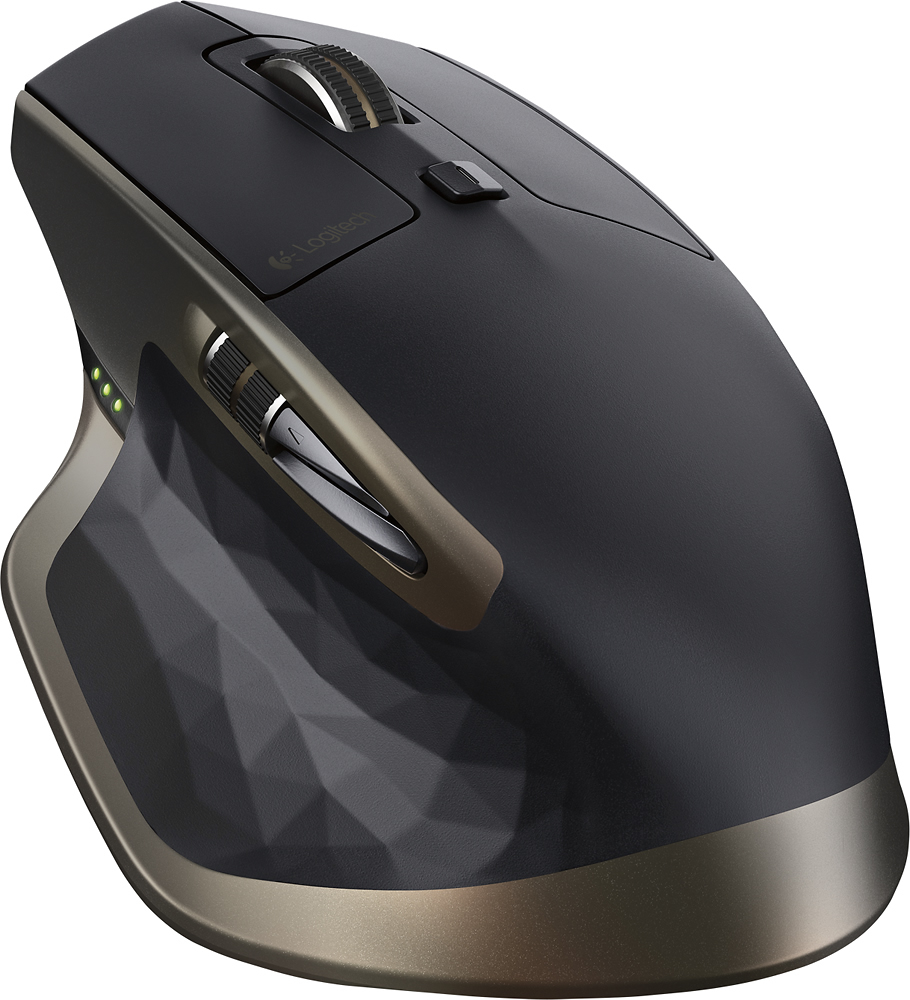
Customers value the MX Master Wireless Laser Mouse for its long battery life, comfortable design, and smooth scrolling wheel. Many appreciate its responsiveness, accuracy, and ability to work on various surfaces. While some find the price high and the weight substantial, the positive feedback on features like Bluetooth connectivity and precise tracking outweighs these concerns for most users.
This summary was generated by AI based on customer reviews.
- Pros mentioned:BluetoothCons mentioned:Software
Rated 5 out of 5 stars
Great addition to track pad
||Posted .This reviewer received promo considerations or sweepstakes entry for writing a review.I currently am using the mouse with a MacBookPro (2014) and works great. I have the apple mouse and trackpad. I was struggling with the apple mouse with certain applications. With the combination of the three, I can switch and have the control I looking with the addition of the MX Master. What prompted me to purchase it was the blue tooth capability. I have other Logitech mouse that uses a USB port. I have only two USB ports on my Mac and need them both for other attachments. My only comment is the software seems to be a bit lacking in features with the Mac. And I had some problems holding the settings. But I expect that to improve with updated software. The MX is a great addition and I will use it with specific applications.
I would recommend this to a friend - Pros mentioned:Battery life, Scroll wheel
Rated 5 out of 5 stars
LOVE this mouse!
||Posted .This reviewer received promo considerations or sweepstakes entry for writing a review.This is by far the best mouse I've ever owned. I never have to worry (too much) about the surface I'm trying to use as my "mousepad". To be fair, every so often, I'll find a surface that will make the pointer move ever-so-slightly slower than standard, but the mouse still works. In addition, its battery life is second to none; the speed-adaptive scroll wheel shifts seamlessly between click-to-click scrolling and hyper-fast scrolling; and Logitech has made it so easy to switch between connected devices (e.g., switch from my work laptop to my home computer). The one thing I haven't adjusted to yet is the thumb scroll wheel. It makes total sense, and it works as well as everything else in this device, but after years of nudging the main scroll wheel left and right, I don't know if I'll ever get used to this. I think the fact that there are so few sites/documents that require left-to-right scrolling makes it unlikely for me to adopt this technology regularly. Overall, I can't say enough about this device. Just love it!
I would recommend this to a friend - Pros mentioned:Battery life, Bluetooth, Scroll wheel
Rated 5 out of 5 stars
Best mouse ever
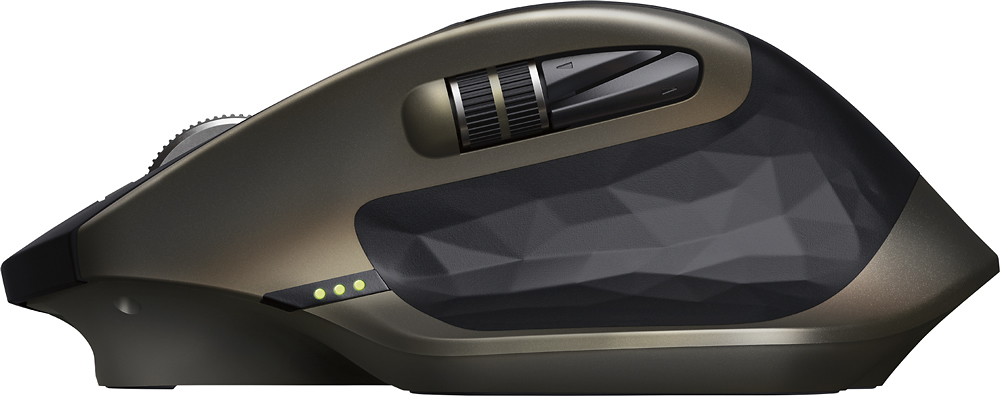
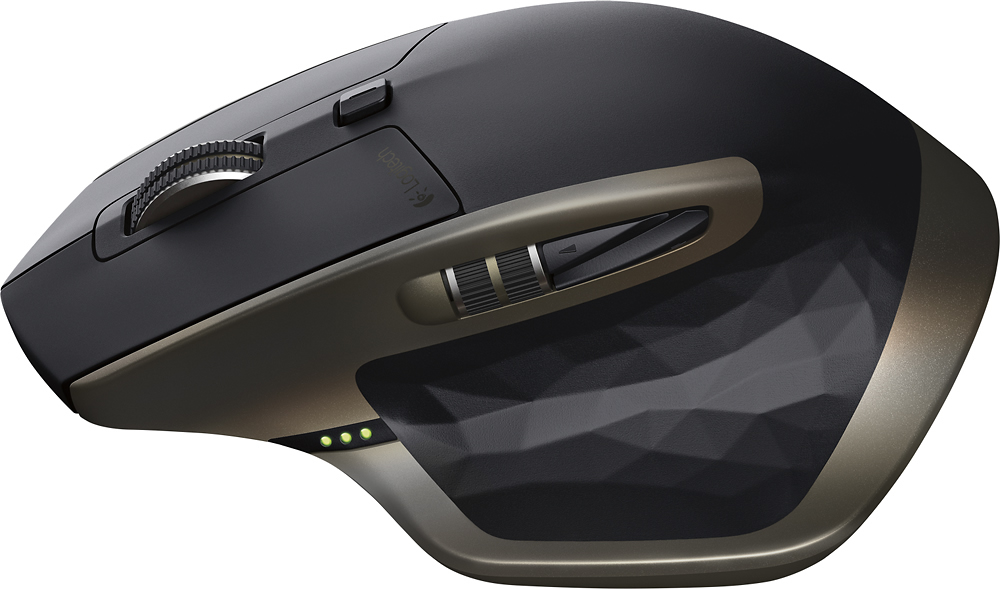
||Posted .This reviewer received promo considerations or sweepstakes entry for writing a review.Rechargeable battery that last for more than 15 days (it is used the entire day). Two wheels for vertical and horizontal scrolling. Five buttons, Bluetooth and wireless connection to up to three devices. Great ergonomic design. Overall: Best mouse ever.
I would recommend this to a friend - Pros mentioned:Scroll wheel, Size
Rated 5 out of 5 stars
One Slick Mouse!
||Posted .This reviewer received promo considerations or sweepstakes entry for writing a review.I bought this to go with my new iMac 27-inch Retina desktop. Me and the Magic Mouse didn't get along since it was kind of small. Now, I got this great big, do-it-all mouse and I'm as happy as can be. Oh, and pairing it up with the iMac was a breeze. The MX Master glides effortlessly across surfaces with the middle scroll wheel spinning down pages faster than ever. I haven't had it long enough to program all the programmable buttons, but there are plenty if you're into that. I'm also not a rabid gamer, so this mouse is my every day mouse for everything I do. I believe it's going to last a long time. My hands are kind of large and this mouse fits my right hand like a glove. Everything is where it should be for minimal effort clicking or grabbing the mouse and moving. It may be expensive, but I'm glad I bought it. I think you will be too.
I would recommend this to a friend - Pros mentioned:Battery life, Scroll wheel
Rated 5 out of 5 stars
Great Mouse
||Posted .This reviewer received promo considerations or sweepstakes entry for writing a review.I've always been a fan of Logitech mice and this is no different. The mouse has unbelievable battery life and is super accurate. I also love the automatic continuous scroll. I would highly recommend this mouse to anyone in the market.
I would recommend this to a friend - Pros mentioned:Battery life, Scroll wheel
Rated 5 out of 5 stars
I love this mouse!
||Posted .This reviewer received promo considerations or sweepstakes entry for writing a review.It seamlessly integrates with my Mac Pro. I love the smooth or click choice for the scrolling wheel action; personally, I prefer the click. Most importantly is how it feels so natural in my hand! There are various options; however I will write that overall, this is the best mouse I ever owned. I used to think that I would never go with a rechargeable mouse, because I prefer the ease of just putting in new batteries; however, the battery level indicators and long charge cord means I never worry about having forgotten to charge it nor having the cord in the way when it's plugged into my Mac.
I would recommend this to a friend - Pros mentioned:Battery life, Scroll wheel
Rated 4 out of 5 stars
Great mouse with overall improvements, some quirks
||Posted .This reviewer received promo considerations or sweepstakes entry for writing a review.I've had mostly all of the MX models from Logitech, starting with the MX Revolution which was their first mouse with the infinite scrolling wheel. I enjoyed that previous versions of the MX series could perform left and right wheel clicks. This MX Master does not have that feature which I grew to love over the multiple models I have. The ergonomics of this mouse are amazing, super comfortable regardless of how you hold it and love the versatility of being compatible with bluetooth or using the Unify receiver. Overall i would recommend this to anyone who is willing to pay a big price for a tool that can sometimes last years (my MX Revolution is around 5-6 years? and still works great apart from cosmetic wear&tear).
I would recommend this to a friend - Pros mentioned:Battery life, Size
Rated 5 out of 5 stars
Excellent mouse
||Posted .This reviewer received promo considerations or sweepstakes entry for writing a review.This mouse fits nicely in my medium/large hands, and has a nice weight to it. Not too much, but enough to where it doesn't feel cheap when you move it. It stays charged awhile, and I like that it charges by a cable instead of a docking base. So you can still use it while it's charging. The scroll button is the best, I have it set to click and not free spin. So while doing small scrolls it's responsive and clicks, however when I need to scroll to the bottom of a long document you give it a good spin and it will free spin for you. I prefer this over my MX 5500 set that I've used for many years.
I would recommend this to a friend - Pros mentioned:Battery life, Comfort, Scroll wheel
Rated 5 out of 5 stars
one of the best mice available
||Posted .This reviewer received promo considerations or sweepstakes entry for writing a review.Exactly as advertised. Very comfortable to use, on the large side, but not overly. Every button can be customized for different applications. Charge holds for at least 3-4 weeks, depending on use. Excellent build quality. Side buttons should be a bit larger. Nice scroll wheel. Highly recommended.
I would recommend this to a friend - Pros mentioned:Battery life, Bluetooth
Rated 5 out of 5 stars
GREAT Wireless Mouse
||Posted .This reviewer received promo considerations or sweepstakes entry for writing a review.This Logitech Wireless mouse is terrific. It has a very long life on it's rechargeable battery, it can be synchronized to 2 different computers via included Logitech unifying receiver, and the mouse can be synchronized to a third computer via Bluetooth. The mouse is very responsive and accurate and tracks well over every surface I have used it on so far.
I would recommend this to a friend - Pros mentioned:Battery life, Bluetooth
Rated 4 out of 5 stars
Nearly perfect mouse for pro use
||Posted .This reviewer received promo considerations or sweepstakes entry for writing a review.I replaced my Apple Magic Mouse (which I loved, but was causing to much pain due it's obscenely bad ergonomic build) with the MX Master. Overall I find it a fantastic mouse. LOVE that it's Bluetooth and I don't have to waste a USB port with some stupid dongle. Battery life is about what they claim—long enough that I don't care if it's 100% accurate. The software is great, which shocked me because Logitech is horrible with software drivers. The pros: Comfortable, nice software for Mac, Bluetooth works great, mouse itself is accurate. The cons: It's almost too accurate/fast. It's sometimes difficult to move slowly and precisely. This is a minor thing that I'm sure I can still adjust for in the software. The thumb wheel and thumb buttons on the other hand cannot be fixed. They're almost too small and too close together to be useful. I find myself having to look to see which button I'm hitting, etc.
I would recommend this to a friend - Pros mentioned:Battery life, Bluetooth, Comfort
Rated 5 out of 5 stars
Very Good Mouse, the best choice around!
||Posted .This reviewer received promo considerations or sweepstakes entry for writing a review.It is a very good mouse, accurate and comfortable with the hand and the wrist. A bit bulky though, so might not be good for carrying in a slim laptop case! Battery is great, and connects to three devices over Bluetooth, which is a blessing! I am really happy with it, and I think it worth every single penny!
I would recommend this to a friend - Pros mentioned:Bluetooth, Scroll wheel
Rated 5 out of 5 stars
Small, clever improvements over Performance MX
||Posted .This reviewer received promo considerations or sweepstakes entry for writing a review.My previous mouse on my gaming desktop was the Logitech Performance MX. The added capabilities of Bluetooth OR Wireless USB through the Unifying Receiver (and multi-device selector switch) make this a great mouse even when I have to use it with my Surface. The auto-unlocking of the scroll wheel, if you flick it hard enough, is also a nice improvement to utilize if you've forgotten wheat the Home key normally does. And still charging via micro USB makes it a wired mouse in a pinch.
I would recommend this to a friend - Pros mentioned:Comfort
Rated 5 out of 5 stars
Life changing from stock mouse
||Posted .This reviewer received promo considerations or sweepstakes entry for writing a review.Full disclosure: I have limited experience using anything but a stock mouse. Having said that, I can’t imagine a mouse being more comfortable, accurate, user friendly and helping me more efficiently navigate my computer than the MX Master. I looked at many. I tried many demos on display. I was hesitant to drop more than $40 in a mouse, but I am glad I did. The MX 2 is even better, and wouldn’t shy away from it if you can no longer find the MX.
I would recommend this to a friend - Pros mentioned:Scroll wheel, Size
Rated 5 out of 5 stars
Best Mouse Ever
||Posted .This reviewer received promo considerations or sweepstakes entry for writing a review.I was formerly completely sold on my Microsoft Sculpt Comfort Bluetooth mouse. I still have it and use it as a backup but this Logitech mouse has won me over. I've used other Logitech wireless mice and was always disappointed but this one is so highly reviewed by so many reviewers on the internet, that I wanted to try it. I was concerned about the size, but it is completely manageable for my relatively small lady hands (I do have long piano playing fingers, though). I love the scroll wheel and the extra programmable buttons. The side scroll wheel sometimes also comes handy in Windows 10 for certain applications. It tracks well on any surface and I've found I don't need to be fastidious about having a mouse pad anymore. But most of all, I love that this mouse is rechargeable and I can use one of the oodles of micro USB cables I already have lying around the house. Highly recommended - don't be afraid of the price. And with the new version of this mouse out now, this model can probably be obtained at a discount.
I would recommend this to a friend - Pros mentioned:Battery life, BluetoothCons mentioned:Weight
Rated 5 out of 5 stars
master piece
||Posted .This reviewer received promo considerations or sweepstakes entry for writing a review.pros: Can connect up to 3 devices including Bluetooth, and there is a switch that can easy switch between; Works on any surface; Battery goes long, and can be used during charing; On cons: Too heavy, if you are looking for a easy carry-on mouse, please try anywhere2; Sharp edge, but really no matter.
I would recommend this to a friend - Pros mentioned:Battery life, Comfort
Rated 4 out of 5 stars
overall good quality mouse
||Posted .This reviewer received promo considerations or sweepstakes entry for writing a review.Overall Great mouse, quick response and tracking. Long battery life. very comfortable to hand. only con is that the thumb buttons are two crowded and easy to hit the wrong button.
I would recommend this to a friend - Pros mentioned:Battery life, Comfort, Size
Rated 5 out of 5 stars
Perfect for Pro users that want no-compromises.
||Posted .This reviewer received promo considerations or sweepstakes entry for writing a review.Comfortable, powerful, quick and light. All words I'd use to describe this mouse. It sits at the top of Logitech's line of wireless mice, and for good reason. With the capability to pair via the included Unify low-profile USB adapter or directly through your computer's Bluetooth antenna, it offers the kind of flexibility and connectivity needed in a pro device. In addition, the myriad of scrolling wheels (both X and Y axis) as well as quick browsing buttons (back and forward) make navigating file structures and the internet far easier than before. The fact that the battery lasts a full week and a half under very heavy use before needing a charge is truly impressive. I have been duly impressed by this device and know you will be to. Make sure that you size this beforehand as it is a very large mouse...which is perfect for my big man hands. Provides a lot of comfort and instantly alleviated all of the wrist and hand tension my previous mouse left behind. Highly recommend.
I would recommend this to a friend - Pros mentioned:Bluetooth, Scroll wheel, Size
Rated 5 out of 5 stars
Better than Logitech's Previous MX
||Posted .This reviewer received promo considerations or sweepstakes entry for writing a review.I've consistently used "high end" Logitech keyboards and mice for some time. Recently, I simply wore out their previous MX offering for which is the replacement. The larger size was the solution NEEDED to relieve an earlier Carpel Tunnel Syndrome that developed years ago. The MX Master continues to provide that relief with even a better feel and smooth scrolling ... even on my white glass desk. (The old MX wasn't that great ..despite claims) The fact that it is BOTH RF and Bluetooth allows be to quickly move and use with up to 3 computers with a quick switch on bottom. Great mouse!
I would recommend this to a friend - Pros mentioned:Bluetooth, Size
Rated 3 out of 5 stars
Great multi functional mouse
||Posted .This reviewer received promo considerations or sweepstakes entry for writing a review.Like I said, great multi functional mouse. However there's a catch. This device is constantly up on the net as a great ergonomic mouse, but the thing is, it's not. I can write an essay on how ergonomics work, but I'll just provide a link instead, http://office-ergo.com/about/ergonomic-mice/. There's basically no support for the ring and pinky finger where if you're looking at the Razor Naga which is a gaming mice there are cut outs specifically to support the ring and pinky finger. In regards to it's functionality there are several buttons that you can assign different functionality to. The mouse is not only Bluetooth enabled, but in case you have a computer that is not Bluetooth friendly it comes with a dongle. The mouse also has the ability to pair with up to 3 devices via bluetooth and/or the dongle that comes with it. This is great as it essentially has built in KVM functionality. The only draw back to the 2 of the extra buttons provided by it are that there's a forward, and backwards button which is closer to your purlicue(the distance between one's forefinger and thumb when extended) than it is to your thumb. Making someone like me who has carpal tunnel hard pressed to ever utilize these buttons. Outside of the small flaws I pointed out the versatility, and the ability to utilize this device among multiple devices out weigh the flaws for me. Is it worth the money though? For me it is. I've spent a lot of money on mice, but the number one thing I've always hated about shopping for mice is how hard it is to find a large enough mouse with the ability to go wireless. This is the first mouse that meets those two criteria, and it's bluetooth enabled!!!
I would recommend this to a friend