Customer Ratings & Reviews






- Model:
- MCA950800V005
- SKU:
- 6517332
Rating by feature
- Value
Rating 4.7 out of 5 stars
- Quality
Rating 4.7 out of 5 stars
- Ease of Use
Rating 4.4 out of 5 stars
Customers are saying
Customers are delighted by McAfee+ Premium Family's ease of installation and overall performance. Many appreciate its comprehensive protection for multiple devices and the user-friendly interface. The included VPN is also frequently praised for its functionality and minimal impact on internet speed. Positive feedback consistently highlights the software's minimal resource usage and compatibility across various operating systems and devices.
This summary was generated by AI based on customer reviews.
- Pros mentioned:Installation, Protection

Great security suite from McAfee
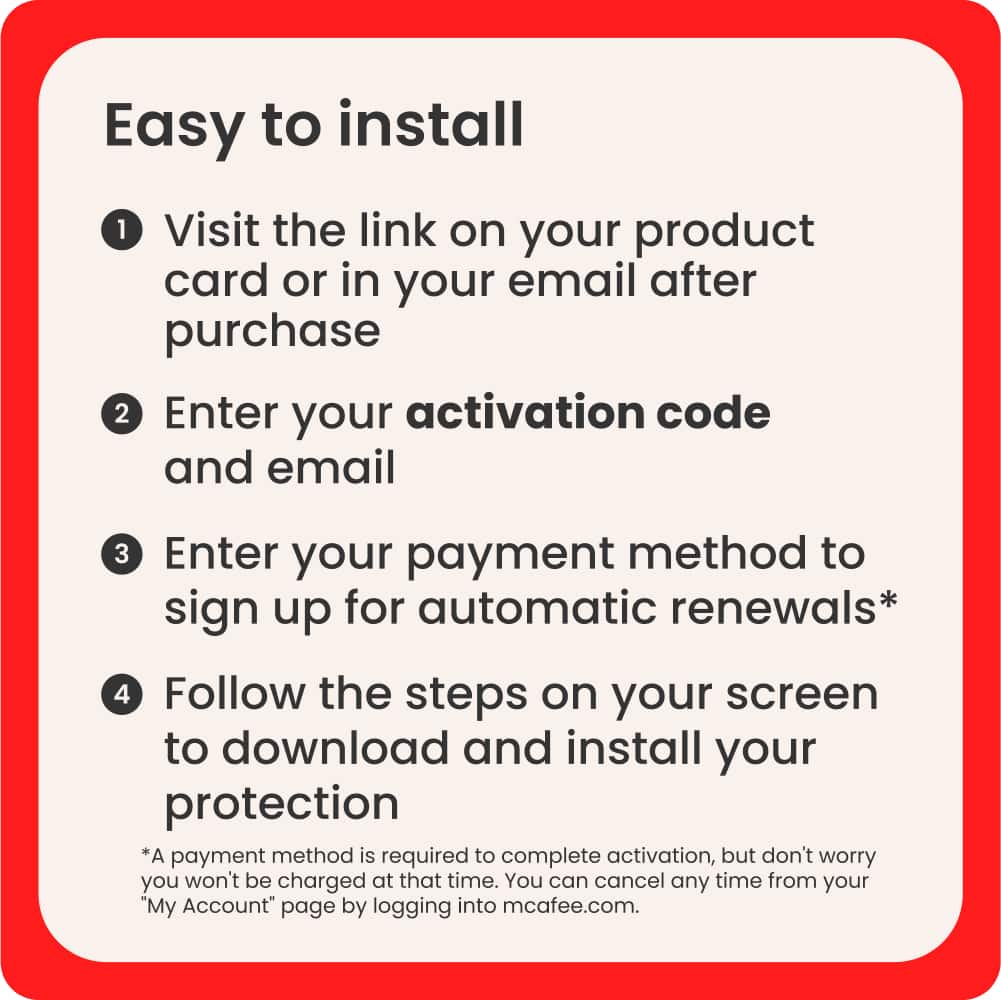
|Posted .This reviewer received promo considerations or sweepstakes entry for writing a review.I am quite impressed by this security suite. We all know McAfee’s reputation as a leader in pc security and they aren’t letting anyone down here. Installation and setup were a breeze. After signing up, you can send emails and texts to all of your family members with links so that they may install on their devices. After a quick and easy installation, it’s time to get the system working for you! You get to select how many or how few aspects of your life the system monitors. Plug in anything from your name, address, email, birthdate, social security number, credit cards, drivers license, etc. The system searches everything, including the dark web identifying any breaches where your information has been exposed or sold. It showed me any “identity search” websites that had my information for sale, and provided links and instructions on how to have your information not subject to sale. They also advise that you have to do it 2x per year or they can put it back up. I am very impressed by McAfee. My wife and I feel much more secure now and it is relieving to know that this security suite is actively searching and will alert my when my information has been exposed. Easy 5 stars.
I would recommend this to a friend - Pros mentioned:Installation
Great Anti-Virus
|Posted .This reviewer received promo considerations or sweepstakes entry for writing a review.i enjoy using McAfee. My job gives out a free version, so I trust using McAfee anti-virus. Scanning, I like that it lets you know what percent it is at. This has a lot of options with it as well, like secure VPN, a protection score and a lot more. was easy to install and get using. You can use it on multiple devices, and multiple types of devices like mobile, Pc and Mac. So far, I have installed on my main PC, as well as my iPhone and no issues. I even have other anti-viruses and in the past, I have had issues installing new anti-viruses as I would always get a conflict and it would tell me I need to uninstall my other virus protections. Not this time. That was something I was afraid would happen and I am glad I did not run into that this time. I also like that this is for unlimited devices and not capped at 5 or 10. I have a few computers/laptops as well as other mobile devices. So, I am glad I don't have to pick and choose what device I want protected. Overall satisfied with this anti-virus. I prefer to use a couple and McAfee has always been one of them.
I would recommend this to a friend - Pros mentioned:Vpn performance
Highly recommend
|Posted .This reviewer received promo considerations or sweepstakes entry for writing a review.McAfee premium + family, it did take a few minutes to get it to download and set up for some reason it kept taking me in circles to create an account and set up with my code I was provided, but once it was done it was pretty easy from there has you set up other personal information to check the dark web for security breaches, name search and how to remove your information it includes the links to those sites which is helpful. You can even enter you drivers license information to check for usage. It sets up VPN for 24/7 monitoring, has child parental control so you can keep an eye on them. I set up two authentication to access account. It was easy to add my other devices, phones, iPads, laptops it comes with unlimited devices which I really needed being that we have so many devices to have on the account. It took me over 20 mins to opt out from websites selling my information it was scary to know I was being searched and information address past and present, phone numbers all so easily available to people. I highly recommend McAfee premium + family if you have multiple devices. So far highly pleased with the product.
I would recommend this to a friend - Pros mentioned:Ease of use, Installation
A huge leap from the past annoyance of antivirus
|Posted .This reviewer received promo considerations or sweepstakes entry for writing a review.When it comes to virus protection for your PCs you really can’t over do it. Windows 11 has some pretty great native antivirus and malware detection but stacking McAfee Plus with it does provide some good peace of mind. Installation is very easy. Activation is by 25 digit activation code; very familiar to a paid app or operation system installation. Once installed, McAfee Plus scans your computer for threats and, after a while, displays a logged report for your review. I really like the unobtrusive way the McAfee Plus antivirus software monitors silently in the background. My past experiences with various antivirus programs, including the older releases of McAfee, were very negative as the programs often used more CPU resources than the PC could supply and thus slowed my computers down significantly. I’m happy to report that I have not noticed any slowdown whatsoever after the installation of McAfee Plus. It’s also worth noting that it’s a lot easier to disable when you don’t require protection.
I would recommend this to a friend - Pros mentioned:Ease of use
If not for two minor flaws it would be 5 stars!
|Posted .This reviewer received promo considerations or sweepstakes entry for writing a review.I think everyone knows the major companies offering malware prevention & removal tools with McAfee being one of the top 3 names you’d get if you asked everyone to name you 3 or 4 or 5 different antivirus/antimalware/internet security solutions. McAfee has been in the AV game for a long time so it absolutely is a brand I can trust. They aren’t going to go out of business tomorrow with me getting 0 updates for my antimalware solution. So, prior to acquiring this McAfee product I spent the better part of a month trying to clean all the malware from every single system in our home. My significant other & I were the targets of targeted spearphishing campaigns which were brought about by a member of our home downloading cheats for offline gameplay resulting in them acquiring malware which allowed the attackers to see what type of work my SO & I do. Being in high level leadership we were prime targets as soon as they spotted us after gaining entry into our home via this softened security point. Prior to this I had not given much thought in regards to segmenting our network…but that has changed & is something I sk be doing very soon. I’m still trying to sort all this mess out. Again, the malware plus our being targeted & attacked was prior to acquiring McAfee but I do make a suggestion due to that attack. Now on to the review. Let me offer two suggestions (and I’ll be reaching out fo McAfee to make the same suggestions): 1) put some sort of hash (such as md5) on your downloads, 2) allow for easy navigation to finding the executable download for your products WITHOUT having to log in. Why on both? First one is because part of the attack was a MITM attack where the downloads were either outright denied if AV related or even injected with malicious code or redirected elsewhere to grab the malicious code infused exe file. So knowing the hash would mean I cold spot this easier if I had an active malware infection that was doing a MITM type attack. Second one is because I did not want to login to anything until I knew I was malware free but yet i couldn’t download the software without logging in. i have a payment method stored in my McAfee account, I wouldn’t want to wake up and find I had bought 10 copies of a McAfee product while I was asleep due to this bad actor logging on & purchasing some since they had a keylogger on the machines. Both of these not being easily viewable or done is a security oversight on McAfee’s part & I hope they correct it. As for the installation & the daily use it was a breeze. I did not experience any major performance impact on any of our systems that I installed this on & I have enjoyed it thus far. It is straight forward, not complicated & easy to use. My non-techie SO has stated how easy it is to use, that it doesn’t bombard you with notifications & because of that she knows when it does notify us it is something important. This is a huge plus in my book because I don’t know about you but I get notification fatigue due to the bombardment of notifications from my phone. So thank you McAfee for not contributing to this. All-in-all we are happy with the McAfee solution & only due to my having had an active malware issue prior to acquiring McAfee+ Premium that I even thought about the only 2 negatives I mentioned (no file hash easily found & not being able to download unless logged in). I’ll end with also saying that both could be there/easily done and I just overlooked it, that is entirely possible and if so then I definitely stand corrected. If you need antimalware for the whole family then definitely give McAfee+ Premium Family a try! You won’t be disappointed!
I would recommend this to a friend - Pros mentioned:Ease of use
Lots of protection and light on the system.
|Posted .This reviewer received promo considerations or sweepstakes entry for writing a review.Pro: -Light on your system -Features that will scan and protect your personal data Con: -VPN slows internet by a lot -Notifications about features keeps popping up -Going through personal data is unnecessary tedious The suite was easy to install with setting each component is a straightforward process. It’s relatively light on the system and offers a lot of different protection. All the components work well, though some are more useful than others, while some are just tedious to go through. It tries to gamify your protection by increasing your Protection Score based on what features you’ve set up. The VPN is only good for light work, and slows down internet speed significantly. Antivirus and Firewall Based on my short time with it, I didn’t find any issues with the antivirus or firewall. They didn’t prevent any games from installing and playing online. The virus scan was light on the system. I do get notifications about features and steps I can do to increase my protection, and there doesn’t seem to be a way to turn these types of alerts off. VPN The VPN is best only used for light web browsing. Using it really reduces my internet speed, lowering it by 100 Mbps. The number of servers is also limited. The VPN will not work with streaming services, so those looking to watch content from other regions will be disappointed. Personal Data Cleanup This feature will scan the web looking for sites that match your information. The more information you provide, the more you’ll get out of it. Once the scan is done, it will list all the sites, but you’ll have to contact each of these sites yourself to tell them you want the information removed. I only provided my basic information and there were already so many sites to sift through. This would be a very tedious process, so McAfee also provides a full service that will do it for you if you upgrade to a higher package. If you really want to scrub your data, then it may be worth it to upgrade. ID Protection Another feature that scans for data breaches leaking your information. In my case, this was less useful. The entries that came up were mostly compiled lists that don't give much details other than my email account and password. The whole process just takes so long to go through each one. If I click to see which password, I need to wait for a verifying email and enter the code. This happens with each entry. And once you go through each listing, it’ll play an animation and pop up every time. It’s unnecessary. Tracker Remover, Web Booster, and browser extensions The tracker remover will scan your system for store tracking data and cookies and remove them. The web booster will try to speed up your browser loading by stopping things like auto video playing. There’s other extensions you can install such as web advisor and password manager.
I would recommend this to a friend An application that your whole family needs
|Posted .This reviewer received promo considerations or sweepstakes entry for writing a review.McAfee has been a leader in Anti-Virus protection for many years. In today’s cyber world, products like this are more important than ever before. This particular bundle is perfect for the family. It provides protection for Windows, Mac OS, Apple IOS, Android, and Chrome. While the coverage lasts only 1 year, you can put it on every device that your family owns. The installs are pretty simple. Just follow the instructions and you will be up and running in no time. McAfee used to just do antivirus, but there is a lot more built in now. When you first set it up, it runs a security scan. It ranks your level of security protection. It can then fix security weak spots and improve security. It has the ability to cleanup personal data. There is a built in VPN to keep your device secure. It removes data trackers and provides ID protection. When I ran my first scan, it found my personal data on the internet 250 times. Some of these you can’t do anything about, other than know that the information is out there. It finds information on Data Broker sites such as those that say they can tell you all about a person by entering their phone number. My phone number is in all of those data bases along with my name and potentially address and age. Most of those you can’t fix, but there are some sites that allow you to remove your data. I got off of 48 sites. You are also going to see a list of data breaches that shows where your passwords have been compromised. You are going to want to use that list and change all of the compromised passwords. I had six passwords compromised and changed them all, just to be safe. The application allows you to specify what data to look for and you can look for things like passports, Driver’s license, Tax ID, Birth Date, Health IDs, User Names Credit Cards, Bank accounts, Social Security Number, Phone number, and e-mail addresses. It really has opened my eyes to all of the information out there about me. I’m slowly getting as much as I can cleaned up so I have less to worry about. I suggest that everyone get this app to clean up their internet footprints and to protect you personal information.
I would recommend this to a friend- Pros mentioned:Installation
Great option to cover ALL your devices
|Posted .This reviewer received promo considerations or sweepstakes entry for writing a review.McAfee has been in the market for years and is recognized as an antivirus of guarantee. With this premium version, MacAfee is offering finally, an all-in-one product that can finally cover ALL the house devices and your needs. This is not a little think in a family of four. Today, the traditional laptop viruses are just one of the areas where your family is exposed: phones, tablets or other devices are as exposed to ransomware or inadequate use or opportunity for thefth of your identity. Installation is very simple, after creating your profile directly on McAfee web, you just need to download the software for the different devices that you plan to use. Saying that this is a simple process is really an overstatement because it’s. If your laptop has previous software, just removing it and installing the McAfee software is enough. I recognize that in one of the oldest laptops, the installation process was stopped for a version problem and the McAfee installation helper was able to fix it without any knowledge from my side. In each download, the page recognizes the version to download: windows or android. As I said, very simple. With an unlimited number of licenses, I don’t see a better investment than this version. Other elements that convinced me: 1.- No need to enter the information of your credit card for automatic license renewal. You could do it but this is not compulsory like in other software. 2.- The first scan is amazingly fast on all my devices and it’s obvious that you are always checking against the last update. 3.- An additional aspect that is also included with this license: is the VPN functionality for all the devices. Yes, I recommend thanks to its simplicity, immense coverage, the trusted manufacturer, identity protection in the dark wen, and the VPN license.
I would recommend this to a friend - Pros mentioned:Ease of use
Good all purpose solution but clumbsy interface
|Posted .This reviewer received promo considerations or sweepstakes entry for writing a review.I've used most of the anti-virus/internet security software solutions over the years. Some are better than others and that's why I have an issue with McAfee. I've used McAfee in the past and if it came pre-installed on any laptop I purchased I would immediately uninstall it and go to my favorite. While it's been a while since I used McAfee I thought I would give it a try. I do like that some basic identity protection is part of this package. I love that the Premium Family package gets you unlimited devices. McAfee anti-virus has been around forever and it okay for what it does. Way back in the earlier days I found that McAfee used a lot of computer resources (memory and CPU useage) but that seems to be addressed in later editions. Anti-virus runs great and there is a web protection add on to browsers to alert you to any malicous sites or phishing attacks. A couple of things I don't like: I don't like that if you do get a virus you must have auto-renewal setup on your account to be able to do virus removal. I absolutely hate the user interface, especially for the data breach info. Duplicates should be handled together as some breach notices are reoccuring. If you clear one it should clear them all if it's the same breach. I don't need to be reminded 12 times that my email shows up on one list. Also it's extremely clumbsy to clear notices. You have to address one at a time and go back to the main breach to proceed to the next breach to address. Breach notifications should be in a list and allow you to click on one to read and address and when done you go back to the list. I had a few data breaches, mainly email address, name and phone number going back as far as 2017. Good to know and while using another solution I had addressed them all, changed passwords if warranted... which McAfee will prompt you to do but there has to be a better way to clear notices. An improved user interface would be a huge improvement. The same clumbsy web based interface is on PC and mobile devices.
I would recommend this to a friend - Pros mentioned:Vpn performance
Great Security Suite for unlimited family users
|Posted .This reviewer received promo considerations or sweepstakes entry for writing a review.McAfee+ Premium for unlimited devices is one of the top-notch security suites for families that is available in the market for providing real-time protection. Purchased this product to protect all our family devices like windows laptop, MacBook, mobile devices, and a desktop after my current subscription of different product expired. We wanted to protect our kid’s device against virus, malware, spyware, online threats and wanted to have parental control to control against phishing. With this product, there is an option to see who is selling the data and doesn’t automatically remove it but provide just the guidance on how to remove it. We choose this compared to other products on market, as it provides secure VPN with no login credentials and with just a click of a button to enable it. Its 24/7 identity monitoring is great and adds bank grade encryption that helps to keep bank details and passwords more secure. It does come with password manager but is limited to only 5 users and not unlimited. Five user account for password protection from a leading competitor costs half the price of this and as we were paying separately for password manager every year, we replaced with this password manager that stores, creates and manages all your password for online credentials safely and securely. Only con for me is it needs payment method to be stored in the account for automatic renewal of subscription. Setup was straightforward if you have McAfee account. Just logged in to the account, entered the product key and installed in no time. Pros: Great real time security thereat protection, No limit secure VPN, Password Manager, Unlimited devices, phishing protection, parental controls, Date breach monitoring. Overall, it’s a top-notch security suite that will keep the entire family from online safe and secure including the dark web monitoring. Highly recommended for anyone who to need to protect the private and financial information online.
I would recommend this to a friend - Pros mentioned:Vpn performance
Simple and non-invasive. No pop-ups either!!
|Posted .This reviewer received promo considerations or sweepstakes entry for writing a review.In this day and age, you really cant have enough protection against viruses, hackers, stolen identity, etc. To protect myself and my family from these issues and to monitor what websites my children are navigating to, I ordered this and installed it. The thing I like most about it is that once it's installed, there really isnt much you need to do besides setting it up the first time. I have some other software for anti-virus and maintenance that drives me crazy because every time I log on, there is a pop-up asking me for this or to order that. I've played with the settings and still the problem persists. This is nothing like that. I usually dont even know it's running. I do get reports telling me the status of things, but I can change the frequency if I want to and the information is quick and simple. The other thing that shouldnt be overlooked about this software is the unlimited VPN. If you are someone who uses public Wi-Fi frequently, this is a feature you should definitely use. To be honest, the software is worth it just for that aspect alone. When I'm out and about, especially when I'm traveling, free internet access is great, but you put yourself and your personal information at risk. Turn on the VPN and you're protected. I have used this multiple times on my iPad and MacBook while traveling or at a coffee shop and I havent noticed any decrease in speed or connectivity. In a nutshell, this is great software with minimal interference, good parental controls and free unlimited VPN. For those reasons, I highly recommend it.
I would recommend this to a friend - Pros mentioned:Installation
Comprehensive and Pretty Complete
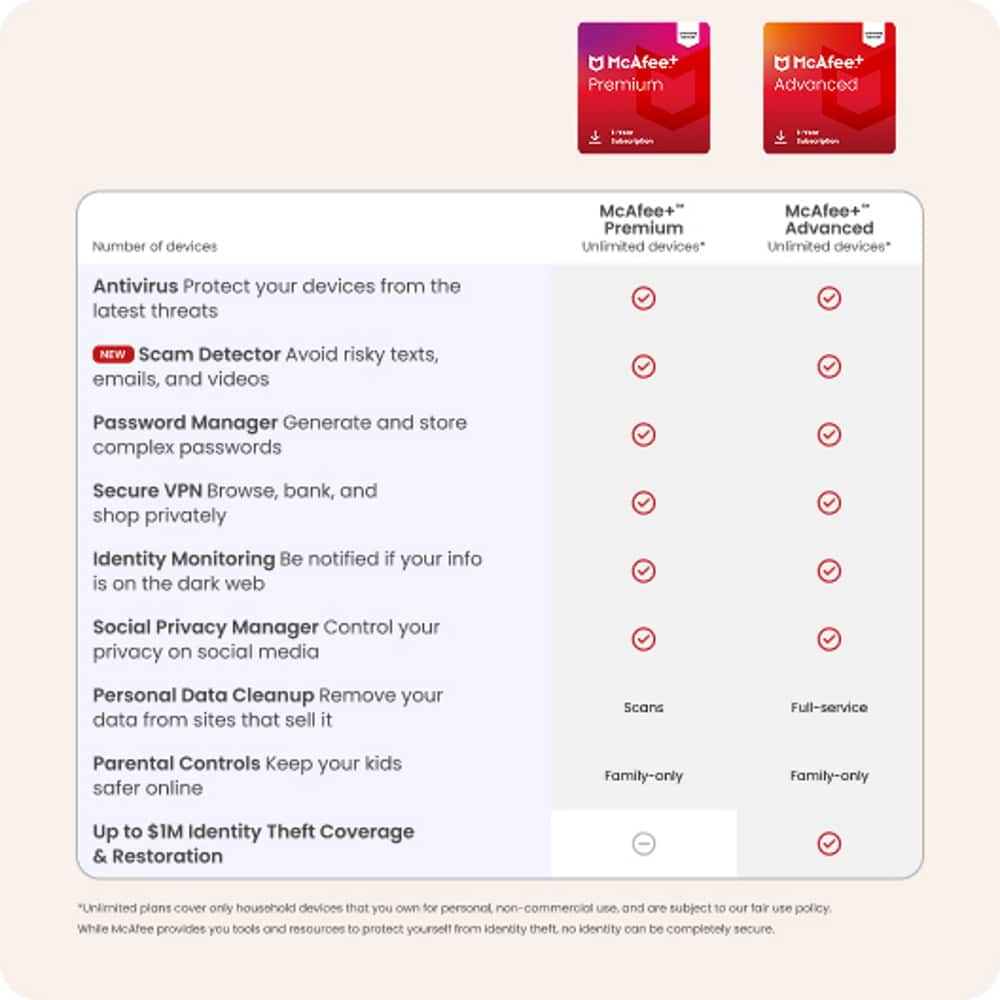
|Posted .This reviewer received promo considerations or sweepstakes entry for writing a review.McAfee+ Premium is a subscription based service that offers a plethora of benefits for my family. From antivirus and other software-related protection to identity monitoring, this package offers a lot. McAfee offers an intuitive setup process for all devices and users that need to be connected. Connecting other people and devices is an simple as sending an email which will contain all necessary codes and links. Upon signing up, I received alerts immediately about compromised data. This speedy feedback was definitely impressive and useful in showing me what I needed to do in order to protect myself. What I value most from my experience of using McAfee+ is the notifications that I got about data broker websites containing my personal information such as phone number, address, and other private things. The service does a great job of navigating me through the manual actions I would need to take in removing this information. Unfortunately, the Premium plan does not include the ability to get the data removed automatically through McAfee. However, Advanced and Ultimate users can utilize this "full service" option. I do wish that McAfee made this a standalone product or allowed for a straightforward upgrade to include this ability. I did find the website quirky to browse through at times but most of my web issues were eventually resolved. I did have a problem in which I could not add additional data to be monitored, but somehow it worked the next day. Despite the quirks, McAfee+ is great product to use to ensure protection for yourself and your family.
I would recommend this to a friend - Pros mentioned:Installation
McAfee has evolved....
|Posted .This reviewer received promo considerations or sweepstakes entry for writing a review.McAfee has come a long way since I have used them back in the day. Before it was just pure virus protection now they have more than that. I got the family multi device subscription. Uninstalled on standard windows 11 PC was super easy. Downloaded and setup in 10 mins. I allowed to do full scan of system and programs and it found potential threats. It also identified personal information on line and other threats. Pretty holistic approach which is nice. I the proceeded to install in my kids phones and my mother in laws phone. All of them browes YouTube and websites on their phones so they have a high chance of clicking on a bad link and messing up their phones. Installation took all but 5 mins. I set up and logged in and I was in. It did the same scan and showed potential threats and showed me how to reduce the potential those threats. Bottom line with all of the hacking and cyber crimes occuring I would highly recommend this product for another line of defense in addition.to best practice to be mindful of what you do online. With that, I would recommend this product for what it says it does.
- Pros mentioned:Protection
McAfee + Premium Family (Unlimited Devices) Great!
|Posted .This reviewer received promo considerations or sweepstakes entry for writing a review.McAfee+ is a great software. Installation was easy and straightforward. I went to their site and activated my license. Once I had the license, I downloaded and then ran the setup on my Mac. I then did the protection where the system went to the internet to find if any of my information/account passwords had been compromised. It let me go to the sites which had the username and password and let me change the password. Once I had changed the password for the sites, I was able to confirm to the system so it could change my score and status at a higher rate. I then went to my tablet and other windows 11 laptops and ran the installation which was just as easy to install. once installed I ran the scans and checked for any issues. I was glad to see there were no issues. McAfee has stepped up to help users where we are today on the internet and shopping and living our lives with so many conveniences. I feel more secure on all my devices and am very glad McAfee is opening their system to mobile as well. This is very impressive software to say the least.
I would recommend this to a friend Nice Suite of features with a couple of caveats!
|Posted .This reviewer received promo considerations or sweepstakes entry for writing a review.Macafee+ Premium Family is somewhat misleading with it’s name and description statement. I do not agee with this practice. I had to dig around on there website and go through the product to really find out what I was getting. What I found out was to truly get the full Macafee suite of services for your family you have to spend more than twice as much for the Macafee+ Ultimate. That being said I do really like Macafee Premium Plus Family and all of the features I just wish Macafee was more straightforward with the product description and it’s capabilities. While you can install it on multiple devices you do not get all of the features on those devices only the antivirus and 5 VPN’s along with 5 TrueKey password manager installations.I think should have not put unlimited devices on the product emblem when you are limited to five devices on those two items and one Drivers license and social security number. They need to more descriptive and forthright with the product details. That being said I do appreciate all of the features Macafee offers in one package. It is so much easier to manage all of your computational devices and personal info in one piece of software vs one for each area that needs protection. I will tell you that it will take some time to address and set up everything. Probably an hour or two maybe more depending on your personal situation and how many passwords were breached and how much personal online data you want to clean up from various people search and records search websites for example. In the end it is time well spent just be prepared to spend some time at your computer to get it done. Overall the value is good for the six main features of which are your protection score, personal data clean up Antivirus, secure VPN, ID protection and Tracker remover. Additionally there is a personal firewall, WebAdvisor, Quick Clean and Shredder, Vulnerability Scanner and App Boost. These are great features to have for example the App Boost blocks automatic videos on the web and Web advisor alerts you of dangerous sites while on the web when clicking links that may be leading you to trouble. In the end the value is there Macafee just needs to be more honest about what you are getting when you are purchasing this product. Now that you know a little more info hopefully you can better choose the Macafee family package that you want!
I would recommend this to a friendGood Security Suite
|Posted .This reviewer received promo considerations or sweepstakes entry for writing a review.McAfee+ Premium is a very good security suite which offers great all-around protection for all of your devices. I only had a few minor issues with it. To begin, it's not clear to me what is even included. I've noticed this trend among a few of the main security software companies. They use vague terms like "device security" but don't really mention what it means. For example, until I actually installed the thing, I wasn't even 100% clear if this product included anti-virus and malware removal. It's almost like they go out of their way to avoid using those terms. But rest assured, these bare minimum features I would consider to be called a security software suite are actually included. My only other issue is that it seems like almost everything is a separate download. It makes it a little difficult to see what you have already downloaded and activated. At times, I wasn't even sure what the point of the actual main software download was because every time I clicked on a different feature, it would just open up a web page and either take me to the feature (like identity monitoring), or tell me to download a different piece of software (like the password manager or VPN). It all just seems a little bit patched together. I'd prefer if it felt a little more consolidated. Given these issues, it is still a great product overall. The core anti virus and malware protection works as good as it always has, and does not bog down my system. The identity monitoring is pretty nifty. You give it some of your identity info like name, address, email address, etc., and it checks the dark web for any of this info that may be compromised. When I ran it, it found about a dozen old accounts on sites I hadn't used in years and warned me that these sites had been compromised in recent years and that my email and passwords may have been exposed. It gives you direction on how to change these passwords and links you directly to the sites. If you're like me and have trouble remembering or coming up with good passwords, one of the best features I found is the password manager. Once you activate it, any time you sign in to a site, it will ask if you want to save that login info. Now any time you visit that site in the future, you can just do a simple one click login using the password manager. It will even create strong passwords for you if you have trouble with that yourself. There is even a smartphone app that integrates well with mobile browsers and apps so that you can use the password manager virtually anywhere you will need to log in to an account. This is by far my favorite piece of the total McAfee suite. Overall I am very happy with McAfee+ Premium. I only wish they made it a little clearer what you were getting and what the differences in different products is. And also make everything a little more coherent and consolidated. Don't have a separate app for almost every feature. Other than that, awesome software.
I would recommend this to a friendMore data protection is never bad
|Posted .This reviewer received promo considerations or sweepstakes entry for writing a review.So it wasn't until I actually had information stolen, that I started to take data protection and identity theft protection seriously. Any and all levels of protection is good. McAfee has a good track record when it comes to security. The McAfee+ is their new top-of-the-line security software as well as adding identity theft protection. I think it provides a great all-around package. Setup is straightforward. As with all products these days, it does require an account or the creation of one if you do not have one. I really am not a fan of this but what can you do. It provides personal data cleanup, credit monitoring, identity restoration (in the event that actual damage is done after identity theft), unlimited bandwidth VPN, as well as unlimited installations on your family's devices. All in all, the McAfee+ Premium is an all-around package that covers unlimited devices in the family. It provides good antivirus as well as identity theft protection if your personal information does get stolen.
I would recommend this to a friendExcellent product
Posted .This reviewer received promo considerations or sweepstakes entry for writing a review.Excellent product Best customer service I will buy this product again
I would recommend this to a friendterrible antivirus
Posted .This reviewer received promo considerations or sweepstakes entry for writing a review.avoid at all costs - youre better off with nothing
No, I would not recommend this to a friendBrand response from McAfee Team
Posted .Hi Garret, thank you for taking the time to try McAfee+ Premium. We're sorry you're not satisfied with our antivirus. Our team would like to help solve any issues you may be having. Please contact us at service.mcafee.com. Thanks!