Customer Ratings & Reviews
- Model:
- NDO-ACC-805-BK
- SKU:
- 6560263
to a friend
Customers are saying
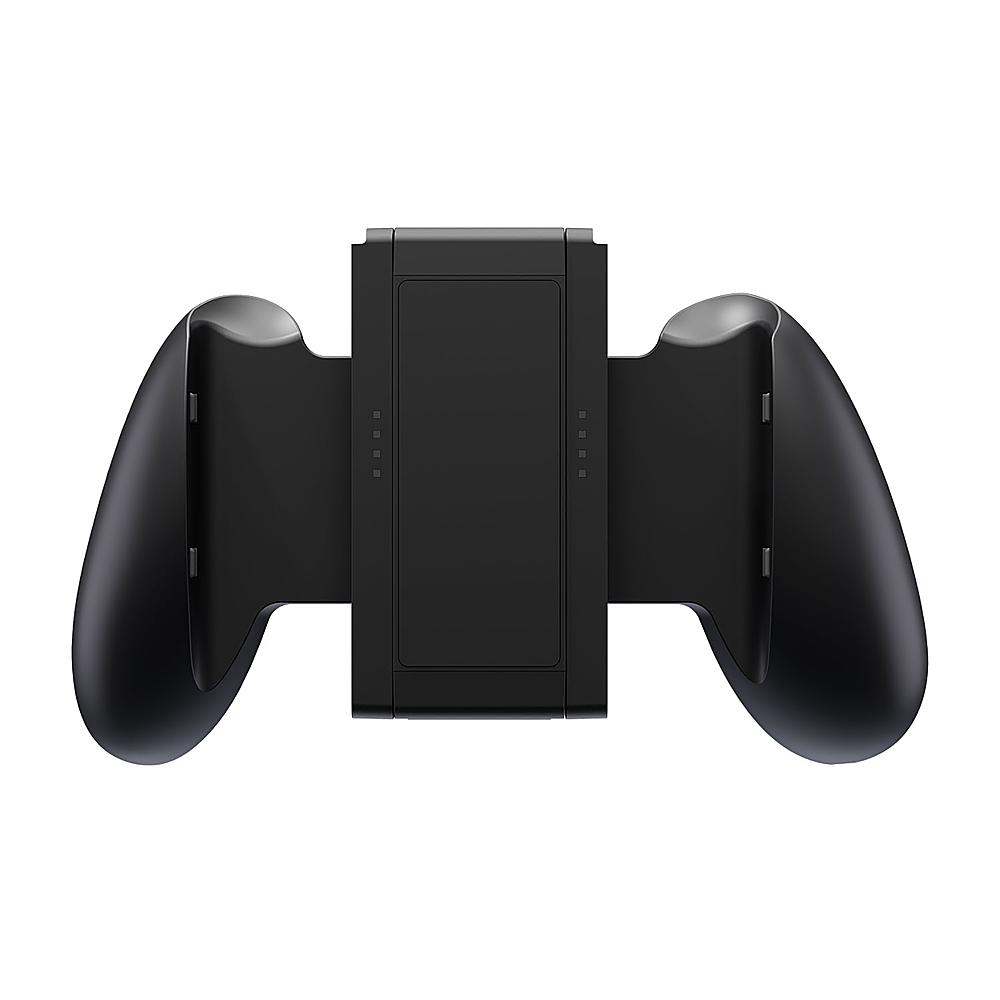
Customers appreciate the Proteus 3-In-1 Joy-Con Grip for Nintendo Switch for its comfort and enhanced grip. The product is also considered reasonably priced, and users find the charging innovation to be a valuable feature. However, some customers feel the grip makes the device significantly larger.
This summary was generated by AI based on customer reviews.
- Pros mentioned:Comfort, Value

A nice addition if you game on the go
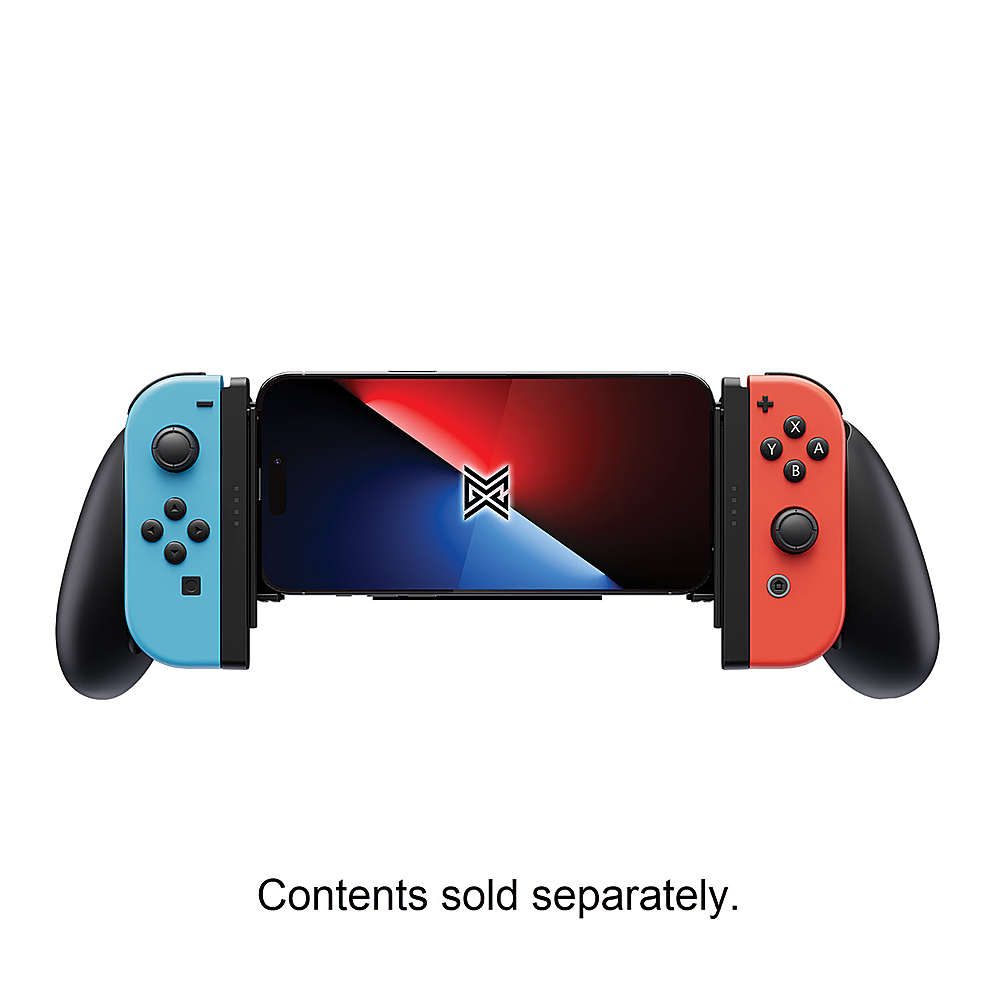
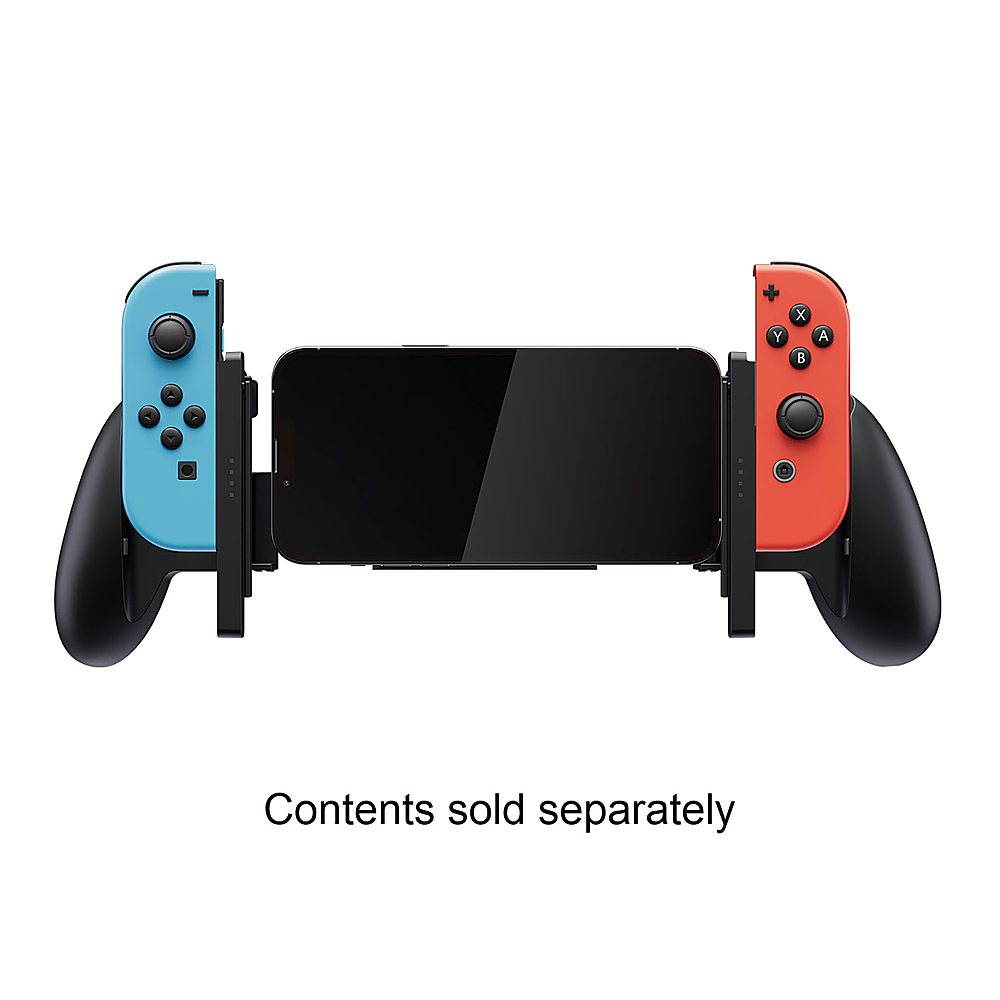
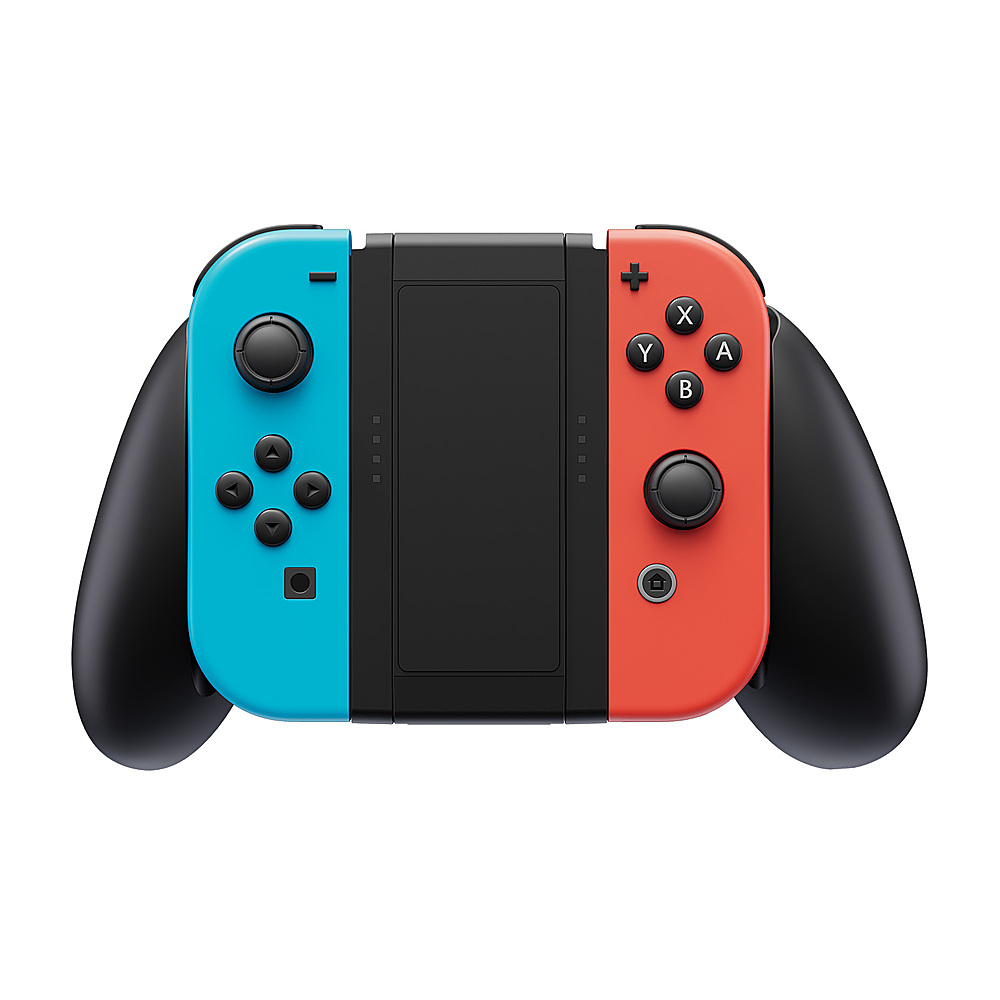
|Posted .This reviewer received promo considerations or sweepstakes entry for writing a review.The Nintendo Switch has a wide range of accessories, ranging from good to mediocre to downright useless. The Proteus X3 goes further and it could be a game changer for some gamers. The idea was to take the joy-cons from the Switch and to create a modular controller that would work not only with the Nintendo console, but would also function with iPhones and Androids, allowing to play on your phone as if you would with a portable console. The box contains the Proteus and a quick start guide. It looks a lot like the original joy-pad accessory that comes with the Switch, the joy-cons slip and lock into place the same way. People with bigger paws will likely be happy with it as it offers a bit more comfort. If you want to swap to phone gaming mode, all you need to do is to slide out the middle section and lock it into place in a horizontal position. You can then extend the middle section to secure your phone. Once the joy-cons are paired, you can start playing pretty much immediately. Here's a quick look at what's good and what could be better: Pros: + 3-in-1 makes it a great, low-cost accessory which extends the use of your joy-cons + Feels sturdy, everything slides and locks into place tight + Enough room for a phone with a case + LED's show you the battery life of the joy-cons + Affordable! Cons: - No rubber grip, just textured plastic which isn't great - Does not allow to charge the joy-cons All in all, this is a great idea and I hope to perhaps see a X4 soon with improved grips and charging. At any rate, this is a really smart idea and it works just fine. Recommended!
I would recommend this to a friend - Pros mentioned:GripCons mentioned:Button size
3rd place...product. Feels great to hold.
|Posted .This reviewer received promo considerations or sweepstakes entry for writing a review.Proteus X3 three-in-one Joy-Con Grips for Nintendo Switch is what you expect. Its textured grips for your Mobile Phone, Nintendo Switch, and controller grip; the product transformers for your convenience. I've tested the product for the Switch. I'll start off with some positives as these are nice to hold in the hand with a simple basic design. I will say the ergonomics molds nicely into the hand. These do not come with Joy-con controllers but rather grips to slide your Joy-Cons into. Not much going on with the packaging but there is a QR code on the back of the box to showcase what it's like to use it. a Demo. Proteus X3 is a modular 3-piece design and allows for a USB-C cord to fit mobile phones. Mobilegamingcorps seems to have the right ideas when making a grip for your hands. I see the intentions and desire they have in making this product but there are some areas where improvement must be made if they want to sand out a little more. Not only does the Proteus X3 make the Nintendo Switch even heavier to hold but it makes the system also top-heavy. (Causing you to tilt the device as you use it. curving it.) These are two areas where I will probably stop using these grips. Worst of all I know grips extend the switch's length making it a tad bit awkward to hold which is understandable in the nature of grips but its something about these that just feels strange and unnatural even compared to other ones. Grips make it insanely larger; some people may find this uncomfortable. However, I believe if you are used to grips the weight won't bother you as much. The case extenders make it so it can hold larger Android phones. My suggestion for the next model is to hammer down the ergonomics of the grips, lighten the grips, and a battery pack version If weight must be applied... Also, do something crazy like throw small Bluetooth speakers inside a controller grip for phones. I can see this company getting it right down the line. I guess I would recommend these if you really don't have any other options for Nintendo Switch Grips. 3rd place item in my opinion but the ambition is there for improvements. These grips are also cheap so it's not a big hit on the wallet.
I would recommend this to a friend - Pros mentioned:Comfort, Value
Really Helps To Get A Grip
|Posted .This reviewer received promo considerations or sweepstakes entry for writing a review.This joy con grip is just what you've needed. Even though, many of us weren't asking for it. As the Nintendo Switch has always been able to hit the sweet spot of comfort and convenience for most fans of the hand-held console. But there are a select many gamers that would love the extra comfort that comes with the Proteus 3 in 1 Joy Con grip, from Game League Corps. I am amongt that select group, even though I didn't know it until I attached this thing to my Switch OLED. The Proteus 3 in 1, is very easy to connect to your system. Ironicly enough, it comes in 3 partts. 2 Joy con connecters and 1 spine piece. This allows you to connect eaach indevidual joy con to its perspective grip( with the spine set aside. Or you can connect the spine in the exxact fashion that you would see from the standard Joy con grip that comes inside the Nintendo Switch box. With the added extention of larger grips. That would make for two , so the 3rd and final mode is for those fans that didn't bring their Swithc consoles with them, but instead, like to game on their smart phones. That is where the spine can go into smart phone grip mode. It connects to just about any phone you have and gives you that extra comfort and assurance that your gamng experience will be a great one. It breaks down easily , for easy storage and it's very affordable. The material does feel as cheap as the standard joy con grip, so just keep it storred in a safe place. It may not fit in your Switch carrying case also. So again, put it somewhere safe when it isn't in use. I do love it and I do recommend it to all mobile gamers.
I would recommend this to a friend - Pros mentioned:Grip
Proteus X3 is a solid grip
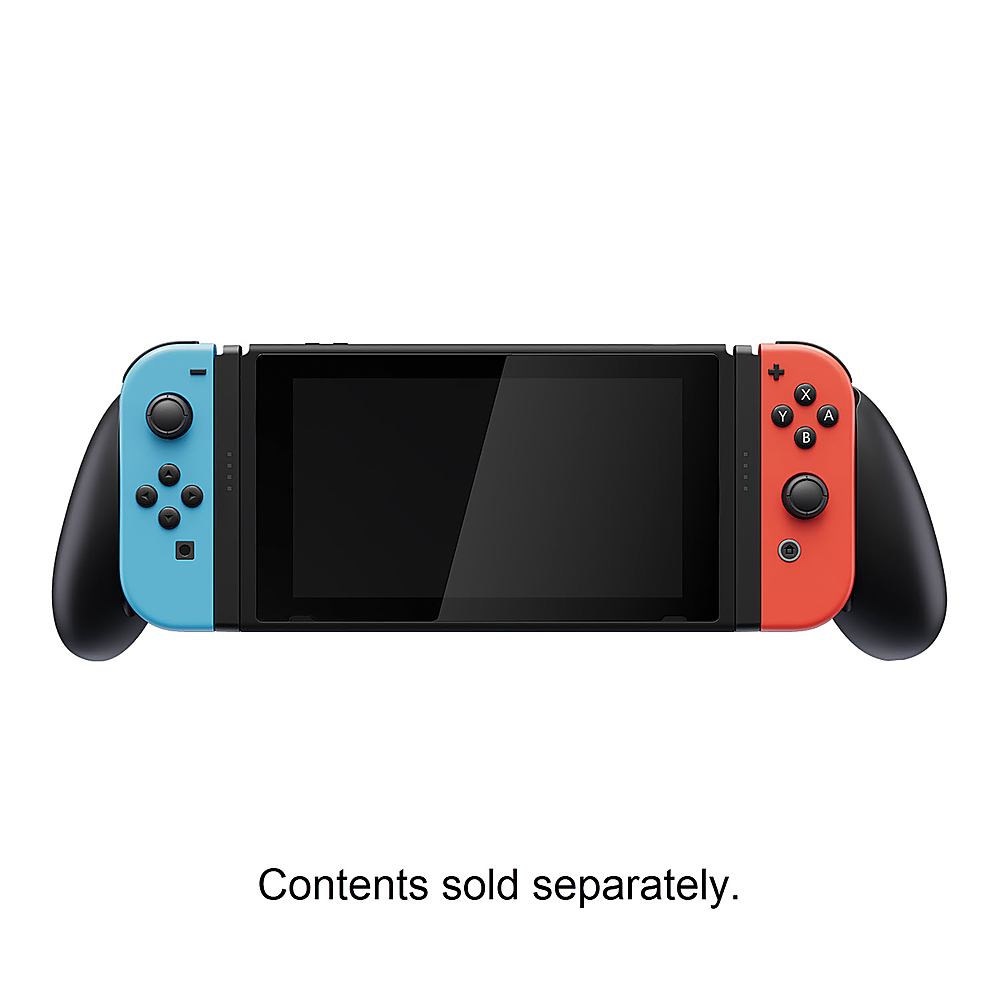
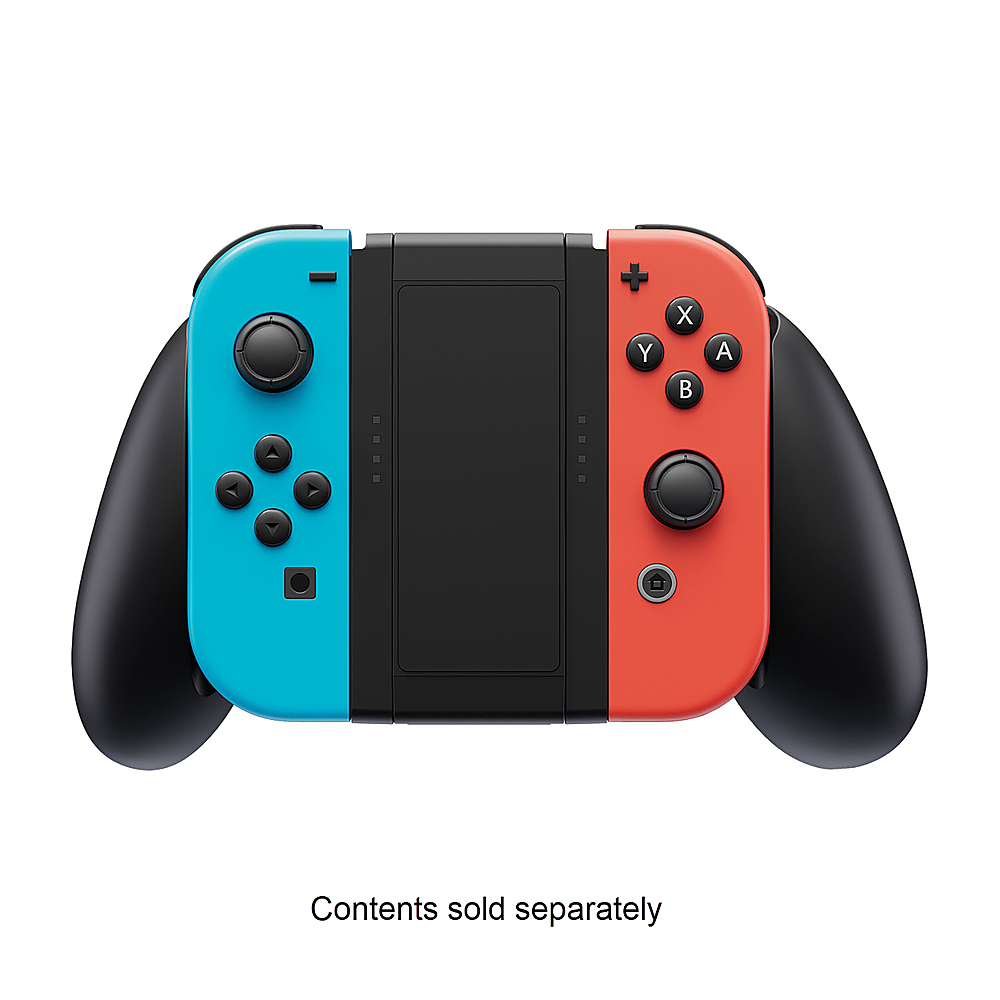
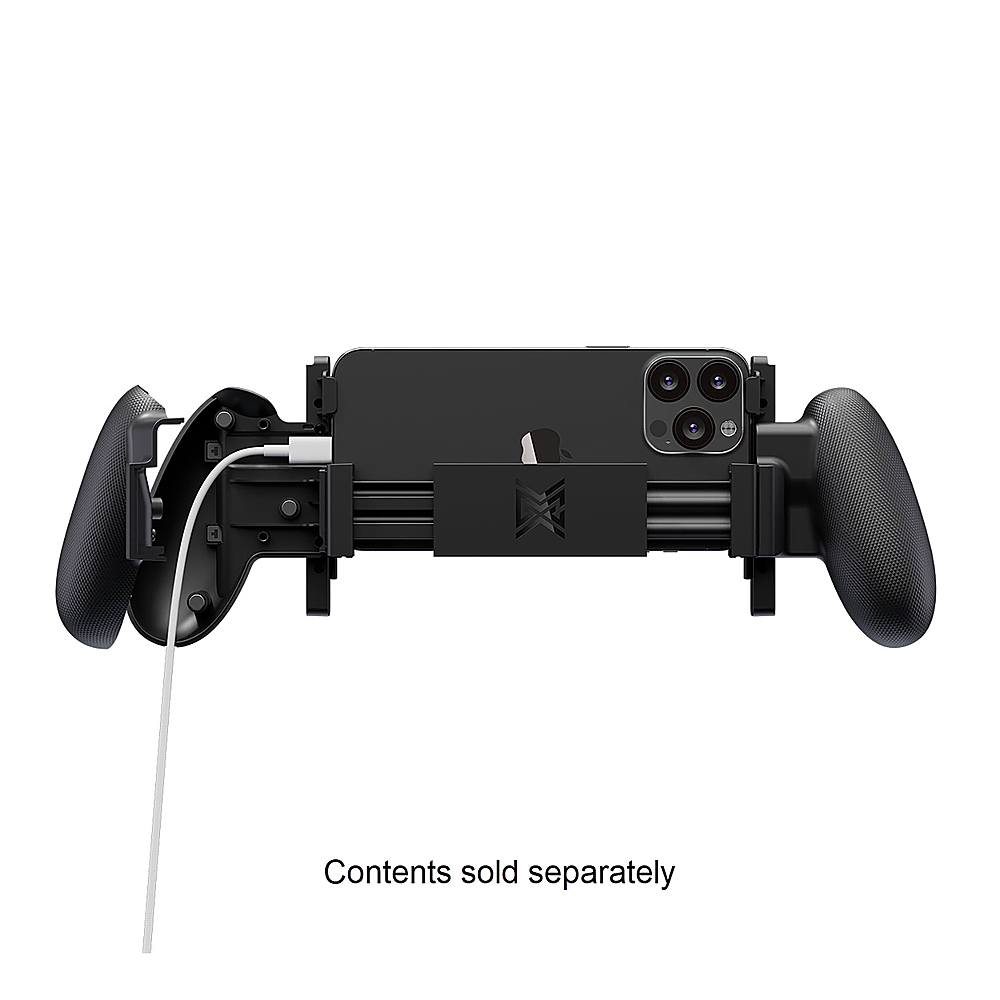
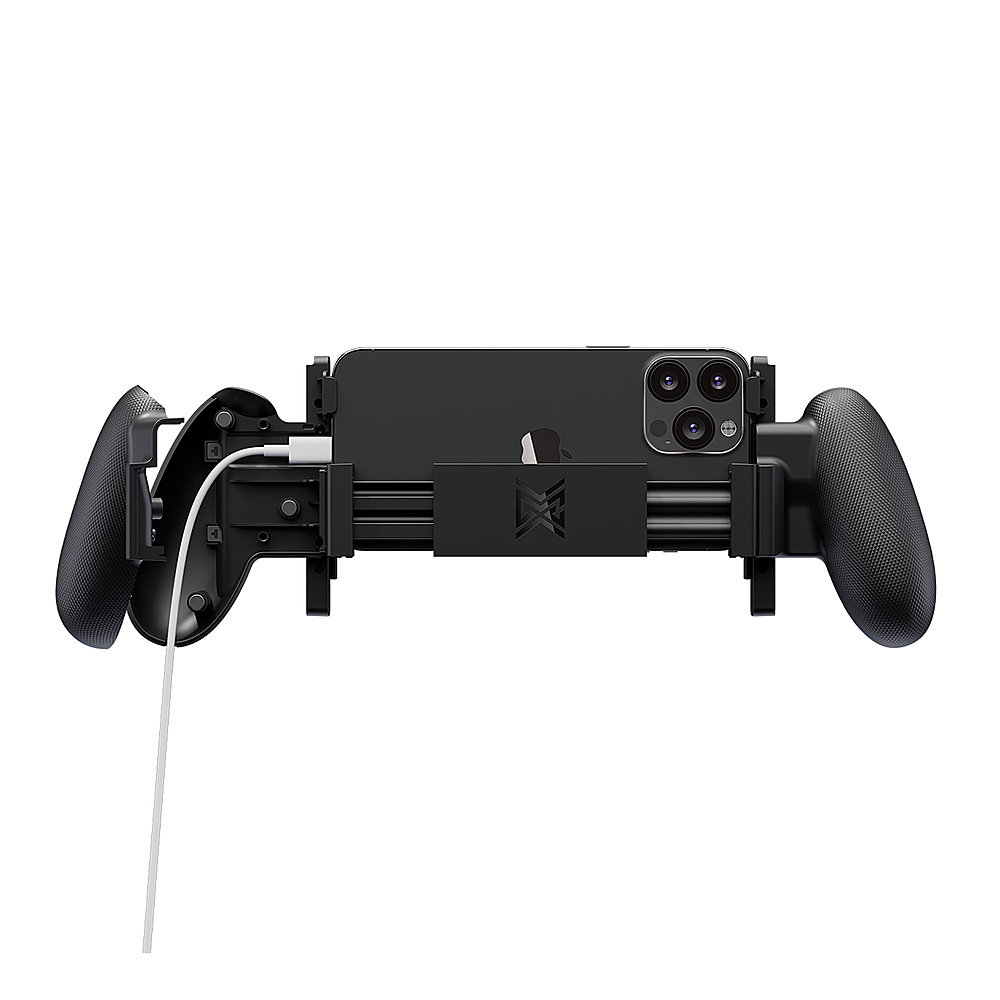
|Posted .This reviewer received promo considerations or sweepstakes entry for writing a review.The Proteus X3 is an affordable multi-use joy con grip that is quite flexible, which is a pro and con. It’s a piece of plastic you can slide your joy cons, switch or phone into and play using the bluetooth capability of the joy cons. The marketing is big, but overall it’s a useful product. So let’s dive into the different purposes to own this grip. At it’s fair enough retail price, it comes standard with no electronics, or really technology other than injected molded plastic, springs and magnets. However don’t let this lack of silicon belie the usefulness of this device. Out of the box it offers 3 different modes of operation: Joy Con grip, Switch console grip, and mobile phone grip. This is accomplished by a highly modular design that essentially is made of a right grip, left grip, and spring loaded connector. Before we talk about the modes in detail though, I’ll point out that the grips themselves, while not uncomfortable, made certain buttons hard to hit, specifically the minus/plus buttons. They’re sizeable enough grips that it’s difficult to hit every button on the joy con unless you have super large hands. With that out of the way, let’s talk modular grips. The standard controller grip feels solid in your hand. This isn’t quite as solid as you’d expect from a included nintendo one, but it’s solid enough that you don’t feel like you’d break it attempting to play Dark Souls Remastered. The controllers are spaced out a bit further, but you’ll see the LED for what player you are clearly on the front of the controller. Disconnecting the left and right grip frees the center piece, which we’ll hide away for right now. The switch console itself now can connect to each left and right grip, giving the console a bit more of a steam deck style feel. This mode is pretty easy and fast. Unfortunately you won’t have joy con charging, as the grips rely on bluetooth connectivity. The center piece, which can now be rotated to the left 90 degrees to reveal the final mode: mobile phone grip. Here you see the spring loaded extension pieces and bits work their magic. The spring loaded mechanism did a good job of stretching to match my iPhone 15 Pro Max, with just a tad bit more room to spare. The right joycon can expand to show magnets holding the grip together. Inside you find channels to route a USB-C (or other I suppose) cable directly to your phone/device. This is a nice touch, allowing you to charge while playing. This mode I found more flimsy than the rest, but that’s somewhat to be expected. Overall, for the price, it’s a nice accessory. I would have preferred to see the grips a tad bit smaller, more like the official nintendo versions. There are areas to improve, but for the price, this does the deed quite well.
I would recommend this to a friend - Pros mentioned:Comfort
Comfortable Grips for the Switch!
|Posted .This reviewer received promo considerations or sweepstakes entry for writing a review.The Proteus 3-in-1 Joy-Con Grip makes the Switch comfortable and helps “emulate” a gaming controller. This grip can also be used for your phone, but I found that it wasn’t the most comfortable and if you have a case on your phone, the phone may not fit into the grip at all. This was the case with my S21 Ultra. I needed to take it out of the case to use the grip with my phone. The third way of using this is the controller grip. This is like the handheld accessory that is included with the switch. I found this to be comfortable to use as well. In terms of quality and materials, it is all made of mostly plastic. It doesn’t feel the highest quality, but it should take a kid’s rough handling. I would have liked some kind of rubber on the grips. Although, I am fine with the plastic grips since they were ergonomic enough. But at this price point, I am not too disappointed. This grip isn’t the most portable either unless you have a “Switch” accessory backpack or a case big enough to house the grip and switch. Overall, this is a solid Joy-Con Grip for your Nintendo Switch. It is ergonomic and comfortable. This is supposed to also work as a mobile phone grip, but I found that it lacked in that area. But as a standalone grip for the switch and Joy-Con controllers, this works well. This seems mostly like a stay-at-home accessory rather than a travel one. If you are on the hunt for some Nintendo Switch Joy-Con Grips, I recommend you give this one a shot!
I would recommend this to a friend - Pros mentioned:Grip, Value
Cool Switch/phone grip
|Posted .This reviewer received promo considerations or sweepstakes entry for writing a review.The Proteus 3-in-1 Joy-Con grip makes gaming on your Switch or cell phone like console gaming. I’m mostly a console gamer with some occasional pc gaming from time to time. So, no matter what I’m gaming on, I prefer the feel of using a controller. When I use my switch on my tv I can use the accessory grip that comes with it and now with the Joy-Con I can when I’m not. When using it with a phone it has a middle support that’s adjustable for different size phones. The back of the grips have a nice texture that gives you a nice secure grip while holding on to it. When using the Proteus 3-in-1 Joy-Con grip on your Switch it just makes gaming a more pleasant experience especially if you have bigger hands because of how thin the Switch is. When using it with your phone, the right grip has a removable back to run a charging cable through the back of it. If you want the console experience while playing on a Switch or your phone, the Proteus 3-in-1 Joy-Con grip gives you just that at an affordable price.
I would recommend this to a friend - Pros mentioned:Charging
Helps my hands
|Posted .This reviewer received promo considerations or sweepstakes entry for writing a review.This is a great accessory for kids who are always playing games on their phone. It’s basically ergonomically correct. It also folds away and breaks up into 3 smaller pieces which is good for travel. In your purse or luggage I do suggested that you connect it together or else those pieces will be harder to find later or you might lose something. Super easy to connect to your phone which can be either an apple or android device. This also has this really cool feature of tucking away and hiding the charging cord so you can play and charge at the same time. Again this feature is best for kids because half way through playing your phone is dead from usage and needs to be charged. With this device you don’t have to worry about that. It doesn’t come with the cord so don’t expect that. Over the quality of this devise is a decent plastic and feels like it will last just as long as my phone. No real complaints on this device other than not remembering tj bring it when I’m away from home but that’s not a bad issue.
I would recommend this to a friend - Pros mentioned:Grip
Great for Playing in Handheld
|Posted .This reviewer received promo considerations or sweepstakes entry for writing a review.The Proteus 3 in 1 Joy-con Grip is super useful. With my large hands, playing my Switch in handheld mode has always been a literal pain because my hands start to cramp since the Joy-cons are so small. With this Proteus Grip that is no longer a problem for me. The grip is lightweight but doesn’t feel super solid, similar to the Nintendo Joy-con controller grip that comes with the Switch. The 3 pieces can be assembled into 3 different modes, Switch handheld, Switch docked controller grip, or a phone can be held between the grips. The Switch handheld mode works great. The 2 grips slide onto the Switch console Joy-con rails and lock into place. Then the Joy-cons slide onto rails on the grips and lock into place. It’s very comfortable to use in this mode. When the Switch is docked to a TV you can slide the grips onto the rails of the central support and you have a Joy-con controller grip similar to the one that comes from Nintendo, except it is significantly larger and therefore more comfortable for big hands. This works fine, although the grips don’t actually lock onto the central support piece. This means the grips can slide along the rails while you are playing. This isn’t a huge problem, but it would be better if they locked onto the rails like they do for the handheld mode. For the phone mode, the central support is turned horizontally and the grips slide into the rails and click into place. Then the grips can be slid apart to hold your phone between, held in place with spring tension from the central support. I don’t have any controller based games that I play on my phone so I can’t really say how well this mode works. But, my phone does fit between the grips, although it it doesn’t feel very secure because the grips flex a lot and the phone is only held in place by tension. Overall, I would say that this Proteus Joy-con grip works great for using the Switch in handheld mode, a real game changer for me. The TV docked controller grip mode works fine, but could be better. But, I don’t think I would trust using the grips with my phone.
I would recommend this to a friend - Pros mentioned:Grip
Best affordable alternative
|Posted .This reviewer received promo considerations or sweepstakes entry for writing a review.The Proteus 3-in-1 Joy Con Grip for the nintendo switch is a great and cheap grip for the switch. The controller grip for the joycons can be used for playing on the television, playing handheld, or even playing on your phone. The grip is great and comfortable to hold for long periods of time and a great replacement for the official joy con grip, with its more grippy texture and bigger size which makes it more comfortable to hold. But what makes it more unique than any other grips is that you can play handheld mode on the switch with the grips on and makes playing handheld significantly better. The only downside is that you can't charge the joycons when using the grip on a handheld but that isn't that big of an issue since the joy cons have a long battery life. Now I don't play games on my phone, especially ones that you can use a controller for but it’s easy to put your phone in and play and there is a removable back that allows for a charging cable to be put through to charge your phone and play. Just follow the simple instructions that come with the grip. For the more than affordable price and multifunction design that makes it very accessible for many ways to play. It's great for playing for long periods of time on handheld and on the tv. I would easily recommend this for anyone wanting to get a better grip or enjoy playing in handheld mode.
I would recommend this to a friend 2 Out of 3 May Not Be So Bad
|Posted .This reviewer received promo considerations or sweepstakes entry for writing a review.I played away with the Proteus Joy-Con Grip and here are my thoughts: [PROS] Comfortable Grips: The textured grips offer a pleasant feeling against the hands while gaming along with being larger in size. For anyone who has purchased a Nintendo Switch, the standard controller grip is smaller and generic so it's nice that this product provides a step-up in the handheld controller experience. Mobile Device Charging: Gaming on phones can be taxing, but the Proteus makes charging my phone simple. The controller grip has a hidden compartment that's easily accessible and conveniently placed. Also, I was able to use a thicker cable in the designated slot without issue. Extension Length: I was quite impressed of how far the grips stretched out. Although the product packaging suggests phones with a standard slim case, I was able to use a Google Pixel 6 with an OtterBox case. [CONS] No Joy-Con Charging: If this device included a mechanism for charging the Joy-Con controllers while playing then this would make Proteus Grip a definite go-to device for gaming on the run. Still, I can't penalize the device much since it already includes a nifty way of conducting phone charging and the Switch's USB C port is unobstructed in anyway from basic charging. Phone Stability: I occasionally found my phone not laying flush against the back support panel. However, I was more concerned about the plastic support that slightly bends when inserting a phone or another small mobile device. I'm not very confident in the longevity since it is plastic. [CONCLUSION] If I could this device a letter grade then it would be a "B-". It's a very decent attempt at providing versatility in the mobile gaming arena. Unfortunately, there's some quality control work that needs to be done with phone support. I think this is works well as controller and switch console grip. Unfortunately, the mobile phone grip must be used with care in my opinion. Regardless, I lean more in the favor of recommending this product due to overall value in relation to other costly competitors.
I would recommend this to a friendErgonomics, functionality, and compatibility.
|Posted .This reviewer received promo considerations or sweepstakes entry for writing a review.The whole accessory Is a combination of cheap-feeling plastic and good construction. Nevertheless, I think the design is totally on the mark for its primary intended uses. Installing it is a breeze. The joycons fit perfectly on the sliders, which fit well into the main body. In controller mode, it resembles the original controller adapter, only slightly bigger. This allows for a more comfortable and natural grip for me. I will say that at first the cheap plastic feel bothered me a bit, but after using it for a while I came to like it, as this actually makes the Joycon much lighter and comfortable for long sessions. In handheld grip mode, it also fits snugly and securely. Again, the grips feel light and well in the hands. I did notice that this makes the Switch look and feel much longer and less compact. The device will not fit in any case I have. This makes it more of a house item, which I don’t really mind. Also, you can no longer slide the Switch into the original dock station with the grips on, so keep that in mind if you lack space. In phone grip mode, I was pleasantly surprised. OK, so it does look a bit clunky, but the functionality is totally on point. I tried with my Note 8 and Galaxy 22S and both worked with no issues. It also worked on my tablet in controller mode as well! In the end I find this an accessory that brings so much to the table in ergonomics, functionality, and compatibility. Sure, it is not perfect, but for the asking price, I believe it’s a must-have.
I would recommend this to a friendDecent product, shipping was quick
||Posted .This reviewer received promo considerations or sweepstakes entry for writing a review.Overall, a good product. Though, make sure you fully read the description. When I saw "charging" I assumed it could charge the joy cons. It can not. The one handle opens, so you can run your charger cord through it, to charge your PHONE while using it. Still nice. Just not quite what I had expected.
I would recommend this to a friendGame on
||Posted .This reviewer received promo considerations or sweepstakes entry for writing a review.This as expected and came in a timely manner! We used it right away after it arrived.
I would recommend this to a friend- Pros mentioned:Charging, Comfort, Value
Instant Upgrade for Switch Owners... MUST BUY
|Posted .This reviewer received promo considerations or sweepstakes entry for writing a review.Calling all Nintendo Switch owners! Ever wanted to buy a dedicated controller for mobile gaming but couldn't justify paying another $100 for it? How about wishing the Joy-Cons were more substantial like a regular controller in console mode? Maybe you want a gaming controller experience from the sofa with a controller grip? How about the MGC Proteus? It can do all of those things and save you money. It will improve your play just with the grip alone. All while coming in for less than 25% of a fancy mobile gaming controller 3x more expensive? The MGC Proteus is all you need to make the already excellent Nintendo Switch experience even better and the best part is there aren't electronics to charge or break here! Everything seems intuitive and familiar, just sliding on the controller, so there is no learning curve, slide and play. The Proteus is made of a black matte plastic build with a thoughtful, versatile design, leaving LOTS of meat on the "value" bone. There are no electronics, so it keeps the cost down and less to break. Pair the Joy-cons by holding the little black button until it blinks. Find Joy-Con (L) Joy-Con ®, pair, and enjoy. Go to the app store and find something fun to play that is supported. It allows a simple, intuitive transition into each use case, like console, controller, and mobile gaming. Everything comes in a self-contained unit that separates and you configure it how you need. Users will think it is reasonably priced for an all-plastic build. Innovation in the grip handle to allow for charging while playing. Through the use of magnets, the even breakaway charger was thoughtful. The adjustable spring clamp to secure your phone is intuitive but needs a little rubber to grip. The value for what you pay, however, is like none other. You get all the functionality of a controller you ALREADY had, just adding a grip. Play on a Mobile Phone. Everything worked well after pairing the joy-cons to Bluetooth. There was no latency to complain about and I played Call of Duty for like an hour and almost forgot I was on a Joy-Con. K/D went up because I had control while others used their fingers. Level up gamers! Android gaming on mobile was fun using the grip, and I highly recommend it over other options. Play Switch Controller. We all know sometimes it is nicer to play with a full-sized controller. With this grip, you can easily accomplish that for longer gaming sessions to reduce finger fatigue. The small included joy-con grip helps, but let's be honest, this is the way to go. Play Switch Console Grip. The same thing applies here as using it in Switch Controller mode. It has helped with longer, less crampy gaming sessions. It is an entirely new feel with you put the grips on and play switch. No better way to go here! The Proteus grip's versatility is unmatched. The price is just right and the value bar is set very high here. If you own a Joy-Con, I don't see a reason NOT to get this if you are part of the Nintendo Switch family. It should be used to give you a better experience making the console gaming experience more like what is expected. For less than 25% of the cost of competitors who include Bluetooth control guts in theirs, you can use what you have to improve your play on mobile and handheld modes. A must buy for Switch owners in my opinion.
I would recommend this to a friend - Pros mentioned:Comfort, ValueCons mentioned:Button size
Well-executed controller that fixes the Switch
|Posted .This reviewer received promo considerations or sweepstakes entry for writing a review.The Proteus X 3 in 1 controller for the Switch and mobile gaming is a surprisingly handy accessory that fixes one of the biggest issues with the Switch for people with bigger hands. The design of the Proteus is really ingenious in that the Joy-Cons are fitted into the handholds, which then clip into the same rails the Joy-Cons normally would slide into on the Switch itself. This leads to a very secure attachment mechanism that leaves the Switch feeling just as sturdy as 'normal.' At the same time, more expensive controller attachments for the Switch often have the controls built-in, and lose the motion controls of the Joy-Cons as a result. I've had a gamepad attachment for the Switch for a few years and it's pretty frustrating to get into a shrine in Zelda only to find that you're in one that requires the motion controls, so you have to dig them out while you're laying on the couch or in bed. The Proteus also can function as a holder for just the Joy-Cons to turn them into a normal sized standalone controller when you're playing in docked mode. This works pretty well although it doesn't feel quite as sturdy as the little cradle controller that's included with the Switch. Still, if you have multiple pairs of Joy-Cons you can easily use this as a second temporary controller and be just fine. Likewise, since you can pair Joy-Cons to an android phone, you can use the whole set up as a mobile controller system. Again, this isn't quite as sturdy or as lightweight as a dedicated mobile controller rig that costs 3 or 4 times as much, but it's still a useful extra function for Switch gamers who are branching out to cloud gaming on a mobile phone. I was really surprised by the Proteus controller attachment - it's really amazing for the Switch itself and the extra capabilities for mobile gaming or just as a standalone controller cradle for the Joy-Cons are well executed in a small, inexpensive, lightweight accessory. I may be picking up a few more at Christmas time myself.
I would recommend this to a friend - Pros mentioned:Charging, Comfort
Versatile holder
|Posted .This reviewer received promo considerations or sweepstakes entry for writing a review.This joycon grip can do everything necessary for a full gaming experience on the Nintendo switch. While functioning as a generic JoyCon grip it also has the capability of becoming an extender comfort grip for the switch itself. Potentially it could serve as grips for the joy cause individually as well, but I wouldn't use it for that purpose. The third functionality is that it has a retractable extension platform for your mobile device. Creating a comfort group for your phone when playing mobile games. If your phone is the right size, you don't even have to remove your case. One of the grip handles is hollowed out so that you can put a charge cord in it and charge while you play. I drew the first facility of this product. The only thing that bothers me is that when using it in one of the format you have to take apart and there would be a tertiary piece. Just lying about this. Came with a carrying case or something that would have been pretty nice. I fear losing it would be very problematic.
I would recommend this to a friend - Pros mentioned:Comfort
Makes playing more comfortable for larger hands!
|Posted .This reviewer received promo considerations or sweepstakes entry for writing a review.This definitely makes playing the switch in handheld mode easier. I have larger hands, so up until now I have pretty much never been able to play my Switch in handheld mode just because it was so uncomfortable. These grips are very easy to install. You just take your Joy-cons off the switch and slide them into either side of the grips. Then you can slide the grips onto either side of the switch. Its as easy as that! You can also take the middle plastic piece and just turn the 2 Joy-cons into a controller without having the switch screen in the middle much like the one that comes with the switch. Although I find these to fit in my larger hands better. The grips are a very light plastic and have a texture on the back. They are still a little slippery though. It would be nice if they were rubberized to make them a little less slippery. But I don’t feel like they would easily fly out of my hands. I find playing the switch with these attached is pretty comfortable. A million times more comfortable than without them! Another small gripe is that you can’t put your switch in the dock while these are attached so you have to remove them to dock. It makes docking and charging the Joy-cons a little bit of a pain. You can also set this up to put your phone (or a very small tablet) in it. I didn’t find that to be all that useful and feel like this might be trying to do a little bit more than it should. But I can definitely see me using this all the time for my switch. Overall, its definitely a cheaper made product with fairly thin plastic. But at the same time, it does work pretty well for playing your Switch if you have larger hands. Its probably not the best one out there, but if you are on a budget, this one is definitely usable.
I would recommend this to a friend - Pros mentioned:Comfort
Game changer for switch in handheld mode
|Posted .This reviewer received promo considerations or sweepstakes entry for writing a review.This is a very clever product that I’ve found myself using every time I grab my switch, and it’s an added benefit of also working as a controller phone mount. The device is made of a durable plastic. While I did not perform any drop tests, it seems like it could withstand some drops and spills. Setup of the device was simple. The switch controllers connected to the grip the same way they connect to the sides of the switch, and the grip connects to the side of the switch the same way the controllers do. The grips do not lock into the switch but I did not have any issue with them coming off the switch while I was playing it. Transforming the grip from “switch mode” to “phone mode” was confusing the first time but simple after i got the hang of it. My iPhone 14 Pro Max fit comfortably in the phone cradle, but I’m unsure how much larger of a device you could fit. Pairing the joy cons to the phone was not a hassle. Connecting them to the Switch in handheld mode is a game changer. I found the stock setup to be cramped and uncomfortable. This fixes both of those concerns as it adds an ergonomic grip to the device. It is unfortunate that the controllers must be used in wireless mode while using the grip, though I would say the benefits outweigh that drawback for me. Phone mode also works well. The phone sits a bit further back than in switch mode. The spring mechanism that squeezes the phone feels solid and grips the side of the phone well. I appreciated that you can add a charging cable to the phone (the right grip is held together by magnets and can separate by pulling apart; there is a place to feed through the cable through that grip). It does include the ability to also be used as a regular joy con grip. There was nothing notable here for me; it works as intended. I really like this device and I will continue to use it daily with my switch.
I would recommend this to a friend - Pros mentioned:Grip
Comfortable & Versatile
|Posted .This reviewer received promo considerations or sweepstakes entry for writing a review.The Proteus X3 is a pretty handy grip. I tried out the three configurations and they all worked. The grips are bigger than typical Nintendo ones making them more comfortable. I liked the controller configuration. It worked well with my joy-cons. I really wanted to like the mobile phone grip configuration. For the best fit I had to take my phone out of its case. I loved that the charging cord was concealed in the handle ensuring hours of phone play. It was a very clever design. I played some Diablo Immortal and it worked well. It just felt really flimsy. My phone didn't feel very secure. The cross member was really weak and bowed. I wouldn't hold it by one hand, it was asking for the case less phone to fall out and be dropped. This was really disappointing because I liked the concept, I think just some stronger plastic and it would have been perfect. The final grip was for the Switch console and this worked perfectly. I felt like the console was very secure. The whole combo in my hands felt good with the textured grips. It would have been awesome if there was some metal to make it a pass through to the joy-cons so you didn't have to Bluetooth pair them. I spent a lot of hours with this grip in all the variations and overall I like it. The comfort when playing Switch games really makes up for the short comings. I would not buy this exclusively to play mobile games. It seems like a nice thing to do once in awhile but this is better suited in the controller or Switch configurations.
I would recommend this to a friend - Pros mentioned:GripCons mentioned:Button size
Do not buy this product
|Posted .This reviewer received promo considerations or sweepstakes entry for writing a review.For an adult with large hands, the Nintendo Switch Joy-Con’s are a nightmare. The Joy-Con’s buttons are smaller than the original Nintendo Entertainment System (NES) joystick buttons that make everything about playing mobile awkward and downright impossible. Thankfully Nintendo released the “Pro” controller which is misnamed and has nothing to do with a persons skill level for gaming but simply include larger buttons. I would have named the Pro controller the “Joy-Con for adults” which says a lot about why I did not enter a career in marketing. The Nintendo Switch comes with an additional hunk of plastic that allows the Joy-Cons to be configured closer to the Microsoft Xbox on Sony Playstation controllers but it doesn’t change the size of the buttons which means its been collecting dust for six years now. The Proteus seemed like it might offer additional spacing for my palms allowing for more comfortable game play, but instead it just made the entire experience worse. Let’s talk about the three methods of play starting with the Switch Console Grip. In this mode the Proteus is connected directly to the switch and the grip does just that - it forces a wider grip allowing the fingers a bit more distance from the buttons which does slightly improve the experience for adults trying to cope with the tiny buttons. The biggest drawback is that with the Grips attached, the Switch no longer fits in the docking station so the joy cons my but removed before the Switch can be docked. If you are exclusively playing without a dock than this might be a good option for you. The grips are comfortable on the palms. The second method of play is the Controller Grip. In this method you get what Nintendo gives you out of the box with the Joycon attachment with the bonus of fatter grips that are angled farther out. The effect is minimal and not worth the hassle. The third method is the Mobile Phone Grip. In this method you awkwardly place your cell phone into a poorly engineered cradle that attempts to hold the phone in place while you play your mobile games on your phone using your JoyCon Controllers. This was a terrible experience. I tested this with an Apple iPhone 14 Pro Plus, an Apple iPhone 12, a Google Pixel 6a, and a Samsung Galaxy S8. The only thing that worked properly was the Bluetooth pairing to the device. None of these phones fit snugly or securely into the gripping mechanism. I was terrified to move or even press buttons too hard for fear of the phones falling out and crashing to the ground. It’s a terrible experience due to the poorly engineered design of the docking cradle. I would not recommend this product for any of the three gameplay methods.
No, I would not recommend this to a friend