Customer Ratings & Reviews
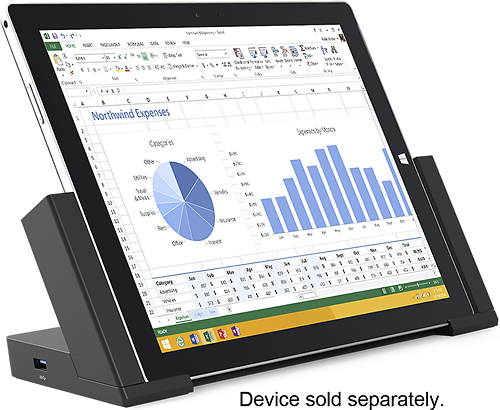
- Model:
- 3Q9-00001
- |
- SKU:
- 7524004
Customer reviews
Rating 4.6 out of 5 stars with 480 reviews
(480 customer reviews)to a friend
Customers are saying
Customers consistently note the Surface Pro 3 Docking Station's ease of use and abundance of USB ports as significant advantages. Many appreciate its size and the ability to charge the Surface Pro 3 while docked, although some find the price to be a drawback. Concerns regarding compatibility with certain devices and accessories were also raised by some users.
This summary was generated by AI based on customer reviews.
- Pros mentioned:Keyboard
Rated 5 out of 5 stars
A must have for office productivity!
||Posted .This reviewer received promo considerations or sweepstakes entry for writing a review.I use my SP3 as a portable work computer. At the office I use the dock to immediately hook into my network, two monitors, VOIP, local printer, wireless mouse and keyboard, external hdd (which I rarely use now) along a couple of other things. It works flawlessly! The only criticism I have is I wish it had another display port.
I would recommend this to a friend - Pros mentioned:Usb ports
Rated 5 out of 5 stars
Perfect
||Posted .This reviewer received promo considerations or sweepstakes entry for writing a review.I hooked up my Ethernet and printer USB to it. Now my surface is a true desktop i can take anywhere i need. Keeps it charged when i need to go its ready without worry. Definitely worth the extra money for it. Love the magnetic holder for the pen so i wont lose it. Wish it had a place for the Arch Mouse. Must have accessory.
I would recommend this to a friend - Pros mentioned:Size
Rated 5 out of 5 stars
Makes the Surface Pro 3 a Desktop Computer
||Posted .This reviewer received promo considerations or sweepstakes entry for writing a review.As soon as I get home from the road, I pop my Surface Pro 3 into this dock and I have a full desktop. The docking station is connected to a keyboard, mouse, and 27 inch touchscreen. My desktop is due for an upgrade at the office, but I will most likely get another docking station like this and problem solved.
No, I would not recommend this to a friend Rated 5 out of 5 stars
Great docking station!
||Posted .This reviewer received promo considerations or sweepstakes entry for writing a review.This docking station is very streamlined and easy to use. The Surface drops in easily and is held in very well while docked. It won't fall out accidentally. There are also several USB 3.0 ports for adding fast USB devices including a USB video adapter so that you can use two monitors with the surface.
I would recommend this to a friend- Pros mentioned:Ease of use, Usb ports
Rated 5 out of 5 stars
Turn the Surface Pro 3 into a workstation
||Posted .This reviewer received promo considerations or sweepstakes entry for writing a review.One of my concerns with the Surface Pro 3 was having only one USB port. When using it at my desk, I have several devices I like to attach, including a wireless keyboard and mouse and a second monitor since I'm addicted to dual screens when working. The dock has more than enough USB 3.0 and 2.0 connections, and with the mini-display port I can keep the monitor attached. Very easy to use and when I'm not running between meetings, I love using the dock.
I would recommend this to a friend - Pros mentioned:Usb ports
Rated 5 out of 5 stars
Perfect solution
||Posted .This reviewer received promo considerations or sweepstakes entry for writing a review.Surface Pros have only one USB port so I was looking for a hub to extend my options. The docking station is a much better solution, providing multiple access points, as well as power and stability for the tablet. Worth the price.
I would recommend this to a friend - Pros mentioned:Size
Rated 5 out of 5 stars
Perfect Dock
||Posted .This reviewer received promo considerations or sweepstakes entry for writing a review.This docking station is perfect with a small profile. It currently sits on the corner of my desk ready for my surface. I like the magnetic left bar to easily hold my pen. I also like that the bars open and close tightly around my surface instead of pushing it down on springs.
I would recommend this to a friend - Pros mentioned:Usb ports
Rated 5 out of 5 stars
Works great with Surface Pro 3
||Posted .This reviewer received promo considerations or sweepstakes entry for writing a review.Bought this for use at my company. Gets used all day every day and it has performed flawlessly. Running USB, dual monitors, Ethernet...all works great. Have 3 others that have also been trouble free. There were some issues with the Surface 2 docks, but these have been great.
I would recommend this to a friend - Pros mentioned:Keyboard
Rated 5 out of 5 stars
Essential accessory
||Posted .This reviewer received promo considerations or sweepstakes entry for writing a review.This is very essential for me since I'm using my Surface 3 Pro as my main computer at home and work. The docking station allows me to connect a large monitor and regular keyboard to my Surface. Making it much easier for me to work for long periods of time on my Surface.
I would recommend this to a friend - Cons mentioned:Angle
Rated 5 out of 5 stars
Not perfect but works well
||Posted .This reviewer received promo considerations or sweepstakes entry for writing a review.The downsides are a single angle for the surface and sometimes it's hard to lines up exactly. It will dock with keyboard attached but not with any of the 3rd party folios. You'll need a mini display port - connection of choice if you want to use an external monitor.
I would recommend this to a friend - Pros mentioned:Usb ports
Rated 5 out of 5 stars
Love it
||Posted .This reviewer received promo considerations or sweepstakes entry for writing a review.Didn't know if i'd like it before buying it but needed another power source at work and decided to buy this for my home..Simply put I wish I hadn't waited as long as I had.Now I can have multiple monitors more usb ports and a dedicated Ethernet port..Perfect!
I would recommend this to a friend - Pros mentioned:Size
Rated 4 out of 5 stars
Nice to Have
||Posted .This reviewer received promo considerations or sweepstakes entry for writing a review.considering how well implemented the current generation of Surface line has been implemented by Microsoft, this device is a nice to have not a must have if you're setting up a home office space and you require a large screen and other peripherals then its a must have but for most other uses, you can get by very well without the docking unit
I would recommend this to a friend - Pros mentioned:Usb ports
Rated 5 out of 5 stars
Easy to use
||Posted .This reviewer received promo considerations or sweepstakes entry for writing a review.I really like this docking station. I have it connected to a monitor I have mounted on the wall above my office desk. I just slip my Surface Pro 3 into the dock and my monitor comes to life. It has extra USB ports which come in handy. It's very easy to use.
I would recommend this to a friend Rated 4 out of 5 stars
Get one if you have a desk
||Posted .This reviewer received promo considerations or sweepstakes entry for writing a review.We use two surface pro's to run a startup medical practice. After using them to set up the business and now to run it for a week, I'm very pleased with our choice. The docking station works great, we initially bought just one but added another when we saw how much we used it and how well it works. Not five stars for a couple of reasons: It has a magnetic holder for your Bluetooth pen which is handy except it is on the left side of the dock. One of us is left handed and loves it, but for me it gets old having to reach across to grab the pen every time. Second is that the tablet can easily rest in the dock and click into place without being all the way in the dock. This just takes some getting used to but it should be a lot smoother and intuitive. I have left my surface docked and "clicked in" thinking it was recharging when I did not have it all the way in the dock. There is an indicator LED on the dock that let's you know when you are all the way in so just use that to make sure each time till you get a feel for it. In spite of this I would not want to give up my dock. Perhaps I will purchase another to keep at home.If you will use your Surface at a desk you definitely want to get one.
I would recommend this to a friend- Pros mentioned:Usb ports
Rated 5 out of 5 stars
very convenient
||Posted .This reviewer received promo considerations or sweepstakes entry for writing a review.I like the option to plug my Surface into a docking station so that I can use it like a computer when I want and take it off when I want to use as a tablet. I have a mouse and keyboard set up to the usb slots but I do wish that it had a hdmi slot.
I would recommend this to a friend - Pros mentioned:Ease of use
Rated 5 out of 5 stars
Really nice dock station
||Posted .This reviewer received promo considerations or sweepstakes entry for writing a review.I've been using this for about 2 months now and really love it. I like being able to snap in my SP3 and switch seamlessly into dual screens. I like leaving it in the dock for charging as well. Built solidly. Feels great. Good product.
I would recommend this to a friend - Pros mentioned:Usb ports
Rated 5 out of 5 stars
Great Doc
||Posted .This reviewer received promo considerations or sweepstakes entry for writing a review.The Surface Pro 3 is very stable in this dock, no worry about falling out or knocking it out by mistake. Plenty of ports for connected devices and quick to setup. Great addition to anyone looking to do more with their Surface Pro 3.
I would recommend this to a friend - Pros mentioned:Ease of use
Rated 5 out of 5 stars
Very handy and so easy to use
||Posted .This reviewer received promo considerations or sweepstakes entry for writing a review.This keeps my tablet from lying around on tables and chairs. Very nice to be able to use on a stand while charging. It's so easy to use and convenient. I have had no problems with it and would definitely recommend the charger.
I would recommend this to a friend - Pros mentioned:Usb ports
Rated 5 out of 5 stars
Exactly what it should be
||Posted .This reviewer received promo considerations or sweepstakes entry for writing a review.No complaints. Station is nice and compact even though the box makes it seem bigger than you might think. Its very small but filled with 5 USB ports among others and works as it should. Its a docking station....it is what it is.
I would recommend this to a friend Rated 5 out of 5 stars
Great Dock with just enough connections
||Posted .This reviewer received promo considerations or sweepstakes entry for writing a review.I have purchased 2 of these docks, 1 for home and 1 for business. The dock works as advertised and display port and USB 3.0 connections work great as advertised. The left side is magnetic to hold the pen. The dock also comes with it's own ac adaptor so now you a have adaptor to travel with. I find the screen of Surface Pro 3 to be at the optimum viewing angle while in the dock. The only slight gripe, sliding Surface Pro 3 into the dock is a little fussy. Make sure the blue led comes on because while it seems the computer is docked, it actually is not so your are using your battery. This is the only dock made for the Surface Pro 3 and hope that it may still work with the pending release of the Surface Pro 4. But we can leave that for a future review.
I would recommend this to a friend