Customer Ratings & Reviews
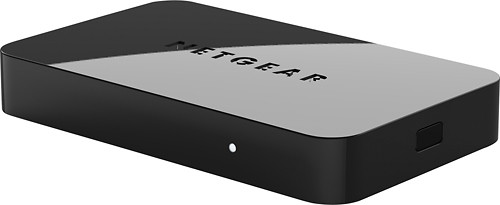
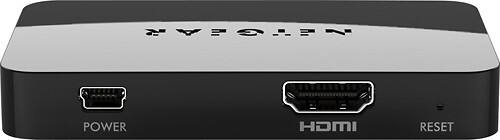
- Model:
- PTV3000-100NAS
- |
- SKU:
- 6510137
Customer reviews
Rating 3.3 out of 5 stars with 220 reviews
(220 customer reviews)Rating by feature
- Ease of Use3.1
Rating 3.1 out of 5 stars
Customers are saying
Customers are enthusiastic about the ease of use, picture quality, and setup of the product, with many praising its compact size and ability to stream content. However, some users experienced connectivity issues and compatibility problems, while others found the firmware update process challenging and reported performance lags. The HDMI functionality was frequently mentioned in positive reviews. Despite some negative feedback regarding connectivity and performance, many users found the device to be a valuable tool for displaying content from various devices on their TVs.
This summary was generated by AI based on customer reviews.
- Pros mentioned:Display, Setup
Rated 4 out of 5 stars
Great tool to display from android devices.
||Posted .This reviewer received promo considerations or sweepstakes entry for writing a review.Great tool to display from android devices. Once you set up its easy to connect to any TV/monitor. It can be carried in a pocket.
I would recommend this to a friend - Pros mentioned:Picture quality
Rated 4 out of 5 stars
Works well on newer HD TV's that are 1080p rated.
||Posted .This reviewer received promo considerations or sweepstakes entry for writing a review.Like I said above: Good price, quick response using Intel's Wi-Di with icore 7, 12gb ram. Works well on newer HD TV's that are 1080p rated. Pictures, video's, DVD's have enhanced colors & clarity. Non 1080p TV formats crop sides of screen off. Forget it ! The Blu-Ray player on my laptop works great projecting it on a 42" HDTV with 1080p built in.....
I would recommend this to a friend - Pros mentioned:Ease of use
Rated 5 out of 5 stars
Easy Way 2 Connect PC
||Posted .This reviewer received promo considerations or sweepstakes entry for writing a review.Hubby wanted to connect PC 2 TV that's why we purchased this. Directions are easy to follow and system easy to setup and use. Until we get WiDi capable products this is the way we'll connect...
I would recommend this to a friend Rated 4 out of 5 stars
Great gadget for making my TV a computer screen!
||Posted .This reviewer received promo considerations or sweepstakes entry for writing a review.I am not smart enough for a smart phone for tablet, so I purchased this to use my TV as a laptop screen - I am getting old and my vision is declining. Once it was installed, it was great, but I had a very difficult time setting it up.
I would recommend this to a friend- Cons mentioned:Performance
Rated 1 out of 5 stars
Does not work well at all
||Posted .This reviewer received promo considerations or sweepstakes entry for writing a review.I returned this item the same day I bought it as it did not work as advertised. It is certified to work with Intel WiDi and Miracast, so I wanted to stream my phone's (nexus 4, supports Miracast) screen to the tv as well as the display from my Samsung laptop with WiDi enabled. I was able, after some work and firmware updates, to get both devices to stream to the TV, but the performance was extremely poor. I knew there would be a delay, so I am not complaining about that, but the constant stuttering picture made this device entirely useless. When I returned it, I picked up a Chromecast, which accomplishes similar tasks but costs $15 less. I would recommend trying that out rather than this item.
No, I would not recommend this to a friend - Cons mentioned:Connectivity
Rated 1 out of 5 stars
Did not stay connected
||Posted .This reviewer received promo considerations or sweepstakes entry for writing a review.Great concept to have a wireless display direct from my i7, but in practice it never stayed connected long enough to be of much use. Finally agve up and returned it. I also tried using it as a Miracast device from my Samsung Note II smartphone with the same connectivity problems. Very disappointing!!!
No, I would not recommend this to a friend - Pros mentioned:Ease of use
Rated 4 out of 5 stars
Great for mirroring...
||Posted .This reviewer received promo considerations or sweepstakes entry for writing a review.Great product for using your TV to mirror your laptop screen or a smartphone. Can also be used as an extended monitor for your laptop or desktop. Very easy to setup. I would check if this is supported by your laptop before buying. Alienware without intel wireless are not supported. Experienced a millisecond time lag while mirroring my smartphone screen. In all its a great product for the price.
I would recommend this to a friend - Cons mentioned:Connectivity
Rated 4 out of 5 stars
Ok to buy
||Posted .This reviewer received promo considerations or sweepstakes entry for writing a review.I have three of these boxes, one of them won't connect if it's been left on too long. Powering down and pack up fixes that problem but it shouldn't do that. The other two will connect after only a couple of tries. All in all a great product. Connection needs to be made more reliable.
I would recommend this to a friend - Cons mentioned:Firmware update
Rated 5 out of 5 stars
Works As I Had Hoped
||Posted .This reviewer received promo considerations or sweepstakes entry for writing a review.The Push2TV is working perfectly for me. I'm glad I bought it. Now there's no need to go out and get a "smart tv." Upon installation, the system recommends updating the firmware. I spent about 30 minutes trying to do that, only to discover that my phone (LG Optimus G) does not have that functionality. The phone can download the appropriate information, but cannot transfer the zip file to the P2TV. I decided to simply start using the P2TV without the update. It works really well! I simply turn on the Miracast feature on my phone, it searches for the compatible device, I choose it on the screen and connection occurs. Now I can watch YouTube videos or Netflix movies on my television. I'm completely satisfied. :)
I would recommend this to a friend - Cons mentioned:Firmware update
Rated 4 out of 5 stars
Accomplishes the job.
||Posted .This reviewer received promo considerations or sweepstakes entry for writing a review.If you can get an hdmi cable to your computer just do that. The device works fine, I can connect the computer, phone, etc. The signal doesn't stay connected for days straight. I have to reconnect mostly every day. The firmware was a pain in the butt to update. I would have preferred to run an hdmi cable to the computer for my application.
I would recommend this to a friend - Pros mentioned:Ease of use
Rated 5 out of 5 stars
Push2TV Wireless Display Adapter
||Posted .This reviewer received promo considerations or sweepstakes entry for writing a review.An inexpensive option to link your notepad to your tv so you can view anything on your notepad on your tv. Easy to set up.
I would recommend this to a friend - Cons mentioned:Compatibility
Rated 2 out of 5 stars
Was not compatible with my monitor
||Posted .This reviewer received promo considerations or sweepstakes entry for writing a review.I had to return it because while it was compatible and linked with my laptop easily it was not compatible and would not drive the HDMI interface on my monitor. Also buyers should note that the Intel WiDi interface utilizes your computer's WiFi interface so when you are connected to this device you cannot be simultaneously connected to the Internet or NAS DRIVE via the same WiFi interface.
No, I would not recommend this to a friend Rated 4 out of 5 stars
Works well
||Posted .This reviewer received promo considerations or sweepstakes entry for writing a review.The unit had an update available for it that I applied right away, so make sure to check for the update to the device, its pretty simple to do. The device works well for my Microsoft Surface 2 windows 8.1 device to share incidental things on the big screen but on an older Lenovo 8" tablet it has issues and after some checking I found that the Lenovo tablet doesn't support Miracast so that's a bummer. Make sure to check your tablet to verify that it will do Miracast if that's what you are hoping to do. For screen sharing or projecting to a big screen it works well but the computer has to stay on (not go to sleep) and be constantly feeding the screen. If you are watching a movie and the computer has a physical cable connection you might find the video much clearer and won't get the shuttering that comes from Miracasting. If you are streaming things from YouTube, you might want to consider a different device such as the Chromecast or a Roku but overall it does exactly what I want it to do on my Surface 2 tablet (screen share for incidental things.)
I would recommend this to a friendRated 4 out of 5 stars
Great product for screen mirroring
||Posted .This reviewer received promo considerations or sweepstakes entry for writing a review.Easy installation, really small device, doesn't take up any space and it looks great. I would recommend this product, but for some reason my laptop will connect and disconnect, it might be that I need software update, no idea. However, the connection is very reliable with my Samsung Galaxy 4 and practically any other device. The range is pretty good, I haven't had any problems.
I would recommend this to a friendRated 3 out of 5 stars
Makes My Wifi Connection unusable.
||Posted .This reviewer received promo considerations or sweepstakes entry for writing a review.This is a nice device when I am having a presentation. I used it with my two sony viao laptops with the widi built in. Only draw back is that the network this widi adapter creates makes my router wifi internet connection unusable. So be sure to have an ethernet connection available if this happens to you. The router I have is a Netgear 6300 v2. Note: that the widi adapter doesn't use your router wifi. It creates its own.
I would recommend this to a friendRated 5 out of 5 stars
no more long cables
||Posted .This reviewer received promo considerations or sweepstakes entry for writing a review.Great little device, tried chromecast and didn't like it. Netgear doesn't need internet connection, simply log onto with laptop or phone and your steaming your screen to tv, no more long vga cables or expensive hdmi cables, great resolution too. Actually bought two.
I would recommend this to a friendRated 4 out of 5 stars
Push2TV works perfectly
||Posted .This reviewer received promo considerations or sweepstakes entry for writing a review.My husband bought an older version of this Netgear Push2TV device for his office. He liked it so much, we bought one for home. the one we bought for home was from Best Buy - better price and updated version from what Amazon offered. The only thing we don't like is that he has to reset the Push2TV device at home each time he used the other Netgear Push2TV device at work. Works great, clear graphics on our HDMI TV screen.
I would recommend this to a friend- Cons mentioned:Compatibility
Rated 4 out of 5 stars
Items works with my android not w my iPhone
||Posted .This reviewer received promo considerations or sweepstakes entry for writing a review.It's not compatible w my iPhone. Plus it's runs slower than running Netflix through my google tv. I do not have a smart tv which I totally regret not thinking of it when I purchased it but too late now. It's a great item for sure it's the only piece that shows my cell phone as is. My whole purpose is to run my movie stream.
I would recommend this to a friend - Cons mentioned:Lag
Rated 4 out of 5 stars
it works!
||Posted .This reviewer received promo considerations or sweepstakes entry for writing a review.I have a samsung s4. It connects to the netgear without any problems. I move this between 3 different tv's. I am about 6-20ft away when connecting. The 4 star rating is because it does have a lag. When streaming, the audio is not synced to the video. Some media is better then others.
I would recommend this to a friend Rated 4 out of 5 stars
great product
||Posted .This reviewer received promo considerations or sweepstakes entry for writing a review.Great product small delay between audio and video and price too much but overall it is okay.
I would recommend this to a friend