Customer Ratings & Reviews

- Model:
- HW-R650/ZA
- SKU:
- 6327857
Rating by feature
- Value
Rating 4.4 out of 5 stars
- Quality
Rating 4.5 out of 5 stars
- Ease of Use
Rating 4.5 out of 5 stars
Customers are saying
Customers are positive about the sound quality, easy setup, price, bass, and Bluetooth connectivity of the 3.1-Channel 340W Soundbar System with 6-1/2" Wireless Subwoofer. They appreciate the impressive sound quality, simple setup process, affordability, strong bass, and convenient Bluetooth connection. However, some customers have expressed concerns about the connectivity issues, limited volume, and size of the soundbar and subwoofer.
This summary was generated by AI based on customer reviews.
Soundbar has good sound!
||Posted . Owned for 3 weeks when reviewed.This reviewer received promo considerations or sweepstakes entry for writing a review.This sound bar has good sound out put for our space.
I would recommend this to a friendThe sound was great
||Posted . Owned for 3 weeks when reviewed.This reviewer received promo considerations or sweepstakes entry for writing a review.The system was great to watch movies and play games
I would recommend this to a friendExcellent
||Posted . Owned for 1 month when reviewed.This reviewer received promo considerations or sweepstakes entry for writing a review.M so satisfied to having this with me.............
I would recommend this to a friendGreat for amplifying sound.
||Posted . Owned for 1 month when reviewed.This reviewer received promo considerations or sweepstakes entry for writing a review.Needed to replace our old soundbar for a new one..
I would recommend this to a friendGreat product
||Posted . Owned for 3 weeks when reviewed.This reviewer received promo considerations or sweepstakes entry for writing a review.Just what I was looking for and love the subwoofer.
I would recommend this to a friendGreat
||Posted . Owned for 1 month when reviewed.This reviewer received promo considerations or sweepstakes entry for writing a review.Works really well for a beginner surround sound...
I would recommend this to a friend- Cons mentioned:Volume
Worse sound possible
||Posted . Owned for less than 1 week when reviewed.This reviewer received promo considerations or sweepstakes entry for writing a review.I had a 2.1 Samsung that had better sound than this. All the audio comes out the first middle little speaker. The sub-woofer has no bass even though I individually set it up all the way. With the 2.1 my volume was set around 20 to 25 and with this 3.1 I have upped the volume to 67 and it still sounds bad. Bad product. Sorry I bought it but the sub-woofer went out on my 2.1 channel and apparently it is so old there are no parts to fix it according to Geek Squad. I usually love Samsung but this product is so inferior do not waste your money.
No, I would not recommend this to a friendBrand response from Samsung
Posted .Rita:
Thank you for purchasing this Samsung HW-R650 Soundbar, featuring a dedicated center channel, 6 speakers, deep 6.5" subwoofer bass, Smart Sound Mode, and Dolby Digital 5.1ch and DTS Digital Surround. I am sorry to hear that you are not happy with sound quality.
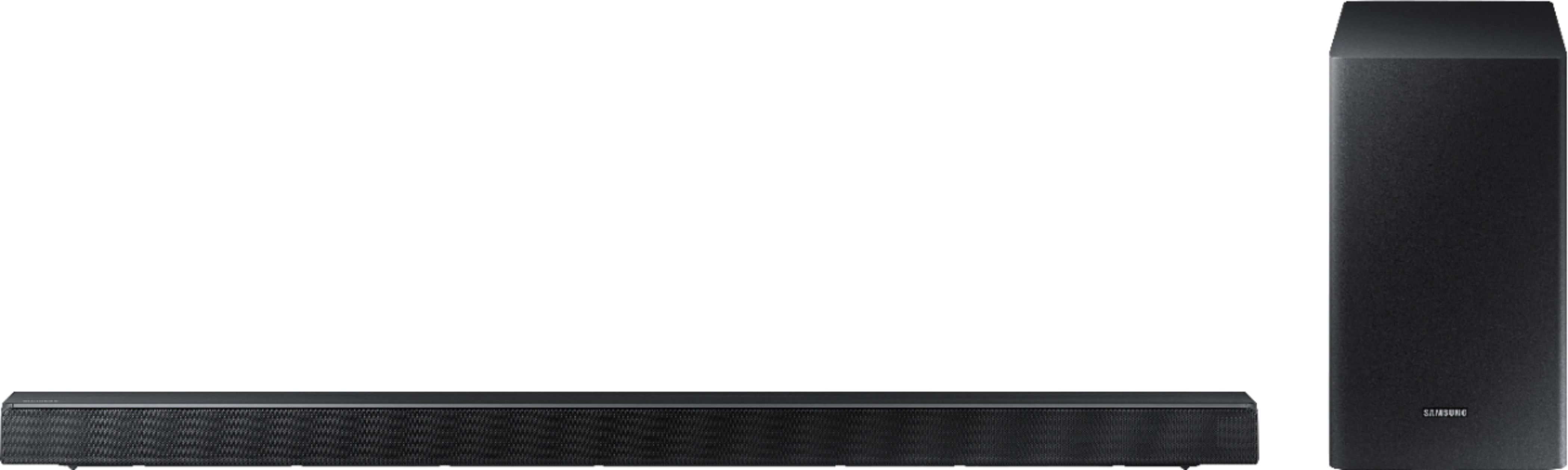
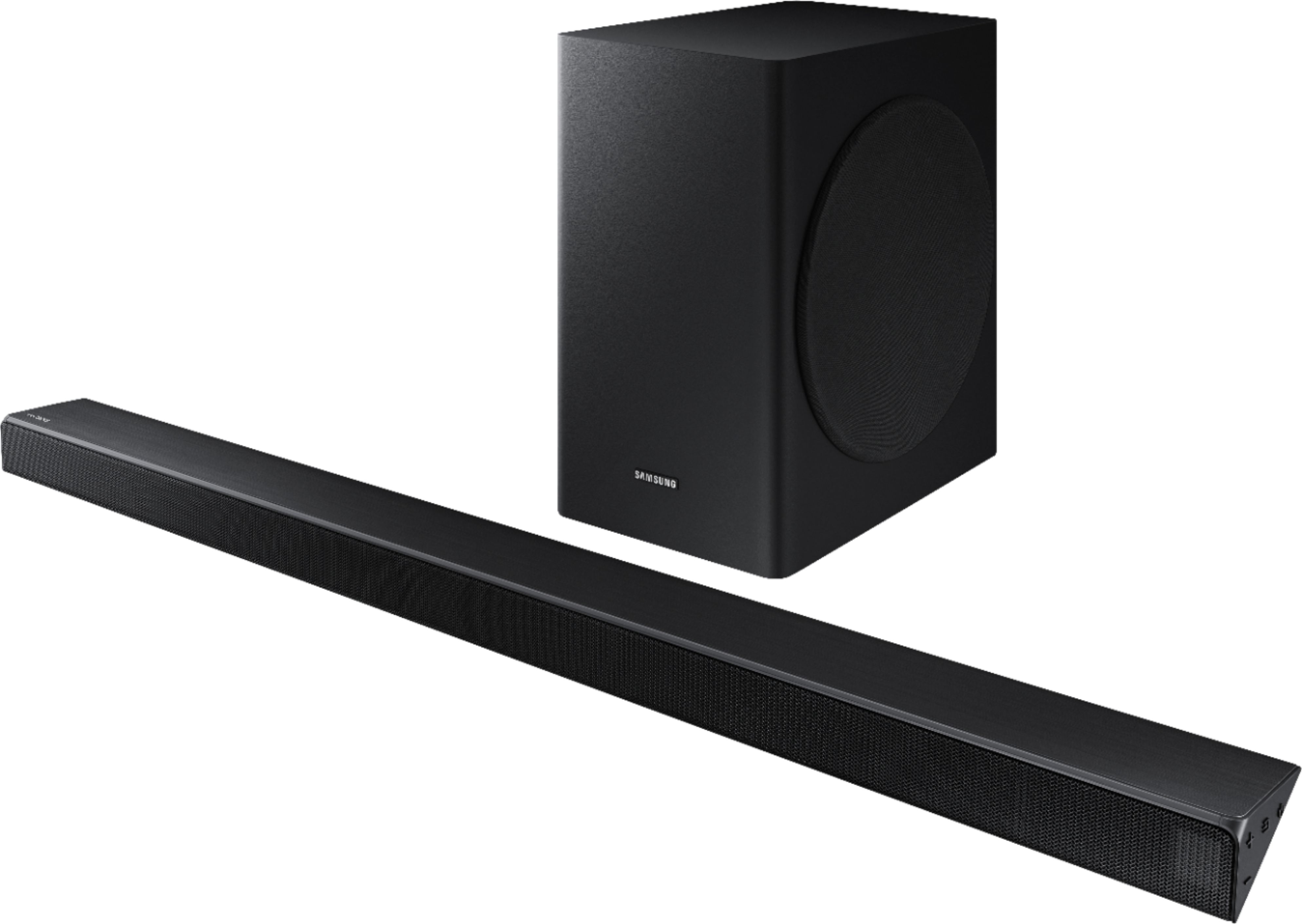
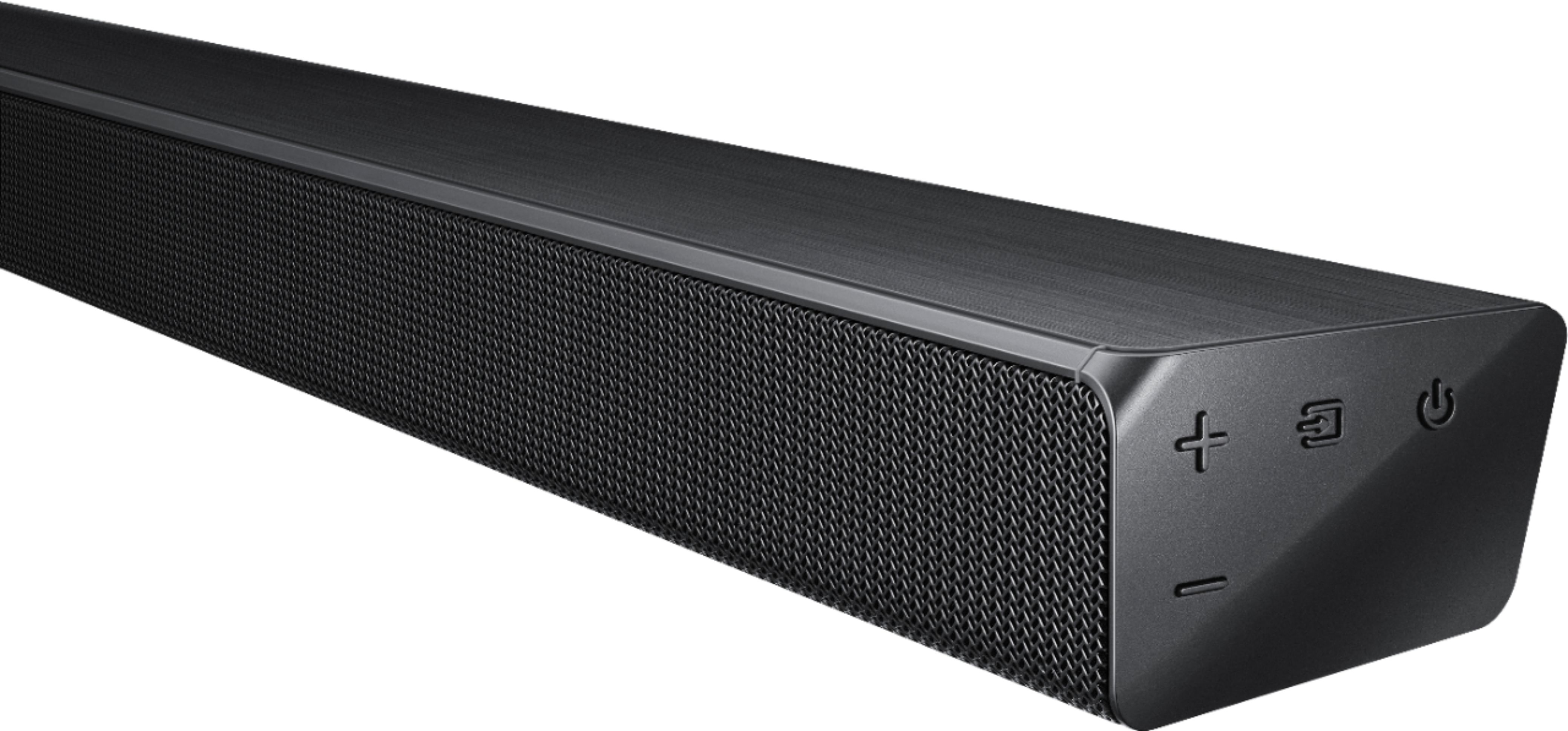
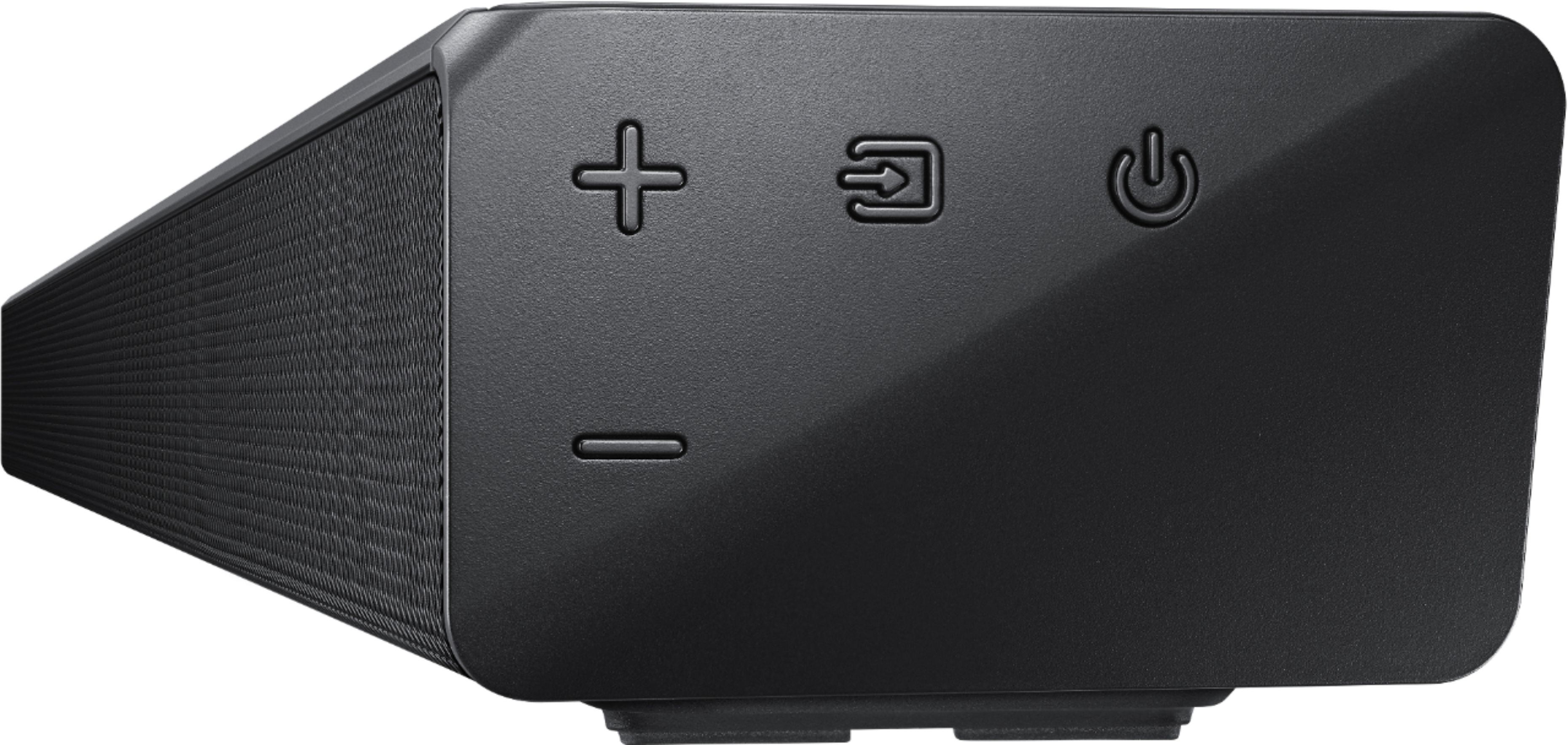
It has come to our attention that customers may be positioning the soundbar incorrectly, resulting in poor sound quality. The soundbar should be placed with the SAMSUNG logo facing up towards the ceiling. If you position the soundbar with the logo facing up, you will see the display/status panel and the speakers will be facing outward. (Refer to product photos on BestBuy.com and zoom in on the photos) If you have incorrectly placed the Soundbar with the display side down and the SAMSUNG logo perpendicular to the floor (facing you when you sit), you will experience muffled or low quality sound because the unit will be resting on the speakers.
So that we can troubleshoot setup and function of the subwoofer, please reach out to Samsung Customer Support:
1) Phone: 1-800-SAMSUNG (ask for Soundbars)
Available 8AM - 12AM EST (Mon-Fri) / 9AM - 11PM EST (Sat-Sun)
2) LiveChat or Email: https://www.samsung.com/us/support/#contact_us_for_support
3) Facebook Messenger: https://www.facebook.com/samsungsupport
4) Twitter: https://twitter.com/SamsungSupport
The Samsung Members Community is also a great resource for getting help from Samsung moderators and customers: https://us.community.samsung.com/t5/Get-Help/ct-p/get-help
If you have not already done so, we invite you to register your new Samsung Soundbar at: https://www.samsung.com/us/support/register/
Registering your product gives you access to easy warranty support, convenient opt-in to special promos & offers, faster troubleshooting & service, and quick notification of system updates.
We hope to hear from you.
- Cons mentioned:Connectivity
Not what I expected
||Posted . Owned for 1 month when reviewed.This reviewer received promo considerations or sweepstakes entry for writing a review.It constantly cuts in and out even though it’s only for a second it’s annoying! Even when I turn the bass up all the way you can barely hear it definitely not worth the price
No, I would not recommend this to a friend Not what we expected
||Posted . Owned for 3 months when reviewed.This reviewer received promo considerations or sweepstakes entry for writing a review.I expected higher quality sound for the price. Would not recommend. Stick with the true audio manufacturers. Will replace with Polk, HK, JBL... or the like. This one is bound for the bedroom. It is not meant for the den.
No, I would not recommend this to a friendBrand response from Samsung
Posted .JohnT:
Thank you for purchasing this Samsung HW-R650 Soundbar featuring a dedicated center channel for clear dialogue and a wireless subwoofer for deep bass. I am sorry to hear that the sound performance did not meet your expectations.
The HW-R650 features Smart Sound Mode to automatically analyze your content and optimize sound settings for the best audio delivery. You can also select from STANDARD, SURROUND SOUND, and GAME effects by pressing the SOUND MODE button on the soundbar remote.
If you should have any concerns or questions, please feel free to reach Samsung Support via:
1) Phone: 1-800-SAMSUNG
- Available 8AM - 12AM EST (Mon-Fri) / 9AM - 11PM EST (Sat-Sun)
2) LiveChat: https://www.samsung.com/us/support/#contact_us_for_support
3) Facebook Messenger: https://www.facebook.com/samsungsupport
4) Twitter: https://twitter.com/SamsungSupport
5) The Samsung Members Community is also a great resource for getting help from Samsung moderators and cust omers: https://us.community.samsung.com
If you have not already done so, we invite you to register your new Samsung product at: https://us.community.samsung.com
Registering your product gives you access to easy warranty support, convenient opt-in to special promos and offers, faster troubleshooting and service, and quick notification of system updates.
~ Samsung Solutions
Loud but want the talking louder then the music
||Posted . Owned for 1 month when reviewed.This reviewer received promo considerations or sweepstakes entry for writing a review.Music is way to loud. Want to hear more voice. Hard to set up and don’t like that I have to have both remotes great for some one that wants true surround sound.
No, I would not recommend this to a friendBrand response from Samsung
Posted .Pugmom:
I am very sorry to hear that dialogue is being drowned out in action scenes and too low to hear in other scenes.
To improve your experience, try using Dynamic Range Control (DRC). DRC lets you apply dynamic range control to Dolby Digital tracks. With DRC turned on, loud sounds will be reduced.
1) Turn off your Soundbar.
2) While the Soundbar is off, press and hold the Sound Mode button on the remote control for 6 seconds until you see “DRC ON” shown on the display.
3) To turn off DRC, repeat steps 1 and 2 above.
If you need additional help with this issue, or have any questions or concerns with this soundbar, please reach out to us via any of the below options:
1) Phone: 1-800-SAMSUNG
Available 8AM - 12AM EST (Mon-Fri) / 9AM - 11PM EST (Sat-Sun)
2) LiveChat: https://www.samsung.com/us/support/#contact_us_for_support
3) Facebook Messenger: https://www.facebook.com/samsungsupport
4) Twitter: https://twitter.com/SamsungSupport
5) The Samsung Members Community is also a great resource for getting help from Samsung moderators and customers: https://us.community.samsung.com
If you have not already done so, we invite you to register your new Samsung product at: https://us.community.samsung.com
Registering your product gives you access to easy warranty support, convenient opt-in to special promos and offers, faster troubleshooting and service, and quick notification of system updates.
Disappointed in the performance
||Posted . Owned for 3 weeks when reviewed.This reviewer received promo considerations or sweepstakes entry for writing a review.This was a Christmas gift from my wife and she had listened to the Samsung Soundbar at the Goodlettsville store She feel that the unit does not perform as well as she remembers and am generally not impressed.
No, I would not recommend this to a friendBrand response from Samsung
Posted .Bob426:
I am very sorry to see that in-home audio output is not as impressive as it was when you experienced it in the store.
First, please check that you have positioned the soundbar correctly. It has come to our attention that customers may be positioning the soundbar incorrectly, resulting in poor sound quality. The soundbar should be placed with the SAMSUNG logo facing up towards the ceiling. If you position the soundbar with the logo facing up, you will see the display/status panel and the speakers will be facing outward. (Refer to product photos on Samsung.com and zoom in on the photos) If you have incorrectly placed the soundbar with the SAMSUNG logo perpendicular to the floor (facing you when you sit), you will experience muffled or low quality sound because the unit will be resting on the speakers.
Next, refer to pages 22-24 in the User Manual for how to adjust settings to your usage scenario: http://downloadcenter.samsung.com/content/UM/201903/20190312112428032/HW-R650_ZA_FullManual_00_ENG_190211.pdf
You can adjust Sound Modes, Treble, Bass, Woofer, Frequency, and more.
If you need further assistance, please know we are here to help with setting optimized to your specific usage scenario. You can reach us at:
1) Phone: 1-800-SAMSUNG
Available 8AM - 12AM EST (Mon-Fri) / 9AM - 11PM EST (Sat-Sun)
2) LiveChat: https://www.samsung.com/us/support/#contact_us_for_support
3) Facebook Messenger: https://www.facebook.com/samsungsupport
4) Twitter: https://twitter.com/SamsungSupport
5) The Samsung Members Community is also a great resource for getting help from Samsung moderators and customers: https://us.community.samsung.com
If you have not already done so, we invite you to register your new Samsung product at: https://us.community.samsung.com
Registering your product gives you access to easy warranty support, convenient opt-in to special promos and offers, faster troubleshooting and service, and quick notification of system updates.
Purchased for sons room for Samsung TV
||Posted . Owned for 3 weeks when reviewed.This reviewer received promo considerations or sweepstakes entry for writing a review.I’m very underwhelmed by the sound quality of this sound-bar. The Subwoofers bass is barley noticeable even in a 14x14 room. The sound-bar itself is a mild upgrade to the Samsung TV it is connected to. The TV and sound-bar work well together connected via ARC with a HDMI cable.The TV remote can be used to control the volume which is nice. It fits the bill for a dorm room or a house that has bedrooms close together since the bass will not be annoying to others. I just can’t see using this in any home theater application, I’ve heard a lot better for less money in my opinion.
No, I would not recommend this to a friendBrand response from Samsung
Posted .MikeHunt:
Thank you for purchasing this Samsung HW-R650 Soundbar featuring a dedicated center channel for clear dialogue and a wireless subwoofer for deep bass. I am sorry to hear that you are not completely happy with performance.
SUBWOOFER:
The subwoofer is responsible for low frequency sounds, like the rumbles of an explosion in an action movie or the bass guitar and drum in your favorite music. It adds rich bass tones and deepens the sound quality you hear, but since the subwoofer only plays low tones, it will be silent when low frequency sounds are not in use. If you'd like louder (or softer) bass from your subwoofer, you can adjust the level by toggling the WOOFER button on the soundbar remote, and then adjusting the level from -6 to +6. To set the subwoofer volume level to 0, press the button.
BASS:
You can adjust TREBLE and BASS via the SOUND CONTROL button (looks like a gear symbol). Adjust the volume between -6~+6 by using the Up/Down buttons
Please also refer to pages 22-24 in the User Manual for how to adjust settings to your usage scenario: http://downloadcenter.samsung.com/content/UM/201903/20190312112428032/HW-R650_ZA_FullManual_00_ENG_190211.pdf
Lastly, please also check that you have positioned the soundbar correctly. It has come to our attention that customers may be positioning the soundbar incorrectly, resulting in poor sound quality. The soundbar should be placed with the SAMSUNG logo facing up towards the ceiling. If you position the soundbar with the logo facing up, you will see the display/status panel and the speakers will be facing outward. (Refer to product photos on Samsung.com and zoom in on the photos) If you have incorrectly placed the soundbar with the SAMSUNG logo perpendicular to the floor (facing you when you sit), you will experience muffled or low quality sound because the unit will be resting on the speakers.
If you need further assistance, please know we are here to help. You can reach Samsung Support via:
1) Phone: 1-800-SAMSUNG
Available 8AM - 12AM EST (Mon-Fri) / 9AM - 11PM EST (Sat-Sun)
2) LiveChat: https://www.samsung.com/us/support/#contact_us_for_support
3) Facebook Messenger: https://www.facebook.com/samsungsupport
4) Twitter: https://twitter.com/SamsungSupport
5) The Samsung Members Community is also a great resource for getting help from Samsung moderators and customers: https://us.community.samsung.com
If you have not already done so, we invite you to register your new Samsung product at: https://us.community.samsung.com
Registering your product gives you access to easy warranty support, convenient opt-in to special promos and offers, faster troubleshooting and service, and quick notification of system updates.
Decent, but needs more bass
||Posted . Owned for 1 week when reviewed.This reviewer received promo considerations or sweepstakes entry for writing a review.You can't go wrong for the price, pairs up perfectly to my Samsung T.V. Comes with fiber optical cable, however lacks bass. Good for a small room. Returning and going with a component system.
I would recommend this to a friendBrand response from Samsung
Posted .Jorge7046:
Thank you for your review of this Samsung HW-R650 Soundbar. I am very sorry that you are not completely happy with the bass performance.
There are two adjustments that can be made to maximize bass from soundbar and subwoofer:
1) Using the WOOFER button on the remote, you can adjust the volume of the subwoofer between -6 to +6 by toggling the button up or down. To set the subwoofer volume level to 0, press the button down.
2) Adjust the bass control by pressing the SOUND CONTROL button (gear icon) on the remote control, then select BASS to increase the level. You can adjust the volume between -6 to +6 by using the Up/Down buttons.
For precise audio adjustments, you can use the 7-band frequency equalizer to optimize the sound for your room acoustics.
Should you need further assistance with setting adjustments or have any questions, please contact Samsung Customer Support via any of the below options:
1) Phone: 1-800-SAMSUNG
- Available 8AM - 12AM EST (Mon-Fri) / 9AM - 11PM EST (Sat-Sun)
2) LiveChat: https://www.samsung.com/us/support/#contact_us_for_support
3) Facebook Messenger: https://www.facebook.com/samsungsupport
4) Twitter: https://twitter.com/SamsungSupport
5) The Samsung Members Community is also a great resource for getting help from Samsung moderators and customers: https://us.community.samsung.com
If you have not already done so, we invite you to register your new Samsung product at: https://us.community.samsung.com
Registering your product gives you access to easy warranty support, convenient opt-in to special promos and offers, faster troubleshooting and service, and quick notification of system updates.
~ Samsung Solutions
The sound is good, but could be better.
||Posted . Owned for 1 month when reviewed.This reviewer received promo considerations or sweepstakes entry for writing a review.This system does have good sound, however it doesn't have very high bass. I'm a little disappointed about that. I wouldn't recommend this system if you enjoy more bass when listening to music.
No, I would not recommend this to a friendBrand response from Samsung
Posted .JBRD:
Thank you for your review of this Samsung HW-R650 Soundbar. I am very sorry that you are not completely happy with the bass performance.
There are two adjustments that can be made to maximize bass from soundbar and subwoofer:
1) Using the WOOFER button on the remote, you can adjust the volume of the subwoofer between -6 to +6 by toggling the button up or down. To set the subwoofer volume level to 0, press the button down.
2) Adjust the bass control by pressing the SOUND CONTROL button (gear icon) on the remote control, then select BASS to increase the level. You can adjust the volume between -6 to +6 by using the Up/Down buttons.
You can try optimizing audio performance for your specific content by pressing the SOUND MODE button on your soundbar remote, and then selecting the desired sound effect by choosing STANDARD, SURROUND SOUND, GAME, or SMART.
Please refer to pages 22-24 in the User Manual for audio setting adjustments: http://downloadcenter.samsung.com/content/UM/201903/20190312112428032/HW-R650_ZA_FullManual_00_ENG_190211.pdf
For further assistance with settings optimized to your usage scenario, please reach out to us at:
1) Phone: 1-800-SAMSUNG
Available 8AM - 12AM EST (Mon-Fri) / 9AM - 11PM EST (Sat-Sun)
2) LiveChat: https://www.samsung.com/us/support/#contact_us_for_support
3) Facebook Messenger: https://www.facebook.com/samsungsupport
4) Twitter: https://twitter.com/SamsungSupport
5) The Samsung Members Community is also a great resource for getting help from Samsung moderators and customers: https://us.community.samsung.com
To optimize your product experience, we encourage you to register your new Samsung product at: https://www.samsung.com/us/support/register/
…and gain access to easy warranty support, convenient opt-in to special promos & offers, faster troubleshooting & service, and quick notification of system updates.
Average sound
||Posted . Owned for 1 month when reviewed.This reviewer received promo considerations or sweepstakes entry for writing a review.Easy to install. Background sounds are separate from words which is nice for music as well as video, but I was expecting a fuller sound. In hindsight I would have bought the next level up.
No, I would not recommend this to a friendBrand response from Samsung
Posted .Blonde2020:
Thank you for your review of this Samsung HW-R650 Soundbar. I am sorry that you are not completely happy with performance.
You can try optimizing audio performance for your specific content by pressing the SOUND MODE button on your soundbar remote, and then selecting the desired sound effect by choosing STANDARD, SURROUND SOUND, GAME, or SMART.
You can also press the Sound Control button on the remote (looks like a gear) to adjust TREBLE and BASS.
Press and hold the Sound Control button for about 5 seconds to adjust the sound for each of seven frequency bands.
Using the WOOFER button on the remote, you can adjust the volume of the subwoofer between -6 to +6 by toggling the button up or down. To set the subwoofer volume level to 0, press the button down.
Please refer to pages 22-24 in the User Manual for audio setting adjustments: http://downloadcenter.samsung.com/content/UM/201903/20190312112428032/HW-R650_ZA_FullManual_00_ENG_190211.pdf
If you ever need assistance with product features, specs, or operation, please know we are here to help. You can reach Samsung Support via:
1) Phone: 1-800-SAMSUNG
Available 8AM - 12AM EST (Mon-Fri) / 9AM - 11PM EST (Sat-Sun)
2) LiveChat: https://www.samsung.com/us/support/#contact_us_for_support
3) Facebook Messenger: https://www.facebook.com/samsungsupport
4) Twitter: https://twitter.com/SamsungSupport
5) The Samsung Members Community is also a great resource for getting help from Samsung moderators and customers: https://us.community.samsung.com
Lastly, we invite you to register your new Samsung product at: https://www.samsung.com/us/support/register/
...for access to easy warranty support, convenient opt-in to special promos & offers, faster troubleshooting & service, and quick notification of system updates.
Decent Quality
||Posted . Owned for 11 months when reviewed.This reviewer received promo considerations or sweepstakes entry for writing a review.Returned and upgraded to another Samsung sound bar to use with a Q-Series TV. Wasn’t a fan of this one, fairly overpriced for the quality compared to others in the price range.
No, I would not recommend this to a friendThe Bass is Too Weak
||Posted . Owned for 6 months when reviewed.This reviewer received promo considerations or sweepstakes entry for writing a review.I purchased this product during black Friday, and was extremely disappointed to find out that this particular soundbar had nonexistent bass. I'm not sure how this product received great reviews, but don't be fooled. Samsung really messed up in the bass department with this particular sound bar. This was my first time owning a soundbar, switching from a budget theater home system due to many cluttered wires. This product became a major disappointment and I would honestly not recommend it to anyone who is looking for something to make their cinema watching experiences immersive and exciting. Luckily, I bought two soundbars, A 2.1 Sony Soundbar (HTS-350) that was much cheaper, and ended up blowing away the Samsung in terms of bass and sound effect. Honestly, I kept switching between the two soundbars to see if my thoughts were correct about the Samsung. I adjusted multiple settings on the Samsung, also I switched from ARC HDMI Input to Optical Input just to see if the sound would improve. With the ARC, it improved slightly, but the bass was still weak. Overall, this soundbar left a bad taste in my mouth with Samsung soundbars. I don't think I can ever purchase a Samsung Soundbar no matter how good the reviews are. Maybe if the price was much cheaper I would be more satisfied with the low quality sound I received. The Samsung wasn't cheap, in fact the Sony was much cheaper and it blew Samsung away. It just shows that no matter how expensive or cheap an item is, the quality isn't determined by the cost.
No, I would not recommend this to a friend- Pros mentioned:Sound quality
Samsung Soundbar review
||Posted . Owned for 3 weeks when reviewed.This reviewer received promo considerations or sweepstakes entry for writing a review.It was broken when received. Other than that I know the product is great it has a wonderful sound and bass response.
I would recommend this to a friend Least favorite item I ever bought at Best Buy!
||Posted . Owned for 7 months when reviewed.This reviewer received promo considerations or sweepstakes entry for writing a review.For the size, it doesn’t put out as good as the as the surround we had before this one. We have thought about moving our old one back. Would not buy this item again.
No, I would not recommend this to a friendIncomplete component from an open-box soundbar
||Posted . Owned for 3 weeks when reviewed.This reviewer received promo considerations or sweepstakes entry for writing a review.This was an open-box item with many essential parts missing. Could not get this soundbar to work and I returned it for a new, unopened soundbar.
No, I would not recommend this to a friend