Customer Ratings & Reviews





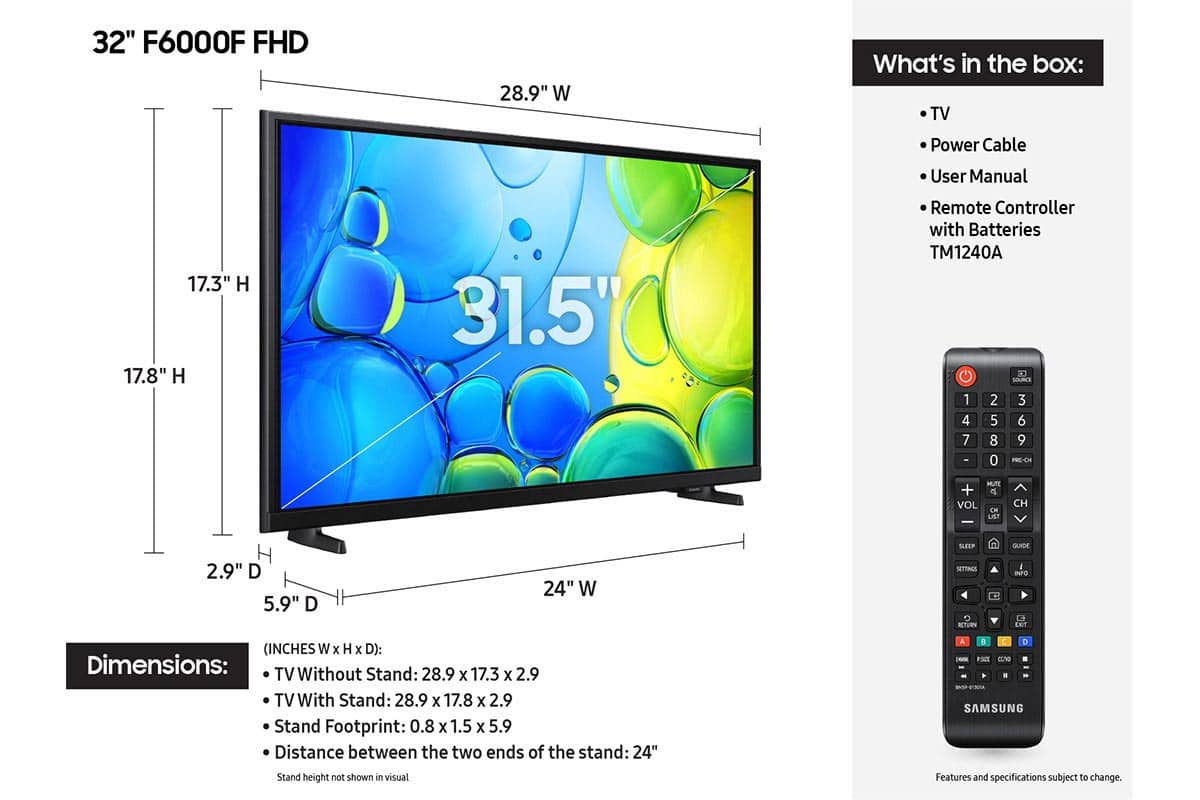






- Model:
- UN32F6000FFXZA
- SKU:
- 11997357
Rating by feature
- Picture Quality
Rating 4.8 out of 5 stars
- Sound Quality
Rating 4.5 out of 5 stars
- Brightness
Rating 4.8 out of 5 stars
- Pros mentioned:Picture quality
Tv
||Posted . Owned for 1 month when reviewed.This reviewer received promo considerations or sweepstakes entry for writing a review.Great picture and is similar to a more expensive Samsung tv that I own.
I would recommend this to a friend The real
||Posted . Owned for 3 weeks when reviewed.This reviewer received promo considerations or sweepstakes entry for writing a review.I love the compact size that fit the kitchen just right!!! Plus it’s a Samsung
I would recommend this to a friendSamsung TV
||Posted . Owned for 8 months when reviewed.This reviewer received promo considerations or sweepstakes entry for writing a review.Love this Samsing tv. Great buy. Best buy has great sales.
I would recommend this to a friend- Pros mentioned:Picture quality
GREAT TV
||Posted . Owned for 3 weeks when reviewed.This reviewer received promo considerations or sweepstakes entry for writing a review.Very pleased with the picture quality and brightness.
I would recommend this to a friend - Pros mentioned:Picture quality
Very good picture and sound
||Posted . Owned for less than 1 week when reviewed.This reviewer received promo considerations or sweepstakes entry for writing a review.Very good picture and sound. Very good price, fast and efficient delivery.
I would recommend this to a friend - Cons mentioned:App performance
Poor WiFi connection and slow apps
||Posted . Owned for 1 month when reviewed.This reviewer received promo considerations or sweepstakes entry for writing a review.The tv seems to have poor connection and apps are slow, the tv we had prior didn’t have these issues and it was also a Samsung. All other devices in the house have good connection and apps run fine.
No, I would not recommend this to a friendBrand response from Samsung
Posted .Hi Rgren,
Thank you for sharing your experience. Buffering during streaming is typically related to internet speed or signal strength. This can happen when your connection isn’t able to deliver data quickly enough for smooth playback.
We recommend the following steps to help improve streaming performance:
1. Use a 5GHz Wi-Fi connection, if available
2. Try a wired LAN connection for more stability
3. Reposition your router to minimize obstacles between it and the TV
4. Make sure your TV is running the latest firmware (Settings > Support > Software Update)
5. Run Device Care to optimize performance: Home > left directional key > Settings > Support > Device Care > Start Device Care
If buffering continues, you may want to contact your internet service provider to check your current speed or explore upgrade options.
If we can assist further, please call us at 1-800-SAMSUNG, available daily from 8AM - 12AM EST. You can also visit the Samsung website and click on ‘Support’ for:
• Live Chat
• Manuals, Software, & Warranty Info
~ Samsung Advisor
- Pros mentioned:Picture quality
nice
||Posted . Owned for 3 weeks when reviewed.This reviewer received promo considerations or sweepstakes entry for writing a review.quality picture. easy to set up. well packed, easy to use remote.
I would recommend this to a friend - Pros mentioned:Picture quality
Samsung 32 class F699F series smart TV
||Posted . Owned for 1 week when reviewed.This reviewer received promo considerations or sweepstakes entry for writing a review.Great picture for its price and good size for small room and desk.
I would recommend this to a friend - Pros mentioned:Picture quality
Excellent Choice!!!
||Posted . Owned for 3 weeks when reviewed.This reviewer received promo considerations or sweepstakes entry for writing a review.Excellent choice! Has All shows and no need for cable.
I would recommend this to a friend - Pros mentioned:Picture quality
Samsung
||Posted .This reviewer received promo considerations or sweepstakes entry for writing a review.Awesome tv! Samsung never disappoints. Great brand
I would recommend this to a friend SAMSUNG 32 GREAT BUY
||Posted . Owned for 2 weeks when reviewed.This reviewer received promo considerations or sweepstakes entry for writing a review.GREAT TELEVISION WITH ALL THE PARTS AND REMOTE INCLUDED UNLIKE OTHER STORE
I would recommend this to a friendGreat tv
||Posted .This reviewer received promo considerations or sweepstakes entry for writing a review.Remote is much better than the previous Samsung remote i I receivedwith previous tv. So glad they improved it. Love the tv!
I would recommend this to a friendgood overall value
||Posted .This reviewer received promo considerations or sweepstakes entry for writing a review.the feet are to me subpar for an excellent tv not easy to install and not sturdy i will have to purchase screw on the back stand to insure sturdiness...it is a big chore to establish streaming app's ..that aside for the price audio and video are solid.
I would recommend this to a friendAffordable quality.
||Posted . Owned for 2 weeks when reviewed.This reviewer received promo considerations or sweepstakes entry for writing a review.Great picture. Good sound. Happy with purchase. Would recommend.
I would recommend this to a friendSo-so for the size but sound isn’t the draw
||Posted . Owned for 1 month when reviewed.This reviewer received promo considerations or sweepstakes entry for writing a review.I made it work. I liked my older, non-super smart tv better. The sound quality was the biggest disappointment. I know they want to sell these sound bars but still. Womp womp… good enough for the price.
No, I would not recommend this to a friendPerfect Little TV for Garage
||Posted .This reviewer received promo considerations or sweepstakes entry for writing a review.Perfect little tv for my garage. A lot better specs than other brands in the price range so was a no brainer purchase for me, even though it was open box. I was skeptical buying open box but this tv was basically brand new with zero cosmetic issues or mechanical.
I would recommend this to a friend- Pros mentioned:Picture quality
Great little TV
||Posted . Owned for 2 months when reviewed.This reviewer received promo considerations or sweepstakes entry for writing a review.Works perfectly. Great picture quality. Easy setup.
I would recommend this to a friend Good TV at the right price
||Posted . Owned for 1 month when reviewed.This reviewer received promo considerations or sweepstakes entry for writing a review.Picture looks good but streaming isn't the best. Several apps freeze and close. I would recommend it if you get it at a good price. Mine was free with the purchase of a big screen TV.
I would recommend this to a friendBrand response from Samsung
Posted .Hi DanielK,
Thank you for your feedback regarding your F6000F TV’s response time. To help ensure optimal performance, please try the following steps:
1. Check for firmware updates – An outdated version can affect overall performance: Home > left directional key > Settings > Support > Software Update > Update Now
2. Run Device Care – This tool clears unused cached memory and closes background apps: Home > left directional key > Settings > Support > Device Care > Start Device Care
3. Cold boot your TV – With the TV on, press and hold the Power button on your remote for about 5 seconds until the TV turns off and back on. This refreshes the system.
4. Power cycle the TV and any connected external devices – Unplug them from the power outlet, wait 30 seconds, then plug them back in.
These steps often resolve issues with lag, freezing, or slow app performance. If the issue continues, please contact Samsung Support at 1-800-SAMSUNG, 8AM – 12AM EST, 7 days a week. LiveChat agents are also available through the ‘Support’ link on our website.
~ Samsung Advisor
Smart tv
||Posted . Owned for 1 month when reviewed.This reviewer received promo considerations or sweepstakes entry for writing a review.Really like this brand. First we purchased a Roku but could not get remote to synchronize with tv. We returned it and purchased a Samsung and had no problems. We have had other Samsung tvs and have had no issues. Roku was cheaper but paying more for a reliable brand like Samsung was worth the difference
I would recommend this to a friendPrice
||Posted . Owned for 1 month when reviewed.This reviewer received promo considerations or sweepstakes entry for writing a review.The price of this television was competitive compared to other stores.
I would recommend this to a friend