Customer Ratings & Reviews





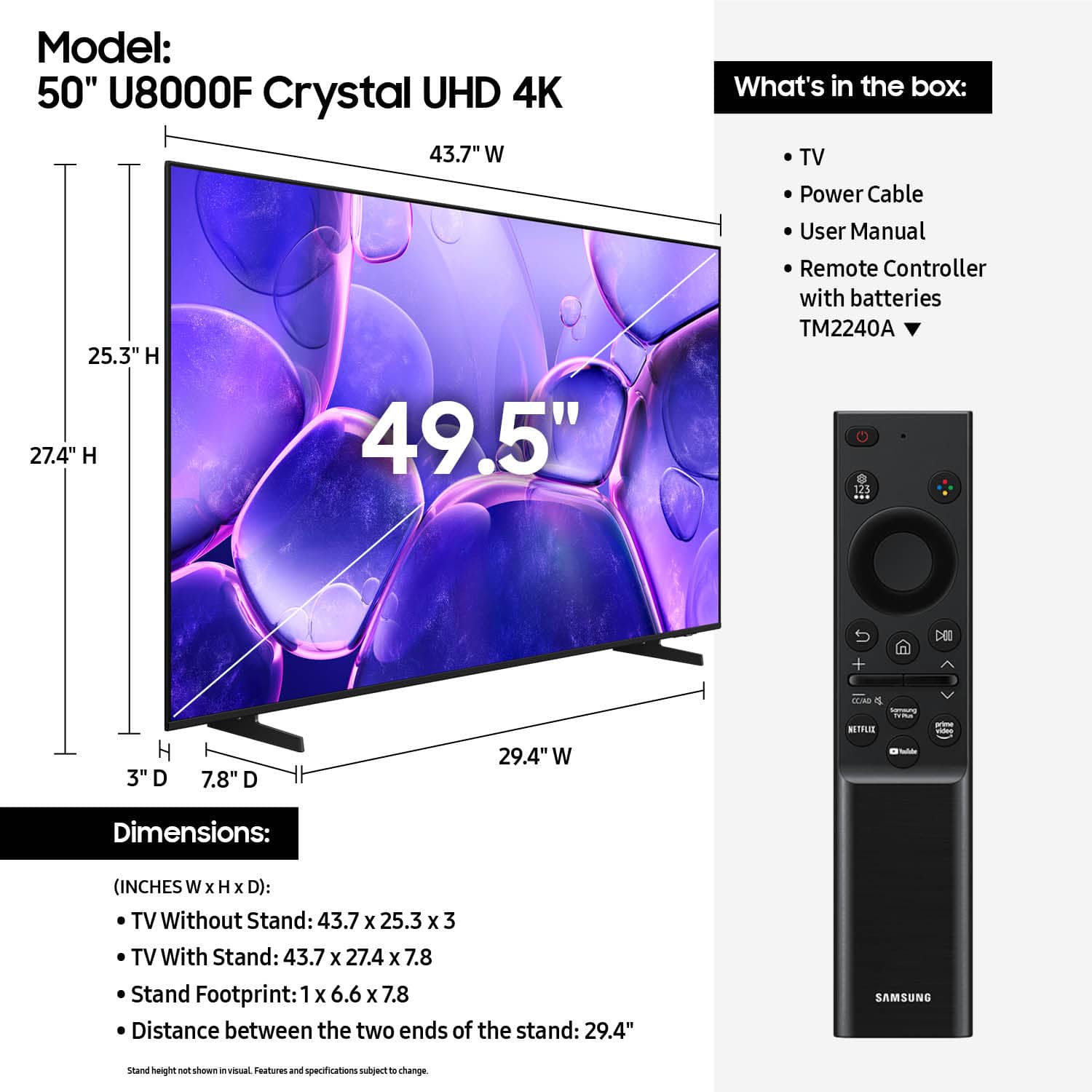












- Model:
- UN50U8000FFXZA
- SKU:
- 10187731
Rating by feature
- Picture Quality
Rating 4.7 out of 5 stars
- Sound Quality
Rating 4.5 out of 5 stars
- Brightness
Rating 4.7 out of 5 stars
Not happy with the delivery service
||Posted . Owned for 2 weeks when reviewed.This reviewer received promo considerations or sweepstakes entry for writing a review.It’s a great TV. I just found a cheaper one elsewhere so I ended up returning it and I was not happy that I did not receive the first order.
I would recommend this to a friendBedroom TV
||Posted . Owned for 2 months when reviewed.This reviewer received promo considerations or sweepstakes entry for writing a review.I got this TV to replace an older unit in my master bedroom. I had gone to streaming most of my TV and needed a unit that could provide good streaming service. This TV has worked out perfectly.
I would recommend this to a friendNew tv
||Posted .This reviewer received promo considerations or sweepstakes entry for writing a review.It might be my age but this tv is harder to navigate than my Roku. I am enjoying the larger screen.
I would recommend this to a friendTV Review
||Posted .This reviewer received promo considerations or sweepstakes entry for writing a review.Remote control is fragile. Some additional setup is required
I would recommend this to a friendPercent for my bedroom
||Posted . Owned for 2 weeks when reviewed.This reviewer received promo considerations or sweepstakes entry for writing a review.Got lucky and my bedroom tv went down labor day weekend. Picked this up at BestBuy at a solid price. No complaints. Replaced a 2017 tv so major jump in general tech.
I would recommend this to a friendSamsung is the best
||Posted . Owned for 1 month when reviewed.This reviewer received promo considerations or sweepstakes entry for writing a review.Knowing my IT knowledge is limited, it was very easy to set up.
I would recommend this to a friendGreat price
||Posted .This reviewer received promo considerations or sweepstakes entry for writing a review.Great price and exlenecent service happy with service
I would recommend this to a friendGreat tv
||Posted . Owned for 2 months when reviewed.This reviewer received promo considerations or sweepstakes entry for writing a review.We had a television that wouldnt get internet signal consistently. So we bought this television and it has so much more than the other one.
I would recommend this to a friendAwesome TV
||Posted . Owned for 2 months when reviewed.This reviewer received promo considerations or sweepstakes entry for writing a review.I bought this TV for my Dad and he is loving it. He loves the Samsungs channels because he can choose from hundreds of channels. It has all the apps you want and more. Great TV.
I would recommend this to a friendPoor quality, too dark and keeps crashing. Avoid.
||Posted . Owned for 1 month when reviewed.This reviewer received promo considerations or sweepstakes entry for writing a review.Too dark, and no way to fix. None of the brightness or viewing setting work to address this issue. It makes everything unwatchable. Additionally, the plugs are straight from the back of the unit, so it doesn’t work for wall mounting. Our last Samsung had plugs to the side for this. All the streaming applications keep frapping out as well, and we are forced to reboot the TV & software multiple times a week. We bought this TV a couple months ago to replace another Samsung that died after 3 years. Overall very disappointed with Samsung. We’re returning this one and won’t be buying another.
No, I would not recommend this to a friendBrand response from Samsung
Posted .Hi CaraGPW,
We’re sorry to hear you’re not fully satisfied with the picture quality on your Samsung U8000F TV. If the image appears too dark, we suggest disabling certain energy-saving features, which can automatically adjust brightness and affect how the screen looks.
Go to: Settings > All Settings > General & Privacy > Power and Energy Saving, then turn off Brightness Optimization, Energy Saving Solution, Motion Lighting, and/or Contrast Enhancer.
You can also adjust the Picture Mode to better suit your environment: Settings > All Settings > Picture > Picture Mode
• Standard – Default mode for general viewing
• Dynamic – Brighter and clearer, ideal for well-lit rooms
• Movie – Best for dark room viewing
• Eco – Energy-saving mode
• Filmmaker Mode – Preserves content as intended by creators
To fine-tune brightness, go to: Home > left directional key > Settings > All Settings > Picture > Expert Settings, then adjust the Brightness level (0–50) to your preference.
Lastly, please make sure your TV is running the latest firmware: Home > Home > left directional key > Settings > Support > Software Update > Update Now
We hope these tips help improve your viewing experience. If you need further support, feel free to contact us at 1-800-SAMSUNG, 8AM – 12AM EST, 7 days a week. LiveChat is also available via the ‘Support’ link on our website.
~Samsung Advisor
Samsung 50 good buy
||Posted . Owned for 1 month when reviewed.This reviewer received promo considerations or sweepstakes entry for writing a review.Great TV and bang for the buck. Overall positive and a good experience working with the Best Buy team.
No, I would not recommend this to a friendTime response
||Posted .This reviewer received promo considerations or sweepstakes entry for writing a review.Excellent Service-Thanks to the whole Best Buy Team
I would recommend this to a friend- Cons mentioned:Connectivity
disappointed
||Posted . Owned for 5 months when reviewed.This reviewer received promo considerations or sweepstakes entry for writing a review.the power connection was broken so I couldnt power up the tv to check it out. so I cant give an honest opinion. had to return it. very disappointing because I really wanted to try this Samsung tv since I heard they are really good TV's.
No, I would not recommend this to a friendBrand response from Samsung
Posted .Hi RobertH,
We're very sorry to hear about your experience receiving a broken TV. Should you give Samsung another look in the future, we’d be glad to assist with setup, settings, or features. You can contact us at 1-800-SAMSUNG, 8AM – 12AM EST daily, or LiveChat with a representative at the ‘Support’ link on our website.
~Samsung Advisor
Samsung t.v.
||Posted .This reviewer received promo considerations or sweepstakes entry for writing a review.Samsung one of my favorite name brands..got this 50" t.v. for my bedroom (my old one gave up) and love it...I recommend
I would recommend this to a friendEasy choice
||Posted . Owned for 3 weeks when reviewed.This reviewer received promo considerations or sweepstakes entry for writing a review.Samsung tv’s have excellent picture quality and easy set up.
I would recommend this to a friendSamsung tv's are the best!
||Posted . Owned for 3 weeks when reviewed.This reviewer received promo considerations or sweepstakes entry for writing a review.The 50 inch Samsung Tv is awesome! Just want my daughter wanted for her birthday!
I would recommend this to a friendCrystal UHD Tv
||Posted .This reviewer received promo considerations or sweepstakes entry for writing a review.Amazing tv so many steams I could watch for free and I would buy this product again in the future. 10/10 would recommend
I would recommend this to a friendGreat value
||Posted . Owned for 1 month when reviewed.This reviewer received promo considerations or sweepstakes entry for writing a review.One of my favorite things that Best Buy provides is Open Box availability for products. I always get a great item at a great price, and this was no exception.
I would recommend this to a friendSecond Samsung TV
||Posted .This reviewer received promo considerations or sweepstakes entry for writing a review.Great service setting uo this new TV. Second Samsung i have purchased. Very pleased with geek squad attention!!
I would recommend this to a friendExcellent
||Posted .This reviewer received promo considerations or sweepstakes entry for writing a review.Excellent Excellent Excellent Excellent Excellent very
I would recommend this to a friend