Customer Ratings & Reviews

















- Model:
- UN55U8000FFXZA
- SKU:
- 10517909
Rating by feature
- Picture Quality
Rating 4.8 out of 5 stars
- Sound Quality
Rating 4.6 out of 5 stars
- Brightness
Rating 4.7 out of 5 stars
Beatiful picture
||Posted . Owned for 2 weeks when reviewed.This reviewer received promo considerations or sweepstakes entry for writing a review.The images are very sharp and the colors are very bright. Easy to use remote. Also good sound quality. Easy set up.
I would recommend this to a friendSamsung 55" UHD 4K customer evaluation
||Posted . Owned for 1 month when reviewed.This reviewer received promo considerations or sweepstakes entry for writing a review.The TV is ok but the screen brightness was darker than expected and the details seemed not as sharp as expected possibly due to the automatic adjustment incorporated in the TV when used in a darker location. It was somewhat difficult to set up for the first time and required discussion with a Best Buy sales person who suggested the picture be set to the dynamic mode which definitely helped. There is a delay in the volume response when using the sound bar with the HDMI connection which was also not expected and a bit annoying and there is occasionally a little static with the sound bar with either the fiber optic or the HDMI connections. It was not considered any better picture quality than the 50" Vizio model it replaced and since that TV wasn't purchased from Best Buy they would not facilitate its return for possible repair. In hindsight we should have requested Best Buy to replace the Samsung unit with a better model however we had already spent more than expected on this one.
No, I would not recommend this to a friendBrand response from Samsung
Posted .Hi DogGramma,
Thank you for sharing your experience with us. I have a few recommendations that may improve the picture and sound connection on your U8000F TV.
First, let's ensure you are running the latest Firmware. Go to Settings> Support> Software Update.
For the sound delay you mentioned please try the below:
1. Adjust Digital Audio Delay. You can manually increase the audio delay to better match the video: Settings > All Settings > Sound > Expert Settings > Digital Output Audio Delay
2. Enable Audio Pass-Through. Samsung TVs include an audio pass-through option, which sends the audio signal directly to your connected soundbar or receiver without additional processing by the TV. This can reduce delay when using external audio devices: Settings > All Settings > Sound > Expert Settings > Digital Audio Output Format > Pass-Through
To explore picture mode options, navigate to: Home > Left directional button > Settings > All Settings > Picture > Picture Mode. Options include:
• Standard – Ideal for general viewing
• Dynamic – Brighter and more vibrant for well-lit spaces
• Eco – Optimized for energy efficiency
• Movie – Best for viewing in low light
• Filmmaker Mode – Preserves the content creator’s intent and disables motion smoothing for supported content
You can further customize your image by going to: Settings > All Settings > Picture > Expert Settings, where you can adjust Brightness, Contrast, Color Tone, Sharpness, Contrast Enhancer and more.
If you’d like help finding the best picture settings for your preferences, please don’t hesitate to contact Samsung Support at 1-800-SAMSUNG, available 8AM – 12AM EST, 7 days a week. You can also LiveChat with an agent or explore additional resources on our website by clicking the ‘Support’ link.
~ Samsung Advisor
Samsung 55 U800F Crystal tv
||Posted .This reviewer received promo considerations or sweepstakes entry for writing a review.This replaced a much older same sized Samsung. the picture and vibrance, comparatively is amazing. The pricing on black Friday equally amazing. this is a great buy for the pricing!
I would recommend this to a friendTv
||Posted .This reviewer received promo considerations or sweepstakes entry for writing a review.Excellent tv great picture quality. Light weight for the size
I would recommend this to a friendNice TV
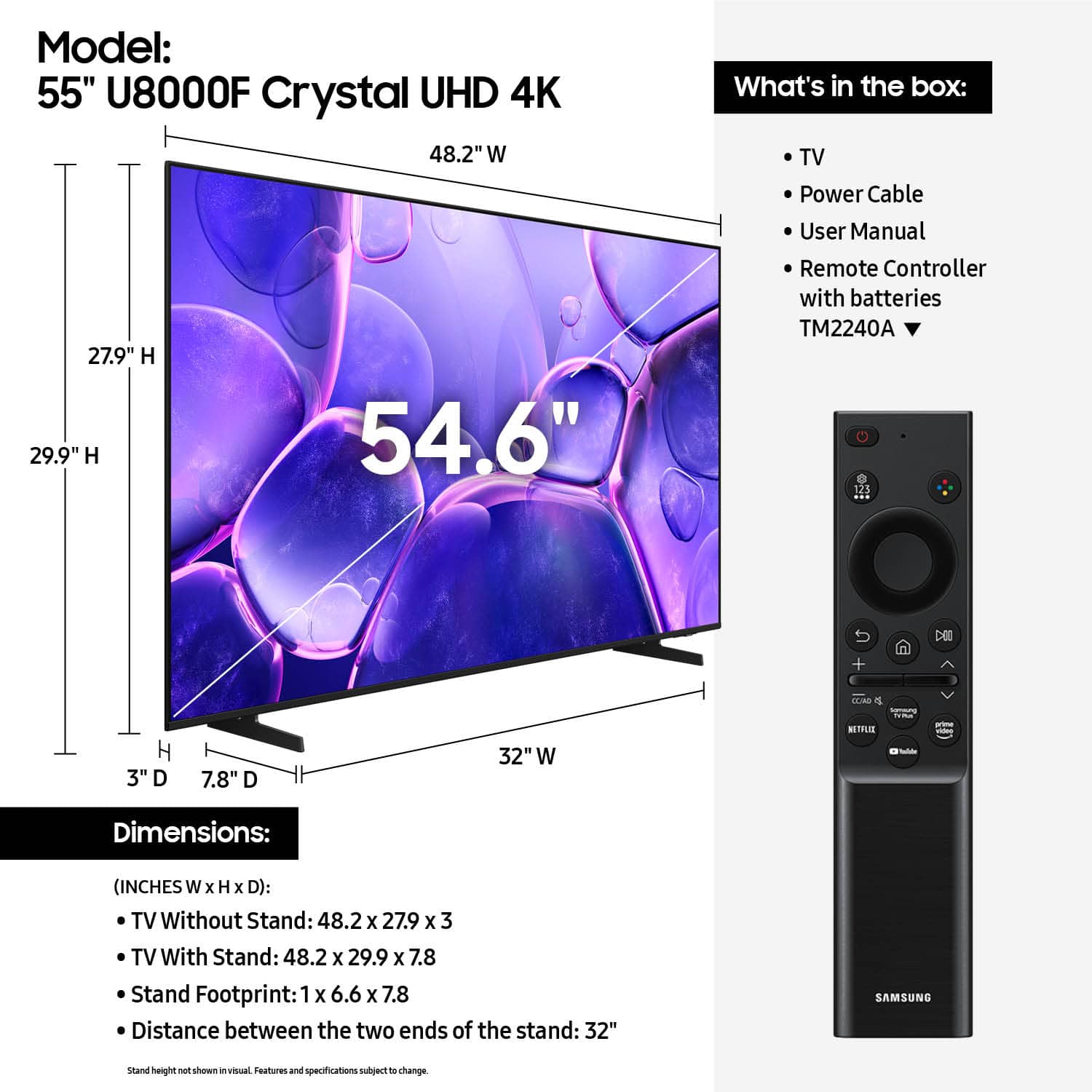
||Posted . Owned for 2 weeks when reviewed.This reviewer received promo considerations or sweepstakes entry for writing a review.Very happy with our new tv. Picture quality is excellent. I really like the feet that came with the tv they set inwards and not so far on outer edge. It fits perfectly on my tv stand. We added a sound bar since the sound was pretty low not great.
I would recommend this to a friendGreat looking TV
||Posted .This reviewer received promo considerations or sweepstakes entry for writing a review.Great response with the remote picture looks good. Great value for the price that you pay for this size TV.
I would recommend this to a friendSamsung TV
||Posted .This reviewer received promo considerations or sweepstakes entry for writing a review.Happy with the nice clear quality picture. Top quality color as well.
I would recommend this to a friendSamsung TV
||Posted . Owned for 3 weeks when reviewed.This reviewer received promo considerations or sweepstakes entry for writing a review.Very good picture. Easy setup. Nice television for the price.
I would recommend this to a friendNice tv
||Posted . Owned for 1 week when reviewed.This reviewer received promo considerations or sweepstakes entry for writing a review.Nice tv with great sound, i like it. I like it very much
I would recommend this to a friendSamsung is my favorite!
||Posted . Owned for 1 month when reviewed.This reviewer received promo considerations or sweepstakes entry for writing a review.Samsung is my favorite. I recently got an LG and the Samsung remote is much easier. The LG keeps wanting to update apps all the time including passwords. I will only get Samsung tvs in the future. Picture is great!
I would recommend this to a friendExpect a little setup.
||Posted . Owned for 1 week when reviewed.This reviewer received promo considerations or sweepstakes entry for writing a review.Howdy, Bought this open box. Had to figure out setting default source so it would stop going to HUB for input selection every time. Had to set Cable receiver to 1080p to fit screen mode. But SAMSUNG support was great. They walked me through the process, and it works as desired now. Color, Brightness and Density are great.
I would recommend this to a friendGood to go
||Posted .This reviewer received promo considerations or sweepstakes entry for writing a review.This Tv was very easy to setup. I just plugged in my other devices into it took very little time. I use it with my Laptop as a monitor, to watch movies on my Ultra HD Blu-Ray DVD player, for my Tv service provider and connected it to my internet. I recently downloaded the app for my Tv service and can get rid of their box saving me a little.
I would recommend this to a friendSamsung 55” TV
||Posted . Owned for 2 weeks when reviewed.This reviewer received promo considerations or sweepstakes entry for writing a review.Great quality great picture and the price was very good.
I would recommend this to a friendGreat purchase for the price
||Posted . Owned for 4 months when reviewed.This reviewer received promo considerations or sweepstakes entry for writing a review.Great picture and easy to use. The Samsung TV Plus app is great for watching anything one could want without any expensive subscription fees.
I would recommend this to a friendSamsung 55 inch
||Posted . Owned for 1 month when reviewed.This reviewer received promo considerations or sweepstakes entry for writing a review.So far we are very pleased. The picture quality is great and the price is great as well. No complaints. I would recommend this tv
I would recommend this to a friendSamsung TV
||Posted . Owned for 3 weeks when reviewed.This reviewer received promo considerations or sweepstakes entry for writing a review.This one replaced an older Samsung. For the price, very nice TV!
I would recommend this to a friendGreat TV!
||Posted .This reviewer received promo considerations or sweepstakes entry for writing a review.Great TV and wonderful install! I would highly suggest this TV!
I would recommend this to a friendEndless viewing options
||Posted . Owned for 3 weeks when reviewed.This reviewer received promo considerations or sweepstakes entry for writing a review.Replaced my fifteen-year-old 47" Visio for the Samsung 55" U8000F for my bedroom. Now i have three Samsung smart TVs and love them all. I'm still learning how to navigate the new one but that shouldn't take long. I'll continue to buy Samsung products
I would recommend this to a friendGood but missing a key component
||Posted . Owned for 5 months when reviewed.This reviewer received promo considerations or sweepstakes entry for writing a review.Good but missing the audio digital output. Made it challenging to connect to a theater system. Would not buy a TV without this feature. Picture is fine..no complaint.
No, I would not recommend this to a friendBeing Loyal Customer
||Posted . Owned for 2 weeks when reviewed.This reviewer received promo considerations or sweepstakes entry for writing a review.OPEN BOX or NEW buying with Best Buy is always a guarantee, since 2010. Really nice display and sound!!!
I would recommend this to a friend