Customer Ratings & Reviews





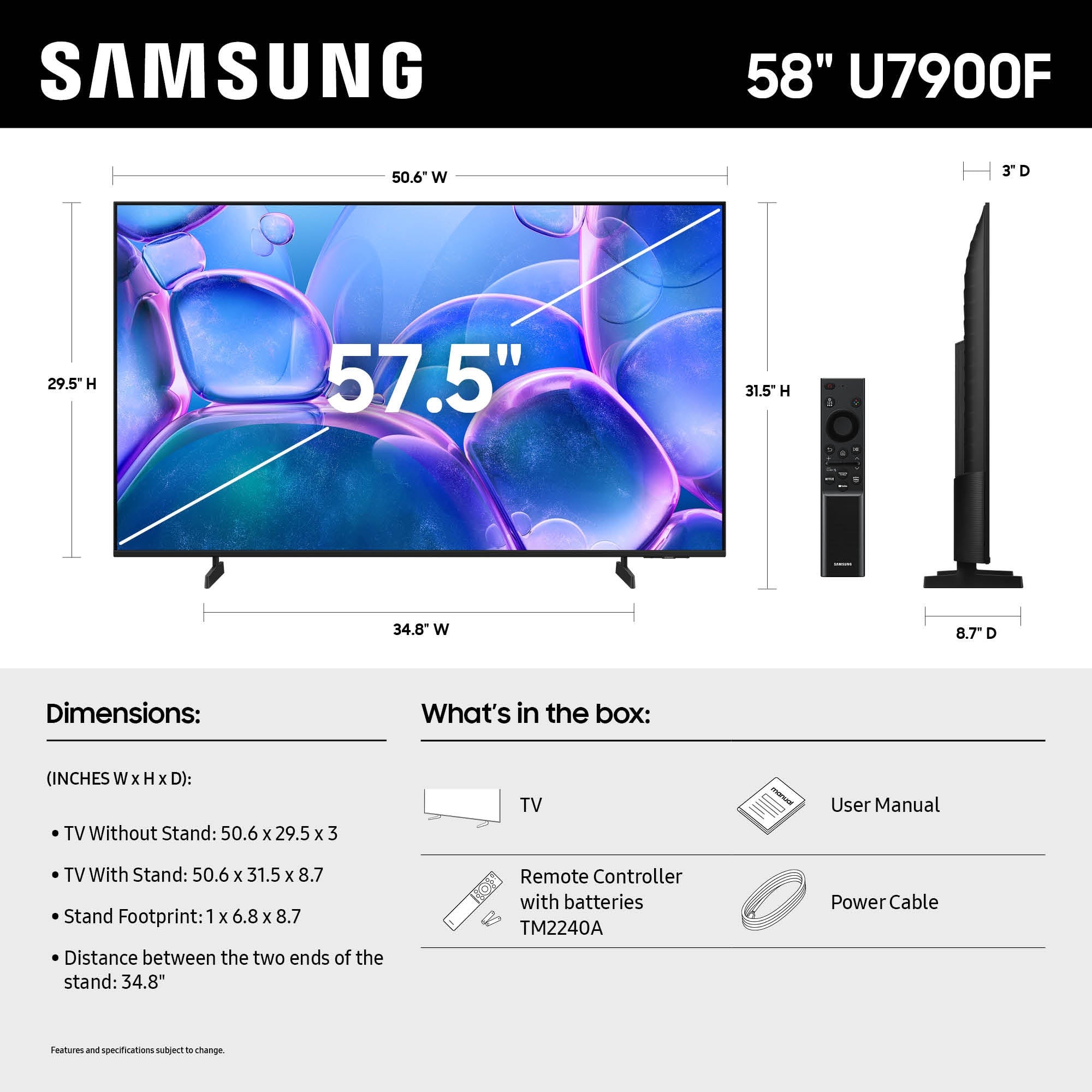






- Model:
- UN58U7900FFXZA
- |
- SKU:
- 10901725
Customer reviews
Rating 4.6 out of 5 stars with 174 reviews
(174 customer reviews)Rating by feature
- Picture Quality4.8
Rating 4.8 out of 5 stars
- Sound Quality4.5
Rating 4.5 out of 5 stars
- Brightness4.8
Rating 4.8 out of 5 stars
Rated 5 out of 5 stars
Excellent TV for our needs!
||Posted . Owned for 2 weeks when reviewed.This reviewer received promo considerations or sweepstakes entry for writing a review.Works great, excellent color, easy to operate and has performed well so far. Very happy with my purchase and got it at a great Black Friday price!
This review is from Samsung - 58" Class U7900 Series UHD 4K Smart Tizen TV (2025)
I would recommend this to a friendRated 5 out of 5 stars
Great Tv
||Posted . Owned for 3 weeks when reviewed.This reviewer received promo considerations or sweepstakes entry for writing a review.Great tv for the price perfect size for the room.
This review is from Samsung - 58" Class U7900 Series UHD 4K Smart Tizen TV (2025)
I would recommend this to a friendRated 5 out of 5 stars
Cool tv
||Posted . Owned for 1 month when reviewed.This reviewer received promo considerations or sweepstakes entry for writing a review.Bright clear and colrful. Good sound too. The smart features are awesome and you can use your phone as a remote.
This review is from Samsung - 58" Class U7900 Series UHD 4K Smart Tizen TV (2025)
I would recommend this to a friendRated 5 out of 5 stars
58" Samsung 4k TV
||Posted . Owned for 1 month when reviewed.This reviewer received promo considerations or sweepstakes entry for writing a review.I watched How The Grinch Stole Christmas the really rare Jim Carey Grinchmas Edition in 4k bluray. The picture was sharper and sound was very excellent
This review is from Samsung - 58" Class U7900 Series UHD 4K Smart Tizen TV (2025)
I would recommend this to a friendRated 5 out of 5 stars
As expected!
||Posted . Owned for 3 weeks when reviewed.This reviewer received promo considerations or sweepstakes entry for writing a review.This Samsung Smart tv is working as I expected to. Great features and looks good mounted. A welcome addition to the other three Samsung tvs we have in the bedrooms.
This review is from Samsung - 58" Class U7900 Series UHD 4K Smart Tizen TV (2025)
I would recommend this to a friendRated 5 out of 5 stars
Must Buy Samsung TV
||Posted . Owned for 3 weeks when reviewed.This reviewer received promo considerations or sweepstakes entry for writing a review.I like the the size and quality of the TV its alot nicer then expected, also there is little too no glare when using during the day the built in speakers are very nice as well i would buy another one
This review is from Samsung - 58" Class U7900 Series UHD 4K Smart Tizen TV (2025)
I would recommend this to a friendRated 5 out of 5 stars
Can't get better for the price. It's a Samsung!
||Posted . Owned for 1 month when reviewed.This reviewer received promo considerations or sweepstakes entry for writing a review.Works great and has great quality. The software is great, and the resolution is perfect! Love it
This review is from Samsung - 58" Class U7900 Series UHD 4K Smart Tizen TV (2025)
I would recommend this to a friendRated 5 out of 5 stars
Great T.V
||Posted .This reviewer received promo considerations or sweepstakes entry for writing a review.I like the 58 inch a lot better than the 55, the captions are a little bigger. such a clear picture from what I had before
This review is from Samsung - 58" Class U7900 Series UHD 4K Smart Tizen TV (2025)
I would recommend this to a friendRated 5 out of 5 stars
I love it
||Posted . Owned for 1 week when reviewed.This reviewer received promo considerations or sweepstakes entry for writing a review.This is my best tv purchase I’m so happy with it this is my second tv purchase
This review is from Samsung - 58" Class U7900 Series UHD 4K Smart Tizen TV (2025)
I would recommend this to a friendRated 5 out of 5 stars
58in Samsung
||Posted .This reviewer received promo considerations or sweepstakes entry for writing a review.So far so good. No problems. Ordered online picked up curbside. Seven was the employee that brought it out. She was very quick and knowledgeable.
This review is from Samsung - 58" Class U7900 Series UHD 4K Smart Tizen TV (2025)
I would recommend this to a friendRated 5 out of 5 stars
Nice addition to my living room .
||Posted . Owned for 2 weeks when reviewed.This reviewer received promo considerations or sweepstakes entry for writing a review.This tv works great , has a great picture and was easy to setup .
This review is from Samsung - 58" Class U7900 Series UHD 4K Smart Tizen TV (2025)
I would recommend this to a friendRated 4 out of 5 stars
Good tv for good price
||Posted . Owned for 3 weeks when reviewed.This reviewer received promo considerations or sweepstakes entry for writing a review.We originally went to Best Buy with the intention of buying a different tv but after discussing the quality this one was suggested to us as a better tv in the same price range. Glad we went with this one. Good picture, easy to use and good price.
This review is from Samsung - 58" Class U7900 Series UHD 4K Smart Tizen TV (2025)
I would recommend this to a friendRated 5 out of 5 stars
Best TV ever!
||Posted .This reviewer received promo considerations or sweepstakes entry for writing a review.Beautiful picture! I would recommend a Samsung TV over the other brands. Excellent quality!
This review is from Samsung - 58" Class U7900 Series UHD 4K Smart Tizen TV (2025)
I would recommend this to a friendRated 5 out of 5 stars
Samsung tv
||Posted . Owned for 2 weeks when reviewed.This reviewer received promo considerations or sweepstakes entry for writing a review.Love everything about this tv and all the features
This review is from Samsung - 58" Class U7900 Series UHD 4K Smart Tizen TV (2025)
I would recommend this to a friendRated 5 out of 5 stars
Very happy
||Posted .This reviewer received promo considerations or sweepstakes entry for writing a review.Great quality and was easy to set up. We love it and is our second Samsung TV.
This review is from Samsung - 58" Class U7900 Series UHD 4K Smart Tizen TV (2025)
I would recommend this to a friendRated 5 out of 5 stars
Samsung 58” tv
||Posted . Owned for 3 weeks when reviewed.This reviewer received promo considerations or sweepstakes entry for writing a review.This tv is working properly. This tv is larger than what we had previously. Like the larger screen. Previous tv went out so this was a replacement.
This review is from Samsung - 58" Class U7900 Series UHD 4K Smart Tizen TV (2025)
I would recommend this to a friendRated 5 out of 5 stars
Would reccomemnd
||Posted .This reviewer received promo considerations or sweepstakes entry for writing a review.So far the TV is holding up very well. Picture is crisp and clear. Paired easily with the samsung sound bar and subwoofer I had.
This review is from Samsung - 58" Class U7900 Series UHD 4K Smart Tizen TV (2025)
I would recommend this to a friendRated 5 out of 5 stars
Tv Samsung
||Posted .This reviewer received promo considerations or sweepstakes entry for writing a review.Really good tv so far we haven’t had any issues with it what so ever.
This review is from Samsung - 58" Class U7900 Series UHD 4K Smart Tizen TV (2025)
I would recommend this to a friendRated 5 out of 5 stars
Samsung
||Posted .This reviewer received promo considerations or sweepstakes entry for writing a review.I recently got this TV, and overall, I'm pretty impressed. The picture quality is excellent.
This review is from Samsung - 58" Class U7900 Series UHD 4K Smart Tizen TV (2025)
I would recommend this to a friendRated 5 out of 5 stars
Conan Rules
||Posted .This reviewer received promo considerations or sweepstakes entry for writing a review.This television has a crisp, clear picture with easy set up and great sound. Conan Obrien an added plus
This review is from Samsung - 58" Class U7900 Series UHD 4K Smart Tizen TV (2025)
I would recommend this to a friend