Customer Ratings & Reviews




- Model:
- S820-ST-OR-US
- SKU:
- 12373830
Rating by feature
- Sound Quality
Rating 4.7 out of 5 stars
- Battery Life
Rating 4.7 out of 5 stars
- Connectivity
Rating 4.8 out of 5 stars
Difficult to turn on and sync poor battery life
||Posted . Owned for 2 months when reviewed.This reviewer received promo considerations or sweepstakes entry for writing a review.It takes many many tried to sync it to my new tv i bought. And if i dont plug it in everytine after using, it will die and not turn on
No, I would not recommend this to a friendSound great, microphone sucks.
||Posted . Owned for 1 month when reviewed.This reviewer received promo considerations or sweepstakes entry for writing a review.I absolutely loved my openrun pro while they worked, less than two months. I was excited to see the openrun pro 2 had a usb c. But wad disappointed with the increased size and terrible microphone. Wouldn’t recommend either pair
No, I would not recommend this to a friendNot bad, still on the quiet side
||Posted . Owned for 1 month when reviewed.This reviewer received promo considerations or sweepstakes entry for writing a review.They do the job to allow me to use these for work. At max volume they are loud enough to hear, but in a loud welding shop far from ideal.
No, I would not recommend this to a friendGood but not great
||Posted . Owned for 2 weeks when reviewed.This reviewer received promo considerations or sweepstakes entry for writing a review.These are cool and okay. I have made the mistake of going from the openairs to these. The openair sound have better sound and louder. Of course these sound better than the open com 2.
I would recommend this to a friendNo help for my ear pain.
||Posted . Owned for 1 month when reviewed.This reviewer received promo considerations or sweepstakes entry for writing a review.I bought these headphones to see if I could reduce the ear pain that I was experiencing by using over the head headphones. These bone conduction headphones made by ear pain worse.
No, I would not recommend this to a friendMeh.
||Posted . Owned for 1 week when reviewed.This reviewer received promo considerations or sweepstakes entry for writing a review.Thw sound waa great until onw of the earbuds started to go out 4 days later
No, I would not recommend this to a friendBrand response from Shokz
Posted .Hi there- We're sorry to hear your OpenRun Pro 2 is not working properly. We have a two-year warranty on all Shokz, we'd be happy to assist you in filing a warranty claim so you can receive a replacement pair! Please contact our Customer Happiness Team so we can assist you further or visit our website directly to submit a warranty claim. Thank you!

Too small
||Posted .This reviewer received promo considerations or sweepstakes entry for writing a review.These are too big for my ears, like most EarPods I have tried
No, I would not recommend this to a friendEarbuds
||Posted . Owned for 4 months when reviewed.This reviewer received promo considerations or sweepstakes entry for writing a review.Not as great as other brands. But they work as advertised
No, I would not recommend this to a friendBrand response from Shokz
Posted .Hi there- Shokz here! We're very sorry to hear this has been your experience. We’re excited to share that we’ve just upgraded to the latest firmware version, and it can be updated via the Shokz app for the best experience with your OpenRun Pro 2. Please reach out to our Customer Happiness Team if you have any questions. Thanks!
Not noise canceling
||Posted . Owned for 3 months when reviewed.This reviewer received promo considerations or sweepstakes entry for writing a review.Work well but if you are riding a mower not so much.
I would recommend this to a friendDon’t waste the money.
||Posted . Owned for 3 weeks when reviewed.This reviewer received promo considerations or sweepstakes entry for writing a review.Bought these for my husband on January 21, 2026 and they stopped working February 11, 2026. Best Buy chose not to do anything and would not provide any help on warranty information.
No, I would not recommend this to a friendBrand response from Shokz
Posted .Hi Ashley -Shokz here! We're very sorry to hear this has been your experience. All Shokz come with a 2-year warranty. Please visit our website to submit your claim or to contact our Customer Happiness Team. Once on our website, click "Support" and "Warranty Claim". *Friendly Reminder- Shokz take 1.5-2 hours to fully charge. To ensure the longest battery life, it’s important to remove Shokz from the charger once the light turns blue.* Thank you!
uncomfortable
||Posted . Owned for 1 month when reviewed.This reviewer received promo considerations or sweepstakes entry for writing a review.After wearing the posts for a while, your head starts to hurt. I don't recommend them for that reason, but as for the rest, they're good, but my head hurt because they fit so tightly to my skull that I couldn't even stand them for half an hour, so I decided to buy another type.
No, I would not recommend this to a friendThey are ok
||Posted . Owned for 5 months when reviewed.This reviewer received promo considerations or sweepstakes entry for writing a review.Loved them but unfortunately they made my ears hurt if constantly used
No, I would not recommend this to a friendSound is to quiet
||Posted . Owned for less than 1 week when reviewed.This reviewer received promo considerations or sweepstakes entry for writing a review.Wayyyyyyyyy to quiet. On a car ride and trying to watch the nfl draft. Sound is so quiet I have to use my phones speakers. Id rather pay for a $20 pair of headphones over these.
No, I would not recommend this to a friendBrand response from Shokz
Posted .Hi Matthew- Shokz here. We're very sorry to hear this has been your experience. We’re excited to share that we’ve just upgraded to the latest firmware version, and it can be updated via the Shokz app for the best experience with your OpenRun Pro 2. There is also a phone setting that may resolve the low volume issue. -On the iPhone, go to Settings > Sound & Haptics > Headphone Safety, make sure that the Reduce Loud Audio Feature is switched off as this will affect the volume of the headphone. -On an Android, go to the Bluetooth Settings on the phone, find the headphone and make sure that the Absolute Volume feature is switched on for it. If you decide these are not a good fit for you, we kindly ask that you reach out to BestBuy Customer Service directly to learn of their return policy. Thank you!
Don’t get the 2nd Gen.
||Posted . Owned for 2 weeks when reviewed.This reviewer received promo considerations or sweepstakes entry for writing a review.Max volume less than previous generation, sound quality seemingly not as good as the first generation.
No, I would not recommend this to a friendBrand response from Shokz
Posted .Hi there- Shokz here! We're very sorry this has been your experience.We highly recommend downloading the Shokz app to customize your listening experience. If you decide these are not a good fit for you, we kindly ask that you reach out to BestBuy Customer Service directly to learn of their return policy. Thanks!
Not a fan
||Posted . Owned for 3 weeks when reviewed.This reviewer received promo considerations or sweepstakes entry for writing a review.Not a fan. Lots of friends had been raving about the headphones, especially as runners but I just didn’t like them. They would shift a lot which was super annoying. I wanted to give them a chance because of safety but whenever I’d pass busy streets, which was 50% of the time given I live in Los Angeles, I couldn’t really hear anything.
No, I would not recommend this to a friendBrand response from Shokz
Posted .Hi Stephanie- Shokz here. We're very sorry to hear this has been your experience. We’re excited to share that we’ve just upgraded to the latest firmware version, and it can be updated via the Shokz app for the best experience with your OpenRun Pro 2. There is also a phone setting that may resolve the low volume issue. -On the iPhone, go to Settings > Sound & Haptics > Headphone Safety, make sure that the Reduce Loud Audio Feature is switched off as this will affect the volume of the headphone. -On an Android, go to the Bluetooth Settings on the phone, find the headphone and make sure that the Absolute Volume feature is switched on for it. If you decide these are not a good fit for you, we kindly ask that you reach out to BestBuy Customer Service directly to learn of their return policy. Thank you!

Light & comfortable, decent sound, easy charging
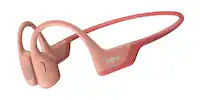
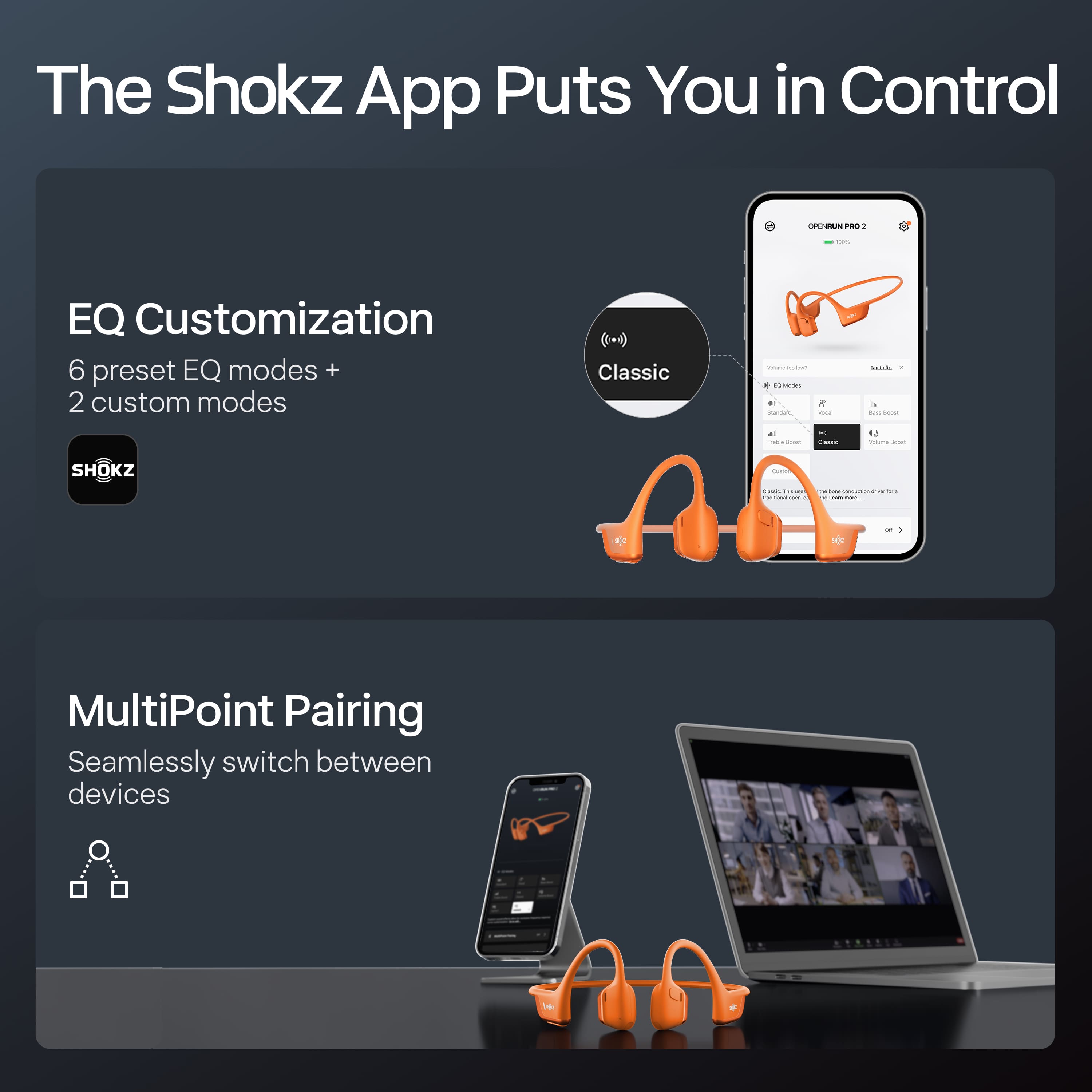
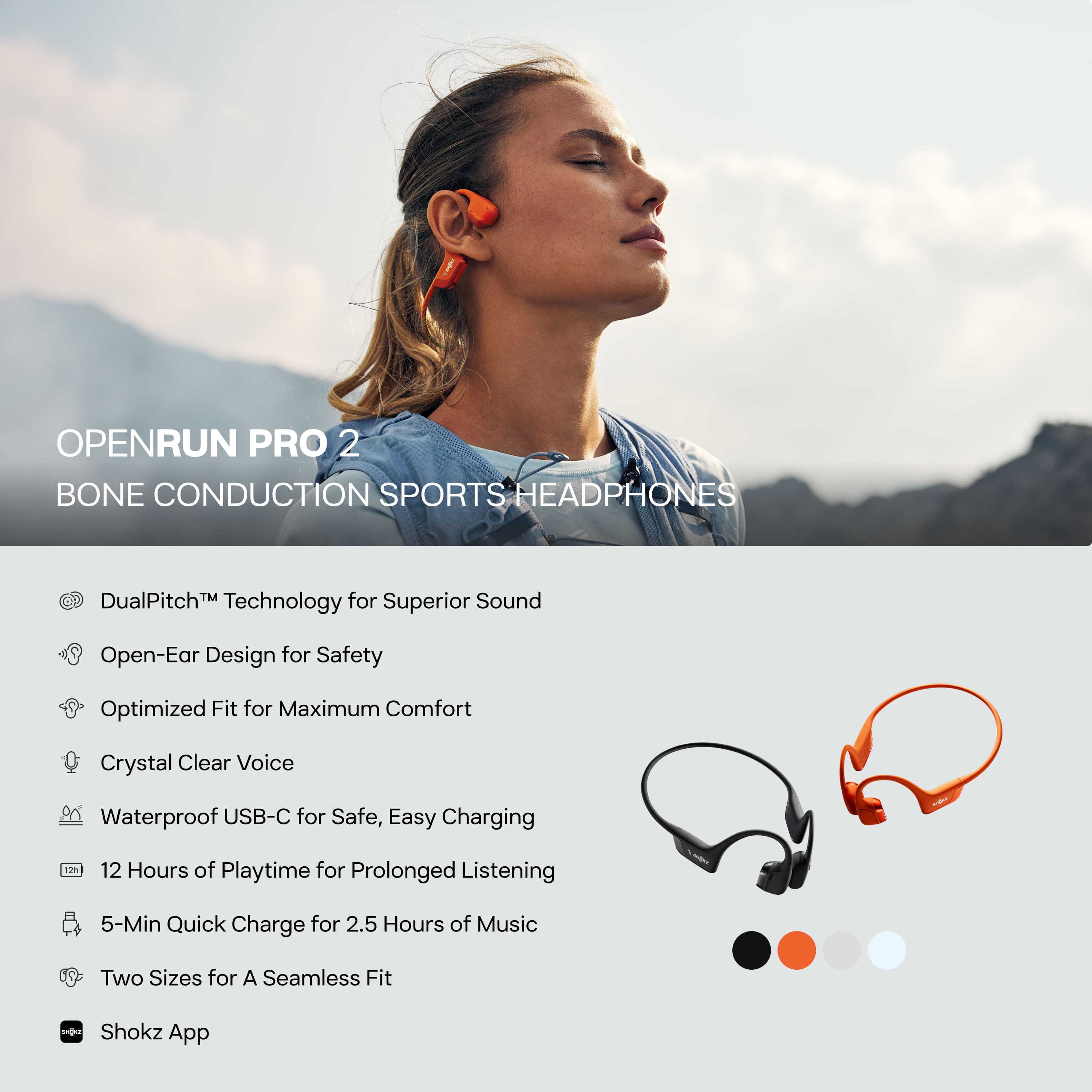
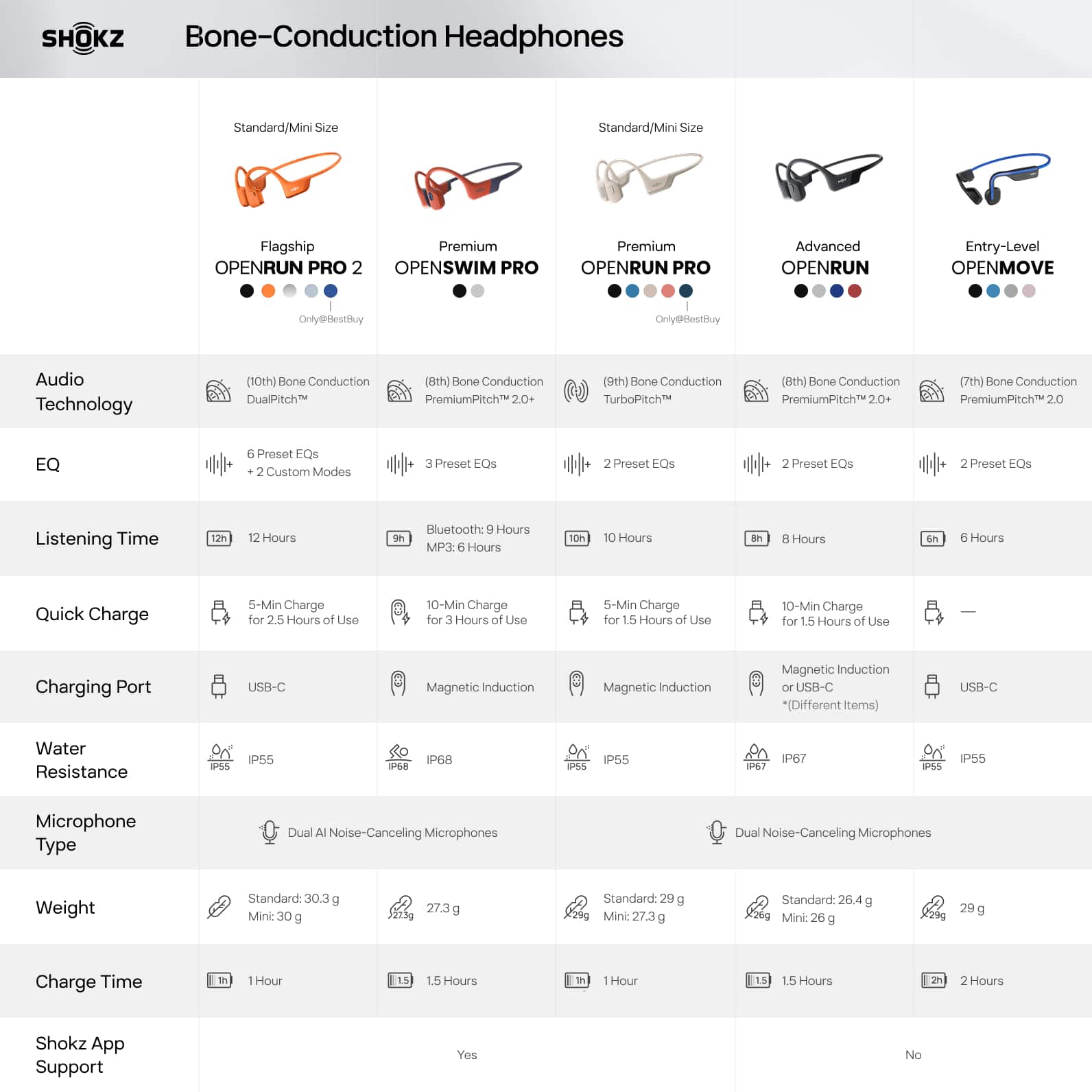
|Posted .This reviewer received promo considerations or sweepstakes entry for writing a review.These OpenRun Pro 2 from Shokz are very lightweight with a minimalistic design. They’re comfortable to wear, even with sunglasses or a bike helmet. They’ve stayed in place securely in position while I walk, run, bike, etc. There’s no uncomfortable squeezing or bouncing/shifting around. Pairing was very easy, and the button layout is intuitive. The headphones support multi-point pairing (connecting to multiple devices simultaneously), but I had to install the Shokz app and enable this feature in the settings before using it. The app also allows for adjusting the EQ settings. Conveniently, there is a USB-C port for charging, so I can use the same cord as other devices and not have to worry about a proprietary connector. The open-ear design is great for running or any other activity where you need to be able to hear what’s going on around you. I also find it more comfortable than having something in my ear, especially for longer runs. As far as sound quality goes, these have come a long way from the first generation of open-ear headphones, and I was pleasantly surprised about how good music sounded through them. Overall, these are a great way to add music to my workouts, and I’m happy with them.
I would recommend this to a friendDie fast!
||Posted . Owned for 2 weeks when reviewed.This reviewer received promo considerations or sweepstakes entry for writing a review.They are too big. Also, they do not have a good battery life. I charge them in the morning, An hour later they're already dying. The sound quality is not bad. However, not for me!
No, I would not recommend this to a friendBrand response from Shokz
Posted .Hello -Shokz here! We're sorry to hear your OpenRun Pro 2 not working properly. All Shokz come with a 2-year warranty. Please visit our website to submit your claim or to contact our Customer Happiness Team. *Friendly Reminder- Shokz take 1.5-2 hours to fully charge. To ensure the longest battery life, it’s important to remove Shokz from the charger once the light turns blue.* Thank you!
Decent
||Posted . Owned for 1 month when reviewed.This reviewer received promo considerations or sweepstakes entry for writing a review.Sound is great, loudness is not so great. Samsung new buds are way better
No, I would not recommend this to a friendBrand response from Shokz
Posted .Hi there- Shokz here! We're very sorry to hear this has been your experience. We’re excited to share that we’ve just upgraded to the latest firmware version, and it can be updated via the Shokz app for the best experience with your OpenRun Pro 2. There is also a phone setting that may resolve any low volume issues.
1. Turn Off Volume Limit Settings
For iPhone: Go to Settings > Sounds & Haptics > Headphone Safety, switch off the Reduce Loud Audio feature.
For Samsung: Go to Settings > Sounds and Vibration > Volume, click More, and turn off Media Volume Limit.
For other Android phones: Go to the Bluetooth Settings on the phone, find the headphones and make sure that the Absolute Volume feature is switched on for them.
2. Adjust EQ Settings
Connect your headphones to the Shokz App and switch the EQ modes to Vocal or Bass Boost mode.
If you decide these are not a good fit for you, we kindly ask that you reach out to BestBuy Customer Service directly to learn of their return policy. Thank you!
Not worth it
||Posted .This reviewer received promo considerations or sweepstakes entry for writing a review.My husband received these as a gift on December 25, 2025 and they quit working in February 2026
No, I would not recommend this to a friendBrand response from Shokz
Posted .Hello -Shokz here! We're very sorry to hear this has been your experience. All Shokz come with a 2-year warranty. We first recommend ensuring that the latest firmware version has been updated via the Shokz app for the best experience with your Shokz. If possible, we then recommend resetting your Shokz. If the issue persists following these steps, please visit our website to submit your claim or to contact our Customer Happiness Team. *Friendly Reminder- Shokz take 1.5-2 hours to fully charge. To ensure the longest battery life, it’s important to remove Shokz from the charger once the light turns blue.* Thank you!
Not Fully Functional With iOS Messaging
||Posted . Owned for less than 1 week when reviewed.This reviewer received promo considerations or sweepstakes entry for writing a review.I purchased this device after spending some time with a sales rep discussing the fact that I only wanted a device if it was capable of reading text messages allowed to me when they arrive on my iPhone. The sales rep did some Google searches and reading within their data database and said that this unit had that capability. If it does, I have been unable to figure out how to make that work. I did submit a question to the question and answers section asking for clarification about this feature, but apparently my question has been rejected as it has not appeared in the listing of Q&A items nearly a week after my purchase. In addition to lacking this critical feature, I have found that the audio quality for calls is less than desirable, and rigid structure around the back of my neck interferes with collared shirts and jackets. I will be returning this item.
No, I would not recommend this to a friendBrand response from Shokz
Posted .Hi there- Shokz here! We're sorry to hear this has been your experience. In order to have messages read aloud, there is usually a phone setting that requires adjusting. To have text messages read aloud on your iPhone through your headphones, go to your phone's settings, navigate to "Notifications" > "Messages", and then turn on the "Announce Notifications" feature; this will allow Siri to read incoming messages aloud through your connected headphones when you receive them.
Please reach out to our Customer Happiness Team if you have any other questions. Thanks!