Customer Ratings & Reviews





- Model:
- HTG700
- SKU:
- 6403902
Rating by feature
- Value
Rating 4.1 out of 5 stars
- Quality
Rating 4.3 out of 5 stars
- Ease of Use
Rating 4.4 out of 5 stars
Customers are saying
Customers value the HT-G700 soundbar for its exceptional sound quality, easy setup, and affordable price. Many customers rave about the crystal-clear sound and immersive surround sound experience, while others appreciate the straightforward setup process and sleek design. While some customers wish for stronger bass and better connectivity, the overall sentiment is that the HT-G700 offers excellent value for its price range.
This summary was generated by AI based on customer reviews.
Not worth the price
||Posted . Owned for 2 months when reviewed.This reviewer received promo considerations or sweepstakes entry for writing a review.Wasn't very happy with the sound for the price. Decided to return it and spend just a bit more for a much higher quality system.
No, I would not recommend this to a friendBrand response from SonyListens
Posted .Hi Success, We regret to hear that the unit had to be returned. To ensure you're getting an optimal listening experience, please follow the steps below:
Check that all the cables and cords of the system and connected device are firmly inserted.
Make sure that the firmware version of the unit is up to date.
Try to select different Sound Mode options which are pre-programmed sound effects that are tailored to different kinds of sound sources.
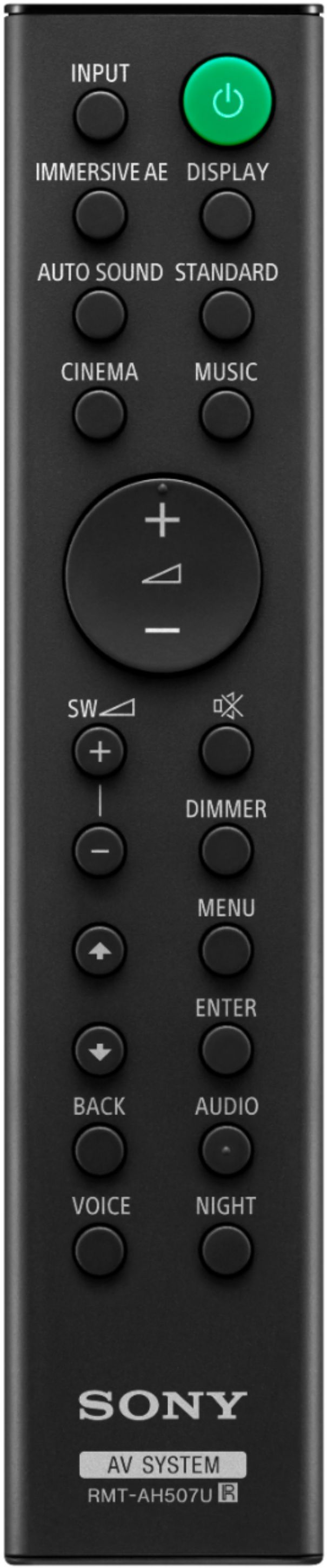
And for a truly immersive listening experience, we recommend turning on the IMMERSIVE AE function.
Regards,
Sam
WHAT A LET DOWN
||Posted . Owned for less than 1 week when reviewed.This reviewer received promo considerations or sweepstakes entry for writing a review.WEAK SOUND and BASS. My tv was way louder. I had turn the volume all the way up to 65 to notice the atoms effect. I turn the subwoofer all the way to 12 and NOT impressed. Also I hook up my Xbox one S to the sound bar HDMI port. To play my 4K movies and didn’t want to play Dolby Atoms only played Dolby True HD. When I played Netflix on my Xbox it kept cutting off the picture in and out every minute. Last thing I’ll say stay from this sound bar.
No, I would not recommend this to a friendBrand response from SonyListens
Posted .Hi Javvy,
We apologize the soundbar did not meet your expectations. The soundbar is capable of Dolby Atmos passthrough with any Dolby Atmos capable media device. Please double check your gaming console’s setting to ensure it is sending the correct signal through. There are tutorials specific to your console available online. The HDMI setting on the G700 should also be set to Enhanced, not Standard if you are using it for 4K 60P viewing. Please ensure the HDMI cables you are using are rated to handle 18 Gbps speeds.
Should you need further assistance, please contact us at [email protected] with the following details:
Name:
Bestbuy Username:
Model Number:
Issue:
Telephone Number:
Sincerely,
Sam
Stay away from it
||Posted . Owned for 3 weeks when reviewed.This reviewer received promo considerations or sweepstakes entry for writing a review.Terrible product, comes at price tag extremely high for the low performance that delivers, you have to turn the volume up at least half way before you can actually start hearing something, subwoofer it's a joke does not deliver any punch whatsoever even if you have tried 900 different settings...not worth not even 50 bucks let alone 500.....
No, I would not recommend this to a friendBrand response from SonyListens
Posted .Hi Reydiver2031, We are sorry to hear that you are experiencing issues with your HTG700. We'd love to troubleshoot the issues that you are having with the soundbar and make this a better experience for you. For the volume level please make sure that the night mode is disabled. Night mode function outputs the sound at low volume with minimum loss of fidelity and clarity of dialogue. Also, please make sure the input source is selected correctly. You should try other input sources by pressing INPUT repeatedly. You may also check our related article to further troubleshoot the issue. https://www.sony.com/electronics/support/home-theater-sound-bars-home-theater-systems/ht-g700/articles/00137387
Should you need assistance, please feel free to contact us for help. Please email the below information to [email protected].
Apologies if you disclosed some of this information in your review and to customer service, we just want to ensure that we have your accurate details at the time of communication.
Full Name:
Best Buy Username:
Telephone Number:
Model Number:
Issue:
Regards,
Carl
Sony 2.1. Bass was lacking
||Posted . Owned for 1 month when reviewed.This reviewer received promo considerations or sweepstakes entry for writing a review.Sony 2.1. Bass was lacking, Max volume did not offer a movie experience .
No, I would not recommend this to a friendworst sound bar ever
||Posted . Owned for 1 month when reviewed.This reviewer received promo considerations or sweepstakes entry for writing a review.Worst sound bar ever. I would return it except it is out of the 15 day return period. Don't waste your money.
No, I would not recommend this to a friendBrand response from SonyListens
Posted .Hello Nassim,
We do apologize for the inconvenience. If there is something technical that we can help you with, please email us at [email protected] with the following details:
Name:
Best Buy Username:
Model Number:
Issue:
Telephone Number:
Hope to hear from you soon,
David
broken BlueTooth/dont work
||Posted . Owned for less than 1 week when reviewed.This reviewer received promo considerations or sweepstakes entry for writing a review.this thing is terrible, it has taken us every bit of 3 plus days to get the subwoofer to connect to the bar. we are returning it tomorrow. don't buy! all the video reviews from sony don't show you how to connect the subwoofer by BlueTooth now we know why. you cannot get any help from Bestbuy tech support and sony support just take you around in a circle on their website
No, I would not recommend this to a friendBrand response from SonyListens
Posted .Hi inspector1, we are sorry to hear that you are experiencing issues with your HTG700 Sound pairing with the subwoofer. If you still have the soundbar with you, we'd love to troubleshoot the issue and make this a better experience for you.
Please follow these steps to link your soundbar to the subwoofer.
1 Press MENU. [SPEAKER] appears in the front
panel display.
2 Press up or down button to select [SPEAKER], then press ENTER.
3 Press [LINK], then press ENTER.
4 Select [START], then press ENTER. [LINK] flashes in the front panel display.
To cancel the manual connection, press BACK.
5 Press LINK on the subwoofer. The manual link starts. The power indicator of the
subwoofer flashes in amber.
6 When [DONE] appears in the front panel display, press MENU. The link is established and the power indicator of the subwoofer lights in amber.
For more information, please check our operating instructions link: https://www.sony.com/electronics/support/res/manuals/5020/d330da0eb60bda23aba90694a33a9a42/50204331M.pdf page 15
Should you need further assistance, please contact us for help.
Please email the below information to [email protected]
Apologies if you disclosed some of this information in your review and to customer service, we just want to ensure that we have your accurate details at the time of communication.
Full Name:
Best Buy Username:
Telephone Number:
Model Number:
Issue:
Regards,
Carl
Don't waste your time!!!
||Posted .This reviewer received promo considerations or sweepstakes entry for writing a review.Waste of time and money, if you have a lot of time on your hands then this is the system for you. As for me I don't have a lot of time and lI like quality sound and bass, which I did not come close to getting it from this system. Do yourself a favor and don't even waste your time, this sound kept going in and out and the base was a joke. I was so happy to return this and purchase the Vizio v-series 5.1.
No, I would not recommend this to a friendBrand response from SonyListens
Posted .Hi BeautifulQueen, We are sorry to hear that the HTG700 Soundbar did not meet your expectations and you had to return the unit. You can adjust the sound quality of the soundbar by using the remote buttons to set it to Auto Sound, STANDARD, CINEMA, or MUSIC. We appreciate all your feedback and this will help improve our product. We hope that you consider Sony again in future purchases. Thank you. -Carl
Worst then my 6 year old Sony soundbar HTCT780
||Posted .This reviewer received promo considerations or sweepstakes entry for writing a review.I have a 6 year old Sony soundbar model HTCT780 priced about the same as this model that is clearer than this model. Bass is about the same. This model highs/voices are 30% less clear having a meddling and echo sounds. Quite annoying.
No, I would not recommend this to a friendBrand response from SonyListens
Posted .Hi NewOrleans, Thanks for sharing your thoughts and feedback on the 3.1 Channel HTG700 Soundbar. We're sorry if it didn't meet your expectations. Make sure that the firmware version of the unit is up to date and make sure that night mode is turned off. You can also try different Sound Mode options which are pre-programmed sound effects that are tailored to different kinds of sound sources.
Hope this helps. -Craig
Disgusted
||Posted .This reviewer received promo considerations or sweepstakes entry for writing a review.It was presented as a higher quality product I could have purchased a cheap Walmart product and received the same quality. Also the remote control won’t work past 13’ which renders the soundbar unusable. So I spent 600 dollars for absolutely nothing. Not to mention the disappointment of the person receiving the gift. So in disgusted in Best Buy, your service, and all your product’s.
No, I would not recommend this to a friendBrand response from SonyListens
Posted .Hi EbenezerScrewed,
Thank you for choosing and purchasing our HT-G700 Soundbar. We are sorry to hear that the soundbar did not meet all of your expectations and that you are experiencing issues with the remote of the soundbar. We'd love to troubleshoot the issue and make sure that you are taken care of. In the meantime, if you are having issues with the volume control of the remote of the soundbar, please try these steps to troubleshoot.
1. Remove any objects that may block the IR signal between your remote control and the device.
-Glass doors or enclosures can affect the signal from the remote control. -Open glass doors to determine if that makes a difference.
-Move indoor plants and devices that may cause interference.
-Make sure the IR sensor on the device isn't exposed to direct sunlight or bright lights.
2. Reset the remote control.
-Remove the batteries from the remote control.
-Press each button on the remote control twice to discharge the power.
-Insert new batteries, noting the correct polarity. Do not use rechargeable batteries.
3. Check to verify that the remote control sends an infrared signal.
-Perform a power reset of the device.
-Unplug the device.
-Wait 1-2 minutes.
-Plug the device back in and turn the power on.
May we contact you to help? If so, please email the below information to [email protected]
Apologies if you disclosed some of this information in your review and to customer service, we just want to ensure that we have your accurate details at the time of communication.
Full Name:
Best Buy Username:
Telephone Number:
Model Number:
Issue:
Regards,
Carl
Not the best
||Posted . Owned for 1 month when reviewed.This reviewer received promo considerations or sweepstakes entry for writing a review.I wish we would of bought a better set up, will move this to our bedroom and purchase a better one
No, I would not recommend this to a friendBrand response from SonyListens
Posted .Hi Sony4Life, To ensure you're getting an optimal listening experience, please follow the steps below:
-Check that all the cables and cords of the system and connected device are firmly inserted.
-Make sure that the firmware version of the unit is up to date. You may check the software update of the HTG700 (version 1.055) using this link: https://www.sony.com/electronics/support/sound-bars-home-theater-systems-sound-bars/ht-g700/downloads/00017093
-Try to select different Sound Mode options which are pre-programmed sound effects that are tailored to different kinds of sound sources.
Also, the G700 has a variety of sound modes to help enhance your listening and viewing experience.
Standard Mode - This will allow you to hear the sound of a TV program clearly.
Cinema - This mode is suitable for watching movies. You feel immersed by the sound that travels behind you and surrounds your entire body
Music - Vividness, and glossiness of the sound are expressed in detail. This mode is suitable for enjoying music in a way that moves you
You can also use AUTO SOUND mode which will change the Sound Mode from Standard, Cinema, and Music based on the content played.
Should you need further assistance with your Soundbar, please feel free to contact us for help.
Please email the below information to [email protected]
Apologies if you disclosed some of this information in your review and to customer service, we just want to ensure that we have your accurate details at the time of communication.
Full Name:
Best Buy Username:
Telephone Number:
Model Number:
Issue:
Regards,
Carl
- Pros mentioned:Dolby atmos, Sound quality

GREAT Sound
|Posted .This reviewer received promo considerations or sweepstakes entry for writing a review.This sound bar puts out an amazing sound! The Dolby Atmos and immersive AE really do a great job at upscaling the audio and mimicking a 7.1 system in a compact package. I have a very high vaulted celing and the system gets plenty loud, yet exceptionally clear, to create an excellent movie experience! Highly recocmend!
I would recommend this to a friend - Pros mentioned:Bass, Sound quality
Great Sound Bar
|Posted .This reviewer received promo considerations or sweepstakes entry for writing a review.I have had many different Sony sound bars and i have always been a fan. This Sound bar is no exception to the high quality products that Sony makes. Setting up this sound bar is easy as plugging it in and turning it one. One of my favorite things about this sound bar is that it turns on and off seamlessly with the TV. You can also change the volume using the TV remote. I believe this is achieved by using the ARC function on the TV and may not be compatible with all TVs but i am unsure. Sony does a great job of creating surround sound with only one sound bar and bass. This sound bar can get extremely loud without sacrificing any sound quality. This is a 3.1 channel speaker so it has left, right, and center speakers for even better all around sound. I would highly recommend this sound bar to anyone looking to get high quality audio out of their television.
I would recommend this to a friend Bad service
||Posted . Owned for less than 1 week when reviewed.This reviewer received promo considerations or sweepstakes entry for writing a review.Came without remote without cables and I talk to the sales guy to check out everything before I go to the store to pickup the item. Because I live far away from the store. Very disappointing
No, I would not recommend this to a friendSpeakers didn’t work!
||Posted . Owned for less than 1 week when reviewed.This reviewer received promo considerations or sweepstakes entry for writing a review.Listened to this in store and sounded awesome! This review isn’t on the sound,etc of soundbar because I can’t give honest review. Sony customer service told me the speakers was dead! What sucks is living 1 hour away from Best Buy and repeatedly having to return item.
No, I would not recommend this to a friendBrand response from SonyListens
Posted .Hi Infinitigirl42,
We understand your concern and we do apologize for the inconvenience. This is definitely not the news that we would like to hear. Please allow us to help you and turn this into a better experience.
For us to better assist you, please email us at [email protected] with the following details:
Name:
Best Buy Username:
Model Number:
Issue:
Telephone Number:
Regards,
David
- Pros mentioned:Bass
Wasted Money
||Posted . Owned for 2 months when reviewed.This reviewer received promo considerations or sweepstakes entry for writing a review.No surround sound whatsoever. Just a speaker with bass.
No, I would not recommend this to a friendBrand response from SonyListens
Posted .Hi there, we are sorry to hear that the HT-G700 did not meet all of your expectations. We recommend using Immersive AE with this you can feel immersed by the sound from not only the horizontal direction but also from the upward direction by using Vertical Surround Engine. Vertical Surround Engine is a highly precise digital sound field processing technology developed by Sony that produces the sound field in the height direction virtually in addition to a sound field in the horizontal direction by only using front speakers and without using top speakers. You can turn on this function using the Immersive AE button on the Sony Remote.
Should you need further assistance with your HT-G700 Soundbar, please contact us for help.
Please email us at [email protected] with the following details so we can better assist you.
Name:
BestBuy username:
Model Number:
Issue:
Telephone Number:
Regards,
Carl
Don't buy! Known issue with sound cutting out.
||Posted . Owned for 11 months when reviewed.This reviewer received promo considerations or sweepstakes entry for writing a review.There is a known issue that has been going on for at least 8 months with the sound cutting out every minute or so for a few seconds. I contacted Sony support and they are aware of it and don't seem to care or want to do anything about it.
No, I would not recommend this to a friendBrand response from SonyListens
Posted .Hi RobG, we are sorry to hear that you are experiencing issues with your Sony HTG700. We'd love to troubleshoot the problem and make this a better experience for you. In the meantime, please follow these steps to troubleshoot the issue.
First, please make sure that the soundbar is up to date with the firmware (version 1.055) as this will improve the overall performance of the soundbar. You may check this link for more information on how to install the software update to your HT-G700. https://www.sony.com/electronics/support/home-theater-sound-bars-home-theater-systems/ht-g700/downloads/00017093
Unplug the Soundbar power cord and plug it back in
1. Turn off the soundbar.
2. Unplug the power cable from the wall outlet.
3. After one minute, replug the power cable back to the wall outlet.
4. Turn on the soundbar.
Verify if this resolves the issue.
- Disconnect the HDMI cable or the optical digital cable and then reconnect it
- Disconnect the cable from the soundbar and playback device and then reconnect the cable.
If the issue is resolved, the issue may have been caused by a faulty connection with the cable.
- If there is a device nearby that generates electromagnetic waves, such as a wireless LAN or a microwave oven in use, locate the system apart from it.
- If there is an obstacle between the bar speaker and the subwoofer, move or remove it.
- Do not cover the top of the bar speaker with metal objects such as TV frame, etc. Wireless functions may become unstable.
- Locate the bar speaker and the subwoofer as close as possible
May we contact you to help? If so, please email the below information to [email protected]
Apologies if you disclosed some of this information in your review and to customer service, we just want to ensure that we have your accurate details at the time of communication.
Full Name:
Best Buy Username:
Telephone Number:
Model Number:
Issue:
Regards,
Carl
Awful
||Posted . Owned for 3 weeks when reviewed.This reviewer received promo considerations or sweepstakes entry for writing a review.Awful. Annoying. Constantly adjusting volume. Overpriced
No, I would not recommend this to a friendBrand response from SonyListens
Posted .Hi Benny, We are sorry to hear that you are experiencing issues with your Sony HTG700. We'd love to troubleshoot this issue and make this a better experience for you. In the meantime, please follow our related article link to troubleshoot. https://www.sony.com/electronics/support/sound-bars-home-theater-systems-sound-bars-surround-speakers/ht-g700/articles/00026049
Should you need further assistance, please email the below information to [email protected]
Apologies if you disclosed some of this information in your review and to customer service, we just want to ensure that we have your accurate details at the time of communication.
Full Name:
Best Buy Username:
Telephone Number:
Model Number:
Issue:
Regards,
Carl
Soundbar
||Posted . Owned for 2 months when reviewed.This reviewer received promo considerations or sweepstakes entry for writing a review.Installed soundbar but didn’t explain anything. In too much of a hurry.
No, I would not recommend this to a friendDon’t recommend
||Posted . Owned for 4 months when reviewed.This reviewer received promo considerations or sweepstakes entry for writing a review.Doesn’t sound very good. Nor does it get loud exchanged it for a Samsung
No, I would not recommend this to a friendBrand response from SonyListens
Posted .Hi Two4orty, We are sorry to hear that the soundbar did not meet your expectations when it comes to sound quality and had to return the unit. For this, the G700 has a variety of sound modes to help enhance your viewing experience.
Standard Mode - This will allow you to hear the sound of a TV program clearly.
Cinema - This mode is suitable for watching movies. You feel immersed by the sound that travels behind you and surrounds your entire body
Music - Vividness, and glossiness of the sound are expressed in detail. This mode is suitable for enjoying music in a way that moves you
You can also use AUTO SOUND mode which will change the Sound Mode from Standard, Cinema, and Music based on the content played.
Also, updating the software of the HTG700 (version 1.055) will help improve the overall performance of the soundbar.
We hope that you consider Sony again in your future purchases.
Regards,
Carl
Poor quality, poor sound for the money
||Posted . Owned for 2 weeks when reviewed.This reviewer received promo considerations or sweepstakes entry for writing a review.Very disappointing product. Had to manually sinc the sub 50% of the time. Difficult to set up. Took back and replaced with a Klipsch bar 48 which was not only cheaper but blows the Sony away in sound quality.
No, I would not recommend this to a friendBrand response from SonyListens
Posted .Hi Jason, we're sorry to hear that you had returned your SONY unit. If you cannot connect the subwoofer to the system, you can connect it manually using the LINK button on the subwoofer. The reset (Resetting) under the settings could also fixed the issue. We have our customer support that will always happy to assist you. You can email us at [email protected] with the following details: Name: Username: Model Number: Issue: Telephone Number:
We hope you reconsider SONY again. Thank you. ~Earl