Customer Ratings & Reviews
- Model:
- 4169083
- |
- SKU:
- 5210400
Customer reviews
Rating 4.4 out of 5 stars with 847 reviews
(847 customer reviews)Rating by feature
- Value4.4
Rating 4.4 out of 5 stars
- Quality4.3
Rating 4.3 out of 5 stars
- Ease of Use4.5
Rating 4.5 out of 5 stars
Customers are saying
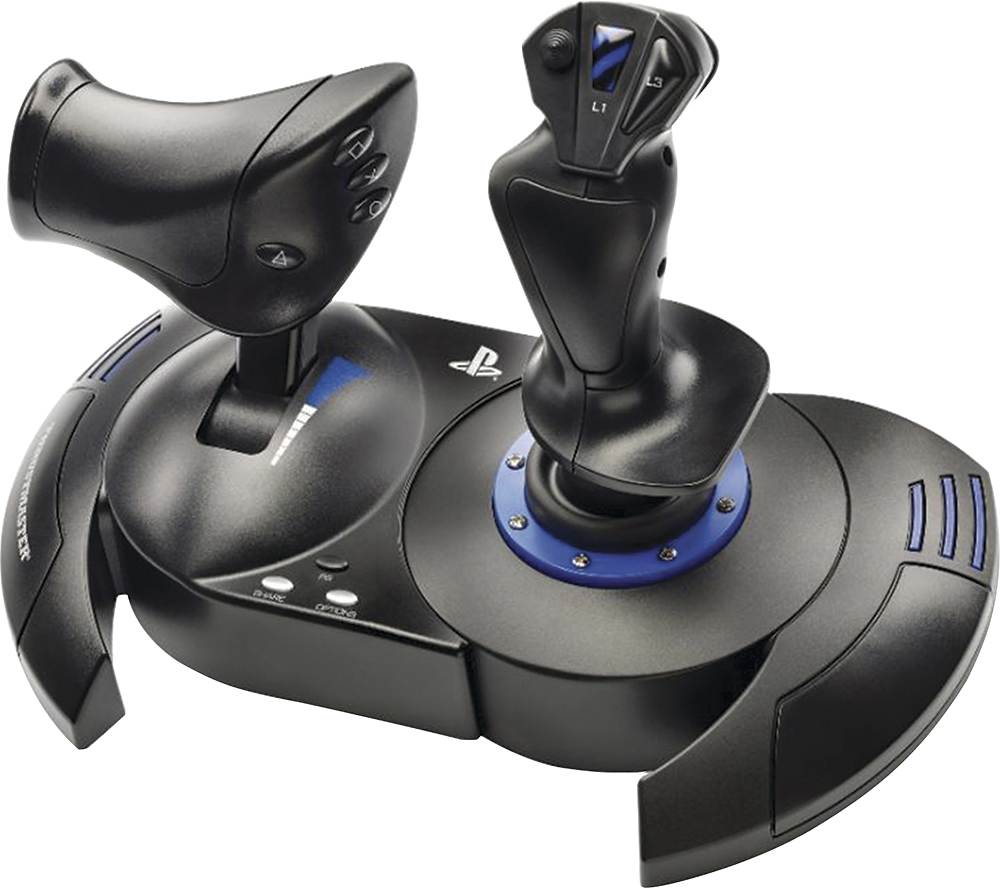
Customers enjoy the T.Flight Hotas 4 Joystick for its ease of use, quality build, and compatibility with various games. Users appreciate the level of control and immersion the joystick provides. However, some customers have noted concerns about the throttle and cable length.
This summary was generated by AI based on customer reviews.
Rated 5 out of 5 stars
Love it!
||Posted . Owned for 2 weeks when reviewed.This reviewer received promo considerations or sweepstakes entry for writing a review.I bought this is MFS and Ultrawings 2 in VR.. It made a huge difference! It took a little time to memorize the controls/buttons since you can’t see them in VR la once I had them down wow flying was so much better! I’ve been using the flight stick on my lap but soon I’ll find a way to secure it..
This review is from Thrustmaster - T.Flight Hotas 4 Joystick for PlayStation 4, PlayStation 5, Windows - Black
I would recommend this to a friendRated 5 out of 5 stars
Great Gift for Ace Combat Fans
||Posted .This reviewer received promo considerations or sweepstakes entry for writing a review.Purchased as a gift for my boyfriend. He loves playing on it. If you're into flight based games and are on the fence with purchasing a HOTAS, this is a great entry-level device. It completely changed the way we play the Ace Combat. Functionally it was great. However would love if there was an option with higher quality material from Thrustmaster.
This review is from Thrustmaster - T.Flight Hotas 4 Joystick for PlayStation 4, PlayStation 5, Windows - Black
I would recommend this to a friendRated 5 out of 5 stars
Good for Microsoft flight simulator
||Posted . Owned for 2 months when reviewed.This reviewer received promo considerations or sweepstakes entry for writing a review.Purchased this product to use for Microsoft flight simulator on my PS5 Pro. Works seamlessly with the console and the game picks it up with no problems highly recommend for flight SIM and war thunder.
This review is from Thrustmaster - T.Flight Hotas 4 Joystick for PlayStation 4, PlayStation 5, Windows - Black
I would recommend this to a friendRated 5 out of 5 stars
Works like a charm
||Posted . Owned for 3 weeks when reviewed.This reviewer received promo considerations or sweepstakes entry for writing a review.Amazing stick, I’ve never used any other flight controller but for the price I don’t think anything can beat this one. I have no issues with the connection and it works perfectly fine!
This review is from Thrustmaster - T.Flight Hotas 4 Joystick for PlayStation 4, PlayStation 5, Windows - Black
I would recommend this to a friendRated 5 out of 5 stars
This thing rocks!
||Posted . Owned for 2 months when reviewed.This reviewer received promo considerations or sweepstakes entry for writing a review.Always liked flying games,never had the chance to own one of these til recently and its an absolute game changer. My inner nerd has never been happier than i was playing Star Wars Squadrons.
This review is from Thrustmaster - T.Flight Hotas 4 Joystick for PlayStation 4, PlayStation 5, Windows - Black
I would recommend this to a friendRated 5 out of 5 stars
Excellent add-on
||Posted . Owned for 1 month when reviewed.This reviewer received promo considerations or sweepstakes entry for writing a review.It is a excellent HOTAS for my PlayStation 5 I'm currently using it for the VR game aces of thunder it works pretty well. I find it easier to fly with us than the joystick.
This review is from Thrustmaster - T.Flight Hotas 4 Joystick for PlayStation 4, PlayStation 5, Windows - Black
I would recommend this to a friendRated 5 out of 5 stars
Kid loves it!!!
||Posted . Owned for 1 week when reviewed.This reviewer received promo considerations or sweepstakes entry for writing a review.Son seems to love it and is very happy, even though we wanted for xmas was sold out everywhere and did like getting the notification they were in and came undamaged so no complaints
This review is from Thrustmaster - T.Flight Hotas 4 Joystick for PlayStation 4, PlayStation 5, Windows - Black
I would recommend this to a friendRated 4 out of 5 stars
Experience varies by games
||Posted . Owned for 3 weeks when reviewed.This reviewer received promo considerations or sweepstakes entry for writing a review.I've been wanting to get Flight Sticks to use in various games. This was on sale and I decided to give it a try. After using it for a couple of weeks, I can say my experience has varied from game to game. This device is not too heavy, can separate in two for better ergonomics but the cable is too short. I've seen multiple reviews cutting the wire and extending it with 2 ethernet CAT cords. I'm not ready to void my warranty yet so I've been playing with the sticks attached together. There are mounting points underneath for attaching them to a chair, which is neat. Make sure to download the drivers if you intend to use them on PC. I haven't tried it on PlayStation as I don't have any games on that platform that could benefit from this controller. The best game it has worked with so far is Star Wars Squadron. It picked it up immediately and I could play without any configuring. The game also supports VR, which I tried with the Oculus Quest but be wary that it could make you motion sick any time you look around your cockpit. War Thunder worked once you figure out how to select the brand and model of HOTAS you are using. After that I was able to play a few missions. DCS so far has not worked too great but I have a friend who's working with me on getting this setup. I think it'll work great once it's setup properly. Battlefield 2042 is the worst game to date. Flight sticks don't work at all. My character was stuck looking down at the ground for as long as the flight sticks were plugged in. Looking online, there is no support at all for HOTAS controls. Another reason to avoid that game. I'm sure there are other games to try and I will find them. Maybe in the future I'll get something fancier but for now I am satisfied with this.
This review is from Thrustmaster - T.Flight Hotas 4 Joystick for PlayStation 4, PlayStation 5, Windows - Black
I would recommend this to a friendRated 5 out of 5 stars
Best ever
||Posted . Owned for 1 month when reviewed.This reviewer received promo considerations or sweepstakes entry for writing a review.Super very fast very easy to play, like a real airplane
This review is from Thrustmaster - T.Flight Hotas 4 Joystick for PlayStation 4, PlayStation 5, Windows - Black
I would recommend this to a friendRated 5 out of 5 stars
Flight Rig
||Posted . Owned for 1 month when reviewed.This reviewer received promo considerations or sweepstakes entry for writing a review.Great flight rig for easy and beginner setup! I use daily for MSFS!
This review is from Thrustmaster - T.Flight Hotas 4 Joystick for PlayStation 4, PlayStation 5, Windows - Black
I would recommend this to a friendRated 5 out of 5 stars
Great flight controller
||Posted . Owned for 3 weeks when reviewed.This reviewer received promo considerations or sweepstakes entry for writing a review.The controller is really good and very responsive. I like it very much. Easy to use and the experience is fantastic.
This review is from Thrustmaster - T.Flight Hotas 4 Joystick for PlayStation 4, PlayStation 5, Windows - Black
I would recommend this to a friendRated 3 out of 5 stars
Only choice for flight sim on PS5
||Posted . Owned for 1 month when reviewed.This reviewer received promo considerations or sweepstakes entry for writing a review.Average joystick, seems fine but isn’t the best and seems dated. With there were more options. No saved configs in MSFS which is another disappointment if I’m honest. Seems to work fine otherwise.
This review is from Thrustmaster - T.Flight Hotas 4 Joystick for PlayStation 4, PlayStation 5, Windows - Black
I would recommend this to a friendRated 5 out of 5 stars
Great flight stick
||Posted . Owned for 2 weeks when reviewed.This reviewer received promo considerations or sweepstakes entry for writing a review.Makes flying games more realistic, seperates so the throttle and yoke are farther apart
This review is from Thrustmaster - T.Flight Hotas 4 Joystick for PlayStation 4, PlayStation 5, Windows - Black
I would recommend this to a friendRated 4 out of 5 stars
Squadrons VR helper
||Posted . Owned for 2 weeks when reviewed.This reviewer received promo considerations or sweepstakes entry for writing a review.I purchased Squadrons VR for PS4 and attempted to use the standard PS4 controller to play it, which is rather confusing as there are A LOT of buttons, which made it not so much fun to play as most of the time was spent figuring out the controls. With everyone being home during this pandemic, Flight Sticks are hard to find or pricey on Amazon as you don’t have much of a choice there as everyone is raising the prices. This particular flight stick is 2x the amount at Best Buy. TWICE THE PRICE for the same product!!! Luckily, Best Buy doesn’t overcharge during these times, but stock is limited, as it took me 2 weeks to be able to purchase, but worth it. Using the flight stick made Squadrons VR a lot more intuitive. There are specific /recommended button configurations (which can be found on the website) to make the game you want to play (Squadrons, Combat Aces, Flight Sim). It takes some time to map it, but the 20 mins spent on button mapping is worth it, and now I enjoy playing Squadrons VR. The flight stick comes as 2 separate pieces (connected with a cable) so you can play it in whichever way you feel comfortable, but it also comes with an allenwrench and screw to attach them together (as pictured) which makes it easy to simply put on your lap and play that way. There are plenty of other flight sticks that can have MORE buttons, and other features, but those triple/quadruple the price of this “entry level” flight stick. I’m pretty happy with this particular flight stick, especially at the Bestbuy price point.
This review is from Thrustmaster - T.Flight Hotas 4 Joystick for PlayStation 4, PlayStation 5, Windows - Black
I would recommend this to a friendRated 5 out of 5 stars
Great controller
||Posted . Owned for 2 weeks when reviewed.This reviewer received promo considerations or sweepstakes entry for writing a review.Very fun to use and quite functional, especially when connected with the rudder pedals
This review is from Thrustmaster - T.Flight Hotas 4 Joystick for PlayStation 4, PlayStation 5, Windows - Black
I would recommend this to a friendRated 5 out of 5 stars
Works well.
||Posted . Owned for 2 weeks when reviewed.This reviewer received promo considerations or sweepstakes entry for writing a review.Works as advertised. Works better when attached unless you bolt down the stick.
This review is from Thrustmaster - T.Flight Hotas 4 Joystick for PlayStation 4, PlayStation 5, Windows - Black
I would recommend this to a friendRated 5 out of 5 stars
Flightsim
||Posted . Owned for 1 month when reviewed.This reviewer received promo considerations or sweepstakes entry for writing a review.Awesome units for ps5 for flight simulator 2024 different buttons to add.
This review is from Thrustmaster - T.Flight Hotas 4 Joystick for PlayStation 4, PlayStation 5, Windows - Black
I would recommend this to a friendRated 5 out of 5 stars
Thrust master
||Posted .This reviewer received promo considerations or sweepstakes entry for writing a review.Works very well Very easy to use Connects very easy to the PlayStation 5 and works quite seamlessly Very good buy You get value for your money and my husband is very happy with it
This review is from Thrustmaster - T.Flight Hotas 4 Joystick for PlayStation 4, PlayStation 5, Windows - Black
I would recommend this to a friendRated 5 out of 5 stars
Good stuff
||Posted .This reviewer received promo considerations or sweepstakes entry for writing a review.Good stuff. Love the service and the gear. Thanks for everything
This review is from Thrustmaster - T.Flight Hotas 4 Joystick for PlayStation 4, PlayStation 5, Windows - Black
I would recommend this to a friendRated 5 out of 5 stars
Hotus 4
||Posted . Owned for 2 weeks when reviewed.This reviewer received promo considerations or sweepstakes entry for writing a review.Makes flight sim games and vr games awsome. Plug and play
This review is from Thrustmaster - T.Flight Hotas 4 Joystick for PlayStation 4, PlayStation 5, Windows - Black
I would recommend this to a friend