Customer Ratings & Reviews
Customer reviews
Rating 4.4 out of 5 stars with 847 reviews
(847 customer reviews)Rating by feature
- Value4.4
Rating 4.4 out of 5 stars
- Quality4.3
Rating 4.3 out of 5 stars
- Ease of Use4.5
Rating 4.5 out of 5 stars
Customers are saying
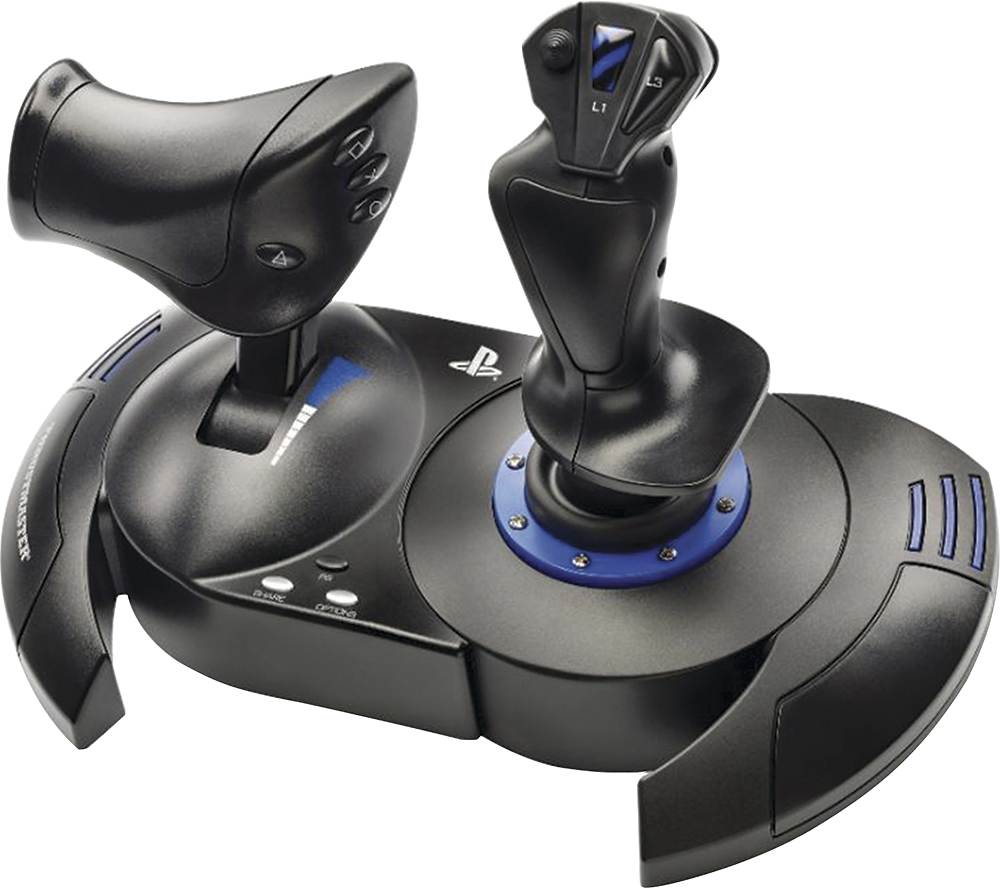
Customers enjoy the T.Flight Hotas 4 Joystick for its ease of use, quality build, and compatibility with various games. Users appreciate the level of control and immersion the joystick provides. However, some customers have noted concerns about the throttle and cable length.
This summary was generated by AI based on customer reviews.
Rated 5 out of 5 stars
Hotas 4
||Posted .This reviewer received promo considerations or sweepstakes entry for writing a review.Works great with Microsoft Flight Simulator 2024. It was sold out right bwfore christmas everywhere including the manufacturer but was able to get one at the last minute as a gift.
This review is from Thrustmaster - T.Flight Hotas 4 Joystick for PlayStation 4, PlayStation 5, Windows - Black
I would recommend this to a friendRated 5 out of 5 stars
Great stick!
||Posted . Owned for 2 weeks when reviewed.This reviewer received promo considerations or sweepstakes entry for writing a review.Great flight stick.. great price! I use it all the time for ace combat and love it!!
This review is from Thrustmaster - T.Flight Hotas 4 Joystick for PlayStation 4, PlayStation 5, Windows - Black
I would recommend this to a friendRated 4 out of 5 stars
Great Entry-level for PC, essential for Consoles.
||Posted . Owned for more than 2 years when reviewed.This reviewer received promo considerations or sweepstakes entry for writing a review.Console-ready HOTAS works well with reasonable responsiveness to PS4 and PS5 games. Available software makes setting up for PC use solid as well. Throttle stops in mid-point, which is good for certain games but is mildly irritating for Sims that use the whole range for throttle controle. For the money, there is not a better entry level HOTAS out there. That being said, as it lacks many of the features of other Thrustmaster models and is limited to only 10 buttons if you are looking for a PC HOTAS consider looking up to the next level. For consoles, where options are significantly more limited, this is the one to get if you are using Playstation products.
This review is from Thrustmaster - T.Flight Hotas 4 Joystick for PlayStation 4, PlayStation 5, Windows - Black
I would recommend this to a friendRated 5 out of 5 stars
Flying high
||Posted .This reviewer received promo considerations or sweepstakes entry for writing a review.Love this thing! Works great on flight Sims, even the Star Wars Squadrons game! Only used on my PS4 so far, but definitely recommended for flying games
This review is from Thrustmaster - T.Flight Hotas 4 Joystick for PlayStation 4, PlayStation 5, Windows - Black
I would recommend this to a friendRated 4 out of 5 stars
Thrustmaster PS5 Flight Stick Review
||Posted .This reviewer received promo considerations or sweepstakes entry for writing a review.Good starter for flight simulators like MSFS 2024. Only issue is with throttle and little resistance.
This review is from Thrustmaster - T.Flight Hotas 4 Joystick for PlayStation 4, PlayStation 5, Windows - Black
I would recommend this to a friendRated 4 out of 5 stars
Christmas gift
||Posted .This reviewer received promo considerations or sweepstakes entry for writing a review.It works great, it's better then expected if ur thinking about getting it go for it
This review is from Thrustmaster - T.Flight Hotas 4 Joystick for PlayStation 4, PlayStation 5, Windows - Black
I would recommend this to a friendRated 5 out of 5 stars
Must have controller for MSFS2024
||Posted .This reviewer received promo considerations or sweepstakes entry for writing a review.Loved it. Must have for your PS5 MSFS2024 playing experience.
This review is from Thrustmaster - T.Flight Hotas 4 Joystick for PlayStation 4, PlayStation 5, Windows - Black
I would recommend this to a friendRated 5 out of 5 stars
Great for MSFS 2024 on PS5
||Posted .This reviewer received promo considerations or sweepstakes entry for writing a review.Works great for Microsoft Flight Simulator 2024 for PS5. Good response and customization available!
This review is from Thrustmaster - T.Flight Hotas 4 Joystick for PlayStation 4, PlayStation 5, Windows - Black
I would recommend this to a friendRated 4 out of 5 stars
Great stick for enjoying flight.
||Posted . Owned for 3 weeks when reviewed.This reviewer received promo considerations or sweepstakes entry for writing a review.I purchased this stick to use on PC with Microsoft Flight Simulator 2020 and it works great! There are a few things that could be better, but I knew what I was getting when I purchased it. Let's start with a few good things. The fact that you can separate the throttle from the flight stick is fantastic. I place my keyboard in between them. The flight stick has some adjustment by using the knob on thy bottom. I loosened mine up a bit. The twist rudder works well. There are plenty of buttons which covers the most essential controls. The biggest con is the detent on the throttle. It gets a bit annoying fighting it for fine control, but I understand that it's likely done for collective control on helicopters. This stick does not have hall effect sensors, so it may not be super precise, but I have enjoyed many hours of flying none the less. If you're looking for a good stick to start with, you'd should be on your list.
This review is from Thrustmaster - T.Flight Hotas 4 Joystick for PlayStation 4, PlayStation 5, Windows - Black
I would recommend this to a friendRated 5 out of 5 stars
Hoteste 4
||Posted .This reviewer received promo considerations or sweepstakes entry for writing a review.Works with ps5 has small learning curve I love it
This review is from Thrustmaster - T.Flight Hotas 4 Joystick for PlayStation 4, PlayStation 5, Windows - Black
I would recommend this to a friendRated 5 out of 5 stars
PS5 flight controller
||Posted .This reviewer received promo considerations or sweepstakes entry for writing a review.Very happy with this product does everything and more for my msfs on the ps5 pro
This review is from Thrustmaster - T.Flight Hotas 4 Joystick for PlayStation 4, PlayStation 5, Windows - Black
I would recommend this to a friendRated 5 out of 5 stars
It's for more than just Play Station
||Posted .This reviewer received promo considerations or sweepstakes entry for writing a review.I initially bought this joystick only because my favorite one was not in stock and having driven 60 miles just to buy one I was reluctant to go home empty handed. (incidentally my favorite one was in stock when I left home but that's another story.) I have to admit that the Thrustmaster - T.Flight Hotas 4 Joystick is a much better joystick than my original. I fly the FSX flight sim and this stick works fantastic. BUT do read the instructions before you go charging off hooking it up. In order to function beyond Play Station you have to download the drivers which are called out in the instructions. It was very easy to do. This joystick can be split into two separate parts which is how I use it. The Thrustmaster is twice as expensive as my original joystick but the quality is much better. I wore out two of the other ones and I'm not a "ham fisted" flyer who bangs the stick from side to side. I think the Thrustmaster is definitely going to outlast my former favorite joystick.
I would recommend this to a friendRated 5 out of 5 stars
Controller
||Posted .This reviewer received promo considerations or sweepstakes entry for writing a review.It’s better than your basic controller waiting on the new velocity controller
This review is from Thrustmaster - T.Flight Hotas 4 Joystick for PlayStation 4, PlayStation 5, Windows - Black
I would recommend this to a friendRated 5 out of 5 stars
Great system!
||Posted .This reviewer received promo considerations or sweepstakes entry for writing a review.My son is going to love this thing! He hasn’t gotten it yet but I opened it and it’ll be perfect!
This review is from Thrustmaster - T.Flight Hotas 4 Joystick for PlayStation 4, PlayStation 5, Windows - Black
I would recommend this to a friendRated 5 out of 5 stars
Great gift for aspiring pilots
||Posted .This reviewer received promo considerations or sweepstakes entry for writing a review.My daughter loves it! She wants to fly some day and says it matches some of the simulators she has done.
This review is from Thrustmaster - T.Flight Hotas 4 Joystick for PlayStation 4, PlayStation 5, Windows - Black
I would recommend this to a friendRated 4 out of 5 stars
Good item
||Posted .This reviewer received promo considerations or sweepstakes entry for writing a review.Not bad for the ps5 , am a beginner it's very user friendly
This review is from Thrustmaster - T.Flight Hotas 4 Joystick for PlayStation 4, PlayStation 5, Windows - Black
I would recommend this to a friendRated 5 out of 5 stars
Playstation
||Posted .This reviewer received promo considerations or sweepstakes entry for writing a review.Bought for my son for Christmas. He says it works well and likes the ease of use.
This review is from Thrustmaster - T.Flight Hotas 4 Joystick for PlayStation 4, PlayStation 5, Windows - Black
I would recommend this to a friendRated 4 out of 5 stars
Was impressed with quality!
||Posted .This reviewer received promo considerations or sweepstakes entry for writing a review.Let me start off by saying. If you are like me and maybe playing with a controller and aren't doing bad but think just maybe if you got one of these you are magically going to be a lot better pilot.. It didn't work out that way for me lol. I was doing decent with my xbox controller. Got one one of these and... I was all over the place.. It did not feel natural. I could fly relatedly smooth on a controller but was all over the place with this stick. Maybe I would be better off with a Yoke setup.. Maybe I just prefer my controller and keyboard. Aside from that I was actually surprised by build quality the plastic feels hefty. Also very comfy to grip. The part connecting the stick to the base looked cheap. Stick movement didn't feel very smooth at all. The throttle moves a little too fast for my liking. I was expecting it to feel more slow when pushing it up and down.. The notch in the middle didnt bother me at all.
This review is from Thrustmaster - T.Flight Hotas 4 Joystick for PlayStation 4, PlayStation 5, Windows - Black
Access Denied
You don't have permission to access "http://www.bestbuy.com/%7eassets/bby/_img/int/plsvgdef-frontend/svg/Close_Cancel_Line.svg" on this server.Reference #18.27182117.1778033193.1a54d847
https://errors.edgesuite.net/18.27182117.1778033193.1a54d847
No, I would not recommend this to a friendRated 5 out of 5 stars
Great flight controls!
||Posted .This reviewer received promo considerations or sweepstakes entry for writing a review.Great addition to the PS5! Makes Flight Simulator even more fun!
This review is from Thrustmaster - T.Flight Hotas 4 Joystick for PlayStation 4, PlayStation 5, Windows - Black
I would recommend this to a friendRated 4 out of 5 stars
Great flying stick. No haptic feedback
||Posted .This reviewer received promo considerations or sweepstakes entry for writing a review.I bought this for a great price on a sale. If you have the space and setting for it, it can be very fun and the flying simulation can feel more realistic. I would recommend it only if you have a desk or table close to where your PS4 is. Since I don’t have that, I have to unfold my plastic table every time I want to use it and it gets tedious. It can be a bit bulky to store as well. I only wish it had vibration or haptic feedback and it would have been perfect. Also, do your research and look for compatible games. It won’t work with every flying game. I wish the instructions were more detailed as well. I still haven’t figured how to switch to alternate weapons in Ace Combat 7.
This review is from Thrustmaster - T.Flight Hotas 4 Joystick for PlayStation 4, PlayStation 5, Windows - Black
I would recommend this to a friend