Customer Ratings & Reviews
- Model:
- HON787800F259
- SKU:
- 8428539
to a friend
Customers are saying
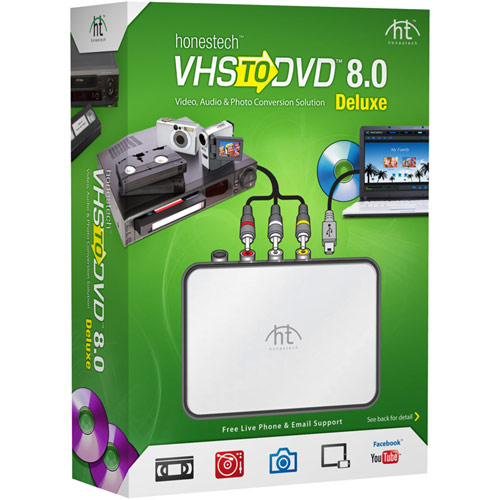
Customers appreciate the VHS to DVD 8.0 Deluxe for its user-friendly interface and easy setup process. Many users found the software simple to use and were pleased with the ability to transfer VHS home movies to their PCs. While some customers mentioned minor glitches and concerns about video quality, overall, customers were satisfied with the product's performance and compatibility with Windows 10.
This summary was generated by AI based on customer reviews.
- Pros mentioned:Ease of use, Video quality
it does what it says
Posted .This reviewer received promo considerations or sweepstakes entry for writing a review.I expected flawlessness on the converting to dvd. Set up was easy. Need internet access to register before getting started on video. It froze up a couple times. It could've been my computer that made it do that. Never had that problem on any other burn except this program setup. The sound didn't go with the video when recording, but it burned correctly. There is some digital jump movement in the dvd burn. It could be because its 8mm transfer. On my portable player it distorts with sound, but plays good on my tv dvd player. Slowing the burn helped just a tad on the digital jumping. I'm really relieved that I found this device to transfer from 8mm. Better than nothing. I guess next everyone will want to go from dvd to sd cards or hard drives, cause dvd will become outdated just like tapes.
I would recommend this to a friend not so good
||Posted .This reviewer received promo considerations or sweepstakes entry for writing a review.could not get product to work. I do not recommend this.
No, I would not recommend this to a friend- Pros mentioned:Video quality
I'm not angry, just confused :)
Posted .This reviewer received promo considerations or sweepstakes entry for writing a review.I was looking for a product to replace my DVD Xpress which essentially does the same thing as this product but is not supported on OS newer than Windows XP SP3. I saw this at BestBuy while I was there buying some thermal compound and came home and did some research on it, it had a 3.9 rating and the Roxio had a 3.4 rating and the price was $49.99 at the store which tuned out to be an error in product location as the product rang up at $59.99, but BestBuy did the right thing and gave me the $10.00 off since it was their mistake. I got the product home and loaded the software and went to activate it but honestech.com web site gave the usual cannot display error. I called technical support and they told me their website had been up and down all day and I didn't need it to activate. The next day their web site took me to Welcome to: honestech.com This Web page is parked for FREE, courtesy of GoDaddy.com. I tried to call technical support at 877-484-6246 and it appears they decided to block my phone because AT&T can reach them but I can't. I was friendly when I called so all I can assume is that Honestech is blocking calls from anyone that calls for technical support. What's funny is this is the story of my life whenever I buy anything the company goes out of business but usually they wait a week or a month or a year, Honestech barely let me get this out of the box like they were waiting for me to buy it before they pulled the plug. It was probably a good product as some five stars indicated but it's going back to BestBuy and will be replaced by the Roxio for $10 more or in my case $20. No sour grapes, it is what it is but definitely check for support before you buy this product, who knows maybe they will come back.
No, I would not recommend this to a friendBrand response from Honestech Support
Posted .Dear customer,
We apologize for any inconveniences you've experienced. We are currently having a hardware issue with our web server, and we are in the process of fixing it. Regarding the technical support, our customer care team is still open and assisting customers. If calling the toll-free is not working from your phone, we also recommend try calling our local number to reach us at 512-346-3700.
[U.S.-based customer care team]
U.S. Toll Free: 1-877-484-6246
Domestic/International: +1-512-346-3700
Monday thru Friday: 9 am - 9 pm CST
Saturdays: 10 am - 3 pm CST
Thank you,
Honestech, Inc
- Pros mentioned:Video quality
Performs as Advertised
Posted .This reviewer received promo considerations or sweepstakes entry for writing a review.For all the complaining by some folks on here, I have found this to be a most excellent product. It does what is says- it converts the VHS to a DVD with ease. Make sure your DVD drive is DVD-RW and you're good to go. Now by no means is this a fast process, especially if you have a long VHS tape. However, the good news is that once it starts recording you go about your business without having to babysit it. I can get it started before I leave for work and when I come home, the DVD is ejected and I just pull out the disk. Contrary to what some posters assert, you can work on your computer while it's burning, etc., but everything will run a little more slowly. Forget about skyping while this thing is burning, but I wouldn't do that anyway. The video and sound quality is awesome, and I'm using Windows Vista. Great product, does what it says, well worth the investment.
I would recommend this to a friend - Pros mentioned:Ease of use, Video quality
Great Product!
Posted .This reviewer received promo considerations or sweepstakes entry for writing a review.I was looking for a reliable product that would convert VHS tapes to DVD, and I'll tell you this works like a charm! It was easy to setup and before you know it, I was converting my old tapes.
I would recommend this to a friend - Pros mentioned:Video quality
Great program
Posted .This reviewer received promo considerations or sweepstakes entry for writing a review.I was finally able to convert all of my old family home videos to digital with this program. All converted files sound great and you can adjust the video to make it look a lot nicer than the old VHS could. Gotta love technology.
I would recommend this to a friend - Pros mentioned:Ease of use
Fairly Simple to Use
Posted .This reviewer received promo considerations or sweepstakes entry for writing a review.Pretty straight forward to use. A decent computer helps to make things work well.
I would recommend this to a friend Super Quick & Easy
Posted .This reviewer received promo considerations or sweepstakes entry for writing a review.After installing the software, I was ripping a vhs to dvd in minutes. I have only used the quick transfer option so far, but it also has more advanced features that I plan to use soon. The software installed on my Win7 machine with no problems. It came with all the cables, including RCA. I can't wait to hook up the turntable and start burning vinyl, too!
I would recommend this to a friendDesperate DVD Camcorder to Hard Drive Conversion
Posted .This reviewer received promo considerations or sweepstakes entry for writing a review.A little difficult at first, but worked it through and was able to convert min-DVD camcorder to computer to upload to Facebook. Minor glitches but still worked.
I would recommend this to a friend- Pros mentioned:Setup
Don't waste your time and money
Posted .This reviewer received promo considerations or sweepstakes entry for writing a review.This product does not work. The set up is easy, but it simply does not capture video. I used it with Windows 7. I connected my camcorder to it and it would not capture. Then connected my VCR to it and the same results. Nothing. There is nothing in the instructions for trouble shooting. Nothing on the website either. And no answer when you call tech support. I did get a call back about three days later, after I returned it to the store. When I returned it to the store I wasn't even asked what the problem was. Very disappointing, I really wanted this to work.
No, I would not recommend this to a friend Works well after you get the hang of it
Posted .This reviewer received promo considerations or sweepstakes entry for writing a review.VIDBOX does a good job of converting VHS tapes to DVDs or files but you should expect initial problems with setup and learning how to use it. Installation required a call to customer support as the drivers needed updating. Using REPLACE versus REPAIR of the latest drivers solved my setup problem. Other problems encountered were audio that cut out after 20-30 seconds and a message that sometimes prevented using the advanced features. The message said "hard disk full". I called customer support for help, had to leave a message, and now three days later have still not heard back from them. But through trial and error I discovered two things necessary to eliminate these problems. 1) Start using VIDBOX from a rebooted computer. 2) Don't run anything else while using VIDBOX. Keep all programs closed and turn off your wi-fi connection. I'm still learning all of the advanced features like titles and editing but can now tell that for the money, VIDBOX is a great value.
I would recommend this to a friendIt works as advertised
Posted .This reviewer received promo considerations or sweepstakes entry for writing a review.The USB Box is great and works very well. The Video Editing SW works to edit video. The editing tools are very basic. Much time spent single stepping in frame, and second increments to get to the frame to cut. Makes DVDs that play on your computer, but does not make those that play in a video player. Some how apparently not included.
I would recommend this to a friendwere are the cables?
Posted .This reviewer received promo considerations or sweepstakes entry for writing a review.I bought the VHRtoDVD 8.0 Deluxe Honestec I bought the deluxe model so I could change my cassette and Lp's into CD'S So when I got ready to start I noticed they did not supply me with the cable I needed. So I called them up to find out If they offered the cable as an option I was told that if I bought the small unit by it self it came with the cable. But not if I bought the deluxe model and they did not offer the cable to purchase as an option. Is it just me or did I just get screwed? So I went to a place caller Electronics Resource in Tumwater WA. and the peple there said they never seen a cable like that before. Fifty mile trip for nothing. The company said that it tells you all the software included but doesn't tell you what is missing and you don" know until you start to hook it up People is this fair? Well to this day I still don't have what I need to use this converter fully. The company has the cables but won't sell them to me Thanks for nothing HONESTEC.
No, I would not recommend this to a friendWorks pretty well
Posted .This reviewer received promo considerations or sweepstakes entry for writing a review.Reading the comments on here and Amazon I was pretty worried that it wouldn't burn after the program "watches" the VHS tape and would have to start all over. However, it worked with no issues and I've burned 4 VHS tapes so I'm not sure why people are complaining. I also use Windows 8.1 which people are complaining about also. The 1 thing I find annoying is that when you hit "stop" it sometimes doesn't stop and when it should ask for you to start burning, it just keeps running the recording of the VHS which wastes time of the overall DVD especially if you are using beginner mode like I am. This has only happened twice. I think most of these complaints are user errors that people just can't follow simple directions and have no idea about technology. If you can't work a smartphone, don't attempt this. (old people)
I would recommend this to a friendVideo Cassett to DVD
Posted .This reviewer received promo considerations or sweepstakes entry for writing a review.I have been using for years and so far still works perfect
I would recommend this to a friend- Pros mentioned:Ease of use
Great product
Posted .This reviewer received promo considerations or sweepstakes entry for writing a review.Works as expected. I was quickly able to get this going and get some home videoso on good media.
I would recommend this to a friend Garbage product and useless support
Posted .This reviewer received promo considerations or sweepstakes entry for writing a review.The transfer device and software are utter garbage. Their tech support, while nice, are useless. I purchased this to transfer some old VHS tapes and some 16mm films. It loaded OK and worked for the first tape but then it started having problems. When I started to transfer the next tape I kept getting a flashing blue screen. I tried four tapes and two had the blue screen problem. Two of the tapes were original transfers of 16mm film from the same source, done at the same time on the same type of tape. One transfered perfectly and one had the blue screen problem. I called their support line and they said I wasn't the first to experience this problem. I sent them information from my computer and they sent back some things to try. Unfortunately I followed their advice without thinking and deleted my DVD burning software. I used Roxio Creator starter to make copies of my DVD's and of course they had me delete their competitors software. After going through all their suggestions, I still kept getting the flashing blue screen on multiple tapes. When I called tech support again I was told their product just wouldn't work and I should return it while I still could. Maybe it will work for you or maybe you'll get told their product just doesn't work. I suggest you just skip their transfer device and try going with a better company.
No, I would not recommend this to a friendBrand response from Honestech Support
Posted .Dear customer,
We are sorry to hear that you were unable to use our product properly. Based on your description, it appears that our software was possibly conflicting with something on your computer but our support team was unable to solve the issue. The customer satisfaction is important to us. If you have not already returned the product, please contact our customer care team with the case # 6530 for a refund.
<U.S.-based customer care team>
U.S. Toll Free: 1-877-484-6246
Domestic/International: +1-512-346-3700
Monday thru Friday: 9 am - 9 pm CST
Saturdays: 10 am - 3 pm CST
Thank you,
Honestech, Inc.
Not a good product
Posted .This reviewer received promo considerations or sweepstakes entry for writing a review.DVD quality not near the VHS video quality. Some type of lag in the creation of the video/DVD. I would play the DVD and the first 5 minutes were missing. Other tries, I've had the top half of the video not displaying while the bottom half did. Sometimes I had sound but no video. I've had the DVD not work in a DVD player, but would work in a Blu-Ray player. I contacted support and tried all their suggestions and am still not happy. I am using version 8.0 deluxe
No, I would not recommend this to a friendDoes not work
Posted .This reviewer received promo considerations or sweepstakes entry for writing a review.I purchased this to transfer my HI8 tapes to DVD. However, the first day I tried this, the video was very bad. I called the support line and they could not help me with version 8.0. I understand that version 7.0 was pretty good, so I requested that I change to the older version. I was informed that I could not change it, but I could used the 7.0 version on a trial basis. Needless to say, that didn't work either. The trial version does not have all the features available. I know my tapes are good, since I can view them on the old video camera. After lots of frustration, I purchased an S-video cable to try and see if that would work. The second time I tried to use the device, I got an error that the device cannot be found, although the blue light is on. I tried is using the S-video and then the video/audio cables. Now the device does not work at all. Since I cannot return it or use it, this product will be going into the trash along with messed up DVDs. All I want to do is to transfer my tapes on a Sony DCR-TRV230 to DVDs.
No, I would not recommend this to a friendBrand response from Honestech Support
Posted .Dear customer,
We are sorry to hear that you are having trouble using our product even after contacting our support line. It appears there may be a hardware and/or software on your system that might be conflicting with our product. Please give our customer care team a call with the case# 6480. We will make an exception and provide a refund for you.
<U.S.-based customer care team>
Domestic/International: +1-512-346-3700 (USA)
Monday thru Friday: 9 am - 9 pm CST
Saturdays: 10 am - 3 pm CST
Thank you,
Honestech, Inc.
constantly crashes on Win10
Posted .This reviewer received promo considerations or sweepstakes entry for writing a review.looks like a nice easy to use program. i bought today and have started to experience constant "not responding" episodes while importing..
No, I would not recommend this to a friend