Customer Ratings & Reviews
- Model:
- PTH651
- |
- SKU:
- 1680758
Customer reviews
Rating 4.6 out of 5 stars with 307 reviews
(307 customer reviews)to a friend
Customers are saying
Customers are delighted by the Intuos Professional Pen and Medium Touch Tablet for its ease of use, wireless capability, and responsive performance. They find the tablet to be a great tool for photo editing, drawing, and upgrading from older Wacom models. While some users mention a learning curve, most agree that the tablet provides a natural feel and programmable buttons that enhance its functionality.
This summary was generated by AI based on customer reviews.
Rated 5 out of 5 stars
Perfect drawing tablet for artists and designers!
||Posted .This reviewer received promo considerations or sweepstakes entry for writing a review.I've been looking to purchase a new tablet to replace my 6-year-old Wacom Bamboo Fun tablet, and I'm really happy that I got the Intuos Pro Medium. The size of the active area (which is where you draw in) is perfect for me and it doesn't too big nor too small. I also like the sleek design and the soft grip on the pen which makes it significantly more comfortable to use over a long period of time. The only issues I found so far is that the wireless kit battery only seems to charge up to 97%, so the light indicator never turns green to show that it is fully charged as it was mentioned in Wacom's demo video. Also there are times when the tablet will lag when I'm using the wireless kit. This doesn't happen too often though and all I would do is unplug and replug the USB bluetooth, or just use the USB cord instead. Despite those minor issues, the Wacom Intuos Pro still deserves a 5-star rating for being an incredible product. If you're interested, I also made an unboxing video of the tablet with some additional info and comments on this product on my blog at http://www.jecamartinez.com/wacom-intuos-pro-unboxing
I would recommend this to a friend- Pros mentioned:Pressure sensitivity, Wireless
Rated 5 out of 5 stars
Excellent tool for Photoshop and other artsy stuff
||Posted .This reviewer received promo considerations or sweepstakes entry for writing a review.Bought this tablet after watching multiple Photoshop tutorials where the instructor used this tool. Using the pen and pressure sensitive tablet rather than a mouse allows the user to have better control over the media and to apply better dexterity to movements, actions, and strokes. Sensitivity and actions can be controlled and refined through the tablet's software, as well as settings within the individual apps you use it to control. Soft keys on the tablet, as well as the dual switch on the pen, can be customized through the tablet's software as well. This tablet can be used direct wired (thru USB connector) or wireless using a small USB wireless sensor. Battery life is good and doesn't require constant charging. This is my first Wacom, and I purchased the large tablet, but I think that I could have gone with a smaller size and would be just as efficient.
I would recommend this to a friend - Pros mentioned:Size, Wireless
Rated 5 out of 5 stars
Great, can go pro on it sooner or later if needed
||Posted .This reviewer received promo considerations or sweepstakes entry for writing a review.Got this as a Christmas present for my teen who is extremely artistic. Give her any drawing medium, and she could create things that won awards at local contests. (She drew pirate ships with sails and waves and fish in the sea the first time someone gave her a mini-etcha-sketch). Had a little extra Christmas $, plan was to give her a tool that would give her something better than a small mouse pad to draw digitally. Looked at all the tablets/touch screens, but the Wacom was custom designed for this sort of thing. Came down to Pro or Touch, and what size. Seemed like for $100 more, we could get something that would let her grow up to a professional level, and medium seemed the right size for most everybody with normal size monitor screens. When we got it set up, she drew for 6 hours straight, totally intrigued by all of the features that allowed her to express things she couldn't reproduce before with a mouse, and she still has only covered a fraction of what it seems capable of. From all the reviews, this is a professional's tool, and I see why after what she has created. It doubles as a huge mouse pad, comes with a whole bunch of tips for the stylus, operates wireless which has been very useful, or by USB, and only charges via USB, which makes it very portable. She doesn't do any photo retouching (yet), but reviews seem to suggest it is great for that. For some odd reason some of the trial software wouldn't install on her computer (but would on another with same Windows 7, but less RAM, go figure), which didn't seem to matter, because all the software it "comes" with is just 30 day free trial. She downloaded some drawing freeware and is in 7th heaven. Even windows paint/draw she loves, the tablet just makes it that much easier. Setup was simple enough, but if you aren't tech savy, you could get hung up, not the most intuitive plug and play device, even opening the battery slot was a bit odd. My wife and daughter and other kids had trouble figuring it out, I got it running in 10 minutes, but I totally see where they got hung up, directions are sparse. Overall, very glad we went with the pro model, the medium size and the Wacom vs. all the other tablets.
I would recommend this to a friend - Pros mentioned:Ease of use, Size
Rated 5 out of 5 stars
Wacom tablet
||Posted .This reviewer received promo considerations or sweepstakes entry for writing a review.The Wacom tablet is an essential item for photo retouching. It's easy to use, intuitive and provides a level of control not attainable using a mouse. The size is perfect as it doesn't consume much desktop real estate. The tablet is a pleasure to use and Best Buy's pricing was excellent.
I would recommend this to a friend - Pros mentioned:Ease of use, Wireless
Rated 4 out of 5 stars
Great upgrade for my college art student
||Posted .This reviewer received promo considerations or sweepstakes entry for writing a review.I purchased this product as a Christmas present for my third year animation student and she was thrilled with it. She had been working with an old bamboo tablet made by the same manufacturer. That device had seen years of heavy use for several hours a day and just finally wore out. I'm hopeful this product will serve her equally as well. She's only had this tablet for a short time, but the product was very easy to set up out of the box, and she was off and running in no time. She was very excited about the additional sensitivity of the pen and the tablet over the previous product and really appreciates the wireless feature. She's only been using this for a few weeks, but so far we're very happy with the purchase and value for the price.
I would recommend this to a friend - Pros mentioned:Quality
Rated 5 out of 5 stars
Excellent for hobbyists as well
||Posted .This reviewer received promo considerations or sweepstakes entry for writing a review.I'm not a professional artist (or even a very good one) but I had some extra cash and picked up this tablet for hobbyist purposes. I was tempted to get one of the cheaper tablets like the bamboo or whatever Wacom is calling it now, but I felt that as I improved I would find myself wanting higher quality. It was a great choice because I'm already thrilled with this product. When registered it came with some great software, including a 30-day trial of Corel Painter 2015 which I LOVED. All in all I'd say if you're itching to try out digital art this is your tablet, but your mileage may vary if it's only a slight curiosity.
I would recommend this to a friend - Pros mentioned:Ease of use, Quality
Rated 5 out of 5 stars
Super easy to set up
||Posted .This reviewer received promo considerations or sweepstakes entry for writing a review.Recommend this all in one to anyone. Super easy to set up and even easier to use. Great quality, speed and service.
I would recommend this to a friend - Pros mentioned:Ease of use
Rated 5 out of 5 stars
Digital perfection
||Posted .This reviewer received promo considerations or sweepstakes entry for writing a review.I look back now and really wonder what was I thinking? There is no comparison, trying to use the mouse in my picture editing and drawing software over using my Wacom Tablet. Well let just say using a mouse is somewhat like drawing with a rock on the walls of a cave and I would still give the rock a better rating than the mouse. My best purchase of the year. Greater productivity with an easy to use design gives you better control for detailed digital perfection.
I would recommend this to a friend Rated 4 out of 5 stars
Great Tool
||Posted .This reviewer received promo considerations or sweepstakes entry for writing a review.finally get this great tool 4 doing my artwork & 3D, and it started out just fine. but there seemed 2 B a software conflict issue w/Wins 7 64-bit on my laptop. unless it was my OS tht destabilized & of course nothing goes well, no matter what.... Install was a little confusing; either use the accompanying CD or Online Services, each w/their own steps & complications... battery life is good (mind U, I haven't really used it on my 3D work yet...), but it's been lighting up all this time just sitting around 4 a vry long time.... looks vry sleek & easy 2 handle. afraid i might break it it looks so sleek & fragile. but it seems sturdy... accessories are wonderful & perfect starting out... can't wait 2 experiment more with it!
I would recommend this to a friend- Pros mentioned:Ease of use, Size
Rated 5 out of 5 stars
AWESOME
||Posted .This reviewer received promo considerations or sweepstakes entry for writing a review.I had the bamboo which was nice, but never really did what I thought or expected it could do and it was pretty small. I was wary of spending the money for this tablet but the program I'm learning to use is very mouse intensive and my right arm and shoulder were hurting something aweful. I was pleasently surprised how well this tablet worked as either a trackpad or pen enabled device on my MacBook Pro, Windows 8.1 or Hackintosh. I was even happier to find that the tablet could be configured for either right or left handed use (I'm left handed). I originally tried the larger version of the tablet, but it was too big. It took up a lot of desk space and the arm movement was very tiring. The medium sized tablet was just the right size. It has been worth every penny and i can use it with either hand (left handed equals ambidextrous).
I would recommend this to a friend - Pros mentioned:Ease of use, Wireless
Rated 5 out of 5 stars
This tablet is awesome!
||Posted .This reviewer received promo considerations or sweepstakes entry for writing a review.It's helped me in so many different programs, from Photoshop to Maya and other 3D apps, I tried to use it in place of a mouse for a while even and it was OK but I really like the feel of a mouse - but for drawing on the computer, this rocks. The wireless is a great feature too - I hate wires :)
I would recommend this to a friend - Pros mentioned:Wireless
Rated 5 out of 5 stars
Great Wireless Tablet
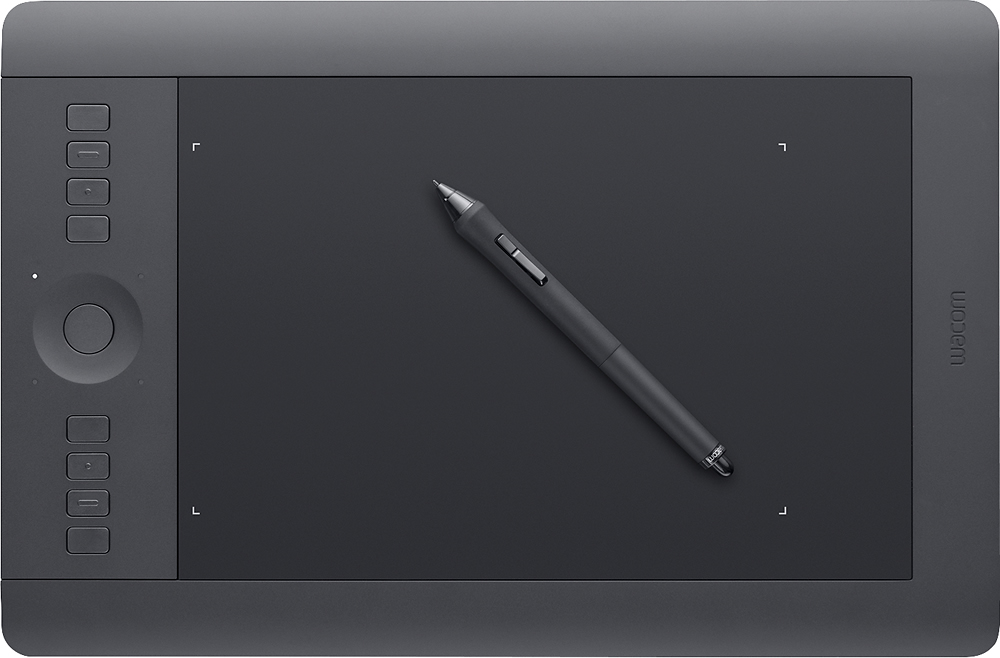
||Posted .This reviewer received promo considerations or sweepstakes entry for writing a review.This is the 3rd tablet I've owned, my last one was a Wacom Graphire 3 which was adequate, but this Intuos is so much better and offers so much more. You initially set it up through a USB, but it comes with a battery and a small USB transmitter/receiver for wireless use. You can use it wired or wireless , and at this point I haven't exhausted the battery life in a single wireless session, as yet and have used it up to 4-5 hrs wirelessly. It also has 8 buttons you can program with preset shortcuts or macros for your particular software application, IE; CTL, ALT, Z for multiple undo in Photoshop. It also has a scroll wheel that you can set up with 4 different functions, IE; zoom, rotate, brush size, etc. and uses LED indicators to alert you which wheel function you have activated. On a dual screen computer setup you are also able to toggle your surface from one screen to the other for higher resolution or set it to access both screens over the entire surface by assigning one of your shortcut buttons to display settings. There are also LED indicators on the surface corners to show you edges of your usable surface. Lastly the base for the stylus is of good weight to hold the stylus when not in use, and also holds spare nibs and a nib removal tool. The tablet comes with a 10 nibs of various flavors. For the money spent, this was a great buy at $300 on sale.
I would recommend this to a friend - Pros mentioned:Ease of use, Pressure sensitivity
Rated 5 out of 5 stars
Great Pen Tablet for Graphics
||Posted .This reviewer received promo considerations or sweepstakes entry for writing a review.Upgraded to this tablet from a basic tablet from 2008. There was a little learning curve, but I love all the features of this tablet. It responds with the feel of a pencil. I would definitely recommend this tablet.
I would recommend this to a friend - Pros mentioned:Ease of use, Wireless
Rated 5 out of 5 stars
Pen AND touch capabilities!
||Posted .This reviewer received promo considerations or sweepstakes entry for writing a review.I've owned WACOM tablets throughout my career, and this one continues that tradition. Love the ease of setup, various pen tips and option to use it wirelessly (although I mainly keep mine plugged in). Good general purpose size for most graphic design work.
I would recommend this to a friend Rated 5 out of 5 stars
Refined tablet for heavy-duty Photoshop work
||Posted .This reviewer received promo considerations or sweepstakes entry for writing a review.The Wacom Intuos 5 Pro is the latest digitizing tablet out on the market - and possibly the best version so far. I've been a fan of Wacom for a decade - I use a tablet everyday for processing photos (I am a commercial photographer). The one-side design is greatly inproved over the earlier Wacom models that offered buttons on both the left and right. Wacom now has a Radial menu, which gives you access to Brushes, Pen tools and even Photoshop actions with a one-button access. Fast and easy! I recently processed over 500 catalog images with the Wacom Intuos 5 and found I could save more than 30% of the time it took with the earlier Intuos tablet - so, the new tablet bought itself in about 2 days.
I would recommend this to a friend- Pros mentioned:Pressure sensitivity
Rated 4 out of 5 stars
Rather Steep Learning Curve
||Posted .This reviewer received promo considerations or sweepstakes entry for writing a review.Interesting concept. Have to get used to moving around much more than with a trackball. The driver has to be manually started through the services menu on my system for some reason. Still researching. I like the various features the tablet offers. I have much more to learn.
I would recommend this to a friend - Pros mentioned:Ease of use, Pressure sensitivity
Rated 5 out of 5 stars
Great for Graphic design work
||Posted .This reviewer received promo considerations or sweepstakes entry for writing a review.The responsiveness of this tablet is perfect for what I design on a regular basis, and it has so many other functionalities for me to play with as I get more and more accustomed to its workings.
I would recommend this to a friend - Pros mentioned:Pressure sensitivity
Rated 5 out of 5 stars
Excellent Tablet
||Posted .This reviewer received promo considerations or sweepstakes entry for writing a review.I decided after reading a few mixed reviews to take the plunge and give this tablet a try. It was a bit pricey at first but after using it for a few weeks now I can see why. It's far better, the pressure points, sensitivity, accuracy, and how fast it keeps up is amazing. I definitely recommend giving this one a try. The hidden extra nibs in the pen holder took me a bit to find but I was quite impressed when I did come across them! Love the wireless adapter that's included too though usually I keep it plugged in.
I would recommend this to a friend - Pros mentioned:Pressure sensitivity
Rated 5 out of 5 stars
Great Tablet
||Posted .This reviewer received promo considerations or sweepstakes entry for writing a review.Getting back into Photography after being away for a while and my old Wacom wasn't supported under Windows 10. I picked this up and could not be happier. It's a little quirky in the setup at first, but it all makes sense after a while. The hardware is solid, and using a pen with Photoshop is definitely the way to go. After purchasing this I also bought a small one to use with my surface. Highly recommended.
I would recommend this to a friend - Pros mentioned:Size, Wireless
Rated 5 out of 5 stars
Wonderful Tablet
||Posted .This reviewer received promo considerations or sweepstakes entry for writing a review.Very good tablet, come with basic drawing software that has to be downloaded with the code in the box. Most of the software can be use to Mac or PC. Medium size is fairy large. Best to be used on a desktop computer. It is also wireless, no issues connecting the unit, comes with its own dongle overall very happy with the product. Going to by another small one to use on my laptop.
I would recommend this to a friend