Customer Ratings & Reviews







- Model:
- F7C059
- |
- SKU:
- 5794511
Customer reviews
Rating 4.3 out of 5 stars with 827 reviews
(827 customer reviews)Rating by feature
- Value4.2
Rating 4.2 out of 5 stars
- Quality4.4
Rating 4.4 out of 5 stars
- Ease of Use4.2
Rating 4.2 out of 5 stars
Customers are saying
Customers recognize the Wi-Fi Smart Dimmer Switch (2-Pack) for its ease of use and simple installation process. The dimmer switch is also appreciated for its dimming capabilities and compatibility with Alexa. However, some customers have expressed concerns about its compatibility, price, and size.
This summary was generated by AI based on customer reviews.
- Pros mentioned:Design, Ease of use
Rated 5 out of 5 stars
Easy to set up
||Posted .This reviewer received promo considerations or sweepstakes entry for writing a review.With easy installation (I have installed so many switches for smart home use, it gets easier every time) and the easiest setup of any smart switch I have purchased, this dimmer is awesome. Works great with Google home and has a great design.
I would recommend this to a friend - Pros mentioned:Ease of use
Rated 5 out of 5 stars
Purchased to add to my other Smart Home devices
||Posted .This reviewer received promo considerations or sweepstakes entry for writing a review.Love that you can tell Alexa to dim to 10% - 100%. My son installed for me.
I would recommend this to a friend - Pros mentioned:Alexa compatibility
Rated 5 out of 5 stars
Very happy
||Posted .This reviewer received promo considerations or sweepstakes entry for writing a review.Very good light switch. Works great with Alexa. Very happy with my purchase
I would recommend this to a friend Rated 5 out of 5 stars
Great First Smart Switch!
||Posted . Owned for 1 week when reviewed.This reviewer received promo considerations or sweepstakes entry for writing a review.This is my first time I've ventured into smart-home territory and decided to buy this switch when it was on sale to get the train rolling. The best switch for me to replace was the front patio light switch. It made sense, high traffic area, dimmable lights, and I can set up what time of the day the lights automatically turn on and off. Installation for me took a while to figure out because I have never touched household wires and was scared of getting electrocuted. But if you are experienced with the basics of electricity, this should take no longer than 10 minutes to install. And if it is your first time - Youtube and Google is your best friend! But here are instructions from one novice to another if it applies to you to save you a headache installing the switch; my old light switch had 3 black wires and 1 green wire. The Wemo switch in comparison has a red (load), black (line), white (neutral), and green (ground) wire. The two black wires that are inserted into the OLD switch **next to each other** on either the bottom or top half the switch is most likely the black (line). The black (line) is the wire that carries the electricity through the circuit, it's also known as the [hot] wire. Connect those two black wires that were previously next to each other on the old switch onto the black (line) of the Wemo switch. So now you should have 3 black wires that are attached together with one wire nut. As for the other black wire that was on the old switch, it is known as the [load] wire. This is the wire that takes the current from the black (line) [hot] wire through the [load] wire into the lightbulb. Simple way to think of it is, black is the supplier, red is the receiver. The receiver are the lightbulbs at the end of the circuit. What does that mean? It means take the remaining black wire on the old switch and connect it to the red (load) wire on the Wemo switch with one wire nut. As for the neutral wire, which is white, connect the Wemo's white wire to the other white wire in the wall. Pretty simple. As for the ground wire, which is usually **bare metal with no insulation**, connect it to the green wire on the Wemo with one wire nut. I've attached a picture below of my old switch wires so others can have a reference to what I'm talking about if they have a similar switch situation like mines. For me the two black wires were at the bottom of the switch, as seen in the picture. That is the load. The one, single black wire at the top is the load wire, which I connected to the red wire on the Wemo. The bare copper wire, is the ground (or green) wire. Boom, you are done! Hope that helps. My wall hole thing was a bit small so I kind of had to shove this puppy into the wall with the hope that it would fit - it fit. I turned on the breaker and setup was easy. I downloaded the Wemo app and shortly after, it had a firmware update for the switch which enabled the use of Apple's Homekit. After the update, I connected it through Homekit and that is my main method of controlling the switch. I have an iPhone XS Max iOS 13.2 and it works flawlessly with Homekit. In the 'Home' app, I've enabled the patio lights to turn on automatically when anyone with an iPhone in the 'Home' arrives...home. You can do this under "Automation" in the Home app on the bottom right corner. The iPhone uses your location and sees when you're arriving close to home and it'll turn on the patio lights. No more arriving home with a front dark patio and fumbling to find the key hole to open the door! It is LIT! I set it to turn off 5 minutes after turning on after someone has arrived home automatically. Works every time, no hiccups. I have also set an automation to turn on the patio lights to 25% brightness from the hours of midnight-6AM everyday, automatically. And at 6AM, it turns off by itself. This is great! One less thing to worry about and provides a sense of security at night. And I recently had a power outage, back-to-back, and the switch recovered and reconnected to WiFi with no interventions. The switch is flawless as far as I know. I paired this switch with lightbulbs from HomeDepot that have dimming ability. In case you were curious, they are the "EcoSmart 90-Watt Equivalent BR40 Dimmable Energy Star LED Light Bulb Daylight". Hope this review has helped anyone else out there!
I would recommend this to a friend- Pros mentioned:Ease of use
Rated 5 out of 5 stars
best dimmer
||Posted .This reviewer received promo considerations or sweepstakes entry for writing a review.this is the best in the market.works perfect w the app.never a problem
I would recommend this to a friend - Pros mentioned:Ease of use
Rated 5 out of 5 stars
Great Smart dimmer
||Posted .This reviewer received promo considerations or sweepstakes entry for writing a review.Great smart dimmer. Easy to install and control. Has a lot of options.
I would recommend this to a friend - Pros mentioned:Ease of use
Rated 5 out of 5 stars
Great dimmer
||Posted .This reviewer received promo considerations or sweepstakes entry for writing a review.Works great and easily to install. Simple connection to Echo as well.
I would recommend this to a friend - Pros mentioned:Ease of use
Rated 5 out of 5 stars
Great product
||Posted .This reviewer received promo considerations or sweepstakes entry for writing a review.Very easy install and very simple to use I very much enjoy the switch
I would recommend this to a friend - Cons mentioned:Compatibility
Rated 4 out of 5 stars
Works great if you prepare!
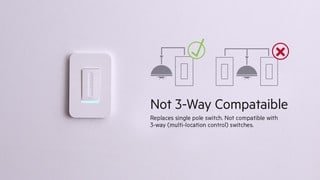
||Posted .This reviewer received promo considerations or sweepstakes entry for writing a review.First off, you need to know that this doesn’t work for all set ups. This will not work if you have a 3-way switch, unless you bypass one switch. Next, not all LED dimmable lights work with WEMO. I highly recommend Cree 40W or 60W LED dimmable bulbs with this switch, as they have excellent range for dimming, make no noise or flicker, and can be purchased from Home Depot. Do not use GE or EcoSmart LEDs bulbs, as they will either not dim at all or make noise when dimmed. If you plan ahead of time and have a good WiFi signal, this will work great!
I would recommend this to a friend Rated 4 out of 5 stars
Good wifi/alexa light switch
||Posted .This reviewer received promo considerations or sweepstakes entry for writing a review.Works well overall. Installation is easy but annoying in that they advise against trying to do it as a 3 way setup with the other switch as a non smart switch (technically, it can be done). I'm not sure it dims my LEDS quite as much as I had hoped it would.
I would recommend this to a friend- Pros mentioned:Ease of use
Rated 5 out of 5 stars
Great Product
||Posted .This reviewer received promo considerations or sweepstakes entry for writing a review.This switch is great for any home owner. Easy to install and setup.
I would recommend this to a friend - Pros mentioned:Dimming, Installation
Rated 5 out of 5 stars
One more reason to not get off the couch :)
||Posted .This reviewer received promo considerations or sweepstakes entry for writing a review.Got this dimmer for our family room lights to work with my echo dot. Easy install and setup. Less than 30 minutes and Alexa was controlling my light. Now I don't have to get up to dim the lights when getting ready to watch a movie.
I would recommend this to a friend - Pros mentioned:Ease of use
Rated 5 out of 5 stars
Excellent addition to WEMO
||Posted .This reviewer received promo considerations or sweepstakes entry for writing a review.This WEMO dimmer was easy to install and an works great with Alexa.
I would recommend this to a friend - Pros mentioned:Ease of useCons mentioned:Compatibility
Rated 5 out of 5 stars
Great product
||Posted .This reviewer received promo considerations or sweepstakes entry for writing a review.I brought this dimmer home and had it set with no problems. Works great and it has had no issues. Using it with Google Assistant. Easy setup. The only improvement that is needed is to make one that works with a 3 way switch.
I would recommend this to a friend Rated 5 out of 5 stars
Easy Set Up and Integration with my Echo
||Posted .This reviewer received promo considerations or sweepstakes entry for writing a review.I wanted a hub-less smart home system and Wemo is IT! I installed three of these dimmers and can control them individually or all together with voice commands through my Amazon Echo! The Wemo Dimmer has a built in WiFi access point and is super easy to configure with the Wemo App. I use Android and had them installed and working in about 15 minutes a piece.
I would recommend this to a friend- Cons mentioned:Compatibility
Rated 4 out of 5 stars
More control than a smart bulb
||Posted .This reviewer received promo considerations or sweepstakes entry for writing a review.Great product, unfortunately it isn’t built for a three way switch configuration. Fairly easy to setup if you already know how to change a switch. Definitely not as simple as installing a smart bulb. The advantage of a switch over a smart bulb is you don’t have to remember to keep the physical switch on. Sometimes with a bulb someone accidentally turns the light switch off and then you can’t operate the device but with a switch you will not have that issue.
This review is from WeMo - Wi-Fi Smart Dimmer Switch (2-Pack) - White
I would recommend this to a friend - Pros mentioned:Installation
Rated 4 out of 5 stars
great for controlling lights in our TV room
||Posted .This reviewer received promo considerations or sweepstakes entry for writing a review.We recently converted a large room into a home theater. The room has several large windows. By combining this Wemo dimmer, power window shades and an Echo voice assistant, we now have voice control over all aspects of the room lighting. The Wemo dimmer's ability to pair with the Echo provides very convenient voice control over the light level.Setup was easy. It took a while to determine the correct commands to make the lights achieve the level of dimming we want, but now we can choose the light level by just asking for it.
I would recommend this to a friend - Pros mentioned:Dimming, Ease of use
Rated 5 out of 5 stars
Dim the lights
||Posted . Owned for 1.5 years when reviewed.This reviewer received promo considerations or sweepstakes entry for writing a review.We are using this on a chandelier with lot’s of lights. Perfect for the times you need a little light without washing out the room. Easily used with Alexa and Google.
I would recommend this to a friend - Pros mentioned:Ease of use
Rated 5 out of 5 stars
Great
||Posted .This reviewer received promo considerations or sweepstakes entry for writing a review.Works flawlessly, connected to google home effortlessly.
I would recommend this to a friend - Pros mentioned:Design, Ease of use
Rated 5 out of 5 stars
Awesome
||Posted .This reviewer received promo considerations or sweepstakes entry for writing a review.I have moved most of my house to smart switches. Easier than bulbs and reliable. Wemo interface is okay but works great with Alexa and Google Home Hub. Great design and was fairly easy to install.
I would recommend this to a friend